Fake Ad Blockers 2: Now with Cookies and Ad Fraud

— OK, Google, I use Chrome, and I'd like to get an ad blocker for it.
— Sure, head to Chrome Web Store, there are literally hundreds of ad blockers there!
— Hmm, hundreds you say? Is it safe? I heard that last year a lot of them appeared to be fake and malicious!
— No worries, we are going to limit the power of ad blockers soon, this will definitely help!
— Oh, really? That's cool, thank you! I'll grab one from the top of the search results. This "AdBlock" by "AdBlock, Inc" looks legit. It has a privacy policy, it has over 800,000 users, and it is from a German company. Or maybe I'll try this "uBlock" by "Charlie Lee"? Five stars rating, 850,000 users, it must be good as well.

Stop right there!

This "AdBlock" is fake and malicious, and the "uBlock" one is the same. And there are many more not so popular deceptive clones there. How do I know that? I spent quite some time inspecting their code trying to figure out what they do. The real question is, how could you (a casual user) know it?
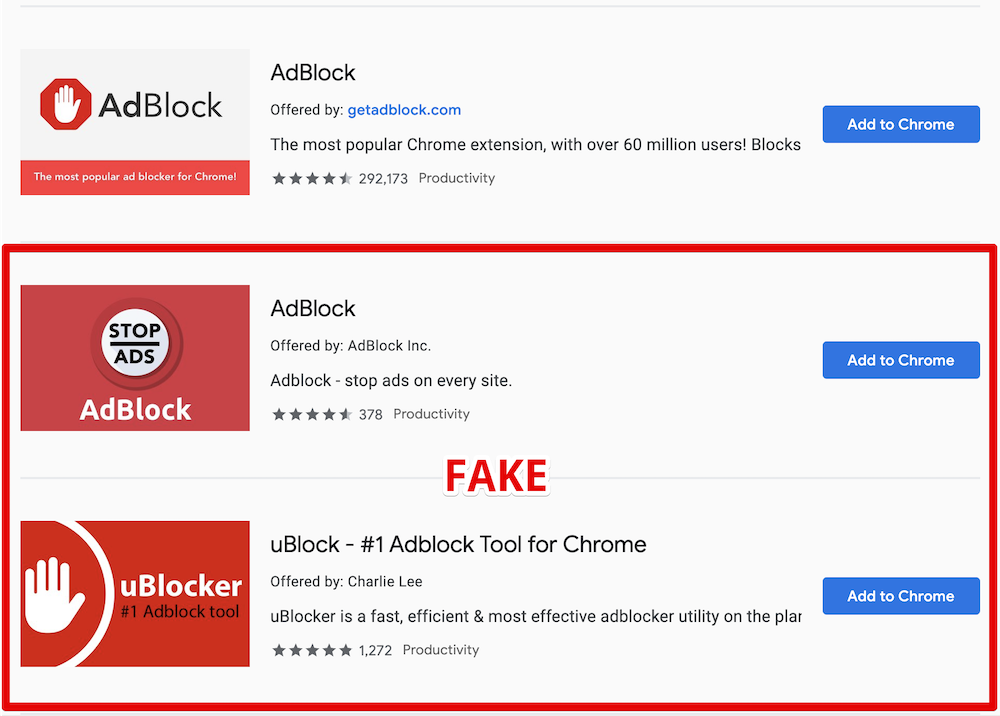
Here is the legit AdBlock extension followed by its clones

What's wrong with them?

For starters, they are using the names of two other very popular ad blockers, and this alone is deceitful and simply not right and should be enough. However, despite multiple reports, these extensions are still not removed.

Apparently, ethical issues and deception cannot be a reason for extension removal. Let's get to the next part then — malicious behavior.

Here goes the technical explanation. Skip to the next part if you're not a developer.

At first, these add-ons just do what they're supposed to do — they block ads. They both are based on the code of the original "AdBlock" extension so the quality is good enough.

Periodically, they send a request like this:

GET https://ublockerext.com/heartbeat/json/?action=config&&id=dgpfeomibahlpbobpnjpcobpechebadh&version=1.7&lt=199&uid=76f24bff-d831-aa47-7377-7ea195bf9cf8&r=1567540438520

At first glance, the server response looks innocent:

{"blockPopups":true,"statuses":[["synchronize_invalid_url","filters_subscription_lastDownload_invalidURL"],["synchronize_connection_error","filters_subscription_lastDownload_connectionError"],["synchronize_invalid_data","filters_subscription_lastDownload_invalidData"],["synchronize_checksum_mismatch","filters_subscription_lastDownload_checksumMismatch"]]}

However, about 55 hours after the installation, the response suddenly changes, and it does not look that innocent anymore.

This new response contains a list of commands for the extension to execute. After that the extensions' behavior changes, and they start doing a few more things besides ad blocking.

They now send a request to urldata.net for each new visited domain. For instance, if you visit teamviewer.com, they'll send a request like this:

http://urldata.net/api?key=4e4a7faf91b2bcda88a60e269e4d6208bfe8d3d6&out=https%3A%2F%2Fteamviewer.com&format=txt

The response to this request contains a special URL:

http://urldata.net/newapi/click/PvdHh16uGq6mLqmbUoT3AaUImj7ynsh0cVlCywkljEF19oBV0JH4jNYpn--xwIyEV36OMPPH1IrESEyclc7yxEbB3mYrfPMxnGqoV4SOmQ4MI9NYNHAQrPHwvJNE0W488ESUN1y7ONahVxwBZKnr4PZlZKI5gNi65DoIfYNwXAPoyFwh8Mgz1bX63V4PnjspvZa-DqjF5GTNxoIJqpHLC1_SwlFRYeoIvVGutkgfCSI4hMHa3z52VbL7VxbaQAhhqLC-uJUJO_s234VL3JDM01O-JE9PS6fXOH6z5XUojvotSQ5mZe7NFEsuMaeSK9rasy8MvaICWZpGDmgxIodzvMpJUv41ppkuqMBDDYpHptCEBb4Za_HffgaiKn-aY_COfan5P650B6ZTQsVqNKidMRRaHY4FxvM7VA79vX5_Oe0J0c9Wczw8VM9GrvzlGLdt4TjyBcF2JEtpcayh99JdL1wxrL_EoEHMml4LDy1JwT8LPxPG2vrlK5QSuoGrx-7tJLHD6Gq3SUeQj1XXEcENy77hkzU79TO9_hEs29Kq6ASdk6NKIZT8gOuJsNOAkU4i0Y9JvmEpdENyBL2ugmFNyitW2CfGzHrLsNex

The extensions will immediately open that URL in the background. A chain of redirects follows this request:

The last request in the chain is:

https://www.teamviewer.com/en/content/2019-cj-emea/?coupon=aff-19-en-10-1&utm_source=affiliate&utm_medium=cj&utm_campaign=dedc1dc5d58611e982c203670a180513&utm_content=2933854&PID=affiliate.cj.q1&s=1&cjevent=dedc1dc5d58611e982c203670a180513

What's going on here, you'd ask? Apparently, this address belongs to Teamviewer's affiliate program. In response, your browser receives a special "affiliate" cookie. Now if you make a purchase on teamviewer.com the extensions owner will be paid a comission by Teamviewer.

This technique is known as Cookie stuffing, and this is basically an ad fraud scheme.

There are many more affiliate links they are using for this. Here's just a small part I've been able to extract in 30 minutes. Here are some notable victims: microsoft.com, linkedin.com, aliexpress.com, booking.com, and many more.

Another interesting thing about this extension is that it contains some self-protection mechanisms. For instance, it detects if the developer console is open, it ceases all suspicious activity at once.

Summary

  • Both fake AdBlock and uBlock deceive users by using names of legitimate popular ad blockers.
  • They have not been taken down by Google despite multiple reports about deceptive naming.
  • The real purpose of these extensions is Cookie stuffing — an illegal ad fraud scheme.
  • The scale is unprecedented. These two add-ons have more than 1.6 Million "weekly active users", who were stuffed with cookies of over than 300 websites from Alexa Top 10000. It is difficult to estimate the damage, but I'd say that we are talking about millions of USD monthly.

Actually, there's a bright side to it. Now that this fraud scheme is uncovered, affiliate programs' owners can follow the money trail and find out who is behind this scheme. Sentences for cookie stuffing are real so there's a chance that the developers of these extensions will be held responsible.

The problem of fake extensions

This problem is not new, and similar cases were reported before. However, despite that, I see no effort from Google to resolve this. It seems that the situation is even worse now. At least fake blockers had to invent a new name before. Now, as you can see, they don't even bother to do that!

It's not only regular users who fall for their tricks. For instance, here is the fake "AdBlock" on the list of ad blockers recommended by androidcentral.com:

Excerpt from the review on Android Central

Is this problem unique to Chrome WebStore? Well, not really. For instance, an AdGuard rip-off has even got a "recommended" badge on Mozilla Add-ons despite multiple reports on the unethical behavior (1, 2). Well, at least it did not try to use our name.

How can this situation be improved?

You might have heard about the solution Google proposed called "Manifest V3". They say that limiting extensions capabilities will improve the overall performance, security and privacy.

Will it, though? While I kinda agree with the performance point, I don't see how it can help with the other two. For instance, it would do no harm to these two add-ons - cookie stuffing is still possible in this scenario.

In fact, I fully agree with what EFF proposes:

In order to truly protect users, Google needs to start properly enforcing existing Chrome Web Store policies.
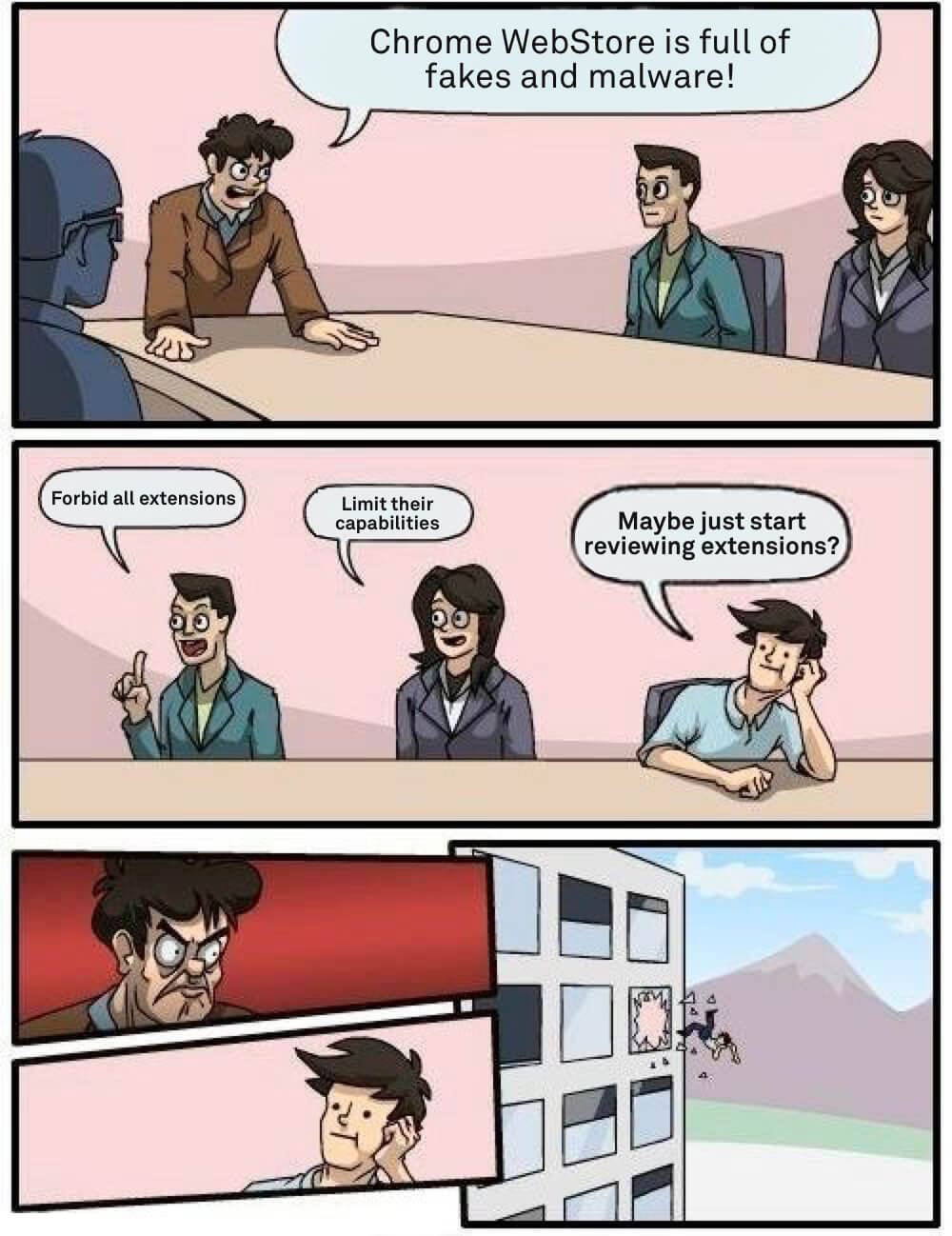
Somewhere at Google office

How can you protect yourself?

As you can see, even journalists sometimes fall for the fakes so this is a difficult question. A year ago I'd have said that the recipe is simple — install extensions only from the developers you trust.

The situation is now worse than before so I'd like to add a couple of things to the list of recommendations, at least until things somehow change:

  1. If you're going to install a browser extension, think again. Maybe you don't really need it?
  2. Don't believe what you read in the extension's description. Be aware that there's almost no review process, and this can easily be a fake.
  3. Reading the users' reviews won't help as well. These two extensions had excellent reviews and yet they were malicious.
  4. Don't use the WebStore internal search, install extensions from the trusted developers' websites directly.

UPD (Sep 18th):
Both malicious extensions we mentioned in this article are currently blocked in Chrome. While this is undoubtedly good news, Google needs to do much, much more to prove they really care about their users' safety.


Vond je dit bericht leuk?
AdGuard VPN AdGuard DNS AdGuard Mail AdGuard Wallet
Het hoofdscherm van AdGuard voor Windows
Het beschermingsscherm van AdGuard voor Windows, met de beschermingsfuncties en -instellingen
Het statistiekenscherm van AdGuard voor Windows, met statistieken over geblokkeerde advertenties en volgers
Het appbeheerscherm van AdGuard voor Windows, met de opties voor beschermingsbeheer van apps die op het apparaat zijn geïnstalleerd
20.557 20557 gebruikersbeoordelingen
Uitstekend!

AdGuard voor Windows: advertentieblokker voor pc

AdGuard voor Windows is meer dan een advertentieblokker. Het is een multifunctioneel hulpmiddel dat advertenties blokkeert, de toegang tot gevaarlijke sites regelt, het laden van pagina's versnelt en kinderen beschermt tegen ongepaste inhoud

Door het programma te downloaden accepteer je de licentievoorwaarden
Microsoft Store
Door het programma te downloaden accepteer je de licentievoorwaarden
AdGuard voor Windows v8.0, 14 dagen proefperiode
Het hoofdscherm van AdGuard voor Mac
Het Incognitomodus-scherm van AdGuard voor Mac
20.557 20557 gebruikersbeoordelingen
Uitstekend!

AdGuard voor Mac: systeembrede advertentieblokker

AdGuard voor Mac is een unieke advertentieblokker die is ontworpen met macOS in gedachten. Het beschermt je niet alleen tegen vervelende advertenties in browsers en apps, maar beschermt je ook tegen volgen, phishing en fraude
Door het programma te downloaden accepteer je de licentievoorwaarden
Meer lezen
AdGuard voor Mac v2.19, 14 dagen proefperiode
Het hoofdscherm van AdGuard voor Android
Het scherm 'Bescherming tegen volgers' van AdGuard voor Android
Het appbeheerscherm van AdGuard voor Android, met de opties voor beschermingsbeheer voor apps die op het apparaat zijn geïnstalleerd
Het statistiekenscherm van AdGuard voor Android, met statistieken over geblokkeerde advertenties en volgers
Het hoofdscherm van de privébrowser van AdGuard voor Android
De QR-code om AdGuard voor Android te downloaden
20.557 20557 gebruikersbeoordelingen
Uitstekend!

AdGuard voor Android: advertentieblokker voor alle apps

Blokkeert advertenties en volgers in alle browsers, spellen en andere apps. Beschermt je privacy en geeft je controle over hoe jouw apps internet gebruiken. Geïnstalleerd via APK
Door het programma te downloaden accepteer je de licentievoorwaarden
Meer lezen
Scannen om te downloaden
Gebruik een QR-codelezer die beschikbaar is op je apparaat
AdGuard voor Android v4.14, 14 dagen proefperiode
Het hoofdscherm van AdGuard voor iOS
Het beschermingsscherm van AdGuard voor iOS, dat de beschermingsfuncties en -instellingen toont.
Het statistiekenscherm van AdGuard voor iOS, met statistieken over geblokkeerde advertenties en volgers
De QR-code om AdGuard voor iOS te downloaden
20.557 20557 gebruikersbeoordelingen
Uitstekend!

AdGuard: advertentieblokker voor iOS

De beste advertentieblokker voor iOS op iPhone en iPad. AdGuard verwijdert alle soorten advertenties en volgers in Safari en beschermt je privacy in alle apps op DNS-niveau
Door het programma te downloaden accepteer je de licentievoorwaarden
Meer lezen
Scannen om te downloaden
Gebruik een QR-codelezer die beschikbaar is op je apparaat
AdGuard voor iOS v4.5
Het hoofdscherm van AdGuard Inhoudsblokker
Het filterscherm van AdGuard Inhoudsblokker
Het instellingenscherm van AdGuard Inhoudsblokker
20.557 20557 gebruikersbeoordelingen
Uitstekend!

AdGuard Content Blocker

AdGuard Content Blocker elimineert allerlei soorten advertenties in mobiele browsers die technologie voor het blokkeren van inhoud ondersteunen, namelijk Samsung Internet en Yandex Browser. De functies zijn beperkt in vergelijking met AdGuard voor Android, maar het is gratis, eenvoudig te installeren en efficiënt
Door het programma te downloaden accepteer je de licentievoorwaarden
Meer lezen
AdGuard Content Blocker v2.8
Het hoofdscherm van de AdGuard-browseruitbreiding
Het scherm 'Bescherming tegen volgers' van AdGuard-browseruitbreiding
20.557 20557 gebruikersbeoordelingen
Uitstekend!

AdGuard Browserextensie

AdGuard is de snelste en lichtste advertentieblokkering uitbreiding die alle soorten advertenties op alle webpagina's effectief blokkeert! Kies AdGuard voor uw browser om advertentievrij, snel en veilig te surfen.
Installeren
Door het programma te downloaden accepteer je de licentievoorwaarden
Installeren
Door het programma te downloaden accepteer je de licentievoorwaarden
Installeren
Door het programma te downloaden accepteer je de licentievoorwaarden
Installeren
Door het programma te downloaden accepteer je de licentievoorwaarden
Installeren
Door het programma te downloaden accepteer je de licentievoorwaarden
Meer lezen
Installeren
Door het programma te downloaden accepteer je de licentievoorwaarden
Meer lezen
AdGuard Browserextensie v5.5
Het hoofdscherm van AdGuard Assistant
20.557 20557 gebruikersbeoordelingen
Uitstekend!

AdGuard Assistant

Een bijbehorende browseruitbreiding voor AdGuard desktop-apps. Het stelt je in staat om aangepaste items op websites te blokkeren, websites toe te voegen aan de toelatingslijst en rapporten rechtstreeks vanuit je browser te versturen
AdGuard Assistant v1.4
20.557 20557 gebruikersbeoordelingen
Uitstekend!

AdGuard Home

AdGuard Home is een netwerkgebaseerde oplossing voor het blokkeren van advertenties en volgers. Installeer het één keer op je router om alle apparaten in je thuisnetwerk te beschermen — geen extra clientsoftware vereist. Dit is vooral belangrijk voor verschillende IoT-apparaten die vaak een bedreiging vormen voor je privacy
AdGuard Home v0.107
Het hoofdscherm van AdGuard Pro voor iOS
Het beschermingsscherm van AdGuard Pro voor iOS, met de beschermingsfuncties en instellingen
Het statistiekenscherm van AdGuard Pro voor iOS, met statistieken over geblokkeerde advertenties en trackers
20.557 20557 gebruikersbeoordelingen
Uitstekend!

AdGuard Pro voor iOS

AdGuard Pro voor iOS wordt geleverd met alle geavanceerde beschermingsfuncties voor het blokkeren van advertenties. Het biedt dezelfde tools als de betaalde versie van AdGuard voor iOS. Het blinkt uit in het blokkeren van advertenties in Safari en laat je DNS-instellingen aanpassen om je bescherming aan te passen. Het blokkeert advertenties in browsers en apps, beschermt je kinderen tegen ongepaste inhoud en houdt je persoonlijke gegevens veilig
Door het programma te downloaden accepteer je de licentievoorwaarden
Meer lezen
AdGuard Pro voor iOS v4.5
Het hoofdscherm van AdGuard Mini voor Mac
Het Safari-beschermingsscherm van AdGuard Mini voor Mac
Het 'Regel aanmaken'-scherm van AdGuard Mini voor Mac
20.557 20557 gebruikersbeoordelingen
Uitstekend!

AdGuard Mini voor Mac — Safari-advertentieblokker

AdGuard Mini voor Mac is een krachtige Safari-advertentieblokker. Deze lichtgewicht app verwijdert advertenties, blokkeert volgers en versnelt het laden van pagina's. Het helpt je om in Safari zonder afleiding op het web te surfen en je gegevens privé te houden
Installeren
Door het programma te downloaden accepteer je de licentievoorwaarden
Meer lezen
AdGuard Mini voor Mac v2.3
Het hoofdscherm van AdGuard voor Android TV met ingeschakelde bescherming
Het advertentieblokkeringsscherm van AdGuard voor Android TV, met zijn functies en instellingen
Het instellingenscherm van AdGuard voor Android TV
Het appbeheer-scherm van AdGuard voor Android TV, waarop de apps worden getoond waar advertenties en volgers worden geblokkeerd
20.557 20557 gebruikersbeoordelingen
Uitstekend!

AdGuard voor Android TV

AdGuard voor Android TV is de enige app die advertenties blokkeert, jouw privacy bewaakt en fungeert als firewall voor je Smart TV. Ontvang waarschuwingen over webbedreigingen, gebruik veilige DNS en profiteer van gecodeerd verkeer. Ontspan en duik in je favoriete programma's met eersteklas beveiliging en zonder advertenties!
AdGuard voor Android TV v4.14, 14 dagen proefperiode
De AdGuard-mascotte, Agnar, houdt de Linux-pinguïn vast
20.557 20557 gebruikersbeoordelingen
Uitstekend!

AdGuard voor Linux

AdGuard voor Linux is 's werelds eerste systeem-brede AdGuard Advertentieblokker. Blokkeer advertenties en volgers op apparaatsniveau, kies uit vooraf geïnstalleerde filters, of voeg je eigen toe - allemaal via de interface
AdGuard voor Linux v1.4
20.557 20557 gebruikersbeoordelingen
Uitstekend!

AdGuard Temp Mail

Een gratis tijdelijke e-mailadresgenerator die je anoniem houdt en jouw privacy beschermt. Geen spam in je hoofdinbox!
20.557 20557 gebruikersbeoordelingen
Uitstekend!

AdGuard VPN

75 locaties wereldwijd

Toegang tot alle inhoud

Sterke versleuteling

Geen logboekregistratie

Snelste verbinding

24/7 ondersteuning

Gratis proberen
Door het programma te downloaden accepteer je de licentievoorwaarden
Meer lezen
20.557 20557 gebruikersbeoordelingen
Uitstekend!

AdGuard DNS

AdGuard DNS is een alternatieve oplossing voor advertentieblokkering, privacybescherming en ouderlijk toezicht. Het is eenvoudig in te stellen en gratis te gebruiken, biedt een minimum aan optimale bescherming tegen online advertenties, volgers en phishing, ongeacht welk platform en welk apparaat je gebruikt.
20.557 20557 gebruikersbeoordelingen
Uitstekend!

AdGuard Mail

Bescherm je identiteit, vermijd spam en houd je Postvak IN veilig met onze aliassen en tijdelijke e-mailadressen. Geniet van onze gratis service voor het doorsturen van e-mail en apps voor alle besturingssystemen
20.557 20557 gebruikersbeoordelingen
Uitstekend!

AdGuard Wallet

Een veilige en privé crypto-wallet die je volledige controle geeft over jouw activa. Beheer meerdere wallets en ontdek duizenden cryptocurrencies om op te slaan, te verzenden en te ruilen
Downloaden AdGuard Klik op het door de pijl aangegeven bestand om AdGuard te installeren. Selecteer "Open" en klik op "OK" - wacht even tot het bestand gedownload is. Sleep dan in het geopende venster het AdGuard icoontje naar de "Applications" map. Dank u dat u voor AdGuard gekozen heeft. Selecteer "Open" en klik op "OK" - wacht even tot het bestand gedownload is. Klik dan in het geopende venster op "Installeren". Dank u dat u voor AdGuard gekozen heeft.
AdGuard op je mobiele apparaat installeren

















































