Mozilla solves the Manifest V3 puzzle to save ad blockers from Chromapocalypse

Mozilla has made good on its promise to implement Google’s new extension platform, Manifest V3, in a way that does not compromise the functionality of ad blockers. The new version of Firefox, which began rolling out last month, will ensure that users still have access to popular privacy-preserving tools, most notably content-blocking extensions.

On the one hand, by implementing Manifest V3 on its own terms, Mozilla saves developers who are switching to the new platform from having to support two different versions of their extensions (for Google Chrome and Firefox) at the same time. On the other hand, it allows content-blocking extensions that were originally built using the less restrictive Manifest V2 to continue working at full tilt.

Before we go any further, let us remind you what Manifest V3 is, and why it has drawn so much backlash from privacy advocates and content-blocking extension developers including AdGuard.

The troubled Manifest

Manifest V3 is Chrome’s new extension API, first announced in 2018. It is now being implemented across Chromium-based browsers, including, of course, Google Chrome itself.

The API introduces significant changes to the rules that extensions have to follow, such as which browser features an extension has access to and can modify. For example, previously the browser would ask a content-blocking extension what to do with a particular web request, and the extension would respond by either greenlighting, blocking or redirecting it. The new, narrower API gives the right to modify requests to the browser itself, while the extension simply announces or “declares” a set of rules by which the browser should respond. Google notes that this will prevent extensions, including ad blockers, from accessing “potentially sensitive user data,” and will make them “safer to everyone.” The downside is, this change will also cause ad blockers to lose some of their functionality.

You can never have too many rules

The problem with Manifest V3 is that it limits the number of built-in and user-added rules for extensions installed by an individual user. Namely, Chrome has set a guaranteed minimum limit of 30,000 built-in (“static”) rules per extension and a total limit of 330,000 static rules. As for user-added (“dynamic”) rules, they are capped at mere 5,000. Since at the heart of any ad-blocking extension are the filtering rules that ‘teach’ it to detect ads, such restrictions can become a real snag.

The number provided by Google is sufficient if you have only one extension that relies on the declarative NetRequest API in Manifest V3 to block ads. However, if you use more than one extension, this can become an issue: extensions will compete for the remaining rules, and some won’t be able to squeeze into the limit.

Another problem is that Google wants developers to have all the rules already built into the extension at the time of installation. Essentially, developers will have to define what their extension will do with specific requests in advance, and not ad-lib as it used to be before. This means that ad blockers will be slower to respond to changes on the site, as developers will have to upload a new version of the extension each time something changes — and wait till it passes a review, which is not a quick process in itself.

However, there’s still a glimmer of hope that the situation will improve. We have proposed an increase in the number of dynamic rules and rule sets and are championing these changes to Manifest V3 in ongoing discussions between browser vendors and the content blocking community. Hopefully the former will take our arguments into account.

Ultimately, with Chrome being a dominant force in the browser market, once Google deprecates Manifest V2, extension developers will either have to adapt to Manifest V3 or lose users. And we would like to see that transition go as smoothly as possible.
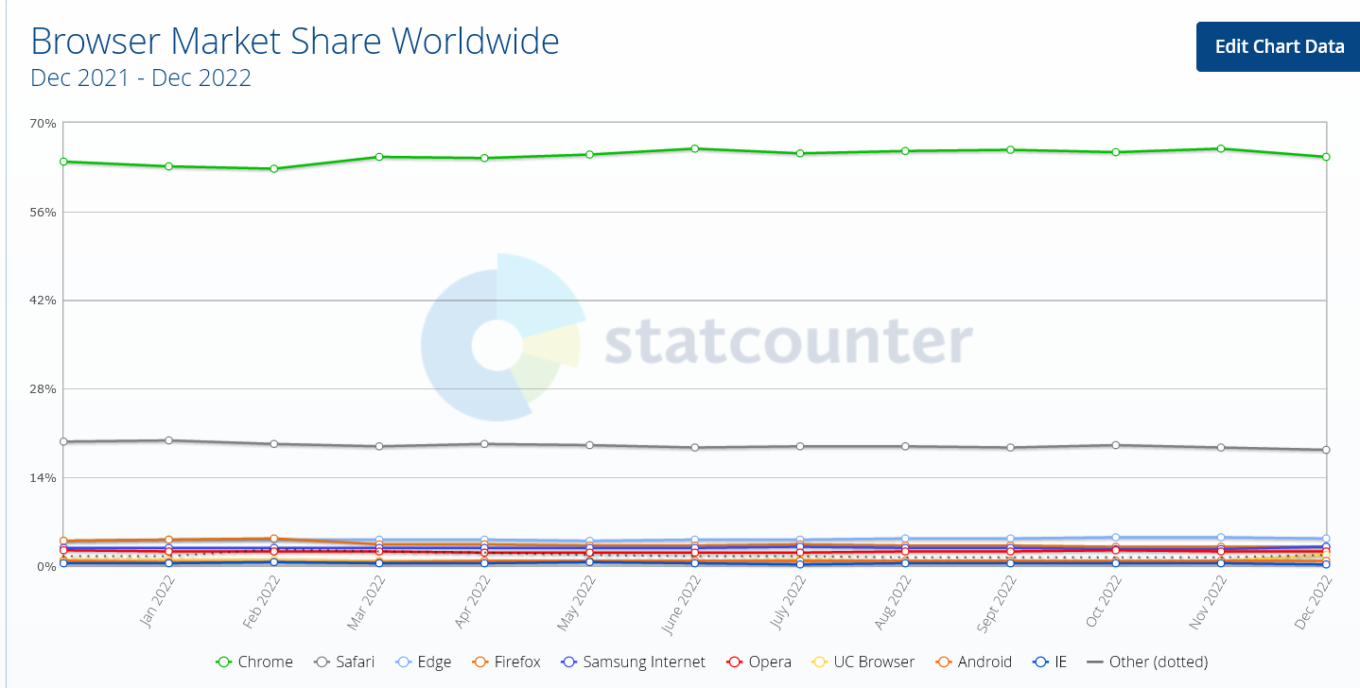
Google Chrome is a dominant force among desktop browsers

The ball in Chrome’s court

Google claims that the changes to the API will make extensions “more secure, performant, and private-respecting by default”. However, lingering concerns over their impact on ad-blocking prevent some experts from embracing the new platform. We too have repeatedly sounded the alarm about the negative impact Manifest V3 may have on Chrome developers and users.

To its credit, though, Google has sought to address these concerns. Being one of the founders of The World Wide Web Consortium’s (W3C) WebExtensions Community Group (on par with Apple, Mozilla, and Microsoft), Chrome solicited feedback on Manifest V3 from extension developers and welcomed criticism.

Still, Google’s response has been too slow and so far has failed to assuage developers’ concerns. Acknowledging these apprehensions, Mozilla announced last year that Firefox would continue to support the webRequest API to block entire categories of HTTP requests in its implementation of Manifest V3, but would also support a compatible version of declarativeNetRequest API, proposed by Google as a replacement for webRequest.

Compared to Firefox users, who will continue to benefit from the full functionality of ad blocking extensions, Chrome's 3 billion users may soon find themselves at a disadvantage when it comes to ad blocking. In the long run, this could become a catalyst for some Chrome users to switch to Firefox.

The sunset that never comes

In November, Mozilla announced that it would continue to support Manifest V2 extensions “for the foreseeable future” and promised to set a timeframe for disabling the old manifest “towards the end of 2023.”

As for Google Chrome, its timeline for pulling the plug on Manifest V2 has been pushed back so many times that it's hard to keep track. In January 2022, Google stopped accepting new extensions based on Manifest V2 to the Chrome Web Store. By June 2023 the tech giant was supposed to be experimenting with turning off support for Manifest V2 extensions in Chrome. However, in December all the remaining deadlines were put under review and all the experiments were postponed indefinitely.
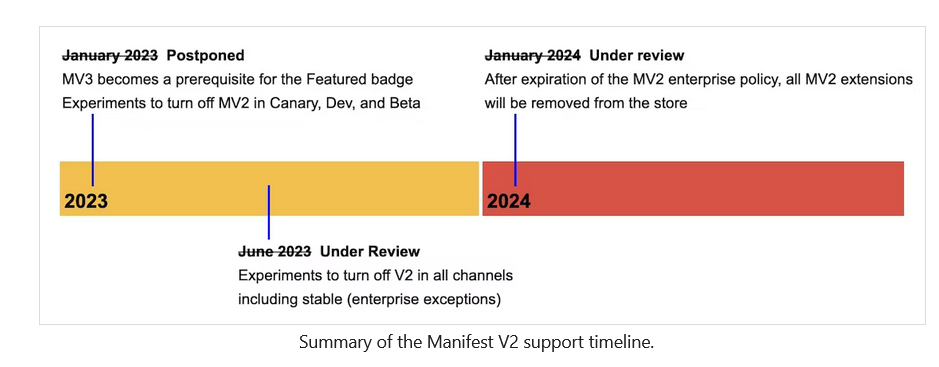
Google has pushed the deadline for sunsetting Manifest V2 a lot of times

That said, the threat of Manifest V2’s eventual demise is real. The doomsday clock for Manifest V2 may have stopped ticking, but Google could resume it at any time, so we thought it was important to have a solution ready if and when that happens.

Ad blocking in the era of Manifest V3

Believing that the chances of a sudden Google U-turn were slim, AdGuard started working on a prototype of a new Manifest V3-compliant extension as early as mid-2021. In August last year, we released an experimental ad blocking extension that met all the requirements of Manifest V3, becoming the first ad blocker to do so. Because it’s based on Manifest V3, with all its unfortunate limitations, this new extension may not be as effective as the old, tried and tested one. The extension will, however, still proactively block requests to trackers, hide social widgets, banners and video ads — in other words, it will do everything you’d expect an ad blocking extension to do.

We may have been the first, but other ad blockers soon followed suit, proving that ad blocking and Manifest V3 may not be a perfect match, but neither its arrival is a death sentence.

A month later, the author of popular ad blocker, uBlock Origin, published an experimental extension uBO Minus, compatible with Manifest V3. AdBlock Plus has also been working on a version of the extension that works on Manifest V3.

Google disappoints, Mozilla saves the day

Google claims that the sole purpose of replacing the old Manifest with a new extension platform that limits ad blocking is to provide greater security and privacy for users. Maybe that’s true, and Google does want to improve the extension platform to make it more secure and private.

Unfortunately, Google has made many decisions about the design of its new platform without taking into account the wishes and concerns of extension developers and, in the end, their own users. As a result, ad blocking extensions will lose some of their functionality. However, we don’t think the company will be too upset about this.

For its part, Mozilla has taken a more measured and less confrontational approach to ad blocking. The Firefox owner has shown that it is not impossible to implement Manifest V3 in a way that does not limit the functionality of ad blockers and at the same time increases security.


Vond je dit bericht leuk?
AdGuard VPN AdGuard DNS AdGuard Mail AdGuard Wallet
Het hoofdscherm van AdGuard voor Windows
Het beschermingsscherm van AdGuard voor Windows, met de beschermingsfuncties en -instellingen
Het statistiekenscherm van AdGuard voor Windows, met statistieken over geblokkeerde advertenties en volgers
Het appbeheerscherm van AdGuard voor Windows, met de opties voor beschermingsbeheer van apps die op het apparaat zijn geïnstalleerd
20.558 20558 gebruikersbeoordelingen
Uitstekend!

AdGuard voor Windows: advertentieblokker voor pc

AdGuard voor Windows is meer dan een advertentieblokker. Het is een multifunctioneel hulpmiddel dat advertenties blokkeert, de toegang tot gevaarlijke sites regelt, het laden van pagina's versnelt en kinderen beschermt tegen ongepaste inhoud

Door het programma te downloaden accepteer je de licentievoorwaarden
Microsoft Store
Door het programma te downloaden accepteer je de licentievoorwaarden
AdGuard voor Windows v8.0, 14 dagen proefperiode
Het hoofdscherm van AdGuard voor Mac
Het Incognitomodus-scherm van AdGuard voor Mac
20.558 20558 gebruikersbeoordelingen
Uitstekend!

AdGuard voor Mac: systeembrede advertentieblokker

AdGuard voor Mac is een unieke advertentieblokker die is ontworpen met macOS in gedachten. Het beschermt je niet alleen tegen vervelende advertenties in browsers en apps, maar beschermt je ook tegen volgen, phishing en fraude
Door het programma te downloaden accepteer je de licentievoorwaarden
Meer lezen
AdGuard voor Mac v2.19, 14 dagen proefperiode
Het hoofdscherm van AdGuard voor Android
Het scherm 'Bescherming tegen volgers' van AdGuard voor Android
Het appbeheerscherm van AdGuard voor Android, met de opties voor beschermingsbeheer voor apps die op het apparaat zijn geïnstalleerd
Het statistiekenscherm van AdGuard voor Android, met statistieken over geblokkeerde advertenties en volgers
Het hoofdscherm van de privébrowser van AdGuard voor Android
De QR-code om AdGuard voor Android te downloaden
20.558 20558 gebruikersbeoordelingen
Uitstekend!

AdGuard voor Android: advertentieblokker voor alle apps

Blokkeert advertenties en volgers in alle browsers, spellen en andere apps. Beschermt je privacy en geeft je controle over hoe jouw apps internet gebruiken. Geïnstalleerd via APK
Door het programma te downloaden accepteer je de licentievoorwaarden
Meer lezen
Scannen om te downloaden
Gebruik een QR-codelezer die beschikbaar is op je apparaat
AdGuard voor Android v4.14, 14 dagen proefperiode
Het hoofdscherm van AdGuard voor iOS
Het beschermingsscherm van AdGuard voor iOS, dat de beschermingsfuncties en -instellingen toont.
Het statistiekenscherm van AdGuard voor iOS, met statistieken over geblokkeerde advertenties en volgers
De QR-code om AdGuard voor iOS te downloaden
20.558 20558 gebruikersbeoordelingen
Uitstekend!

AdGuard: advertentieblokker voor iOS

De beste advertentieblokker voor iOS op iPhone en iPad. AdGuard verwijdert alle soorten advertenties en volgers in Safari en beschermt je privacy in alle apps op DNS-niveau
Door het programma te downloaden accepteer je de licentievoorwaarden
Meer lezen
Scannen om te downloaden
Gebruik een QR-codelezer die beschikbaar is op je apparaat
AdGuard voor iOS v4.5
Het hoofdscherm van AdGuard Inhoudsblokker
Het filterscherm van AdGuard Inhoudsblokker
Het instellingenscherm van AdGuard Inhoudsblokker
20.558 20558 gebruikersbeoordelingen
Uitstekend!

AdGuard Content Blocker

AdGuard Content Blocker elimineert allerlei soorten advertenties in mobiele browsers die technologie voor het blokkeren van inhoud ondersteunen, namelijk Samsung Internet en Yandex Browser. De functies zijn beperkt in vergelijking met AdGuard voor Android, maar het is gratis, eenvoudig te installeren en efficiënt
Door het programma te downloaden accepteer je de licentievoorwaarden
Meer lezen
AdGuard Content Blocker v2.8
Het hoofdscherm van de AdGuard-browseruitbreiding
Het scherm 'Bescherming tegen volgers' van AdGuard-browseruitbreiding
20.558 20558 gebruikersbeoordelingen
Uitstekend!

AdGuard Browserextensie

AdGuard is de snelste en lichtste advertentieblokkering uitbreiding die alle soorten advertenties op alle webpagina's effectief blokkeert! Kies AdGuard voor uw browser om advertentievrij, snel en veilig te surfen.
Installeren
Door het programma te downloaden accepteer je de licentievoorwaarden
Installeren
Door het programma te downloaden accepteer je de licentievoorwaarden
Installeren
Door het programma te downloaden accepteer je de licentievoorwaarden
Installeren
Door het programma te downloaden accepteer je de licentievoorwaarden
Installeren
Door het programma te downloaden accepteer je de licentievoorwaarden
Meer lezen
Installeren
Door het programma te downloaden accepteer je de licentievoorwaarden
Meer lezen
AdGuard Browserextensie v5.5
Het hoofdscherm van AdGuard Assistant
20.558 20558 gebruikersbeoordelingen
Uitstekend!

AdGuard Assistant

Een bijbehorende browseruitbreiding voor AdGuard desktop-apps. Het stelt je in staat om aangepaste items op websites te blokkeren, websites toe te voegen aan de toelatingslijst en rapporten rechtstreeks vanuit je browser te versturen
AdGuard Assistant v1.4
20.558 20558 gebruikersbeoordelingen
Uitstekend!

AdGuard Home

AdGuard Home is een netwerkgebaseerde oplossing voor het blokkeren van advertenties en volgers. Installeer het één keer op je router om alle apparaten in je thuisnetwerk te beschermen — geen extra clientsoftware vereist. Dit is vooral belangrijk voor verschillende IoT-apparaten die vaak een bedreiging vormen voor je privacy
AdGuard Home v0.107
Het hoofdscherm van AdGuard Pro voor iOS
Het beschermingsscherm van AdGuard Pro voor iOS, met de beschermingsfuncties en instellingen
Het statistiekenscherm van AdGuard Pro voor iOS, met statistieken over geblokkeerde advertenties en trackers
20.558 20558 gebruikersbeoordelingen
Uitstekend!

AdGuard Pro voor iOS

AdGuard Pro voor iOS wordt geleverd met alle geavanceerde beschermingsfuncties voor het blokkeren van advertenties. Het biedt dezelfde tools als de betaalde versie van AdGuard voor iOS. Het blinkt uit in het blokkeren van advertenties in Safari en laat je DNS-instellingen aanpassen om je bescherming aan te passen. Het blokkeert advertenties in browsers en apps, beschermt je kinderen tegen ongepaste inhoud en houdt je persoonlijke gegevens veilig
Door het programma te downloaden accepteer je de licentievoorwaarden
Meer lezen
AdGuard Pro voor iOS v4.5
Het hoofdscherm van AdGuard Mini voor Mac
Het Safari-beschermingsscherm van AdGuard Mini voor Mac
Het 'Regel aanmaken'-scherm van AdGuard Mini voor Mac
20.558 20558 gebruikersbeoordelingen
Uitstekend!

AdGuard Mini voor Mac — Safari-advertentieblokker

AdGuard Mini voor Mac is een krachtige Safari-advertentieblokker. Deze lichtgewicht app verwijdert advertenties, blokkeert volgers en versnelt het laden van pagina's. Het helpt je om in Safari zonder afleiding op het web te surfen en je gegevens privé te houden
Installeren
Door het programma te downloaden accepteer je de licentievoorwaarden
Meer lezen
AdGuard Mini voor Mac v2.3
Het hoofdscherm van AdGuard voor Android TV met ingeschakelde bescherming
Het advertentieblokkeringsscherm van AdGuard voor Android TV, met zijn functies en instellingen
Het instellingenscherm van AdGuard voor Android TV
Het appbeheer-scherm van AdGuard voor Android TV, waarop de apps worden getoond waar advertenties en volgers worden geblokkeerd
20.558 20558 gebruikersbeoordelingen
Uitstekend!

AdGuard voor Android TV

AdGuard voor Android TV is de enige app die advertenties blokkeert, jouw privacy bewaakt en fungeert als firewall voor je Smart TV. Ontvang waarschuwingen over webbedreigingen, gebruik veilige DNS en profiteer van gecodeerd verkeer. Ontspan en duik in je favoriete programma's met eersteklas beveiliging en zonder advertenties!
AdGuard voor Android TV v4.14, 14 dagen proefperiode
De AdGuard-mascotte, Agnar, houdt de Linux-pinguïn vast
20.558 20558 gebruikersbeoordelingen
Uitstekend!

AdGuard voor Linux

AdGuard voor Linux is 's werelds eerste systeem-brede AdGuard Advertentieblokker. Blokkeer advertenties en volgers op apparaatsniveau, kies uit vooraf geïnstalleerde filters, of voeg je eigen toe - allemaal via de interface
AdGuard voor Linux v1.4
20.558 20558 gebruikersbeoordelingen
Uitstekend!

AdGuard Temp Mail

Een gratis tijdelijke e-mailadresgenerator die je anoniem houdt en jouw privacy beschermt. Geen spam in je hoofdinbox!
20.558 20558 gebruikersbeoordelingen
Uitstekend!

AdGuard VPN

75 locaties wereldwijd

Toegang tot alle inhoud

Sterke versleuteling

Geen logboekregistratie

Snelste verbinding

24/7 ondersteuning

Gratis proberen
Door het programma te downloaden accepteer je de licentievoorwaarden
Meer lezen
20.558 20558 gebruikersbeoordelingen
Uitstekend!

AdGuard DNS

AdGuard DNS is een alternatieve oplossing voor advertentieblokkering, privacybescherming en ouderlijk toezicht. Het is eenvoudig in te stellen en gratis te gebruiken, biedt een minimum aan optimale bescherming tegen online advertenties, volgers en phishing, ongeacht welk platform en welk apparaat je gebruikt.
20.558 20558 gebruikersbeoordelingen
Uitstekend!

AdGuard Mail

Bescherm je identiteit, vermijd spam en houd je Postvak IN veilig met onze aliassen en tijdelijke e-mailadressen. Geniet van onze gratis service voor het doorsturen van e-mail en apps voor alle besturingssystemen
20.558 20558 gebruikersbeoordelingen
Uitstekend!

AdGuard Wallet

Een veilige en privé crypto-wallet die je volledige controle geeft over jouw activa. Beheer meerdere wallets en ontdek duizenden cryptocurrencies om op te slaan, te verzenden en te ruilen
Downloaden AdGuard Klik op het door de pijl aangegeven bestand om AdGuard te installeren. Selecteer "Open" en klik op "OK" - wacht even tot het bestand gedownload is. Sleep dan in het geopende venster het AdGuard icoontje naar de "Applications" map. Dank u dat u voor AdGuard gekozen heeft. Selecteer "Open" en klik op "OK" - wacht even tot het bestand gedownload is. Klik dan in het geopende venster op "Installeren". Dank u dat u voor AdGuard gekozen heeft.
AdGuard op je mobiele apparaat installeren

















































