HP will rent you a printer, so you don’t have to buy it. But the offer comes with strings attached
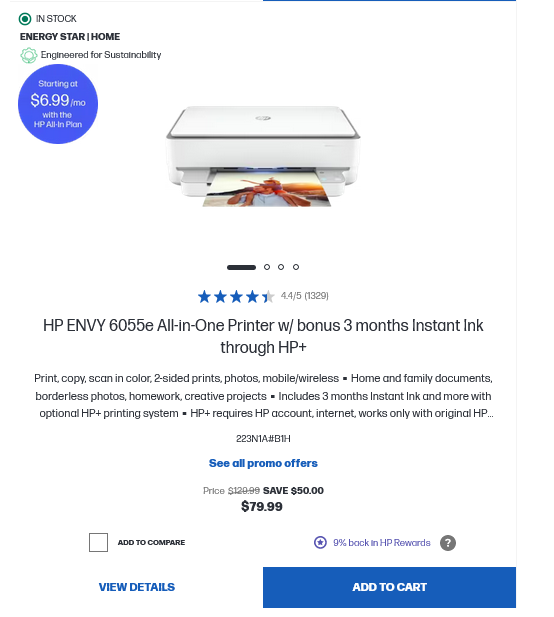
HP, the king of the printing industry by market share, has launched a new subscription service that allows you to lease a printer with a monthly quota of printed pages determined by the chosen plan. The subscription plan also includes ink supply for the allotted pages and an upgrade to a new printer after two years. The caveat? You’ll have to hook up your printer to the Internet — this will enable HP to track usage and gather your personal data. You get a 30-day free trial period, and unless you cancel before it ends, you are obligated to keep the subscription and pay for the rental for a minimum duration of 24 months. And once they are in place, it won’t be easy to break these bonds. If you do, you will have to pay a hefty early termination charge: from $120 to $270 plus tax. For comparison, the cheapest printer model available for the subscription sells for $79.99.
But wait, hold on for a minute. Printing as a subscription service? Since when has it become a thing?
The concept of printing as a subscription service might seem novel indeed, but in fact it’s part of a broader trend where traditional ownership is giving way to subscription models. From home gym equipment to built-in car features activated over-the-air, to now printers, physical products are increasingly becoming a subscription.
Subscriptions then and now
We did not wake up to this brave new world overnight. It was not a sudden revolution but rather a subtle evolution, a shift in the paradigm of ownership that has been inching its way into our lives.
In fact, subscriptions have been around for more than a century. In the UK, people could subscribe to milk deliveries as far back as in the 1860s. Magazine subscriptions, which have now largely moved online, has been a thing for a hundred years.
In the last ten years, subscription services have become firmly associated with digital content, particularly in video and audio streaming, exemplified by platforms like Netflix, Hulu, Amazon Prime, and Spotify. However, slowly but surely, the subscription model has also gained a foothold in the minds of more conventional business people. Apple, traditionally reliant on hardware sales, has been embracing it with Apple News, Apple TV, and Apple Music. One could argue it was only a matter of time before old school industries caught up to the trend, especially considering research indicating that subscription-based companies are growing revenues five times faster than the S&P 500 index.
The vendors that have pivoted to this new model include TV manufacturers, such as Roku. As acknowledged by Roku’s former CEO in 2018, the company has shifted focus to selling ads and services as opposed to hardware sales. The automotive sector is also betting on subscriptions as a revenue stream for the future. General Motors, for instance, anticipates that subscription fees could bring in as much as $25 billion a year by 2030.
Printing companies are not new to the subscription business
In fact, printing companies themselves have been embracing the subscription model for a long time. It’s a poorly kept secret that printer manufacturers make their money selling ink cartridges, not the printers themselves. HP has been particularly notorious for bricking its printers with over-the-air updates when they use third-party cartridges. In a recent interview, HP CEO Enrique Lores called customers who don’t use the company’s supplies a “bad investment” — it doesn’t get any clearer than that.
HP has been offering its customers monthly ink subscription plans since 2014 via the Instant Ink program. As of 2021, it attracted over 10 million subscribers and was forecast to grow 30% year-on-year. Canon has been following in the HP’s footsteps, offering plans with a limited number of pages but also “pay as your print” plans. These require a customer to keep their printer connected to the Internet “to allow Canon to consistently monitor your ink levels”. On the bright side, you could cancel your ink subscription at any time.
HP’s new subscription plan: what is in it?
The key difference between these plans and what HP is offering now as part of its “All-In Plan” is that you are no longer owning a printer, but merely renting it. Lores argues that by introducing this option, HP makes printing “as easy as possible.” The long-term goal, he says, is to “make printing a subscription.” All of it.
On its website, HP is already suggesting that those interested in purchasing the printer opt to subscribe instead. For the time being, this option is being promoted as an alternative and not as the only one available.
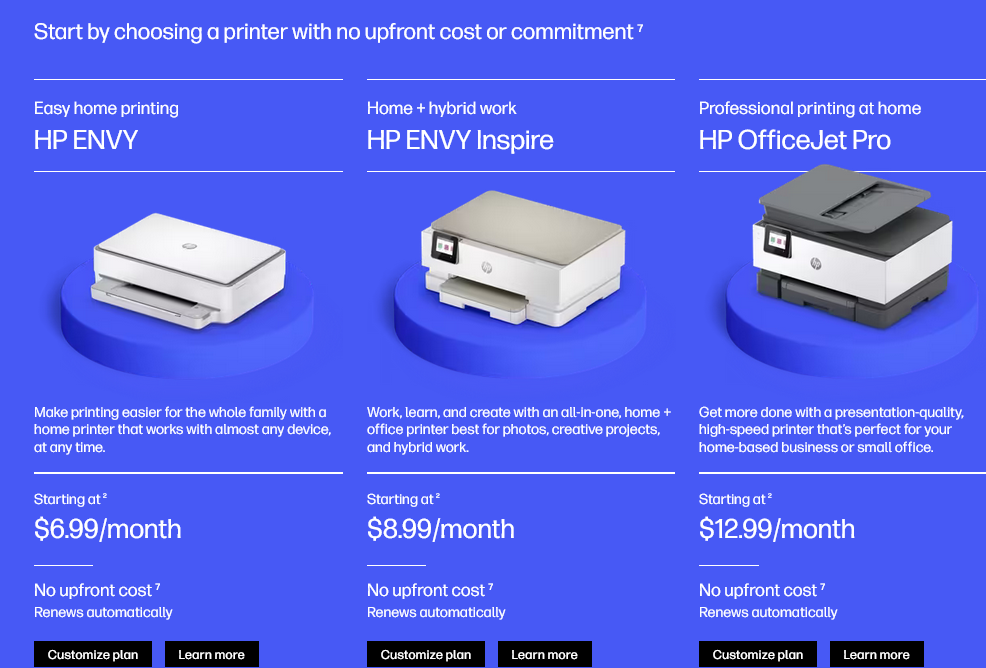
The subscription plans range from $6.99/month for HP’s basic HP Envy model and 25 printed pages to $35.99/month for its color HP OfficeJet Pro model and 700 pages.
And while the manufacturer is arguing that this way is just more convenient, this convenience comes with digital strings attached in the form of terms and conditions. The most important of these non-negotiables is that the printer must be connected to the Internet, and that the monitoring software that comes with the device is able to run without interruption. In its Terms of Service (ToS), HP says: “In order to be able to use the services in an uninterrupted manner, you agree to maintain connectivity of the printer to the Internet and to not remove or disable any remote monitoring software or functionality on the printer.”
So, what happens if the printer is not connected? Typically, a printer doesn’t need an internet connection to operate, a direct connection to the computer via a USB cable or through a local network suffices. But HP says that if the printer is not connected, you may not be able to “access the services,” including your ability to print. In other words, HP warns that they may turn it into a brick, all the while keeping charging you according to your subscription plan.
What data will HP collect?
When an HP printer is plugged into the Internet, it may collect a variety of information. Here’s a breakdown of the types of personal information HP may collect, as described in its privacy statement:
Identifying Information: Your name, company name (optional), subscription ID, HPID (existing or new), and contact details including shipping address, city, state, zip code, province, phone number, and email
Device Information: Your printer’s model, serial number, enrollment start date, shipment and delivery dates, and the date of service cancellation
Usage Metrics: Page counts, types of documents printed (e.g., Word, PowerPoint, PDF, JPEG, etc.), types of devices initiating print jobs, cartridge information (including whether it’s an HP original and if it was new or used when last inserted), ink levels, printer responsiveness, installation times, and peripheral devices
With your consent, HP will also collect the data that can be used to serve you ads, such as location, and other settings. In addition to that, HP reserves the right to supplement the data it collects with demographic and preference information from third-party sources, such as analytics providers, data brokers, and advertising networks. This includes non-personal data like aggregated demographic data, but also personal data obtained through social media logins or other third-party platforms. HP shares this data with service providers it works with, as well as with its advertising partners to tailor ads to you. Additionally, HP may share encrypted or hashed identifiers with its ad partners to facilitate interest-based ads.
We may also transfer information about you to advertising partners (including the ad networks, ad-serving companies, and other service providers we may use) so that they may recognize your devices and deliver interest-based content and advertisements to you. The information may include your name, postal address, email, device ID, or other identifier in encrypted form. The providers may process the information in hashed or de-identified form.
And while the word ‘de-identified’ implies a level of anonymity, it’s possible to re-identify that data by cross-referencing anonymized datasets with publicly available records.
Below is the full breakdown of the types of personal information HP shares with third parties. Note that HP can also share all of that information with the government in accordance with applicable laws.
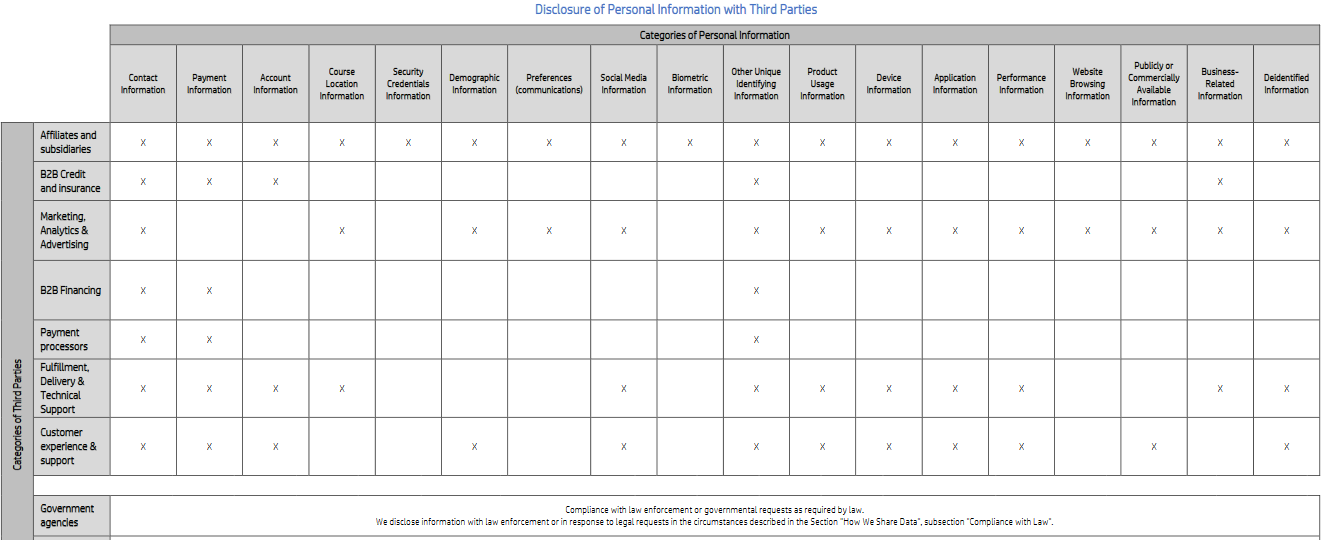
Click to enlarge the picture. Source: HP
Is it possible to block the data collection and still use a printer?
HP’s ToS and privacy statement say that you must not disable its ability to monitor your usage and warn you of the repercussions. But as far as the technical side of things goes, it’s not crystal clear how the company plans to ensure this. As for whether it is possible to block HP’s ability to de facto track your activity and share that information with third parties, that is a tough question.
If we assume that HP uses one domain to handle all requests from an Internet-connected printer, employing a network-wide ad-blocking software like AdGuard Home, or changing your router’s preferred DNS resolver to an ad-blocking one, could inadvertently block all printer requests. This would include essential printing tasks, effectively turning your printer into a pumpkin. However, if HP segregates its monitoring and printing services across multiple domains, it’s possible to selectively block the tracking-related domains without killing printing functionality. This should allow you to protect your privacy without making your printer useless. As soon as we find out which one is the case, we will decide whether to add domains to our filter lists. We won’t add to our filters any domains whose blocking will impact the printer’s core functionality, as that would go against our filter policy.
Final thoughts
From cars to printers and everything in between, the things we used to own are gradually becoming part of the subscription economy. While we are still allowed to own these things if we want to, the companies that make them are disincentivizing ownership by trying to lock us into subscription plans. The longer the plan, the harder it is to cancel — the better. This trend is painful to watch, but it’s not going to reverse itself anytime soon, probably ever.
HP and its “All-In” is one of the latest examples of the trend, and if you don't want to embrace it, the best thing you could do is not to jump on it, while it’s still possible.




















































