Incognito mode is a sham: it makes you feel safe while failing to protect your data

What does it mean to “go incognito”? According to the authoritative Collins dictionary, it means “using a false name or wearing a disguise, in order to avoid being recognized or identified.”

Given that, it’s quite tempting and natural to think that when you open an “incognito” window in the Google Chrome browser, you’re doing just that: hiding your identity and sailing anonymously across the Web (all while donning a stylish fedora hat and those circular Windsor glasses).

A survey by the University of Chicago found that many people vastly overestimate the benefits offered by private browsing modes, even after reading the fine print in the disclaimers. For example, the majority of the respondents believed that their search history was not recorded by Google, even if they were logged in their Google account. While some 27 percent wrongly thought that private mode protects them against viruses and malware.

To dispel these and other misunderstandings about private modes, we will zero in on the most popular of them — Chrome’s incognito mode.

How it works and what it is used for

Let’s start with what Incognito mode can really do for you. In a nutshell, it hides your browsing habits from other users of the same PC, or laptop, or phone — or any device for that matter. In more technical terms, when you’re in incognito mode, neither your search nor your browsing history is stored locally on your device. So it can be quite useful if you are looking for a surprise gift for your partner with whom you happen to share a laptop or a tablet. And if that was what people actually used the mode for, we would have no problem with it.
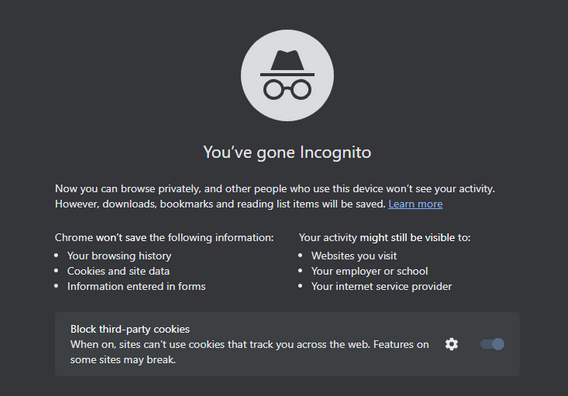
Chrome_Incognito_Mode

However, this is far from being the case. A February 2023 survey conducted in the UK showed that every second person who used private browsing or incognito mode primarily did it to protect their personal information from scammers and criminals. Around 40% would toggle it on in order to stop advertisers from tracking them across the Web.

While Chrome’s incognito mode blocks third-party cookies (tracking codes planted by the websites other than the one you’re visiting in your browser) by default, it still collects cookies and site data during the session. They are stored in a temporary folder and are not deleted at least until you close all incognito windows.

Moreover, a lawsuit filed against Google by the users of incognito mode in 2020 claims that Google “stores users’ regular and private browsing data in the same logs.” It then “uses those mixed logs to send users personalized ads,” and even if individual data points are “anonymized,” Google is able to “uniquely identify a user with a high probability of success” when these data points are pooled.

What Google admits about Incognito mode

Chrome’s incognito mode disclaimer states that your activity will still be visible to three parties: the websites you visit, your employer or school, and your internet service provider.

It means that the analytic tools of the websites you visit can still capture some data about your on-site activity. This data will be anonymized but only to a degree.
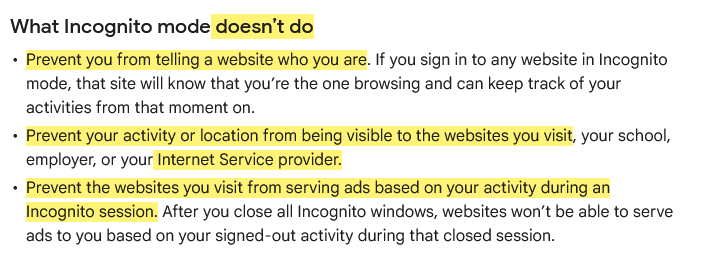
This is what Google says about Incognito mode

Source: Google

To give you the taste of browsing in an ‘incognito mode,’ we visited the CBC.ca website while using the AdGuard browser extension and took a screenshot of what it detected…
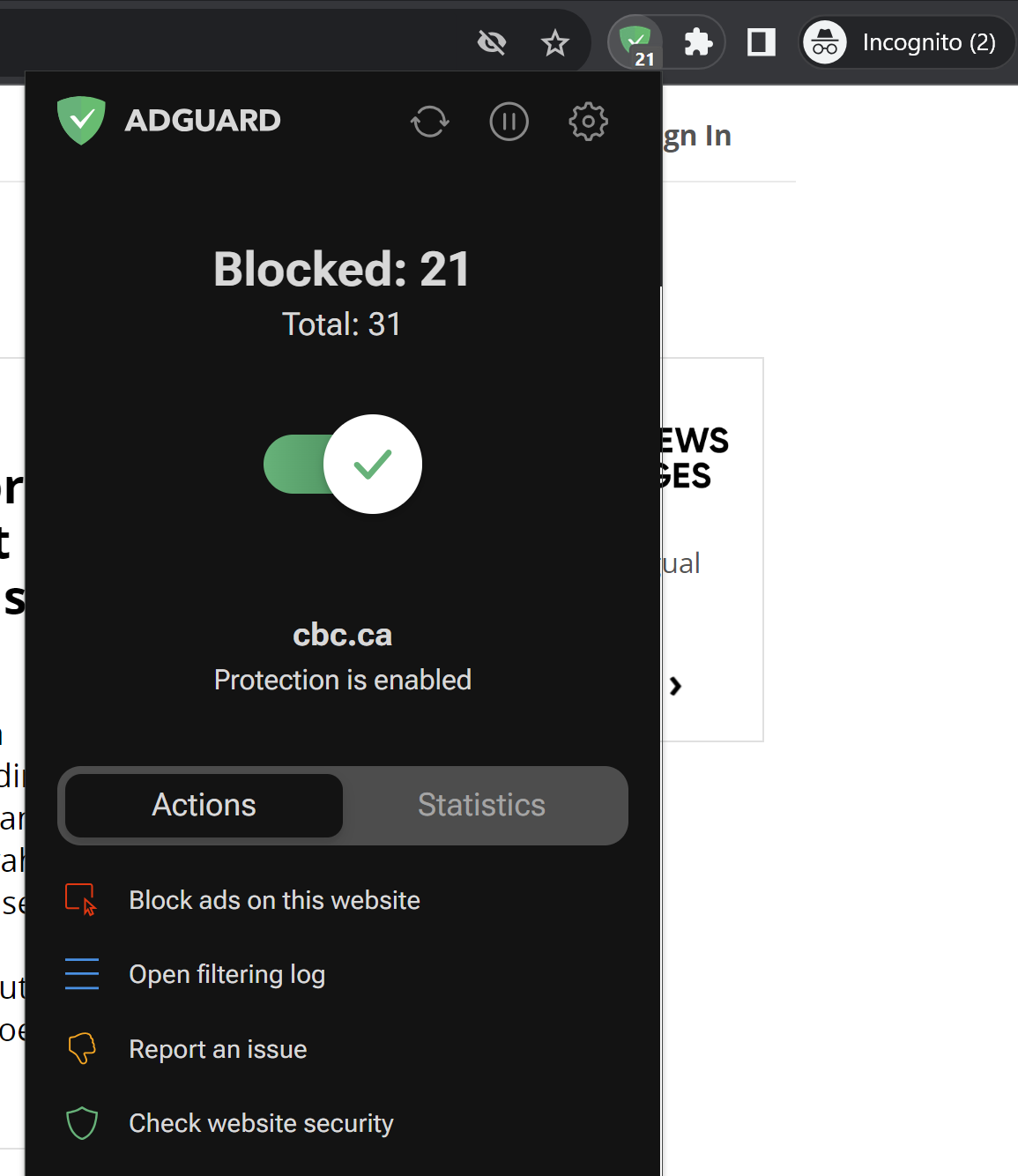
AdGuard Browser Extension has detected trackers in incognito mode

Note that we did not include third-party cookies in this test, because they are already blocked by default in Chrome’s incognito mode. But even without them, you can see how much tracking is going on behind the scenes. Almost every line you can see in the screenshot below is a failed attempt by a tracking tool to send some information about your online identity to a third party.
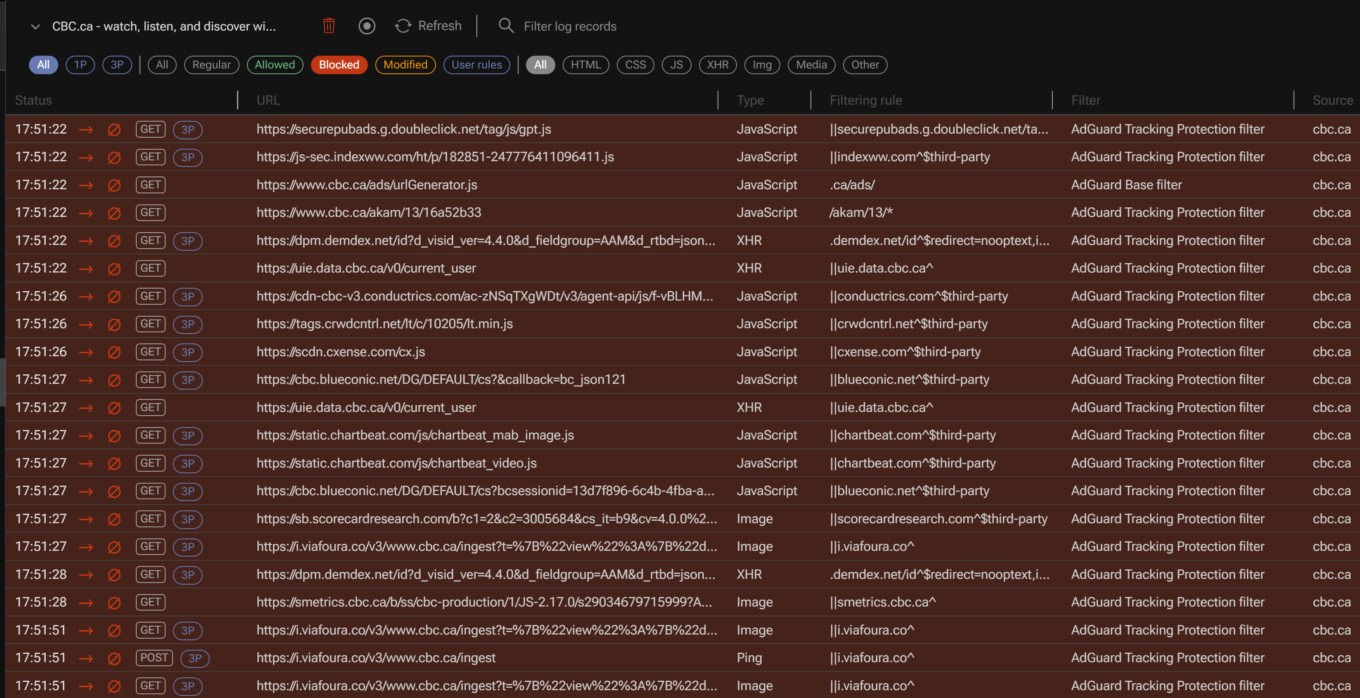
AdGuard filtering log

For example, one of such attempted requests was to Chartbeat, a provider of real-time website analytics. Chartbeat helps websites monitor their traffic, user engagement, and other important metrics. The request URL contains a tracking pixel (a tiny image embedded in web pages that is used to track user activity) and various parameters that send data to Chartbeat, such as host name, page URL, user ID, device type, screen resolution, and more.
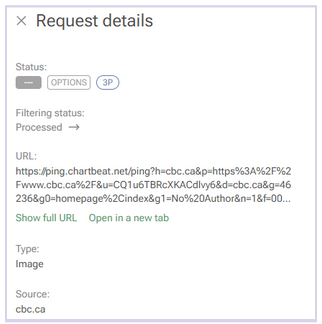
A request to a tracking company detected by AdGuard

Websites will be able to use this data to serve you ads during the session.

Incognito mode also does not hide your browsing activity from your IT department or your school network administrators, if you are using a work or a school network. In short, if you’re not the administrator of the network — for example, if you’re browsing the web using the Wi-Fi in a coffee shop — then you should consider your online activity to be out in the open, incognito mode or not.

In the same vein, regardless of whether you’re using incognito mode, your Internet Service Provider (ISP) will still be able to trace your IP address and see your activity.

And if you sign in to the site with your password and login, the little protection that incognito mode gives you from trackers will naturally be gone. “The site will know that you’re the one browsing and can keep track of your activities from that moment on,”Google says. So, if you sign in on YouTube, for example, while in incognito mode, it will record your activity and serve you recommendations based on it.

It’s probably even worse than that

There are things Google tells users about incognito mode — like the fact that it only helps keep your browsing history private from your partner or child — but there are some things it does not tell. The 2020 class-action lawsuit, that we’ve already mentioned, purports to reveal some of these things.

Remember that disclaimer that appears when you open an incognito mode window? Well, it does mention that third-party websites, your employer, and your school could see what you’re doing online. However, there is one important party that is not mentioned in the disclaimer: Google itself.

An excerpt from the lawsuit challenging incognito mode

Source: Lawsuit

According to the lawsuit, Google tracks and collects data from users even when they are in incognito mode. The plaintiffs claim that Google uses various methods to intercept and monitor users’ browsing data without their consent. The lawsuit explains how this works: “Whenever a user visits a website that is running Google Analytics, Ad Manager, or some similar Google service, Google’s software directs the user’s browser to send a separate communication to Google. This happens even when users are in private browsing mode, unbeknownst to website developers or the users themselves.”

The grand illusion of incognito mode

Incognito mode is like the emperor’s new clothes: it creates a false sense of security where there is none. In fact, its application is so narrow that you might be better off without it. If you want to clear your browsing history, cookies, and site data for a certain time period, there are other tools you can use. In Chrome, you can do this by selecting More Tools → Clear Browsing Data on the desktop version, or Settings → Privacy and security → Clear browsing data on the mobile version.
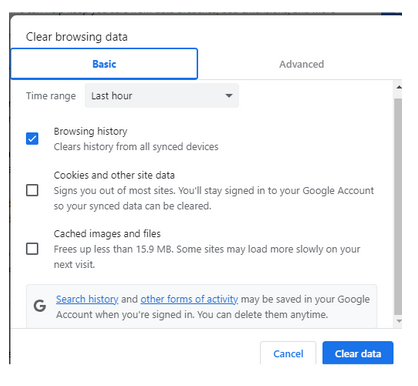
Google privacy controls allow to clear browsing history

However, if you want to truly protect your privacy and anonymity online, there are other, far better ways to do so.

One of them is using a VPN (Virtual Private Network), which is a service that encrypts your internet traffic and routes it through a remote server. This way, you can hide your IP address and location from your ISP, websites and third parties. There are many VPN providers available, but you should choose one that has a good reputation, a no-logs policy, and strong encryption. Generally, a VPN should not slow down your connection a lot, but it might be something you have to come to terms with in exchange for improved privacy.

Another way to go private online is using the Tor browser, which is a free software that allows you to browse the web anonymously. Tor works by bouncing your traffic through a network of volunteer nodes, called relays, that make it hard to trace your identity and location. Tor, however, has some drawbacks as well, such as (sometimes extremely) slow speed and serious compatibility issues.

Using a reliable ad blocker for Chrome will also go a long way in ensuring your browsing stays private. Almost every single one of them blocks trackers and not just ads; not to mention that the vast majority of ads serve as tracking tools, too.

When there are so many tools available to you to protect your privacy and keep your data private, there’s just no reason to resort to incognito mode… unless, of course, you’re looking for that gift for your SO.


Vond je dit bericht leuk?
AdGuard VPN AdGuard DNS AdGuard Mail AdGuard Wallet
Het hoofdscherm van AdGuard voor Windows
Het beschermingsscherm van AdGuard voor Windows, met de beschermingsfuncties en -instellingen
Het statistiekenscherm van AdGuard voor Windows, met statistieken over geblokkeerde advertenties en volgers
Het appbeheerscherm van AdGuard voor Windows, met de opties voor beschermingsbeheer van apps die op het apparaat zijn geïnstalleerd
20.557 20557 gebruikersbeoordelingen
Uitstekend!

AdGuard voor Windows: advertentieblokker voor pc

AdGuard voor Windows is meer dan een advertentieblokker. Het is een multifunctioneel hulpmiddel dat advertenties blokkeert, de toegang tot gevaarlijke sites regelt, het laden van pagina's versnelt en kinderen beschermt tegen ongepaste inhoud

Door het programma te downloaden accepteer je de licentievoorwaarden
Microsoft Store
Door het programma te downloaden accepteer je de licentievoorwaarden
AdGuard voor Windows v8.0, 14 dagen proefperiode
Het hoofdscherm van AdGuard voor Mac
Het Incognitomodus-scherm van AdGuard voor Mac
20.557 20557 gebruikersbeoordelingen
Uitstekend!

AdGuard voor Mac: systeembrede advertentieblokker

AdGuard voor Mac is een unieke advertentieblokker die is ontworpen met macOS in gedachten. Het beschermt je niet alleen tegen vervelende advertenties in browsers en apps, maar beschermt je ook tegen volgen, phishing en fraude
Door het programma te downloaden accepteer je de licentievoorwaarden
Meer lezen
AdGuard voor Mac v2.19, 14 dagen proefperiode
Het hoofdscherm van AdGuard voor Android
Het scherm 'Bescherming tegen volgers' van AdGuard voor Android
Het appbeheerscherm van AdGuard voor Android, met de opties voor beschermingsbeheer voor apps die op het apparaat zijn geïnstalleerd
Het statistiekenscherm van AdGuard voor Android, met statistieken over geblokkeerde advertenties en volgers
Het hoofdscherm van de privébrowser van AdGuard voor Android
De QR-code om AdGuard voor Android te downloaden
20.557 20557 gebruikersbeoordelingen
Uitstekend!

AdGuard voor Android: advertentieblokker voor alle apps

Blokkeert advertenties en volgers in alle browsers, spellen en andere apps. Beschermt je privacy en geeft je controle over hoe jouw apps internet gebruiken. Geïnstalleerd via APK
Door het programma te downloaden accepteer je de licentievoorwaarden
Meer lezen
Scannen om te downloaden
Gebruik een QR-codelezer die beschikbaar is op je apparaat
AdGuard voor Android v4.14, 14 dagen proefperiode
Het hoofdscherm van AdGuard voor iOS
Het beschermingsscherm van AdGuard voor iOS, dat de beschermingsfuncties en -instellingen toont.
Het statistiekenscherm van AdGuard voor iOS, met statistieken over geblokkeerde advertenties en volgers
De QR-code om AdGuard voor iOS te downloaden
20.557 20557 gebruikersbeoordelingen
Uitstekend!

AdGuard: advertentieblokker voor iOS

De beste advertentieblokker voor iOS op iPhone en iPad. AdGuard verwijdert alle soorten advertenties en volgers in Safari en beschermt je privacy in alle apps op DNS-niveau
Door het programma te downloaden accepteer je de licentievoorwaarden
Meer lezen
Scannen om te downloaden
Gebruik een QR-codelezer die beschikbaar is op je apparaat
AdGuard voor iOS v4.5
Het hoofdscherm van AdGuard Inhoudsblokker
Het filterscherm van AdGuard Inhoudsblokker
Het instellingenscherm van AdGuard Inhoudsblokker
20.557 20557 gebruikersbeoordelingen
Uitstekend!

AdGuard Content Blocker

AdGuard Content Blocker elimineert allerlei soorten advertenties in mobiele browsers die technologie voor het blokkeren van inhoud ondersteunen, namelijk Samsung Internet en Yandex Browser. De functies zijn beperkt in vergelijking met AdGuard voor Android, maar het is gratis, eenvoudig te installeren en efficiënt
Door het programma te downloaden accepteer je de licentievoorwaarden
Meer lezen
AdGuard Content Blocker v2.8
Het hoofdscherm van de AdGuard-browseruitbreiding
Het scherm 'Bescherming tegen volgers' van AdGuard-browseruitbreiding
20.557 20557 gebruikersbeoordelingen
Uitstekend!

AdGuard Browserextensie

AdGuard is de snelste en lichtste advertentieblokkering uitbreiding die alle soorten advertenties op alle webpagina's effectief blokkeert! Kies AdGuard voor uw browser om advertentievrij, snel en veilig te surfen.
Installeren
Door het programma te downloaden accepteer je de licentievoorwaarden
Installeren
Door het programma te downloaden accepteer je de licentievoorwaarden
Installeren
Door het programma te downloaden accepteer je de licentievoorwaarden
Installeren
Door het programma te downloaden accepteer je de licentievoorwaarden
Installeren
Door het programma te downloaden accepteer je de licentievoorwaarden
Meer lezen
Installeren
Door het programma te downloaden accepteer je de licentievoorwaarden
Meer lezen
AdGuard Browserextensie v5.5
Het hoofdscherm van AdGuard Assistant
20.557 20557 gebruikersbeoordelingen
Uitstekend!

AdGuard Assistant

Een bijbehorende browseruitbreiding voor AdGuard desktop-apps. Het stelt je in staat om aangepaste items op websites te blokkeren, websites toe te voegen aan de toelatingslijst en rapporten rechtstreeks vanuit je browser te versturen
AdGuard Assistant v1.4
20.557 20557 gebruikersbeoordelingen
Uitstekend!

AdGuard Home

AdGuard Home is een netwerkgebaseerde oplossing voor het blokkeren van advertenties en volgers. Installeer het één keer op je router om alle apparaten in je thuisnetwerk te beschermen — geen extra clientsoftware vereist. Dit is vooral belangrijk voor verschillende IoT-apparaten die vaak een bedreiging vormen voor je privacy
AdGuard Home v0.107
Het hoofdscherm van AdGuard Pro voor iOS
Het beschermingsscherm van AdGuard Pro voor iOS, met de beschermingsfuncties en instellingen
Het statistiekenscherm van AdGuard Pro voor iOS, met statistieken over geblokkeerde advertenties en trackers
20.557 20557 gebruikersbeoordelingen
Uitstekend!

AdGuard Pro voor iOS

AdGuard Pro voor iOS wordt geleverd met alle geavanceerde beschermingsfuncties voor het blokkeren van advertenties. Het biedt dezelfde tools als de betaalde versie van AdGuard voor iOS. Het blinkt uit in het blokkeren van advertenties in Safari en laat je DNS-instellingen aanpassen om je bescherming aan te passen. Het blokkeert advertenties in browsers en apps, beschermt je kinderen tegen ongepaste inhoud en houdt je persoonlijke gegevens veilig
Door het programma te downloaden accepteer je de licentievoorwaarden
Meer lezen
AdGuard Pro voor iOS v4.5
Het hoofdscherm van AdGuard Mini voor Mac
Het Safari-beschermingsscherm van AdGuard Mini voor Mac
Het 'Regel aanmaken'-scherm van AdGuard Mini voor Mac
20.557 20557 gebruikersbeoordelingen
Uitstekend!

AdGuard Mini voor Mac — Safari-advertentieblokker

AdGuard Mini voor Mac is een krachtige Safari-advertentieblokker. Deze lichtgewicht app verwijdert advertenties, blokkeert volgers en versnelt het laden van pagina's. Het helpt je om in Safari zonder afleiding op het web te surfen en je gegevens privé te houden
Installeren
Door het programma te downloaden accepteer je de licentievoorwaarden
Meer lezen
AdGuard Mini voor Mac v2.3
Het hoofdscherm van AdGuard voor Android TV met ingeschakelde bescherming
Het advertentieblokkeringsscherm van AdGuard voor Android TV, met zijn functies en instellingen
Het instellingenscherm van AdGuard voor Android TV
Het appbeheer-scherm van AdGuard voor Android TV, waarop de apps worden getoond waar advertenties en volgers worden geblokkeerd
20.557 20557 gebruikersbeoordelingen
Uitstekend!

AdGuard voor Android TV

AdGuard voor Android TV is de enige app die advertenties blokkeert, jouw privacy bewaakt en fungeert als firewall voor je Smart TV. Ontvang waarschuwingen over webbedreigingen, gebruik veilige DNS en profiteer van gecodeerd verkeer. Ontspan en duik in je favoriete programma's met eersteklas beveiliging en zonder advertenties!
AdGuard voor Android TV v4.14, 14 dagen proefperiode
De AdGuard-mascotte, Agnar, houdt de Linux-pinguïn vast
20.557 20557 gebruikersbeoordelingen
Uitstekend!

AdGuard voor Linux

AdGuard voor Linux is 's werelds eerste systeem-brede AdGuard Advertentieblokker. Blokkeer advertenties en volgers op apparaatsniveau, kies uit vooraf geïnstalleerde filters, of voeg je eigen toe - allemaal via de interface
AdGuard voor Linux v1.4
20.557 20557 gebruikersbeoordelingen
Uitstekend!

AdGuard Temp Mail

Een gratis tijdelijke e-mailadresgenerator die je anoniem houdt en jouw privacy beschermt. Geen spam in je hoofdinbox!
20.557 20557 gebruikersbeoordelingen
Uitstekend!

AdGuard VPN

75 locaties wereldwijd

Toegang tot alle inhoud

Sterke versleuteling

Geen logboekregistratie

Snelste verbinding

24/7 ondersteuning

Gratis proberen
Door het programma te downloaden accepteer je de licentievoorwaarden
Meer lezen
20.557 20557 gebruikersbeoordelingen
Uitstekend!

AdGuard DNS

AdGuard DNS is een alternatieve oplossing voor advertentieblokkering, privacybescherming en ouderlijk toezicht. Het is eenvoudig in te stellen en gratis te gebruiken, biedt een minimum aan optimale bescherming tegen online advertenties, volgers en phishing, ongeacht welk platform en welk apparaat je gebruikt.
20.557 20557 gebruikersbeoordelingen
Uitstekend!

AdGuard Mail

Bescherm je identiteit, vermijd spam en houd je Postvak IN veilig met onze aliassen en tijdelijke e-mailadressen. Geniet van onze gratis service voor het doorsturen van e-mail en apps voor alle besturingssystemen
20.557 20557 gebruikersbeoordelingen
Uitstekend!

AdGuard Wallet

Een veilige en privé crypto-wallet die je volledige controle geeft over jouw activa. Beheer meerdere wallets en ontdek duizenden cryptocurrencies om op te slaan, te verzenden en te ruilen
Downloaden AdGuard Klik op het door de pijl aangegeven bestand om AdGuard te installeren. Selecteer "Open" en klik op "OK" - wacht even tot het bestand gedownload is. Sleep dan in het geopende venster het AdGuard icoontje naar de "Applications" map. Dank u dat u voor AdGuard gekozen heeft. Selecteer "Open" en klik op "OK" - wacht even tot het bestand gedownload is. Klik dan in het geopende venster op "Installeren". Dank u dat u voor AdGuard gekozen heeft.
AdGuard op je mobiele apparaat installeren

















































