Introducing AdGuard Home

As many of you probably know, AdGuard provides a lot of ways to block ads in form of various apps and browser extensions. Some even heard about AdGuard DNS, a way to block ads without installing anything on your device. And today we are announcing the official release of a completely new product — AdGuard Home, which carries a lot of cool new stuff with it.

The short version: AdGuard Home is a network-wide ad-and-tracker blocking DNS server. Its purpose is to let you control your entire network and all your devices, and it does not require using a client-side program. At the same, AdGuard Home features a web interface to easily manage the filtering process.


Where it started

The first step towards AdGuard Home was made two years ago, with the announcement of the AdGuard DNS beta. For the first time, we offered a way to block ads without having to install anything on your device, like a browser extension or an app. And while AdGuard Home is a standalone project, it took a lot from its spiritual predecessor.

In fact, we should probably "thank" Apple for speeding up the development of AdGuard Home. When Apple decided that you couldn't control the traffic on your own devices anymore, we sought ways to put users back in charge of their own gadgets. Naturally, the DNS approach looked the most promising. It's too bad Apple won't allow apps that manage DNS requests anywhere near the AppStore — well, what if you didn't need any apps? And this is the main strength of AdGuard Home: you can set it up anywhere, but I'm getting ahead of myself.

Honestly, I would be lying if I said that we implemented 100% of everything that we wanted. That is why we are calling this version of AdGuard Home "v0.9".

One of the main reasons is that the installation of AdGuard Home is currently not the easiest task for an unprepared user, simplifying it is one of the highest priority tasks as we move forward.

Don't get me wrong, it works perfectly fine in its current state, there's just even more we want to add — and we will, in the official v1.0 release that will be announced before you know it.

But we simply couldn't wait any longer, so meet AdGuard Home 0.9!

Why use it?

It is probably not news to you that ads and trackers follow you on the web wherever you go, not only on your computer, but also on your smartphone (in fact, probably even more on your smartphone!), and even in things like smart fridges, smart vacuums and — God help us all! — smart light bulbs!

Even if you have nothing against companies gathering data about you, tracking can be plain dangerous. Ads are no better — they have long become a gateway to all kinds of malware, viruses, crypto lockers, phishing and more trackers.

Given how densely we are surrounded by gadgets in our life, it can get really tiresome to find, install, configure and maintain an ad blocker app for each of them, and, as I've mentioned already, in case of "smart furniture" this is not possible at all. This is where AdGuard Home comes into play — and shines. It provides a unified solution for blocking ads and trackers on all devices within your network, most commonly your home Wi-Fi network, but nothing prevents you from setting it up in your workspace or anywhere else.

Features and advantages of AG Home

The first thing you will notice is the web interface. We think it looks neat and tidy:
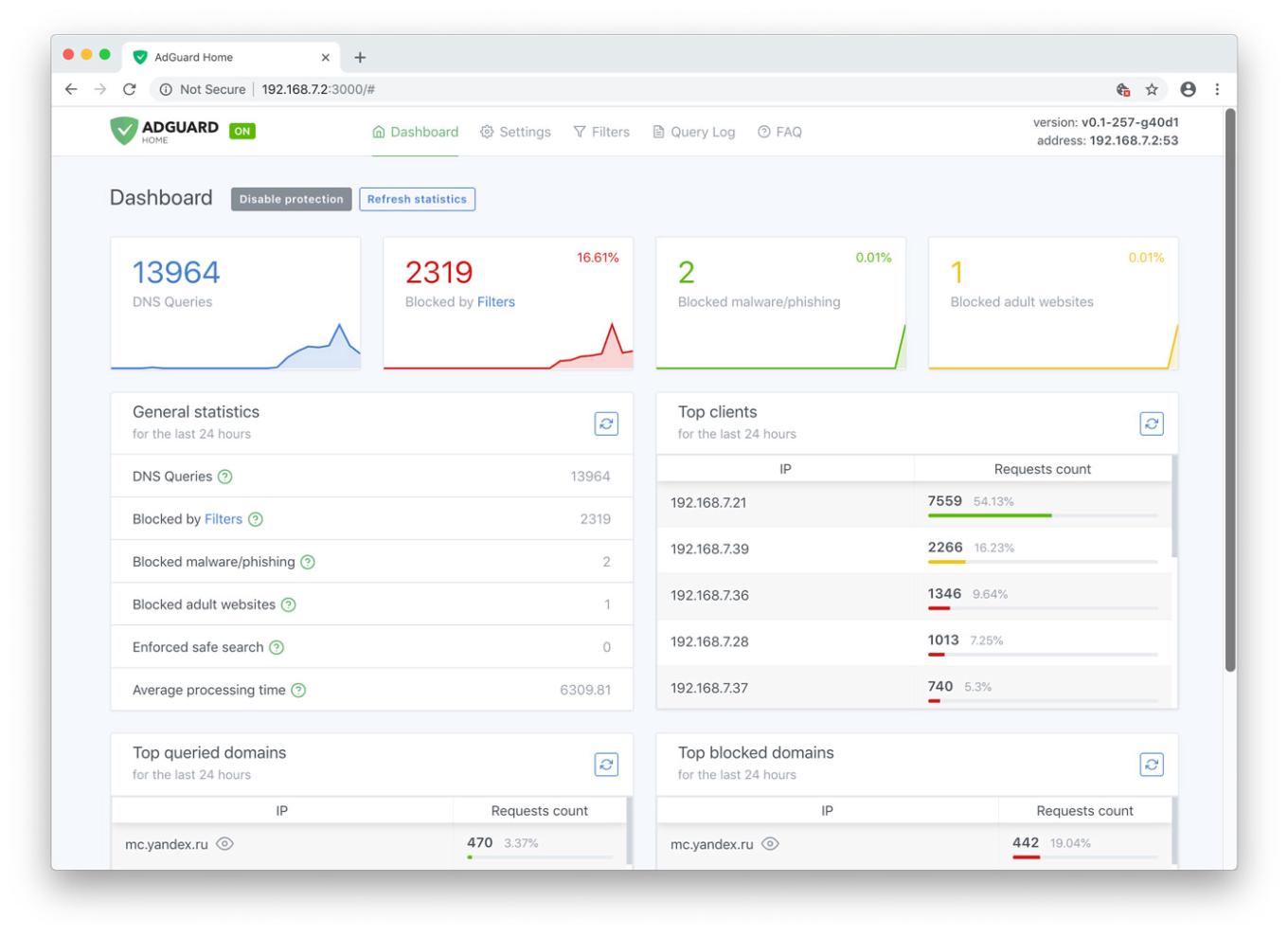
AdGuard Home Dashboard

Let's have a look at the main tab. Here you will find all kinds of statistics, including a vivid graphical representation. As you probably noticed, it looks just like a normal app, but you only need it alone to manage filtering on all your devices within the network.

Unlike application-based solutions for Android and iOS, AdGuard Home is not dependent on media giants like Google and Apple and their countless artificial limitations. Your personal preference is the only deciding factor

Now let's go to the "Settings" tab and look more closely at each of the options offered.
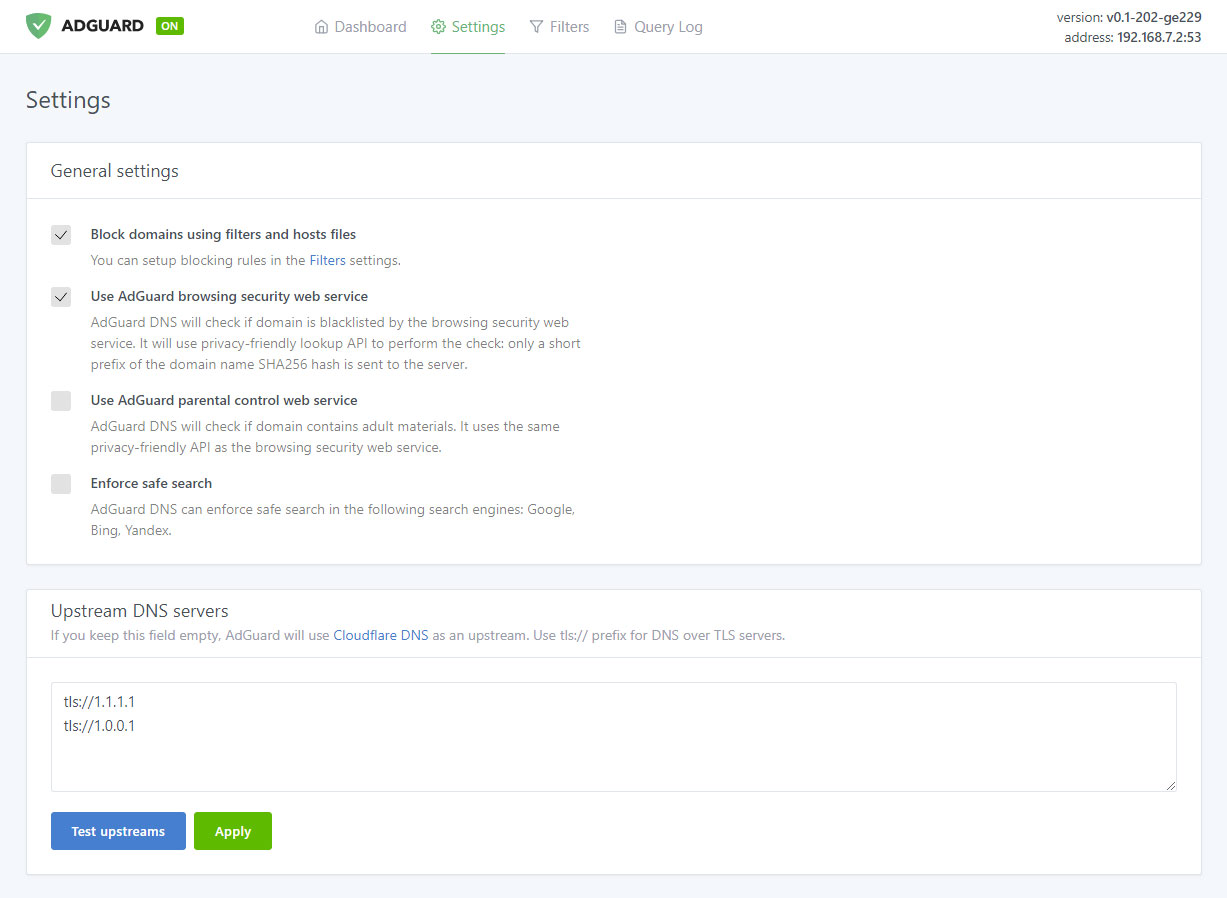
Manage filtering process

Ad blocking

The name speaks for itself. This is the main module, keep it enabled if you want AdGuard Home to block ads and tracking in your network — and it will block a lot. Just look at this comparison:
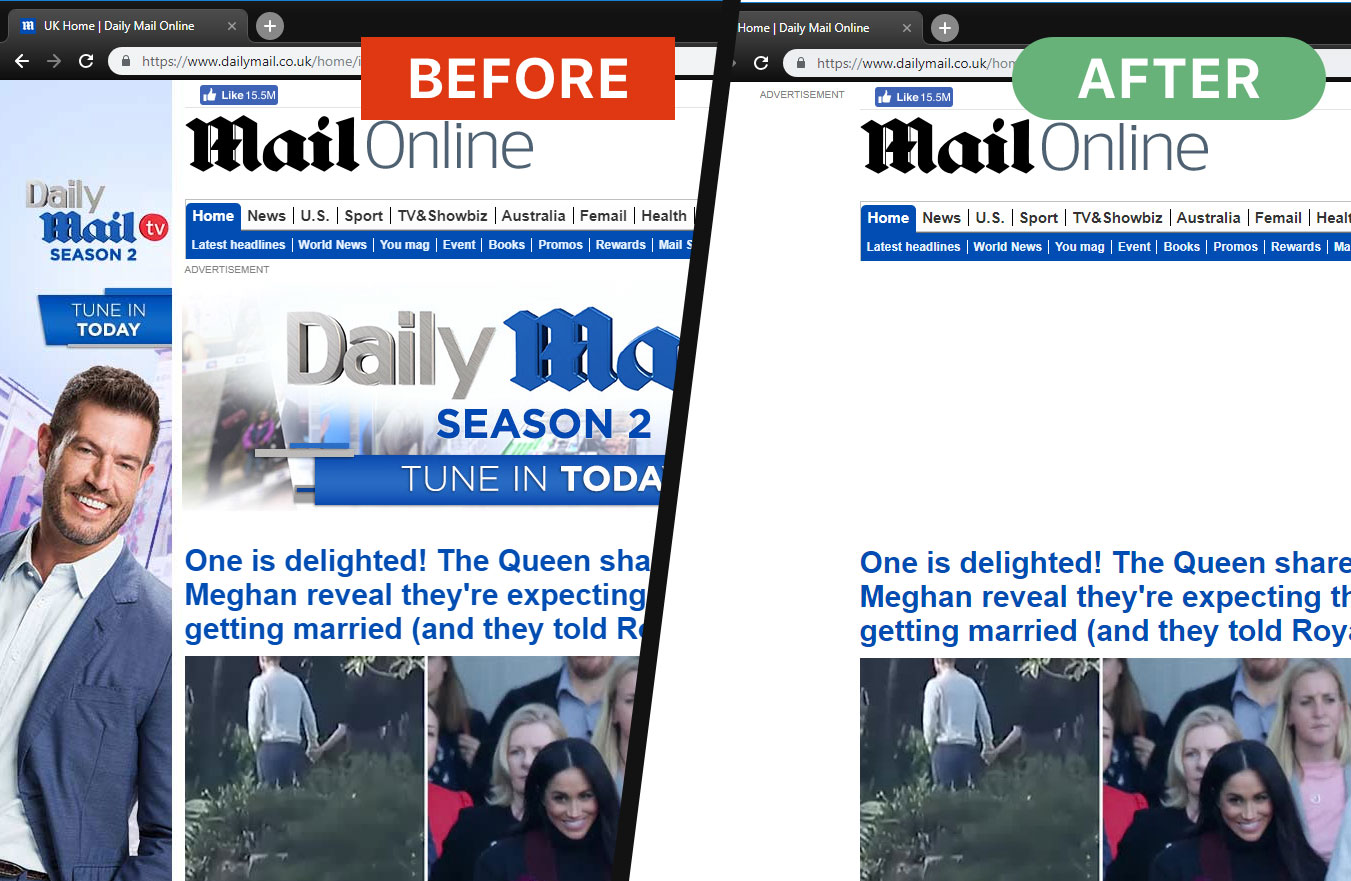
Ads are gone now

And this is not just aesthetics, look at the amount of saved traffic and load speed:
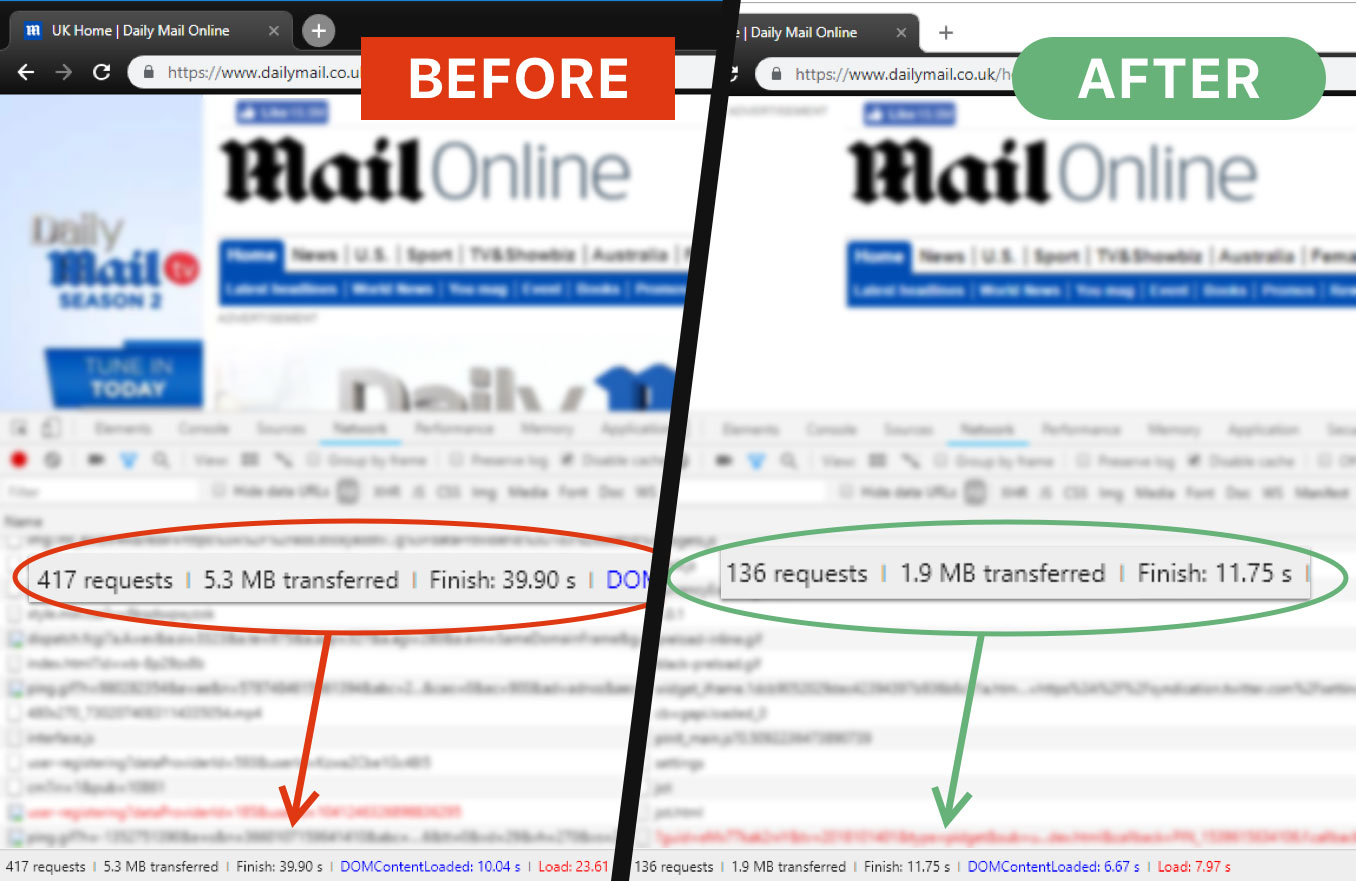
AG Home saves time and traffic

That is more than 3Mb of traffic and 15 seconds of load speed, and that's only one page.

Browsing Security
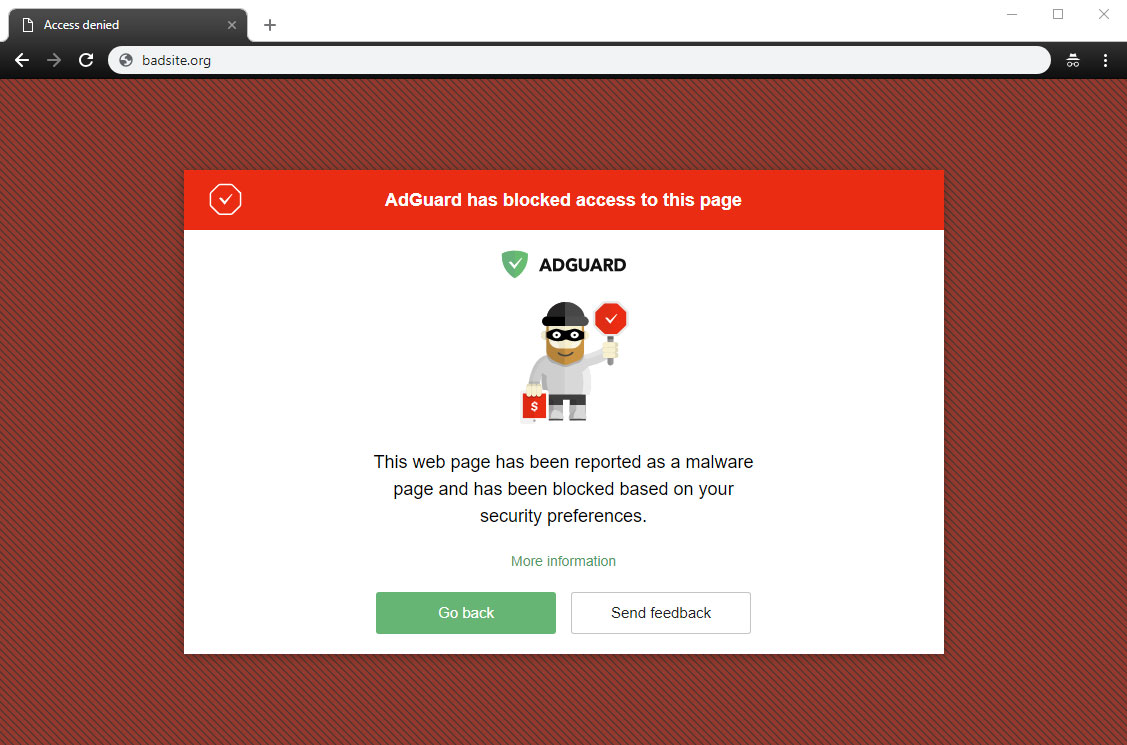
AG Home blocked a dangerous website

This stands for anti-malware and anti-phishing protection. AG Home will block all potentially dangerous requests to malicious and fraudulent websites, protecting you from online threats.

Parental control
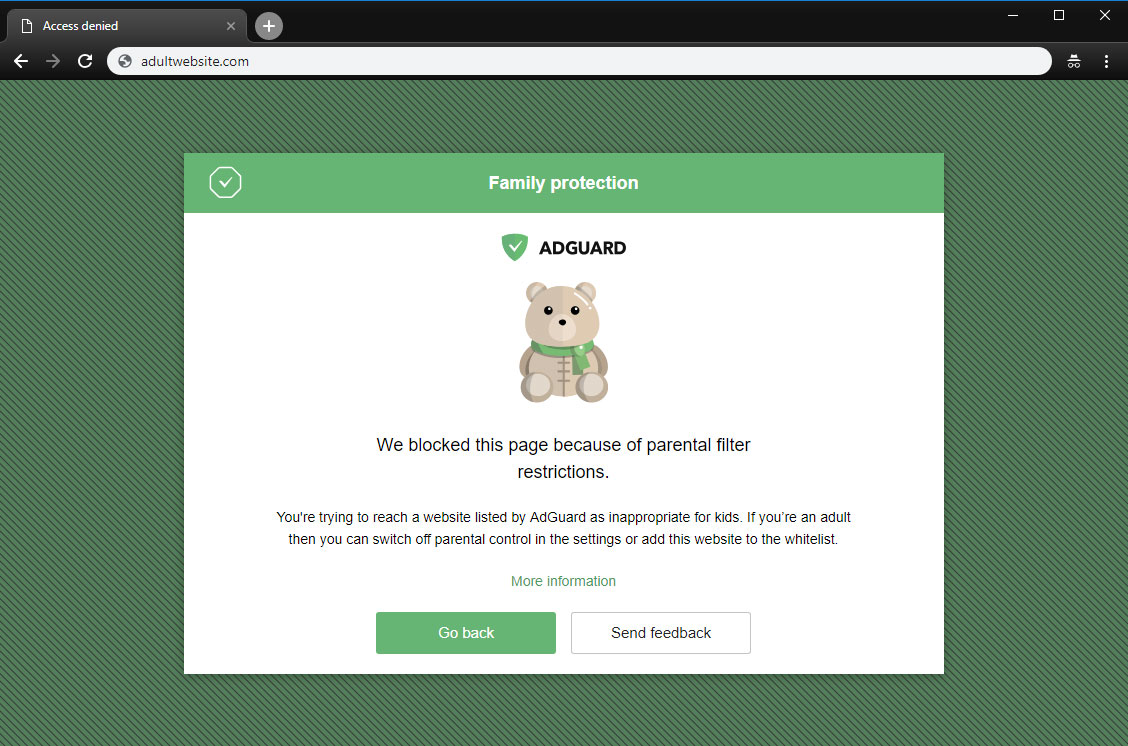
A page is blocked by Parental control

This is useful if you have kids and you don't want them to access websites with inappropriate content.

Safe search
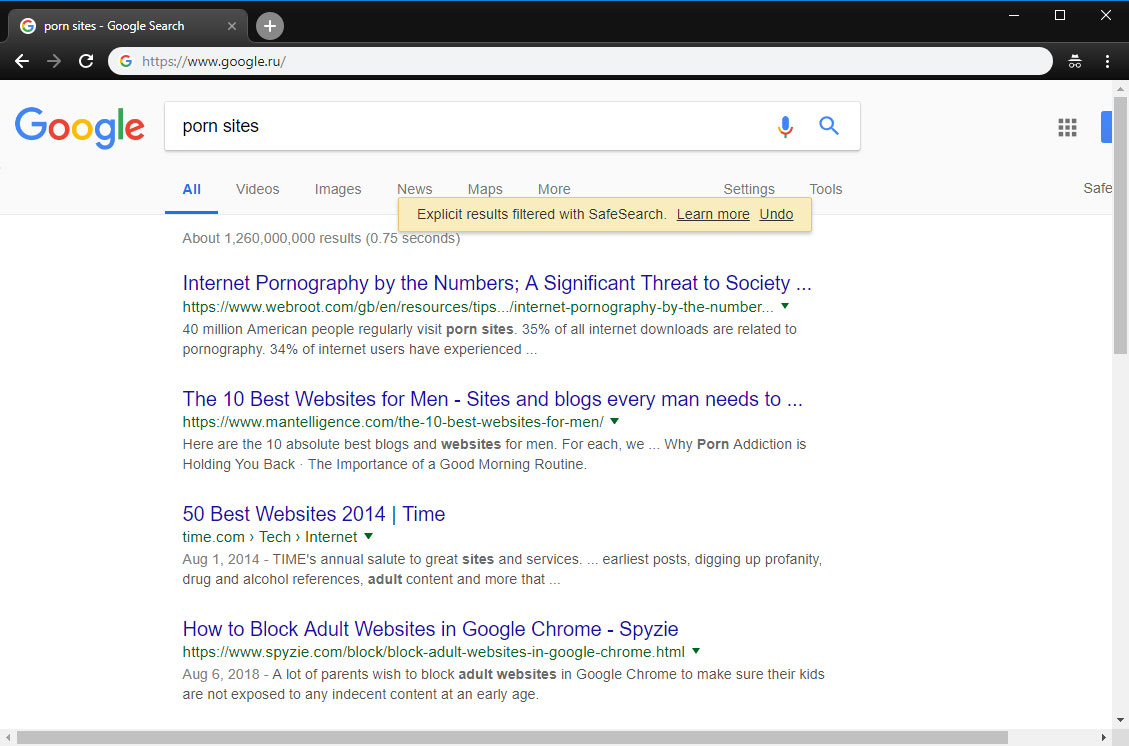
AG Home enforced "Safe search"

In the same vein, this option enforces "Safe search" mode in the most popular search engines (when enabled, it omits adult websites and pictures from being displayed in the search results)

Custom upstream servers

At the bottom of the "Settings" tab is a window to select a preferable upstream DNS server. Don't bother yourself with it unless you know what it means — this option is not essential to the quality filtering at all, but rather is a nice bonus.

AdGuard Home was developed based on the production-ready AdGuard DNS software, which has been used successfully by millions of users from around the globe for the last two years

Filter lists
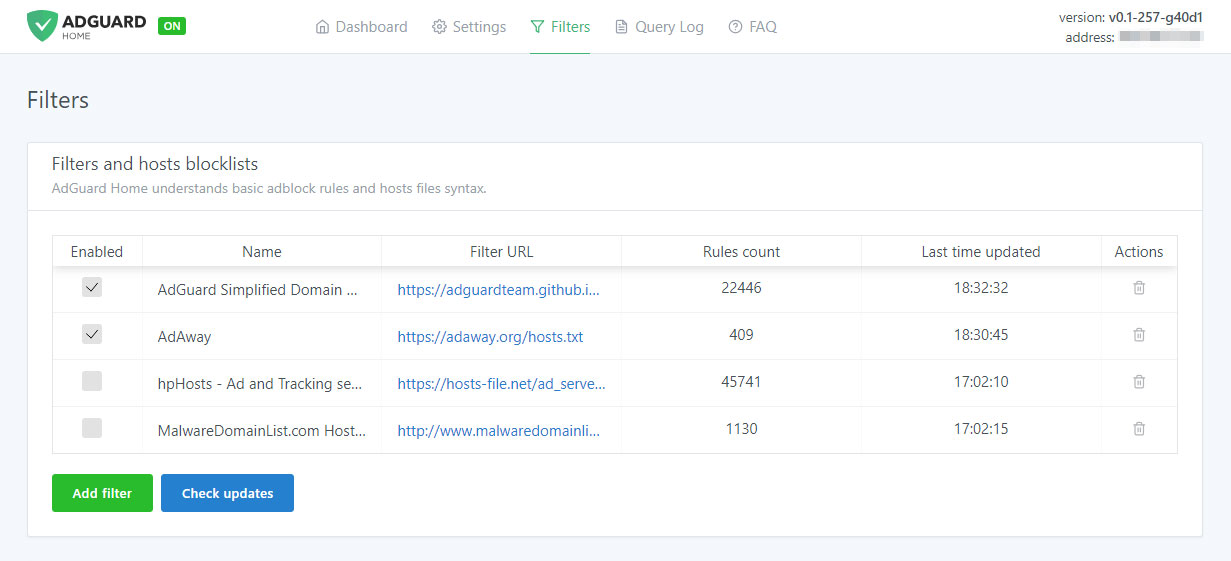
Add third-party filters

The third tab is devoted to filter settings. By default, ad blocking will be managed by the AdGuard SDN filter, but you have an option to add other filters and hosts-based blocking lists (basically, those are lists of rules that tell AG Home what exactly to block), or even create your own custom filtering rules. Multiple filters and hosts lists are available on the Internet.

AdGuard Home is developed by AdGuard — known experts in ad blocking and privacy protection. Over 25,000,000 users entrusted us with their online safety and never looked back

Query log
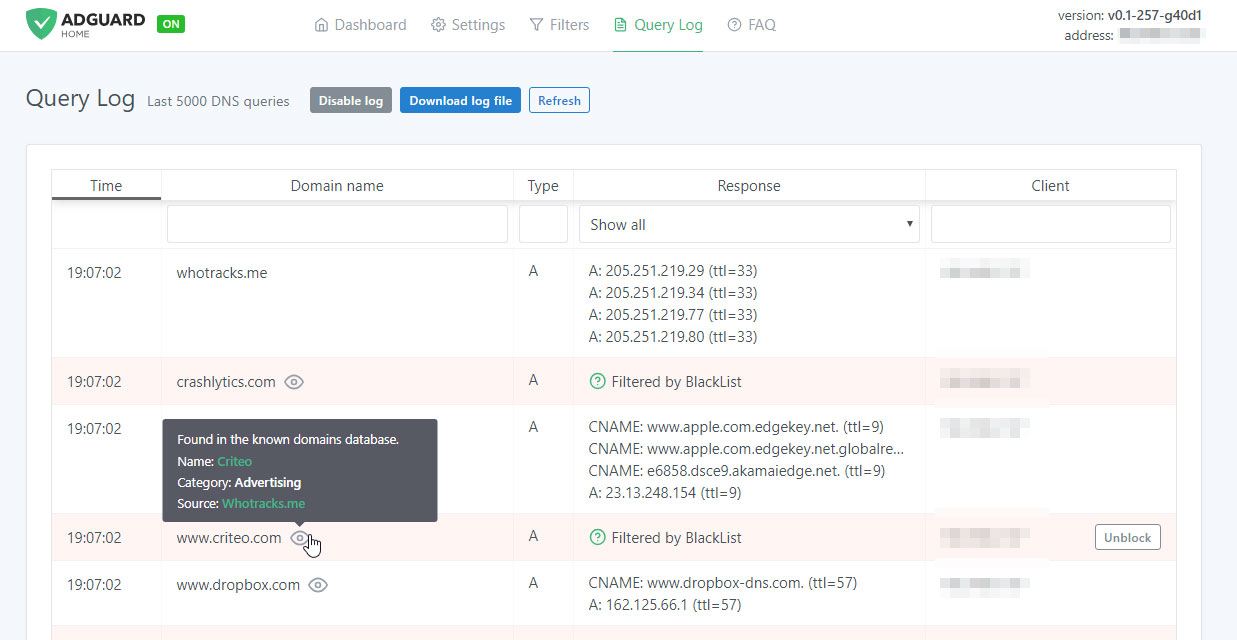
Monitor network activity

In the next tab there is a query log that offers everything you would expect from it — complete information on each and every request, all kinds of sorting. For each blocked request, there is a small tooltip telling you what rule it was filtered by, additional information about its origin and an "Unblock" button right next to it. Similarly, for unblocked requests there is a "Block" button. The log keeps track of the last 5000 queries and, of course, you can download the log file.

Open source

AdGuard Home is an open source project. We would be delighted to see any feedback, suggestions or other contribution from you. Whatever it is you have for us, the place to go to let us know about it is always the GitHub repository.

In summary, AdGuard Home gives you complete control over what is happening within your network.

How to set it up

Currently, you can install AdGuard Home on MacOS, Linux (x32 or x64), and Raspberry Pi. There is no need to go into technical details — we have the installation process described in the dedicated GitHub repository. Also, detailed guides on installing AG DNS to VPS and Raspberry Pi are available in our Wiki.

Further plans

We are not going to stop here: on the contrary, we have big plans regarding the future development of AdGuard Home. Here is a short list of what we are planning to do next:

  • One-click setup of your private VPN integrated with AdGuard Home
  • Improve the UI, make it better both functionally and aesthetically (send us your suggestions!)
  • Enhance the encryption options — DNSCrypt and DoH support, a possibility to run in the encrypted DNS server mode
  • Make it easier to use AdGuard Home with mobile devices (e.g. Mobileconfig for iOS)
  • Integrate AG Home with AdGuard applications

Being optimistic and looking a bit further, we would like AG Home to eventually become the privacy protection center for you and your devices, simple to use and easy to configure, where you can set up a personal proxy, VPN or encrypted DNS just in a couple of clicks.

Can I uninstall my ad blocker now?

The main advantage of AG Home lies in its ability to protect the whole network. When it comes to the sheer "filtering power", DNS-based ad blocking is inherently less potent and flexible than the approach taken by browser extensions and especially less so than dedicated tools. As an example, this article compares AG for Android and hosts-based ad blockers, and it gives a good impression of their relative capabilities. Whether you need this level of protection or not is a matter only you can decide.

And that's about it, hope you'll like AdGuard Home and will find a good use for it!

Do you have any questions or suggestions? We're answering everything on Product Hunt today!

Vond je dit bericht leuk?
AdGuard VPN AdGuard DNS AdGuard Mail AdGuard Wallet
Het hoofdscherm van AdGuard voor Windows
Het beschermingsscherm van AdGuard voor Windows, met de beschermingsfuncties en -instellingen
Het statistiekenscherm van AdGuard voor Windows, met statistieken over geblokkeerde advertenties en volgers
Het appbeheerscherm van AdGuard voor Windows, met de opties voor beschermingsbeheer van apps die op het apparaat zijn geïnstalleerd
20.557 20557 gebruikersbeoordelingen
Uitstekend!

AdGuard voor Windows: advertentieblokker voor pc

AdGuard voor Windows is meer dan een advertentieblokker. Het is een multifunctioneel hulpmiddel dat advertenties blokkeert, de toegang tot gevaarlijke sites regelt, het laden van pagina's versnelt en kinderen beschermt tegen ongepaste inhoud
Door het programma te downloaden accepteer je de licentievoorwaarden
Microsoft Store
Door het programma te downloaden accepteer je de licentievoorwaarden
AdGuard voor Windows v8.0, 14 dagen proefperiode
Het hoofdscherm van AdGuard voor Mac
Het Incognitomodus-scherm van AdGuard voor Mac
20.557 20557 gebruikersbeoordelingen
Uitstekend!

AdGuard voor Mac: systeembrede advertentieblokker

AdGuard voor Mac is een unieke advertentieblokker die is ontworpen met macOS in gedachten. Het beschermt je niet alleen tegen vervelende advertenties in browsers en apps, maar beschermt je ook tegen volgen, phishing en fraude
Door het programma te downloaden accepteer je de licentievoorwaarden
Meer lezen
AdGuard voor Mac v2.19, 14 dagen proefperiode
Het hoofdscherm van AdGuard voor Android
Het scherm 'Bescherming tegen volgers' van AdGuard voor Android
Het appbeheerscherm van AdGuard voor Android, met de opties voor beschermingsbeheer voor apps die op het apparaat zijn geïnstalleerd
Het statistiekenscherm van AdGuard voor Android, met statistieken over geblokkeerde advertenties en volgers
Het hoofdscherm van de privébrowser van AdGuard voor Android
De QR-code om AdGuard voor Android te downloaden
20.557 20557 gebruikersbeoordelingen
Uitstekend!

AdGuard voor Android: advertentieblokker voor alle apps

Blokkeert advertenties en volgers in alle browsers, spellen en andere apps. Beschermt je privacy en geeft je controle over hoe jouw apps internet gebruiken. Geïnstalleerd via APK
Door het programma te downloaden accepteer je de licentievoorwaarden
Meer lezen
Scannen om te downloaden
Gebruik een QR-codelezer die beschikbaar is op je apparaat
AdGuard voor Android v4.14, 14 dagen proefperiode
Het hoofdscherm van AdGuard voor iOS
Het beschermingsscherm van AdGuard voor iOS, dat de beschermingsfuncties en -instellingen toont.
Het statistiekenscherm van AdGuard voor iOS, met statistieken over geblokkeerde advertenties en volgers
De QR-code om AdGuard voor iOS te downloaden
20.557 20557 gebruikersbeoordelingen
Uitstekend!

AdGuard: advertentieblokker voor iOS

De beste advertentieblokker voor iOS op iPhone en iPad. AdGuard verwijdert alle soorten advertenties en volgers in Safari en beschermt je privacy in alle apps op DNS-niveau
Door het programma te downloaden accepteer je de licentievoorwaarden
Meer lezen
Scannen om te downloaden
Gebruik een QR-codelezer die beschikbaar is op je apparaat
AdGuard voor iOS v4.5
Het hoofdscherm van AdGuard Inhoudsblokker
Het filterscherm van AdGuard Inhoudsblokker
Het instellingenscherm van AdGuard Inhoudsblokker
20.557 20557 gebruikersbeoordelingen
Uitstekend!

AdGuard Content Blocker

AdGuard Content Blocker elimineert allerlei soorten advertenties in mobiele browsers die technologie voor het blokkeren van inhoud ondersteunen, namelijk Samsung Internet en Yandex Browser. De functies zijn beperkt in vergelijking met AdGuard voor Android, maar het is gratis, eenvoudig te installeren en efficiënt
Door het programma te downloaden accepteer je de licentievoorwaarden
Meer lezen
AdGuard Content Blocker v2.8
Het hoofdscherm van de AdGuard-browseruitbreiding
Het scherm 'Bescherming tegen volgers' van AdGuard-browseruitbreiding
20.557 20557 gebruikersbeoordelingen
Uitstekend!

AdGuard Browserextensie

AdGuard is de snelste en lichtste advertentieblokkering uitbreiding die alle soorten advertenties op alle webpagina's effectief blokkeert! Kies AdGuard voor uw browser om advertentievrij, snel en veilig te surfen.
Installeren
Door het programma te downloaden accepteer je de licentievoorwaarden
Installeren
Door het programma te downloaden accepteer je de licentievoorwaarden
Installeren
Door het programma te downloaden accepteer je de licentievoorwaarden
Installeren
Door het programma te downloaden accepteer je de licentievoorwaarden
Installeren
Door het programma te downloaden accepteer je de licentievoorwaarden
Meer lezen
Installeren
Door het programma te downloaden accepteer je de licentievoorwaarden
Meer lezen
AdGuard Browserextensie v5.5
Het hoofdscherm van AdGuard Assistant
20.557 20557 gebruikersbeoordelingen
Uitstekend!

AdGuard Assistant

Een bijbehorende browseruitbreiding voor AdGuard desktop-apps. Het stelt je in staat om aangepaste items op websites te blokkeren, websites toe te voegen aan de toelatingslijst en rapporten rechtstreeks vanuit je browser te versturen
AdGuard Assistant v1.4
20.557 20557 gebruikersbeoordelingen
Uitstekend!

AdGuard Home

AdGuard Home is een netwerkgebaseerde oplossing voor het blokkeren van advertenties en volgers. Installeer het één keer op je router om alle apparaten in je thuisnetwerk te beschermen — geen extra clientsoftware vereist. Dit is vooral belangrijk voor verschillende IoT-apparaten die vaak een bedreiging vormen voor je privacy
AdGuard Home v0.107
Het hoofdscherm van AdGuard Pro voor iOS
Het beschermingsscherm van AdGuard Pro voor iOS, met de beschermingsfuncties en instellingen
Het statistiekenscherm van AdGuard Pro voor iOS, met statistieken over geblokkeerde advertenties en trackers
20.557 20557 gebruikersbeoordelingen
Uitstekend!

AdGuard Pro voor iOS

AdGuard Pro voor iOS wordt geleverd met alle geavanceerde beschermingsfuncties voor het blokkeren van advertenties. Het biedt dezelfde tools als de betaalde versie van AdGuard voor iOS. Het blinkt uit in het blokkeren van advertenties in Safari en laat je DNS-instellingen aanpassen om je bescherming aan te passen. Het blokkeert advertenties in browsers en apps, beschermt je kinderen tegen ongepaste inhoud en houdt je persoonlijke gegevens veilig
Door het programma te downloaden accepteer je de licentievoorwaarden
Meer lezen
AdGuard Pro voor iOS v4.5
Het hoofdscherm van AdGuard Mini voor Mac
Het Safari-beschermingsscherm van AdGuard Mini voor Mac
Het 'Regel aanmaken'-scherm van AdGuard Mini voor Mac
20.557 20557 gebruikersbeoordelingen
Uitstekend!

AdGuard Mini voor Mac — Safari-advertentieblokker

AdGuard Mini voor Mac is een krachtige Safari-advertentieblokker. Deze lichtgewicht app verwijdert advertenties, blokkeert volgers en versnelt het laden van pagina's. Het helpt je om in Safari zonder afleiding op het web te surfen en je gegevens privé te houden
Installeren
Door het programma te downloaden accepteer je de licentievoorwaarden
Meer lezen
AdGuard Mini voor Mac v2.3
Het hoofdscherm van AdGuard voor Android TV met ingeschakelde bescherming
Het advertentieblokkeringsscherm van AdGuard voor Android TV, met zijn functies en instellingen
Het instellingenscherm van AdGuard voor Android TV
Het appbeheer-scherm van AdGuard voor Android TV, waarop de apps worden getoond waar advertenties en volgers worden geblokkeerd
20.557 20557 gebruikersbeoordelingen
Uitstekend!

AdGuard voor Android TV

AdGuard voor Android TV is de enige app die advertenties blokkeert, jouw privacy bewaakt en fungeert als firewall voor je Smart TV. Ontvang waarschuwingen over webbedreigingen, gebruik veilige DNS en profiteer van gecodeerd verkeer. Ontspan en duik in je favoriete programma's met eersteklas beveiliging en zonder advertenties!
AdGuard voor Android TV v4.14, 14 dagen proefperiode
De AdGuard-mascotte, Agnar, houdt de Linux-pinguïn vast
20.557 20557 gebruikersbeoordelingen
Uitstekend!

AdGuard voor Linux

AdGuard voor Linux is 's werelds eerste systeem-brede AdGuard Advertentieblokker. Blokkeer advertenties en volgers op apparaatsniveau, kies uit vooraf geïnstalleerde filters, of voeg je eigen toe - allemaal via de interface
AdGuard voor Linux v1.4
20.557 20557 gebruikersbeoordelingen
Uitstekend!

AdGuard Temp Mail

Een gratis tijdelijke e-mailadresgenerator die je anoniem houdt en jouw privacy beschermt. Geen spam in je hoofdinbox!
20.557 20557 gebruikersbeoordelingen
Uitstekend!

AdGuard VPN

75 locaties wereldwijd

Toegang tot alle inhoud

Sterke versleuteling

Geen logboekregistratie

Snelste verbinding

24/7 ondersteuning

Gratis proberen
Door het programma te downloaden accepteer je de licentievoorwaarden
Meer lezen
20.557 20557 gebruikersbeoordelingen
Uitstekend!

AdGuard DNS

AdGuard DNS is een alternatieve oplossing voor advertentieblokkering, privacybescherming en ouderlijk toezicht. Het is eenvoudig in te stellen en gratis te gebruiken, biedt een minimum aan optimale bescherming tegen online advertenties, volgers en phishing, ongeacht welk platform en welk apparaat je gebruikt.
20.557 20557 gebruikersbeoordelingen
Uitstekend!

AdGuard Mail

Bescherm je identiteit, vermijd spam en houd je Postvak IN veilig met onze aliassen en tijdelijke e-mailadressen. Geniet van onze gratis service voor het doorsturen van e-mail en apps voor alle besturingssystemen
20.557 20557 gebruikersbeoordelingen
Uitstekend!

AdGuard Wallet

Een veilige en privé crypto-wallet die je volledige controle geeft over jouw activa. Beheer meerdere wallets en ontdek duizenden cryptocurrencies om op te slaan, te verzenden en te ruilen
Downloaden AdGuard Klik op het door de pijl aangegeven bestand om AdGuard te installeren. Selecteer "Open" en klik op "OK" - wacht even tot het bestand gedownload is. Sleep dan in het geopende venster het AdGuard icoontje naar de "Applications" map. Dank u dat u voor AdGuard gekozen heeft. Selecteer "Open" en klik op "OK" - wacht even tot het bestand gedownload is. Klik dan in het geopende venster op "Installeren". Dank u dat u voor AdGuard gekozen heeft.
AdGuard op je mobiele apparaat installeren


















































