TikTok, Meta, X, and others exploit push notifications on iOS to collect data about users

Apple has long said that fingerprinting — tracking a user through the hardware and software features of their device — is not allowed. But apparently some popular apps have found a backdoor that they are exploiting in plain sight.

Privacy researcher Tommy Mysk has discovered that a number of popular iOS apps are using a push notification feature, first introduced in 2016, to send detailed data about the user’s device to their companies’ servers.

Mysk explained that he noticed this disturbing and seemingly persistent pattern when he examined several social media apps, including TikTok, Facebook, FB Messenger, Instagram, Threads, and X. All of these apps took advantage of the feature that allowed them to customize their push notifications even when not running.

This feature is not intrinsically malicious and serves an important purpose. For example, it can be useful for apps that need to decode the notification payload or download additional content to best present the notification to the user. When an app receives a push notification, iOS signals the app to wake up and run for a short time. During this time, the app can do whatever the developer wants, including tweaking the push notification’s appearance in some way. The latter would be the original purpose of the feature, but the problem is that the app may also be collecting data or sending information about the user during that time.

Mysk has observed that the apps he has studied have learned to take full advantage of this limited run time to collect data from the device and send that data to remote servers. The researcher calls the ability to run code in the background “a gold mine for data-hungry apps.”

So how does it all work, according to Mysk?

  • The app developer comes up with a code they want the app to run in the background
  • The developer sends a push notification to the user of the app. The push can be about anything, from a news update, a live sports score to a new friend request
  • The user’s device receives the push notification, but does not show it on the screen yet. iOS recognizes that the push notification is from the social app and wakes it up in the background. The app is now running, but the user can’t see it or interact with it
  • The app runs the code that the developer has prepared in the background. And while it may be innocuous, for example, be used to add more information, such as images, to the notification, it can also be used to harvest data from the user’s device and send that data to the developer’s servers

This scheme can provide developers with a unique combination of the software and hardware characteristics of the user’s device.

Many apps are using this feature as an opportunity to send detailed device information while running quietly in the background. This includes: system uptime, locale, keyboard language, available memory, battery status, device model, display brightness, to mention a few.

This data can subsequently be used to track the user across applications, Mysk points out.

What data is being collected?

In the video describing the examples of such trickery, Mysk shows the types of data that can be collected by social media companies through the push notification loophole. The collection is done either through the company’s own services or with the help of third-party tools, such as Google’s analytics tools — Google Analytics and Firebase.
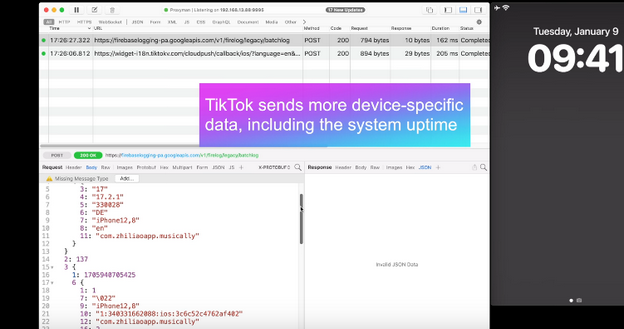
TikTok

With TikTok, for example, the app sends the iPhone’s boot time to the remote servers every time it receives a push notification.
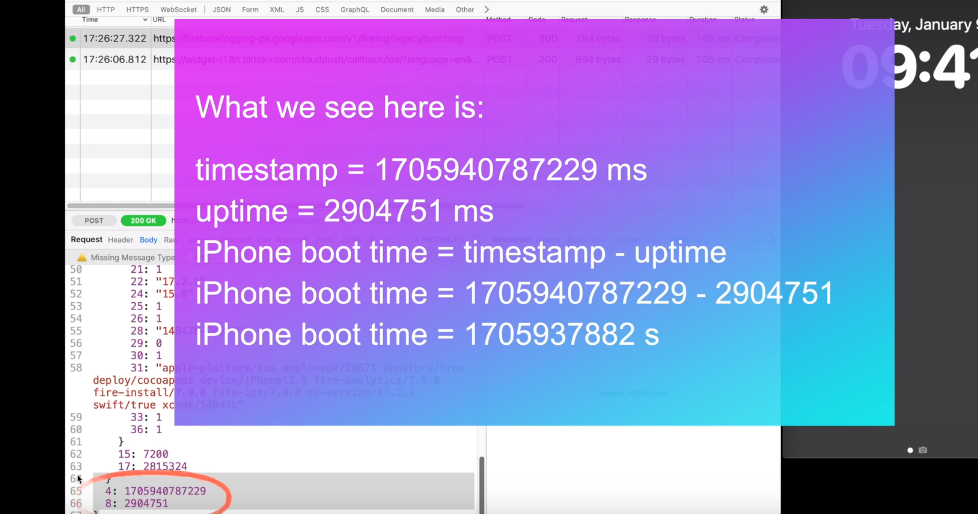
TikTok sends a lot of data to external servers

That means that TikTok knows exactly when the user last restarted their iPhone. If collected over a period of time, the boot time can tell how often the user reboots their iPhone, which can indicate how much they use it or how stable it is. It can be also used to identify the user’s device or track their activity.

When the Facebook app sends a push notification to the same device, Facebook receives the same data about the user’s iPhone last boot time.
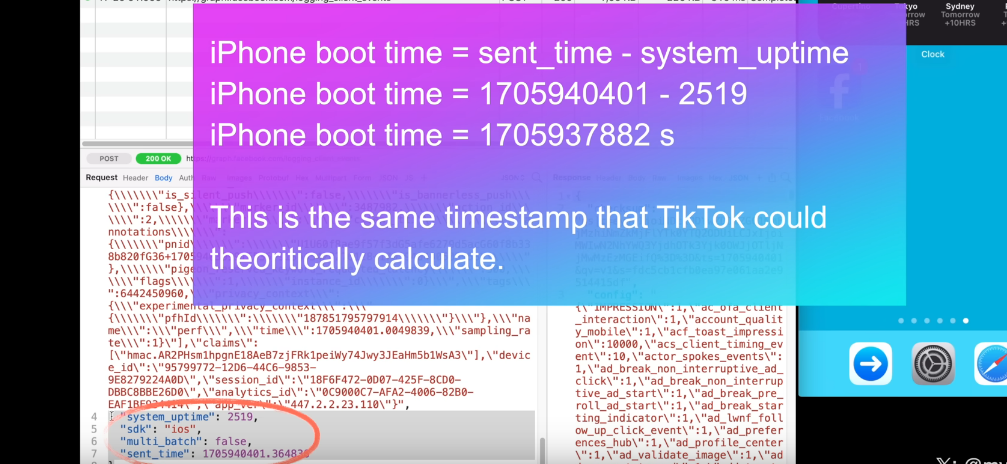
Facebook

As the researcher notes, this may facilitate tracking the user across different apps. That is because the boot time can be used as a unique identifier for the user’s device. If the same device has multiple apps that collect and send the boot time to the same or different servers, these servers can compare the boot time data and link it to the same device. This way, they can track the user’s behavior and preferences across different apps, even if the user does not use the same account or login information for each app. All of this makes the exploitation of the push notification feature by social media companies a legitimate privacy threat.

Moreover, Mysk notes that some apps, for example Facebook and TikTok, also send data when clearing their notifications in Notification Center, which is an iOS feature that provides an overview of alerts from applications.

For example, when a user clears a Facebook notification, the app sends a request with detailed information, including the information about available memory, the last app event, such as liking a post, the time since last app event, the actor ID, that identifies the user’s account on Facebook, the preferred content size, the timestamp (i.e. the exact date and time) when the notification was cleared, the connection type, and so forth.
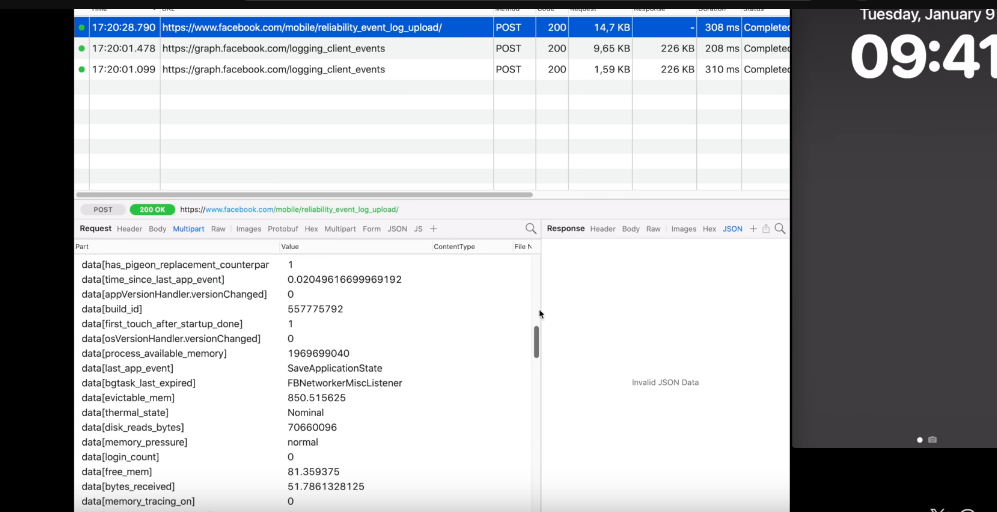
When a user clear a Facebook notification, the app sends detailed information about the user to the external servers

Twitter (X) handles the collection of the user’s information more or less the same way as Facebook and TikTok do.
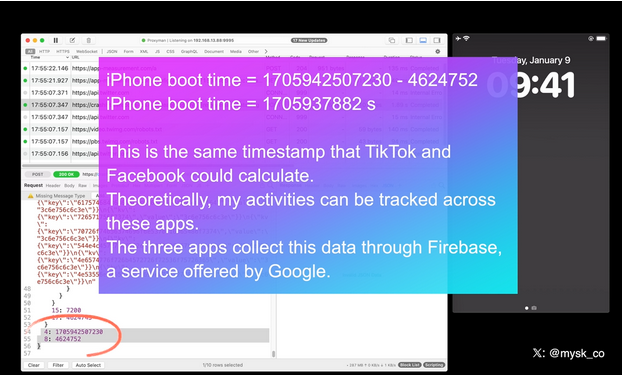
X/Twitter

All three companies are using Firebase, a service offered by Google, Mysk notes, adding that “the frequency at which many apps send device information after being triggered by a notification is mind-blowing.”

New Apple rule for devs: what will they change?

Mysk pins a lot of hopes on the new rules for developers that Apple has put in place and that will come into effect this spring. As it unveiled the rules, Apple announced that developers would need to explain why their apps have to use certain APIs (Application Programming Interfaces), which are methods for different apps to communicate and share data.

The developers will have to explain why they need to access device information not only for their own code, but also for third-party SDKs (software development kits) that they add to their apps. Both apps and third-party SDKs will need to write one or more “approved reasons” for why they need to access device information through specific APIs in separate documents called “privacy manifest files.” These reasons should be “consistent with the app’s functionality.” We wrote a detailed review of Apple’s new requirement for developers in August — check it out here.

But the question is, will it stop companies from harvesting data from apps through the push notification backdoor? In theory, it should, but only if Apple seriously enforces these rules and monitors developers’ compliance. Which is by no means guaranteed.

We believe that the new rules will improve the situation, but by how much? It is a difficult question with many variables. Developers will have to take the new rules into account, so there’s a chance they’ll try to follow them in good faith. However, those who are hell-bent on continuing to collect this data will likely choose to take risks. And then it’ll be up to Apple and its reviewers to catch these apps in the act.

In any case, we hope Apple takes a proactive and transparent approach to privacy enforcement, or users’ data will continue to be at risk.


Vond je dit bericht leuk?
AdGuard VPN AdGuard DNS AdGuard Mail AdGuard Wallet
Het hoofdscherm van AdGuard voor Windows
Het beschermingsscherm van AdGuard voor Windows, met de beschermingsfuncties en -instellingen
Het statistiekenscherm van AdGuard voor Windows, met statistieken over geblokkeerde advertenties en volgers
Het appbeheerscherm van AdGuard voor Windows, met de opties voor beschermingsbeheer van apps die op het apparaat zijn geïnstalleerd
20.557 20557 gebruikersbeoordelingen
Uitstekend!

AdGuard voor Windows: advertentieblokker voor pc

AdGuard voor Windows is meer dan een advertentieblokker. Het is een multifunctioneel hulpmiddel dat advertenties blokkeert, de toegang tot gevaarlijke sites regelt, het laden van pagina's versnelt en kinderen beschermt tegen ongepaste inhoud

Door het programma te downloaden accepteer je de licentievoorwaarden
Microsoft Store
Door het programma te downloaden accepteer je de licentievoorwaarden
AdGuard voor Windows v8.0, 14 dagen proefperiode
Het hoofdscherm van AdGuard voor Mac
Het Incognitomodus-scherm van AdGuard voor Mac
20.557 20557 gebruikersbeoordelingen
Uitstekend!

AdGuard voor Mac: systeembrede advertentieblokker

AdGuard voor Mac is een unieke advertentieblokker die is ontworpen met macOS in gedachten. Het beschermt je niet alleen tegen vervelende advertenties in browsers en apps, maar beschermt je ook tegen volgen, phishing en fraude
Door het programma te downloaden accepteer je de licentievoorwaarden
Meer lezen
AdGuard voor Mac v2.19, 14 dagen proefperiode
Het hoofdscherm van AdGuard voor Android
Het scherm 'Bescherming tegen volgers' van AdGuard voor Android
Het appbeheerscherm van AdGuard voor Android, met de opties voor beschermingsbeheer voor apps die op het apparaat zijn geïnstalleerd
Het statistiekenscherm van AdGuard voor Android, met statistieken over geblokkeerde advertenties en volgers
Het hoofdscherm van de privébrowser van AdGuard voor Android
De QR-code om AdGuard voor Android te downloaden
20.557 20557 gebruikersbeoordelingen
Uitstekend!

AdGuard voor Android: advertentieblokker voor alle apps

Blokkeert advertenties en volgers in alle browsers, spellen en andere apps. Beschermt je privacy en geeft je controle over hoe jouw apps internet gebruiken. Geïnstalleerd via APK
Door het programma te downloaden accepteer je de licentievoorwaarden
Meer lezen
Scannen om te downloaden
Gebruik een QR-codelezer die beschikbaar is op je apparaat
AdGuard voor Android v4.14, 14 dagen proefperiode
Het hoofdscherm van AdGuard voor iOS
Het beschermingsscherm van AdGuard voor iOS, dat de beschermingsfuncties en -instellingen toont.
Het statistiekenscherm van AdGuard voor iOS, met statistieken over geblokkeerde advertenties en volgers
De QR-code om AdGuard voor iOS te downloaden
20.557 20557 gebruikersbeoordelingen
Uitstekend!

AdGuard: advertentieblokker voor iOS

De beste advertentieblokker voor iOS op iPhone en iPad. AdGuard verwijdert alle soorten advertenties en volgers in Safari en beschermt je privacy in alle apps op DNS-niveau
Door het programma te downloaden accepteer je de licentievoorwaarden
Meer lezen
Scannen om te downloaden
Gebruik een QR-codelezer die beschikbaar is op je apparaat
AdGuard voor iOS v4.5
Het hoofdscherm van AdGuard Inhoudsblokker
Het filterscherm van AdGuard Inhoudsblokker
Het instellingenscherm van AdGuard Inhoudsblokker
20.557 20557 gebruikersbeoordelingen
Uitstekend!

AdGuard Content Blocker

AdGuard Content Blocker elimineert allerlei soorten advertenties in mobiele browsers die technologie voor het blokkeren van inhoud ondersteunen, namelijk Samsung Internet en Yandex Browser. De functies zijn beperkt in vergelijking met AdGuard voor Android, maar het is gratis, eenvoudig te installeren en efficiënt
Door het programma te downloaden accepteer je de licentievoorwaarden
Meer lezen
AdGuard Content Blocker v2.8
Het hoofdscherm van de AdGuard-browseruitbreiding
Het scherm 'Bescherming tegen volgers' van AdGuard-browseruitbreiding
20.557 20557 gebruikersbeoordelingen
Uitstekend!

AdGuard Browserextensie

AdGuard is de snelste en lichtste advertentieblokkering uitbreiding die alle soorten advertenties op alle webpagina's effectief blokkeert! Kies AdGuard voor uw browser om advertentievrij, snel en veilig te surfen.
Installeren
Door het programma te downloaden accepteer je de licentievoorwaarden
Installeren
Door het programma te downloaden accepteer je de licentievoorwaarden
Installeren
Door het programma te downloaden accepteer je de licentievoorwaarden
Installeren
Door het programma te downloaden accepteer je de licentievoorwaarden
Installeren
Door het programma te downloaden accepteer je de licentievoorwaarden
Meer lezen
Installeren
Door het programma te downloaden accepteer je de licentievoorwaarden
Meer lezen
AdGuard Browserextensie v5.5
Het hoofdscherm van AdGuard Assistant
20.557 20557 gebruikersbeoordelingen
Uitstekend!

AdGuard Assistant

Een bijbehorende browseruitbreiding voor AdGuard desktop-apps. Het stelt je in staat om aangepaste items op websites te blokkeren, websites toe te voegen aan de toelatingslijst en rapporten rechtstreeks vanuit je browser te versturen
AdGuard Assistant v1.4
20.557 20557 gebruikersbeoordelingen
Uitstekend!

AdGuard Home

AdGuard Home is een netwerkgebaseerde oplossing voor het blokkeren van advertenties en volgers. Installeer het één keer op je router om alle apparaten in je thuisnetwerk te beschermen — geen extra clientsoftware vereist. Dit is vooral belangrijk voor verschillende IoT-apparaten die vaak een bedreiging vormen voor je privacy
AdGuard Home v0.107
Het hoofdscherm van AdGuard Pro voor iOS
Het beschermingsscherm van AdGuard Pro voor iOS, met de beschermingsfuncties en instellingen
Het statistiekenscherm van AdGuard Pro voor iOS, met statistieken over geblokkeerde advertenties en trackers
20.557 20557 gebruikersbeoordelingen
Uitstekend!

AdGuard Pro voor iOS

AdGuard Pro voor iOS wordt geleverd met alle geavanceerde beschermingsfuncties voor het blokkeren van advertenties. Het biedt dezelfde tools als de betaalde versie van AdGuard voor iOS. Het blinkt uit in het blokkeren van advertenties in Safari en laat je DNS-instellingen aanpassen om je bescherming aan te passen. Het blokkeert advertenties in browsers en apps, beschermt je kinderen tegen ongepaste inhoud en houdt je persoonlijke gegevens veilig
Door het programma te downloaden accepteer je de licentievoorwaarden
Meer lezen
AdGuard Pro voor iOS v4.5
Het hoofdscherm van AdGuard Mini voor Mac
Het Safari-beschermingsscherm van AdGuard Mini voor Mac
Het 'Regel aanmaken'-scherm van AdGuard Mini voor Mac
20.557 20557 gebruikersbeoordelingen
Uitstekend!

AdGuard Mini voor Mac — Safari-advertentieblokker

AdGuard Mini voor Mac is een krachtige Safari-advertentieblokker. Deze lichtgewicht app verwijdert advertenties, blokkeert volgers en versnelt het laden van pagina's. Het helpt je om in Safari zonder afleiding op het web te surfen en je gegevens privé te houden
Installeren
Door het programma te downloaden accepteer je de licentievoorwaarden
Meer lezen
AdGuard Mini voor Mac v2.3
Het hoofdscherm van AdGuard voor Android TV met ingeschakelde bescherming
Het advertentieblokkeringsscherm van AdGuard voor Android TV, met zijn functies en instellingen
Het instellingenscherm van AdGuard voor Android TV
Het appbeheer-scherm van AdGuard voor Android TV, waarop de apps worden getoond waar advertenties en volgers worden geblokkeerd
20.557 20557 gebruikersbeoordelingen
Uitstekend!

AdGuard voor Android TV

AdGuard voor Android TV is de enige app die advertenties blokkeert, jouw privacy bewaakt en fungeert als firewall voor je Smart TV. Ontvang waarschuwingen over webbedreigingen, gebruik veilige DNS en profiteer van gecodeerd verkeer. Ontspan en duik in je favoriete programma's met eersteklas beveiliging en zonder advertenties!
AdGuard voor Android TV v4.14, 14 dagen proefperiode
De AdGuard-mascotte, Agnar, houdt de Linux-pinguïn vast
20.557 20557 gebruikersbeoordelingen
Uitstekend!

AdGuard voor Linux

AdGuard voor Linux is 's werelds eerste systeem-brede AdGuard Advertentieblokker. Blokkeer advertenties en volgers op apparaatsniveau, kies uit vooraf geïnstalleerde filters, of voeg je eigen toe - allemaal via de interface
AdGuard voor Linux v1.4
20.557 20557 gebruikersbeoordelingen
Uitstekend!

AdGuard Temp Mail

Een gratis tijdelijke e-mailadresgenerator die je anoniem houdt en jouw privacy beschermt. Geen spam in je hoofdinbox!
20.557 20557 gebruikersbeoordelingen
Uitstekend!

AdGuard VPN

75 locaties wereldwijd

Toegang tot alle inhoud

Sterke versleuteling

Geen logboekregistratie

Snelste verbinding

24/7 ondersteuning

Gratis proberen
Door het programma te downloaden accepteer je de licentievoorwaarden
Meer lezen
20.557 20557 gebruikersbeoordelingen
Uitstekend!

AdGuard DNS

AdGuard DNS is een alternatieve oplossing voor advertentieblokkering, privacybescherming en ouderlijk toezicht. Het is eenvoudig in te stellen en gratis te gebruiken, biedt een minimum aan optimale bescherming tegen online advertenties, volgers en phishing, ongeacht welk platform en welk apparaat je gebruikt.
20.557 20557 gebruikersbeoordelingen
Uitstekend!

AdGuard Mail

Bescherm je identiteit, vermijd spam en houd je Postvak IN veilig met onze aliassen en tijdelijke e-mailadressen. Geniet van onze gratis service voor het doorsturen van e-mail en apps voor alle besturingssystemen
20.557 20557 gebruikersbeoordelingen
Uitstekend!

AdGuard Wallet

Een veilige en privé crypto-wallet die je volledige controle geeft over jouw activa. Beheer meerdere wallets en ontdek duizenden cryptocurrencies om op te slaan, te verzenden en te ruilen
Downloaden AdGuard Klik op het door de pijl aangegeven bestand om AdGuard te installeren. Selecteer "Open" en klik op "OK" - wacht even tot het bestand gedownload is. Sleep dan in het geopende venster het AdGuard icoontje naar de "Applications" map. Dank u dat u voor AdGuard gekozen heeft. Selecteer "Open" en klik op "OK" - wacht even tot het bestand gedownload is. Klik dan in het geopende venster op "Installeren". Dank u dat u voor AdGuard gekozen heeft.
AdGuard op je mobiele apparaat installeren

















































