Dazed, tracked & confused: How unaware and helpless is public about data privacy?

As we spend an increasing chunk of our lives online — more than 6 hours a day on average — we face a growing challenge: how to protect ourselves and, specifically, our personal data in the digital world. Many private firms, such as social media giants, advertisers and data brokers, are hungry for this data. They harvest it and milk it for profit, sometimes without our knowledge or expressed consent. The government also taps into the online data pot, often through intermediaries to bypass legal safeguards.

For the longest time, this covert and shady operation has taken place out of the public eye. But now, more and more people smell something fishy. A recent Pew online privacy survey found that 8 in 10 Americans are concerned about how companies use the data they collect about them, and 7 in 10 harbor the same apprehensions about the government. But while these numbers clearly show that Americans care about privacy, the most interesting finding is that the lion’s share have no idea what is really going on behind the scenes and how they can regain long-lost control of their data.

Americans concerned but in the dark about how their data is used

According to the survey, 73% of Americans believe that they have “little to no control” over the data that the companies collect about them, while 79% believe the same about the government. Even more worrying, 2 out of 3 have “little to no understanding” what it is exactly that companies do with their data, and even more are in the dark about what happens with their data once it falls into the government’s hands.
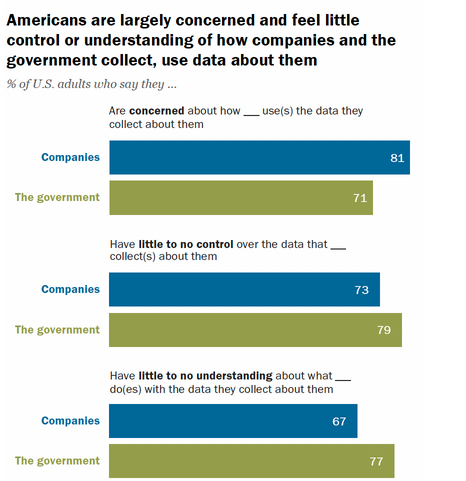
Pew Research poll

It can be indeed challenging to understand what companies do with the information they collect from you, as they apply it for various purposes depending on their goals. Some companies (many, in fact) utilize this data for advertising — they learn about your preferences and online behavior to target you with highly specific ads. This is done by almost every manufacturer, from a smart TV maker to a car company. Companies may also employ the collected data to personalize products, measure the effectiveness of their marketing campaigns, and conduct research. Most consumers probably don’t mind these applications, except for advertising. However, there are also other uses of the data that are more concerning, such as government surveillance or selling it to third parties who can exploit it for any purpose they want. As for Americans, they seem to be more worried about their data being sold without their consent than about the government keeping tabs on their online activity.

About 4 in 10 (42%) say that they are “very worried” about companies selling their information to others without them knowing, while every 7th American (15%) say they are “very worried” about law enforcement monitoring what they do online. 15% may not sound like a lot, but we mustn’t forget that companies are not only selling the data, such as location, to other companies, but also to the government.
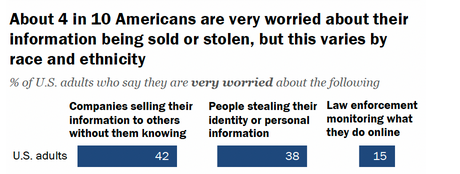
Americans are worried about the selling of their data

Among the companies up to their necks in the business of selling, or as they like to call it, sharing data, the social media giants are at the forefront. They have millions of users and make billions of dollars by selling their data to advertisers. For example, last year, Meta made a whopping $112 billion from this trade, while TikTok's parent company, ByteDance, reported $29 billion in ad revenue. While about 82% Americans now use social media, and juggle an average of 7 accounts, the vast majority of them (76%) say they have “very little or no trust” that social media executives will not sell their personal data without their consent.

And they are right to be distrustful, because this has already happened, and more than once. For instance, in 2022 Twitter (before it became “formerly Twitter”) was fined for selling users’ data for targeted ads illegally, while claiming that it would be used only for security purposes. In 2018, it was exposed that Facebook gave its partners, including Amazon and Microsoft, almost unlimited access to its users’ data, without asking users’ permission first.

Learned hopelessness: concern does not necesarily mean action

One would think that increasing concerns about online privacy would translate into concrete steps to remedy the situation. And to some extent, it’s true. Most Americans believe they are doing everything in their power to safeguard their privacy online — 78% say they trust themselves to make the right decisions about their personal information.

But does that mean they are confident that their privacy is actually protected? Hell, no. About 3 in 5 Americans say they are “skeptical that anything they do will make much difference.” In short, many people feel like they have to take it or leave it, and that the options presented to them are just for show. One of the things that most Americans apparently believe is futile is reading privacy policies. More than half say they “always, almost always or often” skip them. The most glaring example of “not walking the talk” is the 45% of US adults, who say they are “very or somewhat concerned” about how companies handle their data and at the same time admit to not reading privacy policies.
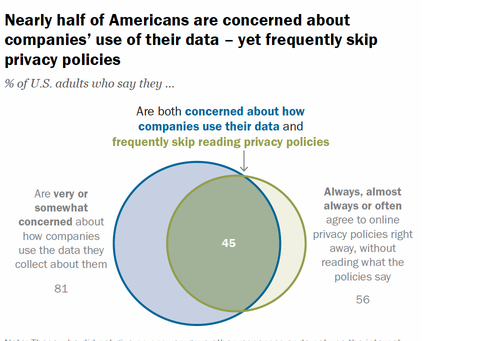
Diagram shows that Americans are worried about privacy, but won't read privacy policies

While reading privacy policies is a basic rule of digital hygiene that we urge you to follow, we would be the last to throw a stone at those who avoid lengthy and confusing texts that companies often use as their privacy policies. Sometimes a privacy policy is not even at one place, and you have to read addenda and other supplements to get a full understanding about what the company will do with your data.

With so many privacy choices to make every day, most of which are meaningless, it’s easy to get discouraged. And when people see how big and hopeless the challenge is, many quit — 37% of Americans say that they are “overwhelmed” by figuring out what they need to do.

Awareness: the key to privacy protection

It's easy to get lost in the sea of privacy choices, and even harder to tell which are real and which seem designed to confuse you (like the infamous “incognito mode”). The key to navigating these stormy waters is to learn more about privacy and cybersecurity — and perhaps you don't need a Pew Research survey to tell you that. According to the survey, those who are the most knowledgeable about privacy and cybersecurity are more likely to be taking more concrete steps to protect their personal information. These include adjusting social media settings, turning off cookies or website tracking, using a privacy-focused browser and search engine, and delegating the task of remembering all your passwords to a password manager.
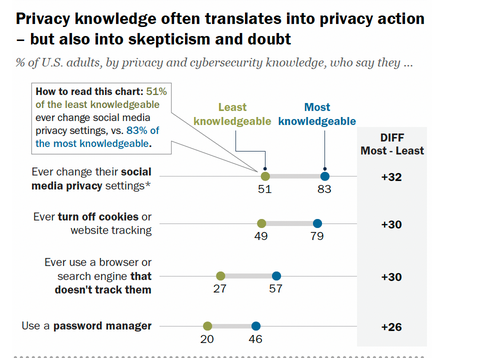
People who know more about privacy make better privacy choices

While only 68% of Americans say that they have changed their social media privacy settings to manage their online privacy, 83% of the most privacy-savvy Americans have done it.

To see that people are taking their privacy in their own hands is encouraging, but the privacy protection methods singled out in the survey are far from being enough. For one thing, changing your social media privacy settings may not do much.

As for the other privacy protection methods listed by Pew, they are all valid, but there are many other ways to boost your privacy even further. You can use a VPN, which will encrypt your data and route it through a server, so that your ISPs or public Wi-Fi provider could not see what you’re doing online. You can also use an ad blocker: it will block tracking requests, and make it more difficult for third parties to track you around the Web. Changing your default DNS resolver, the one provided by your ISP, to the one that blocks ads and trackers, may be another step. For more advanced users, a private DNS may come in handy. A private DNS is a DNS server that, in addition to the benefits of a public DNS server (such as traffic encryption and ad blocking), provides features such as flexible customization, DNS statistics, and parental control.

However, knowing which tools may help you to improve your privacy is not enough either. You should also research services you’re about to use, and make sure they are not wolves in sheep’s clothing, or, in other words, imposters, who pretend to protect your privacy but actually compromise it — just like this free VPN service, which claimed to keep no logs, but exposed over 360 million user records in a breach.

AdGuard stats: only about 36% use tracking protection

Our own data also suggests that awareness is the key when it comes to protecting your privacy. The most comprehensive anti-tracking filter in the AdGuard Ad Blocker extensions and app — the AdGuard Tracking Protection filter — is only enabled by about 36% of our global app and extension user base. This means that the majority of our users are still exposed to some of the unwanted tracking and data collection.
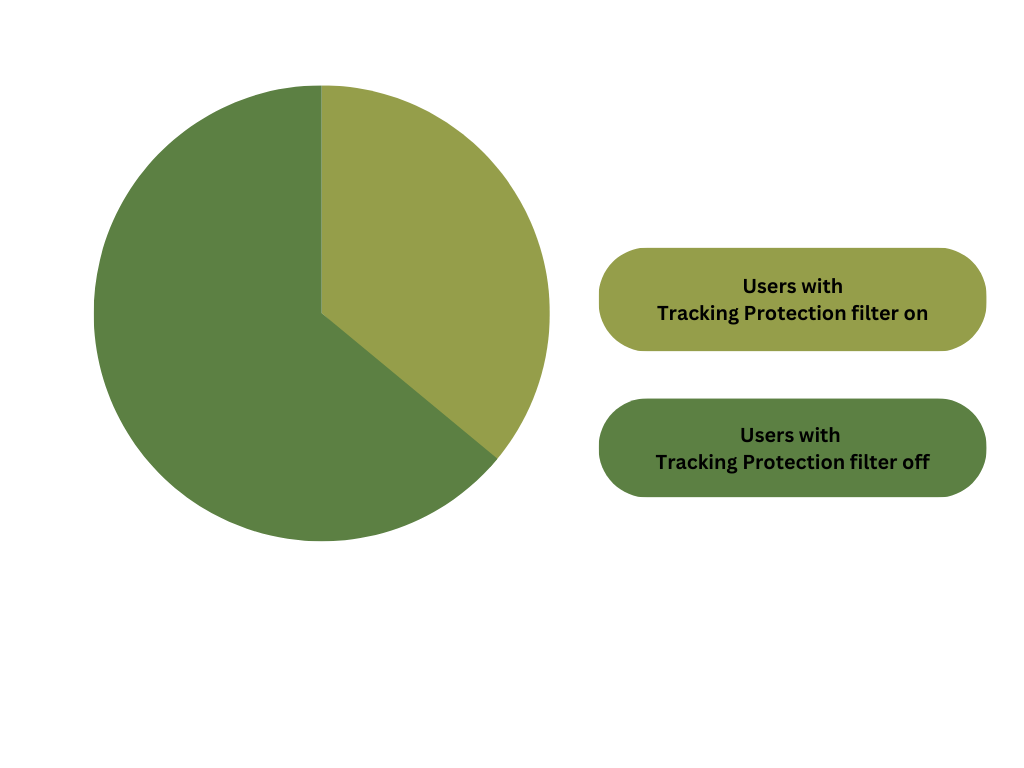
About 36% of AdGuard ad blocking app and extension users have Tracking Protection filter on

In the AdGuard ad blocking extensions, where this filter is available for free, but is off by default, only 27% users have toggled it on. It’s our guess that most who have not done so yet are just unaware of its existence.
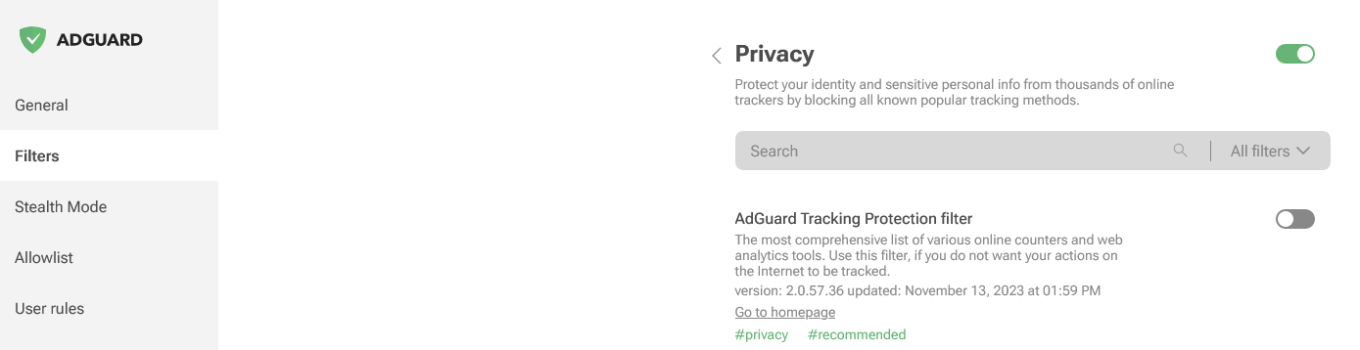
AdGuard extension for Firefox

Screenshot: AdGuard ad blocking extension for Firefox. Go to Filters → Privacy to find and enable AdGuard Tracking Protection filter

We also noticed some regional differences in the usage of this filter among our extension users. The filter is most popular in Japan, the EU comes a close second, while the US lags behind, well below the global average of 27%.
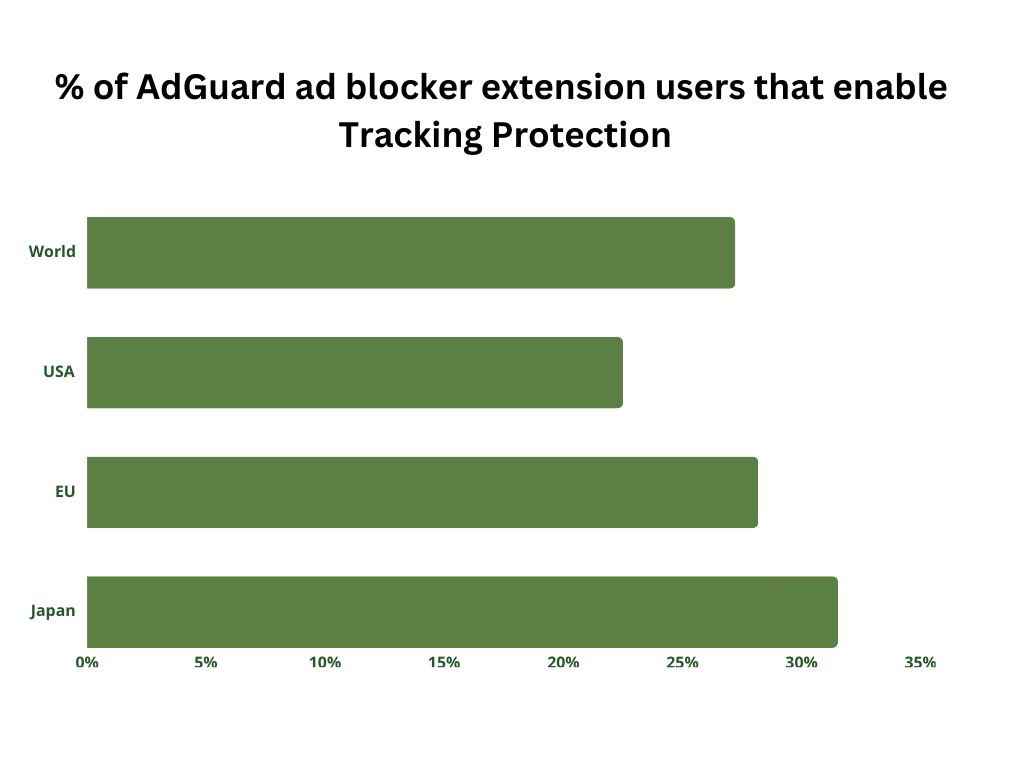
A small percentage of AdGuard ad blocking extension users enable Tracking Protection filter


Studies, including the latest one by the Pew Research center, consistently show that people are getting more concerned about their online privacy. But they often don’t know how to act on their concerns. That’s why raising awareness about privacy protection tools, such as privacy-first search engines, privacy-focused browsers, ad blockers, VPNs, and such is important.

However, knowledge is not infallible. As people learn more about privacy tools and start to use them, they may encounter impostors, such as fake ad blockers or VPNs. They may also come across dark patterns that companies use to trick or even scare users into giving up their information. The bottom line is, however, the more you know, including about potential traps you may fall into, the worse you sleep, the better you are protected.


Vond je dit bericht leuk?
AdGuard VPN AdGuard DNS AdGuard Mail AdGuard Wallet
Het hoofdscherm van AdGuard voor Windows
Het beschermingsscherm van AdGuard voor Windows, met de beschermingsfuncties en -instellingen
Het statistiekenscherm van AdGuard voor Windows, met statistieken over geblokkeerde advertenties en volgers
Het appbeheerscherm van AdGuard voor Windows, met de opties voor beschermingsbeheer van apps die op het apparaat zijn geïnstalleerd
20.557 20557 gebruikersbeoordelingen
Uitstekend!

AdGuard voor Windows: advertentieblokker voor pc

AdGuard voor Windows is meer dan een advertentieblokker. Het is een multifunctioneel hulpmiddel dat advertenties blokkeert, de toegang tot gevaarlijke sites regelt, het laden van pagina's versnelt en kinderen beschermt tegen ongepaste inhoud
Door het programma te downloaden accepteer je de licentievoorwaarden
Microsoft Store
Door het programma te downloaden accepteer je de licentievoorwaarden
AdGuard voor Windows v8.0, 14 dagen proefperiode
Het hoofdscherm van AdGuard voor Mac
Het Incognitomodus-scherm van AdGuard voor Mac
20.557 20557 gebruikersbeoordelingen
Uitstekend!

AdGuard voor Mac: systeembrede advertentieblokker

AdGuard voor Mac is een unieke advertentieblokker die is ontworpen met macOS in gedachten. Het beschermt je niet alleen tegen vervelende advertenties in browsers en apps, maar beschermt je ook tegen volgen, phishing en fraude
Door het programma te downloaden accepteer je de licentievoorwaarden
Meer lezen
AdGuard voor Mac v2.19, 14 dagen proefperiode
Het hoofdscherm van AdGuard voor Android
Het scherm 'Bescherming tegen volgers' van AdGuard voor Android
Het appbeheerscherm van AdGuard voor Android, met de opties voor beschermingsbeheer voor apps die op het apparaat zijn geïnstalleerd
Het statistiekenscherm van AdGuard voor Android, met statistieken over geblokkeerde advertenties en volgers
Het hoofdscherm van de privébrowser van AdGuard voor Android
De QR-code om AdGuard voor Android te downloaden
20.557 20557 gebruikersbeoordelingen
Uitstekend!

AdGuard voor Android: advertentieblokker voor alle apps

Blokkeert advertenties en volgers in alle browsers, spellen en andere apps. Beschermt je privacy en geeft je controle over hoe jouw apps internet gebruiken. Geïnstalleerd via APK
Door het programma te downloaden accepteer je de licentievoorwaarden
Meer lezen
Scannen om te downloaden
Gebruik een QR-codelezer die beschikbaar is op je apparaat
AdGuard voor Android v4.14, 14 dagen proefperiode
Het hoofdscherm van AdGuard voor iOS
Het beschermingsscherm van AdGuard voor iOS, dat de beschermingsfuncties en -instellingen toont.
Het statistiekenscherm van AdGuard voor iOS, met statistieken over geblokkeerde advertenties en volgers
De QR-code om AdGuard voor iOS te downloaden
20.557 20557 gebruikersbeoordelingen
Uitstekend!

AdGuard: advertentieblokker voor iOS

De beste advertentieblokker voor iOS op iPhone en iPad. AdGuard verwijdert alle soorten advertenties en volgers in Safari en beschermt je privacy in alle apps op DNS-niveau

Door het programma te downloaden accepteer je de licentievoorwaarden
Meer lezen
Scannen om te downloaden
Gebruik een QR-codelezer die beschikbaar is op je apparaat
AdGuard voor iOS v4.5
Het hoofdscherm van AdGuard Inhoudsblokker
Het filterscherm van AdGuard Inhoudsblokker
Het instellingenscherm van AdGuard Inhoudsblokker
20.557 20557 gebruikersbeoordelingen
Uitstekend!

AdGuard Content Blocker

AdGuard Content Blocker elimineert allerlei soorten advertenties in mobiele browsers die technologie voor het blokkeren van inhoud ondersteunen, namelijk Samsung Internet en Yandex Browser. De functies zijn beperkt in vergelijking met AdGuard voor Android, maar het is gratis, eenvoudig te installeren en efficiënt

Door het programma te downloaden accepteer je de licentievoorwaarden
Meer lezen
AdGuard Content Blocker v2.8
Het hoofdscherm van de AdGuard-browseruitbreiding
Het scherm 'Bescherming tegen volgers' van AdGuard-browseruitbreiding
20.557 20557 gebruikersbeoordelingen
Uitstekend!

AdGuard Browserextensie

AdGuard is de snelste en lichtste advertentieblokkering uitbreiding die alle soorten advertenties op alle webpagina's effectief blokkeert! Kies AdGuard voor uw browser om advertentievrij, snel en veilig te surfen.
Installeren
Door het programma te downloaden accepteer je de licentievoorwaarden
Installeren
Door het programma te downloaden accepteer je de licentievoorwaarden
Installeren
Door het programma te downloaden accepteer je de licentievoorwaarden
Installeren
Door het programma te downloaden accepteer je de licentievoorwaarden
Installeren
Door het programma te downloaden accepteer je de licentievoorwaarden
Meer lezen
Installeren
Door het programma te downloaden accepteer je de licentievoorwaarden
Meer lezen
AdGuard Browserextensie v5.5
Het hoofdscherm van AdGuard Assistant
20.557 20557 gebruikersbeoordelingen
Uitstekend!

AdGuard Assistant

Een bijbehorende browseruitbreiding voor AdGuard desktop-apps. Het stelt je in staat om aangepaste items op websites te blokkeren, websites toe te voegen aan de toelatingslijst en rapporten rechtstreeks vanuit je browser te versturen
AdGuard Assistant v1.4
20.557 20557 gebruikersbeoordelingen
Uitstekend!

AdGuard Home

AdGuard Home is een netwerkgebaseerde oplossing voor het blokkeren van advertenties en volgers. Installeer het één keer op je router om alle apparaten in je thuisnetwerk te beschermen — geen extra clientsoftware vereist. Dit is vooral belangrijk voor verschillende IoT-apparaten die vaak een bedreiging vormen voor je privacy
AdGuard Home v0.107
Het hoofdscherm van AdGuard Pro voor iOS
Het beschermingsscherm van AdGuard Pro voor iOS, met de beschermingsfuncties en instellingen
Het statistiekenscherm van AdGuard Pro voor iOS, met statistieken over geblokkeerde advertenties en trackers
20.557 20557 gebruikersbeoordelingen
Uitstekend!

AdGuard Pro voor iOS

AdGuard Pro voor iOS wordt geleverd met alle geavanceerde beschermingsfuncties voor het blokkeren van advertenties. Het biedt dezelfde tools als de betaalde versie van AdGuard voor iOS. Het blinkt uit in het blokkeren van advertenties in Safari en laat je DNS-instellingen aanpassen om je bescherming aan te passen. Het blokkeert advertenties in browsers en apps, beschermt je kinderen tegen ongepaste inhoud en houdt je persoonlijke gegevens veilig
Door het programma te downloaden accepteer je de licentievoorwaarden
Meer lezen
AdGuard Pro voor iOS v4.5
Het hoofdscherm van AdGuard Mini voor Mac
Het Safari-beschermingsscherm van AdGuard Mini voor Mac
Het 'Regel aanmaken'-scherm van AdGuard Mini voor Mac
20.557 20557 gebruikersbeoordelingen
Uitstekend!

AdGuard Mini voor Mac — Safari-advertentieblokker

AdGuard Mini voor Mac is een krachtige Safari-advertentieblokker. Deze lichtgewicht app verwijdert advertenties, blokkeert volgers en versnelt het laden van pagina's. Het helpt je om in Safari zonder afleiding op het web te surfen en je gegevens privé te houden
Installeren
Door het programma te downloaden accepteer je de licentievoorwaarden
Meer lezen
AdGuard Mini voor Mac v2.3
Het hoofdscherm van AdGuard voor Android TV met ingeschakelde bescherming
Het advertentieblokkeringsscherm van AdGuard voor Android TV, met zijn functies en instellingen
Het instellingenscherm van AdGuard voor Android TV
Het appbeheer-scherm van AdGuard voor Android TV, waarop de apps worden getoond waar advertenties en volgers worden geblokkeerd
20.557 20557 gebruikersbeoordelingen
Uitstekend!

AdGuard voor Android TV

AdGuard voor Android TV is de enige app die advertenties blokkeert, jouw privacy bewaakt en fungeert als firewall voor je Smart TV. Ontvang waarschuwingen over webbedreigingen, gebruik veilige DNS en profiteer van gecodeerd verkeer. Ontspan en duik in je favoriete programma's met eersteklas beveiliging en zonder advertenties!
AdGuard voor Android TV v4.14, 14 dagen proefperiode
De AdGuard-mascotte, Agnar, houdt de Linux-pinguïn vast
20.557 20557 gebruikersbeoordelingen
Uitstekend!

AdGuard voor Linux

AdGuard voor Linux is 's werelds eerste systeem-brede AdGuard Advertentieblokker. Blokkeer advertenties en volgers op apparaatsniveau, kies uit vooraf geïnstalleerde filters, of voeg je eigen toe - allemaal via de interface
AdGuard voor Linux v1.4
20.557 20557 gebruikersbeoordelingen
Uitstekend!

AdGuard Temp Mail

Een gratis tijdelijke e-mailadresgenerator die je anoniem houdt en jouw privacy beschermt. Geen spam in je hoofdinbox!
20.557 20557 gebruikersbeoordelingen
Uitstekend!

AdGuard VPN

75 locaties wereldwijd

Toegang tot alle inhoud

Sterke versleuteling

Geen logboekregistratie

Snelste verbinding

24/7 ondersteuning

Gratis proberen
Door het programma te downloaden accepteer je de licentievoorwaarden
Meer lezen
20.557 20557 gebruikersbeoordelingen
Uitstekend!

AdGuard DNS

AdGuard DNS is een alternatieve oplossing voor advertentieblokkering, privacybescherming en ouderlijk toezicht. Het is eenvoudig in te stellen en gratis te gebruiken, biedt een minimum aan optimale bescherming tegen online advertenties, volgers en phishing, ongeacht welk platform en welk apparaat je gebruikt.
20.557 20557 gebruikersbeoordelingen
Uitstekend!

AdGuard Mail

Bescherm je identiteit, vermijd spam en houd je Postvak IN veilig met onze aliassen en tijdelijke e-mailadressen. Geniet van onze gratis service voor het doorsturen van e-mail en apps voor alle besturingssystemen
20.557 20557 gebruikersbeoordelingen
Uitstekend!

AdGuard Wallet

Een veilige en privé crypto-wallet die je volledige controle geeft over jouw activa. Beheer meerdere wallets en ontdek duizenden cryptocurrencies om op te slaan, te verzenden en te ruilen
Downloaden AdGuard Klik op het door de pijl aangegeven bestand om AdGuard te installeren. Selecteer "Open" en klik op "OK" - wacht even tot het bestand gedownload is. Sleep dan in het geopende venster het AdGuard icoontje naar de "Applications" map. Dank u dat u voor AdGuard gekozen heeft. Selecteer "Open" en klik op "OK" - wacht even tot het bestand gedownload is. Klik dan in het geopende venster op "Installeren". Dank u dat u voor AdGuard gekozen heeft.
AdGuard op je mobiele apparaat installeren
















































