Privacy Sandbox on Android and how it will affect you

AdGuard always keeps a close eye on industry news that affects privacy issues. Google recently introduced the Privacy Sandbox which will largely determine the future of privacy of Android users. And we certainly need to comment on it. This article is a brief overview of the situation made by Andrey Meshkov, CTO and co-founder of AdGuard. Now we are continuing to explore the topic, and a large research article will be published soon. Follow our blog and social media so you don't miss its release.

Google has announced a new suite of technologies called Privacy Sandbox that should (at least theoretically) make Android devices better in terms of privacy. But at the same time, Google is making it clear that they'd like advertisers to keep as many options as possible — and this is a tough balance to strike. Have they managed to do it?

Privacy Sandbox includes several separate technologies. You can dive deep into the matter yourself, but I'll try to describe the key points about each of the new initiatives here.

SDK Runtime

This is an extremely useful technology that will definitely have a positive effect. This SDK — which stands for Software Development Kit — creates a dedicated environment for third-party SDKs to run in.

How it was before

It used to be kind of a lawless land. Developers would insert third-party libraries in their apps (think Facebook, Google), and those libraries would inherit all the permissions that the app itself was granted. For example, let's say that the app has access to the device's location — the library has it too now. Needless to say, libraries' vendors were abusing this scheme left and right, collecting all sorts of data. And this wasn't the only trouble — should some kind of a problem occur with the library, the app was at risk of suffering the consequences too ([1], [2]).
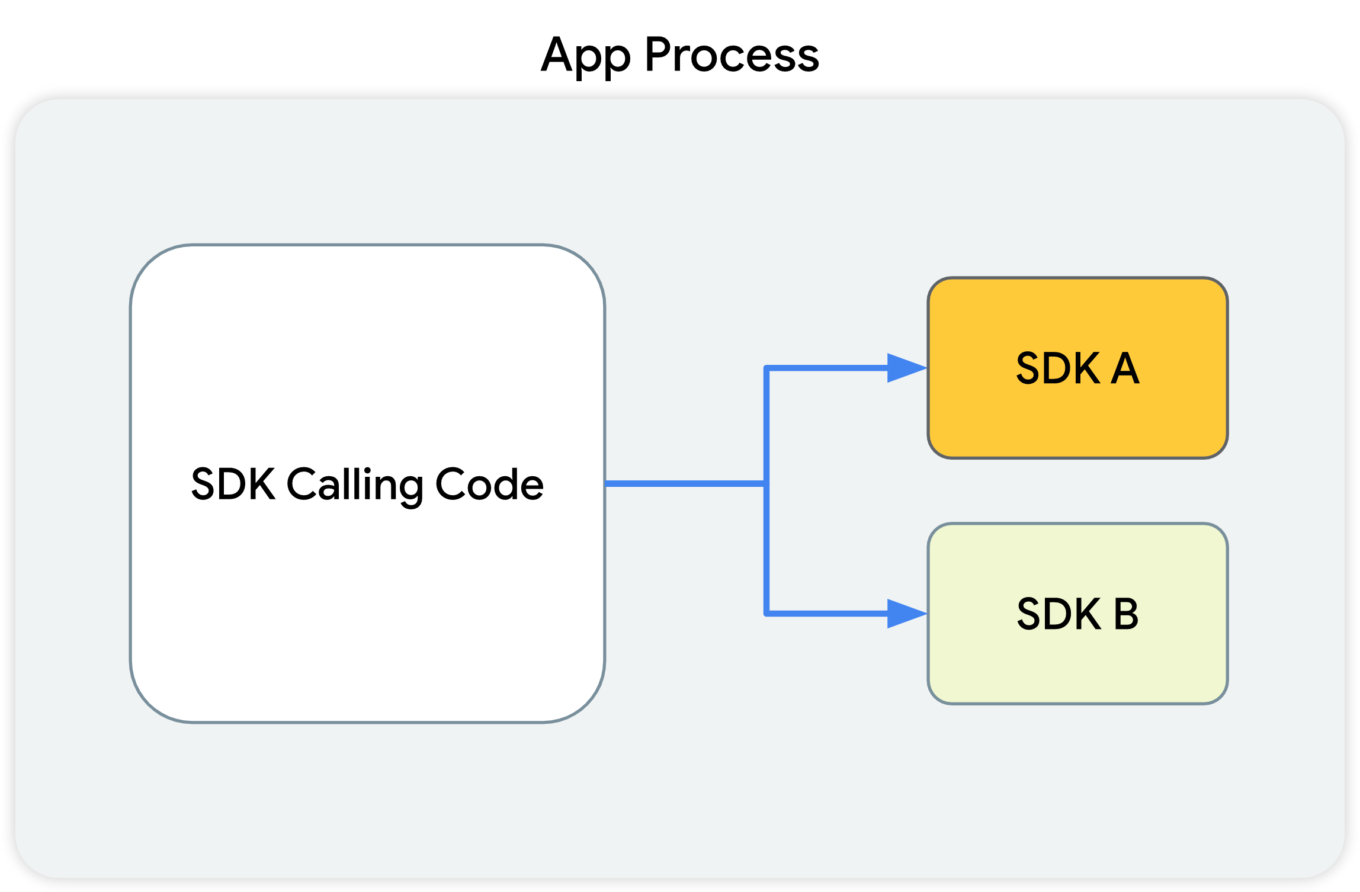
This diagram shows that the SDK-calling code, along with the SDKs that receive the calls from this code, all reside in the app's process.

What Google suggests

With the introduction of SDK Runtime, third-party libraries will operate in a separate, thoroughly monitored and regulated virtual "sandbox", hence the name. The developer will be able to manage the access rights for each of such libraries, including restricting them.
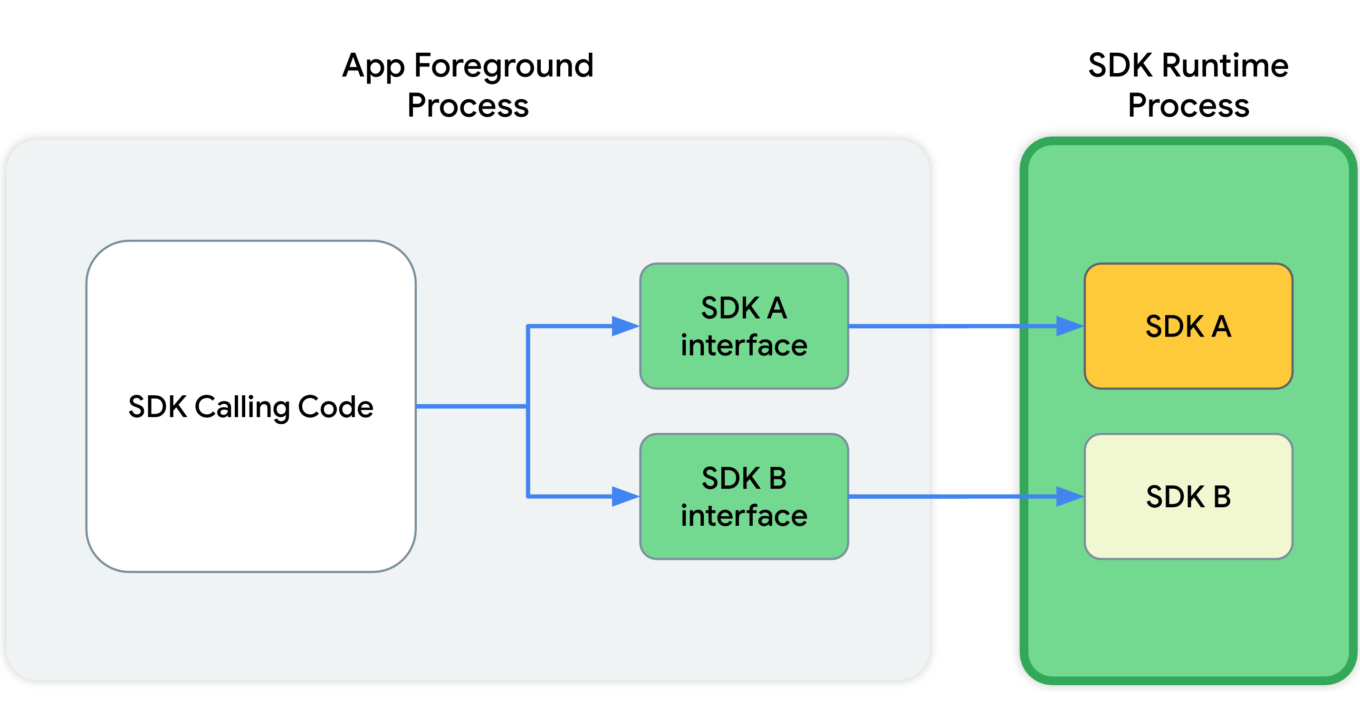
This diagram shows that, in the app's foreground process, the SDK calling code communicates with SDK interfaces. These interfaces then cross a process boundary into the SDK Runtime process to call into the SDKs themselves.

Since all those libraries will be running in a "sandbox" that's detached from the rest of the app's processes, the app won't crash in cases when something goes wrong with one of them.

And last but not least, these libraries will be distributed via a special store that (presumably) will have its own review guidelines.

Read more about SDK Runtime:
https://developer.android.com/design-for-safety/ads/sdk-runtime

Topics

This is the same technology that Google is going to introduce in Chrome. The main idea behind Topics is that the device itself will monitor which apps its owner is using. Based on this data, every week the device will calculate five topics that will have interested the user the most that week.

Apps will be able to get access to some of this data, and different apps will receive different data. This, according to Google, will minimize the risk of using Topics to fingerprint users.

But let's illustrate it with an example:

  1. You have several apps installed on your phone that you use regularly: Facebook, WhatsApp, Instagram, etc.
  2. Each of them receives some part of your topics for the week.
  3. The apps collect this information and use it to supplement your online profile.
  4. Week after week, your profile grows and accretes data.

It's not clear to me why Google has decided that it's OK to share my interests without my consent. Make no mistake, large publishers like Facebook/Meta will not just use this information once and then forget it. They will aggregate it, combine it with other data, and so on.

And that's not the end of it. Lots of apps use SDKs developed by a small pool of companies (you guessed it, Meta is one of them). These companies will receive information streams about you coming from dozens of different apps. From that point, it doesn't take much to construct an excruciatingly detailed profile that has all imaginable data about you.

Read more about Topics for Android:
https://developer.android.com/design-for-safety/ads/topics

FLEDGE on Android

FLEDGE is a mechanism that is meant to be used locally on your device. You will soon see that from a data safety standpoint it compares favorably to the existing alternatives.

How it was before

Currently, ad retargeting is mostly based on the lists of "audiences" that publishers upload. They are often made up of user IDs, or sometimes even straight up emails. This allows publishers to reach these users with ads that they consider relevant to the people from that list.

What Google suggests

When FLEDGE comes into full effect, apps will create such lists themselves with the help of a special API (Application Programming Interface). The key difference is that these lists will be stored locally on the device. The advertising networks will know the names of these lists, and they will upload ads that target specific lists. The process of selecting the ad to display to the user will happen entirely within the device, based on the lists (stored on the same device) and the advertisments uploaded by the ad networks.

Read more about FLEDGE:
https://developer.android.com/design-for-safety/ads/fledge

Attribution Reporting

This is a technology for counting clicks and measuring conversions. Advertisers want to know how their ads perform, and Google suggests doing all the measurements right on the device. Ad networks' SDKs will be able to request an aggregated report, which will, however, be presented with a certain delay. The delay is very important as it greatly complicates potential attempts to identify the user. And the entire mechanism is generously sprinkled with encryption and additional verifications.
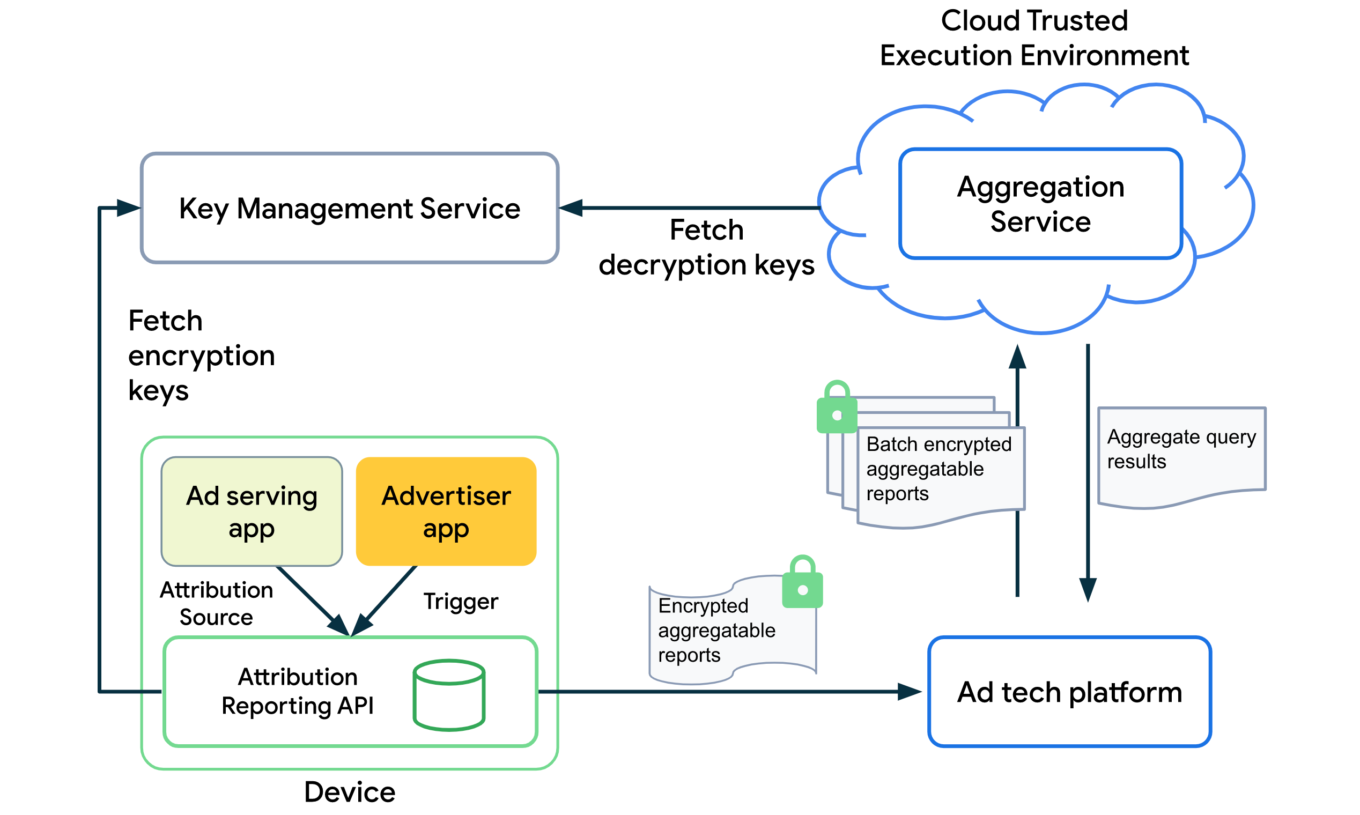
The overall design of how the Attribution Reporting API works looks quite complicated. To better understand the topic, open the link we've posted below.

Read more about Attribution Reporting:
https://developer.android.com/design-for-safety/ads/attribution

Conclusions

In general, all these initiatives (excluding Topics) can be described as improving users' privacy in the context of the ad market. But with one very important condition — ONLY those mechanisms should be used.

As for Topics, it reflects the (completely understandable) desire to keep the ability to utilize information about users' interests for targeting purposes. But this technology further expands the scope of that information instead of reducing it.

But even the good ones still leave a bitter aftertaste: de facto Google will become the single entity to control which ads users see on their Android devices. It was partially true before, but only within Google's own advertising network. Now they are looking to directly influence all other ad networks too, and we know that monopolies rarely end up being good for the consumer. We kind of know what is going to be happening on our smartphones now, and there's no guarantee it will stay that way.

This is the trend that we've been seeing for a while now — advertising networks slowly but steadily moving into our devices. Thinking about buying a new phone? Be ready to get your hands on a highly specialized tool for showing ads instead.


Vond je dit bericht leuk?
AdGuard VPN AdGuard DNS AdGuard Mail AdGuard Wallet
Het hoofdscherm van AdGuard voor Windows
Het beschermingsscherm van AdGuard voor Windows, met de beschermingsfuncties en -instellingen
Het statistiekenscherm van AdGuard voor Windows, met statistieken over geblokkeerde advertenties en volgers
Het appbeheerscherm van AdGuard voor Windows, met de opties voor beschermingsbeheer van apps die op het apparaat zijn geïnstalleerd
20.558 20558 gebruikersbeoordelingen
Uitstekend!

AdGuard voor Windows: advertentieblokker voor pc

AdGuard voor Windows is meer dan een advertentieblokker. Het is een multifunctioneel hulpmiddel dat advertenties blokkeert, de toegang tot gevaarlijke sites regelt, het laden van pagina's versnelt en kinderen beschermt tegen ongepaste inhoud
Door het programma te downloaden accepteer je de licentievoorwaarden
Microsoft Store
Door het programma te downloaden accepteer je de licentievoorwaarden
AdGuard voor Windows v8.0, 14 dagen proefperiode
Het hoofdscherm van AdGuard voor Mac
Het Incognitomodus-scherm van AdGuard voor Mac
20.558 20558 gebruikersbeoordelingen
Uitstekend!

AdGuard voor Mac: systeembrede advertentieblokker

AdGuard voor Mac is een unieke advertentieblokker die is ontworpen met macOS in gedachten. Het beschermt je niet alleen tegen vervelende advertenties in browsers en apps, maar beschermt je ook tegen volgen, phishing en fraude
Door het programma te downloaden accepteer je de licentievoorwaarden
Meer lezen
AdGuard voor Mac v2.19, 14 dagen proefperiode
Het hoofdscherm van AdGuard voor Android
Het scherm 'Bescherming tegen volgers' van AdGuard voor Android
Het appbeheerscherm van AdGuard voor Android, met de opties voor beschermingsbeheer voor apps die op het apparaat zijn geïnstalleerd
Het statistiekenscherm van AdGuard voor Android, met statistieken over geblokkeerde advertenties en volgers
Het hoofdscherm van de privébrowser van AdGuard voor Android
De QR-code om AdGuard voor Android te downloaden
20.558 20558 gebruikersbeoordelingen
Uitstekend!

AdGuard voor Android: advertentieblokker voor alle apps

Blokkeert advertenties en volgers in alle browsers, spellen en andere apps. Beschermt je privacy en geeft je controle over hoe jouw apps internet gebruiken. Geïnstalleerd via APK
Door het programma te downloaden accepteer je de licentievoorwaarden
Meer lezen
Scannen om te downloaden
Gebruik een QR-codelezer die beschikbaar is op je apparaat
AdGuard voor Android v4.14, 14 dagen proefperiode
Het hoofdscherm van AdGuard voor iOS
Het beschermingsscherm van AdGuard voor iOS, dat de beschermingsfuncties en -instellingen toont.
Het statistiekenscherm van AdGuard voor iOS, met statistieken over geblokkeerde advertenties en volgers
De QR-code om AdGuard voor iOS te downloaden
20.558 20558 gebruikersbeoordelingen
Uitstekend!

AdGuard: advertentieblokker voor iOS

De beste advertentieblokker voor iOS op iPhone en iPad. AdGuard verwijdert alle soorten advertenties en volgers in Safari en beschermt je privacy in alle apps op DNS-niveau

Door het programma te downloaden accepteer je de licentievoorwaarden
Meer lezen
Scannen om te downloaden
Gebruik een QR-codelezer die beschikbaar is op je apparaat
AdGuard voor iOS v4.5
Het hoofdscherm van AdGuard Inhoudsblokker
Het filterscherm van AdGuard Inhoudsblokker
Het instellingenscherm van AdGuard Inhoudsblokker
20.558 20558 gebruikersbeoordelingen
Uitstekend!

AdGuard Content Blocker

AdGuard Content Blocker elimineert allerlei soorten advertenties in mobiele browsers die technologie voor het blokkeren van inhoud ondersteunen, namelijk Samsung Internet en Yandex Browser. De functies zijn beperkt in vergelijking met AdGuard voor Android, maar het is gratis, eenvoudig te installeren en efficiënt

Door het programma te downloaden accepteer je de licentievoorwaarden
Meer lezen
AdGuard Content Blocker v2.8
Het hoofdscherm van de AdGuard-browseruitbreiding
Het scherm 'Bescherming tegen volgers' van AdGuard-browseruitbreiding
20.558 20558 gebruikersbeoordelingen
Uitstekend!

AdGuard Browserextensie

AdGuard is de snelste en lichtste advertentieblokkering uitbreiding die alle soorten advertenties op alle webpagina's effectief blokkeert! Kies AdGuard voor uw browser om advertentievrij, snel en veilig te surfen.
Installeren
Door het programma te downloaden accepteer je de licentievoorwaarden
Installeren
Door het programma te downloaden accepteer je de licentievoorwaarden
Installeren
Door het programma te downloaden accepteer je de licentievoorwaarden
Installeren
Door het programma te downloaden accepteer je de licentievoorwaarden
Installeren
Door het programma te downloaden accepteer je de licentievoorwaarden
Meer lezen
Installeren
Door het programma te downloaden accepteer je de licentievoorwaarden
Meer lezen
AdGuard Browserextensie v5.5
Het hoofdscherm van AdGuard Assistant
20.558 20558 gebruikersbeoordelingen
Uitstekend!

AdGuard Assistant

Een bijbehorende browseruitbreiding voor AdGuard desktop-apps. Het stelt je in staat om aangepaste items op websites te blokkeren, websites toe te voegen aan de toelatingslijst en rapporten rechtstreeks vanuit je browser te versturen
AdGuard Assistant v1.4
20.558 20558 gebruikersbeoordelingen
Uitstekend!

AdGuard Home

AdGuard Home is een netwerkgebaseerde oplossing voor het blokkeren van advertenties en volgers. Installeer het één keer op je router om alle apparaten in je thuisnetwerk te beschermen — geen extra clientsoftware vereist. Dit is vooral belangrijk voor verschillende IoT-apparaten die vaak een bedreiging vormen voor je privacy
AdGuard Home v0.107
Het hoofdscherm van AdGuard Pro voor iOS
Het beschermingsscherm van AdGuard Pro voor iOS, met de beschermingsfuncties en instellingen
Het statistiekenscherm van AdGuard Pro voor iOS, met statistieken over geblokkeerde advertenties en trackers
20.558 20558 gebruikersbeoordelingen
Uitstekend!

AdGuard Pro voor iOS

AdGuard Pro voor iOS wordt geleverd met alle geavanceerde beschermingsfuncties voor het blokkeren van advertenties. Het biedt dezelfde tools als de betaalde versie van AdGuard voor iOS. Het blinkt uit in het blokkeren van advertenties in Safari en laat je DNS-instellingen aanpassen om je bescherming aan te passen. Het blokkeert advertenties in browsers en apps, beschermt je kinderen tegen ongepaste inhoud en houdt je persoonlijke gegevens veilig
Door het programma te downloaden accepteer je de licentievoorwaarden
Meer lezen
AdGuard Pro voor iOS v4.5
Het hoofdscherm van AdGuard Mini voor Mac
Het Safari-beschermingsscherm van AdGuard Mini voor Mac
Het 'Regel aanmaken'-scherm van AdGuard Mini voor Mac
20.558 20558 gebruikersbeoordelingen
Uitstekend!

AdGuard Mini voor Mac — Safari-advertentieblokker

AdGuard Mini voor Mac is een krachtige Safari-advertentieblokker. Deze lichtgewicht app verwijdert advertenties, blokkeert volgers en versnelt het laden van pagina's. Het helpt je om in Safari zonder afleiding op het web te surfen en je gegevens privé te houden
Installeren
Door het programma te downloaden accepteer je de licentievoorwaarden
Meer lezen
AdGuard Mini voor Mac v2.3
Het hoofdscherm van AdGuard voor Android TV met ingeschakelde bescherming
Het advertentieblokkeringsscherm van AdGuard voor Android TV, met zijn functies en instellingen
Het instellingenscherm van AdGuard voor Android TV
Het appbeheer-scherm van AdGuard voor Android TV, waarop de apps worden getoond waar advertenties en volgers worden geblokkeerd
20.558 20558 gebruikersbeoordelingen
Uitstekend!

AdGuard voor Android TV

AdGuard voor Android TV is de enige app die advertenties blokkeert, jouw privacy bewaakt en fungeert als firewall voor je Smart TV. Ontvang waarschuwingen over webbedreigingen, gebruik veilige DNS en profiteer van gecodeerd verkeer. Ontspan en duik in je favoriete programma's met eersteklas beveiliging en zonder advertenties!
AdGuard voor Android TV v4.14, 14 dagen proefperiode
De AdGuard-mascotte, Agnar, houdt de Linux-pinguïn vast
20.558 20558 gebruikersbeoordelingen
Uitstekend!

AdGuard voor Linux

AdGuard voor Linux is 's werelds eerste systeem-brede AdGuard Advertentieblokker. Blokkeer advertenties en volgers op apparaatsniveau, kies uit vooraf geïnstalleerde filters, of voeg je eigen toe - allemaal via de interface
AdGuard voor Linux v1.4
20.558 20558 gebruikersbeoordelingen
Uitstekend!

AdGuard Temp Mail

Een gratis tijdelijke e-mailadresgenerator die je anoniem houdt en jouw privacy beschermt. Geen spam in je hoofdinbox!
20.558 20558 gebruikersbeoordelingen
Uitstekend!

AdGuard VPN

75 locaties wereldwijd

Toegang tot alle inhoud

Sterke versleuteling

Geen logboekregistratie

Snelste verbinding

24/7 ondersteuning

Gratis proberen
Door het programma te downloaden accepteer je de licentievoorwaarden
Meer lezen
20.558 20558 gebruikersbeoordelingen
Uitstekend!

AdGuard DNS

AdGuard DNS is een alternatieve oplossing voor advertentieblokkering, privacybescherming en ouderlijk toezicht. Het is eenvoudig in te stellen en gratis te gebruiken, biedt een minimum aan optimale bescherming tegen online advertenties, volgers en phishing, ongeacht welk platform en welk apparaat je gebruikt.
20.558 20558 gebruikersbeoordelingen
Uitstekend!

AdGuard Mail

Bescherm je identiteit, vermijd spam en houd je Postvak IN veilig met onze aliassen en tijdelijke e-mailadressen. Geniet van onze gratis service voor het doorsturen van e-mail en apps voor alle besturingssystemen
20.558 20558 gebruikersbeoordelingen
Uitstekend!

AdGuard Wallet

Een veilige en privé crypto-wallet die je volledige controle geeft over jouw activa. Beheer meerdere wallets en ontdek duizenden cryptocurrencies om op te slaan, te verzenden en te ruilen
Downloaden AdGuard Klik op het door de pijl aangegeven bestand om AdGuard te installeren. Selecteer "Open" en klik op "OK" - wacht even tot het bestand gedownload is. Sleep dan in het geopende venster het AdGuard icoontje naar de "Applications" map. Dank u dat u voor AdGuard gekozen heeft. Selecteer "Open" en klik op "OK" - wacht even tot het bestand gedownload is. Klik dan in het geopende venster op "Installeren". Dank u dat u voor AdGuard gekozen heeft.
AdGuard op je mobiele apparaat installeren
















































