Shopping for smart toys without compromising your child’s safety: how to get it right

December is here, which means many of us are facing a familiar challenge: finding a perfect gift for the kids in our lives, whether they are our own or friends’ children. Shopping for Christmas presents may seem like an arduous task, especially in the digital age: options are endless, while expectations are over the roof. That’s why, in the hopes to please the most demanding crowd, some of us may be tempted to buy smart toys, such as interactive dolls that can talk with you, toy cameras that can snap real pictures, or Bluetooth-enabled karaoke mics that can connect to any device.

A new report by the US Public Interest Research Group (US PIRG), published in early November, sheds light on the state of Internet of Toys (IoToys), a subset of the Internet of Things (IoT). IoT is the umbrella term for the devices that are able to connect and exchange information with other devices in the cloud, IoToys is the same, but for toys.

The ioToys market has been growing rapidly in the last few years, swelling from $14.1 billion in 2022, to $16.7 billion in 2023. According to the recent market research, it is expected to double in size over the next four years. This means it’s likely that in the near future there won’t be a nursery without a smart toy in it.

But while giving a child a smart toy may seem like a win-win — after all, they are more entertaining and have a chance to untie parents’ hands for a little bit longer, they are not without their drawbacks. The most serious one is the threat to the safety and privacy of children and their parents.

How smart toys threaten children’s privacy

The US PIRG report highlights many risks that smart toys can pose to children. In general, the more sensors and cameras a toy has and the more wireless communication technologies it supports, the riskier the toy.

This is because it has more ways to transmit information, such as voice data and facial expressions that it gathers, from a child to a company’s external servers. For example, a Wi-Fi-enabled doll with a built-in microphone can transmit a child’s babbling to voice recognition software hosted by the manufacturer. The software, the researchers say, can then compare the child’s words to its database of likely responses and come up with an appropriate one, which it would then broadcast over Wi-Fi through the toy’s microphone.

Moreover, the manufacturer then can share the collected data with third-party service providers or its advertising partners. And while the US laws, namely COPRA, put parents in control of their children’s data and allow them to request its deletion, a manufacturer may simply not cooperate. This, for instance, happened in the case of Amazon. In June 2023, the US Federal Trade Commission (FTC) and the Department of Justice (DOJ) charged the e-commerce behemoth with violating children’s privacy laws by collecting children’s voice and geolocation data through its Alexa/Echo devices and using it for its own purposes, while turning a blind eye to parent’s data deletion requests. Amazon agreed to pay $25 million in fines to reach a settlement. In 2018, a toymaker VTech, specializing in electronic toys for babies and toddlers, was fined $650,000 by the FTC for violating children’s privacy but failing to obtain consent from parents to collect the data of kids under 13. The same firm suffered a hack back in 2015, which saw about 4.8 million customer records stolen, including names, addresses, IP addresses, email addresses, download history, and passwords.

As with other connected products, we cannot be sure that smart toys are not transmitting data to the company’s back-end servers, even if they say they are not. And if they admit that they are, we may never know what exactly they are doing with it.

So this quote from the US PIRG’s report rings very true to us:

We don’t know with certainty when our child plays with a connected toy that the company isn’t recording us or collecting our data. All we have is their promise and the threat of consequences if they break it.

A passwordless kid’s mic and a dino with no regard to privacy

As part of their research, the US PIRG toyed (pun intended) with a number of smart toys to see how private or non-private they were and to assess their risks. One of the toys they looked at was a Bluetooth-enabled wireless microphone clearly marketed for preschoolers.
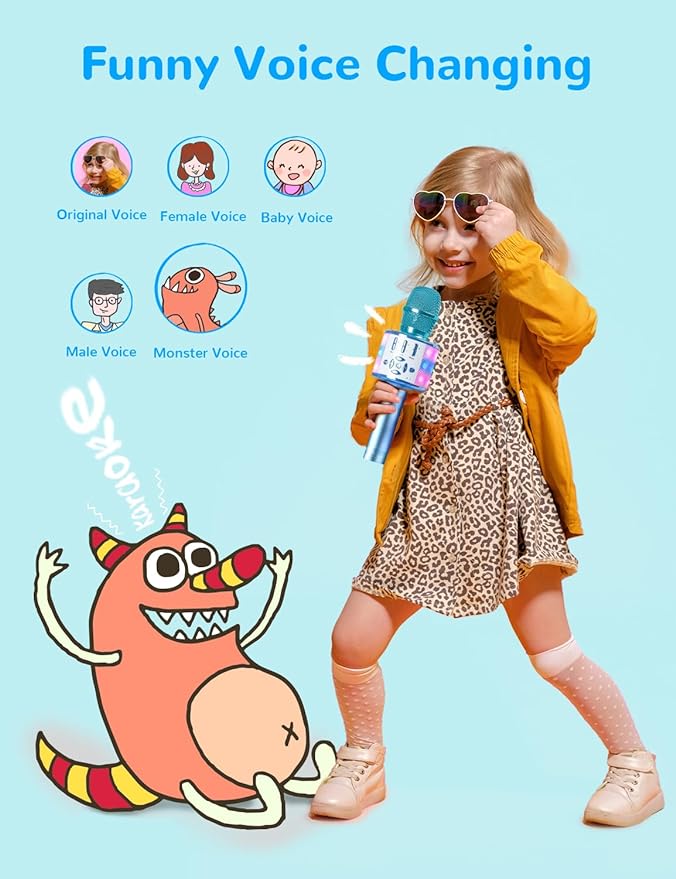
Amazmic smart toy
Source: Amazon

The mic, made by Amazmic, currently sells for a bargain price of about $17 and looks like your perfect gift. It can be paired with any device, including a phone or tablet, and can be used with a cable. However, it has one major flaw that could be a deal-breaker for some. The researchers pointed out that the microphone requires a password to pair with a device, but that password is, well, 0000. Furthermore, when testing the mic with an iPhone, they found that the mic would automatically pair with the device without even requiring a password, from distances of up to 9 meters.

It’s troubling there doesn’t appear to be an easy way to make it undiscoverable so strangers can’t drop in on your child and send undesirable audio messages or play inappropriate music

Among other smart toys the researchers examined was a cute dino below, marketed for children aged five to nine.
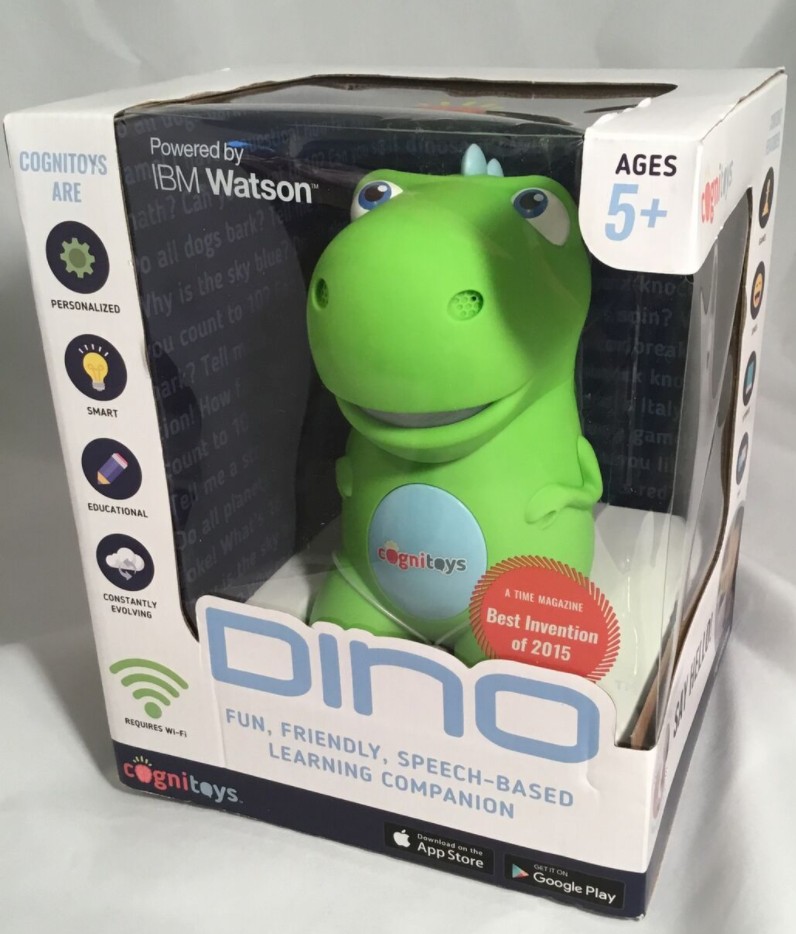
Cognitoys Dino smart toy
Source: HistoryInformation.com

The dino, made by Cognitoys, a brand of internet-connected smart toys, currently sells for about $27. The toy is cloud-based, Wi-Fi-enabled, and is said to be able to “engage children in intelligent conversations.” But while the toy is still on the market, it apparently can no longer connect to the app that allows it to chat with children. “Do not buy this! The developer app and website is no longer working! You will waste your money!” reads a review on a popular online store. And while the company behind the dino apparently no longer supports its smart functionality, as cute as the dino is, this is probably for the best. The PIRG says that when the toy was still fully functional, which would be a few years after 2016, it would eat kids’ data for breakfast. Indeed, the toy’s privacy policy reads like a digital rights advocate’s worst nightmare.

It says that the manufacturer will not only collect swaths of personally identifiable information (PII), including the full names of the parent and child, the child’s date of birth and gender, the parent’s cell phone number, Wi-Fi SSID, IP address, device’s MAC addresses, and payment information. But it will also automatically collect play data — that is, how the child interacts with the toy, including his or her “likes and dislikes, interests, and other educational metrics.” In other words, the manufacturer asserts the right to build up a child’s full profile. And you can only hope it won’t sell it or won’t leak it by accident.

The dino may not have been so smart anymore, but there’s no doubt that other, equally privacy-unfriendly smart toys have since followed in its footsteps. And we can only guess how many unsafe and privacy-threatening toys are roaming online marketplaces and stores right now.

But that doesn’t mean all smart toys are equally dangerous: some of them have features that protect the users’ data and safety. And while there are always inherent risks involved with using connected toys, especially those that can access the Internet, it is still important to know how to tell the difference between a good and a bad toy with regards to privacy.

Smart shopping for smart toys

The US PIRG report contains detailed instructions as to how to spot red flags and what questions to ask of manufacturers. We will give you a brief outline or ground rules to follow. So, before buying or accepting a smart toy for your child, we encourage you to do the following:

  • Search for the name of the toy and read reviews from other users. This way, you’ll not only know if the toy you want to buy is no longer supported, but also if any creeps have used it to scare children by connecting to it, for example.

  • If you’re not buying the toy for your own child, check with the child’s parents to make sure they’re okay with it. The child’s parents may have concerns about the toy’s privacy features and specific preferences about its functions, including safety-wise.

  • Research the manufacturer’s background and reputation. Find out if they have any previous violations or scandals related to their products or practices.

  • Check if the toy can connect to the Internet and allow the child to send messages or access social media. If so, find out what safeguards and parental controls are in place to prevent unwanted or inappropriate interactions.

  • Check what electronics the toy is fitted with. The more is not always the better. For instance, if the toy is equipped with both a mic and a camera, find out when and how they record, do they require wake words to activate, and where do they send the recordings. You should also be able to see or hear a clear indication when the toy is recording, and be able to delete the records without jumping through unnecessary hoops.

  • Last but not least, read the toy’s privacy policy carefully, if it’s available. If it’s not readily available, do not buy the toy — it’s a massive red flag. Make sure you read the toy’s privacy policy and not just a general policy of a manufacturer or of a website where the toy is sold, but the privacy policy specific to the toy. That privacy policy should explain what the toy does, what information it collects, how it uses and shares it, and how you can control it.

For more detailed instructions, including on how to read a toy’s privacy policy, check PIRG’s report (p.11).

We wish you a happy Christmas and safe and smart shopping!

Vond je dit bericht leuk?
AdGuard VPN AdGuard DNS AdGuard Mail AdGuard Wallet
Het hoofdscherm van AdGuard voor Windows
Het beschermingsscherm van AdGuard voor Windows, met de beschermingsfuncties en -instellingen
Het statistiekenscherm van AdGuard voor Windows, met statistieken over geblokkeerde advertenties en volgers
Het appbeheerscherm van AdGuard voor Windows, met de opties voor beschermingsbeheer van apps die op het apparaat zijn geïnstalleerd
20.557 20557 gebruikersbeoordelingen
Uitstekend!

AdGuard voor Windows: advertentieblokker voor pc

AdGuard voor Windows is meer dan een advertentieblokker. Het is een multifunctioneel hulpmiddel dat advertenties blokkeert, de toegang tot gevaarlijke sites regelt, het laden van pagina's versnelt en kinderen beschermt tegen ongepaste inhoud
Door het programma te downloaden accepteer je de licentievoorwaarden
Microsoft Store
Door het programma te downloaden accepteer je de licentievoorwaarden
AdGuard voor Windows v8.0, 14 dagen proefperiode
Het hoofdscherm van AdGuard voor Mac
Het Incognitomodus-scherm van AdGuard voor Mac
20.557 20557 gebruikersbeoordelingen
Uitstekend!

AdGuard voor Mac: systeembrede advertentieblokker

AdGuard voor Mac is een unieke advertentieblokker die is ontworpen met macOS in gedachten. Het beschermt je niet alleen tegen vervelende advertenties in browsers en apps, maar beschermt je ook tegen volgen, phishing en fraude
Door het programma te downloaden accepteer je de licentievoorwaarden
Meer lezen
AdGuard voor Mac v2.19, 14 dagen proefperiode
Het hoofdscherm van AdGuard voor Android
Het scherm 'Bescherming tegen volgers' van AdGuard voor Android
Het appbeheerscherm van AdGuard voor Android, met de opties voor beschermingsbeheer voor apps die op het apparaat zijn geïnstalleerd
Het statistiekenscherm van AdGuard voor Android, met statistieken over geblokkeerde advertenties en volgers
Het hoofdscherm van de privébrowser van AdGuard voor Android
De QR-code om AdGuard voor Android te downloaden
20.557 20557 gebruikersbeoordelingen
Uitstekend!

AdGuard voor Android: advertentieblokker voor alle apps

Blokkeert advertenties en volgers in alle browsers, spellen en andere apps. Beschermt je privacy en geeft je controle over hoe jouw apps internet gebruiken. Geïnstalleerd via APK
Door het programma te downloaden accepteer je de licentievoorwaarden
Meer lezen
Scannen om te downloaden
Gebruik een QR-codelezer die beschikbaar is op je apparaat
AdGuard voor Android v4.14, 14 dagen proefperiode
Het hoofdscherm van AdGuard voor iOS
Het beschermingsscherm van AdGuard voor iOS, dat de beschermingsfuncties en -instellingen toont.
Het statistiekenscherm van AdGuard voor iOS, met statistieken over geblokkeerde advertenties en volgers
De QR-code om AdGuard voor iOS te downloaden
20.557 20557 gebruikersbeoordelingen
Uitstekend!

AdGuard: advertentieblokker voor iOS

De beste advertentieblokker voor iOS op iPhone en iPad. AdGuard verwijdert alle soorten advertenties en volgers in Safari en beschermt je privacy in alle apps op DNS-niveau
Door het programma te downloaden accepteer je de licentievoorwaarden
Meer lezen
Scannen om te downloaden
Gebruik een QR-codelezer die beschikbaar is op je apparaat
AdGuard voor iOS v4.5
Het hoofdscherm van AdGuard Inhoudsblokker
Het filterscherm van AdGuard Inhoudsblokker
Het instellingenscherm van AdGuard Inhoudsblokker
20.557 20557 gebruikersbeoordelingen
Uitstekend!

AdGuard Content Blocker

AdGuard Content Blocker elimineert allerlei soorten advertenties in mobiele browsers die technologie voor het blokkeren van inhoud ondersteunen, namelijk Samsung Internet en Yandex Browser. De functies zijn beperkt in vergelijking met AdGuard voor Android, maar het is gratis, eenvoudig te installeren en efficiënt
Door het programma te downloaden accepteer je de licentievoorwaarden
Meer lezen
AdGuard Content Blocker v2.8
Het hoofdscherm van de AdGuard-browseruitbreiding
Het scherm 'Bescherming tegen volgers' van AdGuard-browseruitbreiding
20.557 20557 gebruikersbeoordelingen
Uitstekend!

AdGuard Browserextensie

AdGuard is de snelste en lichtste advertentieblokkering uitbreiding die alle soorten advertenties op alle webpagina's effectief blokkeert! Kies AdGuard voor uw browser om advertentievrij, snel en veilig te surfen.
Installeren
Door het programma te downloaden accepteer je de licentievoorwaarden
Installeren
Door het programma te downloaden accepteer je de licentievoorwaarden
Installeren
Door het programma te downloaden accepteer je de licentievoorwaarden
Installeren
Door het programma te downloaden accepteer je de licentievoorwaarden
Installeren
Door het programma te downloaden accepteer je de licentievoorwaarden
Meer lezen
Installeren
Door het programma te downloaden accepteer je de licentievoorwaarden
Meer lezen
AdGuard Browserextensie v5.5
Het hoofdscherm van AdGuard Assistant
20.557 20557 gebruikersbeoordelingen
Uitstekend!

AdGuard Assistant

Een bijbehorende browseruitbreiding voor AdGuard desktop-apps. Het stelt je in staat om aangepaste items op websites te blokkeren, websites toe te voegen aan de toelatingslijst en rapporten rechtstreeks vanuit je browser te versturen
AdGuard Assistant v1.4
20.557 20557 gebruikersbeoordelingen
Uitstekend!

AdGuard Home

AdGuard Home is een netwerkgebaseerde oplossing voor het blokkeren van advertenties en volgers. Installeer het één keer op je router om alle apparaten in je thuisnetwerk te beschermen — geen extra clientsoftware vereist. Dit is vooral belangrijk voor verschillende IoT-apparaten die vaak een bedreiging vormen voor je privacy
AdGuard Home v0.107
Het hoofdscherm van AdGuard Pro voor iOS
Het beschermingsscherm van AdGuard Pro voor iOS, met de beschermingsfuncties en instellingen
Het statistiekenscherm van AdGuard Pro voor iOS, met statistieken over geblokkeerde advertenties en trackers
20.557 20557 gebruikersbeoordelingen
Uitstekend!

AdGuard Pro voor iOS

AdGuard Pro voor iOS wordt geleverd met alle geavanceerde beschermingsfuncties voor het blokkeren van advertenties. Het biedt dezelfde tools als de betaalde versie van AdGuard voor iOS. Het blinkt uit in het blokkeren van advertenties in Safari en laat je DNS-instellingen aanpassen om je bescherming aan te passen. Het blokkeert advertenties in browsers en apps, beschermt je kinderen tegen ongepaste inhoud en houdt je persoonlijke gegevens veilig
Door het programma te downloaden accepteer je de licentievoorwaarden
Meer lezen
AdGuard Pro voor iOS v4.5
Het hoofdscherm van AdGuard Mini voor Mac
Het Safari-beschermingsscherm van AdGuard Mini voor Mac
Het 'Regel aanmaken'-scherm van AdGuard Mini voor Mac
20.557 20557 gebruikersbeoordelingen
Uitstekend!

AdGuard Mini voor Mac — Safari-advertentieblokker

AdGuard Mini voor Mac is een krachtige Safari-advertentieblokker. Deze lichtgewicht app verwijdert advertenties, blokkeert volgers en versnelt het laden van pagina's. Het helpt je om in Safari zonder afleiding op het web te surfen en je gegevens privé te houden
Installeren
Door het programma te downloaden accepteer je de licentievoorwaarden
Meer lezen
AdGuard Mini voor Mac v2.3
Het hoofdscherm van AdGuard voor Android TV met ingeschakelde bescherming
Het advertentieblokkeringsscherm van AdGuard voor Android TV, met zijn functies en instellingen
Het instellingenscherm van AdGuard voor Android TV
Het appbeheer-scherm van AdGuard voor Android TV, waarop de apps worden getoond waar advertenties en volgers worden geblokkeerd
20.557 20557 gebruikersbeoordelingen
Uitstekend!

AdGuard voor Android TV

AdGuard voor Android TV is de enige app die advertenties blokkeert, jouw privacy bewaakt en fungeert als firewall voor je Smart TV. Ontvang waarschuwingen over webbedreigingen, gebruik veilige DNS en profiteer van gecodeerd verkeer. Ontspan en duik in je favoriete programma's met eersteklas beveiliging en zonder advertenties!
AdGuard voor Android TV v4.14, 14 dagen proefperiode
De AdGuard-mascotte, Agnar, houdt de Linux-pinguïn vast
20.557 20557 gebruikersbeoordelingen
Uitstekend!

AdGuard voor Linux

AdGuard voor Linux is 's werelds eerste systeem-brede AdGuard Advertentieblokker. Blokkeer advertenties en volgers op apparaatsniveau, kies uit vooraf geïnstalleerde filters, of voeg je eigen toe - allemaal via de interface
AdGuard voor Linux v1.4
20.557 20557 gebruikersbeoordelingen
Uitstekend!

AdGuard Temp Mail

Een gratis tijdelijke e-mailadresgenerator die je anoniem houdt en jouw privacy beschermt. Geen spam in je hoofdinbox!
20.557 20557 gebruikersbeoordelingen
Uitstekend!

AdGuard VPN

75 locaties wereldwijd

Toegang tot alle inhoud

Sterke versleuteling

Geen logboekregistratie

Snelste verbinding

24/7 ondersteuning

Gratis proberen
Door het programma te downloaden accepteer je de licentievoorwaarden
Meer lezen
20.557 20557 gebruikersbeoordelingen
Uitstekend!

AdGuard DNS

AdGuard DNS is een alternatieve oplossing voor advertentieblokkering, privacybescherming en ouderlijk toezicht. Het is eenvoudig in te stellen en gratis te gebruiken, biedt een minimum aan optimale bescherming tegen online advertenties, volgers en phishing, ongeacht welk platform en welk apparaat je gebruikt.
20.557 20557 gebruikersbeoordelingen
Uitstekend!

AdGuard Mail

Bescherm je identiteit, vermijd spam en houd je Postvak IN veilig met onze aliassen en tijdelijke e-mailadressen. Geniet van onze gratis service voor het doorsturen van e-mail en apps voor alle besturingssystemen
20.557 20557 gebruikersbeoordelingen
Uitstekend!

AdGuard Wallet

Een veilige en privé crypto-wallet die je volledige controle geeft over jouw activa. Beheer meerdere wallets en ontdek duizenden cryptocurrencies om op te slaan, te verzenden en te ruilen
Downloaden AdGuard Klik op het door de pijl aangegeven bestand om AdGuard te installeren. Selecteer "Open" en klik op "OK" - wacht even tot het bestand gedownload is. Sleep dan in het geopende venster het AdGuard icoontje naar de "Applications" map. Dank u dat u voor AdGuard gekozen heeft. Selecteer "Open" en klik op "OK" - wacht even tot het bestand gedownload is. Klik dan in het geopende venster op "Installeren". Dank u dat u voor AdGuard gekozen heeft.
AdGuard op je mobiele apparaat installeren


















































