Twitter’s love-hate relationship with ads, Google’s flop, dangerous search and a big data breach. AdGuard’s digest

In this edition of AdGuard’s Digest: Google comes under fire for its flawed attempt to reinvent ad targeting, Twitter makes a U-turn on third-party clients and criticizes its own ad policies, hackers continue to exploit search ads, while a telecoms giant runs into bad luck for the eighth time.

Google’s replacement for third-party cookies is put on blast

Google’s much-discussed Privacy Sandbox initiative has been dealt a stinging blow. The W3C Technical Architecture Group (TAG) has concluded that it did not meet its stated goal of enabling targeted advertising and protecting users from tracking and profiling at the same time.

The group took aim at one specific element of the proposal, the Topics API, envisioned as a replacement for third-party cookies. In its review of Topics, TAG notes that the technology still allows the browser to share information about the user’s online behavior. Moreover, the data is “gathered and sent behind the scenes,” while the user has no “fine-grained control” over what it reveals about them, the group said. The proposed alternative to third-party cookies appears to “maintain the status quo of inappropriate surveillance on the web,” TAG said, while recommending that Google not proceed with the technology. Google disagreed with the findings, insisting that Topics is a significant improvement over third-party cookies.

TAG is a special working group within the The World Wide Web Consortium, and includes the inventor of the Web Tim Berners-Lee.

We have long argued that Google is up to no good with its Topics API. In our own deep-dive review of the Privacy Sandbox we argued that Topics would still allow Big Tech to profile users and, if anything, would only cement Google’s advertising monopoly.

‘End of an era’: Twitter bans third-party clients

Twitter’s embattled CEO Elon Musk may be busy in court, but that does not mean a pause in Twitter-related news.

Recently, Twitter updated its developer terms to outlaw third-party apps, breaking away from its long-held policy. When asked about the change, Twitter said it was simply “enforcing long-standing API rules.” Twitter’s oldest third-party client, Twitterriffic, which came to iOS even before Twitter itself, was forced to pull its apps from the iOS and Mac app stores as well. In a blog post, Twitterrific said that app’s “sudden and undignified demise” was brought about by an unannounced policy change from an “increasingly capricious Twitter”.

The ban represents a U-turn in Twitter’s treatment of third-party clients — the platform previously tolerated them. The move also signals that Musk’s Twitter is willing to go to great lengths to increase the tech giant’s advertising revenue. Users of third-party clients don’t see Twitter’s ads.

The fact that Twitter is betting heavily on advertising and leaving users with no alternatives in the form of third-party clients makes sense from a business perspective, but is worrying from a user’s point of view. The rumors that Twitter is planning to force non-paying users to share their location and phone numbers for targeted advertising only adds fuel to the concerns.

Musk vows to tackle icky ads, teases ad-free Twitter plan

As if to assuage some of these fears, Musk took to Twitter to state the obvious: “Ads are too frequent and too big on Twitter,” the still-CEO wrote. He then promised to take steps to address the issue “in the coming weeks”, as well as release a higher-priced subscription tier with “zero ads”.

Musk teases ad-free subscription tier for Twitter

This is not the first time Musk has teased an ad-free tier. Last month, the Twitter CEO said that the new plan sans ads would arrive already that year. Currently, Twitter Blue subscribers pay $11 a month (if they buy the subscription through Android or iOS) or $8 (if they buy it through a web browser) to see half as many ads as regular, non-paying users.

Twitter’s introduction of an ad-free tier is a welcome step and a cause for celebration for those who have grown tired of ad-cluttered feeds, but not enough to give up on Twitter. A lot will depend on the pricing, though. We can see that Twitter is trying to walk a fine line between pleasing advertisers and users, and we can only hope that the balance doesn’t tip too heavily towards the former.

Google search is infested with malicious ads, researchers find

Cybercriminals increasingly rely on Google Search ads to lure users to bogus websites laced with malware, BleepingComputer has found. These fake websites often resemble those of legitimate companies, known for open-source software.

BleepingComputer conducted the research after a popular influencer saw all his crypto assets stolen as result of the scheme. The researchers found that in some cases, hackers outbid legitimate developers so the malicious ad appeared at the top of search results, above the legitimate company’s paid ad. Such was the case with CCleaner, a utility used to clean unwanted files. The fake CCLeaner website directed users to download Redline malware, which allowed criminals to steal sensitive personal information such as passwords, credit card details and crypto assets from unsuspecting victims. Together with other security researchers, BleepingComputer uncovered a dozen malicious ads leading to fake websites. In response, Google said it has “robust policies” against ads that impersonate brands and enforces them “vigorously”.

Well, apparently not vigorously enough, because the problem of malicious ads in Google search seems to persist. Last month the FBI even issued an alert about dangerous search ads, urging the public to use ad blockers. Indeed, ad blockers, including the AdGuard Browser extension and the AdGuard app, help protect against the threat of ads placed by cybercriminals. To block most search ads, you’ll need to enable the “block search ads” setting in your extension.
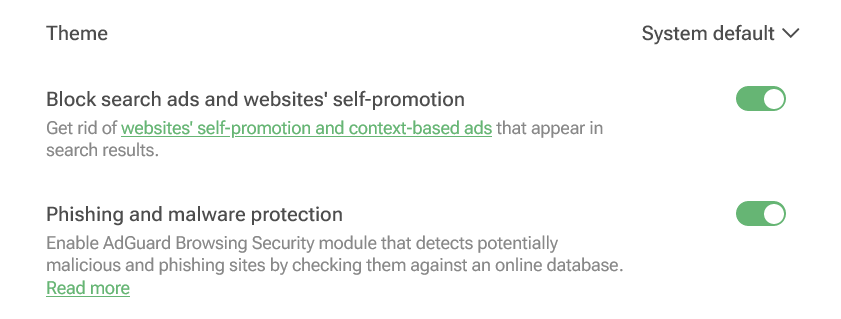
You can enable blocking search ads in your AdGuard Browser extension

Screenshot: AdGuard Browser extension

Not again... Personal data of 37 million T-Mobile customers stolen

Telecoms giant T-Mobile has revealed that it has suffered another data breach, with hackers stealing personal data of some 37 million of its customers. The bad actor apparently exploited a flaw in one of the company’s APIs to retrieve the data.

The breach occurred in early January and was immediately contained, T-Mobile said. The telecoms provider noted that hackers gained access to a “limited set of account information”, including its customers’ names, billing addresses, email addresses, dates of birth and T-Mobile account numbers. No payment information or government ID numbers were exposed, it claimed.

Still, the breach represents a very worrying pattern, as this is the eighth time T-Mobile has been hacked in five years, according to TechCrunch. T-Mobile also famously fell victim to the Lapsus$ hackers, who stole its source code in a series of hacks in March 2022. The new hack, as well as T-Mobile’s history of data breaches, shows that large companies are just as vulnerable to attack as smaller ones. The bigger the company, the more customer data it has at its disposal, the more attractive it is as a target. What this means for us as users is that we need to be very selective about what data we share, with whom, and how much control we have over it.


Vond je dit bericht leuk?
AdGuard VPN AdGuard DNS AdGuard Mail AdGuard Wallet
Het hoofdscherm van AdGuard voor Windows
Het beschermingsscherm van AdGuard voor Windows, met de beschermingsfuncties en -instellingen
Het statistiekenscherm van AdGuard voor Windows, met statistieken over geblokkeerde advertenties en volgers
Het appbeheerscherm van AdGuard voor Windows, met de opties voor beschermingsbeheer van apps die op het apparaat zijn geïnstalleerd
20.558 20558 gebruikersbeoordelingen
Uitstekend!

AdGuard voor Windows: advertentieblokker voor pc

AdGuard voor Windows is meer dan een advertentieblokker. Het is een multifunctioneel hulpmiddel dat advertenties blokkeert, de toegang tot gevaarlijke sites regelt, het laden van pagina's versnelt en kinderen beschermt tegen ongepaste inhoud
Door het programma te downloaden accepteer je de licentievoorwaarden
Microsoft Store
Door het programma te downloaden accepteer je de licentievoorwaarden
AdGuard voor Windows v8.0, 14 dagen proefperiode
Het hoofdscherm van AdGuard voor Mac
Het Incognitomodus-scherm van AdGuard voor Mac
20.558 20558 gebruikersbeoordelingen
Uitstekend!

AdGuard voor Mac: systeembrede advertentieblokker

AdGuard voor Mac is een unieke advertentieblokker die is ontworpen met macOS in gedachten. Het beschermt je niet alleen tegen vervelende advertenties in browsers en apps, maar beschermt je ook tegen volgen, phishing en fraude
Door het programma te downloaden accepteer je de licentievoorwaarden
Meer lezen
AdGuard voor Mac v2.19, 14 dagen proefperiode
Het hoofdscherm van AdGuard voor Android
Het scherm 'Bescherming tegen volgers' van AdGuard voor Android
Het appbeheerscherm van AdGuard voor Android, met de opties voor beschermingsbeheer voor apps die op het apparaat zijn geïnstalleerd
Het statistiekenscherm van AdGuard voor Android, met statistieken over geblokkeerde advertenties en volgers
Het hoofdscherm van de privébrowser van AdGuard voor Android
De QR-code om AdGuard voor Android te downloaden
20.558 20558 gebruikersbeoordelingen
Uitstekend!

AdGuard voor Android: advertentieblokker voor alle apps

Blokkeert advertenties en volgers in alle browsers, spellen en andere apps. Beschermt je privacy en geeft je controle over hoe jouw apps internet gebruiken. Geïnstalleerd via APK
Door het programma te downloaden accepteer je de licentievoorwaarden
Meer lezen
Scannen om te downloaden
Gebruik een QR-codelezer die beschikbaar is op je apparaat
AdGuard voor Android v4.14, 14 dagen proefperiode
Het hoofdscherm van AdGuard voor iOS
Het beschermingsscherm van AdGuard voor iOS, dat de beschermingsfuncties en -instellingen toont.

Het statistiekenscherm van AdGuard voor iOS, met statistieken over geblokkeerde advertenties en volgers
De QR-code om AdGuard voor iOS te downloaden
20.558 20558 gebruikersbeoordelingen
Uitstekend!

AdGuard: advertentieblokker voor iOS

De beste advertentieblokker voor iOS op iPhone en iPad. AdGuard verwijdert alle soorten advertenties en volgers in Safari en beschermt je privacy in alle apps op DNS-niveau

Door het programma te downloaden accepteer je de licentievoorwaarden
Meer lezen
Scannen om te downloaden
Gebruik een QR-codelezer die beschikbaar is op je apparaat
AdGuard voor iOS v4.5
Het hoofdscherm van AdGuard Inhoudsblokker
Het filterscherm van AdGuard Inhoudsblokker
Het instellingenscherm van AdGuard Inhoudsblokker
20.558 20558 gebruikersbeoordelingen
Uitstekend!

AdGuard Content Blocker

AdGuard Content Blocker elimineert allerlei soorten advertenties in mobiele browsers die technologie voor het blokkeren van inhoud ondersteunen, namelijk Samsung Internet en Yandex Browser. De functies zijn beperkt in vergelijking met AdGuard voor Android, maar het is gratis, eenvoudig te installeren en efficiënt
Door het programma te downloaden accepteer je de licentievoorwaarden
Meer lezen
AdGuard Content Blocker v2.8
Het hoofdscherm van de AdGuard-browseruitbreiding
Het scherm 'Bescherming tegen volgers' van AdGuard-browseruitbreiding
20.558 20558 gebruikersbeoordelingen
Uitstekend!

AdGuard Browserextensie

AdGuard is de snelste en lichtste advertentieblokkering uitbreiding die alle soorten advertenties op alle webpagina's effectief blokkeert! Kies AdGuard voor uw browser om advertentievrij, snel en veilig te surfen.
Installeren
Door het programma te downloaden accepteer je de licentievoorwaarden
Installeren
Door het programma te downloaden accepteer je de licentievoorwaarden
Installeren
Door het programma te downloaden accepteer je de licentievoorwaarden
Installeren
Door het programma te downloaden accepteer je de licentievoorwaarden
Installeren
Door het programma te downloaden accepteer je de licentievoorwaarden
Meer lezen
Installeren
Door het programma te downloaden accepteer je de licentievoorwaarden
Meer lezen
AdGuard Browserextensie v5.5
Het hoofdscherm van AdGuard Assistant
20.558 20558 gebruikersbeoordelingen
Uitstekend!

AdGuard Assistant

Een bijbehorende browseruitbreiding voor AdGuard desktop-apps. Het stelt je in staat om aangepaste items op websites te blokkeren, websites toe te voegen aan de toelatingslijst en rapporten rechtstreeks vanuit je browser te versturen
AdGuard Assistant v1.4
20.558 20558 gebruikersbeoordelingen
Uitstekend!

AdGuard Home

AdGuard Home is een netwerkgebaseerde oplossing voor het blokkeren van advertenties en volgers. Installeer het één keer op je router om alle apparaten in je thuisnetwerk te beschermen — geen extra clientsoftware vereist. Dit is vooral belangrijk voor verschillende IoT-apparaten die vaak een bedreiging vormen voor je privacy
AdGuard Home v0.107
Het hoofdscherm van AdGuard Pro voor iOS
Het beschermingsscherm van AdGuard Pro voor iOS, met de beschermingsfuncties en instellingen
Het statistiekenscherm van AdGuard Pro voor iOS, met statistieken over geblokkeerde advertenties en trackers
20.558 20558 gebruikersbeoordelingen
Uitstekend!

AdGuard Pro voor iOS

AdGuard Pro voor iOS wordt geleverd met alle geavanceerde beschermingsfuncties voor het blokkeren van advertenties. Het biedt dezelfde tools als de betaalde versie van AdGuard voor iOS. Het blinkt uit in het blokkeren van advertenties in Safari en laat je DNS-instellingen aanpassen om je bescherming aan te passen. Het blokkeert advertenties in browsers en apps, beschermt je kinderen tegen ongepaste inhoud en houdt je persoonlijke gegevens veilig
Door het programma te downloaden accepteer je de licentievoorwaarden
Meer lezen
AdGuard Pro voor iOS v4.5
Het hoofdscherm van AdGuard Mini voor Mac
Het Safari-beschermingsscherm van AdGuard Mini voor Mac
Het 'Regel aanmaken'-scherm van AdGuard Mini voor Mac
20.558 20558 gebruikersbeoordelingen
Uitstekend!

AdGuard Mini voor Mac — Safari-advertentieblokker

AdGuard Mini voor Mac is een krachtige Safari-advertentieblokker. Deze lichtgewicht app verwijdert advertenties, blokkeert volgers en versnelt het laden van pagina's. Het helpt je om in Safari zonder afleiding op het web te surfen en je gegevens privé te houden
Installeren
Door het programma te downloaden accepteer je de licentievoorwaarden
Meer lezen
AdGuard Mini voor Mac v2.3
Het hoofdscherm van AdGuard voor Android TV met ingeschakelde bescherming
Het advertentieblokkeringsscherm van AdGuard voor Android TV, met zijn functies en instellingen
Het instellingenscherm van AdGuard voor Android TV
Het appbeheer-scherm van AdGuard voor Android TV, waarop de apps worden getoond waar advertenties en volgers worden geblokkeerd
20.558 20558 gebruikersbeoordelingen
Uitstekend!

AdGuard voor Android TV

AdGuard voor Android TV is de enige app die advertenties blokkeert, jouw privacy bewaakt en fungeert als firewall voor je Smart TV. Ontvang waarschuwingen over webbedreigingen, gebruik veilige DNS en profiteer van gecodeerd verkeer. Ontspan en duik in je favoriete programma's met eersteklas beveiliging en zonder advertenties!
AdGuard voor Android TV v4.14, 14 dagen proefperiode
De AdGuard-mascotte, Agnar, houdt de Linux-pinguïn vast
20.558 20558 gebruikersbeoordelingen
Uitstekend!

AdGuard voor Linux

AdGuard voor Linux is 's werelds eerste systeem-brede AdGuard Advertentieblokker. Blokkeer advertenties en volgers op apparaatsniveau, kies uit vooraf geïnstalleerde filters, of voeg je eigen toe - allemaal via de interface
AdGuard voor Linux v1.4
20.558 20558 gebruikersbeoordelingen
Uitstekend!

AdGuard Temp Mail

Een gratis tijdelijke e-mailadresgenerator die je anoniem houdt en jouw privacy beschermt. Geen spam in je hoofdinbox!
20.558 20558 gebruikersbeoordelingen
Uitstekend!

AdGuard VPN

75 locaties wereldwijd

Toegang tot alle inhoud

Sterke versleuteling

Geen logboekregistratie

Snelste verbinding

24/7 ondersteuning

Gratis proberen
Door het programma te downloaden accepteer je de licentievoorwaarden
Meer lezen
20.558 20558 gebruikersbeoordelingen
Uitstekend!

AdGuard DNS

AdGuard DNS is een alternatieve oplossing voor advertentieblokkering, privacybescherming en ouderlijk toezicht. Het is eenvoudig in te stellen en gratis te gebruiken, biedt een minimum aan optimale bescherming tegen online advertenties, volgers en phishing, ongeacht welk platform en welk apparaat je gebruikt.
20.558 20558 gebruikersbeoordelingen
Uitstekend!

AdGuard Mail

Bescherm je identiteit, vermijd spam en houd je Postvak IN veilig met onze aliassen en tijdelijke e-mailadressen. Geniet van onze gratis service voor het doorsturen van e-mail en apps voor alle besturingssystemen
20.558 20558 gebruikersbeoordelingen
Uitstekend!

AdGuard Wallet

Een veilige en privé crypto-wallet die je volledige controle geeft over jouw activa. Beheer meerdere wallets en ontdek duizenden cryptocurrencies om op te slaan, te verzenden en te ruilen
Downloaden AdGuard Klik op het door de pijl aangegeven bestand om AdGuard te installeren. Selecteer "Open" en klik op "OK" - wacht even tot het bestand gedownload is. Sleep dan in het geopende venster het AdGuard icoontje naar de "Applications" map. Dank u dat u voor AdGuard gekozen heeft. Selecteer "Open" en klik op "OK" - wacht even tot het bestand gedownload is. Klik dan in het geopende venster op "Installeren". Dank u dat u voor AdGuard gekozen heeft.
AdGuard op je mobiele apparaat installeren
















































