Musk taking over Twitter has created chaos. Will he make order out of it?

Some thought that this day would never come, but on October 27 billionaire entreprenuer Elon Musk officially closed the deal with Twitter, acquiring the social media company for $44 billion. Musk took the reins in rather dramatic fashion, showing the entire Twitter board of directors the door and making himself its sole director and CEO (presumably temporarily).

After becoming the Chief Twit, Musk unveiled his plan to change the platform’s monetization model via premium subscriptions. About 90% of Twitter’s revenue currently comes from advertising, and Twitter’s overreliance on ad money along with its spam bots have always been one of Musk’s biggest pet peeves.

Faced with the irreversable fact of Musk’s takeover, the Twittersphere descended into chaos. Users have envisaged doomsday scenarios in which Twitter would become a “cesspool of vitriol and hatred”, free of any regulation, and accused Musk of trying to turn it into “a money grabbing cash machine.”

With Musk taking his first steps at Twitter, only time will tell whether he breathes new life into the platform or indeed puts the final nail into its coffin. Musk himself declared that he added Twitter to his already extensive portfolio of assets not to make more money, but to “try to help humanity” and that he does not rule out that he fails in this quest. There is “a very real possibility” of that, according to the entrepreneur himself.

Still, Musk’s vision for Twitter’s future as a freemium service is spot-on. However, there are just too many variables that one has to take into account to bet on his success.

Moving away from ad-based monetization model

Musk had been talking about how he would change Twitter at length even before he bought the company. But the only proposal the auto tycon has given specific details about so far is how he plans to steer Twitter away from its ad-driven monetization model.
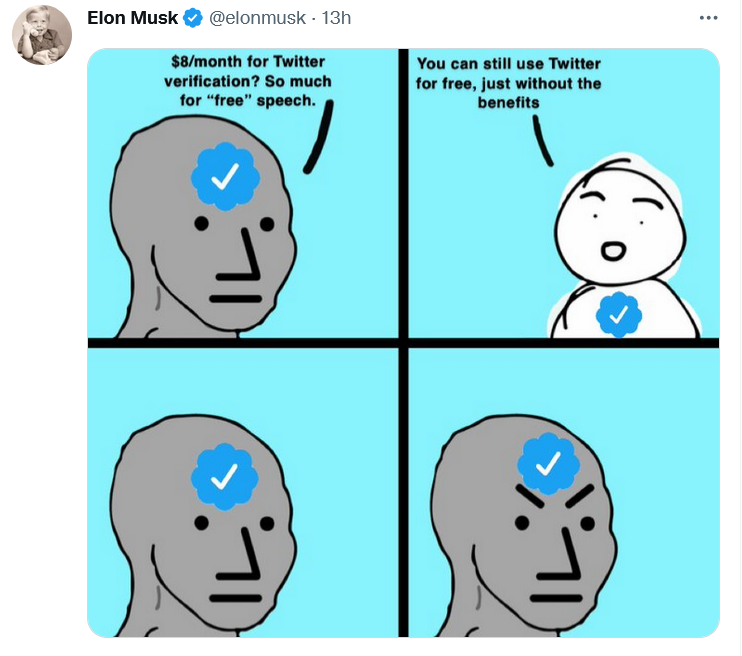
Musk explained Twitter’s freemium model in his favorite way — with a meme

In a series of tweets on November 1, Musk blasted the Twitter verification system as unfair. “Twitter’s current lords & peasants system for who has or doesn’t have a blue checkmark is bullshit,” the billionaire wrote.

To open up verification to all users, Musk suggested making the blue checkmark part of a paid Twitter Blue subscription. Launched last June, Twitter Blue is so far only available in the US, Canada, Australia, and New Zealand. Subscribers pay a monthly fee adjusted for the region. In the US, the fee amounts to $4.99/month.

As of now, Twitter requires an account to be “authentic,”“notable,” and “active” for a blue tick to be bestowed upon it. The allocation of verification badges and their removal is solely at Twitter’s discretion. The practice sparked controversy in the past: in 2016 Twitter “unverified” the account of right-wing personality Milo Yiannopoulos, fuelling the debate about censorship on the platform.

Good value for money finally or a rip-off?

Although Twitter Blue went live more than a year ago, the revenue stream from the company’s original attempt to diversify its monetization model has been more of a trickle. Sensor Tower estimated that Twitter Blue generated only $6.4 million in global spending to date, a drop in the ocean compared to Twitter’s annual revenue of $5.08 billion in 2021. Now Musk, apparently, wants to turn Twitter Blue into something worth paying for. Whether he succeeds in doing so or kills Twitter while trying, is a very big question.

Twitter Blue currently does offer a number of useful features, but they have failed to win over power users. Subscribers can already save tweets to bookmarks, undo a tweet within up to 60 seconds of sending it, read long threads as a single page of text, customize the navigation bar, and get instant access to the most-shared articles from people they follow. Most recently, Twitter Blue allowed subscribers in Australia, Canada, and New Zealand to edit tweets up to five times in 30 minutes after posting.

Musk proposed increasing the Twitter Blue fee from $4.5 to $8 a month in the US, but he also touted additional features that should turn things around for the paid service.

Apart from the blue tick, subscribers will get priority in replies, mentions and search. They will also be able to post longer videos and audios, as well as gain access to paywalled content from publishers willing to partner with Twitter.
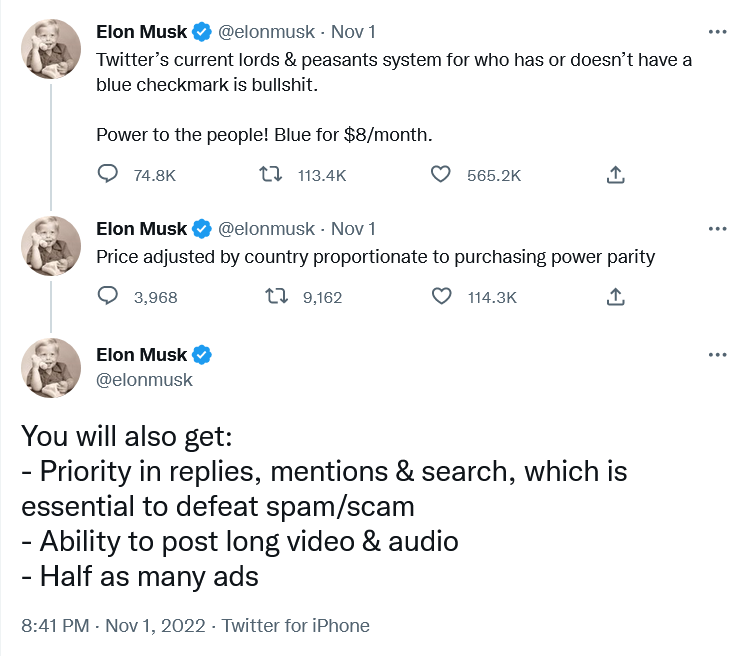
Musk unveiled his plan for Twitter monetization…on Twitter

According to different estimates, there are from 300,000 up to 400,000 verified accounts on Twitter. In the second quarter of 2022, Twitter reported 237 million monetizable daily users. It’s unclear how many of them will buy into the Musk vision, and will be ready to pay for it from their own pockets.

Under Musk’s plan, public figures should remain recognizable even if they do not pay for the subscription. Twitter would add “a secondary tag” below their names, “which is already the case for politicians,” according to Musk. Apparently, the Twitter CEO referred to the labels for government and state-affiliated media accounts Twitter introduced back in 2020.

Fewer ads for subscribers

Most interesting for regular users, perhaps, is that subscribers will see fewer distractions, namely, “half as many ads.”

Some may consider this as a letdown from a man who once said that he “hates advertising.”. In a since deleted Twitter thread from April, Musk proposed essentially the same model, but suggested that those who sign up for Twitter Blue should see no ads at all.

“The power of corporations to dictate policy is greatly enhanced if Twitter depends on advertising money to survive,” Musk tweeted at the time.
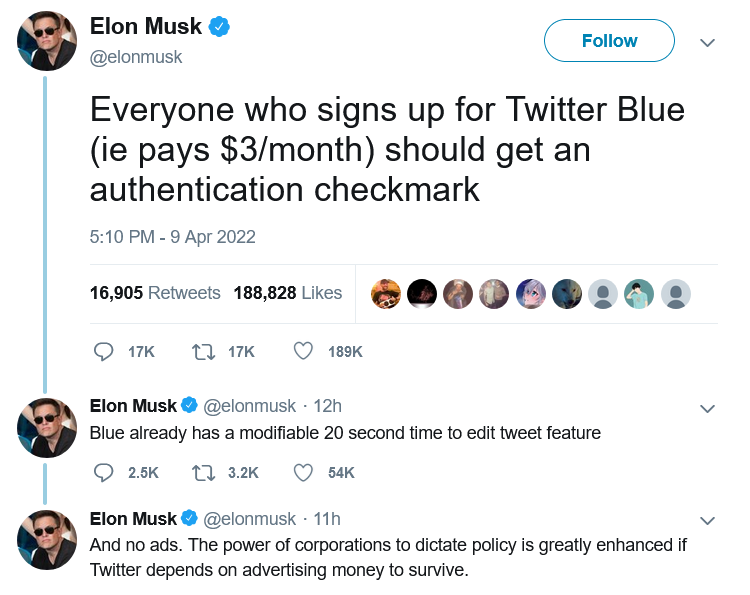
Half a year before becoming Twitter CEO, Musk suggested disabling ads for Twitter Blue subscribers

At the moment, though, Twitter Blue subscribers are being bombarded with the same amount of ads as non-subscribers. So, Musk’s decision can be seen as a step in the right direction.

According to Musk, the new system should enable Twitter to “defeat spam/scam on the platform”, as well as provide it with a “revenue stream to reward content creators.”

Ads will not go away, so won’t content moderation

After ascending to the Twitter throne, Musk has softened his stance towards advertisers. On the same day the Twitter deal was officially done and dusted, Musk addressed the advertising industry in a Twitter post titled “Dear Twitter Advertisers.”

“There has been much speculation about why I bought Twitter and what I think about advertising. Most of it has been wrong,”Musk wrote. The billionaire, who is known as a vocal advocate of the freedom of speech, added that while he wants the platform to be “warm and welcoming to all,” it won’t be completely free of regulation. “Twitter obviously cannot become a free-for-all hellspace, where anything can be said for no consequences!”

Musk then made it clear that advertisers will stay on the platform, but hinted that the rules for how they conduct their business can change. “It is essentially to show Twitter users advertising that is as relevant as possible to their needs. Low relevancy ads are spam, but highly relevant ads are actually content!” Musk went on to write.

The post was too sketchy on details as far as the future of ads on Twitter is concerned. Musk said that he wants to make Twitter “the most respected advertising platform in the world,” and judging by his previous rhetoric it is unlikely to mean harvesting more personal data without user consent. Hopefully, quite the opposite.

Meanwhile, individual companies, such as automaker GM (which, incidentally, is a Tesla competitor), have decided to suspend advertising on Twitter. It is unclear how many advertisers will decide to stick with the platform when the dust settles.

What to expect next?

It remains to be seen if Musk comes back to various proposals he’d made while still not at the helm of Twitter. One of them is to introduce end-to-end encryption for Twitter DMs like in the privacy-first Signal messanger. Another is to make Twitter algorithms open source. If Musk brings these ideas of his to life, Twitter would become more private and secure.

Given that Musk, however successful his other business ventures may be, is rather unpredictable, it’s difficult to gauge what will come out of his great Twitter gamble.

But a pivot from an ad-based revenue model to a model based on paid subscriptions is also pivot to more privacy. If Twitter’s revenue no longer fully depends on advertising, big corporations will have less sway over the company, and Twitter — fewer incentives to sell user data.
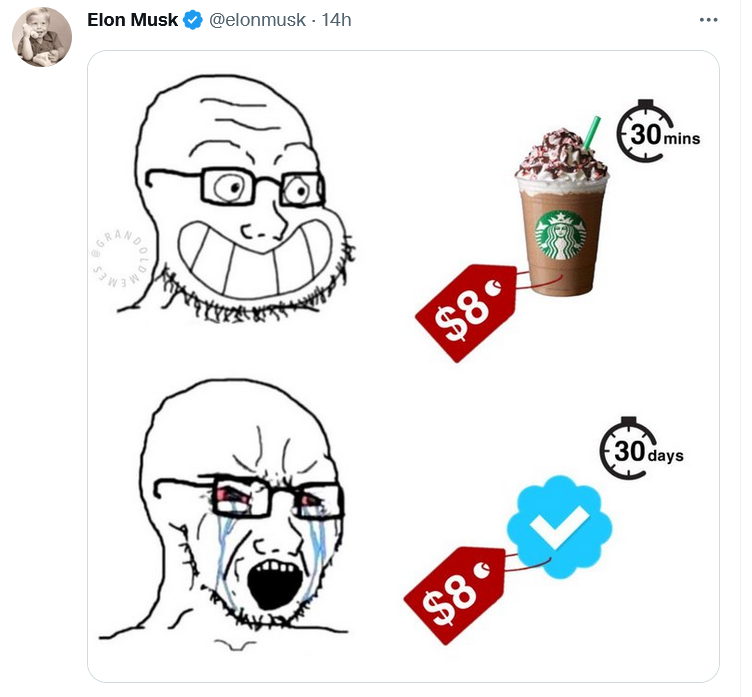
Musk compared the proposed Twitter subscription fee to a price of one cup of coffee

Whether the new model takes off, and what shape it will take in the end, one can only guess. Right now the odds are not in Musk’s favor, but no one becomes the richest man in the world for nothing. Much will depend on how Musk uses his personal marketing appeal to sell Twitter Blue to users, whether and how quickly he adds new features, and how well he listens to feedback. For now, everything is still up in the air. For example, it’s unclear how many ads are “half as many ads” exactly, and whether all the new proposed features would be enough to convince users to pay for a subscription.

As for the price tag, $8 is less than the cost of a few cups of coffee. It’s more about whether Musk will be able to sweeten the deal up enough.


Vond je dit bericht leuk?
AdGuard VPN AdGuard DNS AdGuard Mail AdGuard Wallet
Het hoofdscherm van AdGuard voor Windows
Het beschermingsscherm van AdGuard voor Windows, met de beschermingsfuncties en -instellingen
Het statistiekenscherm van AdGuard voor Windows, met statistieken over geblokkeerde advertenties en volgers
Het appbeheerscherm van AdGuard voor Windows, met de opties voor beschermingsbeheer van apps die op het apparaat zijn geïnstalleerd
20.558 20558 gebruikersbeoordelingen
Uitstekend!

AdGuard voor Windows: advertentieblokker voor pc

AdGuard voor Windows is meer dan een advertentieblokker. Het is een multifunctioneel hulpmiddel dat advertenties blokkeert, de toegang tot gevaarlijke sites regelt, het laden van pagina's versnelt en kinderen beschermt tegen ongepaste inhoud

Door het programma te downloaden accepteer je de licentievoorwaarden
Microsoft Store
Door het programma te downloaden accepteer je de licentievoorwaarden
AdGuard voor Windows v8.0, 14 dagen proefperiode
Het hoofdscherm van AdGuard voor Mac
Het Incognitomodus-scherm van AdGuard voor Mac
20.558 20558 gebruikersbeoordelingen
Uitstekend!

AdGuard voor Mac: systeembrede advertentieblokker

AdGuard voor Mac is een unieke advertentieblokker die is ontworpen met macOS in gedachten. Het beschermt je niet alleen tegen vervelende advertenties in browsers en apps, maar beschermt je ook tegen volgen, phishing en fraude
Door het programma te downloaden accepteer je de licentievoorwaarden
Meer lezen
AdGuard voor Mac v2.19, 14 dagen proefperiode
Het hoofdscherm van AdGuard voor Android
Het scherm 'Bescherming tegen volgers' van AdGuard voor Android
Het appbeheerscherm van AdGuard voor Android, met de opties voor beschermingsbeheer voor apps die op het apparaat zijn geïnstalleerd
Het statistiekenscherm van AdGuard voor Android, met statistieken over geblokkeerde advertenties en volgers
Het hoofdscherm van de privébrowser van AdGuard voor Android
De QR-code om AdGuard voor Android te downloaden
20.558 20558 gebruikersbeoordelingen
Uitstekend!

AdGuard voor Android: advertentieblokker voor alle apps

Blokkeert advertenties en volgers in alle browsers, spellen en andere apps. Beschermt je privacy en geeft je controle over hoe jouw apps internet gebruiken. Geïnstalleerd via APK
Door het programma te downloaden accepteer je de licentievoorwaarden
Meer lezen
Scannen om te downloaden
Gebruik een QR-codelezer die beschikbaar is op je apparaat
AdGuard voor Android v4.14, 14 dagen proefperiode
Het hoofdscherm van AdGuard voor iOS
Het beschermingsscherm van AdGuard voor iOS, dat de beschermingsfuncties en -instellingen toont.
Het statistiekenscherm van AdGuard voor iOS, met statistieken over geblokkeerde advertenties en volgers
De QR-code om AdGuard voor iOS te downloaden
20.558 20558 gebruikersbeoordelingen
Uitstekend!

AdGuard: advertentieblokker voor iOS

De beste advertentieblokker voor iOS op iPhone en iPad. AdGuard verwijdert alle soorten advertenties en volgers in Safari en beschermt je privacy in alle apps op DNS-niveau
Door het programma te downloaden accepteer je de licentievoorwaarden
Meer lezen
Scannen om te downloaden
Gebruik een QR-codelezer die beschikbaar is op je apparaat
AdGuard voor iOS v4.5
Het hoofdscherm van AdGuard Inhoudsblokker
Het filterscherm van AdGuard Inhoudsblokker
Het instellingenscherm van AdGuard Inhoudsblokker
20.558 20558 gebruikersbeoordelingen
Uitstekend!

AdGuard Content Blocker

AdGuard Content Blocker elimineert allerlei soorten advertenties in mobiele browsers die technologie voor het blokkeren van inhoud ondersteunen, namelijk Samsung Internet en Yandex Browser. De functies zijn beperkt in vergelijking met AdGuard voor Android, maar het is gratis, eenvoudig te installeren en efficiënt
Door het programma te downloaden accepteer je de licentievoorwaarden
Meer lezen
AdGuard Content Blocker v2.8
Het hoofdscherm van de AdGuard-browseruitbreiding
Het scherm 'Bescherming tegen volgers' van AdGuard-browseruitbreiding
20.558 20558 gebruikersbeoordelingen
Uitstekend!

AdGuard Browserextensie

AdGuard is de snelste en lichtste advertentieblokkering uitbreiding die alle soorten advertenties op alle webpagina's effectief blokkeert! Kies AdGuard voor uw browser om advertentievrij, snel en veilig te surfen.
Installeren
Door het programma te downloaden accepteer je de licentievoorwaarden
Installeren
Door het programma te downloaden accepteer je de licentievoorwaarden
Installeren
Door het programma te downloaden accepteer je de licentievoorwaarden
Installeren
Door het programma te downloaden accepteer je de licentievoorwaarden
Installeren
Door het programma te downloaden accepteer je de licentievoorwaarden
Meer lezen
Installeren
Door het programma te downloaden accepteer je de licentievoorwaarden
Meer lezen
AdGuard Browserextensie v5.5
Het hoofdscherm van AdGuard Assistant
20.558 20558 gebruikersbeoordelingen
Uitstekend!

AdGuard Assistant

Een bijbehorende browseruitbreiding voor AdGuard desktop-apps. Het stelt je in staat om aangepaste items op websites te blokkeren, websites toe te voegen aan de toelatingslijst en rapporten rechtstreeks vanuit je browser te versturen
AdGuard Assistant v1.4
20.558 20558 gebruikersbeoordelingen
Uitstekend!

AdGuard Home

AdGuard Home is een netwerkgebaseerde oplossing voor het blokkeren van advertenties en volgers. Installeer het één keer op je router om alle apparaten in je thuisnetwerk te beschermen — geen extra clientsoftware vereist. Dit is vooral belangrijk voor verschillende IoT-apparaten die vaak een bedreiging vormen voor je privacy
AdGuard Home v0.107
Het hoofdscherm van AdGuard Pro voor iOS
Het beschermingsscherm van AdGuard Pro voor iOS, met de beschermingsfuncties en instellingen
Het statistiekenscherm van AdGuard Pro voor iOS, met statistieken over geblokkeerde advertenties en trackers
20.558 20558 gebruikersbeoordelingen
Uitstekend!

AdGuard Pro voor iOS

AdGuard Pro voor iOS wordt geleverd met alle geavanceerde beschermingsfuncties voor het blokkeren van advertenties. Het biedt dezelfde tools als de betaalde versie van AdGuard voor iOS. Het blinkt uit in het blokkeren van advertenties in Safari en laat je DNS-instellingen aanpassen om je bescherming aan te passen. Het blokkeert advertenties in browsers en apps, beschermt je kinderen tegen ongepaste inhoud en houdt je persoonlijke gegevens veilig
Door het programma te downloaden accepteer je de licentievoorwaarden
Meer lezen
AdGuard Pro voor iOS v4.5
Het hoofdscherm van AdGuard Mini voor Mac
Het Safari-beschermingsscherm van AdGuard Mini voor Mac
Het 'Regel aanmaken'-scherm van AdGuard Mini voor Mac
20.558 20558 gebruikersbeoordelingen
Uitstekend!

AdGuard Mini voor Mac — Safari-advertentieblokker

AdGuard Mini voor Mac is een krachtige Safari-advertentieblokker. Deze lichtgewicht app verwijdert advertenties, blokkeert volgers en versnelt het laden van pagina's. Het helpt je om in Safari zonder afleiding op het web te surfen en je gegevens privé te houden
Installeren
Door het programma te downloaden accepteer je de licentievoorwaarden
Meer lezen
AdGuard Mini voor Mac v2.3
Het hoofdscherm van AdGuard voor Android TV met ingeschakelde bescherming
Het advertentieblokkeringsscherm van AdGuard voor Android TV, met zijn functies en instellingen
Het instellingenscherm van AdGuard voor Android TV
Het appbeheer-scherm van AdGuard voor Android TV, waarop de apps worden getoond waar advertenties en volgers worden geblokkeerd
20.558 20558 gebruikersbeoordelingen
Uitstekend!

AdGuard voor Android TV

AdGuard voor Android TV is de enige app die advertenties blokkeert, jouw privacy bewaakt en fungeert als firewall voor je Smart TV. Ontvang waarschuwingen over webbedreigingen, gebruik veilige DNS en profiteer van gecodeerd verkeer. Ontspan en duik in je favoriete programma's met eersteklas beveiliging en zonder advertenties!
AdGuard voor Android TV v4.14, 14 dagen proefperiode
De AdGuard-mascotte, Agnar, houdt de Linux-pinguïn vast
20.558 20558 gebruikersbeoordelingen
Uitstekend!

AdGuard voor Linux

AdGuard voor Linux is 's werelds eerste systeem-brede AdGuard Advertentieblokker. Blokkeer advertenties en volgers op apparaatsniveau, kies uit vooraf geïnstalleerde filters, of voeg je eigen toe - allemaal via de interface
AdGuard voor Linux v1.4
20.558 20558 gebruikersbeoordelingen
Uitstekend!

AdGuard Temp Mail

Een gratis tijdelijke e-mailadresgenerator die je anoniem houdt en jouw privacy beschermt. Geen spam in je hoofdinbox!
20.558 20558 gebruikersbeoordelingen
Uitstekend!

AdGuard VPN

75 locaties wereldwijd

Toegang tot alle inhoud

Sterke versleuteling

Geen logboekregistratie

Snelste verbinding

24/7 ondersteuning

Gratis proberen
Door het programma te downloaden accepteer je de licentievoorwaarden
Meer lezen
20.558 20558 gebruikersbeoordelingen
Uitstekend!

AdGuard DNS

AdGuard DNS is een alternatieve oplossing voor advertentieblokkering, privacybescherming en ouderlijk toezicht. Het is eenvoudig in te stellen en gratis te gebruiken, biedt een minimum aan optimale bescherming tegen online advertenties, volgers en phishing, ongeacht welk platform en welk apparaat je gebruikt.
20.558 20558 gebruikersbeoordelingen
Uitstekend!

AdGuard Mail

Bescherm je identiteit, vermijd spam en houd je Postvak IN veilig met onze aliassen en tijdelijke e-mailadressen. Geniet van onze gratis service voor het doorsturen van e-mail en apps voor alle besturingssystemen
20.558 20558 gebruikersbeoordelingen
Uitstekend!

AdGuard Wallet

Een veilige en privé crypto-wallet die je volledige controle geeft over jouw activa. Beheer meerdere wallets en ontdek duizenden cryptocurrencies om op te slaan, te verzenden en te ruilen
Downloaden AdGuard Klik op het door de pijl aangegeven bestand om AdGuard te installeren. Selecteer "Open" en klik op "OK" - wacht even tot het bestand gedownload is. Sleep dan in het geopende venster het AdGuard icoontje naar de "Applications" map. Dank u dat u voor AdGuard gekozen heeft. Selecteer "Open" en klik op "OK" - wacht even tot het bestand gedownload is. Klik dan in het geopende venster op "Installeren". Dank u dat u voor AdGuard gekozen heeft.
AdGuard op je mobiele apparaat installeren

















































