AdGuard 3.0 for Android

You can say that with this huge update, AdGuard for Android is entering a new era. A jump like this can be only compared to the transition from the very first AdGuard for Android version to v2, and it's still more exciting this time.
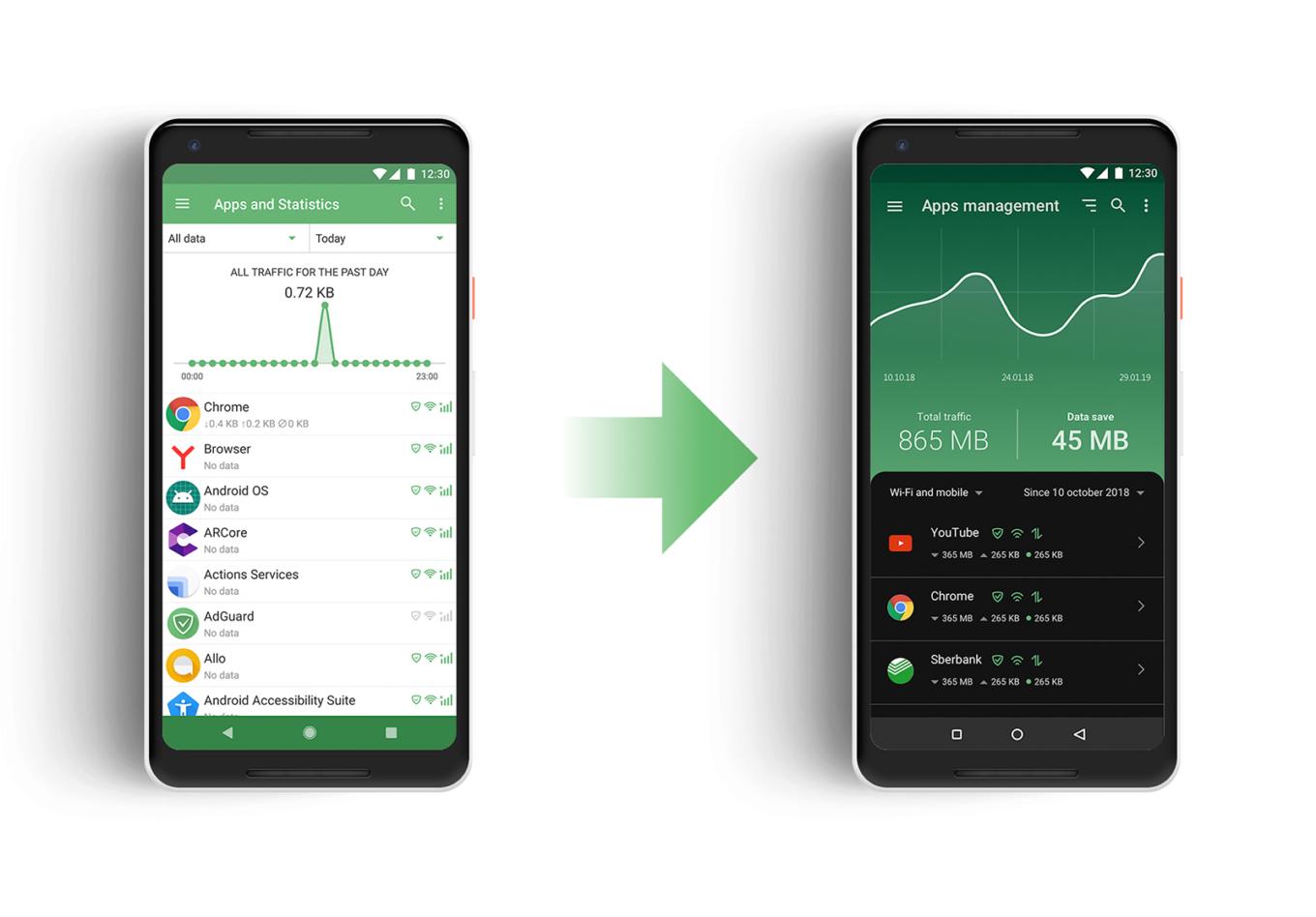
Just look at how better it looks now!

There are significant changes to the UI, as you might expect from an update this big, but in fact the headliner of the new version is Stealth Mode, a new module dedicated solely to privacy protection. Let's kick things off by taking a closer look at the newcomer, and then continue checking out the rest of the changes (there are many more to talk about).

Stealth Mode #2094

It is telling that we’re starting our feature overview with Stealth Mode, listing it even before the redesign, or anything else. With Stealth Mode, AdGuard takes another role in addition to ad blocker and app manager: the role of a privacy protection tool, and a strong one at that. AdGuard has had a special Tracking Protection filter for a long time, but the new module presents an entire range of tools. Some of them will suit almost everyone, and others are for more hardcore users.
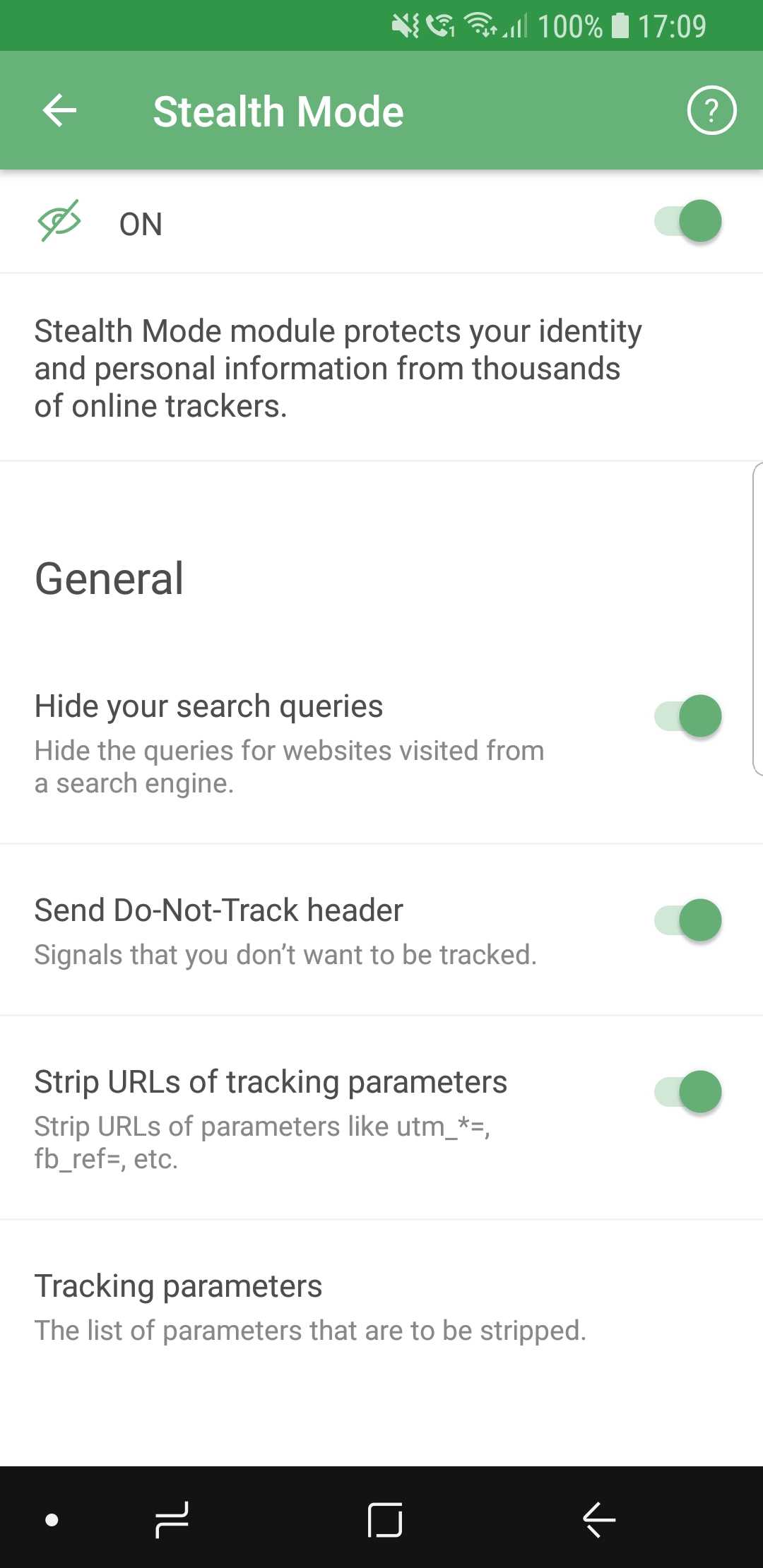
AdGuard Stealth Mode

Let's quickly go over them, but instead of mentioning every single feature, we will group them into categories.

  • General

Here we placed the features that you can enable without any risk of facing much inconvenience. Options like hiding your search queries or removing tracking parameters from URLs are almost strictly advantageous, and you have no reason not to use them if you care about privacy.

  • Tracking methods

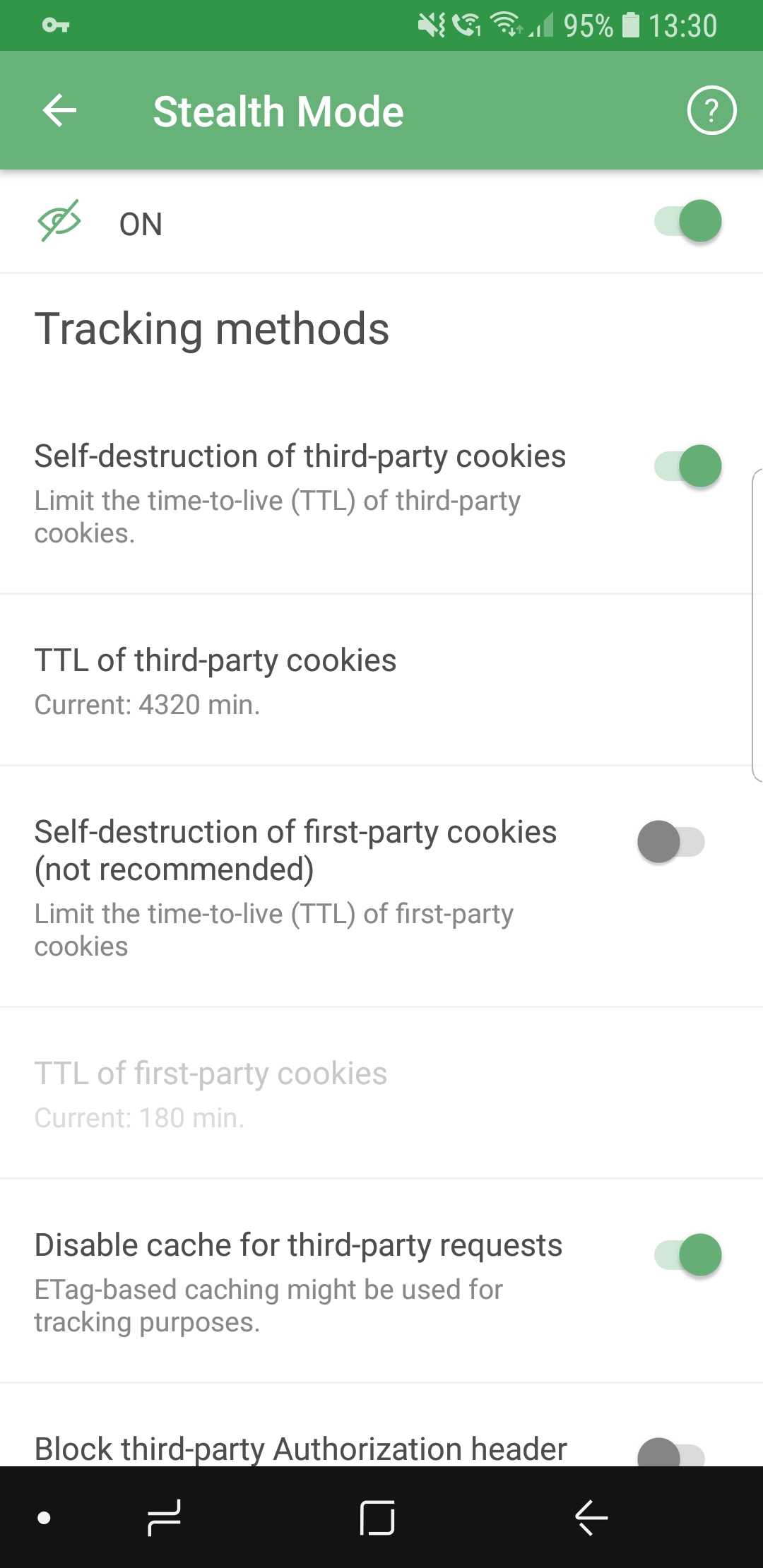
So many options they don't fit on screenshots

Includes options that prevent websites from tracking you by using various mechanisms, for example, cookies. It’s worth mentioning that enabling self-destruction of first-party cookies is not recommended unless you want to take privacy protection to the absolute limit, as it may cause some websites to work improperly, or not work at all.

  • Browser API

In this section, you can enable or disable browser API-related options. Read the description for each of them first to find a good balance between privacy and convenience (for example, blocking Push API will prevent servers from sending any notifications to your browser).

  • Miscellaneous

As the name suggests, this category contains a mish-mash of options. Hiding your User Agent or masking your IP address are the sort of features you will find there.

If you feel intimidated by the variety of available options, you will like the new first launch wizard that will help you choose the configuration most suited for you — more on that later.

New UI

As important as Stealth Mode is, the tone of the update is largely dominated by the visual changes, and this time there are plenty. Almost every aspect of the old design was reworked, revamped and (hopefully) improved. There’s too much to mention in one chunk of text, so let's divide them into more digestible paragraphs.

App redesign #713

Everything is new here. New overall style, new icons, new layout. Our designers spent countless hours on it, going through many iterations. The end goal was to make users feel confident in their ability to navigate the app quickly and easily, and we believe we managed to achieve that.
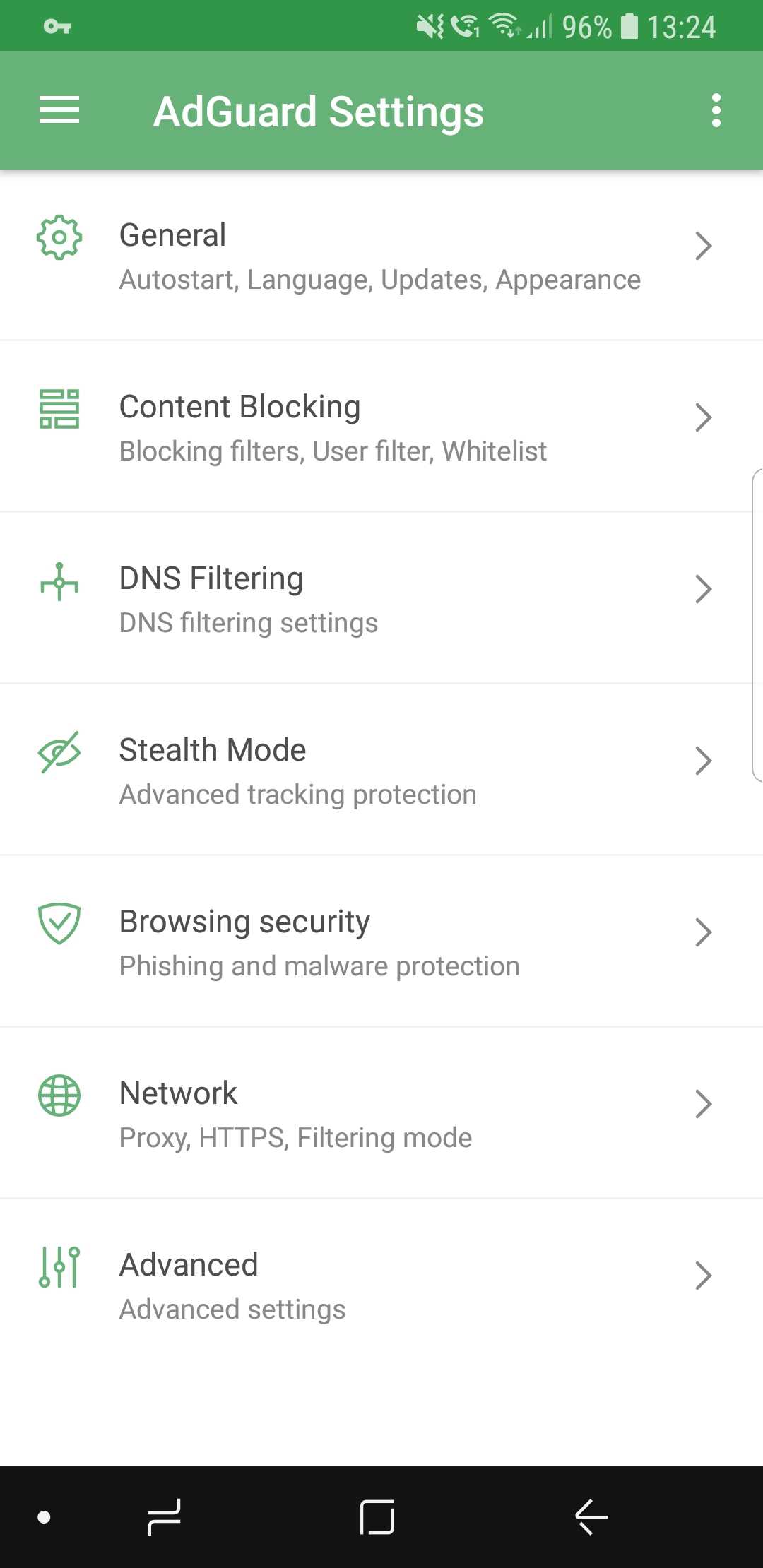
New AdGuard for Android design

We did a lot of tidying up, removed all the elements that clogged up the screen, and added intuitive icons. If you want to get somewhere, it will be very clear to you how to do so.

Dark theme #104

This is probably one of the most desirable features ever. We’ve received requests from users to add a dark theme basically since the app was introduced for the first time more than three years ago. Finally, it has arrived.
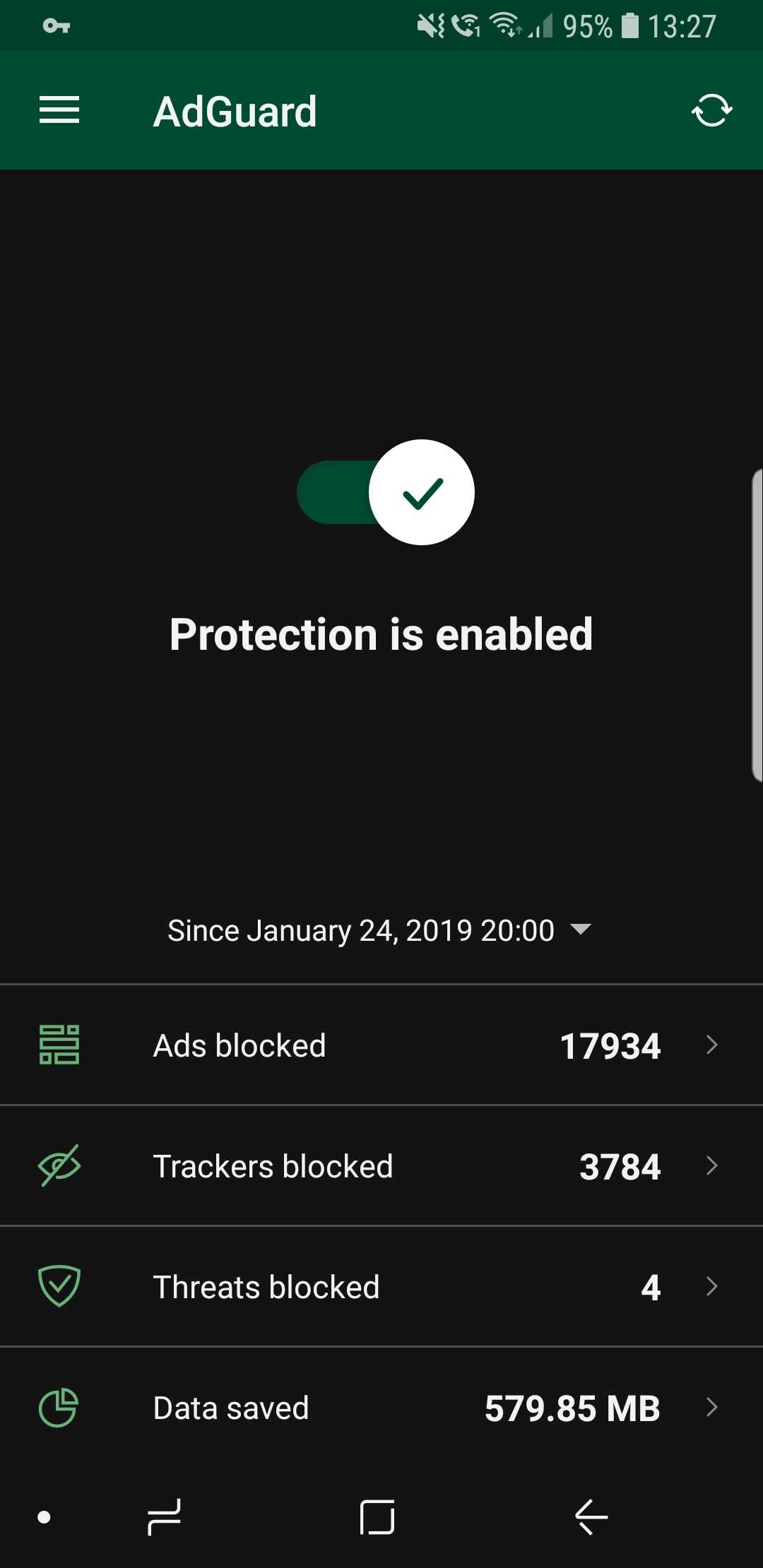
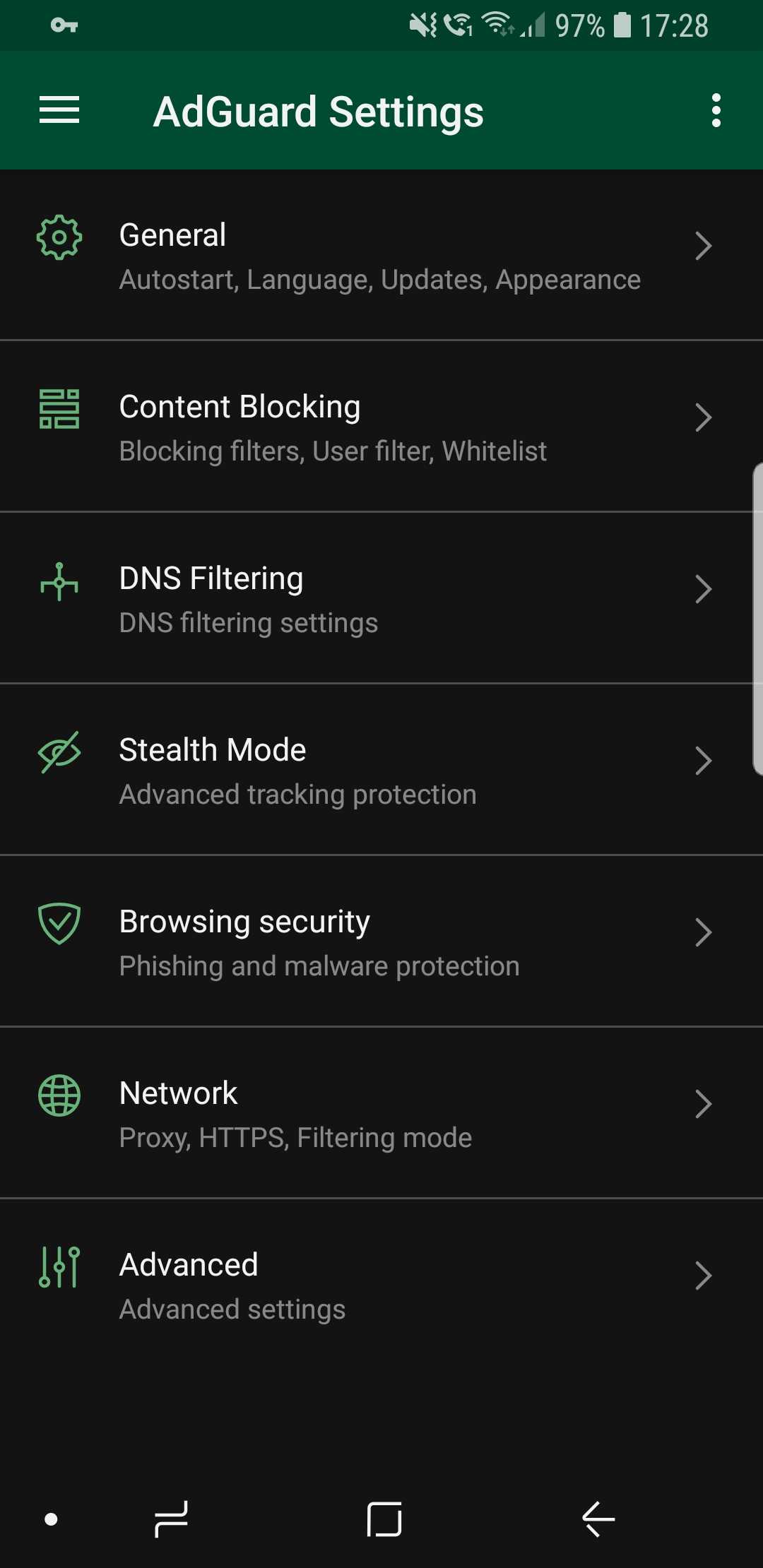
Dark theme looks awesome! (source: us)

It is also true that for every voice that demands a dark theme, there is an equally loud one that goes against it. We would never betray our more conservative users, so the classic light theme is still available (and it's still the default one, for what it's worth).

Statistics charts #2083

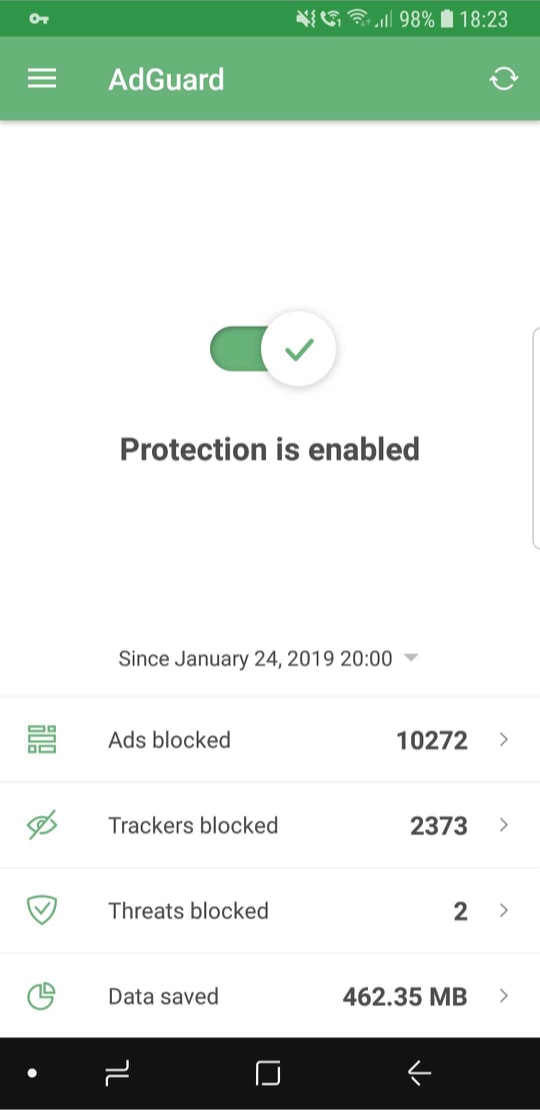
Statistics are useful; it’s always nice to know how many ads were blocked, how much traffic was saved, and so on. But simply looking at bland numbers is not very informative, and also plain boring. Charts provide more information and are much more comprehensive.
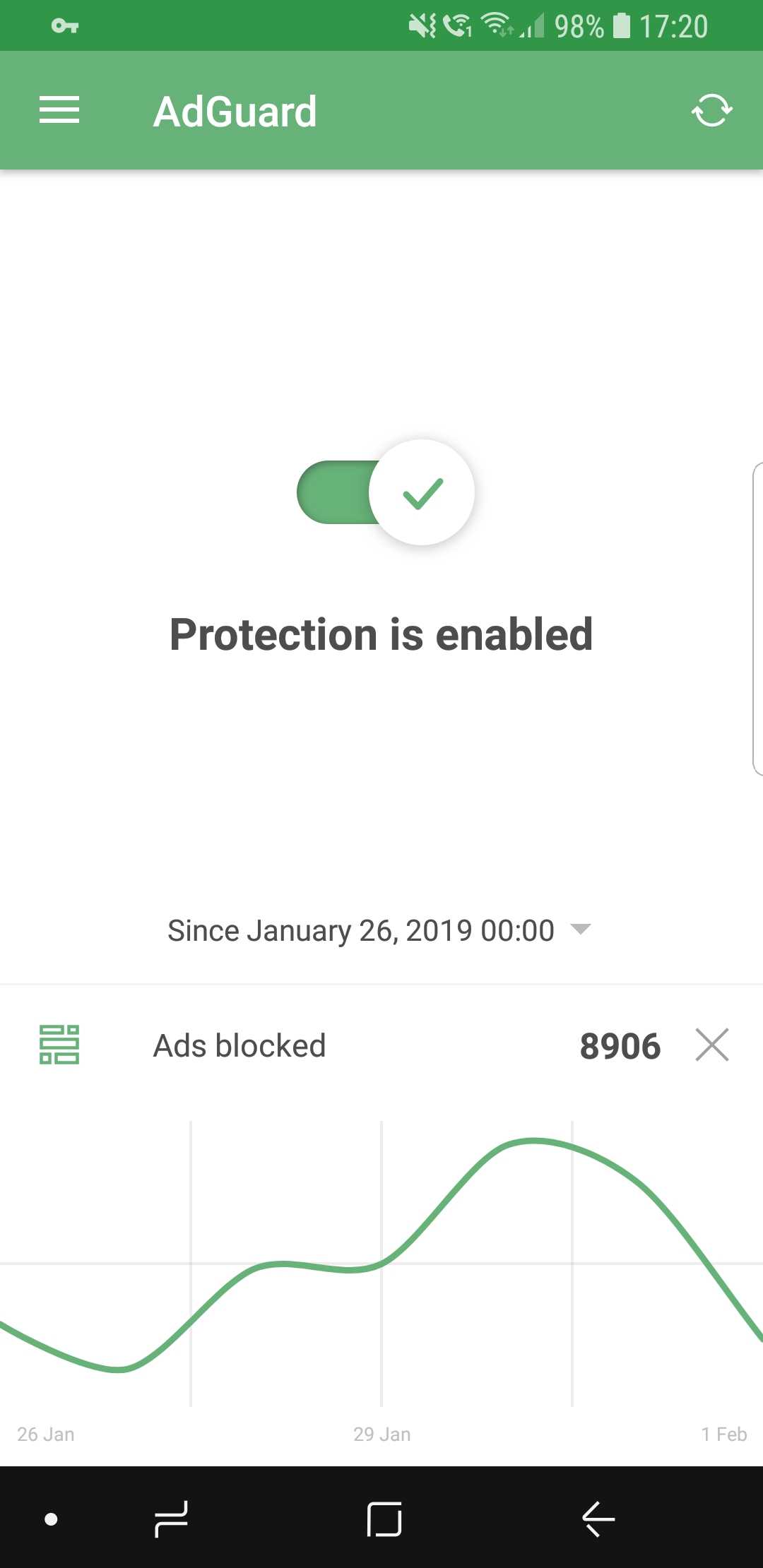
Curves are much better than numbers (that's a fact)

While on the main screen, select the preferred time period and tap on the stat you're interested to display the chart (or go inside Apps Management to look at app-specific charts).

First launch wizard #1965

The wizard's goal is to make you familiar with AdGuard if its your very first time interacting with it. Upon the first launch, it will walk you through the available features and make some suggestions. Feel free to enable or skip any of them, depending on your preferences.
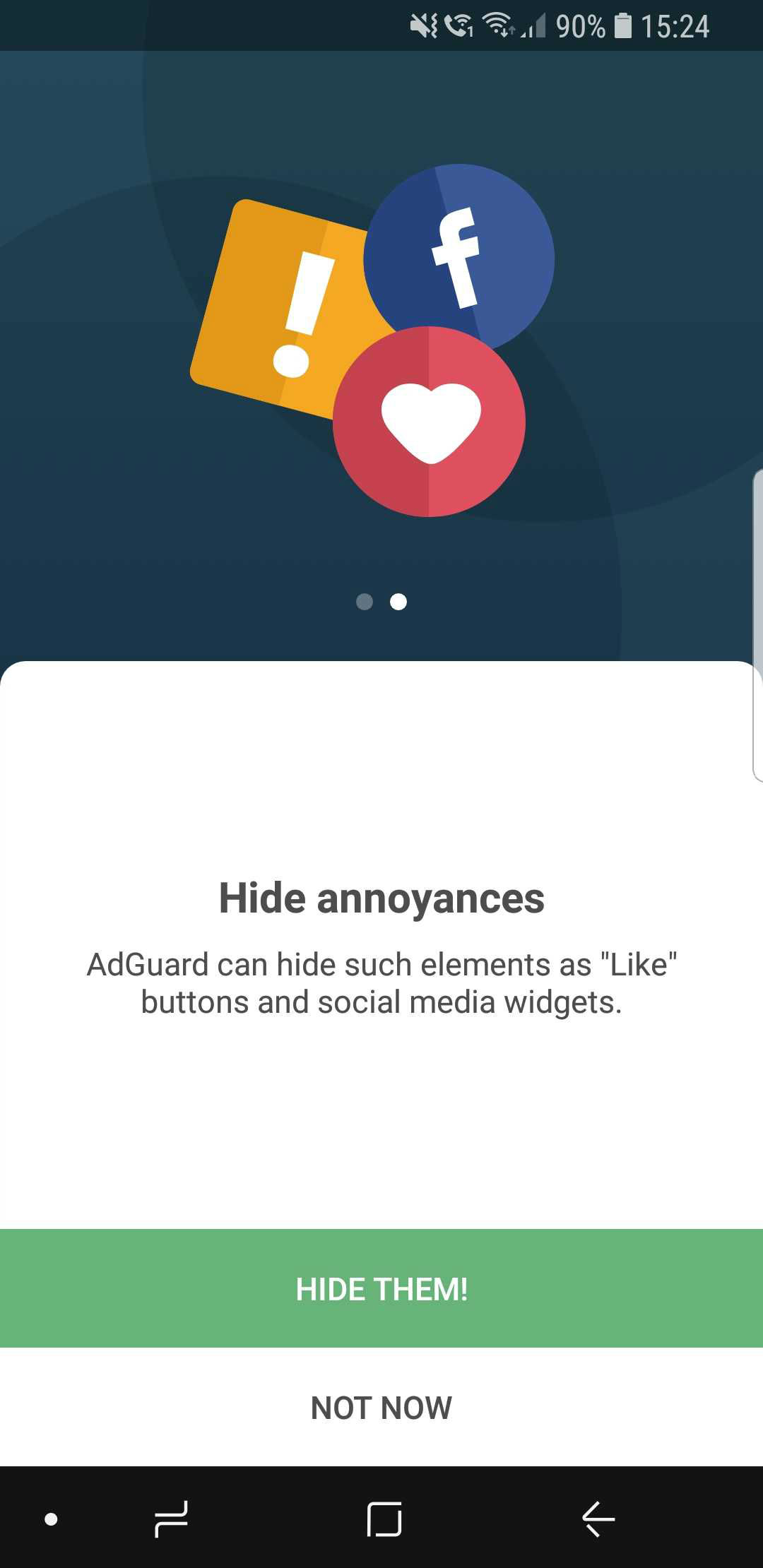
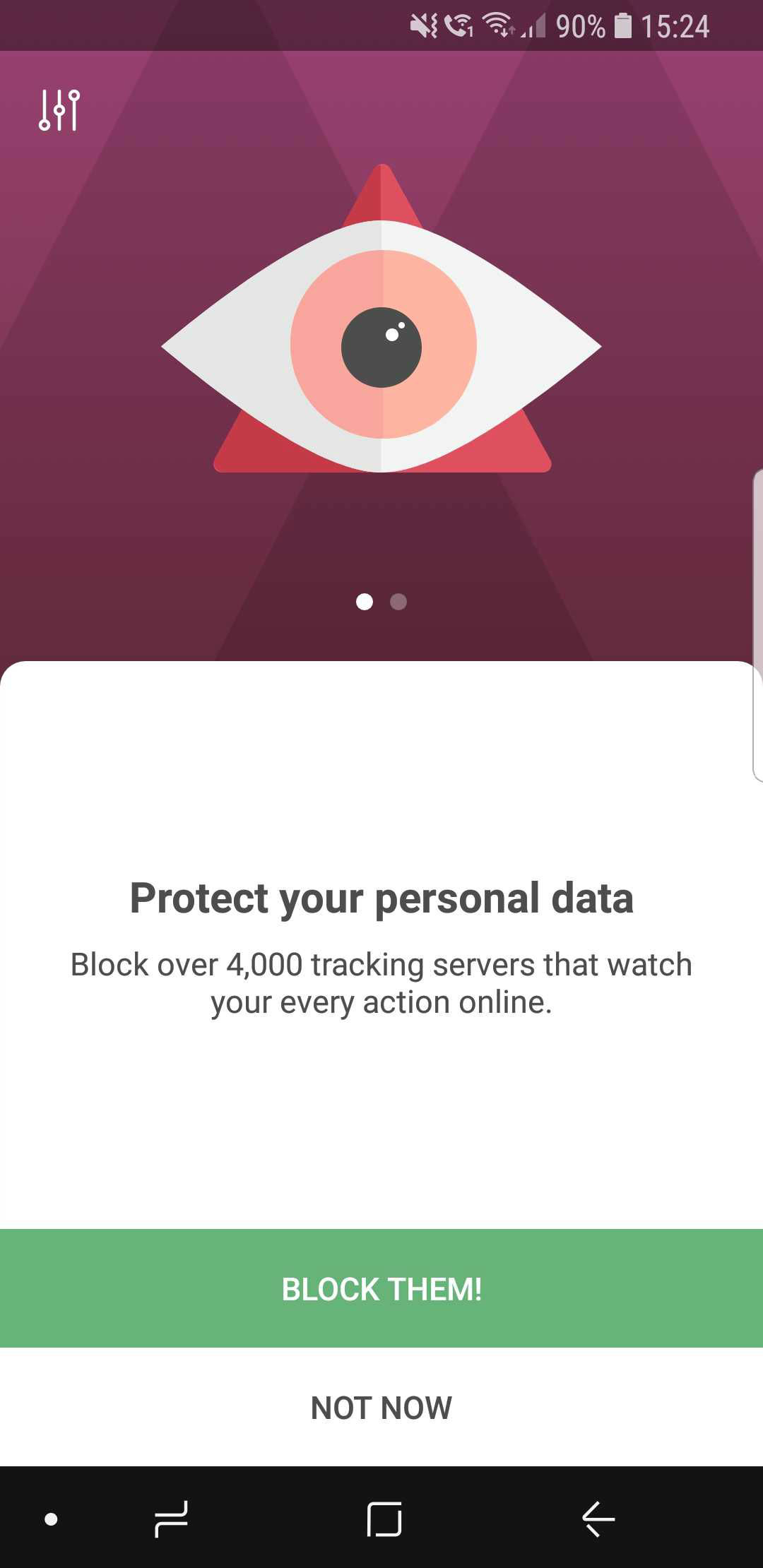
The wizard will help you avoid getting overwhelmed at first

Widget redesign #2354

The apps icon has changed, so the widget needed to be altered as well. Not much to say here: aside from the change in looks, widgets now provide some statistics about blocked requests and so on.
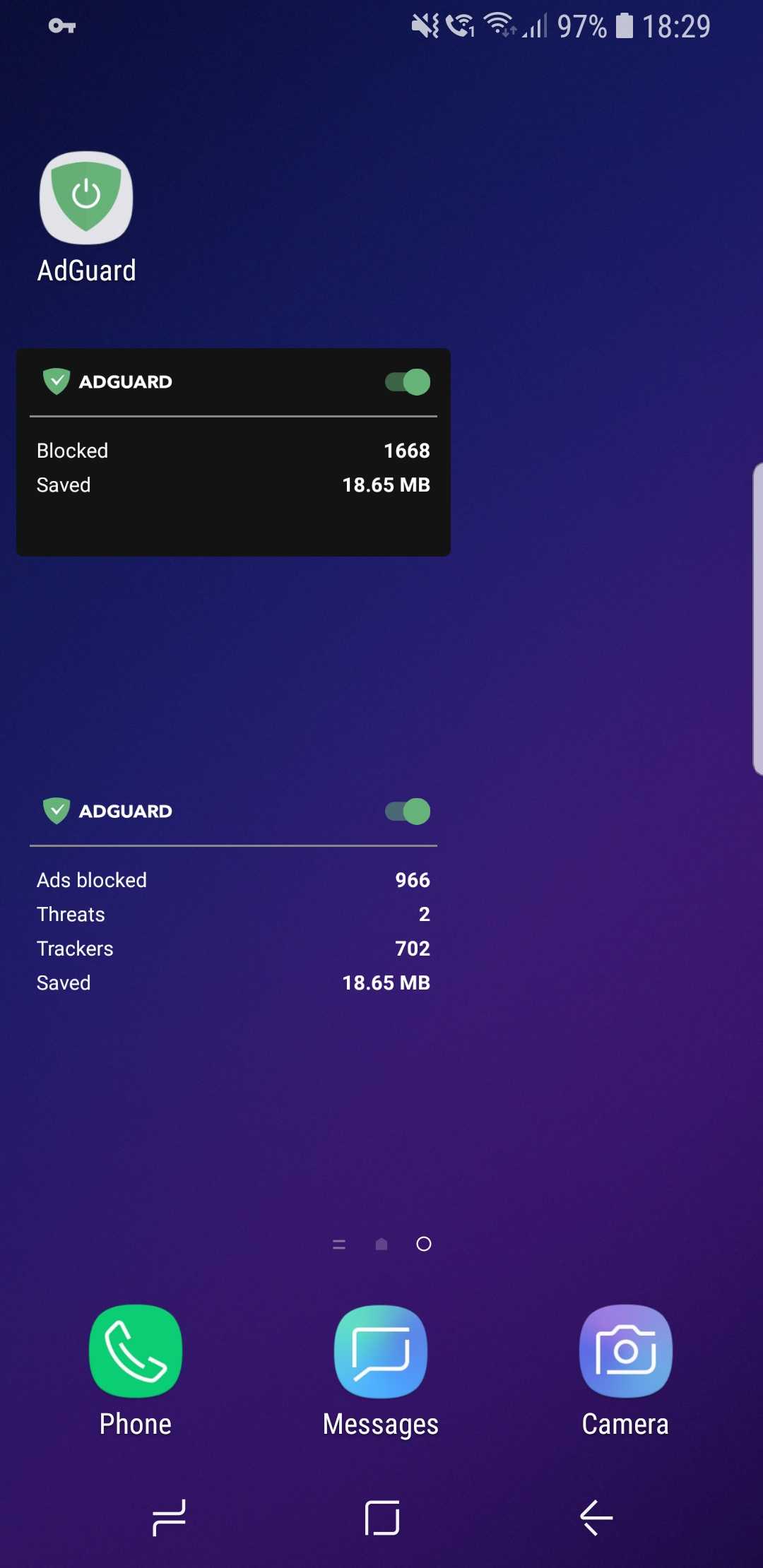
New AdGuard widgets

CoreLibs update

In case you need a refresher, CoreLibs is the new filtering engine that AdGuard is built upon. What AdGuard can and can't do is defined by it, so no wonder it's so important. One of the biggest advantages of CoreLibs compared to the previous engine is that it's cross-platform. This means AdGuard for Android can now take the best from the other AdGuard apps, and you can already see it in action with Stealth Mode.

In this update, CoreLibs receives a further boost, granting better performance and filtering quality. About 150 improvements were made to the filtering engine. We cannot list them all here, but here is a link if you want to check them out.

Other changes

Here are some of the more niche features that will primarily appeal to more tech-savvy users.

Improved DNS functionality #2415

We are now using our own DNS proxy server, which supports all existing DNS protocols. What does that mean for you, the user?

  1. AdGuard now supports the DNS-over-TLS protocol, which is one of the most secure modern DNS protocols
  2. To configure a DNS-over-HTTPS (another secure DNS protocol) server, you don’t need to know the SDNS and can use a simple string like https://dns.adguard.com/dns-query
  3. You can indicate any number of upstream servers for your custom DNS server setup

More filter subscriptions #12
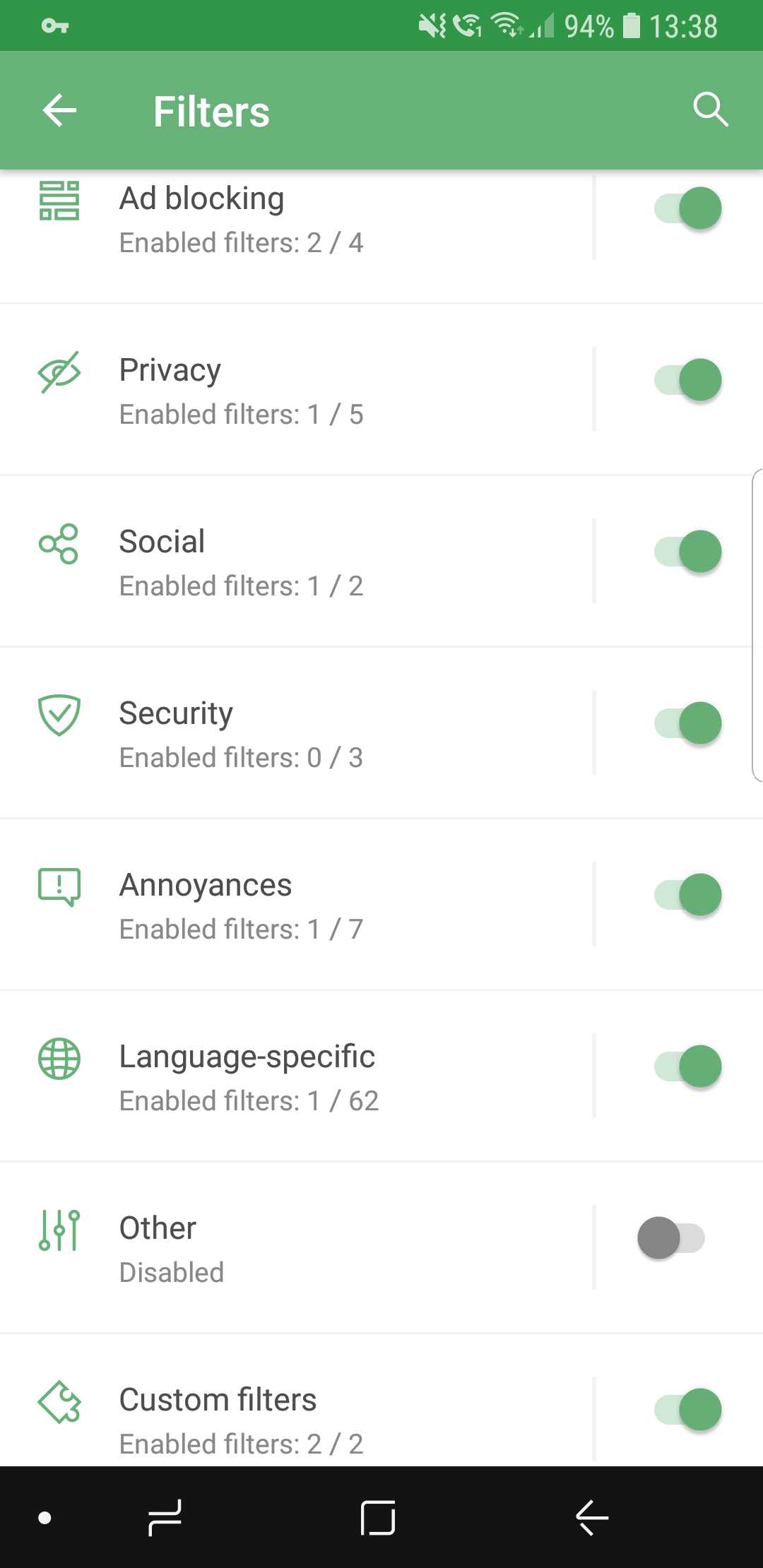
More filters! More!

Self-explanatory: the more, the better! If your favorite subscription wasn’t in the default list before, check it again.

Custom subscriptions by URL #13

…and if it's still not there, no big deal! Just add it manually, because now it's extremely easy. Just tap the respective button, enter the URL, and your filter will appear among the rest. The new filter will be updated automatically, and of course you can add more than one at a time.
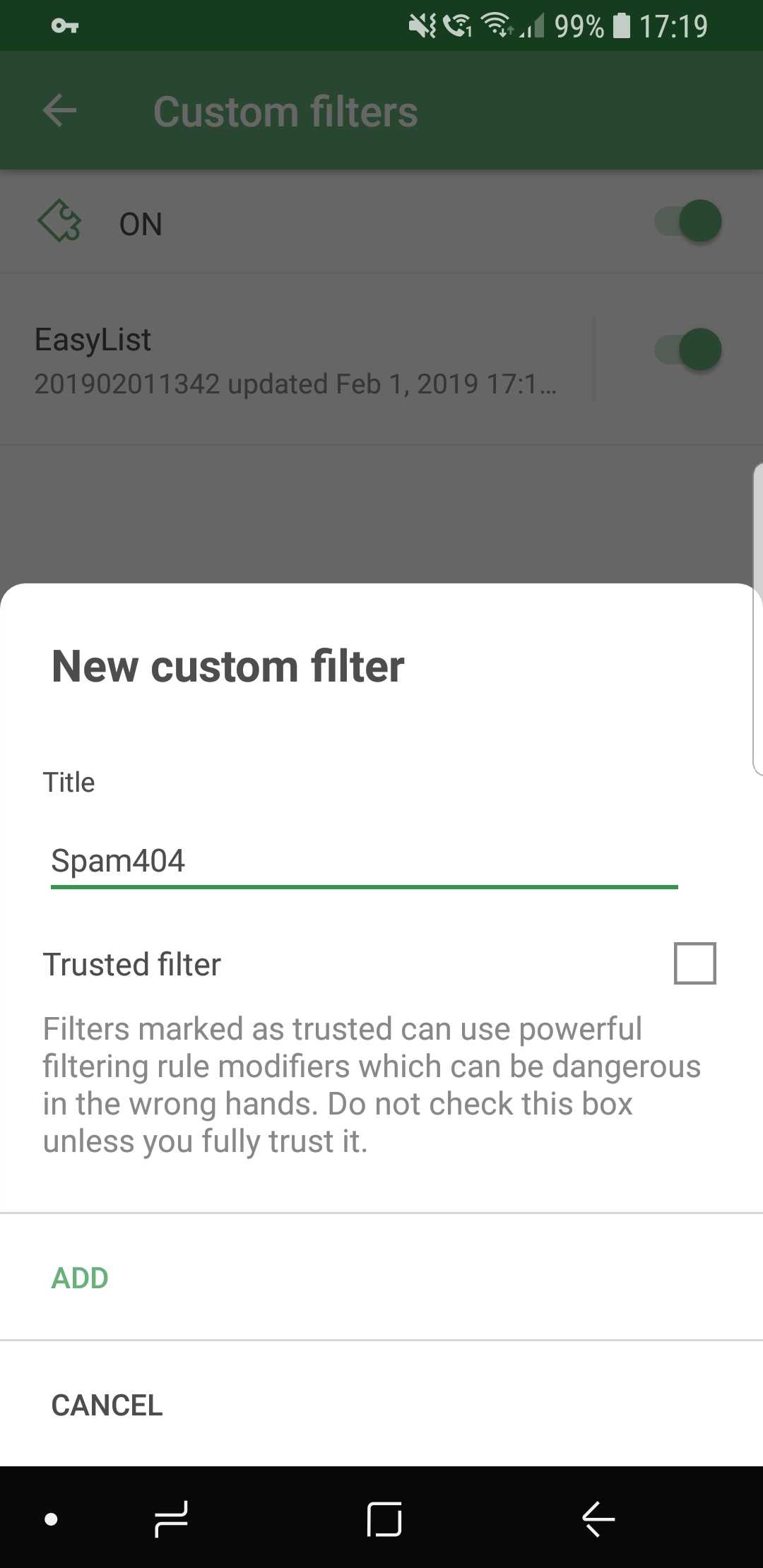
Ok, just one more, I swear...

Conclusion

And that wraps it up for AdGuard 3.0 for Android! Traditionally, the full changelog is available on GitHub. Make sure you install the new version by checking for updates (an icon on the main screen of the app), and if you are new to AdGuard, check out the free trial by downloading the app from our official website.

Let us know about your first impressions of the new AdGuard by leaving a comment below, and see you soon with more news!

PS: Unfortunately, all these wonderful changes would have not been possible without using some of the features available only on newer Android OS versions. Similar to Windows XP, the days of Android 4.x are coming to an end. And despite this wasn't an easy decision, starting with this version AdGuard will only work on devices with Android OS 5+. Owners of devices with Android 4.x can find previous versions of AdGuard on GitHub.

We are currently answering questions about the update on Product Hunt, so if you have any — we are waiting for you there. Oh, and by the way, there is an exclusive 40% discount for "hunters" there, don't tell anyone :)


Podobał Ci się ten post?
AdGuard VPN AdGuard DNS AdGuard Mail AdGuard Wallet
Ekran główny AdGuard dla Windows
Ekran ochrony AdGuard dla Windows, pokazujący funkcje ochrony i ustawienia
Ekran statystyki AdGuard dla Windows, pokazujący statystyki zablokowanych reklam i trackery
Ekran Zarządzanie aplikacjami w AdGuard dla Windows, pokazujący opcje zarządzania ochroną dla aplikacji zainstalowanych na urządzeniu
20 752 20752 recenzje
Doskonały!

AdGuard dla Windows: bloker reklam na PC

AdGuard dla systemu Windows to coś więcej niż bloker reklam. To wielofunkcyjne narzędzie, które blokuje reklamy, kontroluje dostęp do niebezpiecznych stron, przyspiesza ładowanie stron i chroni dzieci przed nieodpowiednimi treściami
Pobierając program, akceptujesz warunki Umowy licencyjnej
Microsoft Store
Pobierając program, akceptujesz warunki Umowy licencyjnej
AdGuard na Windows v8.0, 14-dniowa wersja próbna
Ekran główny AdGuard dla Mac
Ekran Trybu ukrytego w AdGuard dla Mac
20 752 20752 recenzje
Doskonały!

AdGuard: bloker reklam na Maca

AdGuard dla Mac to wyjątkowy bloker reklam zaprojektowany z myślą o macOS. Oprócz ochrony przed uciążliwymi reklamami w przeglądarkach i aplikacjach chroni Cię przed śledzeniem, phishingiem i oszustwami
Pobierając program, akceptujesz warunki Umowy licencyjnej
Przeczytaj więcej
AdGuard na Mac v2.19, 14-dniowa wersja próbna
Ekran główny AdGuard dla Android
Ekran Ochrona przed śledzeniem w AdGuard dla Android
Ekran Zarządzanie aplikacjami w AdGuard dla Android, pokazujący opcje zarządzania ochroną dla aplikacji zainstalowanych na urządzeniu
Ekran statystyki AdGuard dla Android, pokazujący statystyki zablokowanych reklam i trackery
Ekran główny prywatnej przeglądarki AdGuard dla Android
Kod QR, aby pobierz AdGuard dla Android
20 752 20752 recenzje
Doskonały!

AdGuard: bloker reklam na Androida

Blokuje reklamy i moduły śledzące we wszystkich przeglądarkach, grach i innych aplikacjach. Chroni Twoją prywatność i pozwala kontrolować, w jaki sposób aplikacje korzystają z Internetu. Instalowane za pomocą pliku APK
Pobierając program, akceptujesz warunki Umowy licencyjnej
Przeczytaj więcej
Skanuj, aby pobrać
Użyj dowolnego czytnika kodów QR dostępnego w Twoim urządzeniu
AdGuard na Android v4.14, 14-dniowa wersja próbna
Ekran główny AdGuard dla iOS
Ekran ochrony AdGuard dla iOS, pokazujący funkcje ochrony i ustawienia
Ekran statystyki AdGuard dla iOS, pokazujący statystyki zablokowanych reklam i trackery
Kod QR, aby pobierz AdGuard dla iOS
20 752 20752 recenzje
Doskonały!

AdGuard na iOS: bloker reklam poza Safari

Najlepszy bloker reklam na iOS dla iPhone’a i iPada. AdGuard usuwa wszelkiego rodzaju reklamy i elementy śledzące w Safari oraz chroni Twoją prywatność we wszystkich aplikacjach na poziomie DNS
Pobierając program, akceptujesz warunki Umowy licencyjnej
Przeczytaj więcej
Skanuj, aby pobrać
Użyj dowolnego czytnika kodów QR dostępnego w Twoim urządzeniu
AdGuard na iOS v4.5
Ekran główny AdGuard Content Blocker
Ekran Filtry w AdGuard Content Blocker
Ekran ustawienia w AdGuard Content Blocker
20 752 20752 recenzje
Doskonały!

Blokada treści AdGuard

AdGuard Content Blocker eliminuje wszelkiego rodzaju reklamy w przeglądarkach mobilnych, które obsługują technologię blokowania treści — a mianowicie Samsung Internet i Yandex Browser. Jego funkcje są ograniczone w porównaniu z AdGuard na Androida, ale jest darmowy, łatwy w instalacji i wydajny
Pobierając program, akceptujesz warunki Umowy licencyjnej
Przeczytaj więcej
Blokada treści AdGuard v2.8
Ekran główny AdGuard Browser Extension
Ekran Ochrona przed śledzeniem w AdGuard Browser Extension
20 752 20752 recenzje
Doskonały!

Rozszerzenie przeglądarki AdGuard

AdGuard to najszybsze i najlżejsze rozszerzenie blokowania reklam, które skutecznie blokuje wszystkie typy reklam na wszystkich stronach internetowych! Wybierz AdGuard dla swojej przeglądarki i uzyskaj szybkie i bezpieczne przeglądanie Internetu pozbawione reklam.
Instalacja
Pobierając program, akceptujesz warunki Umowy licencyjnej
Instalacja
Pobierając program, akceptujesz warunki Umowy licencyjnej
Instalacja
Pobierając program, akceptujesz warunki Umowy licencyjnej
Instalacja
Pobierając program, akceptujesz warunki Umowy licencyjnej
Instalacja
Pobierając program, akceptujesz warunki Umowy licencyjnej
Przeczytaj więcej
Instalacja
Pobierając program, akceptujesz warunki Umowy licencyjnej
Przeczytaj więcej
Rozszerzenie przeglądarki AdGuard v5.5
Ekran główny Asystenta przeglądarki
20 752 20752 recenzje
Doskonały!

Asystent AdGuard

Towarzyszące rozszerzenie przeglądarki dla aplikacji desktopowych AdGuard. Umożliwia blokowanie niestandardowych elementów na stronach internetowych, dodawanie stron internetowych do listy dozwolonych i wysyłanie raportów bezpośrednio z przeglądarki
Asystent AdGuard v1.4
20 752 20752 recenzje
Doskonały!

AdGuard Home

AdGuard Home to sieciowe rozwiązanie do blokowania reklam i modułów śledzących. Zainstaluj go raz na routerze, aby objąć nim wszystkie urządzenia w sieci domowej — nie jest wymagane żadne dodatkowe oprogramowanie klienckie. Jest to szczególnie ważne w przypadku różnych urządzeń IoT, które często stanowią zagrożenie dla Twojej prywatności
AdGuard Home v0.107
Ekran główny AdGuard Pro dla iOS
Ekran Ochrona w AdGuard Pro dla iOS, pokazujący funkcje i ustawienia ochrony
Ekran statystyki w AdGuard Pro dla iOS, pokazujący statystyki zablokowanych reklam i trackerów
20 752 20752 recenzje
Doskonały!

AdGuard Pro dla iOS

AdGuard Pro na iOS oferuje wszystkie zaawansowane funkcje blokowania reklam. Oferuje te same narzędzia, co płatna wersja AdGuard na iOS. Doskonale blokuje reklamy w Safari i pozwala dostosować ustawienia DNS, aby dostosować poziom ochrony. Blokuje reklamy w przeglądarkach i aplikacjach, chroni dzieci przed nieodpowiednimi treściami i dba o bezpieczeństwo danych osobowych.
Pobierając program, akceptujesz warunki Umowy licencyjnej
Przeczytaj więcej
AdGuard Pro dla iOS v4.5
Ekran główny AdGuard Mini dla Mac
Ekran ochrony Safari w AdGuard Mini dla Mac
Ekran tworzenia reguły w AdGuard Mini dla Mac
20 752 20752 recenzje
Doskonały!

AdGuard Mini dla Mac — bloker reklam Safari

AdGuard Mini dla komputerów Mac to potężny bloker reklam w Safari. Ta lekka aplikacja usuwa reklamy, blokuje moduły śledzące i przyspiesza ładowanie stron. Umożliwia przeglądanie internetu w Safari bez rozpraszania uwagi i chroni prywatność danych
Instalacja
Pobierając program, akceptujesz warunki Umowy licencyjnej
Przeczytaj więcej
AdGuard Mini dla Mac v2.3
Ekran główny AdGuard dla Android TV z włączoną ochroną
Ekran blokowanie reklama AdGuard dla Android TV, pokazujący jego funkcje i ustawienia
Ekran ustawienia AdGuard dla Android TV
Ekran Zarządzanie aplikacjami AdGuard dla Android TV, pokazujący aplikacje, w których reklamy i trackery są zablokowane
20 752 20752 recenzje
Doskonały!

AdGuard dla Android TV

AdGuard dla Android TV to jedyna aplikacja, która blokuje reklamy, chroni prywatność i działa jak zapora sieciowa dla Smart TV. Otrzymuj ostrzeżenia o zagrożeniach internetowych, używaj bezpiecznego DNS i korzystaj z szyfrowanego ruchu. Zrelaksuj się i zanurz się w swoich ulubionych programach z najwyższej klasy zabezpieczeniami bez reklam!
AdGuard dla Android TV v4.14, 14-dniowa wersja próbna
Maskotka AdGuard, Agnar, trzymający pingwina Linux
20 752 20752 recenzje
Doskonały!

AdGuard dla Linux

AdGuard for Linux to pierwszy na świecie systemowy bloker reklam dla systemu Linux. Blokuj reklamy i elementy śledzące na poziomie urządzenia, wybieraj spośród wstępnie zainstalowanych filtrów lub dodawaj własne — wszystko za pośrednictwem interfejsu wiersza poleceń
AdGuard dla Linux v1.4
20 752 20752 recenzje
Doskonały!

AdGuard Temp Mail

Darmowy generator tymczasowych adresów e-mail, który zapewnia anonimowość i chroni prywatność. Brak spamu w głównej skrzynce odbiorczej!
20 752 20752 recenzje
Doskonały!

AdGuard VPN

75 lokalizacji na świecie

Dostęp do wszelkich treści

Silne szyfrowanie

Polityka braku logów

Najszybsze połączenie

Wsparcie 24/7

Wypróbuj za darmo
Pobierając program, akceptujesz warunki Umowy licencyjnej
Przeczytaj więcej
20 752 20752 recenzje
Doskonały!

AdGuard DNS

AdGuard DNS to alternatywne rozwiązanie do blokowania reklam, ochrony prywatności i kontroli rodzicielskiej. Łatwy w konfiguracji i darmowy, zapewnia niezbędną minimalną ochronę przed reklamami, śledzeniem i phishingiem, bez względu na platformę i urządzenie, z którego korzystasz.
20 752 20752 recenzje
Doskonały!

AdGuard Mail

Chroń swoją tożsamość, unikaj spamu i zabezpiecz swoją skrzynkę odbiorczą dzięki naszym aliasom i tymczasowym adresom e-mail. Skorzystaj z naszej bezpłatnej usługi przekazywania e-maili oraz aplikacji na wszystkie systemy operacyjne
20 752 20752 recenzje
Doskonały!

AdGuard Wallet

Bezpieczny i prywatny portfel kryptowalutowy, który daje Ci pełną kontrolę nad Twoimi aktywami. Zarządzaj wieloma portfelami i odkrywaj tysiące kryptowalut, aby je przechowywać, wysyłać i wymieniać
Rozpoczęto pobieranie AdGuard Kliknij przycisk wskazany strzałką, aby rozpocząć instalację Wybierz „Otwórz” i kliknij „OK”. Poczekaj aż plik zostanie pobrany. W otwartym oknie, przeciągnij ikonę AdGuard do folderu „Aplikacje”. Dziękujemy za wybrania AdGuard! Wybierz „Otrwórz” i kliknij „OK”. Poczekaj aż plik zostanie pobrany. W otwartym kliknij „Instaluj”. Dziękujemy za wybrania AdGuard!
Zainstaluj również AdGuard dla urządzeń mobilnych