Coming soon: AdGuard VPN — fast and reliable

Imagine this: you got everything sorted out. Your ad blocker protects you from all kinds of ads (except for that one website you really want to support). You have configured AdGuard DNS on your router and it stops all trackers in their tracks on every device in your home. You know what, you even got yourself an antivirus! Just to be 100% safe. It seems that you got all bases covered when it comes to your online privacy and security. You can finally find some peace and watch that new TV series that everyone can't keep their mouth shut about. But wait, what's that? "This video is not available in your country". After all this work?! Turns out, you missed one thing to truly complete your responsible web surfer suit: a VPN.

And we're going to give it to you! AdGuard VPN is about to officially hit the digital shelves of Chrome Web Store (you can already try the beta), and you can become one of the first to try it.

What is VPN?

First of all, let's get it out of the way: what's a VPN? What do you need it for? I'm sure many of you know the answer to these questions but it won't hurt to have a quick recap. The acronym stands for Virtual Private Network, but it alone doesn't clarify much. The point of a VPN is to create a secure connection to another network over the Internet.

Imagine there's an underground tunnel that leads from your house to your neighbour's. When you go through it and then outside, to everyone on the street it looks like you live there. It's roughly the same with VPNs. You establish a secure connection with another network and to everyone outside of this network it looks like your traffic comes from there. In fact, nobody even knows that it's your traffic. In our example VPN would be your neighbour's house, and the tunnel is an encrypted connection.
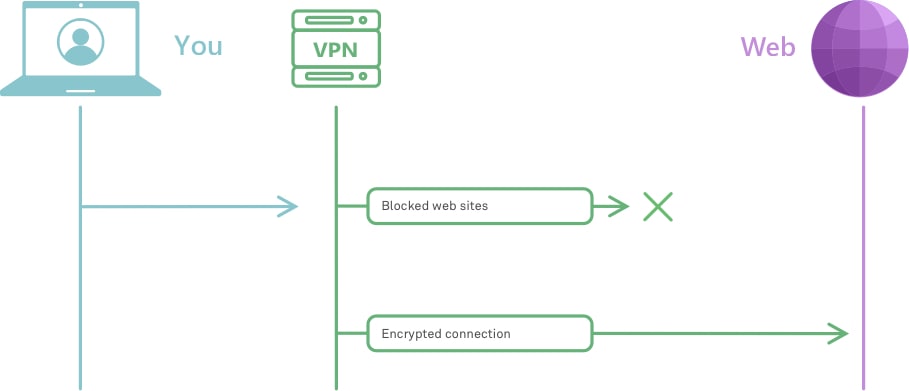
How VPN works *mobile
Very roughly, this is how VPN works

To understand better how it works, check out this article. And to really, really understand how it works, head to this one instead.

But why would you need it? We've already established that VPN masks your traffic so that no one knows that it's actually yours. And this has several real life applications:

  • provides online security, hides your location and other information about you and your computer;
  • protects your privacy by encrypting your data and masking IP address;
  • allows to see geo-restricted content;
  • helps avoiding geo-targeted ads.

These are only some of the ways VPN can be helpful when you browse online. So, now that you have an idea about how VPN works and why it is useful, it's high time to introduce our own brand new VPN!

Meet AdGuard VPN

So many people asked us in the past if we were going to develop a VPN, and every time we answered that it's not really our area of expertise. But one day we thought: "Hey, why not? We've got a lot of experience in privacy protection and other adjacent areas, we could do it!" And so we did. To test the waters, we kicked things off by developing a Chrome browser extension.
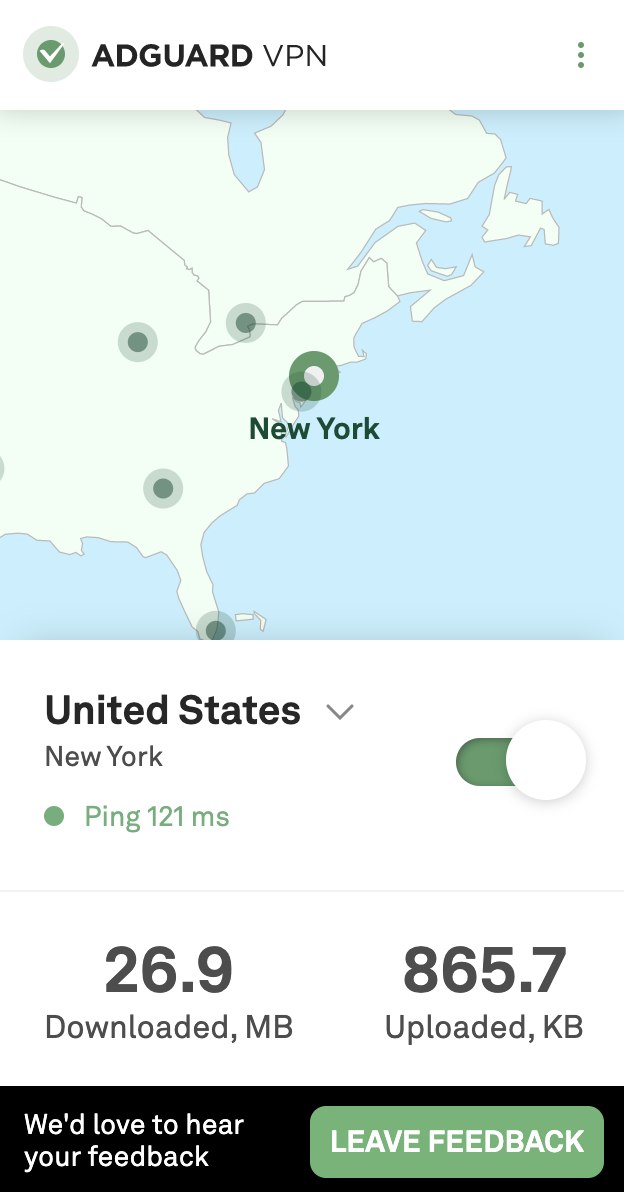
VPN extension main *mobile
Simple yet stylish, this is how we like it

To make things clear from the get-go: it's still work in progress. By this moment, only a beta version is available. Mostly to try out how well our server infrastructure will handle the traffic load and other technical things like that. There's still a lot to do, but it's functioning, and you can even join the beta test right now. Despite being in its infancy, the extension has all the basic stuff that you want from your VPN. A wide selection of server locations from all around the globe, a whitelist, a selective mode, traffic statistics. Fast speed and high reliability too, of course. In fact, more about this in just a moment.

Why AdGuard?

That's a valid question. There are hundreds of VPNs around, many of them proved to be good at their job and earned trust of millions of users. You could choose any of them, what can we offer to counter that? We've got a couple of unique advantages.

All in one

First, let's track back to our analogy. One of the biggest drawbacks of current VPNs is that they can be detected. Imagine you emerge from that little tunnel of yours and exit the neighbour's house all covered in dirt. It'll be pretty obvious that you don't live there. Same with VPN. Your ISP, or anyone else who has access to your traffic, will be able to tell you’re using a VPN.

There are solutions. You could be crawling through your tunnel more carefully to remain clean, but it would take much more time. There are some VPN protocols that conceal the fact that any VPN is being used, as a trade-off their speed is generally significantly lower. It seems that there are really no VPN protocols that have the best of both worlds.
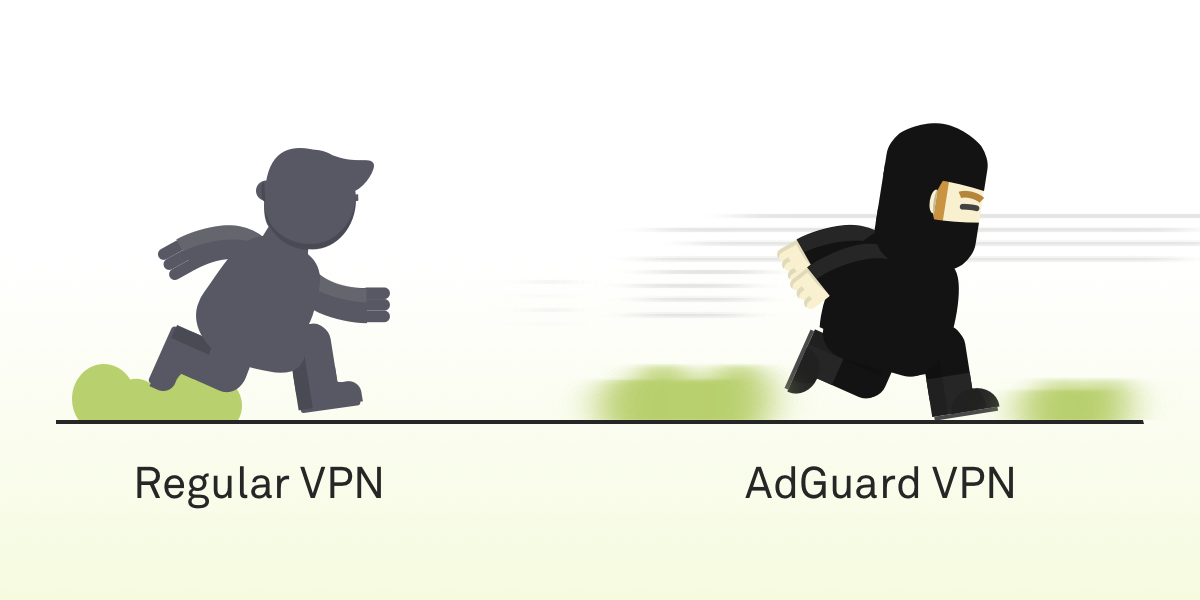
Fast *mobile
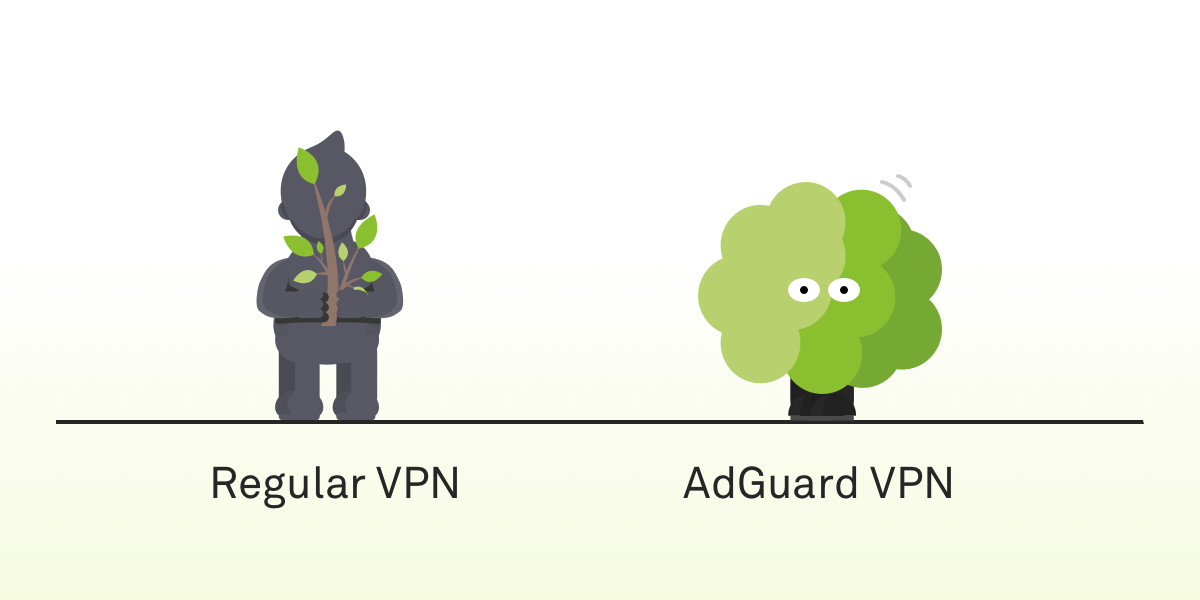
Safe *mobile
AdGuard VPN is both fast and hard to detect

And this is the ace up our sleeve. The protocol AdGuard VPN will employ is, in fact, both fast and hard to detect. It is brand new, we are developing it from scratch, and no other product is using it. It's still getting polished, so it will probably get added only by the time of the official release.

We often repeat ourselves about the importance of open source, and we stand by our words. Multiple AdGuard products, AdGuard DNS, AdGuard Home — we have a long list of open source projects and once the work is done, when the new protocol is up and running, tested and approved, then we'll make it open source too.

Compatibility with AdGuard ad blockers

Another advantage that we can offer to our users is that AdGuard VPN, unsurprisingly, will be able to work alongside the AdGuard mobile ad blocking apps. The struggle is familiar to any Android or iOS AdGuard user. To properly block ads on those platforms a local VPN is required; on Android you can't use two VPNs at the same time at all, on iOS not any two VPNs will work together. With AdGuard VPN, this will shortly become an ex-problem.

Future plans

Our plans reach far. It's clear our current priority is finishing the Chrome browser extension. Implementing the new protocol, stuffing it with more features. Adding more servers and new server locations. Eventually, we're going to release extensions for other browsers (e.g. Firefox), mobile apps for iOS and Android. Desktop apps are somewhere in a more distant future, but not out of the question either.

Don't want to miss all of it? Join the waitlist now and get an email notification the very day when AdGuard VPN becomes officially available to the public.

We should also mention that AdGuard VPN will be a freemium product. Part of the features will require a subscription, and we, of course, will give more details on that in a separate blog article when we near the big day. By the way, speaking of that...

Take part in the giveaway

If you sign up for early access now, you'll automatically join the giveaway of 10 free yearly AdGuard VPN subscriptions. To do that, follow this link and enter your email in the form. The winners will be announced in our social media: Twitter, Facebook, Telegram. Feel free to subscribe!


There's a lot to unpack here, so take your time. Ask us any questions about the present and the future of AdGuard VPN, we'll make sure to answer each and every one of them. And if you're brave enough to try the beta, give us your feedback! We're in that stage where you can influence how the app will look like in the end.

And most importantly — stay safe online!

Podobał Ci się ten post?
AdGuard VPN AdGuard DNS AdGuard Mail AdGuard Wallet
Ekran główny AdGuard dla Windows
Ekran ochrony AdGuard dla Windows, pokazujący funkcje ochrony i ustawienia
Ekran statystyki AdGuard dla Windows, pokazujący statystyki zablokowanych reklam i trackery
Ekran Zarządzanie aplikacjami w AdGuard dla Windows, pokazujący opcje zarządzania ochroną dla aplikacji zainstalowanych na urządzeniu
20 752 20752 recenzje
Doskonały!

AdGuard dla Windows: bloker reklam na PC

AdGuard dla systemu Windows to coś więcej niż bloker reklam. To wielofunkcyjne narzędzie, które blokuje reklamy, kontroluje dostęp do niebezpiecznych stron, przyspiesza ładowanie stron i chroni dzieci przed nieodpowiednimi treściami
Pobierając program, akceptujesz warunki Umowy licencyjnej
Microsoft Store
Pobierając program, akceptujesz warunki Umowy licencyjnej
AdGuard na Windows v8.0, 14-dniowa wersja próbna
Ekran główny AdGuard dla Mac
Ekran Trybu ukrytego w AdGuard dla Mac
20 752 20752 recenzje
Doskonały!

AdGuard: bloker reklam na Maca

AdGuard dla Mac to wyjątkowy bloker reklam zaprojektowany z myślą o macOS. Oprócz ochrony przed uciążliwymi reklamami w przeglądarkach i aplikacjach chroni Cię przed śledzeniem, phishingiem i oszustwami
Pobierając program, akceptujesz warunki Umowy licencyjnej
Przeczytaj więcej
AdGuard na Mac v2.19, 14-dniowa wersja próbna
Ekran główny AdGuard dla Android
Ekran Ochrona przed śledzeniem w AdGuard dla Android
Ekran Zarządzanie aplikacjami w AdGuard dla Android, pokazujący opcje zarządzania ochroną dla aplikacji zainstalowanych na urządzeniu
Ekran statystyki AdGuard dla Android, pokazujący statystyki zablokowanych reklam i trackery
Ekran główny prywatnej przeglądarki AdGuard dla Android
Kod QR, aby pobierz AdGuard dla Android
20 752 20752 recenzje
Doskonały!

AdGuard: bloker reklam na Androida

Blokuje reklamy i moduły śledzące we wszystkich przeglądarkach, grach i innych aplikacjach. Chroni Twoją prywatność i pozwala kontrolować, w jaki sposób aplikacje korzystają z Internetu. Instalowane za pomocą pliku APK
Pobierając program, akceptujesz warunki Umowy licencyjnej
Przeczytaj więcej
Skanuj, aby pobrać
Użyj dowolnego czytnika kodów QR dostępnego w Twoim urządzeniu
AdGuard na Android v4.14, 14-dniowa wersja próbna
Ekran główny AdGuard dla iOS
Ekran ochrony AdGuard dla iOS, pokazujący funkcje ochrony i ustawienia
Ekran statystyki AdGuard dla iOS, pokazujący statystyki zablokowanych reklam i trackery
Kod QR, aby pobierz AdGuard dla iOS
20 752 20752 recenzje
Doskonały!

AdGuard na iOS: bloker reklam poza Safari

Najlepszy bloker reklam na iOS dla iPhone’a i iPada. AdGuard usuwa wszelkiego rodzaju reklamy i elementy śledzące w Safari oraz chroni Twoją prywatność we wszystkich aplikacjach na poziomie DNS
Pobierając program, akceptujesz warunki Umowy licencyjnej
Przeczytaj więcej
Skanuj, aby pobrać
Użyj dowolnego czytnika kodów QR dostępnego w Twoim urządzeniu
AdGuard na iOS v4.5
Ekran główny AdGuard Content Blocker
Ekran Filtry w AdGuard Content Blocker
Ekran ustawienia w AdGuard Content Blocker
20 752 20752 recenzje
Doskonały!

Blokada treści AdGuard

AdGuard Content Blocker eliminuje wszelkiego rodzaju reklamy w przeglądarkach mobilnych, które obsługują technologię blokowania treści — a mianowicie Samsung Internet i Yandex Browser. Jego funkcje są ograniczone w porównaniu z AdGuard na Androida, ale jest darmowy, łatwy w instalacji i wydajny
Pobierając program, akceptujesz warunki Umowy licencyjnej
Przeczytaj więcej
Blokada treści AdGuard v2.8
Ekran główny AdGuard Browser Extension
Ekran Ochrona przed śledzeniem w AdGuard Browser Extension
20 752 20752 recenzje
Doskonały!

Rozszerzenie przeglądarki AdGuard

AdGuard to najszybsze i najlżejsze rozszerzenie blokowania reklam, które skutecznie blokuje wszystkie typy reklam na wszystkich stronach internetowych! Wybierz AdGuard dla swojej przeglądarki i uzyskaj szybkie i bezpieczne przeglądanie Internetu pozbawione reklam.
Instalacja
Pobierając program, akceptujesz warunki Umowy licencyjnej
Instalacja
Pobierając program, akceptujesz warunki Umowy licencyjnej
Instalacja
Pobierając program, akceptujesz warunki Umowy licencyjnej
Instalacja
Pobierając program, akceptujesz warunki Umowy licencyjnej
Instalacja
Pobierając program, akceptujesz warunki Umowy licencyjnej
Przeczytaj więcej
Instalacja
Pobierając program, akceptujesz warunki Umowy licencyjnej
Przeczytaj więcej
Rozszerzenie przeglądarki AdGuard v5.5
Ekran główny Asystenta przeglądarki
20 752 20752 recenzje
Doskonały!

Asystent AdGuard

Towarzyszące rozszerzenie przeglądarki dla aplikacji desktopowych AdGuard. Umożliwia blokowanie niestandardowych elementów na stronach internetowych, dodawanie stron internetowych do listy dozwolonych i wysyłanie raportów bezpośrednio z przeglądarki
Asystent AdGuard v1.4
20 752 20752 recenzje
Doskonały!

AdGuard Home

AdGuard Home to sieciowe rozwiązanie do blokowania reklam i modułów śledzących. Zainstaluj go raz na routerze, aby objąć nim wszystkie urządzenia w sieci domowej — nie jest wymagane żadne dodatkowe oprogramowanie klienckie. Jest to szczególnie ważne w przypadku różnych urządzeń IoT, które często stanowią zagrożenie dla Twojej prywatności
AdGuard Home v0.107
Ekran główny AdGuard Pro dla iOS
Ekran Ochrona w AdGuard Pro dla iOS, pokazujący funkcje i ustawienia ochrony
Ekran statystyki w AdGuard Pro dla iOS, pokazujący statystyki zablokowanych reklam i trackerów
20 752 20752 recenzje
Doskonały!

AdGuard Pro dla iOS

AdGuard Pro na iOS oferuje wszystkie zaawansowane funkcje blokowania reklam. Oferuje te same narzędzia, co płatna wersja AdGuard na iOS. Doskonale blokuje reklamy w Safari i pozwala dostosować ustawienia DNS, aby dostosować poziom ochrony. Blokuje reklamy w przeglądarkach i aplikacjach, chroni dzieci przed nieodpowiednimi treściami i dba o bezpieczeństwo danych osobowych.
Pobierając program, akceptujesz warunki Umowy licencyjnej
Przeczytaj więcej
AdGuard Pro dla iOS v4.5
Ekran główny AdGuard Mini dla Mac
Ekran ochrony Safari w AdGuard Mini dla Mac
Ekran tworzenia reguły w AdGuard Mini dla Mac
20 752 20752 recenzje
Doskonały!

AdGuard Mini dla Mac — bloker reklam Safari

AdGuard Mini dla komputerów Mac to potężny bloker reklam w Safari. Ta lekka aplikacja usuwa reklamy, blokuje moduły śledzące i przyspiesza ładowanie stron. Umożliwia przeglądanie internetu w Safari bez rozpraszania uwagi i chroni prywatność danych
Instalacja
Pobierając program, akceptujesz warunki Umowy licencyjnej
Przeczytaj więcej
AdGuard Mini dla Mac v2.3
Ekran główny AdGuard dla Android TV z włączoną ochroną
Ekran blokowanie reklama AdGuard dla Android TV, pokazujący jego funkcje i ustawienia
Ekran ustawienia AdGuard dla Android TV
Ekran Zarządzanie aplikacjami AdGuard dla Android TV, pokazujący aplikacje, w których reklamy i trackery są zablokowane
20 752 20752 recenzje
Doskonały!

AdGuard dla Android TV

AdGuard dla Android TV to jedyna aplikacja, która blokuje reklamy, chroni prywatność i działa jak zapora sieciowa dla Smart TV. Otrzymuj ostrzeżenia o zagrożeniach internetowych, używaj bezpiecznego DNS i korzystaj z szyfrowanego ruchu. Zrelaksuj się i zanurz się w swoich ulubionych programach z najwyższej klasy zabezpieczeniami bez reklam!
AdGuard dla Android TV v4.14, 14-dniowa wersja próbna
Maskotka AdGuard, Agnar, trzymający pingwina Linux
20 752 20752 recenzje
Doskonały!

AdGuard dla Linux

AdGuard for Linux to pierwszy na świecie systemowy bloker reklam dla systemu Linux. Blokuj reklamy i elementy śledzące na poziomie urządzenia, wybieraj spośród wstępnie zainstalowanych filtrów lub dodawaj własne — wszystko za pośrednictwem interfejsu wiersza poleceń
AdGuard dla Linux v1.4
20 752 20752 recenzje
Doskonały!

AdGuard Temp Mail

Darmowy generator tymczasowych adresów e-mail, który zapewnia anonimowość i chroni prywatność. Brak spamu w głównej skrzynce odbiorczej!
20 752 20752 recenzje
Doskonały!

AdGuard VPN

75 lokalizacji na świecie

Dostęp do wszelkich treści

Silne szyfrowanie

Polityka braku logów

Najszybsze połączenie

Wsparcie 24/7

Wypróbuj za darmo
Pobierając program, akceptujesz warunki Umowy licencyjnej
Przeczytaj więcej
20 752 20752 recenzje
Doskonały!

AdGuard DNS

AdGuard DNS to alternatywne rozwiązanie do blokowania reklam, ochrony prywatności i kontroli rodzicielskiej. Łatwy w konfiguracji i darmowy, zapewnia niezbędną minimalną ochronę przed reklamami, śledzeniem i phishingiem, bez względu na platformę i urządzenie, z którego korzystasz.
20 752 20752 recenzje
Doskonały!

AdGuard Mail

Chroń swoją tożsamość, unikaj spamu i zabezpiecz swoją skrzynkę odbiorczą dzięki naszym aliasom i tymczasowym adresom e-mail. Skorzystaj z naszej bezpłatnej usługi przekazywania e-maili oraz aplikacji na wszystkie systemy operacyjne
20 752 20752 recenzje
Doskonały!

AdGuard Wallet

Bezpieczny i prywatny portfel kryptowalutowy, który daje Ci pełną kontrolę nad Twoimi aktywami. Zarządzaj wieloma portfelami i odkrywaj tysiące kryptowalut, aby je przechowywać, wysyłać i wymieniać
Rozpoczęto pobieranie AdGuard Kliknij przycisk wskazany strzałką, aby rozpocząć instalację Wybierz „Otwórz” i kliknij „OK”. Poczekaj aż plik zostanie pobrany. W otwartym oknie, przeciągnij ikonę AdGuard do folderu „Aplikacje”. Dziękujemy za wybrania AdGuard! Wybierz „Otrwórz” i kliknij „OK”. Poczekaj aż plik zostanie pobrany. W otwartym kliknij „Instaluj”. Dziękujemy za wybrania AdGuard!
Zainstaluj również AdGuard dla urządzeń mobilnych


















































