AdGuard’s digest: Meta’s record GDPR fine, Amazon’s spying, VPN leak, and OpenAI’s warning

In this edition of AdGuard’s digest: Amazon to fork out $30 million for privacy violations, Meta is hit with a record fine for playing fast and loose with EU user data, a popular free VPN leaks sensitive information, Mozilla makes an uncharacteristic blunder, and OpenAI’s boss issues a dire warning.

Amazon to pay $30 million for Alexa and Ring privacy breaches

Amazon is facing a cumulative $30 million fine for storing children’s voice recordings “indefinitely” and allowing employees of its doorbell camera subsidiary Ring to spy on people inside their own homes.

According to the US Federal Trade Commission (FTC), Amazon failed to heed parents’ requests and wipe out their children’s voice data collected through its Alexa voice assistant. Instead of deleting the files completely, Amazon would only remove them from “some databases” while keeping them stored “elsewhere” and using them to train algorithms. Similarly, Amazon misled people into thinking they could delete their geolocation data. But just like with voice data, Amazon deleted it from one place only to keep it stored in a different one. The FTC said Amazon knew about this problem since 2018, but didn't fix it until 2022. Separately, the FTC accused Amazon of illegally spying on consumers with its Ring doorbell security cameras. According to the regulator, Amazon allowed “any employee or contractor to access consumers’ private videos” without their knowledge until 2018. In one particular egregious case, a Ring employee “viewed thousands of video recordings belonging to female users of Ring cameras” for his own entertainment.

The FTC accused Amazon of putting profits ahead of privacy, and said the order should send a signal that this is not the way. We also hope that rulings like this will discourage Big Tech companies from mishandling user data, and that while the proposed settlement amount may pale in comparison to what they earn, it will serve as a deterrent against future violations.

Mozilla blunders with VPN ad, then issues apology

Mozilla has apologized after Firefox users complained en masse about seeing a hard-to-close banner ad popup while they browse random pages. Adding insult to injury, the full-screen ad promoted Mozilla’s own paid VPN service.

A report on Bugzilla, which includes a screenshot of the popup, says that when displayed, it would “disable the rest of the Firefox UI” until you close it.
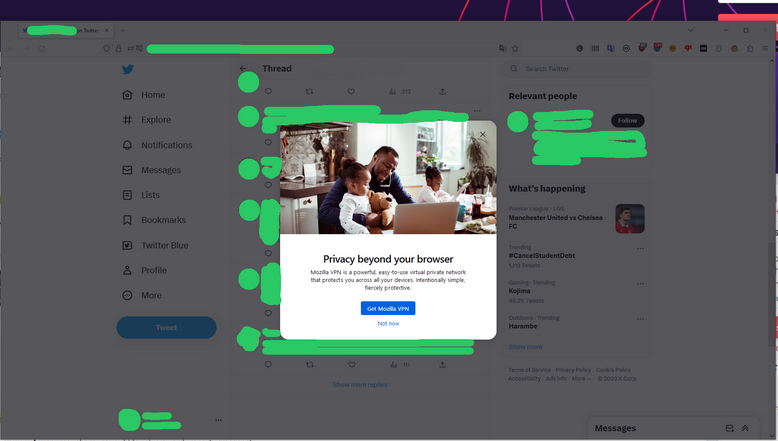
A Mozilla VPN ad in Firefox prompted a barrage of complaints from users

In a statement to BleepingComputer, Mozilla confirmed that it was running an ad campaign for its VPN, but conceded it was not a good one. “Ultimately, we accomplished the exact opposite of what we intended in this experiment and quickly rolled the experience back. We apologize for any confusion or concern,” the maker of Firefox said. Mozilla did not clarify whether the way the ad behaved was a bug.

The ad campaign might seem unseemly for a browser that vows to respect user privacy and generally does a good job of it. But Mozilla’s prompt apology shows that it is at least willing to admit mistakes and learn from them. Hopefully, this will be the end of it, but the truth is, you never know. To make sure you don’t see these ads again, you can use an ad blocker like AdGuard. AdGuard not only blocks popups, but also other types of ads, annoyances and trackers.

Not so ‘super’: SuperVPN leaks 360 million sensitive records online

A database containing 360 million user records and linked to a VPN has been discovered by a security researcher. According to a report by vpnMentor the VPN in question is Super VPN, a free-to-download app which also offers paid options.

The database was not password protected and contained sensitive information such as email addresses, geolocation records, original IP addresses, records of VPN servers used, unique user identifiers, device information, refund requests, and even visited websites. The researcher who uncovered the database, Jeremiah Fowler, said it likely belonged to a company called Qingdao Leyou Hudong Network Technology Co, which is listed as the developer of SuperVPN’s iOS app on Apple’s App Store. However, an app of the same name is listed under a different developer on the Google Play Store, so it is unclear whether the two are related, although it is highly likely. On the App Store, SuperVPN says it doesn’t keep logs, which is obviously not true, as the contents of the leak showed. The database has since been closed.

SuperVPN is notorious for making headlines for its security flaws. It’s been dubbed “very dangerous” and was once ranked as the “third most malware-rigged” VPN application. Needless to say, we do not recommend using it. What we do recommend is that you do your research before installing a VPN and choose a reputable service with clear ownership and privacy policies, and no history of data leak scandals.

OpenAI’s boss warns of ‘extinction risk’ coming from AI

You might not expect Sam Altman, the CEO of OpenAI, to be the one sounding the alarm about the risk of extinction from advanced AI. After all, his company is behind some of the most impressive and controversial AI breakthroughs in recent years, such as DALLE-E and ChatGPT. These tools themselves have sparked concerns about potential harms of AI — we wrote about them before. Nonetheless, Altman has recently signed a statement warning of precisely that.

The statement is as succinct as it gets, and calls for “mitigating the risk of extinction from AI” as a global priority, on par with preventing future pandemics and nuclear war.
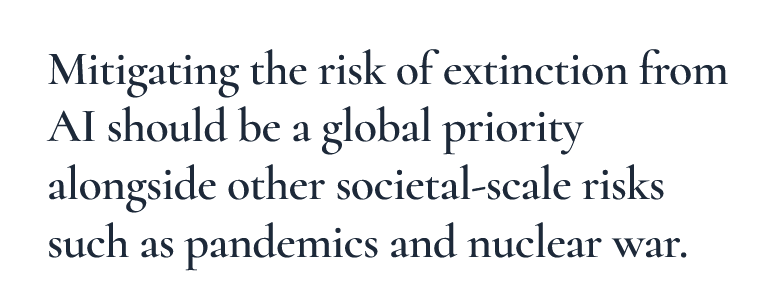
OpenAI CEO warns of a threat of extinction from AI in a short statement

A cynic might say that the statement is rather bland and to some extent deflects from the more pressing issue, which is, arguably, the ethical and legal implications of mass data collection enabling AI progress. The training data that powers the AI models are scraped from the Internet without the users’ knowledge or permission. So far, OpenAI has shielded itself from lawsuits that other AI startups are facing by not disclosing the details about its training data. Though, a proposed EU law might force it to do so. In any case, although there’s no harm in subscribing to non-binding feel-good statements, we would like to see AI companies making concrete steps towards improving their practices as far as user privacy goes.

$1.3 billion: Meta hit with record privacy fine

Meta has been slapped with a record $1.3 billion fine for violating the EU’s landmark data protection law, the General Data Protection Regulation (GDPR). The Irish privacy watchdog, which oversees Meta’s operation in the EU, said the tech giant broke the law by continuing to send EU user data to the US despite a 2020 ruling banning such transfers.

Meta relies on a mechanism called “standard contractual clauses” to move data across borders. But EU regulators say it is insufficient to protect EU users from the risk of surveillance in the US, which has weaker privacy protections and no federal data protection law. The EU and the US are still negotiating a new data-transfer agreement, and if they ink a deal this year, Meta could escape any sanctions. However, if they fail to do so, Meta may be forced not only to stop transferring any personal data of EU users to the US, but also delete all the EU user data it has already stored in the States. The latter may be especially difficult (and expensive) to perform.

This situation is further proof, if any were needed, that Meta wants to hang on to its ability to collect data no matter what the risks, and that user privacy concerns have never been a priority for it. If anything, the threat of a massive fine should serve as a reminder for Meta and other Big Tech companies that the EU takes the privacy rights of its citizens extremely seriously. Hopefully, this will also inspire a broader change in other regions, so that all users, regardless of their location, could enjoy the same strong privacy protections.


Podobał Ci się ten post?
AdGuard VPN AdGuard DNS AdGuard Mail AdGuard Wallet
Ekran główny AdGuard dla Windows
Ekran ochrony AdGuard dla Windows, pokazujący funkcje ochrony i ustawienia
Ekran statystyki AdGuard dla Windows, pokazujący statystyki zablokowanych reklam i trackery
Ekran Zarządzanie aplikacjami w AdGuard dla Windows, pokazujący opcje zarządzania ochroną dla aplikacji zainstalowanych na urządzeniu
20 752 20752 recenzje
Doskonały!

AdGuard dla Windows: bloker reklam na PC

AdGuard dla systemu Windows to coś więcej niż bloker reklam. To wielofunkcyjne narzędzie, które blokuje reklamy, kontroluje dostęp do niebezpiecznych stron, przyspiesza ładowanie stron i chroni dzieci przed nieodpowiednimi treściami

Pobierając program, akceptujesz warunki Umowy licencyjnej
Microsoft Store
Pobierając program, akceptujesz warunki Umowy licencyjnej
AdGuard na Windows v8.0, 14-dniowa wersja próbna
Ekran główny AdGuard dla Mac
Ekran Trybu ukrytego w AdGuard dla Mac
20 752 20752 recenzje
Doskonały!

AdGuard: bloker reklam na Maca

AdGuard dla Mac to wyjątkowy bloker reklam zaprojektowany z myślą o macOS. Oprócz ochrony przed uciążliwymi reklamami w przeglądarkach i aplikacjach chroni Cię przed śledzeniem, phishingiem i oszustwami
Pobierając program, akceptujesz warunki Umowy licencyjnej
Przeczytaj więcej
AdGuard na Mac v2.19, 14-dniowa wersja próbna
Ekran główny AdGuard dla Android
Ekran Ochrona przed śledzeniem w AdGuard dla Android
Ekran Zarządzanie aplikacjami w AdGuard dla Android, pokazujący opcje zarządzania ochroną dla aplikacji zainstalowanych na urządzeniu
Ekran statystyki AdGuard dla Android, pokazujący statystyki zablokowanych reklam i trackery
Ekran główny prywatnej przeglądarki AdGuard dla Android
Kod QR, aby pobierz AdGuard dla Android
20 752 20752 recenzje
Doskonały!

AdGuard: bloker reklam na Androida

Blokuje reklamy i moduły śledzące we wszystkich przeglądarkach, grach i innych aplikacjach. Chroni Twoją prywatność i pozwala kontrolować, w jaki sposób aplikacje korzystają z Internetu. Instalowane za pomocą pliku APK
Pobierając program, akceptujesz warunki Umowy licencyjnej
Przeczytaj więcej
Skanuj, aby pobrać
Użyj dowolnego czytnika kodów QR dostępnego w Twoim urządzeniu
AdGuard na Android v4.14, 14-dniowa wersja próbna
Ekran główny AdGuard dla iOS
Ekran ochrony AdGuard dla iOS, pokazujący funkcje ochrony i ustawienia
Ekran statystyki AdGuard dla iOS, pokazujący statystyki zablokowanych reklam i trackery
Kod QR, aby pobierz AdGuard dla iOS
20 752 20752 recenzje
Doskonały!

AdGuard na iOS: bloker reklam poza Safari

Najlepszy bloker reklam na iOS dla iPhone’a i iPada. AdGuard usuwa wszelkiego rodzaju reklamy i elementy śledzące w Safari oraz chroni Twoją prywatność we wszystkich aplikacjach na poziomie DNS
Pobierając program, akceptujesz warunki Umowy licencyjnej
Przeczytaj więcej
Skanuj, aby pobrać
Użyj dowolnego czytnika kodów QR dostępnego w Twoim urządzeniu
AdGuard na iOS v4.5
Ekran główny AdGuard Content Blocker
Ekran Filtry w AdGuard Content Blocker
Ekran ustawienia w AdGuard Content Blocker
20 752 20752 recenzje
Doskonały!

Blokada treści AdGuard

AdGuard Content Blocker eliminuje wszelkiego rodzaju reklamy w przeglądarkach mobilnych, które obsługują technologię blokowania treści — a mianowicie Samsung Internet i Yandex Browser. Jego funkcje są ograniczone w porównaniu z AdGuard na Androida, ale jest darmowy, łatwy w instalacji i wydajny
Pobierając program, akceptujesz warunki Umowy licencyjnej
Przeczytaj więcej
Blokada treści AdGuard v2.8
Ekran główny AdGuard Browser Extension
Ekran Ochrona przed śledzeniem w AdGuard Browser Extension
20 752 20752 recenzje
Doskonały!

Rozszerzenie przeglądarki AdGuard

AdGuard to najszybsze i najlżejsze rozszerzenie blokowania reklam, które skutecznie blokuje wszystkie typy reklam na wszystkich stronach internetowych! Wybierz AdGuard dla swojej przeglądarki i uzyskaj szybkie i bezpieczne przeglądanie Internetu pozbawione reklam.
Instalacja
Pobierając program, akceptujesz warunki Umowy licencyjnej
Instalacja
Pobierając program, akceptujesz warunki Umowy licencyjnej
Instalacja
Pobierając program, akceptujesz warunki Umowy licencyjnej
Instalacja
Pobierając program, akceptujesz warunki Umowy licencyjnej
Instalacja
Pobierając program, akceptujesz warunki Umowy licencyjnej
Przeczytaj więcej
Instalacja
Pobierając program, akceptujesz warunki Umowy licencyjnej
Przeczytaj więcej
Rozszerzenie przeglądarki AdGuard v5.5
Ekran główny Asystenta przeglądarki
20 752 20752 recenzje
Doskonały!

Asystent AdGuard

Towarzyszące rozszerzenie przeglądarki dla aplikacji desktopowych AdGuard. Umożliwia blokowanie niestandardowych elementów na stronach internetowych, dodawanie stron internetowych do listy dozwolonych i wysyłanie raportów bezpośrednio z przeglądarki
Asystent AdGuard v1.4
20 752 20752 recenzje
Doskonały!

AdGuard Home

AdGuard Home to sieciowe rozwiązanie do blokowania reklam i modułów śledzących. Zainstaluj go raz na routerze, aby objąć nim wszystkie urządzenia w sieci domowej — nie jest wymagane żadne dodatkowe oprogramowanie klienckie. Jest to szczególnie ważne w przypadku różnych urządzeń IoT, które często stanowią zagrożenie dla Twojej prywatności
AdGuard Home v0.107
Ekran główny AdGuard Pro dla iOS
Ekran Ochrona w AdGuard Pro dla iOS, pokazujący funkcje i ustawienia ochrony
Ekran statystyki w AdGuard Pro dla iOS, pokazujący statystyki zablokowanych reklam i trackerów
20 752 20752 recenzje
Doskonały!

AdGuard Pro dla iOS

AdGuard Pro na iOS oferuje wszystkie zaawansowane funkcje blokowania reklam. Oferuje te same narzędzia, co płatna wersja AdGuard na iOS. Doskonale blokuje reklamy w Safari i pozwala dostosować ustawienia DNS, aby dostosować poziom ochrony. Blokuje reklamy w przeglądarkach i aplikacjach, chroni dzieci przed nieodpowiednimi treściami i dba o bezpieczeństwo danych osobowych.
Pobierając program, akceptujesz warunki Umowy licencyjnej
Przeczytaj więcej
AdGuard Pro dla iOS v4.5
Ekran główny AdGuard Mini dla Mac
Ekran ochrony Safari w AdGuard Mini dla Mac
Ekran tworzenia reguły w AdGuard Mini dla Mac
20 752 20752 recenzje
Doskonały!

AdGuard Mini dla Mac — bloker reklam Safari

AdGuard Mini dla komputerów Mac to potężny bloker reklam w Safari. Ta lekka aplikacja usuwa reklamy, blokuje moduły śledzące i przyspiesza ładowanie stron. Umożliwia przeglądanie internetu w Safari bez rozpraszania uwagi i chroni prywatność danych
Instalacja
Pobierając program, akceptujesz warunki Umowy licencyjnej
Przeczytaj więcej
AdGuard Mini dla Mac v2.3
Ekran główny AdGuard dla Android TV z włączoną ochroną
Ekran blokowanie reklama AdGuard dla Android TV, pokazujący jego funkcje i ustawienia
Ekran ustawienia AdGuard dla Android TV
Ekran Zarządzanie aplikacjami AdGuard dla Android TV, pokazujący aplikacje, w których reklamy i trackery są zablokowane
20 752 20752 recenzje
Doskonały!

AdGuard dla Android TV

AdGuard dla Android TV to jedyna aplikacja, która blokuje reklamy, chroni prywatność i działa jak zapora sieciowa dla Smart TV. Otrzymuj ostrzeżenia o zagrożeniach internetowych, używaj bezpiecznego DNS i korzystaj z szyfrowanego ruchu. Zrelaksuj się i zanurz się w swoich ulubionych programach z najwyższej klasy zabezpieczeniami bez reklam!
AdGuard dla Android TV v4.14, 14-dniowa wersja próbna
Maskotka AdGuard, Agnar, trzymający pingwina Linux
20 752 20752 recenzje
Doskonały!

AdGuard dla Linux

AdGuard for Linux to pierwszy na świecie systemowy bloker reklam dla systemu Linux. Blokuj reklamy i elementy śledzące na poziomie urządzenia, wybieraj spośród wstępnie zainstalowanych filtrów lub dodawaj własne — wszystko za pośrednictwem interfejsu wiersza poleceń
AdGuard dla Linux v1.4
20 752 20752 recenzje
Doskonały!

AdGuard Temp Mail

Darmowy generator tymczasowych adresów e-mail, który zapewnia anonimowość i chroni prywatność. Brak spamu w głównej skrzynce odbiorczej!
20 752 20752 recenzje
Doskonały!

AdGuard VPN

75 lokalizacji na świecie

Dostęp do wszelkich treści

Silne szyfrowanie

Polityka braku logów

Najszybsze połączenie

Wsparcie 24/7

Wypróbuj za darmo
Pobierając program, akceptujesz warunki Umowy licencyjnej
Przeczytaj więcej
20 752 20752 recenzje
Doskonały!

AdGuard DNS

AdGuard DNS to alternatywne rozwiązanie do blokowania reklam, ochrony prywatności i kontroli rodzicielskiej. Łatwy w konfiguracji i darmowy, zapewnia niezbędną minimalną ochronę przed reklamami, śledzeniem i phishingiem, bez względu na platformę i urządzenie, z którego korzystasz.
20 752 20752 recenzje
Doskonały!

AdGuard Mail

Chroń swoją tożsamość, unikaj spamu i zabezpiecz swoją skrzynkę odbiorczą dzięki naszym aliasom i tymczasowym adresom e-mail. Skorzystaj z naszej bezpłatnej usługi przekazywania e-maili oraz aplikacji na wszystkie systemy operacyjne
20 752 20752 recenzje
Doskonały!

AdGuard Wallet

Bezpieczny i prywatny portfel kryptowalutowy, który daje Ci pełną kontrolę nad Twoimi aktywami. Zarządzaj wieloma portfelami i odkrywaj tysiące kryptowalut, aby je przechowywać, wysyłać i wymieniać
Rozpoczęto pobieranie AdGuard Kliknij przycisk wskazany strzałką, aby rozpocząć instalację Wybierz „Otwórz” i kliknij „OK”. Poczekaj aż plik zostanie pobrany. W otwartym oknie, przeciągnij ikonę AdGuard do folderu „Aplikacje”. Dziękujemy za wybrania AdGuard! Wybierz „Otrwórz” i kliknij „OK”. Poczekaj aż plik zostanie pobrany. W otwartym kliknij „Instaluj”. Dziękujemy za wybrania AdGuard!
Zainstaluj również AdGuard dla urządzeń mobilnych

















































