Is ad-free streaming doomed?

Those of us who have been around for a while may remember the blissful old days when streaming was strongly associated with an ad-free experience. Sick and tired of the commercial breaks on cable TV (and let’s not even get started on linear TV), we would embrace streaming as a healthy alternative to the choiceless and ad-laden regular TV viewing.

Little did we know that this would not last forever… a paradise lost, likely never to be rediscovered. Slowly but surely, the old subscription-based streaming services introduced ad-supported tiers, while the new ones, like Discovery+ or Peacock, received ad-supported tiers right out of the gate.

Last year, it was time for streaming veteran Netflix to bow to the trend: Netflix introduced an ad-supported tier for $6.99 a month and, to rub salt in the wound, in July this year dropped its $9.99 ad-free basic plan in the US, the UK, and Canada, with its cheapest ad-free plan now costing $15.49 a month. We have already lamented the demise of the completely ad-free Netflix, which once promised to never introduce ads. You can read our detailed epitaph here. This time, the bell has tolled for Amazon Prime.

Prime Video is past its prime

This month, Amazon announced that its Prime Video streaming service will begin featuring ads in shows and movies in early 2024. The rollout will begin in the US, UK, Germany, and Canada, and later expand to France, Italy, Spain, Mexico, and Australia. In a press release, Amazon justified the introduction of a new ad-supported tier by citing the need to support the creation of “compelling content,” such as its hit series The Marvelous Mrs. Maisel.

Whatever the justification, the fact that Prime Video is turning to an ad-supported model is frustrating. And it’s not just a matter of seeing ads in places where there were none before. The other problem with any ad-supported service is that it collects a lot of viewers’ data in order to show them the most relevant ads. We do not know what kind of information Amazon will use to target ads in Prime Video, but we can assume that it will have a lot of data to work with, given the role that Amazon services play in the daily lives of the average American. For example, Amazon has 148 million Prime members in the US who use its various services such as streaming, retail, prescription drugs, grocery delivery, photo storage, and gaming. This means that Amazon can track and analyze their online behavior, preferences, purchases, and more. The sheer amount of data potentially available to advertisers means that they will be willing to pay a lot of money to reach these customers with personalized ads.

For Amazon Prime users who want to keep watching videos without ads, they will have to shell out an extra $2.99/month. That may sound like just a cup of coffee, but it’s actually a huge price hike. It means paying ~20% more for the monthly Prime subscription in the US (currently $14.99) or ~26% more for the annual one (currently $139).

This, along with the sneaky way that Amazon is rolling out the ad-supported option, suggests that the company’s real goal is to lure users into staying on the ad-infested tier, rather than a genuine offer to let them choose between ads and no ads.

But what is so sneaky about Amazon’s new hard-to-resist offer?

‘No action required’

The sneaky part is that while there’s a fundamental difference between ads and no ads, and it may be a deal-breaker for many, Amazon isn’t technically introducing a new ad-supported tier that you are free to join; rather, it’s automatically enrolling all of its Prime users into the ad-supported plan.

In a statement announcing the arrival of ads to Prime Video, Amazon says: “No action is required for Prime members.” In the same statement it describes ads as a necessary evil that should not detract much from the Prime viewing experience, at least in comparison with its competitors: “We aim to have meaningfully fewer ads than linear TV and other streaming TV providers.”

However, the wording leaves much to interpretation, and we cannot possibly know what Amazon means by “meaningfully fewer ads” and who are “streaming TV providers” it compares itself with. For instance, subscribers of Netflix ad-supported plan should see on average 4 minutes of ads per hour, while Discovery +’s and Hulu’s ad load is higher — 5 minutes of ads per hour and 7.3(!) minutes of ads per hour respectively. According to Media Radar, the largest advertising-based video on-demand platforms average 6.1 minutes of ads per hour.

The way Amazon Prime is quietly pushing its subscribers toward the ad-supported plan reeks of unfair practices and dark patterns. And it’s not like Amazon is new to this. Just three months ago the US Federal Trade Commission (FTC) accused the company of having “knowingly duped millions into unknowingly enrolling in Amazon Prime,” that is without their consent or knowledge. The FTC claimed that Amazon had employed “manipulative, coercive or deceptive user-interface designs known as 'dark patterns' to trick consumers into enrolling in automatically renewing Prime subscriptions.” History repeating itself?

It’s bigger than Amazon

We have zeroed in on Amazon in this article not because it is an outlier, but because it is a perfect illustration of the domineering trend. Many streaming services nowadays are either adding ad-supported tiers or raising prices of the already existing ones. The ultimate goal seems to be to get users to accept the idea that what was once considered incompatible, even absurd — paying for subscriptions and still watching ads — is now the new normal.

In arguably the same vein, YouTube recently removed its cheapest ad-free plan, ‘Premium Lite,’ from several wealthy European countries where it was previously available. However, YouTube has not ruled out the plan’s return in some other form, and has launched ‘YouTube Lite’ in Thailand.

In any case, the idea that ads are something we have to come to terms with is being hammered vigorously into our minds. For instance, Telsey Advisory Group analyst Joseph Feldman, complementing Amazon for boosting its ad business via the new tier, notes that “for members who are heavy consumers of video, the ad-supported and ad-free options are standards in the industry, including Netflix, Inc NFLX and Hulu, and should not be a surprise.”

However, some users still beg to differ. In response to Amazon’s announcement, some have argued that the presence of ads, and not just the generic ads you can see on cable TV, but highly-targeted high-paying ads, is enough of a trade-off between the user and the service provider.
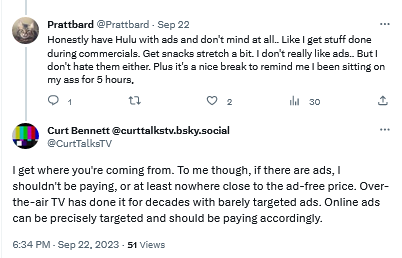
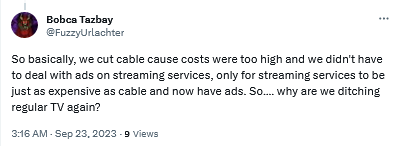
Users are not yet comfortable with streaming services introducing ad tiers

By introducing ads streaming services become just like regular TV

Bracing for the worst, hoping for the best

Unfortunately, everything points to a future where users are forced to be comfortable with ads as an inherent part of subscription-based services. We can come up with various reasons why this is so, but the most likely one is that ads are simply too lucrative to pass up, and no subscription revenue can (probably) make up for what they bring in.

Streaming platforms train us to see ads not as what they are — inherently intrusive and privacy-breaking nuisances — but as an inalienable part of every service, of every interface. We believe that users deserve a better streaming experience, and if platforms are not willing to provide it to them, it’s only natural that they turn to ad blockers.

However, there are limits to what ad blockers can do when you want to block ads on streaming services. If you want to get the most out of your ad blocker, we recommend that you use your streaming service in the browser. This way, an ad blocker (a browser extension or standalone app) is able to apply more complicated filtering techniques and block most ads. But it comes with no surprise that streaming platforms do not like their ads to be blocked, and they try to prevent ad blockers from working at full tilt. They do this by constantly changing their code and ad loading mechanism. This, in turn, requires ad blockers and filter developers to constantly update their filters to keep up with these changes. That takes time, as it’s not easy to monitor numerous streaming services all at once — and then there are thousands of other websites to block ads on, too. That’s why we at AdGuard appreciate it so much when you send us reports about missed ads. If you’re using AdGuard and notice an ad — please, take a minute of your time to report it. It really helps us a lot to stay on top of things.

Note that while DNS services (such as AdGuard DNS) can occasionally block some ads on some streaming services, it’s more the exception than the rule. So we would not recommend relying on DNS-level blocking alone to stop ads on your streaming platform of choice. The reason for this is that streaming services often use the same domain name for both the video content and the ads, making it impossible for the DNS server to distinguish between them. DNS blocking has its applications, but this isn’t the job for it.


Podobał Ci się ten post?
AdGuard VPN AdGuard DNS AdGuard Mail AdGuard Wallet
Ekran główny AdGuard dla Windows
Ekran ochrony AdGuard dla Windows, pokazujący funkcje ochrony i ustawienia
Ekran statystyki AdGuard dla Windows, pokazujący statystyki zablokowanych reklam i trackery
Ekran Zarządzanie aplikacjami w AdGuard dla Windows, pokazujący opcje zarządzania ochroną dla aplikacji zainstalowanych na urządzeniu
20 752 20752 recenzje
Doskonały!

AdGuard dla Windows: bloker reklam na PC

AdGuard dla systemu Windows to coś więcej niż bloker reklam. To wielofunkcyjne narzędzie, które blokuje reklamy, kontroluje dostęp do niebezpiecznych stron, przyspiesza ładowanie stron i chroni dzieci przed nieodpowiednimi treściami

Pobierając program, akceptujesz warunki Umowy licencyjnej
Microsoft Store
Pobierając program, akceptujesz warunki Umowy licencyjnej
AdGuard na Windows v8.0, 14-dniowa wersja próbna
Ekran główny AdGuard dla Mac
Ekran Trybu ukrytego w AdGuard dla Mac
20 752 20752 recenzje
Doskonały!

AdGuard: bloker reklam na Maca

AdGuard dla Mac to wyjątkowy bloker reklam zaprojektowany z myślą o macOS. Oprócz ochrony przed uciążliwymi reklamami w przeglądarkach i aplikacjach chroni Cię przed śledzeniem, phishingiem i oszustwami
Pobierając program, akceptujesz warunki Umowy licencyjnej
Przeczytaj więcej
AdGuard na Mac v2.19, 14-dniowa wersja próbna
Ekran główny AdGuard dla Android
Ekran Ochrona przed śledzeniem w AdGuard dla Android
Ekran Zarządzanie aplikacjami w AdGuard dla Android, pokazujący opcje zarządzania ochroną dla aplikacji zainstalowanych na urządzeniu
Ekran statystyki AdGuard dla Android, pokazujący statystyki zablokowanych reklam i trackery
Ekran główny prywatnej przeglądarki AdGuard dla Android
Kod QR, aby pobierz AdGuard dla Android
20 752 20752 recenzje
Doskonały!

AdGuard: bloker reklam na Androida

Blokuje reklamy i moduły śledzące we wszystkich przeglądarkach, grach i innych aplikacjach. Chroni Twoją prywatność i pozwala kontrolować, w jaki sposób aplikacje korzystają z Internetu. Instalowane za pomocą pliku APK
Pobierając program, akceptujesz warunki Umowy licencyjnej
Przeczytaj więcej
Skanuj, aby pobrać
Użyj dowolnego czytnika kodów QR dostępnego w Twoim urządzeniu
AdGuard na Android v4.14, 14-dniowa wersja próbna
Ekran główny AdGuard dla iOS
Ekran ochrony AdGuard dla iOS, pokazujący funkcje ochrony i ustawienia
Ekran statystyki AdGuard dla iOS, pokazujący statystyki zablokowanych reklam i trackery
Kod QR, aby pobierz AdGuard dla iOS
20 752 20752 recenzje
Doskonały!

AdGuard na iOS: bloker reklam poza Safari

Najlepszy bloker reklam na iOS dla iPhone’a i iPada. AdGuard usuwa wszelkiego rodzaju reklamy i elementy śledzące w Safari oraz chroni Twoją prywatność we wszystkich aplikacjach na poziomie DNS
Pobierając program, akceptujesz warunki Umowy licencyjnej
Przeczytaj więcej
Skanuj, aby pobrać
Użyj dowolnego czytnika kodów QR dostępnego w Twoim urządzeniu
AdGuard na iOS v4.5
Ekran główny AdGuard Content Blocker
Ekran Filtry w AdGuard Content Blocker
Ekran ustawienia w AdGuard Content Blocker
20 752 20752 recenzje
Doskonały!

Blokada treści AdGuard

AdGuard Content Blocker eliminuje wszelkiego rodzaju reklamy w przeglądarkach mobilnych, które obsługują technologię blokowania treści — a mianowicie Samsung Internet i Yandex Browser. Jego funkcje są ograniczone w porównaniu z AdGuard na Androida, ale jest darmowy, łatwy w instalacji i wydajny
Pobierając program, akceptujesz warunki Umowy licencyjnej
Przeczytaj więcej
Blokada treści AdGuard v2.8
Ekran główny AdGuard Browser Extension
Ekran Ochrona przed śledzeniem w AdGuard Browser Extension
20 752 20752 recenzje
Doskonały!

Rozszerzenie przeglądarki AdGuard

AdGuard to najszybsze i najlżejsze rozszerzenie blokowania reklam, które skutecznie blokuje wszystkie typy reklam na wszystkich stronach internetowych! Wybierz AdGuard dla swojej przeglądarki i uzyskaj szybkie i bezpieczne przeglądanie Internetu pozbawione reklam.
Instalacja
Pobierając program, akceptujesz warunki Umowy licencyjnej
Instalacja
Pobierając program, akceptujesz warunki Umowy licencyjnej
Instalacja
Pobierając program, akceptujesz warunki Umowy licencyjnej
Instalacja
Pobierając program, akceptujesz warunki Umowy licencyjnej
Instalacja
Pobierając program, akceptujesz warunki Umowy licencyjnej
Przeczytaj więcej
Instalacja
Pobierając program, akceptujesz warunki Umowy licencyjnej
Przeczytaj więcej
Rozszerzenie przeglądarki AdGuard v5.5
Ekran główny Asystenta przeglądarki
20 752 20752 recenzje
Doskonały!

Asystent AdGuard

Towarzyszące rozszerzenie przeglądarki dla aplikacji desktopowych AdGuard. Umożliwia blokowanie niestandardowych elementów na stronach internetowych, dodawanie stron internetowych do listy dozwolonych i wysyłanie raportów bezpośrednio z przeglądarki
Asystent AdGuard v1.4
20 752 20752 recenzje
Doskonały!

AdGuard Home

AdGuard Home to sieciowe rozwiązanie do blokowania reklam i modułów śledzących. Zainstaluj go raz na routerze, aby objąć nim wszystkie urządzenia w sieci domowej — nie jest wymagane żadne dodatkowe oprogramowanie klienckie. Jest to szczególnie ważne w przypadku różnych urządzeń IoT, które często stanowią zagrożenie dla Twojej prywatności
AdGuard Home v0.107
Ekran główny AdGuard Pro dla iOS
Ekran Ochrona w AdGuard Pro dla iOS, pokazujący funkcje i ustawienia ochrony
Ekran statystyki w AdGuard Pro dla iOS, pokazujący statystyki zablokowanych reklam i trackerów
20 752 20752 recenzje
Doskonały!

AdGuard Pro dla iOS

AdGuard Pro na iOS oferuje wszystkie zaawansowane funkcje blokowania reklam. Oferuje te same narzędzia, co płatna wersja AdGuard na iOS. Doskonale blokuje reklamy w Safari i pozwala dostosować ustawienia DNS, aby dostosować poziom ochrony. Blokuje reklamy w przeglądarkach i aplikacjach, chroni dzieci przed nieodpowiednimi treściami i dba o bezpieczeństwo danych osobowych.
Pobierając program, akceptujesz warunki Umowy licencyjnej
Przeczytaj więcej
AdGuard Pro dla iOS v4.5
Ekran główny AdGuard Mini dla Mac
Ekran ochrony Safari w AdGuard Mini dla Mac
Ekran tworzenia reguły w AdGuard Mini dla Mac
20 752 20752 recenzje
Doskonały!

AdGuard Mini dla Mac — bloker reklam Safari

AdGuard Mini dla komputerów Mac to potężny bloker reklam w Safari. Ta lekka aplikacja usuwa reklamy, blokuje moduły śledzące i przyspiesza ładowanie stron. Umożliwia przeglądanie internetu w Safari bez rozpraszania uwagi i chroni prywatność danych
Instalacja
Pobierając program, akceptujesz warunki Umowy licencyjnej
Przeczytaj więcej
AdGuard Mini dla Mac v2.3
Ekran główny AdGuard dla Android TV z włączoną ochroną
Ekran blokowanie reklama AdGuard dla Android TV, pokazujący jego funkcje i ustawienia
Ekran ustawienia AdGuard dla Android TV
Ekran Zarządzanie aplikacjami AdGuard dla Android TV, pokazujący aplikacje, w których reklamy i trackery są zablokowane
20 752 20752 recenzje
Doskonały!

AdGuard dla Android TV

AdGuard dla Android TV to jedyna aplikacja, która blokuje reklamy, chroni prywatność i działa jak zapora sieciowa dla Smart TV. Otrzymuj ostrzeżenia o zagrożeniach internetowych, używaj bezpiecznego DNS i korzystaj z szyfrowanego ruchu. Zrelaksuj się i zanurz się w swoich ulubionych programach z najwyższej klasy zabezpieczeniami bez reklam!
AdGuard dla Android TV v4.14, 14-dniowa wersja próbna
Maskotka AdGuard, Agnar, trzymający pingwina Linux
20 752 20752 recenzje
Doskonały!

AdGuard dla Linux

AdGuard for Linux to pierwszy na świecie systemowy bloker reklam dla systemu Linux. Blokuj reklamy i elementy śledzące na poziomie urządzenia, wybieraj spośród wstępnie zainstalowanych filtrów lub dodawaj własne — wszystko za pośrednictwem interfejsu wiersza poleceń
AdGuard dla Linux v1.4
20 752 20752 recenzje
Doskonały!

AdGuard Temp Mail

Darmowy generator tymczasowych adresów e-mail, który zapewnia anonimowość i chroni prywatność. Brak spamu w głównej skrzynce odbiorczej!
20 752 20752 recenzje
Doskonały!

AdGuard VPN

75 lokalizacji na świecie

Dostęp do wszelkich treści

Silne szyfrowanie

Polityka braku logów

Najszybsze połączenie

Wsparcie 24/7

Wypróbuj za darmo
Pobierając program, akceptujesz warunki Umowy licencyjnej
Przeczytaj więcej
20 752 20752 recenzje
Doskonały!

AdGuard DNS

AdGuard DNS to alternatywne rozwiązanie do blokowania reklam, ochrony prywatności i kontroli rodzicielskiej. Łatwy w konfiguracji i darmowy, zapewnia niezbędną minimalną ochronę przed reklamami, śledzeniem i phishingiem, bez względu na platformę i urządzenie, z którego korzystasz.
20 752 20752 recenzje
Doskonały!

AdGuard Mail

Chroń swoją tożsamość, unikaj spamu i zabezpiecz swoją skrzynkę odbiorczą dzięki naszym aliasom i tymczasowym adresom e-mail. Skorzystaj z naszej bezpłatnej usługi przekazywania e-maili oraz aplikacji na wszystkie systemy operacyjne
20 752 20752 recenzje
Doskonały!

AdGuard Wallet

Bezpieczny i prywatny portfel kryptowalutowy, który daje Ci pełną kontrolę nad Twoimi aktywami. Zarządzaj wieloma portfelami i odkrywaj tysiące kryptowalut, aby je przechowywać, wysyłać i wymieniać
Rozpoczęto pobieranie AdGuard Kliknij przycisk wskazany strzałką, aby rozpocząć instalację Wybierz „Otwórz” i kliknij „OK”. Poczekaj aż plik zostanie pobrany. W otwartym oknie, przeciągnij ikonę AdGuard do folderu „Aplikacje”. Dziękujemy za wybrania AdGuard! Wybierz „Otrwórz” i kliknij „OK”. Poczekaj aż plik zostanie pobrany. W otwartym kliknij „Instaluj”. Dziękujemy za wybrania AdGuard!
Zainstaluj również AdGuard dla urządzeń mobilnych

















































