AdGuard’s digest: Data brokers, slot machines, UFO hunting, and new Google privacy option

In this edition of AdGuard’s digest: California residents will be able to request all data brokers to delete their data at once, TikTok is accused of being as addictive as gambling, Amazon launches a surveillance-friendly competition, US officials are found to be illegally spying on Americans (again), Google facilitates browsing history deletion.

One click to delete: New law allows Californians to remove all their data from data brokers

Californians will be able to force all data brokers at once to wipe off their personal data with a single request starting from January 1, 2026. The fittingly named “Delete Act” bill requires the state privacy protection agency to set up an “accessible deletion mechanism” that will enable users to request “that every data broker that maintains any personal information delete any personal information related to that consumer held by the data broker or associated service provider or contractor.”

Applicable data brokers will have to check for deletion requests at least once every 45 days. The user has to make only one deletion request, and the data broker will have to keep deleting their information every 45 days, even if the user does not make further requests. And while data brokers will still be able to collect user data for those 45 days, they are prohibited from selling or sharing it with any third parties.

As the Verge points out, Californias could already request data brokers to delete their data, but they had to appeal to them one by one — a daunting task, by any account. The new law simplifies the process, and is great news for privacy-conscious users. It also cements the status of California as the US’s most forward-looking state in terms of privacy, which it once earned by passing The California Consumer Privacy Act (CCPA), and we can only hope others will follow its example.

US state says TikTok is akin to addictive ‘slot machine’ for kids

Utah has filed a lawsuit against TikTok, taking aim at the social network’s recommendation algorithms. The state’s attorney general argued that TikTok’s algorithms “spoon-feed kids endless, highly curated content” and likened them to a “cruel slot machine that hooks kid’s attention and doesn’t let go.”

TikTok, owned by China-based ByteDance, has come under increasing pressure in the US for its origins, but also for its alleged harmful influence on children, perhaps best exemplified by the dangerous challenges apparently promoted by its algorithms. The debate over the alleged dangers of TikTok and social media in general has sparked a wave of so-called “social media ID laws,” which require social media to verify the age of their users, including by forcing them to produce their digital ID. In March this year, Utah became the first state in the US to pass such an age verification law. Under the law, users under 18 will need parental consent to sign up for social media.

We have already discussed the potential pitfalls of age-verification laws sweeping the US in our blog. In short, they have the noble goal of protecting children, but they threaten the privacy and security of users of all ages by necessitating the collection of users’ most sensitive information.

Amazon wants you to spy on your neighbors and calls it ‘UFO hunting’

Amazon’s security camera brand, Ring, is encouraging customers in the US to send in videos captured by either their indoor or outdoor cameras… that show aliens. Yes, you heard that right. The customers whose videos contain “scientific evidence of the extraterrestrial” are eligible for the grand prize of $1 million.

However, the rules of the contest, as Vice points out, suggest that Ring does not actually plan to award the prize. The rules state that the “scientific evidence” must “unequivocally rule out any known explanations or any new Earth-based phenomena as an explanation.” A pretty tough, if not impossible, criterion to meet, if you ask us. However, Ring says that if you fake an alien sighting in convincing enough fashion, you could win a $500 Amazon gift card for “extraordinary creativity.”

The contest is timed to Halloween, and we don’t want to spoil the mood, but it’s hard to disagree with Vice that what Amazon is doing here is “cashing in on the UFO craze to promote its surveillance dystopia.” Ring has already been embroiled in several controversies, including when it was revealed that any Amazon employee could view and download every single Ring customer video. And while the competition may seem like fun, it normalizes sharing your private information for free with big tech giants. And who knows what they might do with the data you share. So, thanks, Ring, but we’ll rather pass.

New report, but same old tale: US officials revealed to have illegally spied on users

A new report has revealed that US law enforcement agencies, including US Customs and Border Protection (CBP), US Immigration and Customs Enforcement (ICE), and the Secret Service, failed to conduct mandatory privacy assessments when they purchased Americans’ location data in bulk from data brokers.

The report, released in late September, says the agencies violated federal law in obtaining the so-called Commercial Telemetry Data, or CTD (a law enforcement term for the location data they bought from third parties). In particular, they apparently decided not to waste time conducting reviews to see if the privacy risks from buying the data were proportionate and could be mitigated in some way. It does not take much imagination to see what this lack of oversight could lead to. In one particularly egregious case cited in the report, a CBP officer used access to location data to track his co-workers without any legal need to do so.
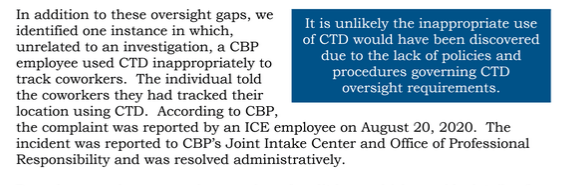
Screenshot from the report

Source: CBP, ICE, and Secret Service Did Not Adhere to Privacy Policies or Develop Sufficient Policies Before Procuring and Using Commercial Telemetry Data

The report is alarming, but not surprising. The fact that US law enforcement agencies are exploiting a legal loophole to buy Americans’ data has long been an open secret. Earlier this year, CBP promised to stop buying smartphone location data — and we believe that public pressure and extensive media coverage of the practice were partly responsible for this move. At the same time, the practice has not completely stopped. According to 404 Media, ICE says it will continue to buy commercially-sourced location data despite recommendations to stop. So, unless laws are passed that expressly prohibit such practices under threat of severe punishment, it will likely continue unabated, if not in the open, then behind closed doors.

Google makes it easier to erase your most recent browsing history

Google has given Android users an option to clear the last 15 minutes of their browsing history. Before they could only delete their browsing data for the last hour. While this new control option is hailed by Google as yet another way to protect your privacy, do not get your hopes up. The catch is Google will still keep your search history and “other Google activity” data, which you will have to delete separately.
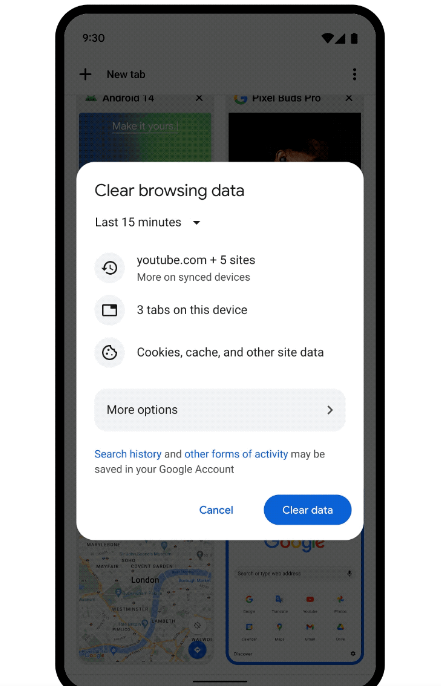
Google introduces new browsing data deletion option

The new deletion option still gives you more control over your data. When you use it, it will remove the web addresses of the pages that you’re visited from the History page and shortcuts to those pages from the Tab page. It will also stop showing you predictions to those websites in your address bar.

The new option may come in handy in situations when you don’t want to wipe off an hour’s worth of data, but only your latest searches, and as quickly as possible. Everyone can think of their own reasons to do that (wink-wink). One of these will be, for example, if you share your device with someone else, and don’t want them to see your most recent searches. But overall, it won’t make a big difference for your privacy.


Podobał Ci się ten post?
AdGuard VPN AdGuard DNS AdGuard Mail AdGuard Wallet
Ekran główny AdGuard dla Windows
Ekran ochrony AdGuard dla Windows, pokazujący funkcje ochrony i ustawienia
Ekran statystyki AdGuard dla Windows, pokazujący statystyki zablokowanych reklam i trackery
Ekran Zarządzanie aplikacjami w AdGuard dla Windows, pokazujący opcje zarządzania ochroną dla aplikacji zainstalowanych na urządzeniu
20 752 20752 recenzje
Doskonały!

AdGuard dla Windows: bloker reklam na PC

AdGuard dla systemu Windows to coś więcej niż bloker reklam. To wielofunkcyjne narzędzie, które blokuje reklamy, kontroluje dostęp do niebezpiecznych stron, przyspiesza ładowanie stron i chroni dzieci przed nieodpowiednimi treściami
Pobierając program, akceptujesz warunki Umowy licencyjnej
Microsoft Store
Pobierając program, akceptujesz warunki Umowy licencyjnej
AdGuard na Windows v8.0, 14-dniowa wersja próbna
Ekran główny AdGuard dla Mac
Ekran Trybu ukrytego w AdGuard dla Mac
20 752 20752 recenzje
Doskonały!

AdGuard: bloker reklam na Maca

AdGuard dla Mac to wyjątkowy bloker reklam zaprojektowany z myślą o macOS. Oprócz ochrony przed uciążliwymi reklamami w przeglądarkach i aplikacjach chroni Cię przed śledzeniem, phishingiem i oszustwami
Pobierając program, akceptujesz warunki Umowy licencyjnej
Przeczytaj więcej
AdGuard na Mac v2.19, 14-dniowa wersja próbna
Ekran główny AdGuard dla Android
Ekran Ochrona przed śledzeniem w AdGuard dla Android
Ekran Zarządzanie aplikacjami w AdGuard dla Android, pokazujący opcje zarządzania ochroną dla aplikacji zainstalowanych na urządzeniu
Ekran statystyki AdGuard dla Android, pokazujący statystyki zablokowanych reklam i trackery
Ekran główny prywatnej przeglądarki AdGuard dla Android
Kod QR, aby pobierz AdGuard dla Android
20 752 20752 recenzje
Doskonały!

AdGuard: bloker reklam na Androida

Blokuje reklamy i moduły śledzące we wszystkich przeglądarkach, grach i innych aplikacjach. Chroni Twoją prywatność i pozwala kontrolować, w jaki sposób aplikacje korzystają z Internetu. Instalowane za pomocą pliku APK
Pobierając program, akceptujesz warunki Umowy licencyjnej
Przeczytaj więcej
Skanuj, aby pobrać
Użyj dowolnego czytnika kodów QR dostępnego w Twoim urządzeniu
AdGuard na Android v4.14, 14-dniowa wersja próbna
Ekran główny AdGuard dla iOS
Ekran ochrony AdGuard dla iOS, pokazujący funkcje ochrony i ustawienia
Ekran statystyki AdGuard dla iOS, pokazujący statystyki zablokowanych reklam i trackery
Kod QR, aby pobierz AdGuard dla iOS
20 752 20752 recenzje
Doskonały!

AdGuard na iOS: bloker reklam poza Safari

Najlepszy bloker reklam na iOS dla iPhone’a i iPada. AdGuard usuwa wszelkiego rodzaju reklamy i elementy śledzące w Safari oraz chroni Twoją prywatność we wszystkich aplikacjach na poziomie DNS
Pobierając program, akceptujesz warunki Umowy licencyjnej
Przeczytaj więcej
Skanuj, aby pobrać
Użyj dowolnego czytnika kodów QR dostępnego w Twoim urządzeniu
AdGuard na iOS v4.5
Ekran główny AdGuard Content Blocker
Ekran Filtry w AdGuard Content Blocker
Ekran ustawienia w AdGuard Content Blocker
20 752 20752 recenzje
Doskonały!

Blokada treści AdGuard

AdGuard Content Blocker eliminuje wszelkiego rodzaju reklamy w przeglądarkach mobilnych, które obsługują technologię blokowania treści — a mianowicie Samsung Internet i Yandex Browser. Jego funkcje są ograniczone w porównaniu z AdGuard na Androida, ale jest darmowy, łatwy w instalacji i wydajny
Pobierając program, akceptujesz warunki Umowy licencyjnej
Przeczytaj więcej
Blokada treści AdGuard v2.8
Ekran główny AdGuard Browser Extension
Ekran Ochrona przed śledzeniem w AdGuard Browser Extension
20 752 20752 recenzje
Doskonały!

Rozszerzenie przeglądarki AdGuard

AdGuard to najszybsze i najlżejsze rozszerzenie blokowania reklam, które skutecznie blokuje wszystkie typy reklam na wszystkich stronach internetowych! Wybierz AdGuard dla swojej przeglądarki i uzyskaj szybkie i bezpieczne przeglądanie Internetu pozbawione reklam.
Instalacja
Pobierając program, akceptujesz warunki Umowy licencyjnej
Instalacja
Pobierając program, akceptujesz warunki Umowy licencyjnej
Instalacja
Pobierając program, akceptujesz warunki Umowy licencyjnej
Instalacja
Pobierając program, akceptujesz warunki Umowy licencyjnej
Instalacja
Pobierając program, akceptujesz warunki Umowy licencyjnej
Przeczytaj więcej
Instalacja
Pobierając program, akceptujesz warunki Umowy licencyjnej
Przeczytaj więcej
Rozszerzenie przeglądarki AdGuard v5.5
Ekran główny Asystenta przeglądarki
20 752 20752 recenzje
Doskonały!

Asystent AdGuard

Towarzyszące rozszerzenie przeglądarki dla aplikacji desktopowych AdGuard. Umożliwia blokowanie niestandardowych elementów na stronach internetowych, dodawanie stron internetowych do listy dozwolonych i wysyłanie raportów bezpośrednio z przeglądarki
Asystent AdGuard v1.4
20 752 20752 recenzje
Doskonały!

AdGuard Home

AdGuard Home to sieciowe rozwiązanie do blokowania reklam i modułów śledzących. Zainstaluj go raz na routerze, aby objąć nim wszystkie urządzenia w sieci domowej — nie jest wymagane żadne dodatkowe oprogramowanie klienckie. Jest to szczególnie ważne w przypadku różnych urządzeń IoT, które często stanowią zagrożenie dla Twojej prywatności
AdGuard Home v0.107
Ekran główny AdGuard Pro dla iOS
Ekran Ochrona w AdGuard Pro dla iOS, pokazujący funkcje i ustawienia ochrony
Ekran statystyki w AdGuard Pro dla iOS, pokazujący statystyki zablokowanych reklam i trackerów
20 752 20752 recenzje
Doskonały!

AdGuard Pro dla iOS

AdGuard Pro na iOS oferuje wszystkie zaawansowane funkcje blokowania reklam. Oferuje te same narzędzia, co płatna wersja AdGuard na iOS. Doskonale blokuje reklamy w Safari i pozwala dostosować ustawienia DNS, aby dostosować poziom ochrony. Blokuje reklamy w przeglądarkach i aplikacjach, chroni dzieci przed nieodpowiednimi treściami i dba o bezpieczeństwo danych osobowych.


Pobierając program, akceptujesz warunki Umowy licencyjnej
Przeczytaj więcej
AdGuard Pro dla iOS v4.5
Ekran główny AdGuard Mini dla Mac
Ekran ochrony Safari w AdGuard Mini dla Mac
Ekran tworzenia reguły w AdGuard Mini dla Mac
20 752 20752 recenzje
Doskonały!

AdGuard Mini dla Mac — bloker reklam Safari

AdGuard Mini dla komputerów Mac to potężny bloker reklam w Safari. Ta lekka aplikacja usuwa reklamy, blokuje moduły śledzące i przyspiesza ładowanie stron. Umożliwia przeglądanie internetu w Safari bez rozpraszania uwagi i chroni prywatność danych
Instalacja
Pobierając program, akceptujesz warunki Umowy licencyjnej
Przeczytaj więcej
AdGuard Mini dla Mac v2.3
Ekran główny AdGuard dla Android TV z włączoną ochroną
Ekran blokowanie reklama AdGuard dla Android TV, pokazujący jego funkcje i ustawienia
Ekran ustawienia AdGuard dla Android TV
Ekran Zarządzanie aplikacjami AdGuard dla Android TV, pokazujący aplikacje, w których reklamy i trackery są zablokowane
20 752 20752 recenzje
Doskonały!

AdGuard dla Android TV

AdGuard dla Android TV to jedyna aplikacja, która blokuje reklamy, chroni prywatność i działa jak zapora sieciowa dla Smart TV. Otrzymuj ostrzeżenia o zagrożeniach internetowych, używaj bezpiecznego DNS i korzystaj z szyfrowanego ruchu. Zrelaksuj się i zanurz się w swoich ulubionych programach z najwyższej klasy zabezpieczeniami bez reklam!
AdGuard dla Android TV v4.14, 14-dniowa wersja próbna
Maskotka AdGuard, Agnar, trzymający pingwina Linux
20 752 20752 recenzje
Doskonały!

AdGuard dla Linux

AdGuard for Linux to pierwszy na świecie systemowy bloker reklam dla systemu Linux. Blokuj reklamy i elementy śledzące na poziomie urządzenia, wybieraj spośród wstępnie zainstalowanych filtrów lub dodawaj własne — wszystko za pośrednictwem interfejsu wiersza poleceń
AdGuard dla Linux v1.4
20 752 20752 recenzje
Doskonały!

AdGuard Temp Mail

Darmowy generator tymczasowych adresów e-mail, który zapewnia anonimowość i chroni prywatność. Brak spamu w głównej skrzynce odbiorczej!
20 752 20752 recenzje
Doskonały!

AdGuard VPN

75 lokalizacji na świecie

Dostęp do wszelkich treści

Silne szyfrowanie

Polityka braku logów

Najszybsze połączenie

Wsparcie 24/7

Wypróbuj za darmo
Pobierając program, akceptujesz warunki Umowy licencyjnej
Przeczytaj więcej
20 752 20752 recenzje
Doskonały!

AdGuard DNS

AdGuard DNS to alternatywne rozwiązanie do blokowania reklam, ochrony prywatności i kontroli rodzicielskiej. Łatwy w konfiguracji i darmowy, zapewnia niezbędną minimalną ochronę przed reklamami, śledzeniem i phishingiem, bez względu na platformę i urządzenie, z którego korzystasz.
20 752 20752 recenzje
Doskonały!

AdGuard Mail

Chroń swoją tożsamość, unikaj spamu i zabezpiecz swoją skrzynkę odbiorczą dzięki naszym aliasom i tymczasowym adresom e-mail. Skorzystaj z naszej bezpłatnej usługi przekazywania e-maili oraz aplikacji na wszystkie systemy operacyjne
20 752 20752 recenzje
Doskonały!

AdGuard Wallet

Bezpieczny i prywatny portfel kryptowalutowy, który daje Ci pełną kontrolę nad Twoimi aktywami. Zarządzaj wieloma portfelami i odkrywaj tysiące kryptowalut, aby je przechowywać, wysyłać i wymieniać
Rozpoczęto pobieranie AdGuard Kliknij przycisk wskazany strzałką, aby rozpocząć instalację Wybierz „Otwórz” i kliknij „OK”. Poczekaj aż plik zostanie pobrany. W otwartym oknie, przeciągnij ikonę AdGuard do folderu „Aplikacje”. Dziękujemy za wybrania AdGuard! Wybierz „Otrwórz” i kliknij „OK”. Poczekaj aż plik zostanie pobrany. W otwartym kliknij „Instaluj”. Dziękujemy za wybrania AdGuard!
Zainstaluj również AdGuard dla urządzeń mobilnych
















































