Apple’s new EU terms: accept and lose money, or reject and stay within the walled garden

Apple’s ecosystem has always been known as a walled garden because of the restrictions it imposed on app developers and users. Developers had no choice but to list their apps on Apple’s App Store if they wanted an iOS user to install them. And if they wanted the user to buy something from them, they had to process payments through Apple’s own payment mechanism.

Such a closed system made life difficult not only for developers, who had to pay Apple’s 30% standard fee on in-app purchases (or 15% for small businesses), but also for users. The latter had less of a choice when it came to apps and download options than the users of the Android-based phones, since Google has always allowed sideloading.

This situation is about to change. The culprit is the EU’s upcoming antitrust law, known as the Digital Markets Act (DMA). In September 2023, App Store, iOS operating system, and Safari browser, all owned by Apple, received gatekeeper status under the DMA. This means that by March 6, 2024, Cupertino will have to open them up to competitors or face hefty fines of up to 10% of the company’s total global turnover.

As the deadline draws closer, Apple has come up with a plan for how it’s going to comply with the DMA. And after taking a look at this plan, it’s clear as day to us that Apple intends to comply with the legislation in letter, but definitely not in spirit. Essentially, Apple offers developers a false choice: either they agree to stay within the iOS ecosystem’s confines, or they can explore alternative payment methods and app stores — and risk going under in the process.

What’s wrong with Apple’s new business terms in Europe?

The dilemma that developers face right now is the following: they can either stay on the official App Store under the current terms, or accept the new terms and be subject to the new Core Technology Fee (CTF) that may cost them a fortune. Before we zoom in on the CTF and what it means for developers, especially those of free and freemium apps, we will briefly list the other parts of Apple’s DMA compliance plan.
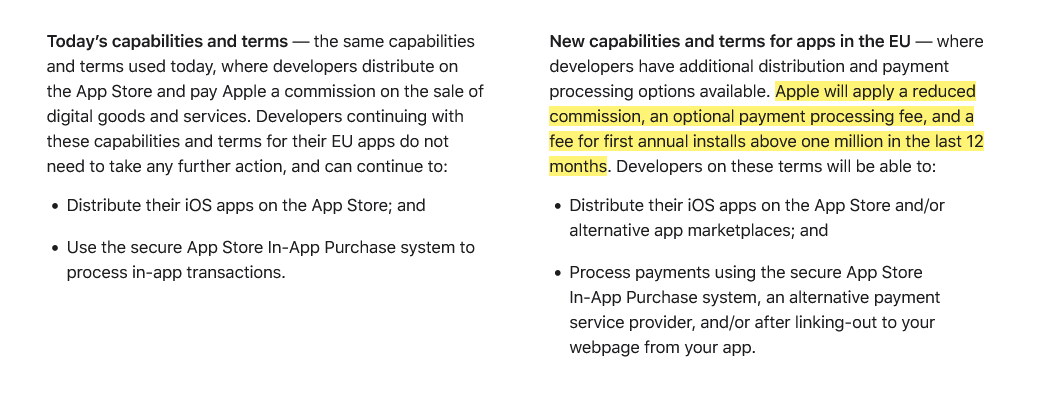
Apple introduces new terms for developers in the EU

Screenshot: Apple gives developers in the EU two options: stay on the current terms or accept the new news. Source: Apple

Under the plan, Apple says it will apply a “reduced commission” to in-app purchases. Developers in Apple’s small business program will pay a 10% fee instead of 15%, regardless of the payment method they choose. Others will pay a 17% fee instead of the standard 30% commission. If developers choose to continue using Apple as their payment processor, they’ll pay an additional 3% payment processing fee. But if they decide to ditch Apple and switch to an alternative payment system or redirect users to their own site for payment, they won’t have to pay Apple any additional fees.

So far so good, right?

It’s when we move to the third part of this masterplan, the Core Technology Fee, that things stop being pretty. In fact, they are starting to look pretty ugly.
The Core Technology Fee (CTF) is the fee that will apply only to the iOS apps whose developers accepted the new business terms. Importantly, it will apply both to iOS apps distributed on the App Store, as well as to the apps that are distributed through alternative app stores, or “marketplaces” as Apple calls them.

The definition of the 'first annual install' is not that straightforward

Subject to the fee are the developers whose apps will clock in over 1 million first annual installs in the past 12 months. They will have to pay a €0.50 fee to Apple for each user over 1 million who installed their app for the first time in a year. After these 12 months, developers will have to pay the fee again, and it does not have to be an install per se. The developer terms state that “app updates,” for instance, are also counted as new installs, “as long as they start a new 12-month period.”
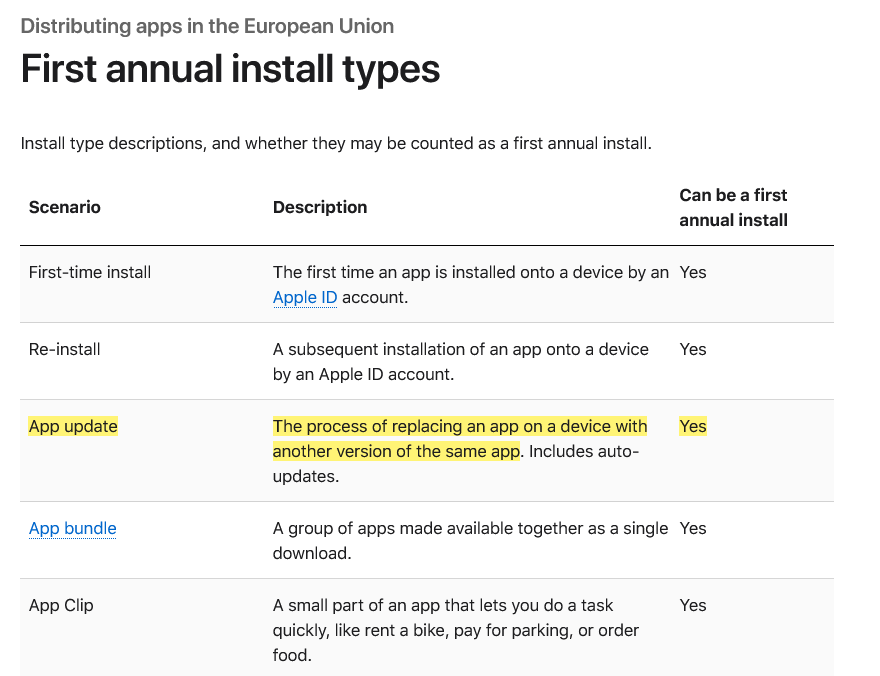
Types of first annual install under Apple's new terms

Marketplace apps or alternative app stores will have it even worse under Apple’s new and supposedly more competition-friendly rules. The developers who will create and distribute their own app stores for iOS apps in the EU are due a €0.50 CTF to Apple for each user who installs their app store for the first time in a year even if it happens before the developer racks up one million installs in total.

Go DMA and go broke: what CTF means in practice

If any of the “big guns,” meaning apps that get more than 1 million downloads in a year, could afford such a fee, it would be the paid apps. However, when it comes to free apps that make money by showing ads, or to freemium apps that offer part of their functionality for free, the fee is insurmountable.

Needless to say, Apple’s masterplan did not strike a chord with developers. Spotify did not hold back, calling the CTF “extortion, plain and simple.”

A key issue raised by Spotify in its scathing response to Apple’s plan is the vulnerable position it puts free app developers in: “How will a developer pay Apple back if its free app goes viral — multiple millions of accounts install that free app, and then that developer owes Apple millions?” Indeed, if a developer of a free or freemium app makes the unfortunate decision to accept Apple’s new terms in the EU, and then has a breakthrough and sees the app gain popularity, the last thing on their mind would be celebrating their achievement, because the first thing they should be thinking about is how to pay Apple back the fees they would owe. And, as Spotify points out, there is nothing preventing Apple from raising the fees at any time they deem fit.

To be fair, Apple has made no big secret of how punitive the new terms could be for some developers. Anyone can estimate how much they’ll pay Apple under its DMA compliance plan using its fee calculator. So let’s take a game that hit the sweet spot and went moderately viral, reaching 2 million installs in the EU in 12 months. Under the new terms, it would have to pay Apple $45,290 per month, whereas under the old terms, it would have to pay nothing. The choice seems a no-brainer to us.
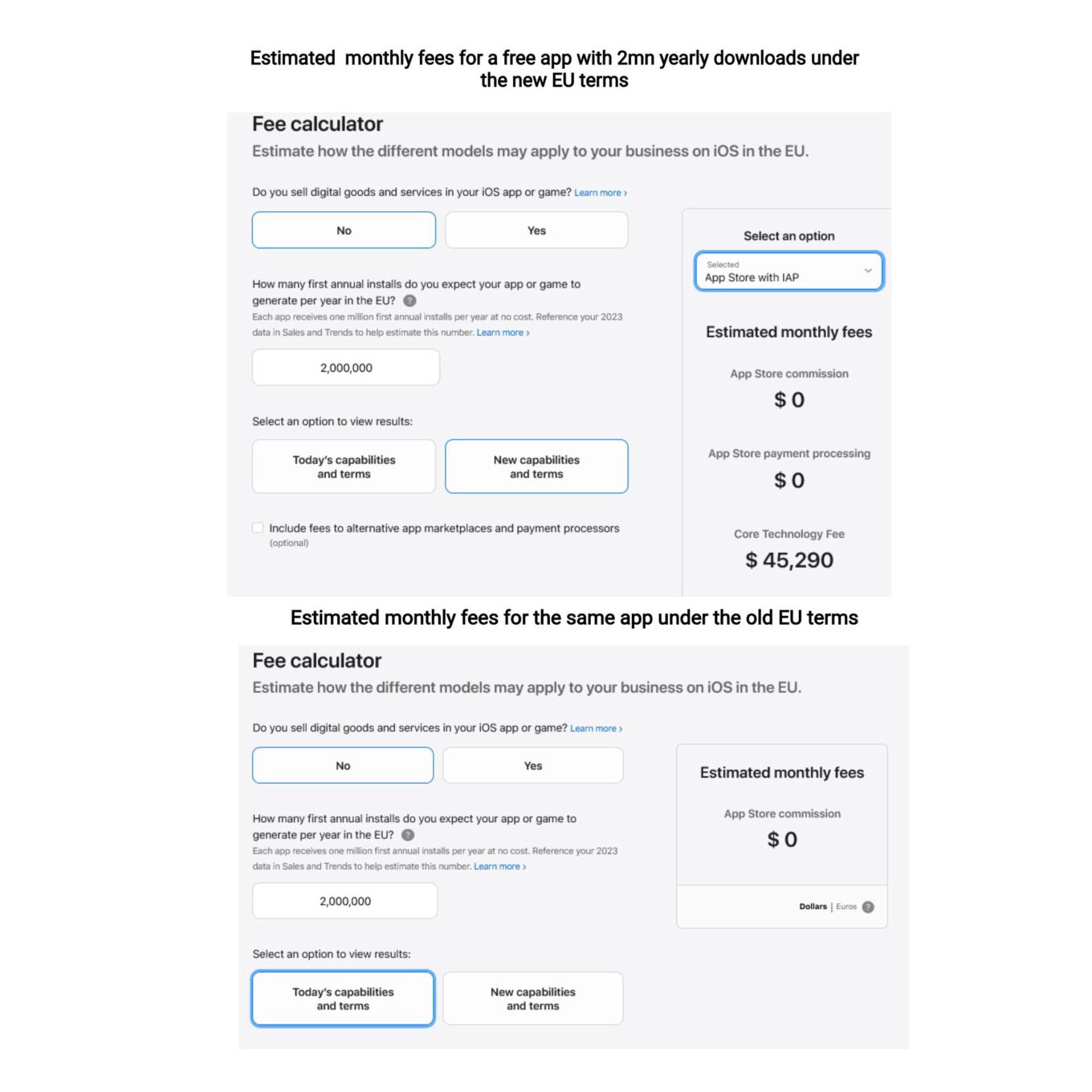
You can use a calculator to estimate your potential CTF

What Apple is effectively doing is trying to discourage developers from switching to the new terms, where they would have had more freedom to choose distribution and payment options. They are betting, and rightly so, that not so many would be willing to risk going into the red if their app takes off or experiences a sudden surge in popularity.

So, while Apple allows alternative stores de jure, de facto there is a prohibitive Core Technology Fee that blocks the way for free and freemium apps to enter alternative stores. In AdGuard’s case, we cannot take advantage of this offer either, simply because we do not have enough resources to pay the Core Technology Fee, and we are not alone in this. The only option left on the table is to make the app fully paid — which we have no intention of doing.

Will the EU regulators buy it?

It remains to be seen whether the DMA-focused changes that Apple plans to introduce will raise an issue with the EU regulators. As TechCrunch points out, the Article 6(12) of the DMA states that “the gatekeeper shall apply fair, reasonable, and non-discriminatory general conditions of access for business users to its software application stores, online search engines and online social networking services.” Is the Core Technology Fee fair? We don’t think so.

Apple’s plan to comply with the DMA is a clever attempt to spin the regulation to its own advantage, and to pressure developers into sticking with the old terms. By imposing the Core Technology Fee on apps that exceed a certain threshold of downloads, Apple is effectively penalizing developers who want to explore alternative distribution and payment options. This is a false choice and a mockery of real freedom and real competition in the digital sector. We hope that the EU regulators will not be fooled by Apple’s cosmetic changes and will insist that the DMA is enforced in a way that truly benefits consumers and developers.


Podobał Ci się ten post?
AdGuard VPN AdGuard DNS AdGuard Mail AdGuard Wallet
Ekran główny AdGuard dla Windows
Ekran ochrony AdGuard dla Windows, pokazujący funkcje ochrony i ustawienia
Ekran statystyki AdGuard dla Windows, pokazujący statystyki zablokowanych reklam i trackery
Ekran Zarządzanie aplikacjami w AdGuard dla Windows, pokazujący opcje zarządzania ochroną dla aplikacji zainstalowanych na urządzeniu
20 752 20752 recenzje
Doskonały!

AdGuard dla Windows: bloker reklam na PC

AdGuard dla systemu Windows to coś więcej niż bloker reklam. To wielofunkcyjne narzędzie, które blokuje reklamy, kontroluje dostęp do niebezpiecznych stron, przyspiesza ładowanie stron i chroni dzieci przed nieodpowiednimi treściami

Pobierając program, akceptujesz warunki Umowy licencyjnej
Microsoft Store
Pobierając program, akceptujesz warunki Umowy licencyjnej
AdGuard na Windows v8.0, 14-dniowa wersja próbna
Ekran główny AdGuard dla Mac
Ekran Trybu ukrytego w AdGuard dla Mac
20 752 20752 recenzje
Doskonały!

AdGuard: bloker reklam na Maca

AdGuard dla Mac to wyjątkowy bloker reklam zaprojektowany z myślą o macOS. Oprócz ochrony przed uciążliwymi reklamami w przeglądarkach i aplikacjach chroni Cię przed śledzeniem, phishingiem i oszustwami
Pobierając program, akceptujesz warunki Umowy licencyjnej
Przeczytaj więcej
AdGuard na Mac v2.19, 14-dniowa wersja próbna
Ekran główny AdGuard dla Android
Ekran Ochrona przed śledzeniem w AdGuard dla Android
Ekran Zarządzanie aplikacjami w AdGuard dla Android, pokazujący opcje zarządzania ochroną dla aplikacji zainstalowanych na urządzeniu
Ekran statystyki AdGuard dla Android, pokazujący statystyki zablokowanych reklam i trackery
Ekran główny prywatnej przeglądarki AdGuard dla Android
Kod QR, aby pobierz AdGuard dla Android
20 752 20752 recenzje
Doskonały!

AdGuard: bloker reklam na Androida

Blokuje reklamy i moduły śledzące we wszystkich przeglądarkach, grach i innych aplikacjach. Chroni Twoją prywatność i pozwala kontrolować, w jaki sposób aplikacje korzystają z Internetu. Instalowane za pomocą pliku APK
Pobierając program, akceptujesz warunki Umowy licencyjnej
Przeczytaj więcej
Skanuj, aby pobrać
Użyj dowolnego czytnika kodów QR dostępnego w Twoim urządzeniu
AdGuard na Android v4.14, 14-dniowa wersja próbna
Ekran główny AdGuard dla iOS
Ekran ochrony AdGuard dla iOS, pokazujący funkcje ochrony i ustawienia
Ekran statystyki AdGuard dla iOS, pokazujący statystyki zablokowanych reklam i trackery
Kod QR, aby pobierz AdGuard dla iOS
20 752 20752 recenzje
Doskonały!

AdGuard na iOS: bloker reklam poza Safari

Najlepszy bloker reklam na iOS dla iPhone’a i iPada. AdGuard usuwa wszelkiego rodzaju reklamy i elementy śledzące w Safari oraz chroni Twoją prywatność we wszystkich aplikacjach na poziomie DNS
Pobierając program, akceptujesz warunki Umowy licencyjnej
Przeczytaj więcej
Skanuj, aby pobrać
Użyj dowolnego czytnika kodów QR dostępnego w Twoim urządzeniu
AdGuard na iOS v4.5
Ekran główny AdGuard Content Blocker
Ekran Filtry w AdGuard Content Blocker
Ekran ustawienia w AdGuard Content Blocker
20 752 20752 recenzje
Doskonały!

Blokada treści AdGuard

AdGuard Content Blocker eliminuje wszelkiego rodzaju reklamy w przeglądarkach mobilnych, które obsługują technologię blokowania treści — a mianowicie Samsung Internet i Yandex Browser. Jego funkcje są ograniczone w porównaniu z AdGuard na Androida, ale jest darmowy, łatwy w instalacji i wydajny
Pobierając program, akceptujesz warunki Umowy licencyjnej
Przeczytaj więcej
Blokada treści AdGuard v2.8
Ekran główny AdGuard Browser Extension
Ekran Ochrona przed śledzeniem w AdGuard Browser Extension
20 752 20752 recenzje
Doskonały!

Rozszerzenie przeglądarki AdGuard

AdGuard to najszybsze i najlżejsze rozszerzenie blokowania reklam, które skutecznie blokuje wszystkie typy reklam na wszystkich stronach internetowych! Wybierz AdGuard dla swojej przeglądarki i uzyskaj szybkie i bezpieczne przeglądanie Internetu pozbawione reklam.
Instalacja
Pobierając program, akceptujesz warunki Umowy licencyjnej
Instalacja
Pobierając program, akceptujesz warunki Umowy licencyjnej
Instalacja
Pobierając program, akceptujesz warunki Umowy licencyjnej
Instalacja
Pobierając program, akceptujesz warunki Umowy licencyjnej
Instalacja
Pobierając program, akceptujesz warunki Umowy licencyjnej
Przeczytaj więcej
Instalacja
Pobierając program, akceptujesz warunki Umowy licencyjnej
Przeczytaj więcej
Rozszerzenie przeglądarki AdGuard v5.5
Ekran główny Asystenta przeglądarki
20 752 20752 recenzje
Doskonały!

Asystent AdGuard

Towarzyszące rozszerzenie przeglądarki dla aplikacji desktopowych AdGuard. Umożliwia blokowanie niestandardowych elementów na stronach internetowych, dodawanie stron internetowych do listy dozwolonych i wysyłanie raportów bezpośrednio z przeglądarki
Asystent AdGuard v1.4
20 752 20752 recenzje
Doskonały!

AdGuard Home

AdGuard Home to sieciowe rozwiązanie do blokowania reklam i modułów śledzących. Zainstaluj go raz na routerze, aby objąć nim wszystkie urządzenia w sieci domowej — nie jest wymagane żadne dodatkowe oprogramowanie klienckie. Jest to szczególnie ważne w przypadku różnych urządzeń IoT, które często stanowią zagrożenie dla Twojej prywatności
AdGuard Home v0.107
Ekran główny AdGuard Pro dla iOS
Ekran Ochrona w AdGuard Pro dla iOS, pokazujący funkcje i ustawienia ochrony
Ekran statystyki w AdGuard Pro dla iOS, pokazujący statystyki zablokowanych reklam i trackerów
20 752 20752 recenzje
Doskonały!

AdGuard Pro dla iOS

AdGuard Pro na iOS oferuje wszystkie zaawansowane funkcje blokowania reklam. Oferuje te same narzędzia, co płatna wersja AdGuard na iOS. Doskonale blokuje reklamy w Safari i pozwala dostosować ustawienia DNS, aby dostosować poziom ochrony. Blokuje reklamy w przeglądarkach i aplikacjach, chroni dzieci przed nieodpowiednimi treściami i dba o bezpieczeństwo danych osobowych.
Pobierając program, akceptujesz warunki Umowy licencyjnej
Przeczytaj więcej
AdGuard Pro dla iOS v4.5
Ekran główny AdGuard Mini dla Mac
Ekran ochrony Safari w AdGuard Mini dla Mac
Ekran tworzenia reguły w AdGuard Mini dla Mac
20 752 20752 recenzje
Doskonały!

AdGuard Mini dla Mac — bloker reklam Safari

AdGuard Mini dla komputerów Mac to potężny bloker reklam w Safari. Ta lekka aplikacja usuwa reklamy, blokuje moduły śledzące i przyspiesza ładowanie stron. Umożliwia przeglądanie internetu w Safari bez rozpraszania uwagi i chroni prywatność danych
Instalacja
Pobierając program, akceptujesz warunki Umowy licencyjnej
Przeczytaj więcej
AdGuard Mini dla Mac v2.3
Ekran główny AdGuard dla Android TV z włączoną ochroną
Ekran blokowanie reklama AdGuard dla Android TV, pokazujący jego funkcje i ustawienia
Ekran ustawienia AdGuard dla Android TV
Ekran Zarządzanie aplikacjami AdGuard dla Android TV, pokazujący aplikacje, w których reklamy i trackery są zablokowane
20 752 20752 recenzje
Doskonały!

AdGuard dla Android TV

AdGuard dla Android TV to jedyna aplikacja, która blokuje reklamy, chroni prywatność i działa jak zapora sieciowa dla Smart TV. Otrzymuj ostrzeżenia o zagrożeniach internetowych, używaj bezpiecznego DNS i korzystaj z szyfrowanego ruchu. Zrelaksuj się i zanurz się w swoich ulubionych programach z najwyższej klasy zabezpieczeniami bez reklam!
AdGuard dla Android TV v4.14, 14-dniowa wersja próbna
Maskotka AdGuard, Agnar, trzymający pingwina Linux
20 752 20752 recenzje
Doskonały!

AdGuard dla Linux

AdGuard for Linux to pierwszy na świecie systemowy bloker reklam dla systemu Linux. Blokuj reklamy i elementy śledzące na poziomie urządzenia, wybieraj spośród wstępnie zainstalowanych filtrów lub dodawaj własne — wszystko za pośrednictwem interfejsu wiersza poleceń
AdGuard dla Linux v1.4
20 752 20752 recenzje
Doskonały!

AdGuard Temp Mail

Darmowy generator tymczasowych adresów e-mail, który zapewnia anonimowość i chroni prywatność. Brak spamu w głównej skrzynce odbiorczej!
20 752 20752 recenzje
Doskonały!

AdGuard VPN

75 lokalizacji na świecie

Dostęp do wszelkich treści

Silne szyfrowanie

Polityka braku logów

Najszybsze połączenie

Wsparcie 24/7

Wypróbuj za darmo
Pobierając program, akceptujesz warunki Umowy licencyjnej
Przeczytaj więcej
20 752 20752 recenzje
Doskonały!

AdGuard DNS

AdGuard DNS to alternatywne rozwiązanie do blokowania reklam, ochrony prywatności i kontroli rodzicielskiej. Łatwy w konfiguracji i darmowy, zapewnia niezbędną minimalną ochronę przed reklamami, śledzeniem i phishingiem, bez względu na platformę i urządzenie, z którego korzystasz.
20 752 20752 recenzje
Doskonały!

AdGuard Mail

Chroń swoją tożsamość, unikaj spamu i zabezpiecz swoją skrzynkę odbiorczą dzięki naszym aliasom i tymczasowym adresom e-mail. Skorzystaj z naszej bezpłatnej usługi przekazywania e-maili oraz aplikacji na wszystkie systemy operacyjne
20 752 20752 recenzje
Doskonały!

AdGuard Wallet

Bezpieczny i prywatny portfel kryptowalutowy, który daje Ci pełną kontrolę nad Twoimi aktywami. Zarządzaj wieloma portfelami i odkrywaj tysiące kryptowalut, aby je przechowywać, wysyłać i wymieniać
Rozpoczęto pobieranie AdGuard Kliknij przycisk wskazany strzałką, aby rozpocząć instalację Wybierz „Otwórz” i kliknij „OK”. Poczekaj aż plik zostanie pobrany. W otwartym oknie, przeciągnij ikonę AdGuard do folderu „Aplikacje”. Dziękujemy za wybrania AdGuard! Wybierz „Otrwórz” i kliknij „OK”. Poczekaj aż plik zostanie pobrany. W otwartym kliknij „Instaluj”. Dziękujemy za wybrania AdGuard!
Zainstaluj również AdGuard dla urządzeń mobilnych

















































