Apple is accused of ‘stealing from street musicians’ with new Patreon requirements. Is it really?

Apple has historically received less bad press than Google — the sleek interface and reputation of a privacy champion as opposed to Google’s ruthless data collector has played its role. But now Cupertino has also landed in hot water, and the reason for that is its closed iOS ecosystem.

Notoriously, Apple device owners can only upload apps (at least officially) from Apple’s own App Store. The idea of sideloading — meaning downloading apps from third-party app stores or installing them directly from .IPA files provided by developers — has been off the table for a long time. Even though now the EU has pressured Apple to allow sideloading under the Digital Markets Act (DMA), the company isn’t letting go easily. Apps still have to go through a “notarization” process, ensuring that Apple remains the gatekeeper of app distribution and keeping the control firmly in its grasp.

A recent display of Apple’s tight grip and its potential impact on both users and developers is the case of Patreon. This app, which lets creators support their work without relying on ad revenue, like from YouTube, will face Apple’s 30% cut on in-app purchases starting in November 2025. According to Patreon, Apple made it an ultimatum — if it does not comply with the rules, it will be banished from the app store.

“Unfortunately, Apple is requiring us to switch over to their in-app purchase system for all iOS transactions or else risk being kicked out of the App Store altogether – and their in-app purchase system is not built with our same level of creator-first flexibility, if creators on Patreon continue to use unsupported billing models or disable transactions in the iOS app, we will be at risk of having the entire app removed from their App Store.”

In a nutshell, Apple is pushing Patreon to implement a new feature which would make all transactions between creators and their supporters go through its billing system. To make the transition easier for creators, Patreon has developed an optional tool for the iOS app that can automatically raise subscription prices to cover Apple’s 30% fee. This adjustment ensures that creators will earn the same amount per membership as they do on other platforms. However, creators are not required to use this tool. While the automatic price increase is set as the default, they also have the option to keep their prices unchanged and absorb the 30% fee themselves.
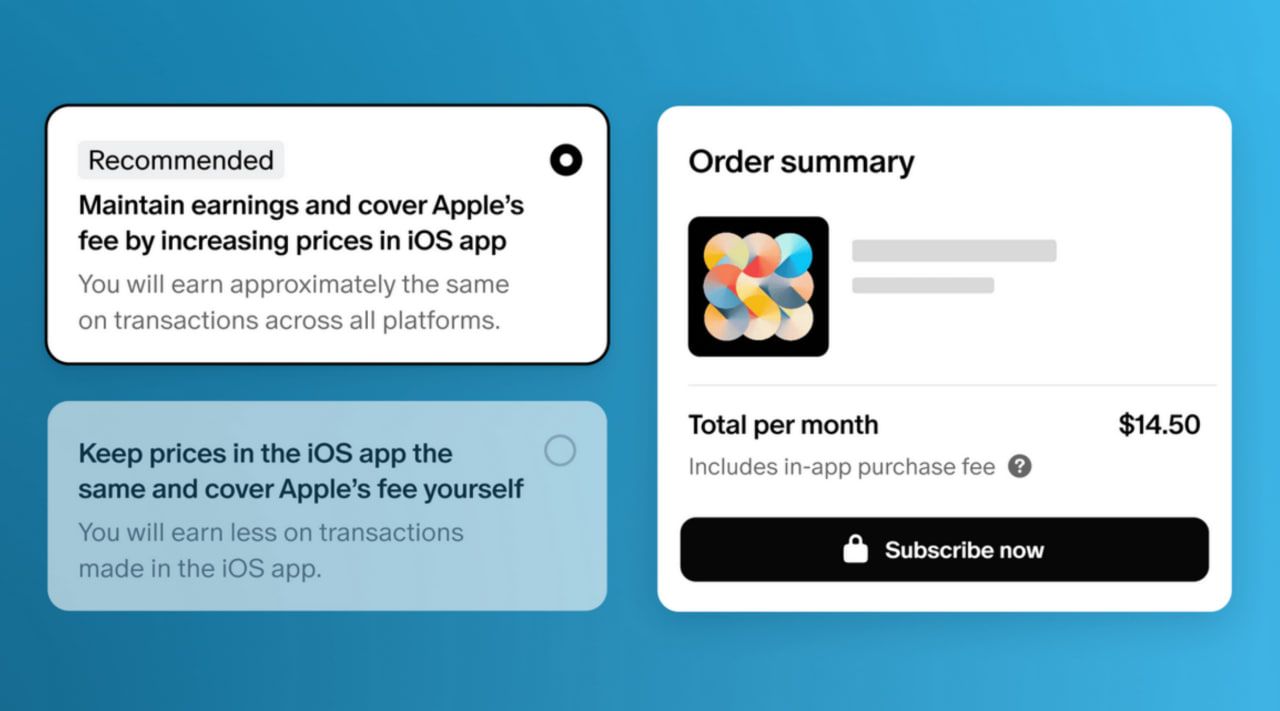
Patreon iOS subscription

Describing both options as not ideal, Patreon noted that the inevitable price increase only applies to the company’s iOS app. It won’t affect existing members — those who have signed up before November 2025 — and won’t affect prices on the web and in the Android app.

A storm of criticism

Patreon users are neither the first nor the last to be impacted by Apple’s fee structure, but this particular case has struck a nerve and a chord with many. Perhaps this is because Apple is seeking a share of what are essentially donations — and donations, by their very nature, are meant to be free from such commercial encumbrances. This move feels particularly controversial, as it seems to intrude on the spirit of charitable giving and voluntary support.

Tim Sweeney from Epic Games was among the first to voice his disapproval.
“Apple must be stopped. The digital world cannot go on like this,” Sweeney said on X.
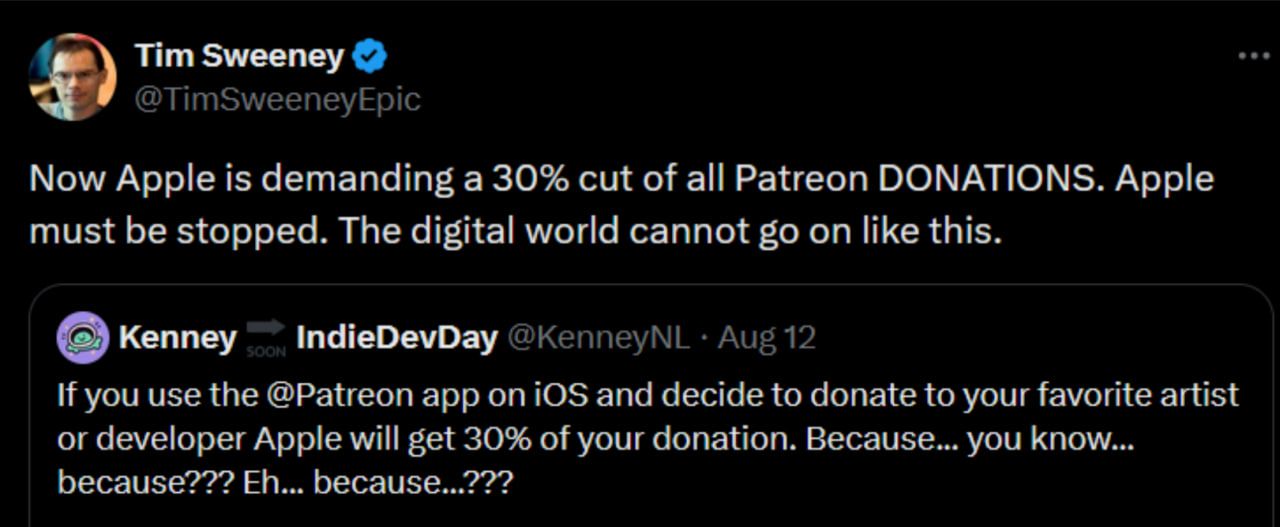
Sweeney's tweet

Epic Games has been in a long-standing battle with Apple ever since Fortnite was pulled from the App Store four years ago. It’s only recently made a return, but only in the EU and through Epic’s new mobile store. This change is thanks to the DMA, which, as we’ve mentioned before, pushed Apple to slightly open up its walled garden.
Another staunch critic of Apple’s way, Elon Musk, accused Apple of doing something akin to “taking money from street musicians.”
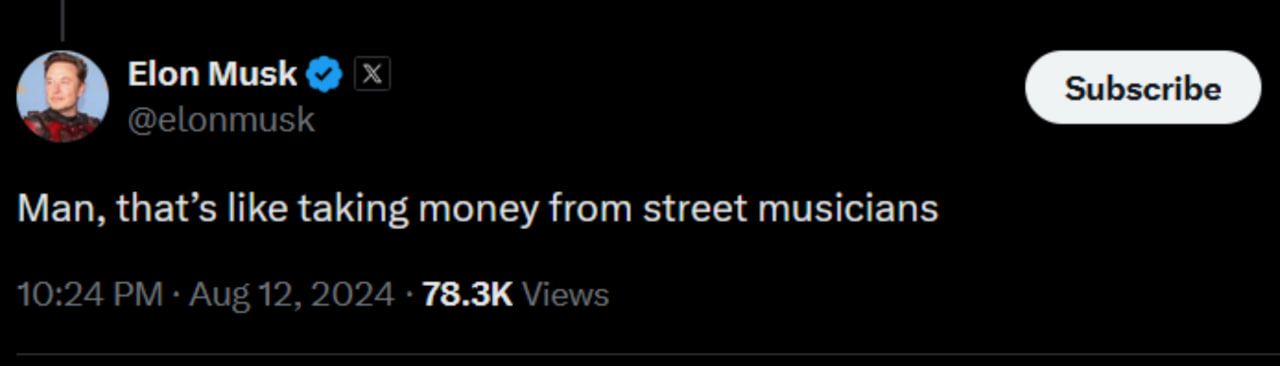
Musk's tweet

Some have started calling on Patreon users to switch to other payment methods to avoid doing Apple’s bidding.

A call to abandon Patreon on X

What it takes to get Apple to acquiesce

Apple has been pushing back against changes and strongly resisting any efforts by regulators to dismantle its walled garden. The company argues that easing its control over the ecosystem would have disastrous consequences for security — that’s been their main argument. But in some cases, Apple’s resistance seems more about protecting its own interests than about security concerns.
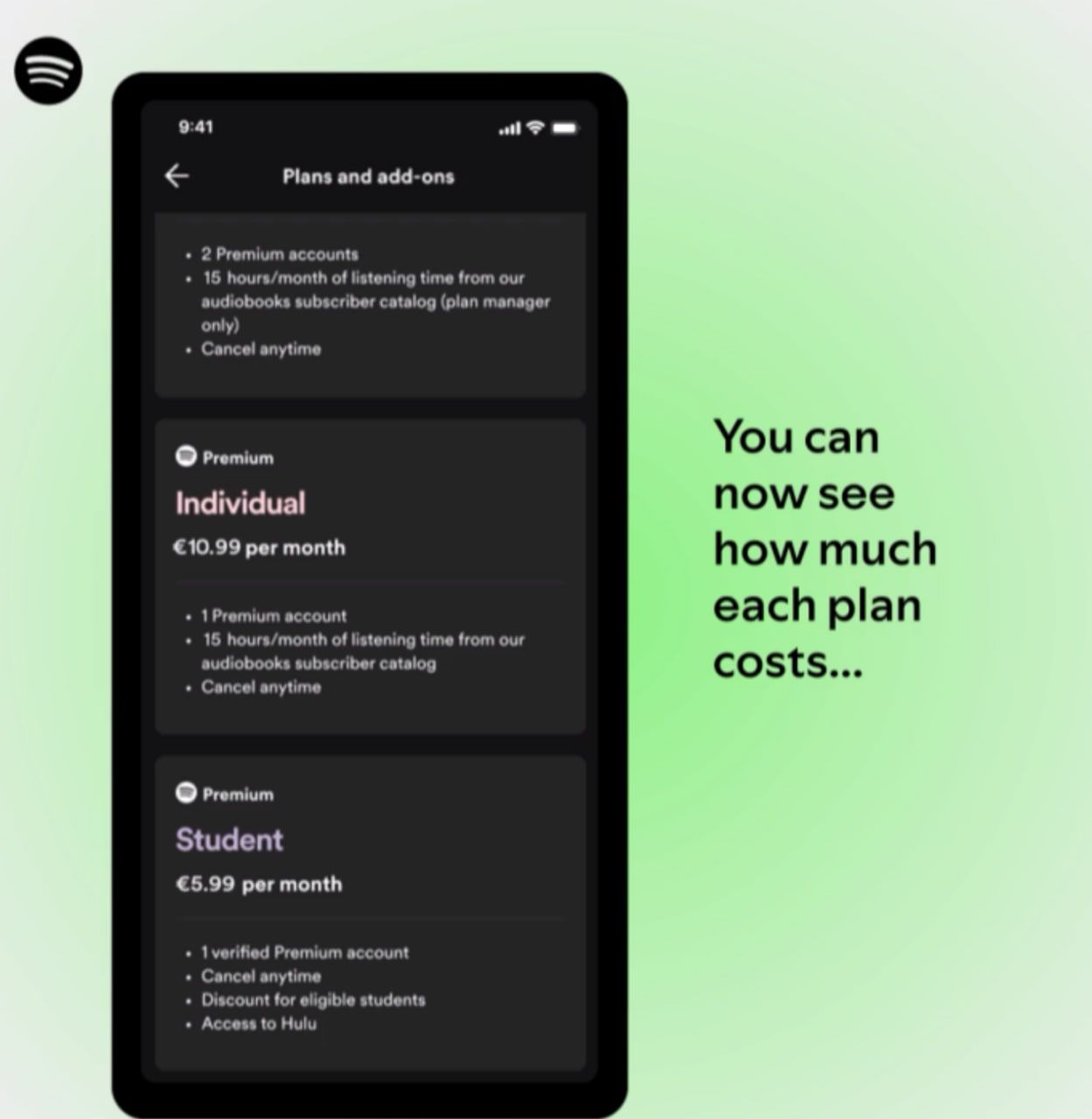
Spotify plans' costs

For instance, Spotify announced last week that EU iPhone users would finally be able to see the company’s promotional offers straight in the Apple’s App Store. That has been a thing on Android and other operating systems for years.

“While this is progress, it’s only a small step in the long march towards giving iPhone consumers basic product experiences they expect and deserve in their apps – experiences that users of other phones already enjoy.”

Apple was forced to make this change — it took a whole court to make the company give some ground. Spotify decided to enroll in the “music streaming services entitlement” program that Apple introduced after being fined €1.84 billion by the EU in March for “abusing its dominant position” in the market.

The European Commission found that Apple’s actions constituted abuse by preventing app developers from informing iOS users about alternative, often cheaper, services available outside the App Store. This choice comes instead of agreeing to Apple’s newly proposed developer terms. These new terms would let EU developers link to external payment options but would still enable Apple to collect a share of those off-platform sales. Spotify has condemned these terms, labeling Apple’s approach “unfair and exploitative.”

Spotify described the victory as “small,” and it is indeed so — Cupertino has shown time and again that if it is to give some leeway, it would do so only under duress. And there is more ground to be gained by developers. Currently, Spotify and other music streaming services in the EU remain unable to offer users an option to click a link to purchase an app due to the ongoing restrictive fees imposed by Apple.

In conclusion

Overall, Apple’s tight grip on its iOS ecosystem is causing major headaches for both users and developers. The company’s strict rules and hefty fees are hurdles to innovation and fairness. Even though regulators like the European Commission are making some headway — like pushing for better app visibility and limited changes — the progress is slow and often comes only after lengthy legal fights. The latest controversy around Patreon’s fee structure shows just how damaging Apple’s approach can be, especially when it impacts donations meant to be free from such fees. As the struggle continues, AdGuard plans to launch a petition to push for global sideloading of apps, aiming to open up the app marketplace and challenge Apple’s dominance.


Podobał Ci się ten post?
AdGuard VPN AdGuard DNS AdGuard Mail AdGuard Wallet
Ekran główny AdGuard dla Windows
Ekran ochrony AdGuard dla Windows, pokazujący funkcje ochrony i ustawienia
Ekran statystyki AdGuard dla Windows, pokazujący statystyki zablokowanych reklam i trackery
Ekran Zarządzanie aplikacjami w AdGuard dla Windows, pokazujący opcje zarządzania ochroną dla aplikacji zainstalowanych na urządzeniu
20 751 20751 recenzji
Doskonały!

AdGuard dla Windows: bloker reklam na PC

AdGuard dla systemu Windows to coś więcej niż bloker reklam. To wielofunkcyjne narzędzie, które blokuje reklamy, kontroluje dostęp do niebezpiecznych stron, przyspiesza ładowanie stron i chroni dzieci przed nieodpowiednimi treściami
Pobierając program, akceptujesz warunki Umowy licencyjnej
Microsoft Store
Pobierając program, akceptujesz warunki Umowy licencyjnej
AdGuard na Windows v8.0, 14-dniowa wersja próbna
Ekran główny AdGuard dla Mac
Ekran Trybu ukrytego w AdGuard dla Mac
20 751 20751 recenzji
Doskonały!

AdGuard: bloker reklam na Maca

AdGuard dla Mac to wyjątkowy bloker reklam zaprojektowany z myślą o macOS. Oprócz ochrony przed uciążliwymi reklamami w przeglądarkach i aplikacjach chroni Cię przed śledzeniem, phishingiem i oszustwami
Pobierając program, akceptujesz warunki Umowy licencyjnej
Przeczytaj więcej
AdGuard na Mac v2.19, 14-dniowa wersja próbna
Ekran główny AdGuard dla Android
Ekran Ochrona przed śledzeniem w AdGuard dla Android
Ekran Zarządzanie aplikacjami w AdGuard dla Android, pokazujący opcje zarządzania ochroną dla aplikacji zainstalowanych na urządzeniu
Ekran statystyki AdGuard dla Android, pokazujący statystyki zablokowanych reklam i trackery
Ekran główny prywatnej przeglądarki AdGuard dla Android
Kod QR, aby pobierz AdGuard dla Android
20 751 20751 recenzji
Doskonały!

AdGuard: bloker reklam na Androida

Blokuje reklamy i moduły śledzące we wszystkich przeglądarkach, grach i innych aplikacjach. Chroni Twoją prywatność i pozwala kontrolować, w jaki sposób aplikacje korzystają z Internetu. Instalowane za pomocą pliku APK
Pobierając program, akceptujesz warunki Umowy licencyjnej
Przeczytaj więcej
Skanuj, aby pobrać
Użyj dowolnego czytnika kodów QR dostępnego w Twoim urządzeniu
AdGuard na Android v4.14, 14-dniowa wersja próbna
Ekran główny AdGuard dla iOS
Ekran ochrony AdGuard dla iOS, pokazujący funkcje ochrony i ustawienia
Ekran statystyki AdGuard dla iOS, pokazujący statystyki zablokowanych reklam i trackery
Kod QR, aby pobierz AdGuard dla iOS
20 751 20751 recenzji
Doskonały!

AdGuard na iOS: bloker reklam poza Safari

Najlepszy bloker reklam na iOS dla iPhone’a i iPada. AdGuard usuwa wszelkiego rodzaju reklamy i elementy śledzące w Safari oraz chroni Twoją prywatność we wszystkich aplikacjach na poziomie DNS
Pobierając program, akceptujesz warunki Umowy licencyjnej
Przeczytaj więcej
Skanuj, aby pobrać
Użyj dowolnego czytnika kodów QR dostępnego w Twoim urządzeniu
AdGuard na iOS v4.5
Ekran główny AdGuard Content Blocker
Ekran Filtry w AdGuard Content Blocker
Ekran ustawienia w AdGuard Content Blocker
20 751 20751 recenzji
Doskonały!

Blokada treści AdGuard

AdGuard Content Blocker eliminuje wszelkiego rodzaju reklamy w przeglądarkach mobilnych, które obsługują technologię blokowania treści — a mianowicie Samsung Internet i Yandex Browser. Jego funkcje są ograniczone w porównaniu z AdGuard na Androida, ale jest darmowy, łatwy w instalacji i wydajny
Pobierając program, akceptujesz warunki Umowy licencyjnej
Przeczytaj więcej
Blokada treści AdGuard v2.8
Ekran główny AdGuard Browser Extension
Ekran Ochrona przed śledzeniem w AdGuard Browser Extension
20 751 20751 recenzji
Doskonały!

Rozszerzenie przeglądarki AdGuard

AdGuard to najszybsze i najlżejsze rozszerzenie blokowania reklam, które skutecznie blokuje wszystkie typy reklam na wszystkich stronach internetowych! Wybierz AdGuard dla swojej przeglądarki i uzyskaj szybkie i bezpieczne przeglądanie Internetu pozbawione reklam.
Instalacja
Pobierając program, akceptujesz warunki Umowy licencyjnej
Instalacja
Pobierając program, akceptujesz warunki Umowy licencyjnej
Instalacja
Pobierając program, akceptujesz warunki Umowy licencyjnej
Instalacja
Pobierając program, akceptujesz warunki Umowy licencyjnej
Instalacja
Pobierając program, akceptujesz warunki Umowy licencyjnej
Przeczytaj więcej
Instalacja
Pobierając program, akceptujesz warunki Umowy licencyjnej
Przeczytaj więcej
Rozszerzenie przeglądarki AdGuard v5.5
Ekran główny Asystenta przeglądarki
20 751 20751 recenzji
Doskonały!

Asystent AdGuard

Towarzyszące rozszerzenie przeglądarki dla aplikacji desktopowych AdGuard. Umożliwia blokowanie niestandardowych elementów na stronach internetowych, dodawanie stron internetowych do listy dozwolonych i wysyłanie raportów bezpośrednio z przeglądarki
Asystent AdGuard v1.4
20 751 20751 recenzji
Doskonały!

AdGuard Home

AdGuard Home to sieciowe rozwiązanie do blokowania reklam i modułów śledzących. Zainstaluj go raz na routerze, aby objąć nim wszystkie urządzenia w sieci domowej — nie jest wymagane żadne dodatkowe oprogramowanie klienckie. Jest to szczególnie ważne w przypadku różnych urządzeń IoT, które często stanowią zagrożenie dla Twojej prywatności

AdGuard Home v0.107
Ekran główny AdGuard Pro dla iOS
Ekran Ochrona w AdGuard Pro dla iOS, pokazujący funkcje i ustawienia ochrony
Ekran statystyki w AdGuard Pro dla iOS, pokazujący statystyki zablokowanych reklam i trackerów
20 751 20751 recenzji
Doskonały!

AdGuard Pro dla iOS

AdGuard Pro na iOS oferuje wszystkie zaawansowane funkcje blokowania reklam. Oferuje te same narzędzia, co płatna wersja AdGuard na iOS. Doskonale blokuje reklamy w Safari i pozwala dostosować ustawienia DNS, aby dostosować poziom ochrony. Blokuje reklamy w przeglądarkach i aplikacjach, chroni dzieci przed nieodpowiednimi treściami i dba o bezpieczeństwo danych osobowych.

Pobierając program, akceptujesz warunki Umowy licencyjnej
Przeczytaj więcej
AdGuard Pro dla iOS v4.5
Ekran główny AdGuard Mini dla Mac
Ekran ochrony Safari w AdGuard Mini dla Mac
Ekran tworzenia reguły w AdGuard Mini dla Mac
20 751 20751 recenzji
Doskonały!

AdGuard Mini dla Mac — bloker reklam Safari

AdGuard Mini dla komputerów Mac to potężny bloker reklam w Safari. Ta lekka aplikacja usuwa reklamy, blokuje moduły śledzące i przyspiesza ładowanie stron. Umożliwia przeglądanie internetu w Safari bez rozpraszania uwagi i chroni prywatność danych
Instalacja
Pobierając program, akceptujesz warunki Umowy licencyjnej
Przeczytaj więcej
AdGuard Mini dla Mac v2.3
Ekran główny AdGuard dla Android TV z włączoną ochroną
Ekran blokowanie reklama AdGuard dla Android TV, pokazujący jego funkcje i ustawienia
Ekran ustawienia AdGuard dla Android TV
Ekran Zarządzanie aplikacjami AdGuard dla Android TV, pokazujący aplikacje, w których reklamy i trackery są zablokowane
20 751 20751 recenzji
Doskonały!

AdGuard dla Android TV

AdGuard dla Android TV to jedyna aplikacja, która blokuje reklamy, chroni prywatność i działa jak zapora sieciowa dla Smart TV. Otrzymuj ostrzeżenia o zagrożeniach internetowych, używaj bezpiecznego DNS i korzystaj z szyfrowanego ruchu. Zrelaksuj się i zanurz się w swoich ulubionych programach z najwyższej klasy zabezpieczeniami bez reklam!
AdGuard dla Android TV v4.14, 14-dniowa wersja próbna
Maskotka AdGuard, Agnar, trzymający pingwina Linux
20 751 20751 recenzji
Doskonały!

AdGuard dla Linux

AdGuard for Linux to pierwszy na świecie systemowy bloker reklam dla systemu Linux. Blokuj reklamy i elementy śledzące na poziomie urządzenia, wybieraj spośród wstępnie zainstalowanych filtrów lub dodawaj własne — wszystko za pośrednictwem interfejsu wiersza poleceń
AdGuard dla Linux v1.4
20 751 20751 recenzji
Doskonały!

AdGuard Temp Mail

Darmowy generator tymczasowych adresów e-mail, który zapewnia anonimowość i chroni prywatność. Brak spamu w głównej skrzynce odbiorczej!
20 751 20751 recenzji
Doskonały!

AdGuard VPN

75 lokalizacji na świecie

Dostęp do wszelkich treści

Silne szyfrowanie

Polityka braku logów

Najszybsze połączenie

Wsparcie 24/7

Wypróbuj za darmo
Pobierając program, akceptujesz warunki Umowy licencyjnej
Przeczytaj więcej
20 751 20751 recenzji
Doskonały!

AdGuard DNS

AdGuard DNS to alternatywne rozwiązanie do blokowania reklam, ochrony prywatności i kontroli rodzicielskiej. Łatwy w konfiguracji i darmowy, zapewnia niezbędną minimalną ochronę przed reklamami, śledzeniem i phishingiem, bez względu na platformę i urządzenie, z którego korzystasz.
20 751 20751 recenzji
Doskonały!

AdGuard Mail

Chroń swoją tożsamość, unikaj spamu i zabezpiecz swoją skrzynkę odbiorczą dzięki naszym aliasom i tymczasowym adresom e-mail. Skorzystaj z naszej bezpłatnej usługi przekazywania e-maili oraz aplikacji na wszystkie systemy operacyjne
20 751 20751 recenzji
Doskonały!

AdGuard Wallet

Bezpieczny i prywatny portfel kryptowalutowy, który daje Ci pełną kontrolę nad Twoimi aktywami. Zarządzaj wieloma portfelami i odkrywaj tysiące kryptowalut, aby je przechowywać, wysyłać i wymieniać
Rozpoczęto pobieranie AdGuard Kliknij przycisk wskazany strzałką, aby rozpocząć instalację Wybierz „Otwórz” i kliknij „OK”. Poczekaj aż plik zostanie pobrany. W otwartym oknie, przeciągnij ikonę AdGuard do folderu „Aplikacje”. Dziękujemy za wybrania AdGuard! Wybierz „Otrwórz” i kliknij „OK”. Poczekaj aż plik zostanie pobrany. W otwartym kliknij „Instaluj”. Dziękujemy za wybrania AdGuard!
Zainstaluj również AdGuard dla urządzeń mobilnych
















































