AdGuard’s digest: Bard lands in EU, Google goes all in on data-scraping, tax sites abuse privacy, EU and US have a deal

In this edition of the AdGuard digest: Google’s AI chatbot comes to the EU after a privacy hiccup, Shutterstock satisfies OpenAI’s appetite for data, tax filing sites leak personal data, the EU and US take another shot at a data transfer deal, as Google’s replacement for tracking cookies comes under scrutiny in France.

Google’s Bard AI chatbot launches in EU after privacy delay

Google’s answer to OpenAI’s ChatGPT and Microsoft’s Bing AI has finally launched in Europe, expanding its geographic reach to over 230 countries. It comes after Bard was derailed last month on its way to EU release by the Irish data protection watchdog. Back in June, the Irish regulator said that Google had failed to provide enough information to show that it was compliant with European data privacy laws.

Since then Google has updated Bard’s interface to include a link to Google’s “privacy hub” that explains in detail how users can limit Bard’s access to their data. Users have the option to turn off Bard’s activity, which means it will no longer be stored in their Google account, as well as delete their past chats. However, Google notes that even with Bard Activity turned off, it will still retain chats for 72 hours “to provide the service” and “to process feedback.” A privacy notice displayed by Bard urges
users “not to include information that can be used to identify you or others,” since it can be reviewed by humans — underpaid and overworked third-party contractors, presumably.
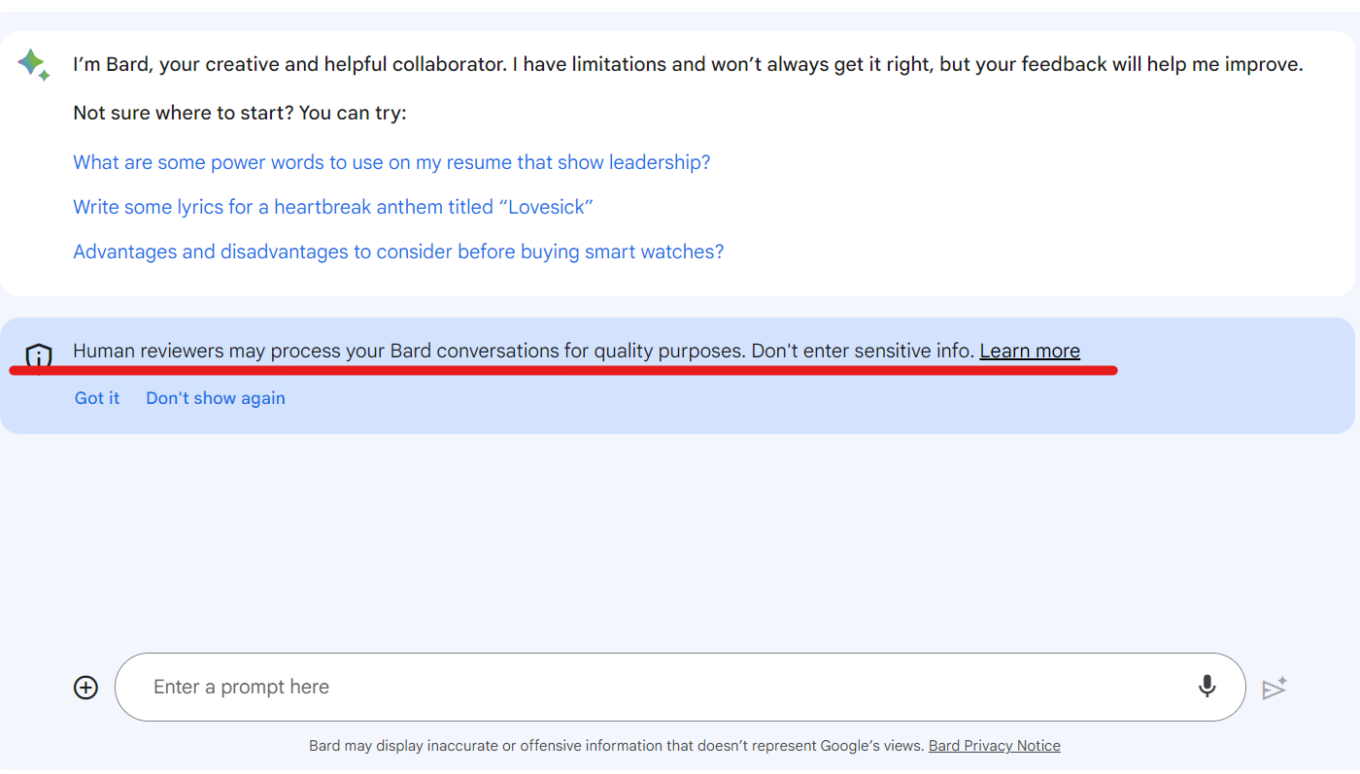
Bard informs users that human reviewers can read their chats

The fact that Google has been forced to make the information about Bard’s data processing readily available to users and offer them more privacy options is a good thing. However, Bard’s privacy policy still remains vague and seems to leave loopholes for Google to continue harvesting data. So, heeding Google’s advice (yes, you heard this right) will be the best option this time: do not entrust Bard with any of your sensitive data.

Tax prep sites leak sensitive user data to Meta and Google

An investigation by US lawmakers has revealed that tax preparation websites have been handing over sensitive personal and financial data to Meta and Google for years, in possible violation of privacy laws. The culprits are TaxAct, H&R Bloсk, and TaxSlayer, who placed Meta and Google’s tracking codes on their websites, giving the big tech giants access to the confidential information of millions of taxpayers.

The report zooms in on Meta’s tracking practices, which were first exposed by The Markup last year. The websites shared all kinds of data with Meta, such as names, email addresses, phone numbers, and gender as hashes, as well as filing status, refund amount, taxes owed, and dependents’ names. Meta even got data on whether users qualified for deductions or exemptions. Meta then used this information to target ads to taxpayers across the web, and to train its AI algorithms. Lawmakers slammed both Meta and Google for their “stunning disregard for taxpayer privacy.” The report also notes that while both companies claimed to have filtering systems in place to prevent the collection of sensitive taxpayer data, those systems were apparently “ineffective.”

The investigation confirmed that Meta and Google exploited tax preparation sites to get their hands on sensitive taxpayer information without their explicit consent or knowledge, which once again shows that their priorities are in data harvesting, not data protection. It’s good to see that US lawmakers are trying to hold big tech companies accountable, and not just the tax prep sites (who claim they didn’t know they were sending the sensitive taxpayer data). Users deserve to have their privacy and data protected, especially their personal and financial information.

Shutterstock allows OpenAI to train AI on its images for 6 more years

The world’s largest stock image site, Shutterstock, will continue allowing OpenAI, the company behind ChatGPT and DALLE-E, to use its vast library of images, videos, music, and associated metadata to train AI. OpenAI and Shutterstock first partnered in 2021, and the partnership has now been expanded and extended for an additional 6 years. Shutterstock’s partnership with OpenAI previously saw the stock photo site directly integrate an DALLE-E image generator into its platform.

Shutterstock promised to compensate those artists whose works would be used for training its generative AI, as well as pay royalties for “newly generated assets.” Last year, Shutterstock became the first in the industry to launch a contributor fund in an attempt to make things right with creators, irate over the fact that their images were being scraped to make AI art. Shutterstock’s approach to AI is drastically different from that of Getty Images, which banned AI-generated images outright over fears of future copyright infringement claims.

AI companies and artists have long been at odds over the use of their work for AI training and generation. The legal and ethical issues are complex and unresolved. Shutterstock is trying to balance both sides by compensating artists and giving them an option to opt out, but it’s hard to say if that’s enough or even enforceable. We will have to wait and see which approach, embracing or rejecting AI art, prevails. In the meantime, OpenAI faces increasing pressure from regulators, including from the US goverment which investigates it for potentially harming consumers through data collection and “hallucinations.”

Google’s replacement for tracking cookies requires consent, says watchdog

We have written and railed extensively about Google’s replacement for third-party cookies in Chrome called “Topics.” Topics are part of Google’s Privacy Sandbox initiative to make targeting for personalized ads more privacy-friendly. Despite widespread criticism that it fails to do so, including from Apple, Mozzila, and AdGuard, Google has moved forward with the implementation of Topics. Since July, Google has been allowing sites to test its features as part of a transition period before it completely deprecates third-party cookies in the second half of 2024.

Now, the French privacy watchdog, CNIL, has clarified the legal obligations of developers who want to test Google’s new tracking method. The watchdog said that, as with cookies before, developers would have to ask users’ permission to track them with the new method.

The French privacy watchdog’s decision is significant because it implies that the new and supposedly privacy-friendly tracking method, Topics, is not foolproof and may not be that drastically different from the old tracking cookie. It also seems to validate our concerns that Topics will not prevent tracking of users by larger platforms, such as Google itself. AdGuard users don’t need to worry though: we’ve already committed to blocking the Topics API.

Google hit with lawsuit after saying it will scrape all Internet to train AI

Google’s attempt to claim that it has every right to scrape everything you post online to train its AI models has backfired, with its now facing a class-action lawsuit for “harvesting data in secret” to create AI products. Google recently updated its privacy policy to state that it “uses publicly available information to help train Google's AI models and build products and features like Google Translate, Bard, and Cloud AI capabilities.”
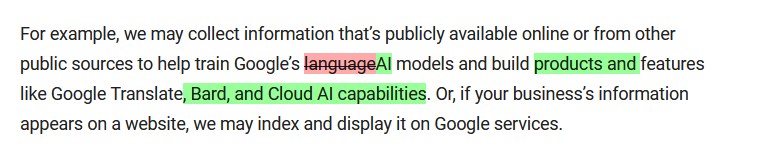
Google’s privacy policy has undergone a troubling update

Historic differences between Google’s old and updated privacy policies. The current version is in green. Source: Google

Such audacity drew a backlash from privacy activists, and now Google is facing a lawsuit seeking billions in punitive damages. The plaintiffs argue that Google’s activities amount to stealing in plain sight, and that it could have obtained the data legally instead. “Google had options other than to steal personal and copyrighted information. Internet data is available for purchase just like any other content or property,” the lawsuit says.

It’s encouraging to see that Google’s ongoing data grab is being challenged and exposed, and that more people are becoming aware of what’s going on behind the scenes. Hopefully, this will deter Google from using online data as its own without compensation or the ability to opt out. Although, we may be hoping for too much.

US and EU agree on deal to transfer personal data across Atlantic

The EU has approved a deal aimed at making the transfer of personal user data between the US and the EU legal again. The deal comes about three years after EU court quashed the previous pact, called “Privacy Shield,” which resulted in a legal void and multimillion-dollar fines for companies that continued to send European data to the US.

But it’s too early to celebrate the deal. Privacy advocates argue that it is not that different from previous proposals that were deemed inadequate by EU bodies. NOYB, a privacy group that has successfully challenged previous deals, called the new agreement “largely a copy of the failed Privacy Shield” and said it would also challenge it in court.

We’ll be following the situation closely, and in the meantime, stock up on popcorn.

Podobał Ci się ten post?
AdGuard VPN AdGuard DNS AdGuard Mail AdGuard Wallet
Ekran główny AdGuard dla Windows
Ekran ochrony AdGuard dla Windows, pokazujący funkcje ochrony i ustawienia
Ekran statystyki AdGuard dla Windows, pokazujący statystyki zablokowanych reklam i trackery
Ekran Zarządzanie aplikacjami w AdGuard dla Windows, pokazujący opcje zarządzania ochroną dla aplikacji zainstalowanych na urządzeniu
20 752 20752 recenzje
Doskonały!

AdGuard dla Windows: bloker reklam na PC

AdGuard dla systemu Windows to coś więcej niż bloker reklam. To wielofunkcyjne narzędzie, które blokuje reklamy, kontroluje dostęp do niebezpiecznych stron, przyspiesza ładowanie stron i chroni dzieci przed nieodpowiednimi treściami
Pobierając program, akceptujesz warunki Umowy licencyjnej
Microsoft Store
Pobierając program, akceptujesz warunki Umowy licencyjnej
AdGuard na Windows v8.0, 14-dniowa wersja próbna
Ekran główny AdGuard dla Mac
Ekran Trybu ukrytego w AdGuard dla Mac
20 752 20752 recenzje
Doskonały!

AdGuard: bloker reklam na Maca

AdGuard dla Mac to wyjątkowy bloker reklam zaprojektowany z myślą o macOS. Oprócz ochrony przed uciążliwymi reklamami w przeglądarkach i aplikacjach chroni Cię przed śledzeniem, phishingiem i oszustwami
Pobierając program, akceptujesz warunki Umowy licencyjnej
Przeczytaj więcej
AdGuard na Mac v2.19, 14-dniowa wersja próbna
Ekran główny AdGuard dla Android
Ekran Ochrona przed śledzeniem w AdGuard dla Android
Ekran Zarządzanie aplikacjami w AdGuard dla Android, pokazujący opcje zarządzania ochroną dla aplikacji zainstalowanych na urządzeniu
Ekran statystyki AdGuard dla Android, pokazujący statystyki zablokowanych reklam i trackery
Ekran główny prywatnej przeglądarki AdGuard dla Android
Kod QR, aby pobierz AdGuard dla Android
20 752 20752 recenzje
Doskonały!

AdGuard: bloker reklam na Androida

Blokuje reklamy i moduły śledzące we wszystkich przeglądarkach, grach i innych aplikacjach. Chroni Twoją prywatność i pozwala kontrolować, w jaki sposób aplikacje korzystają z Internetu. Instalowane za pomocą pliku APK
Pobierając program, akceptujesz warunki Umowy licencyjnej
Przeczytaj więcej
Skanuj, aby pobrać
Użyj dowolnego czytnika kodów QR dostępnego w Twoim urządzeniu
AdGuard na Android v4.14, 14-dniowa wersja próbna
Ekran główny AdGuard dla iOS
Ekran ochrony AdGuard dla iOS, pokazujący funkcje ochrony i ustawienia
Ekran statystyki AdGuard dla iOS, pokazujący statystyki zablokowanych reklam i trackery
Kod QR, aby pobierz AdGuard dla iOS
20 752 20752 recenzje
Doskonały!

AdGuard na iOS: bloker reklam poza Safari

Najlepszy bloker reklam na iOS dla iPhone’a i iPada. AdGuard usuwa wszelkiego rodzaju reklamy i elementy śledzące w Safari oraz chroni Twoją prywatność we wszystkich aplikacjach na poziomie DNS
Pobierając program, akceptujesz warunki Umowy licencyjnej
Przeczytaj więcej
Skanuj, aby pobrać
Użyj dowolnego czytnika kodów QR dostępnego w Twoim urządzeniu
AdGuard na iOS v4.5
Ekran główny AdGuard Content Blocker
Ekran Filtry w AdGuard Content Blocker
Ekran ustawienia w AdGuard Content Blocker
20 752 20752 recenzje
Doskonały!

Blokada treści AdGuard

AdGuard Content Blocker eliminuje wszelkiego rodzaju reklamy w przeglądarkach mobilnych, które obsługują technologię blokowania treści — a mianowicie Samsung Internet i Yandex Browser. Jego funkcje są ograniczone w porównaniu z AdGuard na Androida, ale jest darmowy, łatwy w instalacji i wydajny
Pobierając program, akceptujesz warunki Umowy licencyjnej
Przeczytaj więcej
Blokada treści AdGuard v2.8
Ekran główny AdGuard Browser Extension
Ekran Ochrona przed śledzeniem w AdGuard Browser Extension
20 752 20752 recenzje
Doskonały!

Rozszerzenie przeglądarki AdGuard

AdGuard to najszybsze i najlżejsze rozszerzenie blokowania reklam, które skutecznie blokuje wszystkie typy reklam na wszystkich stronach internetowych! Wybierz AdGuard dla swojej przeglądarki i uzyskaj szybkie i bezpieczne przeglądanie Internetu pozbawione reklam.
Instalacja
Pobierając program, akceptujesz warunki Umowy licencyjnej
Instalacja
Pobierając program, akceptujesz warunki Umowy licencyjnej
Instalacja
Pobierając program, akceptujesz warunki Umowy licencyjnej
Instalacja
Pobierając program, akceptujesz warunki Umowy licencyjnej
Instalacja
Pobierając program, akceptujesz warunki Umowy licencyjnej
Przeczytaj więcej
Instalacja
Pobierając program, akceptujesz warunki Umowy licencyjnej
Przeczytaj więcej
Rozszerzenie przeglądarki AdGuard v5.5
Ekran główny Asystenta przeglądarki
20 752 20752 recenzje
Doskonały!

Asystent AdGuard

Towarzyszące rozszerzenie przeglądarki dla aplikacji desktopowych AdGuard. Umożliwia blokowanie niestandardowych elementów na stronach internetowych, dodawanie stron internetowych do listy dozwolonych i wysyłanie raportów bezpośrednio z przeglądarki
Asystent AdGuard v1.4
20 752 20752 recenzje
Doskonały!

AdGuard Home

AdGuard Home to sieciowe rozwiązanie do blokowania reklam i modułów śledzących. Zainstaluj go raz na routerze, aby objąć nim wszystkie urządzenia w sieci domowej — nie jest wymagane żadne dodatkowe oprogramowanie klienckie. Jest to szczególnie ważne w przypadku różnych urządzeń IoT, które często stanowią zagrożenie dla Twojej prywatności
AdGuard Home v0.107
Ekran główny AdGuard Pro dla iOS
Ekran Ochrona w AdGuard Pro dla iOS, pokazujący funkcje i ustawienia ochrony
Ekran statystyki w AdGuard Pro dla iOS, pokazujący statystyki zablokowanych reklam i trackerów
20 752 20752 recenzje
Doskonały!

AdGuard Pro dla iOS

AdGuard Pro na iOS oferuje wszystkie zaawansowane funkcje blokowania reklam. Oferuje te same narzędzia, co płatna wersja AdGuard na iOS. Doskonale blokuje reklamy w Safari i pozwala dostosować ustawienia DNS, aby dostosować poziom ochrony. Blokuje reklamy w przeglądarkach i aplikacjach, chroni dzieci przed nieodpowiednimi treściami i dba o bezpieczeństwo danych osobowych.
Pobierając program, akceptujesz warunki Umowy licencyjnej
Przeczytaj więcej
AdGuard Pro dla iOS v4.5
Ekran główny AdGuard Mini dla Mac
Ekran ochrony Safari w AdGuard Mini dla Mac
Ekran tworzenia reguły w AdGuard Mini dla Mac
20 752 20752 recenzje
Doskonały!

AdGuard Mini dla Mac — bloker reklam Safari

AdGuard Mini dla komputerów Mac to potężny bloker reklam w Safari. Ta lekka aplikacja usuwa reklamy, blokuje moduły śledzące i przyspiesza ładowanie stron. Umożliwia przeglądanie internetu w Safari bez rozpraszania uwagi i chroni prywatność danych

Instalacja
Pobierając program, akceptujesz warunki Umowy licencyjnej
Przeczytaj więcej
AdGuard Mini dla Mac v2.3
Ekran główny AdGuard dla Android TV z włączoną ochroną
Ekran blokowanie reklama AdGuard dla Android TV, pokazujący jego funkcje i ustawienia
Ekran ustawienia AdGuard dla Android TV
Ekran Zarządzanie aplikacjami AdGuard dla Android TV, pokazujący aplikacje, w których reklamy i trackery są zablokowane
20 752 20752 recenzje
Doskonały!

AdGuard dla Android TV

AdGuard dla Android TV to jedyna aplikacja, która blokuje reklamy, chroni prywatność i działa jak zapora sieciowa dla Smart TV. Otrzymuj ostrzeżenia o zagrożeniach internetowych, używaj bezpiecznego DNS i korzystaj z szyfrowanego ruchu. Zrelaksuj się i zanurz się w swoich ulubionych programach z najwyższej klasy zabezpieczeniami bez reklam!

AdGuard dla Android TV v4.14, 14-dniowa wersja próbna
Maskotka AdGuard, Agnar, trzymający pingwina Linux
20 752 20752 recenzje
Doskonały!

AdGuard dla Linux

AdGuard for Linux to pierwszy na świecie systemowy bloker reklam dla systemu Linux. Blokuj reklamy i elementy śledzące na poziomie urządzenia, wybieraj spośród wstępnie zainstalowanych filtrów lub dodawaj własne — wszystko za pośrednictwem interfejsu wiersza poleceń
AdGuard dla Linux v1.4
20 752 20752 recenzje
Doskonały!

AdGuard Temp Mail

Darmowy generator tymczasowych adresów e-mail, który zapewnia anonimowość i chroni prywatność. Brak spamu w głównej skrzynce odbiorczej!
20 752 20752 recenzje
Doskonały!

AdGuard VPN

75 lokalizacji na świecie

Dostęp do wszelkich treści

Silne szyfrowanie

Polityka braku logów

Najszybsze połączenie

Wsparcie 24/7

Wypróbuj za darmo
Pobierając program, akceptujesz warunki Umowy licencyjnej
Przeczytaj więcej
20 752 20752 recenzje
Doskonały!

AdGuard DNS

AdGuard DNS to alternatywne rozwiązanie do blokowania reklam, ochrony prywatności i kontroli rodzicielskiej. Łatwy w konfiguracji i darmowy, zapewnia niezbędną minimalną ochronę przed reklamami, śledzeniem i phishingiem, bez względu na platformę i urządzenie, z którego korzystasz.
20 752 20752 recenzje
Doskonały!

AdGuard Mail

Chroń swoją tożsamość, unikaj spamu i zabezpiecz swoją skrzynkę odbiorczą dzięki naszym aliasom i tymczasowym adresom e-mail. Skorzystaj z naszej bezpłatnej usługi przekazywania e-maili oraz aplikacji na wszystkie systemy operacyjne
20 752 20752 recenzje
Doskonały!

AdGuard Wallet

Bezpieczny i prywatny portfel kryptowalutowy, który daje Ci pełną kontrolę nad Twoimi aktywami. Zarządzaj wieloma portfelami i odkrywaj tysiące kryptowalut, aby je przechowywać, wysyłać i wymieniać
Rozpoczęto pobieranie AdGuard Kliknij przycisk wskazany strzałką, aby rozpocząć instalację Wybierz „Otwórz” i kliknij „OK”. Poczekaj aż plik zostanie pobrany. W otwartym oknie, przeciągnij ikonę AdGuard do folderu „Aplikacje”. Dziękujemy za wybrania AdGuard! Wybierz „Otrwórz” i kliknij „OK”. Poczekaj aż plik zostanie pobrany. W otwartym kliknij „Instaluj”. Dziękujemy za wybrania AdGuard!
Zainstaluj również AdGuard dla urządzeń mobilnych

















































