AdGuard Browser Extension v3.0

A lot has changed since the first ad blocking browser extensions appeared on the market. Simply blocking ads is not enough anymore (not to say it is an easy task — advertisers are constantly learning new tricks to jam their ads past the filters). Today, big data rules the world. Tracking is omnipresent, the price of information has skyrocketed, and so has the value of privacy. People seek tools to protect it, and ad blockers need to adapt to the new demands in order to stay competitive. We understand this more than anyone, and the new AdGuard browser extension v3.0 reflects this.

Thanks to the newly added Stealth Mode, a privacy-oriented multitool, AdGuard further stands out from the ranks of regular ad blocking extensions.

What's new?

Stealth Mode, without any doubt, is the headliner of the new version, but let's be patient and go over every noteworthy change one at a time.

New design

It’s true that any change starts from the inside, but in the end you’ll be judged by your looks more often than not. The AdGuard extension now has a new design, and it’s not just a dumb reskin. There’s a lot more to it: fresh icons and a new overall theme make the interface more natural and user friendly.
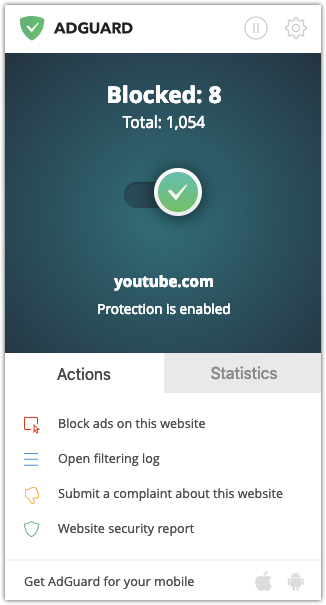
AdGuard Extension v3.0 main menu

In the main extension menu, you’ll also find a brand new "Statistics" tab. It features detailed numerical stats and charts, with the ability to show different types of data: filter-specific data, data for various time frames, or in total.
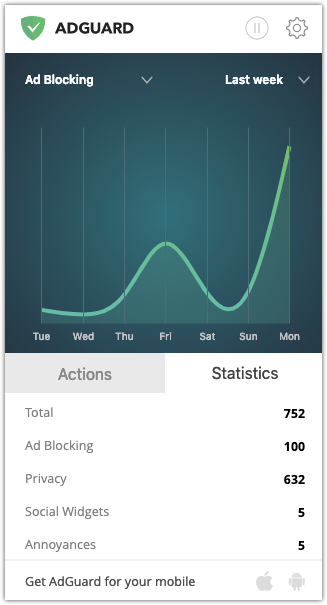
New Statistics tab

Also worth mentioning is the User filter. It has undergone a few changes too. The new luminous element highlighting and auto-save function, as well as a unified text field for filtering rules should make editing more convenient. The text box can also be resized to your liking.
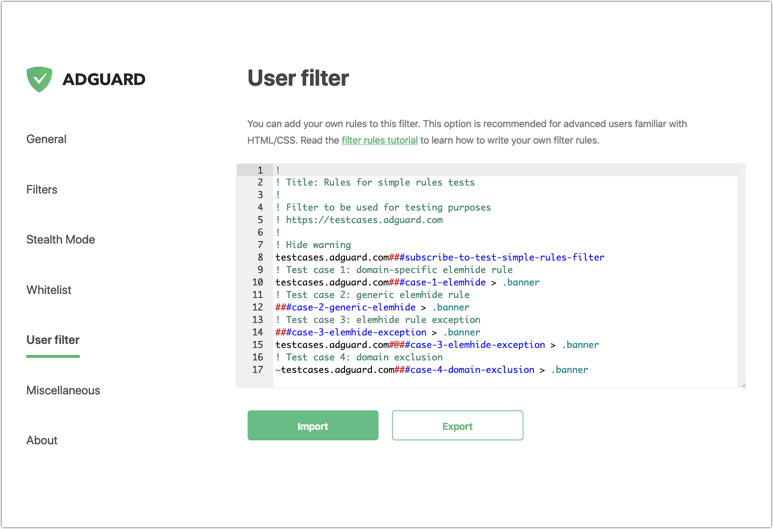
The new look of the User filter

We hope you’ll like the new design and find it convenient and pleasing to the eye. We certainly do!

Introducing Stealth Mode #283

Now, on to the main course of the update. We’ve said it a thousand times already and will say it again: privacy is not a luxury, it is an inalienable right of each person. Unfortunately, we have to fight for this right, and the AdGuard team is proud to be at the forefront of this battle.

Stealth Mode is a powerful instrument that protects your online privacy in many ways. In fact, Stealth Mode is more than that: it’s a whole module that includes a wide range of tools. Previously, only AdGuard for Windows users had access to Stealth Mode; and although the browser extension version doesn't have the full capabilities of its bigger brother just yet, it still does a very good job.
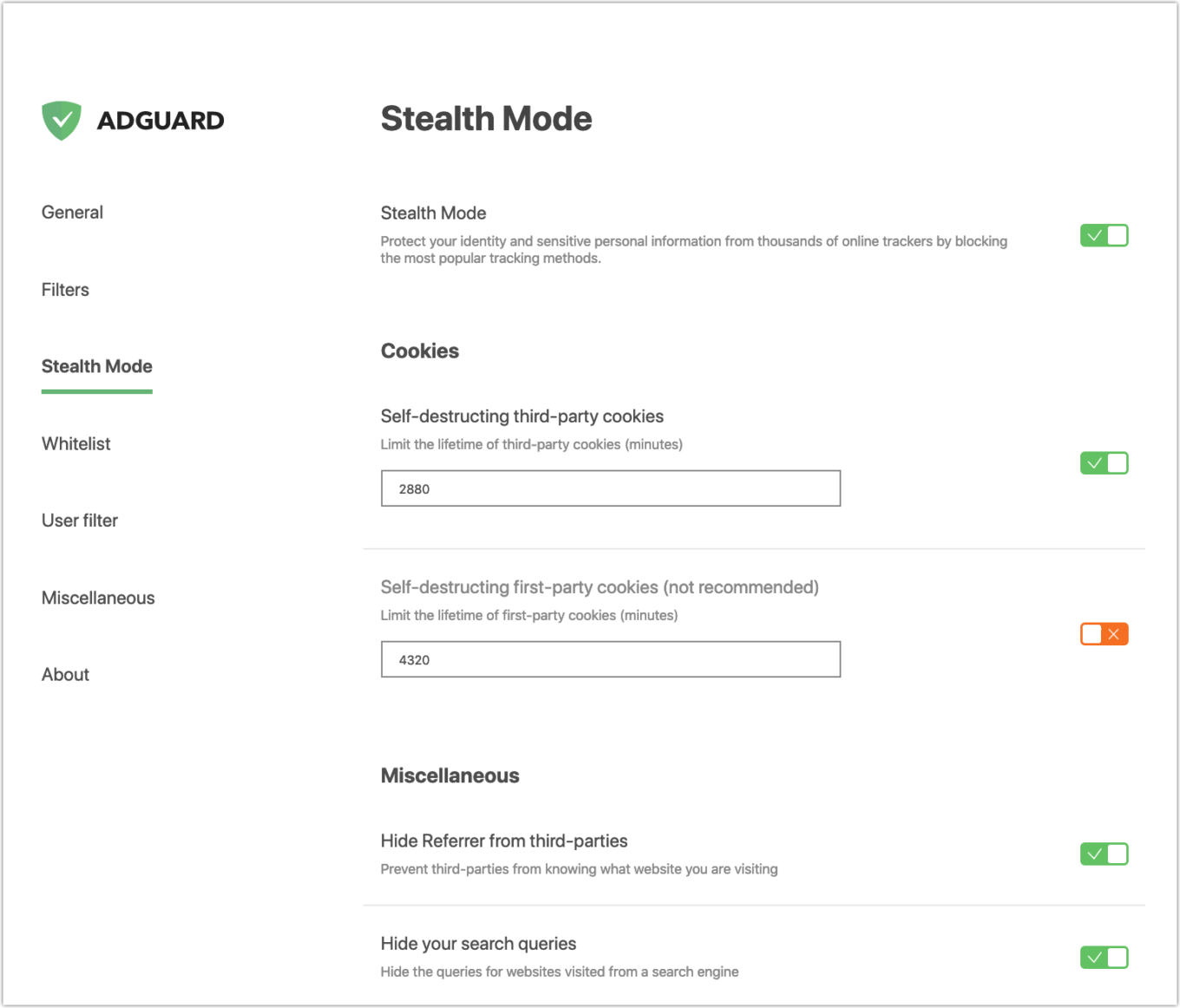
Stealth Mode — a great way to protect your online privacy

Those users who are new to the world of privacy protection might have some troubles understanding what this or that option does. And although all settings have tooltips, let's run through them real quick.

  • Cookies
    Cookies are one of the most common ways, for websites to get information about you just by using the built-in capabilities of your browser. By disabling them (or restricting their lifespan), you will make their job a lot harder. Be careful though: restricting third-party cookies will at most cause you minor inconvenience (e.g., you will have to manually enter your logins/passwords), but restricting first-party cookies can break some websites.

  • Hide Referrer
    Whenever you visit a website, it usually knows where you came there from, and will act accordingly. For example, let’s say you want to purchase a plane ticket after browsing travel packages — tickets for you might be overpriced. By hiding your referrer you deprive websites of this luxury.

  • Hide search queries
    Rather self-explanatory: whenever you click on a link from search results, it won't know what queries you made.

  • Send Do-Not-Track header
    Surprisingly, some websites are more polite than others, and actually will not track you if you ask them nicely by sending this special header with your web requests.

  • Delete X-Client-Data header
    Unique to the Chrome browser, this setting will prevent it from sending information about itself to Google domains.

  • Remove tracking parameters
    You must have noticed this before: often the link you follow contains garbage like utm_source, utm_content, etc. All these parameters are not essential in the slightest for the link to work, but serve for tracking purposes. Bonus: You can modify the list of these parameters yourself!

Future AdGuard extension updates will bring more Stealth Mode options, making it better and better at protecting your privacy.

Other major changes

Filter groups #1068

Going back a little, let's talk more about the new design. We changed the way in which the filters are presented to users. Instead of listing them all together, we combined the filters into semantic groups. Each group includes filters that serve some particular goal. For example, filters that block ads are grouped together, filters that block trackers and serve privacy purposes will be united into a different group, etc.
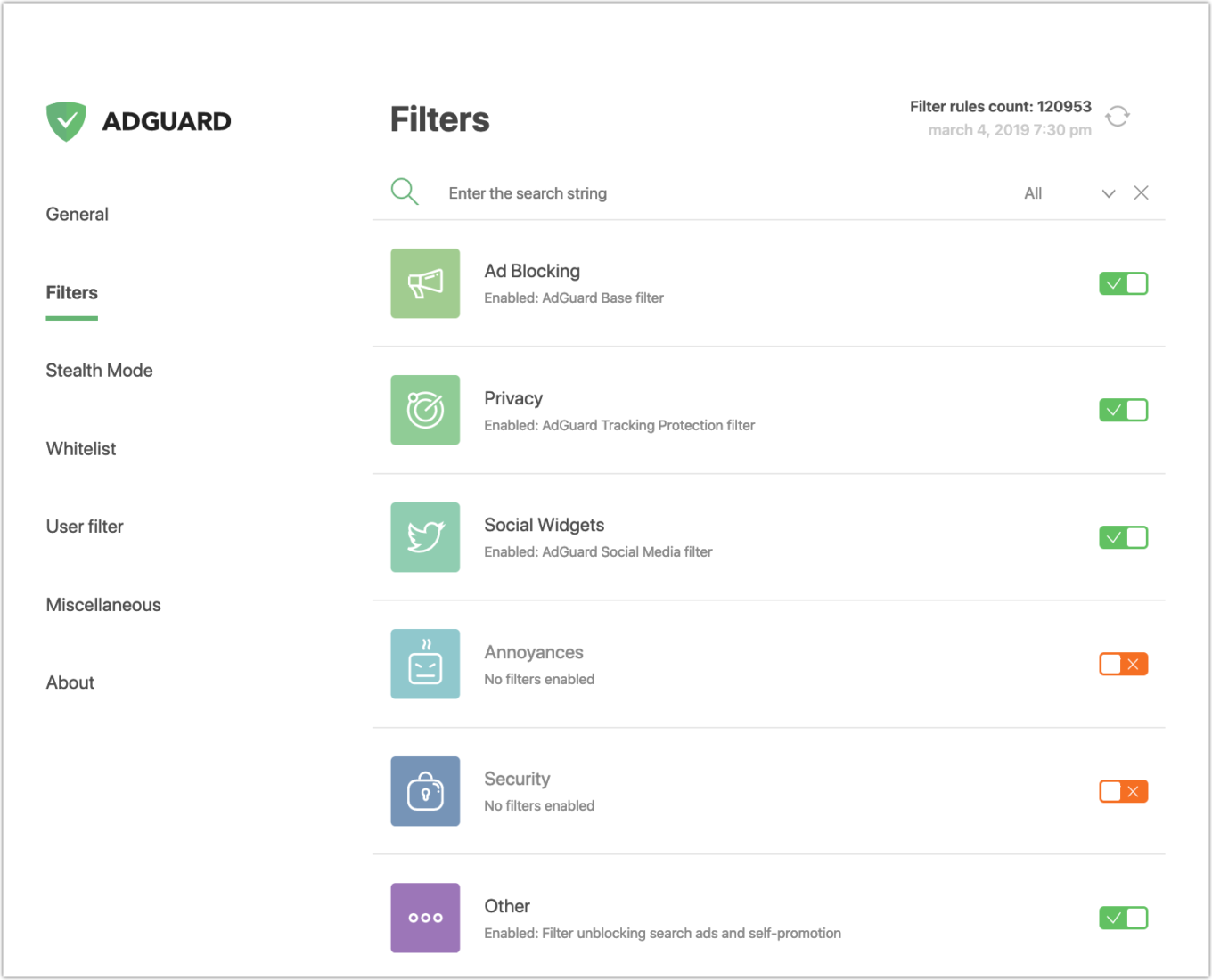
Filter groups

Filters in a group can be enabled and disabled individually, or all at once. Note that once the group is switched off, related filters will not work, even if they are enabled (they will not receive updates either). The new system should make filter management more intuitive and help new users.

New "Filters update period" setting #596

Speaking of filters, previously, filters were automatically updated every 48 hours (default period), end of story. Now you can adjust the frequency of automatic updates (by choosing from options: every 1/6/12/24/48 hours) or disable them completely, in case you prefer manual updates.

An option to disable integration mode #1012

For those who don't know, if you already have the AdGuard desktop app (either for Windows or Mac), our browser extension may become a useful addition to it. The extension can completely replace the browser-based “AdGuard Assistant” module (learn more). It is called Integration Mode, and now you can turn it on or off at will from the “Other settings” tab.

In conclusion

This doesn't, of course, cover the entire changelog. To see the rest of the changes (totaling almost a hundred), go to the GitHub repository.

Also, we would like to remind you that there is a beta channel for the AdGuard extension. If you’re interested in receiving the latest updates as soon as physically possible (and don't fear a stray bug or two), welcome into the fold.

And that’s all for today! Make sure your AdGuard is up to date, and see you soon!

At the moment of publishing of this post, the extension is in the process of updating. If you are using Firefox, the new version might not be available yet. To avoid waiting, you can install the beta version of the extension, it is quite stable.


Podobał Ci się ten post?
AdGuard VPN AdGuard DNS AdGuard Mail AdGuard Wallet
Ekran główny AdGuard dla Windows
Ekran ochrony AdGuard dla Windows, pokazujący funkcje ochrony i ustawienia
Ekran statystyki AdGuard dla Windows, pokazujący statystyki zablokowanych reklam i trackery
Ekran Zarządzanie aplikacjami w AdGuard dla Windows, pokazujący opcje zarządzania ochroną dla aplikacji zainstalowanych na urządzeniu
20 752 20752 recenzje
Doskonały!

AdGuard dla Windows: bloker reklam na PC

AdGuard dla systemu Windows to coś więcej niż bloker reklam. To wielofunkcyjne narzędzie, które blokuje reklamy, kontroluje dostęp do niebezpiecznych stron, przyspiesza ładowanie stron i chroni dzieci przed nieodpowiednimi treściami
Pobierając program, akceptujesz warunki Umowy licencyjnej
Microsoft Store
Pobierając program, akceptujesz warunki Umowy licencyjnej
AdGuard na Windows v8.0, 14-dniowa wersja próbna
Ekran główny AdGuard dla Mac
Ekran Trybu ukrytego w AdGuard dla Mac
20 752 20752 recenzje
Doskonały!

AdGuard: bloker reklam na Maca

AdGuard dla Mac to wyjątkowy bloker reklam zaprojektowany z myślą o macOS. Oprócz ochrony przed uciążliwymi reklamami w przeglądarkach i aplikacjach chroni Cię przed śledzeniem, phishingiem i oszustwami
Pobierając program, akceptujesz warunki Umowy licencyjnej
Przeczytaj więcej
AdGuard na Mac v2.19, 14-dniowa wersja próbna
Ekran główny AdGuard dla Android
Ekran Ochrona przed śledzeniem w AdGuard dla Android
Ekran Zarządzanie aplikacjami w AdGuard dla Android, pokazujący opcje zarządzania ochroną dla aplikacji zainstalowanych na urządzeniu
Ekran statystyki AdGuard dla Android, pokazujący statystyki zablokowanych reklam i trackery
Ekran główny prywatnej przeglądarki AdGuard dla Android
Kod QR, aby pobierz AdGuard dla Android
20 752 20752 recenzje
Doskonały!

AdGuard: bloker reklam na Androida

Blokuje reklamy i moduły śledzące we wszystkich przeglądarkach, grach i innych aplikacjach. Chroni Twoją prywatność i pozwala kontrolować, w jaki sposób aplikacje korzystają z Internetu. Instalowane za pomocą pliku APK
Pobierając program, akceptujesz warunki Umowy licencyjnej
Przeczytaj więcej
Skanuj, aby pobrać
Użyj dowolnego czytnika kodów QR dostępnego w Twoim urządzeniu
AdGuard na Android v4.14, 14-dniowa wersja próbna
Ekran główny AdGuard dla iOS
Ekran ochrony AdGuard dla iOS, pokazujący funkcje ochrony i ustawienia
Ekran statystyki AdGuard dla iOS, pokazujący statystyki zablokowanych reklam i trackery
Kod QR, aby pobierz AdGuard dla iOS
20 752 20752 recenzje
Doskonały!

AdGuard na iOS: bloker reklam poza Safari

Najlepszy bloker reklam na iOS dla iPhone’a i iPada. AdGuard usuwa wszelkiego rodzaju reklamy i elementy śledzące w Safari oraz chroni Twoją prywatność we wszystkich aplikacjach na poziomie DNS
Pobierając program, akceptujesz warunki Umowy licencyjnej
Przeczytaj więcej
Skanuj, aby pobrać
Użyj dowolnego czytnika kodów QR dostępnego w Twoim urządzeniu
AdGuard na iOS v4.5
Ekran główny AdGuard Content Blocker
Ekran Filtry w AdGuard Content Blocker
Ekran ustawienia w AdGuard Content Blocker
20 752 20752 recenzje
Doskonały!

Blokada treści AdGuard

AdGuard Content Blocker eliminuje wszelkiego rodzaju reklamy w przeglądarkach mobilnych, które obsługują technologię blokowania treści — a mianowicie Samsung Internet i Yandex Browser. Jego funkcje są ograniczone w porównaniu z AdGuard na Androida, ale jest darmowy, łatwy w instalacji i wydajny
Pobierając program, akceptujesz warunki Umowy licencyjnej
Przeczytaj więcej
Blokada treści AdGuard v2.8
Ekran główny AdGuard Browser Extension
Ekran Ochrona przed śledzeniem w AdGuard Browser Extension
20 752 20752 recenzje
Doskonały!

Rozszerzenie przeglądarki AdGuard

AdGuard to najszybsze i najlżejsze rozszerzenie blokowania reklam, które skutecznie blokuje wszystkie typy reklam na wszystkich stronach internetowych! Wybierz AdGuard dla swojej przeglądarki i uzyskaj szybkie i bezpieczne przeglądanie Internetu pozbawione reklam.
Instalacja
Pobierając program, akceptujesz warunki Umowy licencyjnej
Instalacja
Pobierając program, akceptujesz warunki Umowy licencyjnej
Instalacja
Pobierając program, akceptujesz warunki Umowy licencyjnej
Instalacja
Pobierając program, akceptujesz warunki Umowy licencyjnej
Instalacja
Pobierając program, akceptujesz warunki Umowy licencyjnej
Przeczytaj więcej
Instalacja
Pobierając program, akceptujesz warunki Umowy licencyjnej
Przeczytaj więcej
Rozszerzenie przeglądarki AdGuard v5.5
Ekran główny Asystenta przeglądarki
20 752 20752 recenzje
Doskonały!

Asystent AdGuard

Towarzyszące rozszerzenie przeglądarki dla aplikacji desktopowych AdGuard. Umożliwia blokowanie niestandardowych elementów na stronach internetowych, dodawanie stron internetowych do listy dozwolonych i wysyłanie raportów bezpośrednio z przeglądarki
Asystent AdGuard v1.4
20 752 20752 recenzje
Doskonały!

AdGuard Home

AdGuard Home to sieciowe rozwiązanie do blokowania reklam i modułów śledzących. Zainstaluj go raz na routerze, aby objąć nim wszystkie urządzenia w sieci domowej — nie jest wymagane żadne dodatkowe oprogramowanie klienckie. Jest to szczególnie ważne w przypadku różnych urządzeń IoT, które często stanowią zagrożenie dla Twojej prywatności

AdGuard Home v0.107
Ekran główny AdGuard Pro dla iOS
Ekran Ochrona w AdGuard Pro dla iOS, pokazujący funkcje i ustawienia ochrony
Ekran statystyki w AdGuard Pro dla iOS, pokazujący statystyki zablokowanych reklam i trackerów
20 752 20752 recenzje
Doskonały!

AdGuard Pro dla iOS

AdGuard Pro na iOS oferuje wszystkie zaawansowane funkcje blokowania reklam. Oferuje te same narzędzia, co płatna wersja AdGuard na iOS. Doskonale blokuje reklamy w Safari i pozwala dostosować ustawienia DNS, aby dostosować poziom ochrony. Blokuje reklamy w przeglądarkach i aplikacjach, chroni dzieci przed nieodpowiednimi treściami i dba o bezpieczeństwo danych osobowych.

Pobierając program, akceptujesz warunki Umowy licencyjnej
Przeczytaj więcej
AdGuard Pro dla iOS v4.5
Ekran główny AdGuard Mini dla Mac
Ekran ochrony Safari w AdGuard Mini dla Mac
Ekran tworzenia reguły w AdGuard Mini dla Mac
20 752 20752 recenzje
Doskonały!

AdGuard Mini dla Mac — bloker reklam Safari

AdGuard Mini dla komputerów Mac to potężny bloker reklam w Safari. Ta lekka aplikacja usuwa reklamy, blokuje moduły śledzące i przyspiesza ładowanie stron. Umożliwia przeglądanie internetu w Safari bez rozpraszania uwagi i chroni prywatność danych
Instalacja
Pobierając program, akceptujesz warunki Umowy licencyjnej
Przeczytaj więcej
AdGuard Mini dla Mac v2.3
Ekran główny AdGuard dla Android TV z włączoną ochroną
Ekran blokowanie reklama AdGuard dla Android TV, pokazujący jego funkcje i ustawienia
Ekran ustawienia AdGuard dla Android TV
Ekran Zarządzanie aplikacjami AdGuard dla Android TV, pokazujący aplikacje, w których reklamy i trackery są zablokowane
20 752 20752 recenzje
Doskonały!

AdGuard dla Android TV

AdGuard dla Android TV to jedyna aplikacja, która blokuje reklamy, chroni prywatność i działa jak zapora sieciowa dla Smart TV. Otrzymuj ostrzeżenia o zagrożeniach internetowych, używaj bezpiecznego DNS i korzystaj z szyfrowanego ruchu. Zrelaksuj się i zanurz się w swoich ulubionych programach z najwyższej klasy zabezpieczeniami bez reklam!
AdGuard dla Android TV v4.14, 14-dniowa wersja próbna
Maskotka AdGuard, Agnar, trzymający pingwina Linux
20 752 20752 recenzje
Doskonały!

AdGuard dla Linux

AdGuard for Linux to pierwszy na świecie systemowy bloker reklam dla systemu Linux. Blokuj reklamy i elementy śledzące na poziomie urządzenia, wybieraj spośród wstępnie zainstalowanych filtrów lub dodawaj własne — wszystko za pośrednictwem interfejsu wiersza poleceń
AdGuard dla Linux v1.4
20 752 20752 recenzje
Doskonały!

AdGuard Temp Mail

Darmowy generator tymczasowych adresów e-mail, który zapewnia anonimowość i chroni prywatność. Brak spamu w głównej skrzynce odbiorczej!
20 752 20752 recenzje
Doskonały!

AdGuard VPN

75 lokalizacji na świecie

Dostęp do wszelkich treści

Silne szyfrowanie

Polityka braku logów

Najszybsze połączenie

Wsparcie 24/7

Wypróbuj za darmo
Pobierając program, akceptujesz warunki Umowy licencyjnej
Przeczytaj więcej
20 752 20752 recenzje
Doskonały!

AdGuard DNS

AdGuard DNS to alternatywne rozwiązanie do blokowania reklam, ochrony prywatności i kontroli rodzicielskiej. Łatwy w konfiguracji i darmowy, zapewnia niezbędną minimalną ochronę przed reklamami, śledzeniem i phishingiem, bez względu na platformę i urządzenie, z którego korzystasz.
20 752 20752 recenzje
Doskonały!

AdGuard Mail

Chroń swoją tożsamość, unikaj spamu i zabezpiecz swoją skrzynkę odbiorczą dzięki naszym aliasom i tymczasowym adresom e-mail. Skorzystaj z naszej bezpłatnej usługi przekazywania e-maili oraz aplikacji na wszystkie systemy operacyjne
20 752 20752 recenzje
Doskonały!

AdGuard Wallet

Bezpieczny i prywatny portfel kryptowalutowy, który daje Ci pełną kontrolę nad Twoimi aktywami. Zarządzaj wieloma portfelami i odkrywaj tysiące kryptowalut, aby je przechowywać, wysyłać i wymieniać
Rozpoczęto pobieranie AdGuard Kliknij przycisk wskazany strzałką, aby rozpocząć instalację Wybierz „Otwórz” i kliknij „OK”. Poczekaj aż plik zostanie pobrany. W otwartym oknie, przeciągnij ikonę AdGuard do folderu „Aplikacje”. Dziękujemy za wybrania AdGuard! Wybierz „Otrwórz” i kliknij „OK”. Poczekaj aż plik zostanie pobrany. W otwartym kliknij „Instaluj”. Dziękujemy za wybrania AdGuard!
Zainstaluj również AdGuard dla urządzeń mobilnych
















































