Cars gobbling up your data and showing ads are becoming the new normal. Can it be stopped?

Ads have been creeping onto infotainment screens across various car brands. They are made possible by technology known as over-the-air updates, once touted as a convenient way for connected car owners to receive new features and fixes without ever visiting a dealer. But this still cutting-edge tech increasingly reveals its darker side: continuous data collection, privacy erosion, and, inevitably, ads delivered straight to the dashboard.

How much does ‘peace of mind’ cost?

Stellantis, which owns Jeep, has become particularly notorious for its clumsy execution of the trend. Over the past few years, the company has repeatedly managed to spark the ire of its high-end model owners.

In February 2025, Reddit was set ablaze by a post from a 2022 Grand Cherokee owner who claimed their car simply would not stop serving ads on the infotainment screen.

Ironically, the pop-up (an image of which the Redditor shared) urged them to “purchase peace of mind,” Stellantis’ chosen branding for its extended vehicle warranties.
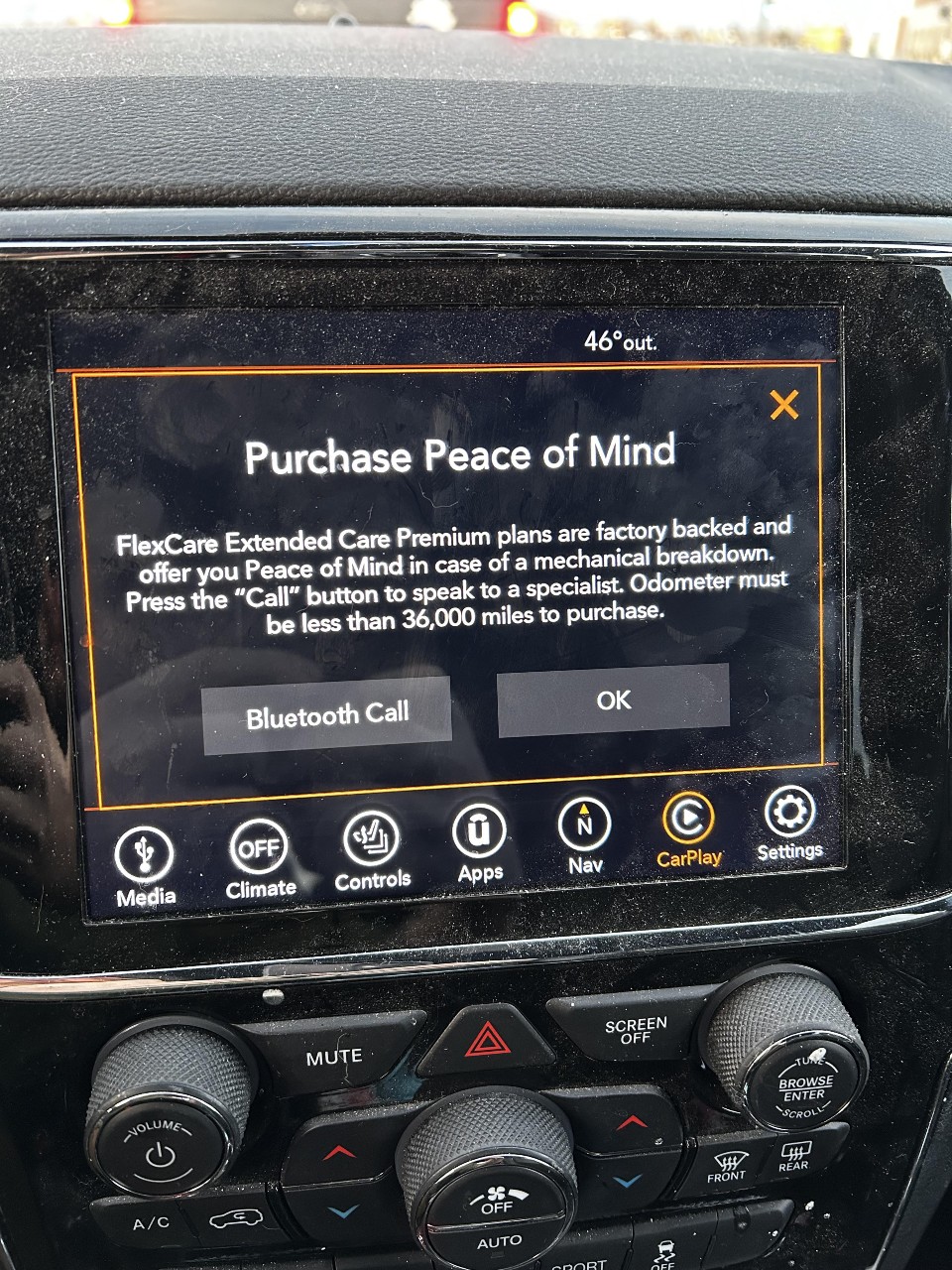
Ads in cars *mobile
Image source: Reddit

According to the owner, the message appeared every time the car stopped and refused to disappear even after the OK button was pressed. Stellantis blamed the behavior on a glitch, stating that the pop-up should have closed once the owner opted out, but otherwise defended the practice as an “information update.”

Similar Jeep owners’ encounters with warranty ads reportedly date back to at least 2022, and judging by recent history, the manufacturer shows little sign of backing away from this controversial yet increasingly common practice.

As the 2025 was slowly drawing to a close, Stellantis screeched yet again, blasting discount pop-ups onto WL Grand Cherokee owners’ in-car screens. The company defended the move by claiming it was simply “staying in touch with customers at critical points in their ownership,” a familiar bit of customer-service speak.

According to Stellantis, the messages were sent only to a limited group of owners and were designed to be as unobtrusive as possible. The discount offer appeared as a plain text notification only when the vehicle was started and stationary, disappeared once the car began moving or after the driver dismissed it (or after 15 seconds), and would reappear on the next startup only if the driver chose to be reminded later or didn’t interact with the message.

‘Almost wrecked it’: When pop-ups become a safety risk

It’s one thing when a pop-up lights up your infotainment screen while you’re stopped at a traffic light or parked. It’s already annoying and potentially distracting, but the risks multiply when ads appear mid-drive. That’s what allegedly happened to one Subaru driver, who claimed on Reddit that he nearly lost control of his vehicle after a pop-up promoting SiriusXM satellite radio suddenly took over the infotainment screen while he was driving at highway speed.

According to the post, the ad caused the entire screen to change, forcing the driver to take his eyes off the road. Driving at around 55 mph in winter conditions, he reportedly swerved, slid, and narrowly avoided ending up in a ditch. The poster claimed that the incident would not have happened had the ad not appeared. The driver described the experience as unacceptable, called on Subaru to stop all advertising while vehicles are in motion, and said he reported the incident to the US National Highway Traffic Safety Administration (NHTSA).

The incident was originally reported by The Autopian, which then spoke with the car’s owner. The owner revealed that he had received between six and eight such ads over the past two years. While that number might seem negligible on its own, the fact that the ads appeared while the car was in motion changes the equation entirely, each one carrying the potential for disastrous, even deadly, consequences. The Autopian also reported that Subaru owners appear to be receiving similar messages on a regular basis, with the first complaints dating back to early this year.

When asked to comment, Subaru confirmed that it pushes such pop-ups twice a year but appeared strikingly oblivious to the negative perception, let alone the potential consequences, of this tone-deaf marketing effort, claiming it was “the first” time it had heard of any issues related to them. Blessed be the unaware.

A legislative brake finally?

Incidents like these are fueling a broader debate about who really controls the data modern cars generate and what manufacturers are allowed to do with it. While pop-up ads themselves aren’t explicitly targeted (or at least not always), regulators and privacy advocates are increasingly and rightfully view connected cars as a symptom of a much larger problem: the near-total lack of meaningful limits on how automakers collect, use, and monetize vehicle data.

In the US the lawmakers have recently attempted to tackle this issue with the Data Rights for Information and Vehicle Electronics in Real-time (DRIVER) Act a bill that would give car owners greater control over the data their cars generate, including the ability to access it directly and opt out of any sales of personal data that might have been collected by the manufacturer through cameras, sensors, or otherwise.

Under the proposal, automakers would be prohibited from selling covered data unless they provide vehicle owners with a clear and conspicuous opportunity to opt out. Covered data includes personal motor-vehicle data linked to an identifiable person, such as biometric identifiers (like facial features or voice), precise geolocation data accurate within roughly a third of a mile, and driver behavior data, particularly when that data is used for profiling that can cause serious legal or similarly significant harm outside of employment. Data that is properly de-identified, pseudonymized, aggregated, or already public would remain exempt.

While the bill doesn’t ban in-car advertising outright, it directly challenges the ecosystem that enables it. Services like SiriusXM don’t materialize on infotainment screens by magic. They rely on data-sharing arrangements, behavioral insights, and access to the vehicle’s software environment. By forcing transparency, limiting resale, and giving drivers a real opt-out, the DRIVER Act would make it harder for automakers to quietly turn cars into rolling data pipelines for third parties.

The bill also carves out notable exceptions, allowing data use for safety improvements, recalls, cybersecurity, warranty administration, fraud prevention, and similar needs. In theory, those exceptions could provide loopholes for companies like Stellantis to keep bombarding customers with warranty ads. But although the bill isn’t perfect, it might represent a first step toward reining in the ad-driven, data-hungry car ecosystem.

Whether the DRIVER Act ultimately becomes law remains to be seen. But as infotainment screens increasingly double as ad surfaces, and, in some cases, potential safety hazards, it’s becoming harder to argue that the current free-for-all around vehicle data is not only a threat to privacy, but also to safety.


Podobał Ci się ten post?
AdGuard VPN AdGuard DNS AdGuard Mail AdGuard Wallet
Ekran główny AdGuard dla Windows
Ekran ochrony AdGuard dla Windows, pokazujący funkcje ochrony i ustawienia
Ekran statystyki AdGuard dla Windows, pokazujący statystyki zablokowanych reklam i trackery
Ekran Zarządzanie aplikacjami w AdGuard dla Windows, pokazujący opcje zarządzania ochroną dla aplikacji zainstalowanych na urządzeniu
20 751 20751 recenzji
Doskonały!

AdGuard dla Windows: bloker reklam na PC

AdGuard dla systemu Windows to coś więcej niż bloker reklam. To wielofunkcyjne narzędzie, które blokuje reklamy, kontroluje dostęp do niebezpiecznych stron, przyspiesza ładowanie stron i chroni dzieci przed nieodpowiednimi treściami
Pobierając program, akceptujesz warunki Umowy licencyjnej
Microsoft Store
Pobierając program, akceptujesz warunki Umowy licencyjnej
AdGuard na Windows v8.0, 14-dniowa wersja próbna
Ekran główny AdGuard dla Mac
Ekran Trybu ukrytego w AdGuard dla Mac
20 751 20751 recenzji
Doskonały!

AdGuard: bloker reklam na Maca

AdGuard dla Mac to wyjątkowy bloker reklam zaprojektowany z myślą o macOS. Oprócz ochrony przed uciążliwymi reklamami w przeglądarkach i aplikacjach chroni Cię przed śledzeniem, phishingiem i oszustwami
Pobierając program, akceptujesz warunki Umowy licencyjnej
Przeczytaj więcej
AdGuard na Mac v2.19, 14-dniowa wersja próbna
Ekran główny AdGuard dla Android
Ekran Ochrona przed śledzeniem w AdGuard dla Android
Ekran Zarządzanie aplikacjami w AdGuard dla Android, pokazujący opcje zarządzania ochroną dla aplikacji zainstalowanych na urządzeniu
Ekran statystyki AdGuard dla Android, pokazujący statystyki zablokowanych reklam i trackery
Ekran główny prywatnej przeglądarki AdGuard dla Android
Kod QR, aby pobierz AdGuard dla Android
20 751 20751 recenzji
Doskonały!

AdGuard: bloker reklam na Androida

Blokuje reklamy i moduły śledzące we wszystkich przeglądarkach, grach i innych aplikacjach. Chroni Twoją prywatność i pozwala kontrolować, w jaki sposób aplikacje korzystają z Internetu. Instalowane za pomocą pliku APK
Pobierając program, akceptujesz warunki Umowy licencyjnej
Przeczytaj więcej
Skanuj, aby pobrać
Użyj dowolnego czytnika kodów QR dostępnego w Twoim urządzeniu
AdGuard na Android v4.14, 14-dniowa wersja próbna
Ekran główny AdGuard dla iOS
Ekran ochrony AdGuard dla iOS, pokazujący funkcje ochrony i ustawienia
Ekran statystyki AdGuard dla iOS, pokazujący statystyki zablokowanych reklam i trackery
Kod QR, aby pobierz AdGuard dla iOS
20 751 20751 recenzji
Doskonały!

AdGuard na iOS: bloker reklam poza Safari

Najlepszy bloker reklam na iOS dla iPhone’a i iPada. AdGuard usuwa wszelkiego rodzaju reklamy i elementy śledzące w Safari oraz chroni Twoją prywatność we wszystkich aplikacjach na poziomie DNS
Pobierając program, akceptujesz warunki Umowy licencyjnej
Przeczytaj więcej
Skanuj, aby pobrać
Użyj dowolnego czytnika kodów QR dostępnego w Twoim urządzeniu
AdGuard na iOS v4.5
Ekran główny AdGuard Content Blocker
Ekran Filtry w AdGuard Content Blocker
Ekran ustawienia w AdGuard Content Blocker
20 751 20751 recenzji
Doskonały!

Blokada treści AdGuard

AdGuard Content Blocker eliminuje wszelkiego rodzaju reklamy w przeglądarkach mobilnych, które obsługują technologię blokowania treści — a mianowicie Samsung Internet i Yandex Browser. Jego funkcje są ograniczone w porównaniu z AdGuard na Androida, ale jest darmowy, łatwy w instalacji i wydajny
Pobierając program, akceptujesz warunki Umowy licencyjnej
Przeczytaj więcej
Blokada treści AdGuard v2.8
Ekran główny AdGuard Browser Extension
Ekran Ochrona przed śledzeniem w AdGuard Browser Extension
20 751 20751 recenzji
Doskonały!

Rozszerzenie przeglądarki AdGuard

AdGuard to najszybsze i najlżejsze rozszerzenie blokowania reklam, które skutecznie blokuje wszystkie typy reklam na wszystkich stronach internetowych! Wybierz AdGuard dla swojej przeglądarki i uzyskaj szybkie i bezpieczne przeglądanie Internetu pozbawione reklam.
Instalacja
Pobierając program, akceptujesz warunki Umowy licencyjnej
Instalacja
Pobierając program, akceptujesz warunki Umowy licencyjnej
Instalacja
Pobierając program, akceptujesz warunki Umowy licencyjnej
Instalacja
Pobierając program, akceptujesz warunki Umowy licencyjnej
Instalacja
Pobierając program, akceptujesz warunki Umowy licencyjnej
Przeczytaj więcej
Instalacja
Pobierając program, akceptujesz warunki Umowy licencyjnej
Przeczytaj więcej
Rozszerzenie przeglądarki AdGuard v5.5
Ekran główny Asystenta przeglądarki
20 751 20751 recenzji
Doskonały!

Asystent AdGuard

Towarzyszące rozszerzenie przeglądarki dla aplikacji desktopowych AdGuard. Umożliwia blokowanie niestandardowych elementów na stronach internetowych, dodawanie stron internetowych do listy dozwolonych i wysyłanie raportów bezpośrednio z przeglądarki
Asystent AdGuard v1.4
20 751 20751 recenzji
Doskonały!

AdGuard Home

AdGuard Home to sieciowe rozwiązanie do blokowania reklam i modułów śledzących. Zainstaluj go raz na routerze, aby objąć nim wszystkie urządzenia w sieci domowej — nie jest wymagane żadne dodatkowe oprogramowanie klienckie. Jest to szczególnie ważne w przypadku różnych urządzeń IoT, które często stanowią zagrożenie dla Twojej prywatności
AdGuard Home v0.107
Ekran główny AdGuard Pro dla iOS
Ekran Ochrona w AdGuard Pro dla iOS, pokazujący funkcje i ustawienia ochrony
Ekran statystyki w AdGuard Pro dla iOS, pokazujący statystyki zablokowanych reklam i trackerów
20 751 20751 recenzji
Doskonały!

AdGuard Pro dla iOS

AdGuard Pro na iOS oferuje wszystkie zaawansowane funkcje blokowania reklam. Oferuje te same narzędzia, co płatna wersja AdGuard na iOS. Doskonale blokuje reklamy w Safari i pozwala dostosować ustawienia DNS, aby dostosować poziom ochrony. Blokuje reklamy w przeglądarkach i aplikacjach, chroni dzieci przed nieodpowiednimi treściami i dba o bezpieczeństwo danych osobowych.


Pobierając program, akceptujesz warunki Umowy licencyjnej
Przeczytaj więcej
AdGuard Pro dla iOS v4.5
Ekran główny AdGuard Mini dla Mac
Ekran ochrony Safari w AdGuard Mini dla Mac
Ekran tworzenia reguły w AdGuard Mini dla Mac
20 751 20751 recenzji
Doskonały!

AdGuard Mini dla Mac — bloker reklam Safari

AdGuard Mini dla komputerów Mac to potężny bloker reklam w Safari. Ta lekka aplikacja usuwa reklamy, blokuje moduły śledzące i przyspiesza ładowanie stron. Umożliwia przeglądanie internetu w Safari bez rozpraszania uwagi i chroni prywatność danych
Instalacja
Pobierając program, akceptujesz warunki Umowy licencyjnej
Przeczytaj więcej
AdGuard Mini dla Mac v2.3
Ekran główny AdGuard dla Android TV z włączoną ochroną
Ekran blokowanie reklama AdGuard dla Android TV, pokazujący jego funkcje i ustawienia
Ekran ustawienia AdGuard dla Android TV
Ekran Zarządzanie aplikacjami AdGuard dla Android TV, pokazujący aplikacje, w których reklamy i trackery są zablokowane
20 751 20751 recenzji
Doskonały!

AdGuard dla Android TV

AdGuard dla Android TV to jedyna aplikacja, która blokuje reklamy, chroni prywatność i działa jak zapora sieciowa dla Smart TV. Otrzymuj ostrzeżenia o zagrożeniach internetowych, używaj bezpiecznego DNS i korzystaj z szyfrowanego ruchu. Zrelaksuj się i zanurz się w swoich ulubionych programach z najwyższej klasy zabezpieczeniami bez reklam!
AdGuard dla Android TV v4.14, 14-dniowa wersja próbna
Maskotka AdGuard, Agnar, trzymający pingwina Linux
20 751 20751 recenzji
Doskonały!

AdGuard dla Linux

AdGuard for Linux to pierwszy na świecie systemowy bloker reklam dla systemu Linux. Blokuj reklamy i elementy śledzące na poziomie urządzenia, wybieraj spośród wstępnie zainstalowanych filtrów lub dodawaj własne — wszystko za pośrednictwem interfejsu wiersza poleceń
AdGuard dla Linux v1.4
20 751 20751 recenzji
Doskonały!

AdGuard Temp Mail

Darmowy generator tymczasowych adresów e-mail, który zapewnia anonimowość i chroni prywatność. Brak spamu w głównej skrzynce odbiorczej!
20 751 20751 recenzji
Doskonały!

AdGuard VPN

75 lokalizacji na świecie

Dostęp do wszelkich treści

Silne szyfrowanie

Polityka braku logów

Najszybsze połączenie

Wsparcie 24/7

Wypróbuj za darmo
Pobierając program, akceptujesz warunki Umowy licencyjnej
Przeczytaj więcej
20 751 20751 recenzji
Doskonały!

AdGuard DNS

AdGuard DNS to alternatywne rozwiązanie do blokowania reklam, ochrony prywatności i kontroli rodzicielskiej. Łatwy w konfiguracji i darmowy, zapewnia niezbędną minimalną ochronę przed reklamami, śledzeniem i phishingiem, bez względu na platformę i urządzenie, z którego korzystasz.
20 751 20751 recenzji
Doskonały!

AdGuard Mail

Chroń swoją tożsamość, unikaj spamu i zabezpiecz swoją skrzynkę odbiorczą dzięki naszym aliasom i tymczasowym adresom e-mail. Skorzystaj z naszej bezpłatnej usługi przekazywania e-maili oraz aplikacji na wszystkie systemy operacyjne
20 751 20751 recenzji
Doskonały!

AdGuard Wallet

Bezpieczny i prywatny portfel kryptowalutowy, który daje Ci pełną kontrolę nad Twoimi aktywami. Zarządzaj wieloma portfelami i odkrywaj tysiące kryptowalut, aby je przechowywać, wysyłać i wymieniać
Rozpoczęto pobieranie AdGuard Kliknij przycisk wskazany strzałką, aby rozpocząć instalację Wybierz „Otwórz” i kliknij „OK”. Poczekaj aż plik zostanie pobrany. W otwartym oknie, przeciągnij ikonę AdGuard do folderu „Aplikacje”. Dziękujemy za wybrania AdGuard! Wybierz „Otrwórz” i kliknij „OK”. Poczekaj aż plik zostanie pobrany. W otwartym kliknij „Instaluj”. Dziękujemy za wybrania AdGuard!
Zainstaluj również AdGuard dla urządzeń mobilnych
















































