Can GPT-4 block ads better than humans? We put an AI-powered ad blocker to the test

Everyone knows ChatGPT, an AI chatbot based on OpenAI’s latest model, GPT-4. But beyond OpenAI’s own products, GPT-4 has been integrated into many applications and services, from learning and payment apps to Microsoft’s Bing AI and now ad blocking.

A Chrome extension with a rather straightforward name GPT-AdBlocker was launched in April this year on Product Hunt. It is developed by a company called In5 Tech, based in Dubai, UAE. The extension claims to use GPT-4 technology to block all kinds of trackers and ads, including sponsored content inside YouTube videos that your typical ad blocker cannot block. The GPT-AdBlocker team describes the extension as “the ultimate all-in-one solution.” As far as its accuracy goes, they say it’s “very accurate” in detecting ads in videos but “some errors”may creep in. So far, the extension is available only for Chrome, but the team behind it plans to deploy it to “multiple other browsers.”

Intrigued by the new kid on the block, and the AI-powered one at that, we decided to give it a try.

The ideal outcome: achievable or not?

Before we present you the results of our experiments with GPT-AdBlocker, let’s talk a bit about the extension’s features and how it should work in an ideal world.

GPT-AdBlocker has a very clean, if not ascetic interface and only two switches: one for regular ad blocking and one for AI-powered sponsor blocking, which is what we are interested in today. Of course, you can turn off the AI mode and use it as a regular ad blocker, but that’s not what we’re here for. It is with both of its modes enabled at the same time that GPT AdBlocker is supposed to be at its most efficient.
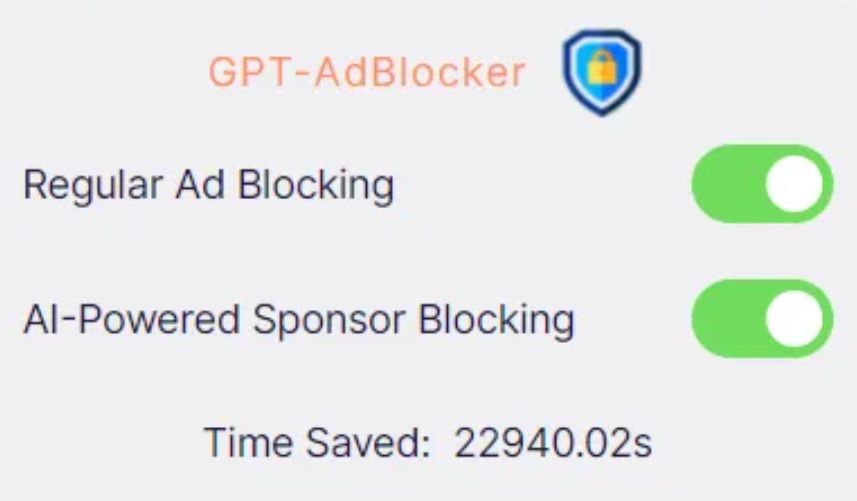
GPT-AdBlocker has a clean and simple interface *mobile

So, in its ideal implementation the GPT-AdBlocker should allow you to skip sponsored content in videos, which are the segments that brands usually pay the content creator directly for.

We imagined it would look something like in the example below, where we used a graphic editor to manually cut the Destroying My RTX 3090 Ti With Incredible Minecraft Graphics YouTube video to remove a sponsored segment.

Some of you might wonder why we had to cut the video manually to demonstrate a ‘near-perfect’ example of how the GPT-AdBlocker is supposed to work. But let’s just say that the results of our interaction with the actual extension to skip sponsored ads were… a very mixed bag. And now we will show you why — with receipts, of course.

The challenges of AI ad blocking: choppy cuts & incomplete sentences

We wanted to test how well the GPT-AdBlocker works on different types of videos that feature at least one sponsored segment. One of these videos was the one that we had manually edited before — now let’s compare it with the version that the AI-powered ad blocker produced.

The difference is not huge, but it is noticeable and not in favor of the extension: after the sponsored segment is skipped, the video resumes abruptly, in the middle of a sentence. However, this by no means a catastrophe and the content is still watchable.

The same cannot be said about videos that feature multiple product placements throughout, which is very common with tutorials, where showing tools, whichever they are, is an inalienable part of the content. When we watched a makeup tutorial with the GPT-AdBlocker on, we counted five skipped segments. The cuts were usually rough, some product placements were removed, some were not. As a result, we missed important parts of the content, which made the video unwatchable. See our compilation of cuts by the extension below (fade in and fade out are done by us).

Sometimes the issue would be just a jagged cut, which made you wonder whether anything valuable was skipped or if it was just how it was supposed to be.

Sometimes it would be just a few words missing, with the video stopping and resuming mid-sentence as in the example below — though, one could argue that even a few words can make a big difference.

Generally, the problems started when the sponsored segment was not a separate part of the video, but an integral part of it. Like in the example below, where AI cropped the video in such a way that the key part of financial advice is missing (we would not weigh in on the merits of that advice, but you get the point).

Oftentimes the extension would not remove the sponsored segment in its entirety, but only parts of it, which is, however, probably still better than removing too much.

Ethical dilemma

In our express analysis on YouTube’s potential ban on ad blockers, we mentioned that content creators are increasingly relying on brand deals, in addition to donations, to support their work. The ways of YouTube when it comes to monetization or demonetization of certain videos and entire channels are generally unsearchable; besides, YouTube takes about 45% of the creators’ ad revenues. Brands, unlike YouTube, pay content creators directly, usually better, and that pay is more stable.

Granted, sponsored segments can be annoying, sketchy and feel too long — but they are still part of the content, so blocking them entirely raises an ethical issue. And as far as we’re concerned, it’s probably unfair to take an axe to all that brand money. Content creators who are transparent about sponsored content in their videos and clearly label it, make it pretty easy to manually skip it. On the other hand, there are plenty of YouTubers who promote junk, but should honest content creators suffer for the unscrupulous ones?

In a nutshell: what we think about AI & ad blocking

The emergence of an AI-powered ad blocking extension is an intriguing and a potentially transformative development in the field. The goal of the extension is to detect and remove sponsored segments from videos, and it does that, but not all of them, and not completely. Sometimes it leaves “leftovers” of sponsored ads, sometimes it cuts the video rather crudely. Sometimes it works nearly perfectly, but rarely.

The approach is interesting and will shape the future of ad blocking to some extent. AI is permeating all areas, and ad blocking, like ad creation, is no exception. However, the current implementation of this technology, exemplified by the GPT-AdBlocker, falls short of providing a reliable and comprehensive solution. Moreover, while the integration of AI into ad blocking is promising, it’s possible that even with additional fine-tuning it won’t be a panacea for all ad-related challenges due to the intricacies of content creation.

In cases where sponsored segments or product placements are seamlessly embedded into a video, GPT-AdBlocker may render the content unwatchable. For example, content genres such as makeup tutorials (or any type of tutorial) can suffer significantly when key segments are omitted.

Nonetheless, AI is already impacting the advertising industry, and it’s only natural that the ad blocking industry will take advantage of its capabilities. The debate is not whether we should use AI, but rather how we should use it.


Podobał Ci się ten post?
AdGuard VPN AdGuard DNS AdGuard Mail AdGuard Wallet
Ekran główny AdGuard dla Windows
Ekran ochrony AdGuard dla Windows, pokazujący funkcje ochrony i ustawienia
Ekran statystyki AdGuard dla Windows, pokazujący statystyki zablokowanych reklam i trackery
Ekran Zarządzanie aplikacjami w AdGuard dla Windows, pokazujący opcje zarządzania ochroną dla aplikacji zainstalowanych na urządzeniu
20 752 20752 recenzje
Doskonały!

AdGuard dla Windows: bloker reklam na PC

AdGuard dla systemu Windows to coś więcej niż bloker reklam. To wielofunkcyjne narzędzie, które blokuje reklamy, kontroluje dostęp do niebezpiecznych stron, przyspiesza ładowanie stron i chroni dzieci przed nieodpowiednimi treściami

Pobierając program, akceptujesz warunki Umowy licencyjnej
Microsoft Store
Pobierając program, akceptujesz warunki Umowy licencyjnej
AdGuard na Windows v8.0, 14-dniowa wersja próbna
Ekran główny AdGuard dla Mac
Ekran Trybu ukrytego w AdGuard dla Mac
20 752 20752 recenzje
Doskonały!

AdGuard: bloker reklam na Maca

AdGuard dla Mac to wyjątkowy bloker reklam zaprojektowany z myślą o macOS. Oprócz ochrony przed uciążliwymi reklamami w przeglądarkach i aplikacjach chroni Cię przed śledzeniem, phishingiem i oszustwami
Pobierając program, akceptujesz warunki Umowy licencyjnej
Przeczytaj więcej
AdGuard na Mac v2.19, 14-dniowa wersja próbna
Ekran główny AdGuard dla Android
Ekran Ochrona przed śledzeniem w AdGuard dla Android
Ekran Zarządzanie aplikacjami w AdGuard dla Android, pokazujący opcje zarządzania ochroną dla aplikacji zainstalowanych na urządzeniu
Ekran statystyki AdGuard dla Android, pokazujący statystyki zablokowanych reklam i trackery
Ekran główny prywatnej przeglądarki AdGuard dla Android
Kod QR, aby pobierz AdGuard dla Android
20 752 20752 recenzje
Doskonały!

AdGuard: bloker reklam na Androida

Blokuje reklamy i moduły śledzące we wszystkich przeglądarkach, grach i innych aplikacjach. Chroni Twoją prywatność i pozwala kontrolować, w jaki sposób aplikacje korzystają z Internetu. Instalowane za pomocą pliku APK
Pobierając program, akceptujesz warunki Umowy licencyjnej
Przeczytaj więcej
Skanuj, aby pobrać
Użyj dowolnego czytnika kodów QR dostępnego w Twoim urządzeniu
AdGuard na Android v4.14, 14-dniowa wersja próbna
Ekran główny AdGuard dla iOS
Ekran ochrony AdGuard dla iOS, pokazujący funkcje ochrony i ustawienia
Ekran statystyki AdGuard dla iOS, pokazujący statystyki zablokowanych reklam i trackery
Kod QR, aby pobierz AdGuard dla iOS
20 752 20752 recenzje
Doskonały!

AdGuard na iOS: bloker reklam poza Safari

Najlepszy bloker reklam na iOS dla iPhone’a i iPada. AdGuard usuwa wszelkiego rodzaju reklamy i elementy śledzące w Safari oraz chroni Twoją prywatność we wszystkich aplikacjach na poziomie DNS
Pobierając program, akceptujesz warunki Umowy licencyjnej
Przeczytaj więcej
Skanuj, aby pobrać
Użyj dowolnego czytnika kodów QR dostępnego w Twoim urządzeniu
AdGuard na iOS v4.5
Ekran główny AdGuard Content Blocker
Ekran Filtry w AdGuard Content Blocker
Ekran ustawienia w AdGuard Content Blocker
20 752 20752 recenzje
Doskonały!

Blokada treści AdGuard

AdGuard Content Blocker eliminuje wszelkiego rodzaju reklamy w przeglądarkach mobilnych, które obsługują technologię blokowania treści — a mianowicie Samsung Internet i Yandex Browser. Jego funkcje są ograniczone w porównaniu z AdGuard na Androida, ale jest darmowy, łatwy w instalacji i wydajny
Pobierając program, akceptujesz warunki Umowy licencyjnej
Przeczytaj więcej
Blokada treści AdGuard v2.8
Ekran główny AdGuard Browser Extension
Ekran Ochrona przed śledzeniem w AdGuard Browser Extension
20 752 20752 recenzje
Doskonały!

Rozszerzenie przeglądarki AdGuard

AdGuard to najszybsze i najlżejsze rozszerzenie blokowania reklam, które skutecznie blokuje wszystkie typy reklam na wszystkich stronach internetowych! Wybierz AdGuard dla swojej przeglądarki i uzyskaj szybkie i bezpieczne przeglądanie Internetu pozbawione reklam.
Instalacja
Pobierając program, akceptujesz warunki Umowy licencyjnej
Instalacja
Pobierając program, akceptujesz warunki Umowy licencyjnej
Instalacja
Pobierając program, akceptujesz warunki Umowy licencyjnej
Instalacja
Pobierając program, akceptujesz warunki Umowy licencyjnej
Instalacja
Pobierając program, akceptujesz warunki Umowy licencyjnej
Przeczytaj więcej
Instalacja
Pobierając program, akceptujesz warunki Umowy licencyjnej
Przeczytaj więcej
Rozszerzenie przeglądarki AdGuard v5.5
Ekran główny Asystenta przeglądarki
20 752 20752 recenzje
Doskonały!

Asystent AdGuard

Towarzyszące rozszerzenie przeglądarki dla aplikacji desktopowych AdGuard. Umożliwia blokowanie niestandardowych elementów na stronach internetowych, dodawanie stron internetowych do listy dozwolonych i wysyłanie raportów bezpośrednio z przeglądarki
Asystent AdGuard v1.4
20 752 20752 recenzje
Doskonały!

AdGuard Home

AdGuard Home to sieciowe rozwiązanie do blokowania reklam i modułów śledzących. Zainstaluj go raz na routerze, aby objąć nim wszystkie urządzenia w sieci domowej — nie jest wymagane żadne dodatkowe oprogramowanie klienckie. Jest to szczególnie ważne w przypadku różnych urządzeń IoT, które często stanowią zagrożenie dla Twojej prywatności
AdGuard Home v0.107
Ekran główny AdGuard Pro dla iOS
Ekran Ochrona w AdGuard Pro dla iOS, pokazujący funkcje i ustawienia ochrony
Ekran statystyki w AdGuard Pro dla iOS, pokazujący statystyki zablokowanych reklam i trackerów
20 752 20752 recenzje
Doskonały!

AdGuard Pro dla iOS

AdGuard Pro na iOS oferuje wszystkie zaawansowane funkcje blokowania reklam. Oferuje te same narzędzia, co płatna wersja AdGuard na iOS. Doskonale blokuje reklamy w Safari i pozwala dostosować ustawienia DNS, aby dostosować poziom ochrony. Blokuje reklamy w przeglądarkach i aplikacjach, chroni dzieci przed nieodpowiednimi treściami i dba o bezpieczeństwo danych osobowych.
Pobierając program, akceptujesz warunki Umowy licencyjnej
Przeczytaj więcej
AdGuard Pro dla iOS v4.5
Ekran główny AdGuard Mini dla Mac
Ekran ochrony Safari w AdGuard Mini dla Mac
Ekran tworzenia reguły w AdGuard Mini dla Mac
20 752 20752 recenzje
Doskonały!

AdGuard Mini dla Mac — bloker reklam Safari

AdGuard Mini dla komputerów Mac to potężny bloker reklam w Safari. Ta lekka aplikacja usuwa reklamy, blokuje moduły śledzące i przyspiesza ładowanie stron. Umożliwia przeglądanie internetu w Safari bez rozpraszania uwagi i chroni prywatność danych
Instalacja
Pobierając program, akceptujesz warunki Umowy licencyjnej
Przeczytaj więcej
AdGuard Mini dla Mac v2.3
Ekran główny AdGuard dla Android TV z włączoną ochroną
Ekran blokowanie reklama AdGuard dla Android TV, pokazujący jego funkcje i ustawienia
Ekran ustawienia AdGuard dla Android TV
Ekran Zarządzanie aplikacjami AdGuard dla Android TV, pokazujący aplikacje, w których reklamy i trackery są zablokowane
20 752 20752 recenzje
Doskonały!

AdGuard dla Android TV

AdGuard dla Android TV to jedyna aplikacja, która blokuje reklamy, chroni prywatność i działa jak zapora sieciowa dla Smart TV. Otrzymuj ostrzeżenia o zagrożeniach internetowych, używaj bezpiecznego DNS i korzystaj z szyfrowanego ruchu. Zrelaksuj się i zanurz się w swoich ulubionych programach z najwyższej klasy zabezpieczeniami bez reklam!
AdGuard dla Android TV v4.14, 14-dniowa wersja próbna
Maskotka AdGuard, Agnar, trzymający pingwina Linux
20 752 20752 recenzje
Doskonały!

AdGuard dla Linux

AdGuard for Linux to pierwszy na świecie systemowy bloker reklam dla systemu Linux. Blokuj reklamy i elementy śledzące na poziomie urządzenia, wybieraj spośród wstępnie zainstalowanych filtrów lub dodawaj własne — wszystko za pośrednictwem interfejsu wiersza poleceń
AdGuard dla Linux v1.4
20 752 20752 recenzje
Doskonały!

AdGuard Temp Mail

Darmowy generator tymczasowych adresów e-mail, który zapewnia anonimowość i chroni prywatność. Brak spamu w głównej skrzynce odbiorczej!
20 752 20752 recenzje
Doskonały!

AdGuard VPN

75 lokalizacji na świecie

Dostęp do wszelkich treści

Silne szyfrowanie

Polityka braku logów

Najszybsze połączenie

Wsparcie 24/7

Wypróbuj za darmo
Pobierając program, akceptujesz warunki Umowy licencyjnej
Przeczytaj więcej
20 752 20752 recenzje
Doskonały!

AdGuard DNS

AdGuard DNS to alternatywne rozwiązanie do blokowania reklam, ochrony prywatności i kontroli rodzicielskiej. Łatwy w konfiguracji i darmowy, zapewnia niezbędną minimalną ochronę przed reklamami, śledzeniem i phishingiem, bez względu na platformę i urządzenie, z którego korzystasz.
20 752 20752 recenzje
Doskonały!

AdGuard Mail

Chroń swoją tożsamość, unikaj spamu i zabezpiecz swoją skrzynkę odbiorczą dzięki naszym aliasom i tymczasowym adresom e-mail. Skorzystaj z naszej bezpłatnej usługi przekazywania e-maili oraz aplikacji na wszystkie systemy operacyjne
20 752 20752 recenzje
Doskonały!

AdGuard Wallet

Bezpieczny i prywatny portfel kryptowalutowy, który daje Ci pełną kontrolę nad Twoimi aktywami. Zarządzaj wieloma portfelami i odkrywaj tysiące kryptowalut, aby je przechowywać, wysyłać i wymieniać
Rozpoczęto pobieranie AdGuard Kliknij przycisk wskazany strzałką, aby rozpocząć instalację Wybierz „Otwórz” i kliknij „OK”. Poczekaj aż plik zostanie pobrany. W otwartym oknie, przeciągnij ikonę AdGuard do folderu „Aplikacje”. Dziękujemy za wybrania AdGuard! Wybierz „Otrwórz” i kliknij „OK”. Poczekaj aż plik zostanie pobrany. W otwartym kliknij „Instaluj”. Dziękujemy za wybrania AdGuard!
Zainstaluj również AdGuard dla urządzeń mobilnych

















































