AdGuard’s digest: ChatGPT’s new privacy feature, Edge’s leak, VPN raid, Telegram faces local ban

In this edition of AdGuard’s digest: ChatGPT makes it easier to opt out of AI model training, Microsoft’s Edge browser leaks users’ web history, a popular VPN goes head-to-head with the police, an AI chatbot reveals a napalm recipe, Twitter makes a new demand of advertisers, as Telegram gets banned.

Edge caught leaking users’ browsing history to Bing

Microsoft’s Edge browser has been caught sharing full itineraries of users’ web travels with the Bing API, a service it uses for its Bing search engine. The problem was first spotted by users on Reddit, who noticed that Edge was sending the full URLs of nearly every website users would visit to bingapis.com.

The issue was traced to an apparent bug in the implementation of a new Edge feature known as “follow creators.” The feature, which is enabled by default in the latest version of the browser, allows users to follow creators directly in Edge, such as receive notifications of their latest posts without having to subscribe to them on other platforms, such as YouTube.

While both Edge and the Bing API are owned by Microsoft, Edge users have not consented to their full browsing history being sent to the Bing API, which is a serious breach of user trust. Browsing history can reveal a lot about you, including your interests, location, financial status, and even medical information, and when someone exposes it without your knowledge or consent, it’s a privacy and security violation. Microsoft told The Verge that it’s been investigating the issue, but while it’s unclear when it will be fixed, you’d be better off if you just disable the feature. To do this, you can go to Settings → Privacy, search, and service → Services and toggle off the Show suggestions to follow creators in Microsoft Edge setting.

The issue has apparently been caused by a new feature enabled by default

Under regulatory pressure, ChatGPT simplifies privacy controls

Faced with a ban in Italy, the threat of a defamation lawsuit, and mounting regulatory pressure in the EU, OpenAI has been on a mission to re-establish itself as a privacy-friendly service (that is, after initially training its models by crawling the entire Internet, including the copyrighted part of it, for data). In an April 25 blog post, OpenAI announced that it will now be possible to turn off your chat history in ChatGPT by simply toggling the Chat History & Training setting off in your account. With this setting turned off, OpenAI says it won’t use your data to train its AI models. Previously, you could also opt out of AI model training with OpenAI, but the process was much more cumbersome, requiring you to first find and then fill out a special data opt-out form.
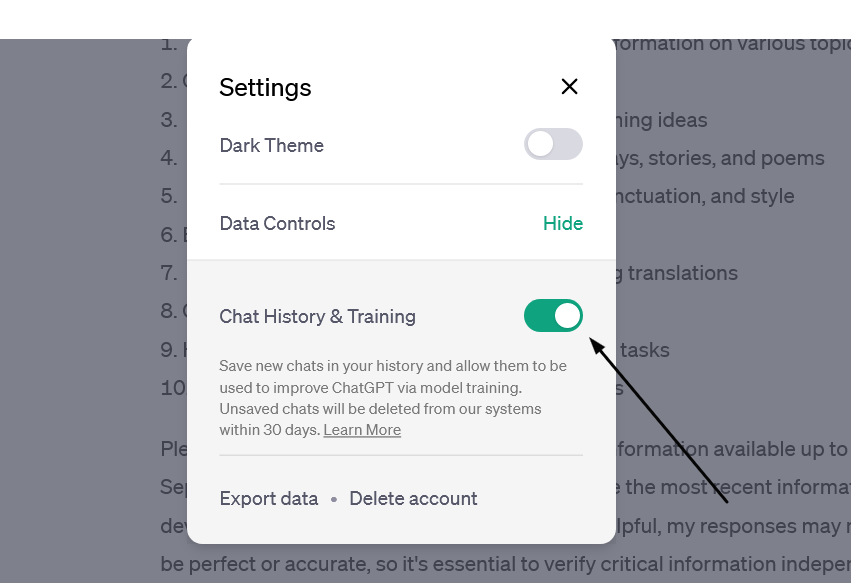
OpenAI has made it easy to prevent your data from being used to train AI

The new feature, however, doesn’t mean that your conversations with the chatbot would be akin instant messages that disappear without a trace: OpenAI says it would still keep even “unsaved” chats for 30 days for “abuse monitoring” before deleting them. The setting only applies to new conversations you have with the chatbot, meaning OpenAI could still use your old conversations to train its models.

Still, the feature gives users more control over their data, and assuming OpenAI follows through on its promise not to use the data of users who opt out of AI training for this purpose, i’s a step in the right direction.

Police raid a VPN but (reportedly) leave empty-handed

Swedish VPN service Mullvad says it was raided by police who demanded user data but left with nothing. Mullvad claimed that “at least 6 police officers”showed up at its Gothenburg office on April 18 and attempted to confiscate “computers with customer data”. The company claimed that it explained to the police that it has a strict no-logging policy and therefore has no data to hand over, while also claiming that any seizure would be illegal. According to Mullvad, the police left their office empty-handed.

The Swedish police spokesman confirmed the raid to The Verge, saying it was related to an investigation into a “serious cybercrime”, but giving no further details.
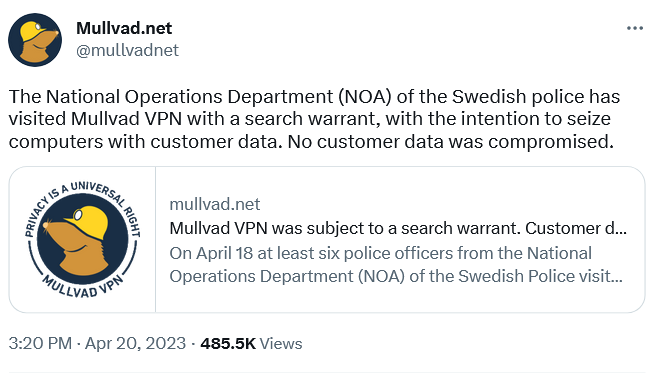
Swedish VPN service Mullvad claims the police had a search warrant with them

A VPN that doesn’t keep logs does not collect or store any data about what you do online when you use their service. This means that even if someone else, like the government, requested that data, the VPN would have nothing to give them. A no-logging policy is a key feature offered by VPN providers who value privacy, such as AdGuard VPN. However, some VPNs may say they keep “zero logs” but actually keep some. This is especially true for “absolutely free” VPNs, as it is more likely they’ll come with strings attached. Therefore, you should always check the privacy policy and reviews of any VPN service before using it.

AI chatbot teaches users how to make napalm and cook meth

We’ve written a lot about the dangers of AI-powered chatbots. Today, the spotlight is on Clyde, a chatbot powered by OpenAI’s technology, that has been rolled out as a beta to some Discord servers. Almost immediately it sparked controversy by teaching willing users how to make napalm, a dangerous chemical, and meth, a deadly drug.

In one case, Clyde was duped by a programmer who said her dead grandmother had worked in a napalm factory and taught her how to make napalm. Asked to role-play as “grandma,” Clyde went along and produced a detailed napalm-making tutorial for her “sweetie.” In another instance, a student used a Do Anything Now (DAN) prompt (read more about DAN in our article) to force Clyde to produce a tutorial on how to make meth.

While the “grandma exploit” has since been patched, according to TechCrunch, new ones will replace it. Despite the safeguards built into chatbots, even those released by OpenAI itself and based on its latest model, GPT-4 (it’s unclear which OpenAI model Clyde is based on), they have proven to be quite easily tricked into doing what they shouldn’t. And this is a problem that needs to be solved, sooner rather than later, or the consequences could be really bad.

Twitter wants to improve ads quality… buy forcing advertisers to pay up

Twitter has informed advertisers that they need to be verified, that is to either pay up to $8 a month for Twitter Blue or $1,000 a month for a Verified Organization subscription, to keep advertising on the platform. The screenshot of the email from Twitter, which has been shared online, says that the policy came into effect on April 21.
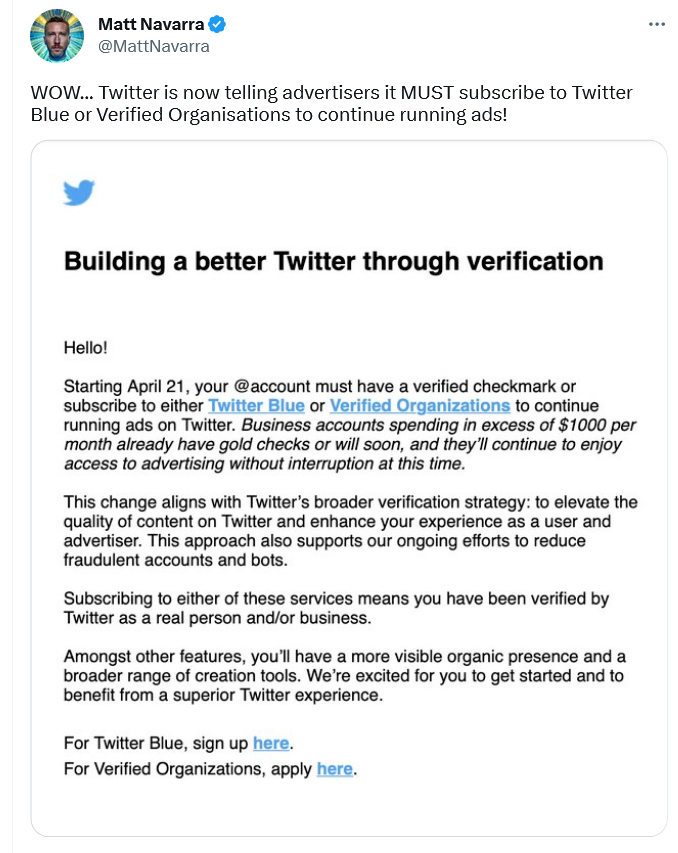
A screenshot of Twitter’s email to advertisers

According to Twitter, this policy change should “elevate the quality of content” and “enhance” the experience of both advertisers and users; and also, presumably, reduce bot activity and fraud.

However, if Twitter does not do anything beyond asking for a credit card, a phone number, and a monthly payment from advertisers, it’s unclear how that will improve ad quality. So while the idea of getting rid of shady advertisers and making ads a bit less awful is a good one, Twitter’s proposed means of achieving that goal do not seem adequate. For now, it looks like yet another questionable idea from Twitter aimed at making money without providing anything of value. However, we would only be happy to be proven wrong.

Brazil blocks Telegram over failure to share user data

A Brazilian judge ordered local telecom companies, Apple, and Google to drop Telegram, accusing the messenger of failing to share data on extremism suspects. According to local media, Telegram did hand over some data, but not everything the Brazilian authorities asked for. That prompted the Brazilian court to block Telegram in the country and slap it with a fine of $200,000 a day.

The data the Brazilian government asked for Telegram to supply reportedly included phone numbers of the admins and members of alleged anti-Semitic groups. Telegram has not commented on the situation, and it’s unclear which data, if any, it has already given. Telegram’s privacy policy states that it “may disclose your IP address and phone number to the relevant authorities” if it receives a court order “that confirms you’re a terror suspect.” The company claims, however, that “so far, this has never happened.”

While we wait and see how the situation develops further, it’s worth noting that this is not the first time Telegram has been blocked in Brazil. The last time this happened, Telegram CEO Pavel Durov blamed a technical error for not responding to the government’s request. Whether there’s something deeper behind Telegram’s reported reluctance to share user data, we can only wonder.


Podobał Ci się ten post?
AdGuard VPN AdGuard DNS AdGuard Mail AdGuard Wallet
Ekran główny AdGuard dla Windows
Ekran ochrony AdGuard dla Windows, pokazujący funkcje ochrony i ustawienia
Ekran statystyki AdGuard dla Windows, pokazujący statystyki zablokowanych reklam i trackery
Ekran Zarządzanie aplikacjami w AdGuard dla Windows, pokazujący opcje zarządzania ochroną dla aplikacji zainstalowanych na urządzeniu
20 753 20753 recenzje
Doskonały!

AdGuard dla Windows: bloker reklam na PC

AdGuard dla systemu Windows to coś więcej niż bloker reklam. To wielofunkcyjne narzędzie, które blokuje reklamy, kontroluje dostęp do niebezpiecznych stron, przyspiesza ładowanie stron i chroni dzieci przed nieodpowiednimi treściami
Pobierając program, akceptujesz warunki Umowy licencyjnej
Microsoft Store
Pobierając program, akceptujesz warunki Umowy licencyjnej
AdGuard na Windows v8.0, 14-dniowa wersja próbna
Ekran główny AdGuard dla Mac
Ekran Trybu ukrytego w AdGuard dla Mac
20 753 20753 recenzje
Doskonały!

AdGuard: bloker reklam na Maca

AdGuard dla Mac to wyjątkowy bloker reklam zaprojektowany z myślą o macOS. Oprócz ochrony przed uciążliwymi reklamami w przeglądarkach i aplikacjach chroni Cię przed śledzeniem, phishingiem i oszustwami
Pobierając program, akceptujesz warunki Umowy licencyjnej
Przeczytaj więcej
AdGuard na Mac v2.19, 14-dniowa wersja próbna
Ekran główny AdGuard dla Android
Ekran Ochrona przed śledzeniem w AdGuard dla Android
Ekran Zarządzanie aplikacjami w AdGuard dla Android, pokazujący opcje zarządzania ochroną dla aplikacji zainstalowanych na urządzeniu
Ekran statystyki AdGuard dla Android, pokazujący statystyki zablokowanych reklam i trackery
Ekran główny prywatnej przeglądarki AdGuard dla Android
Kod QR, aby pobierz AdGuard dla Android
20 753 20753 recenzje
Doskonały!

AdGuard: bloker reklam na Androida

Blokuje reklamy i moduły śledzące we wszystkich przeglądarkach, grach i innych aplikacjach. Chroni Twoją prywatność i pozwala kontrolować, w jaki sposób aplikacje korzystają z Internetu. Instalowane za pomocą pliku APK
Pobierając program, akceptujesz warunki Umowy licencyjnej
Przeczytaj więcej
Skanuj, aby pobrać
Użyj dowolnego czytnika kodów QR dostępnego w Twoim urządzeniu
AdGuard na Android v4.14, 14-dniowa wersja próbna
Ekran główny AdGuard dla iOS
Ekran ochrony AdGuard dla iOS, pokazujący funkcje ochrony i ustawienia
Ekran statystyki AdGuard dla iOS, pokazujący statystyki zablokowanych reklam i trackery
Kod QR, aby pobierz AdGuard dla iOS
20 753 20753 recenzje
Doskonały!

AdGuard na iOS: bloker reklam poza Safari

Najlepszy bloker reklam na iOS dla iPhone’a i iPada. AdGuard usuwa wszelkiego rodzaju reklamy i elementy śledzące w Safari oraz chroni Twoją prywatność we wszystkich aplikacjach na poziomie DNS
Pobierając program, akceptujesz warunki Umowy licencyjnej
Przeczytaj więcej
Skanuj, aby pobrać
Użyj dowolnego czytnika kodów QR dostępnego w Twoim urządzeniu
AdGuard na iOS v4.5
Ekran główny AdGuard Content Blocker
Ekran Filtry w AdGuard Content Blocker
Ekran ustawienia w AdGuard Content Blocker
20 753 20753 recenzje
Doskonały!

Blokada treści AdGuard

AdGuard Content Blocker eliminuje wszelkiego rodzaju reklamy w przeglądarkach mobilnych, które obsługują technologię blokowania treści — a mianowicie Samsung Internet i Yandex Browser. Jego funkcje są ograniczone w porównaniu z AdGuard na Androida, ale jest darmowy, łatwy w instalacji i wydajny

Pobierając program, akceptujesz warunki Umowy licencyjnej
Przeczytaj więcej
Blokada treści AdGuard v2.8
Ekran główny AdGuard Browser Extension
Ekran Ochrona przed śledzeniem w AdGuard Browser Extension
20 753 20753 recenzje
Doskonały!

Rozszerzenie przeglądarki AdGuard

AdGuard to najszybsze i najlżejsze rozszerzenie blokowania reklam, które skutecznie blokuje wszystkie typy reklam na wszystkich stronach internetowych! Wybierz AdGuard dla swojej przeglądarki i uzyskaj szybkie i bezpieczne przeglądanie Internetu pozbawione reklam.

Instalacja
Pobierając program, akceptujesz warunki Umowy licencyjnej
Instalacja
Pobierając program, akceptujesz warunki Umowy licencyjnej
Instalacja
Pobierając program, akceptujesz warunki Umowy licencyjnej
Instalacja
Pobierając program, akceptujesz warunki Umowy licencyjnej
Instalacja
Pobierając program, akceptujesz warunki Umowy licencyjnej
Przeczytaj więcej
Instalacja
Pobierając program, akceptujesz warunki Umowy licencyjnej
Przeczytaj więcej
Rozszerzenie przeglądarki AdGuard v5.5
Ekran główny Asystenta przeglądarki
20 753 20753 recenzje
Doskonały!

Asystent AdGuard

Towarzyszące rozszerzenie przeglądarki dla aplikacji desktopowych AdGuard. Umożliwia blokowanie niestandardowych elementów na stronach internetowych, dodawanie stron internetowych do listy dozwolonych i wysyłanie raportów bezpośrednio z przeglądarki
Asystent AdGuard v1.4
20 753 20753 recenzje
Doskonały!

AdGuard Home

AdGuard Home to sieciowe rozwiązanie do blokowania reklam i modułów śledzących. Zainstaluj go raz na routerze, aby objąć nim wszystkie urządzenia w sieci domowej — nie jest wymagane żadne dodatkowe oprogramowanie klienckie. Jest to szczególnie ważne w przypadku różnych urządzeń IoT, które często stanowią zagrożenie dla Twojej prywatności
AdGuard Home v0.107
Ekran główny AdGuard Pro dla iOS
Ekran Ochrona w AdGuard Pro dla iOS, pokazujący funkcje i ustawienia ochrony
Ekran statystyki w AdGuard Pro dla iOS, pokazujący statystyki zablokowanych reklam i trackerów
20 753 20753 recenzje
Doskonały!

AdGuard Pro dla iOS

AdGuard Pro na iOS oferuje wszystkie zaawansowane funkcje blokowania reklam. Oferuje te same narzędzia, co płatna wersja AdGuard na iOS. Doskonale blokuje reklamy w Safari i pozwala dostosować ustawienia DNS, aby dostosować poziom ochrony. Blokuje reklamy w przeglądarkach i aplikacjach, chroni dzieci przed nieodpowiednimi treściami i dba o bezpieczeństwo danych osobowych.
Pobierając program, akceptujesz warunki Umowy licencyjnej
Przeczytaj więcej
AdGuard Pro dla iOS v4.5
Ekran główny AdGuard Mini dla Mac
Ekran ochrony Safari w AdGuard Mini dla Mac
Ekran tworzenia reguły w AdGuard Mini dla Mac
20 753 20753 recenzje
Doskonały!

AdGuard Mini dla Mac — bloker reklam Safari

AdGuard Mini dla komputerów Mac to potężny bloker reklam w Safari. Ta lekka aplikacja usuwa reklamy, blokuje moduły śledzące i przyspiesza ładowanie stron. Umożliwia przeglądanie internetu w Safari bez rozpraszania uwagi i chroni prywatność danych
Instalacja
Pobierając program, akceptujesz warunki Umowy licencyjnej
Przeczytaj więcej
AdGuard Mini dla Mac v2.3
Ekran główny AdGuard dla Android TV z włączoną ochroną
Ekran blokowanie reklama AdGuard dla Android TV, pokazujący jego funkcje i ustawienia
Ekran ustawienia AdGuard dla Android TV
Ekran Zarządzanie aplikacjami AdGuard dla Android TV, pokazujący aplikacje, w których reklamy i trackery są zablokowane
20 753 20753 recenzje
Doskonały!

AdGuard dla Android TV

AdGuard dla Android TV to jedyna aplikacja, która blokuje reklamy, chroni prywatność i działa jak zapora sieciowa dla Smart TV. Otrzymuj ostrzeżenia o zagrożeniach internetowych, używaj bezpiecznego DNS i korzystaj z szyfrowanego ruchu. Zrelaksuj się i zanurz się w swoich ulubionych programach z najwyższej klasy zabezpieczeniami bez reklam!
AdGuard dla Android TV v4.14, 14-dniowa wersja próbna
Maskotka AdGuard, Agnar, trzymający pingwina Linux
20 753 20753 recenzje
Doskonały!

AdGuard dla Linux

AdGuard for Linux to pierwszy na świecie systemowy bloker reklam dla systemu Linux. Blokuj reklamy i elementy śledzące na poziomie urządzenia, wybieraj spośród wstępnie zainstalowanych filtrów lub dodawaj własne — wszystko za pośrednictwem interfejsu wiersza poleceń
AdGuard dla Linux v1.4
20 753 20753 recenzje
Doskonały!

AdGuard Temp Mail

Darmowy generator tymczasowych adresów e-mail, który zapewnia anonimowość i chroni prywatność. Brak spamu w głównej skrzynce odbiorczej!
20 753 20753 recenzje
Doskonały!

AdGuard VPN

75 lokalizacji na świecie

Dostęp do wszelkich treści

Silne szyfrowanie

Polityka braku logów

Najszybsze połączenie

Wsparcie 24/7

Wypróbuj za darmo
Pobierając program, akceptujesz warunki Umowy licencyjnej
Przeczytaj więcej
20 753 20753 recenzje
Doskonały!

AdGuard DNS

AdGuard DNS to alternatywne rozwiązanie do blokowania reklam, ochrony prywatności i kontroli rodzicielskiej. Łatwy w konfiguracji i darmowy, zapewnia niezbędną minimalną ochronę przed reklamami, śledzeniem i phishingiem, bez względu na platformę i urządzenie, z którego korzystasz.
20 753 20753 recenzje
Doskonały!

AdGuard Mail

Chroń swoją tożsamość, unikaj spamu i zabezpiecz swoją skrzynkę odbiorczą dzięki naszym aliasom i tymczasowym adresom e-mail. Skorzystaj z naszej bezpłatnej usługi przekazywania e-maili oraz aplikacji na wszystkie systemy operacyjne
20 753 20753 recenzje
Doskonały!

AdGuard Wallet

Bezpieczny i prywatny portfel kryptowalutowy, który daje Ci pełną kontrolę nad Twoimi aktywami. Zarządzaj wieloma portfelami i odkrywaj tysiące kryptowalut, aby je przechowywać, wysyłać i wymieniać
Rozpoczęto pobieranie AdGuard Kliknij przycisk wskazany strzałką, aby rozpocząć instalację Wybierz „Otwórz” i kliknij „OK”. Poczekaj aż plik zostanie pobrany. W otwartym oknie, przeciągnij ikonę AdGuard do folderu „Aplikacje”. Dziękujemy za wybrania AdGuard! Wybierz „Otrwórz” i kliknij „OK”. Poczekaj aż plik zostanie pobrany. W otwartym kliknij „Instaluj”. Dziękujemy za wybrania AdGuard!
Zainstaluj również AdGuard dla urządzeń mobilnych
















































