Mozilla solves the Manifest V3 puzzle to save ad blockers from Chromapocalypse

Mozilla has made good on its promise to implement Google’s new extension platform, Manifest V3, in a way that does not compromise the functionality of ad blockers. The new version of Firefox, which began rolling out last month, will ensure that users still have access to popular privacy-preserving tools, most notably content-blocking extensions.

On the one hand, by implementing Manifest V3 on its own terms, Mozilla saves developers who are switching to the new platform from having to support two different versions of their extensions (for Google Chrome and Firefox) at the same time. On the other hand, it allows content-blocking extensions that were originally built using the less restrictive Manifest V2 to continue working at full tilt.

Before we go any further, let us remind you what Manifest V3 is, and why it has drawn so much backlash from privacy advocates and content-blocking extension developers including AdGuard.

The troubled Manifest

Manifest V3 is Chrome’s new extension API, first announced in 2018. It is now being implemented across Chromium-based browsers, including, of course, Google Chrome itself.

The API introduces significant changes to the rules that extensions have to follow, such as which browser features an extension has access to and can modify. For example, previously the browser would ask a content-blocking extension what to do with a particular web request, and the extension would respond by either greenlighting, blocking or redirecting it. The new, narrower API gives the right to modify requests to the browser itself, while the extension simply announces or “declares” a set of rules by which the browser should respond. Google notes that this will prevent extensions, including ad blockers, from accessing “potentially sensitive user data,” and will make them “safer to everyone.” The downside is, this change will also cause ad blockers to lose some of their functionality.

You can never have too many rules

The problem with Manifest V3 is that it limits the number of built-in and user-added rules for extensions installed by an individual user. Namely, Chrome has set a guaranteed minimum limit of 30,000 built-in (“static”) rules per extension and a total limit of 330,000 static rules. As for user-added (“dynamic”) rules, they are capped at mere 5,000. Since at the heart of any ad-blocking extension are the filtering rules that ‘teach’ it to detect ads, such restrictions can become a real snag.

The number provided by Google is sufficient if you have only one extension that relies on the declarative NetRequest API in Manifest V3 to block ads. However, if you use more than one extension, this can become an issue: extensions will compete for the remaining rules, and some won’t be able to squeeze into the limit.

Another problem is that Google wants developers to have all the rules already built into the extension at the time of installation. Essentially, developers will have to define what their extension will do with specific requests in advance, and not ad-lib as it used to be before. This means that ad blockers will be slower to respond to changes on the site, as developers will have to upload a new version of the extension each time something changes — and wait till it passes a review, which is not a quick process in itself.

However, there’s still a glimmer of hope that the situation will improve. We have proposed an increase in the number of dynamic rules and rule sets and are championing these changes to Manifest V3 in ongoing discussions between browser vendors and the content blocking community. Hopefully the former will take our arguments into account.

Ultimately, with Chrome being a dominant force in the browser market, once Google deprecates Manifest V2, extension developers will either have to adapt to Manifest V3 or lose users. And we would like to see that transition go as smoothly as possible.
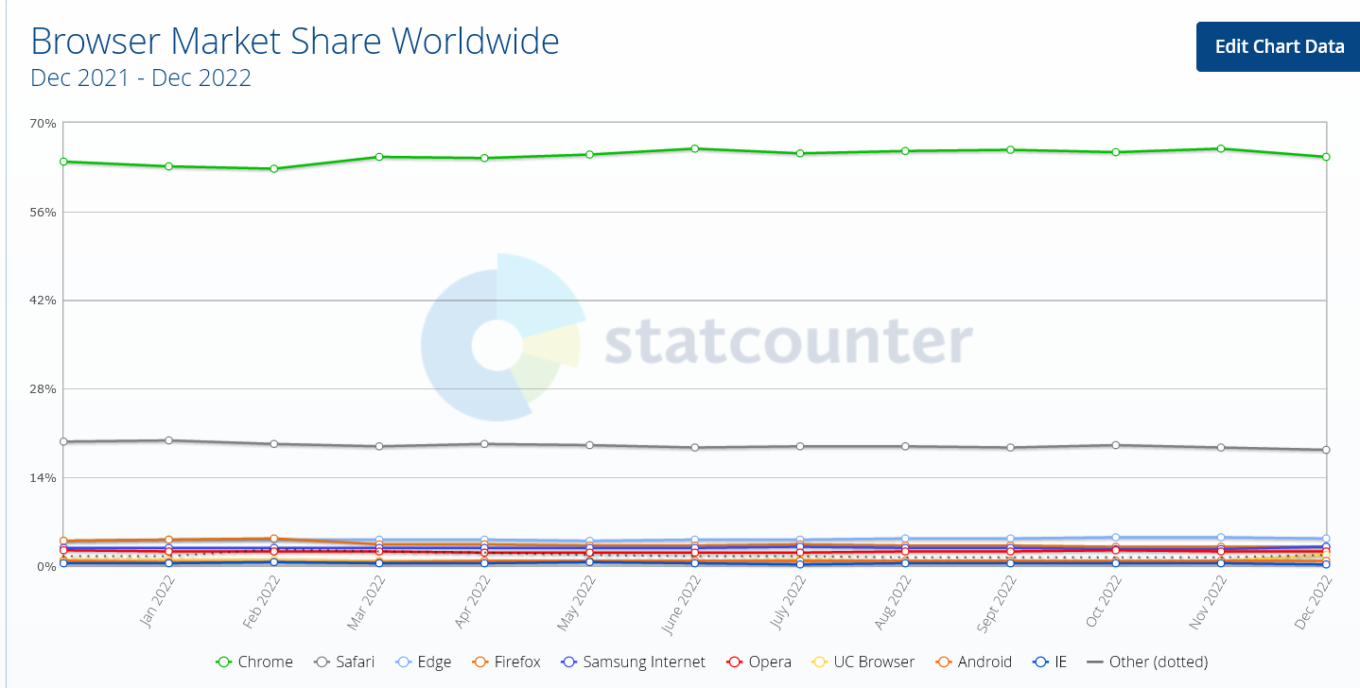
Google Chrome is a dominant force among desktop browsers

The ball in Chrome’s court

Google claims that the changes to the API will make extensions “more secure, performant, and private-respecting by default”. However, lingering concerns over their impact on ad-blocking prevent some experts from embracing the new platform. We too have repeatedly sounded the alarm about the negative impact Manifest V3 may have on Chrome developers and users.

To its credit, though, Google has sought to address these concerns. Being one of the founders of The World Wide Web Consortium’s (W3C) WebExtensions Community Group (on par with Apple, Mozilla, and Microsoft), Chrome solicited feedback on Manifest V3 from extension developers and welcomed criticism.

Still, Google’s response has been too slow and so far has failed to assuage developers’ concerns. Acknowledging these apprehensions, Mozilla announced last year that Firefox would continue to support the webRequest API to block entire categories of HTTP requests in its implementation of Manifest V3, but would also support a compatible version of declarativeNetRequest API, proposed by Google as a replacement for webRequest.

Compared to Firefox users, who will continue to benefit from the full functionality of ad blocking extensions, Chrome's 3 billion users may soon find themselves at a disadvantage when it comes to ad blocking. In the long run, this could become a catalyst for some Chrome users to switch to Firefox.

The sunset that never comes

In November, Mozilla announced that it would continue to support Manifest V2 extensions “for the foreseeable future” and promised to set a timeframe for disabling the old manifest “towards the end of 2023.”

As for Google Chrome, its timeline for pulling the plug on Manifest V2 has been pushed back so many times that it's hard to keep track. In January 2022, Google stopped accepting new extensions based on Manifest V2 to the Chrome Web Store. By June 2023 the tech giant was supposed to be experimenting with turning off support for Manifest V2 extensions in Chrome. However, in December all the remaining deadlines were put under review and all the experiments were postponed indefinitely.
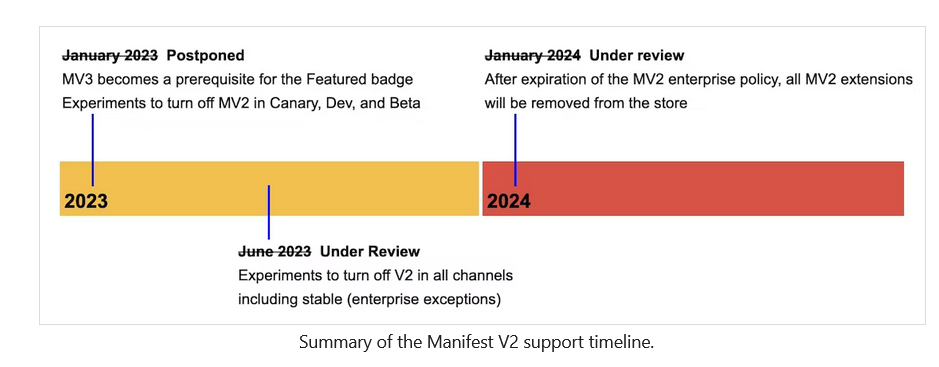
Google has pushed the deadline for sunsetting Manifest V2 a lot of times

That said, the threat of Manifest V2’s eventual demise is real. The doomsday clock for Manifest V2 may have stopped ticking, but Google could resume it at any time, so we thought it was important to have a solution ready if and when that happens.

Ad blocking in the era of Manifest V3

Believing that the chances of a sudden Google U-turn were slim, AdGuard started working on a prototype of a new Manifest V3-compliant extension as early as mid-2021. In August last year, we released an experimental ad blocking extension that met all the requirements of Manifest V3, becoming the first ad blocker to do so. Because it’s based on Manifest V3, with all its unfortunate limitations, this new extension may not be as effective as the old, tried and tested one. The extension will, however, still proactively block requests to trackers, hide social widgets, banners and video ads — in other words, it will do everything you’d expect an ad blocking extension to do.

We may have been the first, but other ad blockers soon followed suit, proving that ad blocking and Manifest V3 may not be a perfect match, but neither its arrival is a death sentence.

A month later, the author of popular ad blocker, uBlock Origin, published an experimental extension uBO Minus, compatible with Manifest V3. AdBlock Plus has also been working on a version of the extension that works on Manifest V3.

Google disappoints, Mozilla saves the day

Google claims that the sole purpose of replacing the old Manifest with a new extension platform that limits ad blocking is to provide greater security and privacy for users. Maybe that’s true, and Google does want to improve the extension platform to make it more secure and private.

Unfortunately, Google has made many decisions about the design of its new platform without taking into account the wishes and concerns of extension developers and, in the end, their own users. As a result, ad blocking extensions will lose some of their functionality. However, we don’t think the company will be too upset about this.

For its part, Mozilla has taken a more measured and less confrontational approach to ad blocking. The Firefox owner has shown that it is not impossible to implement Manifest V3 in a way that does not limit the functionality of ad blockers and at the same time increases security.


Podobał Ci się ten post?
AdGuard VPN AdGuard DNS AdGuard Mail AdGuard Wallet
Ekran główny AdGuard dla Windows
Ekran ochrony AdGuard dla Windows, pokazujący funkcje ochrony i ustawienia
Ekran statystyki AdGuard dla Windows, pokazujący statystyki zablokowanych reklam i trackery
Ekran Zarządzanie aplikacjami w AdGuard dla Windows, pokazujący opcje zarządzania ochroną dla aplikacji zainstalowanych na urządzeniu
20 753 20753 recenzje
Doskonały!

AdGuard dla Windows: bloker reklam na PC

AdGuard dla systemu Windows to coś więcej niż bloker reklam. To wielofunkcyjne narzędzie, które blokuje reklamy, kontroluje dostęp do niebezpiecznych stron, przyspiesza ładowanie stron i chroni dzieci przed nieodpowiednimi treściami
Pobierając program, akceptujesz warunki Umowy licencyjnej
Microsoft Store
Pobierając program, akceptujesz warunki Umowy licencyjnej
AdGuard na Windows v8.0, 14-dniowa wersja próbna
Ekran główny AdGuard dla Mac
Ekran Trybu ukrytego w AdGuard dla Mac
20 753 20753 recenzje
Doskonały!

AdGuard: bloker reklam na Maca

AdGuard dla Mac to wyjątkowy bloker reklam zaprojektowany z myślą o macOS. Oprócz ochrony przed uciążliwymi reklamami w przeglądarkach i aplikacjach chroni Cię przed śledzeniem, phishingiem i oszustwami
Pobierając program, akceptujesz warunki Umowy licencyjnej
Przeczytaj więcej
AdGuard na Mac v2.19, 14-dniowa wersja próbna
Ekran główny AdGuard dla Android
Ekran Ochrona przed śledzeniem w AdGuard dla Android
Ekran Zarządzanie aplikacjami w AdGuard dla Android, pokazujący opcje zarządzania ochroną dla aplikacji zainstalowanych na urządzeniu
Ekran statystyki AdGuard dla Android, pokazujący statystyki zablokowanych reklam i trackery
Ekran główny prywatnej przeglądarki AdGuard dla Android
Kod QR, aby pobierz AdGuard dla Android
20 753 20753 recenzje
Doskonały!

AdGuard: bloker reklam na Androida

Blokuje reklamy i moduły śledzące we wszystkich przeglądarkach, grach i innych aplikacjach. Chroni Twoją prywatność i pozwala kontrolować, w jaki sposób aplikacje korzystają z Internetu. Instalowane za pomocą pliku APK
Pobierając program, akceptujesz warunki Umowy licencyjnej
Przeczytaj więcej
Skanuj, aby pobrać
Użyj dowolnego czytnika kodów QR dostępnego w Twoim urządzeniu
AdGuard na Android v4.14, 14-dniowa wersja próbna
Ekran główny AdGuard dla iOS
Ekran ochrony AdGuard dla iOS, pokazujący funkcje ochrony i ustawienia
Ekran statystyki AdGuard dla iOS, pokazujący statystyki zablokowanych reklam i trackery
Kod QR, aby pobierz AdGuard dla iOS
20 753 20753 recenzje
Doskonały!

AdGuard na iOS: bloker reklam poza Safari

Najlepszy bloker reklam na iOS dla iPhone’a i iPada. AdGuard usuwa wszelkiego rodzaju reklamy i elementy śledzące w Safari oraz chroni Twoją prywatność we wszystkich aplikacjach na poziomie DNS
Pobierając program, akceptujesz warunki Umowy licencyjnej
Przeczytaj więcej
Skanuj, aby pobrać
Użyj dowolnego czytnika kodów QR dostępnego w Twoim urządzeniu
AdGuard na iOS v4.5
Ekran główny AdGuard Content Blocker
Ekran Filtry w AdGuard Content Blocker
Ekran ustawienia w AdGuard Content Blocker
20 753 20753 recenzje
Doskonały!

Blokada treści AdGuard

AdGuard Content Blocker eliminuje wszelkiego rodzaju reklamy w przeglądarkach mobilnych, które obsługują technologię blokowania treści — a mianowicie Samsung Internet i Yandex Browser. Jego funkcje są ograniczone w porównaniu z AdGuard na Androida, ale jest darmowy, łatwy w instalacji i wydajny
Pobierając program, akceptujesz warunki Umowy licencyjnej
Przeczytaj więcej
Blokada treści AdGuard v2.8
Ekran główny AdGuard Browser Extension
Ekran Ochrona przed śledzeniem w AdGuard Browser Extension
20 753 20753 recenzje
Doskonały!

Rozszerzenie przeglądarki AdGuard

AdGuard to najszybsze i najlżejsze rozszerzenie blokowania reklam, które skutecznie blokuje wszystkie typy reklam na wszystkich stronach internetowych! Wybierz AdGuard dla swojej przeglądarki i uzyskaj szybkie i bezpieczne przeglądanie Internetu pozbawione reklam.
Instalacja
Pobierając program, akceptujesz warunki Umowy licencyjnej
Instalacja
Pobierając program, akceptujesz warunki Umowy licencyjnej
Instalacja
Pobierając program, akceptujesz warunki Umowy licencyjnej
Instalacja
Pobierając program, akceptujesz warunki Umowy licencyjnej
Instalacja
Pobierając program, akceptujesz warunki Umowy licencyjnej
Przeczytaj więcej
Instalacja
Pobierając program, akceptujesz warunki Umowy licencyjnej
Przeczytaj więcej
Rozszerzenie przeglądarki AdGuard v5.5
Ekran główny Asystenta przeglądarki
20 753 20753 recenzje
Doskonały!

Asystent AdGuard

Towarzyszące rozszerzenie przeglądarki dla aplikacji desktopowych AdGuard. Umożliwia blokowanie niestandardowych elementów na stronach internetowych, dodawanie stron internetowych do listy dozwolonych i wysyłanie raportów bezpośrednio z przeglądarki
Asystent AdGuard v1.4
20 753 20753 recenzje
Doskonały!

AdGuard Home

AdGuard Home to sieciowe rozwiązanie do blokowania reklam i modułów śledzących. Zainstaluj go raz na routerze, aby objąć nim wszystkie urządzenia w sieci domowej — nie jest wymagane żadne dodatkowe oprogramowanie klienckie. Jest to szczególnie ważne w przypadku różnych urządzeń IoT, które często stanowią zagrożenie dla Twojej prywatności
AdGuard Home v0.107
Ekran główny AdGuard Pro dla iOS
Ekran Ochrona w AdGuard Pro dla iOS, pokazujący funkcje i ustawienia ochrony
Ekran statystyki w AdGuard Pro dla iOS, pokazujący statystyki zablokowanych reklam i trackerów
20 753 20753 recenzje
Doskonały!

AdGuard Pro dla iOS

AdGuard Pro na iOS oferuje wszystkie zaawansowane funkcje blokowania reklam. Oferuje te same narzędzia, co płatna wersja AdGuard na iOS. Doskonale blokuje reklamy w Safari i pozwala dostosować ustawienia DNS, aby dostosować poziom ochrony. Blokuje reklamy w przeglądarkach i aplikacjach, chroni dzieci przed nieodpowiednimi treściami i dba o bezpieczeństwo danych osobowych.


Pobierając program, akceptujesz warunki Umowy licencyjnej
Przeczytaj więcej
AdGuard Pro dla iOS v4.5
Ekran główny AdGuard Mini dla Mac
Ekran ochrony Safari w AdGuard Mini dla Mac
Ekran tworzenia reguły w AdGuard Mini dla Mac
20 753 20753 recenzje
Doskonały!

AdGuard Mini dla Mac — bloker reklam Safari

AdGuard Mini dla komputerów Mac to potężny bloker reklam w Safari. Ta lekka aplikacja usuwa reklamy, blokuje moduły śledzące i przyspiesza ładowanie stron. Umożliwia przeglądanie internetu w Safari bez rozpraszania uwagi i chroni prywatność danych
Instalacja
Pobierając program, akceptujesz warunki Umowy licencyjnej
Przeczytaj więcej
AdGuard Mini dla Mac v2.3
Ekran główny AdGuard dla Android TV z włączoną ochroną
Ekran blokowanie reklama AdGuard dla Android TV, pokazujący jego funkcje i ustawienia
Ekran ustawienia AdGuard dla Android TV
Ekran Zarządzanie aplikacjami AdGuard dla Android TV, pokazujący aplikacje, w których reklamy i trackery są zablokowane
20 753 20753 recenzje
Doskonały!

AdGuard dla Android TV

AdGuard dla Android TV to jedyna aplikacja, która blokuje reklamy, chroni prywatność i działa jak zapora sieciowa dla Smart TV. Otrzymuj ostrzeżenia o zagrożeniach internetowych, używaj bezpiecznego DNS i korzystaj z szyfrowanego ruchu. Zrelaksuj się i zanurz się w swoich ulubionych programach z najwyższej klasy zabezpieczeniami bez reklam!
AdGuard dla Android TV v4.14, 14-dniowa wersja próbna
Maskotka AdGuard, Agnar, trzymający pingwina Linux
20 753 20753 recenzje
Doskonały!

AdGuard dla Linux

AdGuard for Linux to pierwszy na świecie systemowy bloker reklam dla systemu Linux. Blokuj reklamy i elementy śledzące na poziomie urządzenia, wybieraj spośród wstępnie zainstalowanych filtrów lub dodawaj własne — wszystko za pośrednictwem interfejsu wiersza poleceń
AdGuard dla Linux v1.4
20 753 20753 recenzje
Doskonały!

AdGuard Temp Mail

Darmowy generator tymczasowych adresów e-mail, który zapewnia anonimowość i chroni prywatność. Brak spamu w głównej skrzynce odbiorczej!
20 753 20753 recenzje
Doskonały!

AdGuard VPN

75 lokalizacji na świecie

Dostęp do wszelkich treści

Silne szyfrowanie

Polityka braku logów

Najszybsze połączenie

Wsparcie 24/7

Wypróbuj za darmo
Pobierając program, akceptujesz warunki Umowy licencyjnej
Przeczytaj więcej
20 753 20753 recenzje
Doskonały!

AdGuard DNS

AdGuard DNS to alternatywne rozwiązanie do blokowania reklam, ochrony prywatności i kontroli rodzicielskiej. Łatwy w konfiguracji i darmowy, zapewnia niezbędną minimalną ochronę przed reklamami, śledzeniem i phishingiem, bez względu na platformę i urządzenie, z którego korzystasz.
20 753 20753 recenzje
Doskonały!

AdGuard Mail

Chroń swoją tożsamość, unikaj spamu i zabezpiecz swoją skrzynkę odbiorczą dzięki naszym aliasom i tymczasowym adresom e-mail. Skorzystaj z naszej bezpłatnej usługi przekazywania e-maili oraz aplikacji na wszystkie systemy operacyjne
20 753 20753 recenzje
Doskonały!

AdGuard Wallet

Bezpieczny i prywatny portfel kryptowalutowy, który daje Ci pełną kontrolę nad Twoimi aktywami. Zarządzaj wieloma portfelami i odkrywaj tysiące kryptowalut, aby je przechowywać, wysyłać i wymieniać
Rozpoczęto pobieranie AdGuard Kliknij przycisk wskazany strzałką, aby rozpocząć instalację Wybierz „Otwórz” i kliknij „OK”. Poczekaj aż plik zostanie pobrany. W otwartym oknie, przeciągnij ikonę AdGuard do folderu „Aplikacje”. Dziękujemy za wybrania AdGuard! Wybierz „Otrwórz” i kliknij „OK”. Poczekaj aż plik zostanie pobrany. W otwartym kliknij „Instaluj”. Dziękujemy za wybrania AdGuard!
Zainstaluj również AdGuard dla urządzeń mobilnych
















































