You can now get a ‘free’ TV – but it will cost you your privacy
Imagine getting a smart 55-inch 4K TV with an integrated soundbar and camera for free. Sounds too good to be true, right? But that’s exactly what a company called ‘Telly’ is promising to get you. It says it’ll send anyone who signs up for their program a free TV. The offer has created a lot of buzz in the media and sparked massive interest from users: more than 100,000 people reportedly registered to get a freebie within 36 hours of the product’s launch. But what’s the catch behind this generous offer?
They say, every gift has a string attached to it, but in this case, it’s not a string, but a screen — a second screen that will show you ads which you can’t get rid of. The smaller 9-inch screen sits just below the main one, separated by a soundbar. The main screen will show you the content you want to see, such as movies and shows, and the smaller one will show you the content you are hardly interested in, such as ads, sports scores, stock indexes, ads, weather forecasts, news ticker, and more ads. Ads will mostly appear in the far right-hand corner of the second screen, but they could also sneak into the news feed.
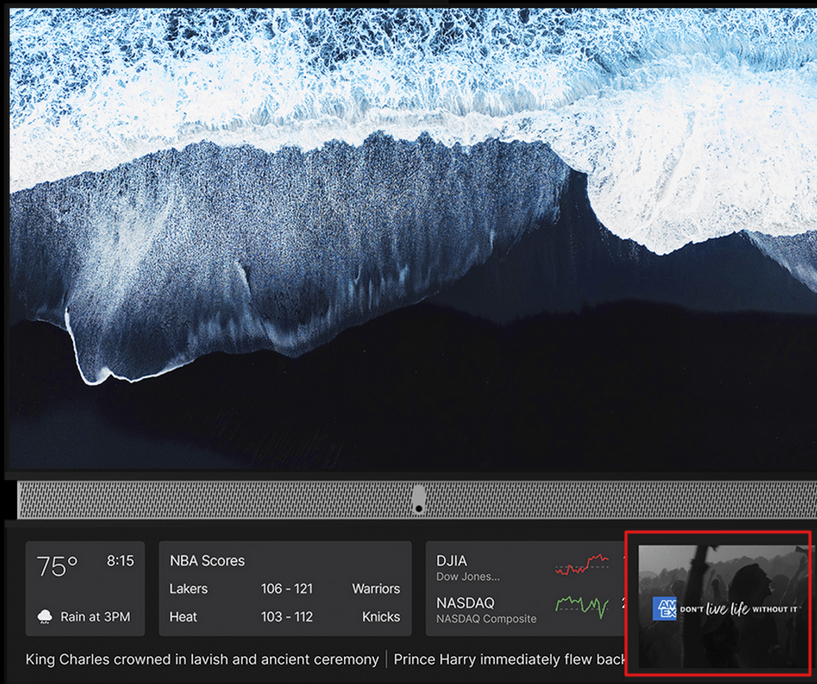
According to some reports, the square-shaped ‘mini-screen’ will show ads “all the time,” even when you’re not watching anything. Ads could also apparently come to the main screen in some cases. Telly’s chief strategy officer, Dallas Lawrence, told the Verge that the main screen would usually be ad-free, but it could light up with ads when idle. “When the Theatre display (top screen) is not in use, the ad unit could come to life in a fun way connecting both,” Lawrence said.
Advertising is what Telly is going to rely on completely to cover the cost of the high-end hardware and to make a profit on top of that. Telly will use its own TellyOS to connect the main and secondary screens, but its own OS won’t support third-party streaming apps, at least not out of the box. That’s why the company will ship the 55-inch 4k monitor with a 4k Android TV dongle that you can plug into your TV’s HDMI port to stream content from various apps and services. You can also connect your TV to any streaming device you prefer, such as Roku or Apple TV.
Telly’s offering — the apex of the ad-supported TV model
Telly is the first smart TV brand to offer you a free TV and that with a dual screen, but the reality is that TV prices have been falling for a long time and are at historic lows. For many smart TV companies, hardware sales are showing diminishing returns. For instance, Vizio’s hardware sales plunged 24% in Q4 of last year to $397 million, while its platform revenue rose 30% to $136 million. For the whole year of 2022, Vizio’s platform revenue more than doubled, with it adding 130 new advertisers. Roku, which famously declared years ago that it was not in the hardware business, but in the ad business, is a prime example of how the industry is shifting towards ads. In Q1 of 2023 Roku’s hardware sales only amounted to $106.4 million, a small fraction of the total platform’s revenue of $634.6 million.
The online advertising market may go through ups and downs and ad revenues may fluctuate, but the trend is clear: smart TV companies are willing to sell hardware at low prices, and then make up for the difference from ad sales. Over time, it allows them to reap considerable profits from a single household. Such an approach makes sense: after all, we don’t buy TVs every quarter or even year, but we watch content and ads that come with it for years or even decades. By offering a free ad-supported TV, Telly has just taken this approach to the next level.
As for how long it might take for Telly to recoup the cost of a TV (plus make some money), the company is aiming for at least several years of use. Telly CEO and founder Ilya Pozin told the Hollywood Reporter that they are building a “future-proof” TV that should stay on top of the game for at least the next three or four years.
In addition to its price, or lack thereof, what sets Telly apart from many other ad-supported brands is that recipients of its “free” devices won’t be able to opt out of the data collection that enables serving highly personalized ads. Well, they can opt out, but at a cost.
In its privacy policy, Telly states: “You have the right to opt-out of sharing your Viewing and Activity Data, but unfortunately, that means you will no longer have access to the Services [and must return the television].” If you do not return the TV, Telly says it will automatically charge your credit card for $500. It’s unclear how Telly came up with this price; in several media interviews, Ilya Pozin estimated the retail value of Telly’s hardware set at $1000. Opting out may not be easy either. Telly says you can do it by sending an email to Telly, while most big brands let users opt out of some data collection through the TV settings.
The lack of a free opt-out option is one way Telly will compensate for the lost profits from hardware sales. Another way is the amount and the type of data it will collect.
The true cost of ‘free TV’
Before we look at what data Telly plans to collect and share with advertisers, let’s remind ourselves that all smart TV companies collect some information about viewers. So unless you use an ad blocker, you’re probably already trading your data for your smart viewing experience.
Many smart TV companies use a technology called ACR (Automatic Content Recognition) to track your viewing history, others may have different names for it or employ different methods for this purpose. ACR and its alternatives allow manufacturers to know what shows, movies, commercials, etc. you watch, when exactly and for how long. Manufacturers may also combine this data with information they get from third parties, such as data brokers that may collect and sell demographic data, advertising networks, and other devices connected to your smart TV, including your smartphone, tablet or gaming console.
Smart TVs may share the collected information, including information that can identify you, such as your device ID, and information about your online activity with advertisers, so they can target you with relevant ads that are more likely to pique your interest. Typically, viewers can opt out of ACR and personalized advertising, but not all ads — to learn how to stop receiving even generic ads, not linked to you, read our article.
Telly: data collection on steroids
In the case of Telly, it wants to know a lot about you before you even get your free TV. After you sign up on Telly’s website, you’ll be asked to download the Telly mobile app and create a profile there.
Telly’s CEO and founder Ilya Pozin told the Hollywood Reporter:
“You’re giving us your demographics, your psychographics at the individual and household level before you even get your device, so we know who you are, we know where you live, we know your income, we know what car you’re driving, we know when your lease is up… We know what your favorite brands are. We know your favorite sports teams are so when you first bring your TV home, you scan a QR code with your phone, all the data is already there.”
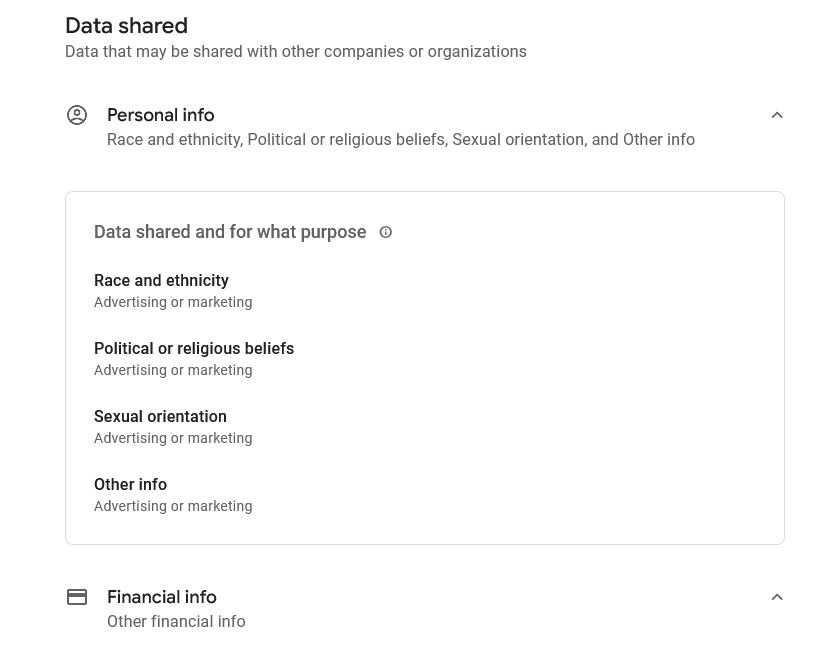
A good way to check what data an app collects and shares is to look at the data safety section of the Google App Store, where developers have to provide information about their apps’ privacy and security practices. This information is verified by Google before it shows up on the app’s store listing. Telly’s app data safety section on Play Store reveals that it can collect and share this data about you for advertising or marketing purposes: race and ethnicity, political or religious beliefs, sexual orientation, and financial information. That sounds pretty invasive to us.
But that’s not all. Telly will also collect and share more data while you use its services. As for which data and with whom, well, you can only be so sure. Telly, which plans to ship first TVs in the US already this summer, says in its privacy policy that its “services might operate in ways we do not anticipate or intend” so they “may need to change this Privacy Policy from time to time.”
In a supplement to its privacy policy, Telly states that it will collect your viewing history associated with your IP address and your Telly account, and store it in an “unidentified format.” It will also collect your activity data, including search queries, setting preferences, apps usage, buttons your click on, as well as “the physical presence of you and any other individuals using the TV at any given time” (for that Telly will use a motion sensor). If it accidentally collects the data on children under 13 this way, it promises to delete it “as quickly as possible.”
Some of the data Telly collects is fairly typical for all smart TV brands, such as device ID, type of OS, browser, billing address, phone number and email. You can see more details here. However, some of the data is not so typical. For instance, in addition to all the above, Telly will also collect “cultural and social identifiers,” such as “being a skateboarder, a Green Bay Packers fan, an environmental activist.”
As for data collection and Telly, it seems that only the sky’s the limit. While other smart TV companies already collect a large amount of personal data on users, Telly takes it up a notch. This raises the question: what is the next step? Will we live as a reality TV talk show, or are we already at that stage?
Are you up for an exchange?
Telly claims that the dual-screen TV is ‘so smart it pays for itself’, but in reality it is not the TV itself that is footing the bill, but you — with your personal data. Pozin sees this as only a fair exchange, which Telly, with its offer, has made official. “For too long, consumers have not been an equal part of the advertising value exchange,” he says.
Well, it’s up to you to decide if you want to be a part of this exchange, but what we owe Telly already now is revealing the true cost of an individual user/household data: at least $500 spread over several years, but most likely way more. If anything, it should remind us that our personal data is not worthless, but a valuable commodity that, at the very least, is worth a good-sized TV you, as a child, could probably only dream of.




















































