Incognito mode is a sham: it makes you feel safe while failing to protect your data

What does it mean to “go incognito”? According to the authoritative Collins dictionary, it means “using a false name or wearing a disguise, in order to avoid being recognized or identified.”

Given that, it’s quite tempting and natural to think that when you open an “incognito” window in the Google Chrome browser, you’re doing just that: hiding your identity and sailing anonymously across the Web (all while donning a stylish fedora hat and those circular Windsor glasses).

A survey by the University of Chicago found that many people vastly overestimate the benefits offered by private browsing modes, even after reading the fine print in the disclaimers. For example, the majority of the respondents believed that their search history was not recorded by Google, even if they were logged in their Google account. While some 27 percent wrongly thought that private mode protects them against viruses and malware.

To dispel these and other misunderstandings about private modes, we will zero in on the most popular of them — Chrome’s incognito mode.

How it works and what it is used for

Let’s start with what Incognito mode can really do for you. In a nutshell, it hides your browsing habits from other users of the same PC, or laptop, or phone — or any device for that matter. In more technical terms, when you’re in incognito mode, neither your search nor your browsing history is stored locally on your device. So it can be quite useful if you are looking for a surprise gift for your partner with whom you happen to share a laptop or a tablet. And if that was what people actually used the mode for, we would have no problem with it.
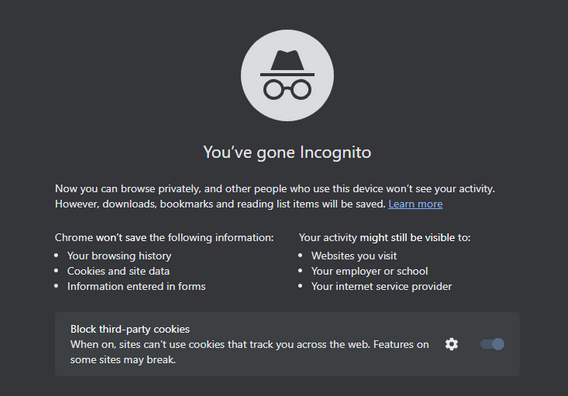
Chrome_Incognito_Mode

However, this is far from being the case. A February 2023 survey conducted in the UK showed that every second person who used private browsing or incognito mode primarily did it to protect their personal information from scammers and criminals. Around 40% would toggle it on in order to stop advertisers from tracking them across the Web.

While Chrome’s incognito mode blocks third-party cookies (tracking codes planted by the websites other than the one you’re visiting in your browser) by default, it still collects cookies and site data during the session. They are stored in a temporary folder and are not deleted at least until you close all incognito windows.

Moreover, a lawsuit filed against Google by the users of incognito mode in 2020 claims that Google “stores users’ regular and private browsing data in the same logs.” It then “uses those mixed logs to send users personalized ads,” and even if individual data points are “anonymized,” Google is able to “uniquely identify a user with a high probability of success” when these data points are pooled.

What Google admits about Incognito mode

Chrome’s incognito mode disclaimer states that your activity will still be visible to three parties: the websites you visit, your employer or school, and your internet service provider.

It means that the analytic tools of the websites you visit can still capture some data about your on-site activity. This data will be anonymized but only to a degree.
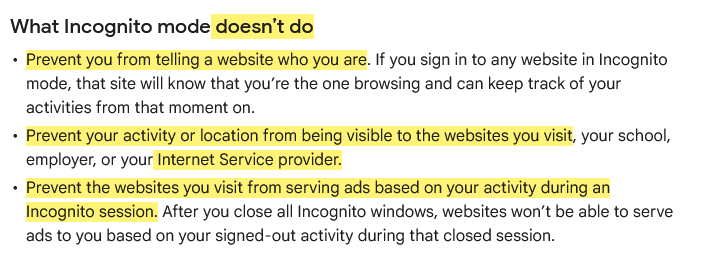
This is what Google says about Incognito mode

Source: Google

To give you the taste of browsing in an ‘incognito mode,’ we visited the CBC.ca website while using the AdGuard browser extension and took a screenshot of what it detected…
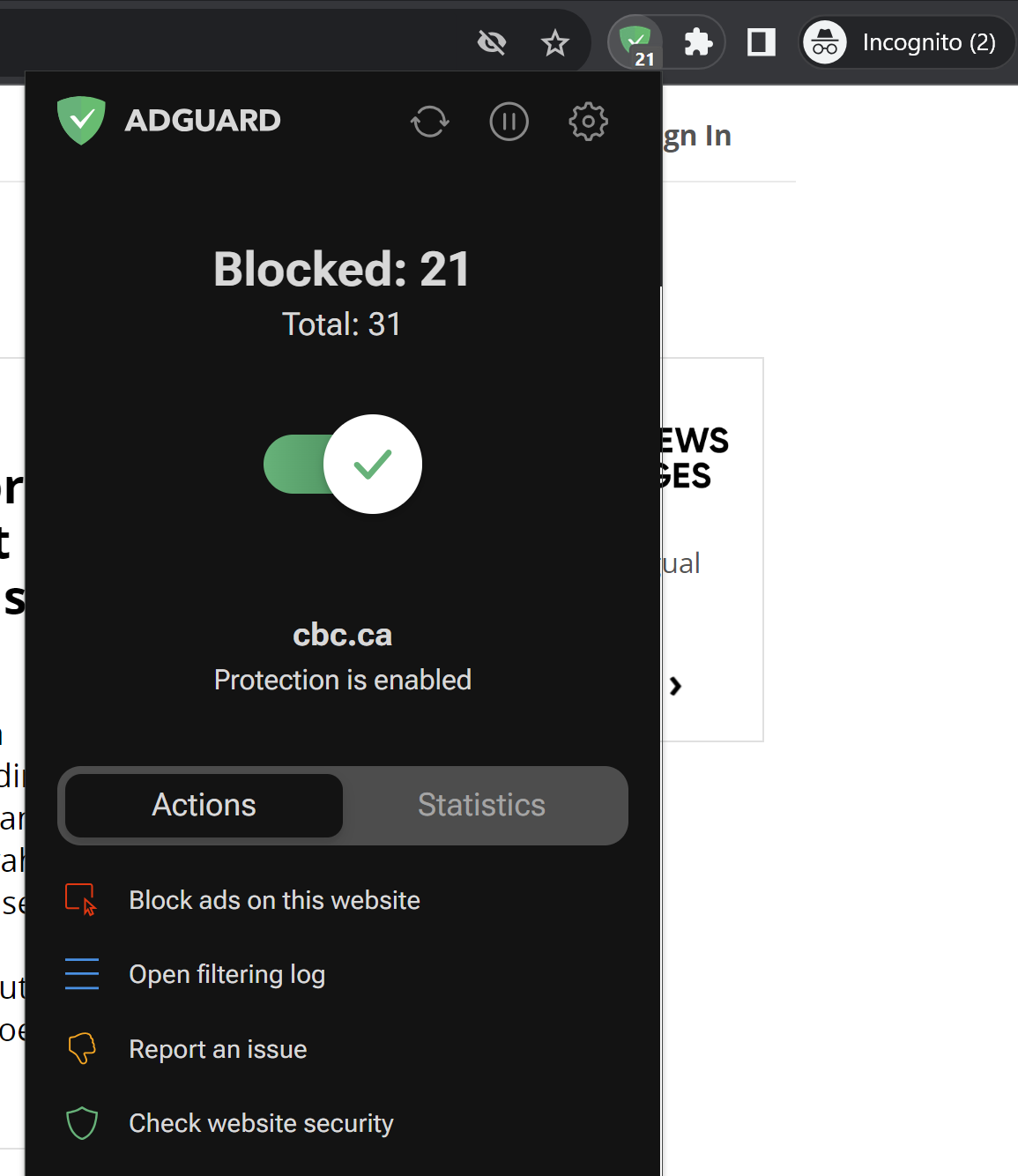
AdGuard Browser Extension has detected trackers in incognito mode

Note that we did not include third-party cookies in this test, because they are already blocked by default in Chrome’s incognito mode. But even without them, you can see how much tracking is going on behind the scenes. Almost every line you can see in the screenshot below is a failed attempt by a tracking tool to send some information about your online identity to a third party.
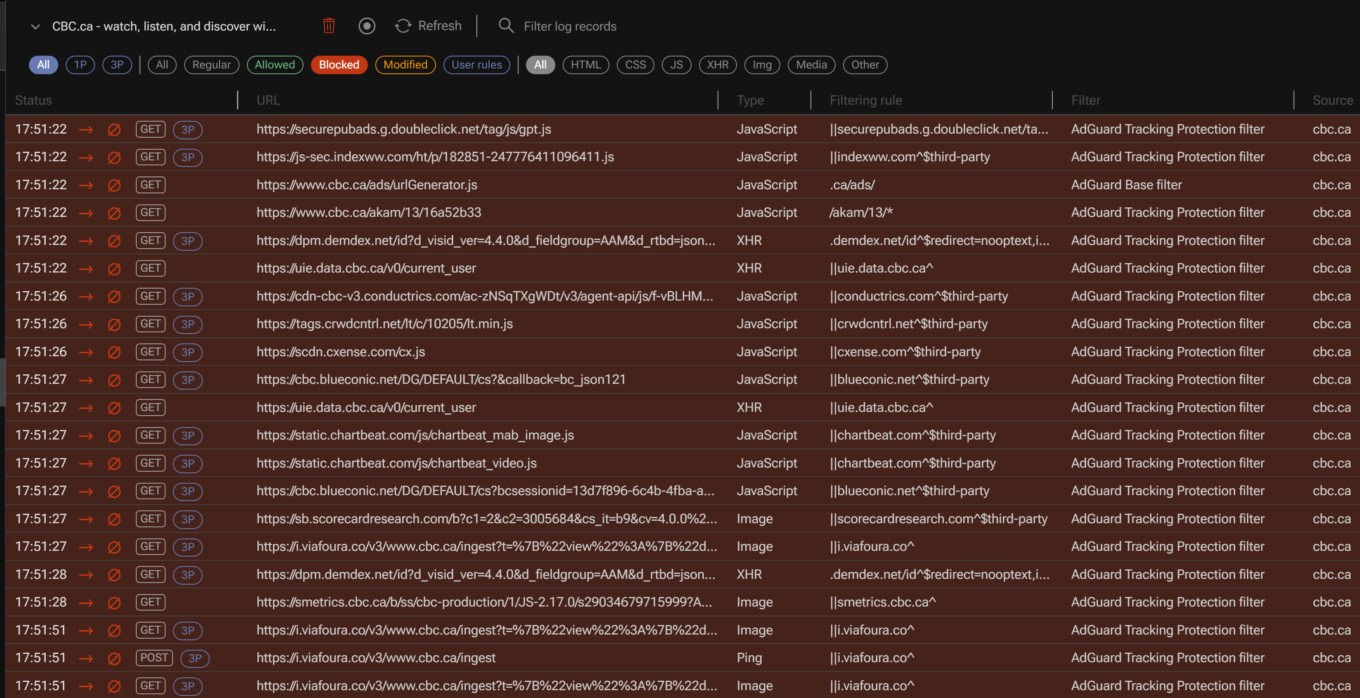
AdGuard filtering log

For example, one of such attempted requests was to Chartbeat, a provider of real-time website analytics. Chartbeat helps websites monitor their traffic, user engagement, and other important metrics. The request URL contains a tracking pixel (a tiny image embedded in web pages that is used to track user activity) and various parameters that send data to Chartbeat, such as host name, page URL, user ID, device type, screen resolution, and more.
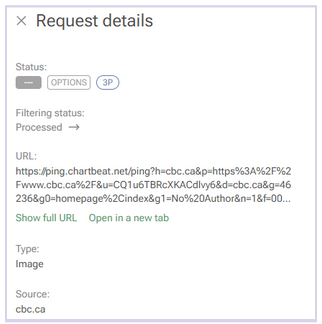
A request to a tracking company detected by AdGuard

Websites will be able to use this data to serve you ads during the session.

Incognito mode also does not hide your browsing activity from your IT department or your school network administrators, if you are using a work or a school network. In short, if you’re not the administrator of the network — for example, if you’re browsing the web using the Wi-Fi in a coffee shop — then you should consider your online activity to be out in the open, incognito mode or not.

In the same vein, regardless of whether you’re using incognito mode, your Internet Service Provider (ISP) will still be able to trace your IP address and see your activity.

And if you sign in to the site with your password and login, the little protection that incognito mode gives you from trackers will naturally be gone. “The site will know that you’re the one browsing and can keep track of your activities from that moment on,”Google says. So, if you sign in on YouTube, for example, while in incognito mode, it will record your activity and serve you recommendations based on it.

It’s probably even worse than that

There are things Google tells users about incognito mode — like the fact that it only helps keep your browsing history private from your partner or child — but there are some things it does not tell. The 2020 class-action lawsuit, that we’ve already mentioned, purports to reveal some of these things.

Remember that disclaimer that appears when you open an incognito mode window? Well, it does mention that third-party websites, your employer, and your school could see what you’re doing online. However, there is one important party that is not mentioned in the disclaimer: Google itself.

An excerpt from the lawsuit challenging incognito mode

Source: Lawsuit

According to the lawsuit, Google tracks and collects data from users even when they are in incognito mode. The plaintiffs claim that Google uses various methods to intercept and monitor users’ browsing data without their consent. The lawsuit explains how this works: “Whenever a user visits a website that is running Google Analytics, Ad Manager, or some similar Google service, Google’s software directs the user’s browser to send a separate communication to Google. This happens even when users are in private browsing mode, unbeknownst to website developers or the users themselves.”

The grand illusion of incognito mode

Incognito mode is like the emperor’s new clothes: it creates a false sense of security where there is none. In fact, its application is so narrow that you might be better off without it. If you want to clear your browsing history, cookies, and site data for a certain time period, there are other tools you can use. In Chrome, you can do this by selecting More Tools → Clear Browsing Data on the desktop version, or Settings → Privacy and security → Clear browsing data on the mobile version.
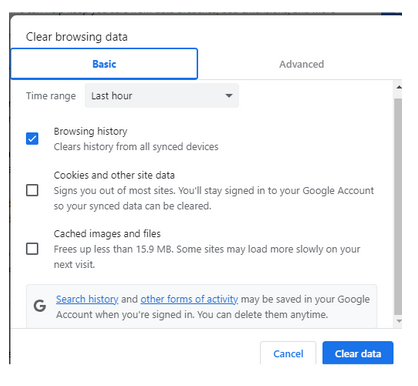
Google privacy controls allow to clear browsing history

However, if you want to truly protect your privacy and anonymity online, there are other, far better ways to do so.

One of them is using a VPN (Virtual Private Network), which is a service that encrypts your internet traffic and routes it through a remote server. This way, you can hide your IP address and location from your ISP, websites and third parties. There are many VPN providers available, but you should choose one that has a good reputation, a no-logs policy, and strong encryption. Generally, a VPN should not slow down your connection a lot, but it might be something you have to come to terms with in exchange for improved privacy.

Another way to go private online is using the Tor browser, which is a free software that allows you to browse the web anonymously. Tor works by bouncing your traffic through a network of volunteer nodes, called relays, that make it hard to trace your identity and location. Tor, however, has some drawbacks as well, such as (sometimes extremely) slow speed and serious compatibility issues.

Using a reliable ad blocker for Chrome will also go a long way in ensuring your browsing stays private. Almost every single one of them blocks trackers and not just ads; not to mention that the vast majority of ads serve as tracking tools, too.

When there are so many tools available to you to protect your privacy and keep your data private, there’s just no reason to resort to incognito mode… unless, of course, you’re looking for that gift for your SO.


Podobał Ci się ten post?
AdGuard VPN AdGuard DNS AdGuard Mail AdGuard Wallet
Ekran główny AdGuard dla Windows
Ekran ochrony AdGuard dla Windows, pokazujący funkcje ochrony i ustawienia
Ekran statystyki AdGuard dla Windows, pokazujący statystyki zablokowanych reklam i trackery
Ekran Zarządzanie aplikacjami w AdGuard dla Windows, pokazujący opcje zarządzania ochroną dla aplikacji zainstalowanych na urządzeniu
20 752 20752 recenzje
Doskonały!

AdGuard dla Windows: bloker reklam na PC

AdGuard dla systemu Windows to coś więcej niż bloker reklam. To wielofunkcyjne narzędzie, które blokuje reklamy, kontroluje dostęp do niebezpiecznych stron, przyspiesza ładowanie stron i chroni dzieci przed nieodpowiednimi treściami

Pobierając program, akceptujesz warunki Umowy licencyjnej
Microsoft Store
Pobierając program, akceptujesz warunki Umowy licencyjnej
AdGuard na Windows v8.0, 14-dniowa wersja próbna
Ekran główny AdGuard dla Mac
Ekran Trybu ukrytego w AdGuard dla Mac
20 752 20752 recenzje
Doskonały!

AdGuard: bloker reklam na Maca

AdGuard dla Mac to wyjątkowy bloker reklam zaprojektowany z myślą o macOS. Oprócz ochrony przed uciążliwymi reklamami w przeglądarkach i aplikacjach chroni Cię przed śledzeniem, phishingiem i oszustwami
Pobierając program, akceptujesz warunki Umowy licencyjnej
Przeczytaj więcej
AdGuard na Mac v2.19, 14-dniowa wersja próbna
Ekran główny AdGuard dla Android
Ekran Ochrona przed śledzeniem w AdGuard dla Android
Ekran Zarządzanie aplikacjami w AdGuard dla Android, pokazujący opcje zarządzania ochroną dla aplikacji zainstalowanych na urządzeniu
Ekran statystyki AdGuard dla Android, pokazujący statystyki zablokowanych reklam i trackery
Ekran główny prywatnej przeglądarki AdGuard dla Android
Kod QR, aby pobierz AdGuard dla Android
20 752 20752 recenzje
Doskonały!

AdGuard: bloker reklam na Androida

Blokuje reklamy i moduły śledzące we wszystkich przeglądarkach, grach i innych aplikacjach. Chroni Twoją prywatność i pozwala kontrolować, w jaki sposób aplikacje korzystają z Internetu. Instalowane za pomocą pliku APK
Pobierając program, akceptujesz warunki Umowy licencyjnej
Przeczytaj więcej
Skanuj, aby pobrać
Użyj dowolnego czytnika kodów QR dostępnego w Twoim urządzeniu
AdGuard na Android v4.14, 14-dniowa wersja próbna
Ekran główny AdGuard dla iOS
Ekran ochrony AdGuard dla iOS, pokazujący funkcje ochrony i ustawienia
Ekran statystyki AdGuard dla iOS, pokazujący statystyki zablokowanych reklam i trackery
Kod QR, aby pobierz AdGuard dla iOS
20 752 20752 recenzje
Doskonały!

AdGuard na iOS: bloker reklam poza Safari

Najlepszy bloker reklam na iOS dla iPhone’a i iPada. AdGuard usuwa wszelkiego rodzaju reklamy i elementy śledzące w Safari oraz chroni Twoją prywatność we wszystkich aplikacjach na poziomie DNS
Pobierając program, akceptujesz warunki Umowy licencyjnej
Przeczytaj więcej
Skanuj, aby pobrać
Użyj dowolnego czytnika kodów QR dostępnego w Twoim urządzeniu
AdGuard na iOS v4.5
Ekran główny AdGuard Content Blocker
Ekran Filtry w AdGuard Content Blocker
Ekran ustawienia w AdGuard Content Blocker
20 752 20752 recenzje
Doskonały!

Blokada treści AdGuard

AdGuard Content Blocker eliminuje wszelkiego rodzaju reklamy w przeglądarkach mobilnych, które obsługują technologię blokowania treści — a mianowicie Samsung Internet i Yandex Browser. Jego funkcje są ograniczone w porównaniu z AdGuard na Androida, ale jest darmowy, łatwy w instalacji i wydajny
Pobierając program, akceptujesz warunki Umowy licencyjnej
Przeczytaj więcej
Blokada treści AdGuard v2.8
Ekran główny AdGuard Browser Extension
Ekran Ochrona przed śledzeniem w AdGuard Browser Extension
20 752 20752 recenzje
Doskonały!

Rozszerzenie przeglądarki AdGuard

AdGuard to najszybsze i najlżejsze rozszerzenie blokowania reklam, które skutecznie blokuje wszystkie typy reklam na wszystkich stronach internetowych! Wybierz AdGuard dla swojej przeglądarki i uzyskaj szybkie i bezpieczne przeglądanie Internetu pozbawione reklam.
Instalacja
Pobierając program, akceptujesz warunki Umowy licencyjnej
Instalacja
Pobierając program, akceptujesz warunki Umowy licencyjnej
Instalacja
Pobierając program, akceptujesz warunki Umowy licencyjnej
Instalacja
Pobierając program, akceptujesz warunki Umowy licencyjnej
Instalacja
Pobierając program, akceptujesz warunki Umowy licencyjnej
Przeczytaj więcej
Instalacja
Pobierając program, akceptujesz warunki Umowy licencyjnej
Przeczytaj więcej
Rozszerzenie przeglądarki AdGuard v5.5
Ekran główny Asystenta przeglądarki
20 752 20752 recenzje
Doskonały!

Asystent AdGuard

Towarzyszące rozszerzenie przeglądarki dla aplikacji desktopowych AdGuard. Umożliwia blokowanie niestandardowych elementów na stronach internetowych, dodawanie stron internetowych do listy dozwolonych i wysyłanie raportów bezpośrednio z przeglądarki
Asystent AdGuard v1.4
20 752 20752 recenzje
Doskonały!

AdGuard Home

AdGuard Home to sieciowe rozwiązanie do blokowania reklam i modułów śledzących. Zainstaluj go raz na routerze, aby objąć nim wszystkie urządzenia w sieci domowej — nie jest wymagane żadne dodatkowe oprogramowanie klienckie. Jest to szczególnie ważne w przypadku różnych urządzeń IoT, które często stanowią zagrożenie dla Twojej prywatności
AdGuard Home v0.107
Ekran główny AdGuard Pro dla iOS
Ekran Ochrona w AdGuard Pro dla iOS, pokazujący funkcje i ustawienia ochrony
Ekran statystyki w AdGuard Pro dla iOS, pokazujący statystyki zablokowanych reklam i trackerów
20 752 20752 recenzje
Doskonały!

AdGuard Pro dla iOS

AdGuard Pro na iOS oferuje wszystkie zaawansowane funkcje blokowania reklam. Oferuje te same narzędzia, co płatna wersja AdGuard na iOS. Doskonale blokuje reklamy w Safari i pozwala dostosować ustawienia DNS, aby dostosować poziom ochrony. Blokuje reklamy w przeglądarkach i aplikacjach, chroni dzieci przed nieodpowiednimi treściami i dba o bezpieczeństwo danych osobowych.
Pobierając program, akceptujesz warunki Umowy licencyjnej
Przeczytaj więcej
AdGuard Pro dla iOS v4.5
Ekran główny AdGuard Mini dla Mac
Ekran ochrony Safari w AdGuard Mini dla Mac
Ekran tworzenia reguły w AdGuard Mini dla Mac
20 752 20752 recenzje
Doskonały!

AdGuard Mini dla Mac — bloker reklam Safari

AdGuard Mini dla komputerów Mac to potężny bloker reklam w Safari. Ta lekka aplikacja usuwa reklamy, blokuje moduły śledzące i przyspiesza ładowanie stron. Umożliwia przeglądanie internetu w Safari bez rozpraszania uwagi i chroni prywatność danych
Instalacja
Pobierając program, akceptujesz warunki Umowy licencyjnej
Przeczytaj więcej
AdGuard Mini dla Mac v2.3
Ekran główny AdGuard dla Android TV z włączoną ochroną
Ekran blokowanie reklama AdGuard dla Android TV, pokazujący jego funkcje i ustawienia
Ekran ustawienia AdGuard dla Android TV
Ekran Zarządzanie aplikacjami AdGuard dla Android TV, pokazujący aplikacje, w których reklamy i trackery są zablokowane
20 752 20752 recenzje
Doskonały!

AdGuard dla Android TV

AdGuard dla Android TV to jedyna aplikacja, która blokuje reklamy, chroni prywatność i działa jak zapora sieciowa dla Smart TV. Otrzymuj ostrzeżenia o zagrożeniach internetowych, używaj bezpiecznego DNS i korzystaj z szyfrowanego ruchu. Zrelaksuj się i zanurz się w swoich ulubionych programach z najwyższej klasy zabezpieczeniami bez reklam!
AdGuard dla Android TV v4.14, 14-dniowa wersja próbna
Maskotka AdGuard, Agnar, trzymający pingwina Linux
20 752 20752 recenzje
Doskonały!

AdGuard dla Linux

AdGuard for Linux to pierwszy na świecie systemowy bloker reklam dla systemu Linux. Blokuj reklamy i elementy śledzące na poziomie urządzenia, wybieraj spośród wstępnie zainstalowanych filtrów lub dodawaj własne — wszystko za pośrednictwem interfejsu wiersza poleceń
AdGuard dla Linux v1.4
20 752 20752 recenzje
Doskonały!

AdGuard Temp Mail

Darmowy generator tymczasowych adresów e-mail, który zapewnia anonimowość i chroni prywatność. Brak spamu w głównej skrzynce odbiorczej!
20 752 20752 recenzje
Doskonały!

AdGuard VPN

75 lokalizacji na świecie

Dostęp do wszelkich treści

Silne szyfrowanie

Polityka braku logów

Najszybsze połączenie

Wsparcie 24/7

Wypróbuj za darmo
Pobierając program, akceptujesz warunki Umowy licencyjnej
Przeczytaj więcej
20 752 20752 recenzje
Doskonały!

AdGuard DNS

AdGuard DNS to alternatywne rozwiązanie do blokowania reklam, ochrony prywatności i kontroli rodzicielskiej. Łatwy w konfiguracji i darmowy, zapewnia niezbędną minimalną ochronę przed reklamami, śledzeniem i phishingiem, bez względu na platformę i urządzenie, z którego korzystasz.
20 752 20752 recenzje
Doskonały!

AdGuard Mail

Chroń swoją tożsamość, unikaj spamu i zabezpiecz swoją skrzynkę odbiorczą dzięki naszym aliasom i tymczasowym adresom e-mail. Skorzystaj z naszej bezpłatnej usługi przekazywania e-maili oraz aplikacji na wszystkie systemy operacyjne
20 752 20752 recenzje
Doskonały!

AdGuard Wallet

Bezpieczny i prywatny portfel kryptowalutowy, który daje Ci pełną kontrolę nad Twoimi aktywami. Zarządzaj wieloma portfelami i odkrywaj tysiące kryptowalut, aby je przechowywać, wysyłać i wymieniać
Rozpoczęto pobieranie AdGuard Kliknij przycisk wskazany strzałką, aby rozpocząć instalację Wybierz „Otwórz” i kliknij „OK”. Poczekaj aż plik zostanie pobrany. W otwartym oknie, przeciągnij ikonę AdGuard do folderu „Aplikacje”. Dziękujemy za wybrania AdGuard! Wybierz „Otrwórz” i kliknij „OK”. Poczekaj aż plik zostanie pobrany. W otwartym kliknij „Instaluj”. Dziękujemy za wybrania AdGuard!
Zainstaluj również AdGuard dla urządzeń mobilnych

















































