If you think your data is safer with big corps, you’re wrong: The story of Lapsus$ hacker group

Today we have somewhat of an unusual digest, we're going to talk about a notorious hacker group called Lapsus$ that's responsible for a number of high-profile cases. And if this topic may seem like it has nothing to do with you — it's only at first glance.

Mr. President

In early January this year, Portuguese mediagroup IMPRESA was targeted by hackers. Mediagroup's child companies — TV channel SIC and newspaper Expresso — were hacked. SIC's streaming got cut off, Expresso's Twitter account was hijacked. Appealing to Expresso's 540,000 followers, the hacker group impertinently declared itself the "new president of Portugal".

Lapsus$ tweet under the Expresso account
Source: Cyber etc. Twitter account

Next in line was Localiza, the biggest car rental service in Latin America. Anyone who visited their website got redirected to a porn website.

The hackers could have easily redirected users to a fake website, visually identical to the original, where the unsuspecting visitors would have voluntarily left all their personal data such as bank accounts' details. Like, for example, it happened to the hacked Instagram page of the NFT project Bored Ape Yacht Club. The hackers used the account to display phishing information and managed to steal over $1 million.

But Lapsus$, apparently, were more interested in attacking the big corp rather than in stealing the personal data of ordinary users.

Going big...

But this was only the beginning. The news about the NVIDIA hack shocked everyone. Among the stolen data were:

  • source codes for graphics cards' drivers, including the hashrate limiting technology that makes GPUs less desirable for miners;
  • highly confidential information about microchip design, including unreleased ones;
  • credentials of 71,000 NVIDIA employees;
  • source code for the DLSS rendering system;
  • and official code-signing certificates.

The list is long enough but one would think that at least the attack would only affect NVIDIA itself, its competitors, and, perhaps, miners. But this couldn't be further from reality. The signing certificates that were leaked to the web allow to sign any software as NVIDIA's. Any malefactor could use it to sign their virus, for example, and any computer would recognize this virus as perfectly normal NVIDIA software. This has opened a window for all kinds of perpetrators to circumvent Windows' built-in security systems.

And it didn't take long for the stolen certificates to start popping up in the news.
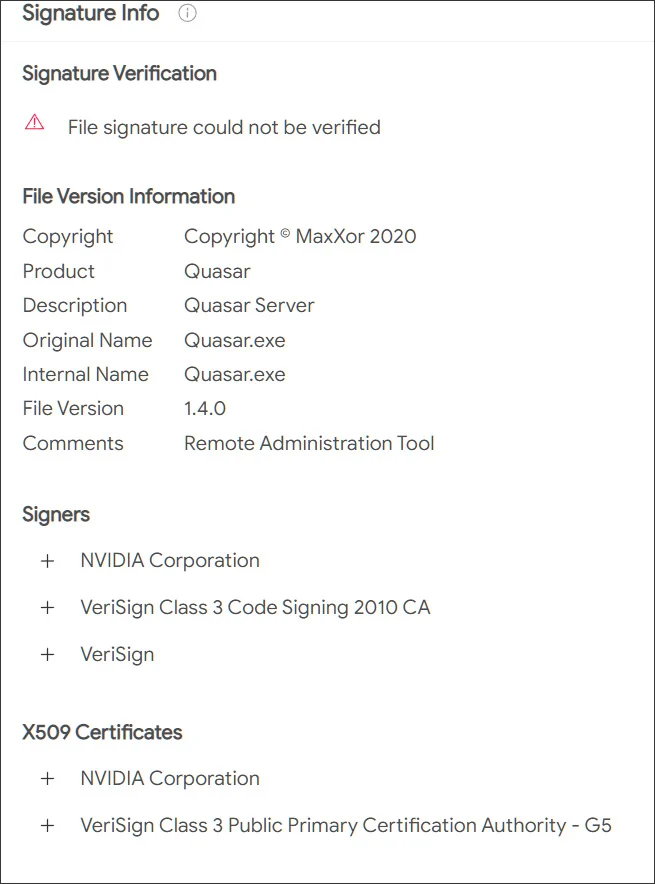
Stolen NVIDIA certificate
Source: Bleeping computer

...and going even bigger

The group expectantly didn't stop there, its appetites only growing. Samsung was destined to become the next victim. Lapsus$ stole source texts for the loader used in all latest devices, as well as the code responsible for biometrics, authentication, and encryption. In addition, confidential data of Qualcomm, one of Samsung's counterparties, was stolen.

The consequences, especially in the context of Samsung devices' security systems, can be quite disastrous. With high certainty, this data is currently being thoroughly scanned for vulnerabilities, and we can expect to hear about a series of Samsung devices being breached, and sooner rather than later. Evidently, even a single company getting hacked can often lead to more subsequent breaches and more data leakages. We all are forced into picking our poison and "trusting" one company or another with our personal data, but do they deserve this trust?

Meanwhile, Lapsus$ was only starting to gain momentum. Vodafone breach resulted in 200GB of data getting stolen. The company states that user data wasn't affected, and it may well be true, as it hasn't emerged anywhere on the darknet yet and wasn't among the files published by the hackers. It seems that the members of Lapsus$ are more interested in intellectual property than personal data. It doesn't mean that the next big hacker group will have the same preferences, we know plenty of examples when cybercriminals extorted money from regular Internet users. Yes, the sums may be smaller, but the number of potential victims compensates for that.

Gamedev was not spared either. Ubisoft became one of the next targets, and again, the company's data was stolen. We don't know yet what data exactly had been acquired by hackers, but Ubisoft initiated a full password reset for all its employees after the fact. It's unclear what was the hackers' goal this time, it may have simply been a stepping stone for performing larger scale attacks in the future. We can only wait and see if any of the clients' information was stolen too.

There was still room for Lapsus$ to go bigger: Microsoft fell prey next, a lot of source code was stolen, including that of Bing search engine and Cortana voice assistant. Hackers may be keeping the juiciest bites for themselves (e.g. credentials to access infrastructure), but even the share that they have decided to make public is enough to find more vulnerabilities in Microsoft products and exploit them in future breaches.

There are examples when hackers were able to cause some serious damage by gaining access to customer support accounts. Imagine what can be achieved when you have access to security engineers' accounts, know private message history and other details.

What's there to come

But the best illustration to the point we're making today is the breach of the single sign-on provider Okta. To carry out the attack, hackers compromised one of the company's contractors and proceeded to use it to get access to Okta systems. According to the company's statements, hackers stole the laptop of an engineer employed by one of Okta's contractors — talk about secure passwords.

It needs to be mentioned that Okta offers its services to over 15,000 companies around the world. Taking into account the fact that among them there are such giants as Peloton, Sonos, T-Mobile, and even The Federal Communications Commission of the US government, it's a safe bet that we're yet to witness how huge the aftermath of this breach can be.

After Okta, there was Globant breach — a key player in the market of software development consulting․ Around 70GB of data were stolen, and you can see from the screenshot below that among the affected companies are such big names as DHL, Facebook, Apple, C-span, Fortune, Arcserve.
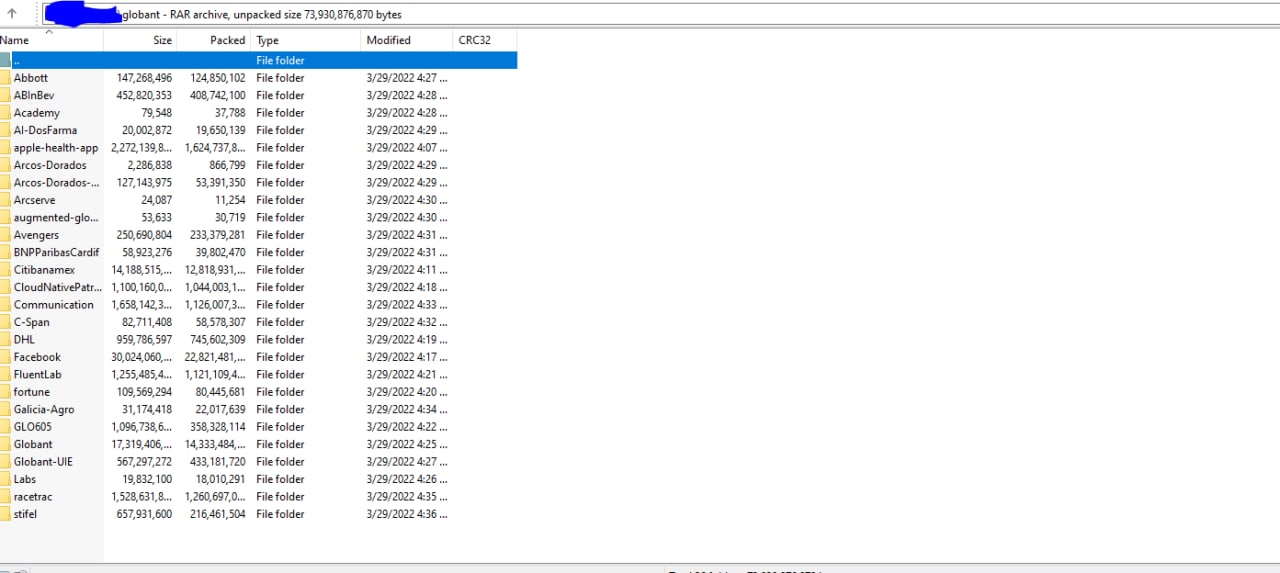
Globant data leak
Source: Lapsus$ Telegram channel

Another counterparty targeted, another case, which scale we'll be able to grasp only in the future. It'll greatly depend on which data exactly had been stolen and what the hackers will decide to do with it.

The prodigy

What makes all of this especially intriguing is the fact that the leader (or how cybersec experts often call him, the mastermind and ideologist) behind the Lapsus$ group allegedly is a 16-year-old teenager. And he's not the only one — according to investigators, some of the other supposed members of the group are teenagers as well, and they often turn their attacks into nothing less than a spectacle. How else would you call hacking and joining Zoom meetings and trolling company representatives? All of this adds spice to the story, but also raises a lot of questions to the hacked corporations and their security systems.

If you thought that we're done and there's nothing else to top the above mentioned breaches, here's another one: Apple and Meta voluntarily transferred user data to hackers who impersonated police representatives. The malefactors managed to hijack a police email account, which opened the door to sending urgent inquiries to obtain all kinds of confidential information, and Meta and Apple duly obliged. Despite the fact that the incident only recently got publicity, and that a different group called Recursion Team was responsible, Lapsus$ leader has employed similar techniques. Part of the Recursion Team's roster even (presumably) joined Lapsus$ later under different nicknames when the original group was disbanded.
And the argument that user data wasn't truly compromised doesn't fly with this breach's case. Ask yourself: do you really want to let the government and megacorps know everything about you?

Conclusion

Quite an impressive record for a group that was founded towards the very end of 2021, isn't it? And we haven't even listed all of their achievements. As you could see, smallish companies and tech giants from the top-10s in their respective fields, all fell victim to a bunch of teenagers with laptops. It's hard to convince yourself that they all were cutting costs at the expense of security. Nonetheless, they were all proven to be absolutely susceptible to hacker attacks.

The entire Lapsus$ story is a perfect example to dispel the myth that the bigger the company, the safer your data is with it. As it turns out, those giant corporations often present the juiciest bite. Companies' employees have access to your data, and with a little help from hackers, it may end up in the wrong hands so very easily. So when you're about to say "I've got nothing to hide anyway" the next time, think twice.


Podobał Ci się ten post?
AdGuard VPN AdGuard DNS AdGuard Mail AdGuard Wallet
Ekran główny AdGuard dla Windows
Ekran ochrony AdGuard dla Windows, pokazujący funkcje ochrony i ustawienia
Ekran statystyki AdGuard dla Windows, pokazujący statystyki zablokowanych reklam i trackery
Ekran Zarządzanie aplikacjami w AdGuard dla Windows, pokazujący opcje zarządzania ochroną dla aplikacji zainstalowanych na urządzeniu
20 753 20753 recenzje
Doskonały!

AdGuard dla Windows: bloker reklam na PC

AdGuard dla systemu Windows to coś więcej niż bloker reklam. To wielofunkcyjne narzędzie, które blokuje reklamy, kontroluje dostęp do niebezpiecznych stron, przyspiesza ładowanie stron i chroni dzieci przed nieodpowiednimi treściami
Pobierając program, akceptujesz warunki Umowy licencyjnej
Microsoft Store
Pobierając program, akceptujesz warunki Umowy licencyjnej
AdGuard na Windows v8.0, 14-dniowa wersja próbna
Ekran główny AdGuard dla Mac
Ekran Trybu ukrytego w AdGuard dla Mac
20 753 20753 recenzje
Doskonały!

AdGuard: bloker reklam na Maca

AdGuard dla Mac to wyjątkowy bloker reklam zaprojektowany z myślą o macOS. Oprócz ochrony przed uciążliwymi reklamami w przeglądarkach i aplikacjach chroni Cię przed śledzeniem, phishingiem i oszustwami
Pobierając program, akceptujesz warunki Umowy licencyjnej
Przeczytaj więcej
AdGuard na Mac v2.19, 14-dniowa wersja próbna
Ekran główny AdGuard dla Android
Ekran Ochrona przed śledzeniem w AdGuard dla Android
Ekran Zarządzanie aplikacjami w AdGuard dla Android, pokazujący opcje zarządzania ochroną dla aplikacji zainstalowanych na urządzeniu
Ekran statystyki AdGuard dla Android, pokazujący statystyki zablokowanych reklam i trackery
Ekran główny prywatnej przeglądarki AdGuard dla Android
Kod QR, aby pobierz AdGuard dla Android
20 753 20753 recenzje
Doskonały!

AdGuard: bloker reklam na Androida

Blokuje reklamy i moduły śledzące we wszystkich przeglądarkach, grach i innych aplikacjach. Chroni Twoją prywatność i pozwala kontrolować, w jaki sposób aplikacje korzystają z Internetu. Instalowane za pomocą pliku APK
Pobierając program, akceptujesz warunki Umowy licencyjnej
Przeczytaj więcej
Skanuj, aby pobrać
Użyj dowolnego czytnika kodów QR dostępnego w Twoim urządzeniu
AdGuard na Android v4.14, 14-dniowa wersja próbna
Ekran główny AdGuard dla iOS
Ekran ochrony AdGuard dla iOS, pokazujący funkcje ochrony i ustawienia
Ekran statystyki AdGuard dla iOS, pokazujący statystyki zablokowanych reklam i trackery
Kod QR, aby pobierz AdGuard dla iOS
20 753 20753 recenzje
Doskonały!

AdGuard na iOS: bloker reklam poza Safari

Najlepszy bloker reklam na iOS dla iPhone’a i iPada. AdGuard usuwa wszelkiego rodzaju reklamy i elementy śledzące w Safari oraz chroni Twoją prywatność we wszystkich aplikacjach na poziomie DNS
Pobierając program, akceptujesz warunki Umowy licencyjnej
Przeczytaj więcej
Skanuj, aby pobrać
Użyj dowolnego czytnika kodów QR dostępnego w Twoim urządzeniu
AdGuard na iOS v4.5
Ekran główny AdGuard Content Blocker
Ekran Filtry w AdGuard Content Blocker
Ekran ustawienia w AdGuard Content Blocker
20 753 20753 recenzje
Doskonały!

Blokada treści AdGuard

AdGuard Content Blocker eliminuje wszelkiego rodzaju reklamy w przeglądarkach mobilnych, które obsługują technologię blokowania treści — a mianowicie Samsung Internet i Yandex Browser. Jego funkcje są ograniczone w porównaniu z AdGuard na Androida, ale jest darmowy, łatwy w instalacji i wydajny
Pobierając program, akceptujesz warunki Umowy licencyjnej
Przeczytaj więcej
Blokada treści AdGuard v2.8
Ekran główny AdGuard Browser Extension
Ekran Ochrona przed śledzeniem w AdGuard Browser Extension
20 753 20753 recenzje
Doskonały!

Rozszerzenie przeglądarki AdGuard

AdGuard to najszybsze i najlżejsze rozszerzenie blokowania reklam, które skutecznie blokuje wszystkie typy reklam na wszystkich stronach internetowych! Wybierz AdGuard dla swojej przeglądarki i uzyskaj szybkie i bezpieczne przeglądanie Internetu pozbawione reklam.
Instalacja
Pobierając program, akceptujesz warunki Umowy licencyjnej
Instalacja
Pobierając program, akceptujesz warunki Umowy licencyjnej
Instalacja
Pobierając program, akceptujesz warunki Umowy licencyjnej
Instalacja
Pobierając program, akceptujesz warunki Umowy licencyjnej
Instalacja
Pobierając program, akceptujesz warunki Umowy licencyjnej
Przeczytaj więcej
Instalacja
Pobierając program, akceptujesz warunki Umowy licencyjnej
Przeczytaj więcej
Rozszerzenie przeglądarki AdGuard v5.5
Ekran główny Asystenta przeglądarki
20 753 20753 recenzje
Doskonały!

Asystent AdGuard

Towarzyszące rozszerzenie przeglądarki dla aplikacji desktopowych AdGuard. Umożliwia blokowanie niestandardowych elementów na stronach internetowych, dodawanie stron internetowych do listy dozwolonych i wysyłanie raportów bezpośrednio z przeglądarki
Asystent AdGuard v1.4
20 753 20753 recenzje
Doskonały!

AdGuard Home

AdGuard Home to sieciowe rozwiązanie do blokowania reklam i modułów śledzących. Zainstaluj go raz na routerze, aby objąć nim wszystkie urządzenia w sieci domowej — nie jest wymagane żadne dodatkowe oprogramowanie klienckie. Jest to szczególnie ważne w przypadku różnych urządzeń IoT, które często stanowią zagrożenie dla Twojej prywatności

AdGuard Home v0.107
Ekran główny AdGuard Pro dla iOS
Ekran Ochrona w AdGuard Pro dla iOS, pokazujący funkcje i ustawienia ochrony
Ekran statystyki w AdGuard Pro dla iOS, pokazujący statystyki zablokowanych reklam i trackerów
20 753 20753 recenzje
Doskonały!

AdGuard Pro dla iOS

AdGuard Pro na iOS oferuje wszystkie zaawansowane funkcje blokowania reklam. Oferuje te same narzędzia, co płatna wersja AdGuard na iOS. Doskonale blokuje reklamy w Safari i pozwala dostosować ustawienia DNS, aby dostosować poziom ochrony. Blokuje reklamy w przeglądarkach i aplikacjach, chroni dzieci przed nieodpowiednimi treściami i dba o bezpieczeństwo danych osobowych.

Pobierając program, akceptujesz warunki Umowy licencyjnej
Przeczytaj więcej
AdGuard Pro dla iOS v4.5
Ekran główny AdGuard Mini dla Mac
Ekran ochrony Safari w AdGuard Mini dla Mac
Ekran tworzenia reguły w AdGuard Mini dla Mac
20 753 20753 recenzje
Doskonały!

AdGuard Mini dla Mac — bloker reklam Safari

AdGuard Mini dla komputerów Mac to potężny bloker reklam w Safari. Ta lekka aplikacja usuwa reklamy, blokuje moduły śledzące i przyspiesza ładowanie stron. Umożliwia przeglądanie internetu w Safari bez rozpraszania uwagi i chroni prywatność danych
Instalacja
Pobierając program, akceptujesz warunki Umowy licencyjnej
Przeczytaj więcej
AdGuard Mini dla Mac v2.3
Ekran główny AdGuard dla Android TV z włączoną ochroną
Ekran blokowanie reklama AdGuard dla Android TV, pokazujący jego funkcje i ustawienia
Ekran ustawienia AdGuard dla Android TV
Ekran Zarządzanie aplikacjami AdGuard dla Android TV, pokazujący aplikacje, w których reklamy i trackery są zablokowane
20 753 20753 recenzje
Doskonały!

AdGuard dla Android TV

AdGuard dla Android TV to jedyna aplikacja, która blokuje reklamy, chroni prywatność i działa jak zapora sieciowa dla Smart TV. Otrzymuj ostrzeżenia o zagrożeniach internetowych, używaj bezpiecznego DNS i korzystaj z szyfrowanego ruchu. Zrelaksuj się i zanurz się w swoich ulubionych programach z najwyższej klasy zabezpieczeniami bez reklam!
AdGuard dla Android TV v4.14, 14-dniowa wersja próbna
Maskotka AdGuard, Agnar, trzymający pingwina Linux
20 753 20753 recenzje
Doskonały!

AdGuard dla Linux

AdGuard for Linux to pierwszy na świecie systemowy bloker reklam dla systemu Linux. Blokuj reklamy i elementy śledzące na poziomie urządzenia, wybieraj spośród wstępnie zainstalowanych filtrów lub dodawaj własne — wszystko za pośrednictwem interfejsu wiersza poleceń
AdGuard dla Linux v1.4
20 753 20753 recenzje
Doskonały!

AdGuard Temp Mail

Darmowy generator tymczasowych adresów e-mail, który zapewnia anonimowość i chroni prywatność. Brak spamu w głównej skrzynce odbiorczej!
20 753 20753 recenzje
Doskonały!

AdGuard VPN

75 lokalizacji na świecie

Dostęp do wszelkich treści

Silne szyfrowanie

Polityka braku logów

Najszybsze połączenie

Wsparcie 24/7

Wypróbuj za darmo
Pobierając program, akceptujesz warunki Umowy licencyjnej
Przeczytaj więcej
20 753 20753 recenzje
Doskonały!

AdGuard DNS

AdGuard DNS to alternatywne rozwiązanie do blokowania reklam, ochrony prywatności i kontroli rodzicielskiej. Łatwy w konfiguracji i darmowy, zapewnia niezbędną minimalną ochronę przed reklamami, śledzeniem i phishingiem, bez względu na platformę i urządzenie, z którego korzystasz.
20 753 20753 recenzje
Doskonały!

AdGuard Mail

Chroń swoją tożsamość, unikaj spamu i zabezpiecz swoją skrzynkę odbiorczą dzięki naszym aliasom i tymczasowym adresom e-mail. Skorzystaj z naszej bezpłatnej usługi przekazywania e-maili oraz aplikacji na wszystkie systemy operacyjne
20 753 20753 recenzje
Doskonały!

AdGuard Wallet

Bezpieczny i prywatny portfel kryptowalutowy, który daje Ci pełną kontrolę nad Twoimi aktywami. Zarządzaj wieloma portfelami i odkrywaj tysiące kryptowalut, aby je przechowywać, wysyłać i wymieniać
Rozpoczęto pobieranie AdGuard Kliknij przycisk wskazany strzałką, aby rozpocząć instalację Wybierz „Otwórz” i kliknij „OK”. Poczekaj aż plik zostanie pobrany. W otwartym oknie, przeciągnij ikonę AdGuard do folderu „Aplikacje”. Dziękujemy za wybrania AdGuard! Wybierz „Otrwórz” i kliknij „OK”. Poczekaj aż plik zostanie pobrany. W otwartym kliknij „Instaluj”. Dziękujemy za wybrania AdGuard!
Zainstaluj również AdGuard dla urządzeń mobilnych
















































