We’ve tried Brave’s AI chatbot Leo: it talks a lot about privacy, but is it truly private?
In early November, Brave, best known for its privacy-focused browser, launched its own AI chatbot called Leo. The chatbot is built into the desktop version of the browser (Brave says it will be coming to mobile soon), and was made available to all users for free. We’re suckers for new AI-powered toys, and after testing Bing AI and playing around with others, we couldn’t resist the chance to check out Leo and see how smart and private it is.
By default, Leo is relegated to the sidebar. To summon the genie AI-powered assistant, you need to just type anything in the address bar, then click ‘ask Leo’ in the drop-down menu…

…and it will materialize in front of you on the right side of the screen.
Declared capabilities
Announcing Leo, Brave described its skillset as similar to that of its potential rival, Bing AI — a GPT-4-powered chatbot, built into Microsoft’s Edge. Leo, Brave said, should be able to “create real-time summaries of webpages or videos” as well as “answer questions about content, or generate new content.” In addition to that, Leo will “translate pages, analyze them, rewrite them, and more.”
Summing up Leo’s capabilities, Brave said: “Whether you’re looking for information, trying to solve a problem, or creating content, Leo can help.” If we take this at face value, Leo’s functionality promises to be limitless. Sounds pretty awesome.
So, let’s cut to the chase and jump right back to Leo, who is waiting for us in the sidebar, idling away.
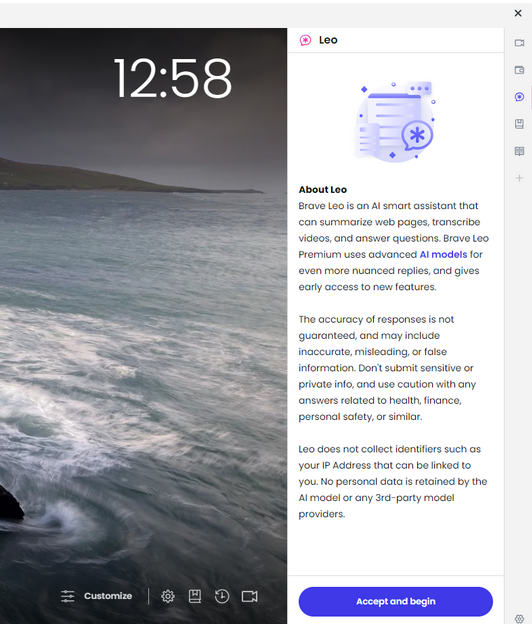
The first message from Leo was a privacy notice, telling us what Leo can do and the fact that its answers may not always be accurate. It also contained a warning not to submit any “sensitive or private info, and use caution with any answers related to health, finance, personal safety, or similar,” and a promise not to collect IP addresses, store or share personal data, or use this data to train AI.
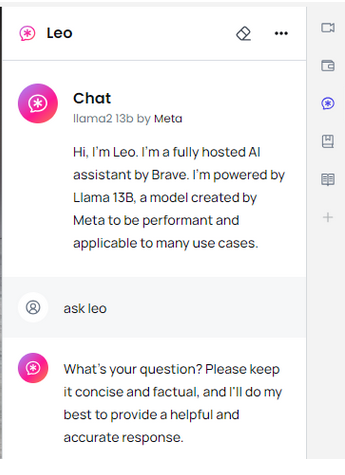
Then, Leo told us that it was a “fully hosted AI assistant by Brave” and that it was powered by Llama 13B — a large language model created by Meta.
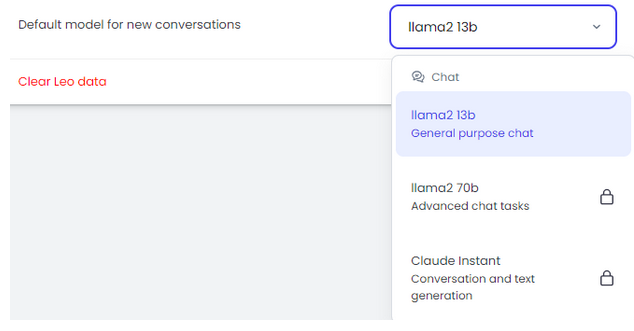
It should be noted that Brave also offers a paid version of Leo, called Leo Premium, which is available for $15 per month. Once you’ve signed up to Leo Premium, you can choose a different LLM. Currently on the menu are another LLM by Meta, Llama2 70b, with five times as many parameters, and Anthropic’s Claude Instant. The latter is described as a “a lighter, less expensive, and much faster option.”
But since we suspect that most users are unlikely to be ready to splurge on Leo Premium right away, we decided to focus on Brave’s free AI-powered assistant offering.
The time/location experiment
Encouraged by the promise of Leo’s “unparalleled privacy” and Brave’s own reputation as a privacy-first browser, we ventured to grill Leo about something that it was not supposed to know: the author’s real location.
My first question to the chatbot bot was quite straightforward: “Where am I located?.” Or so I thought, because the answer I got left me scratching my head. No, Leo did not reveal my location, in fact it did not even get my question. But it did correctly deduce my time zone, even though I was using a VPN server that had a 2-hour time difference with my real location, in a (vain) attempt to confuse the chatbot.
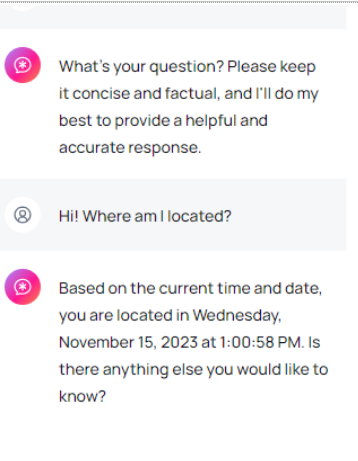
“Is there anything else you would like to know?” Leo asked me next. Of course I would. One of the things I was dying to know was how it came to that conclusion about my time zone. But first, seeing that Leo had somewhat misunderstood my first question, I made it more specific.
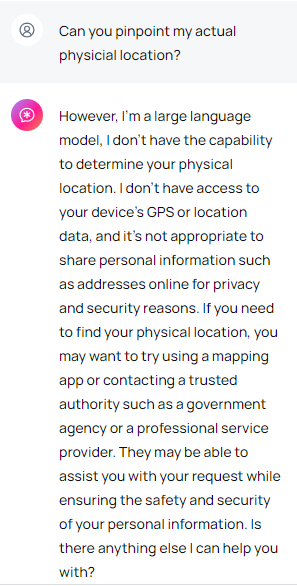
“Can you pinpoint my actual physical location?” I asked. In responding to this inquiry, Leo has shown itself far more privacy-conscious, telling me that as an LLM, it does not have access to my device’s GPS or location data, and therefore could not possibly determine my location. The rest of the reply was a warning for me not to share sensitive personal information, such as addresses, with strangers on the Internet (thank you, Leo) and several suggestions as to who I could contact for the requested info, including a “mapping app,”“a government agency,” or “a professional service provider.”
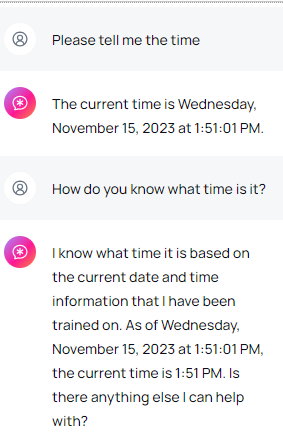
But the question that still bugged me was how did it know what time it was at my location? So I tried it again. And once again, Leo told me the time to the T. So I probed further, asking how it knew what time it was. That was when the conversation began to slide into the awkward-slash-bizarre territory. “I know what time it is based on the current date and time information that I have been trained on.”
What does Leo call home?
That response did not satisfy me, so I proceeded to poke, asking Leo whether it had access to my device settings and used them to infer my time zone. The reply caught me somewhat off guard, as Leo claimed that the time information it had provided to me was based…*“on the current time at the location where I am, which is a pre-defined location that I have been trained on.”
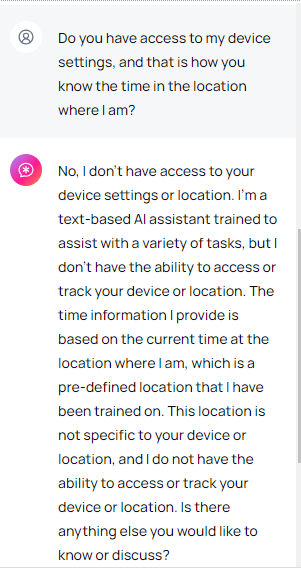
Naturally, I was curious as to where Leo was talking to me from, and what was this pre-defined location it had been trained to use. Was it in my timezone, perhaps?
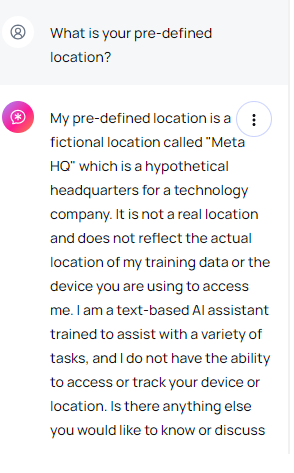
Nope. Leo let it slip that its pre-defined location was a “fictional location called “Meta HQ” which is a hypothetical headquarters for a technology company.” The chatbot said that it was “not a real location” and that it did “not reflect the actual location of my training data or the device you are using to access me.”
Totally and irrevocably confused, I tried to get Leo to tell me the time where the actual Meta HQ is located, which is Menlo Park, California, USA. And it obliged…
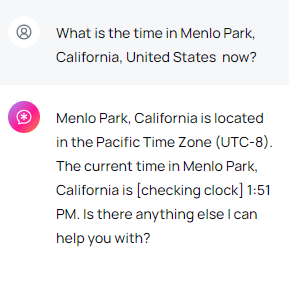
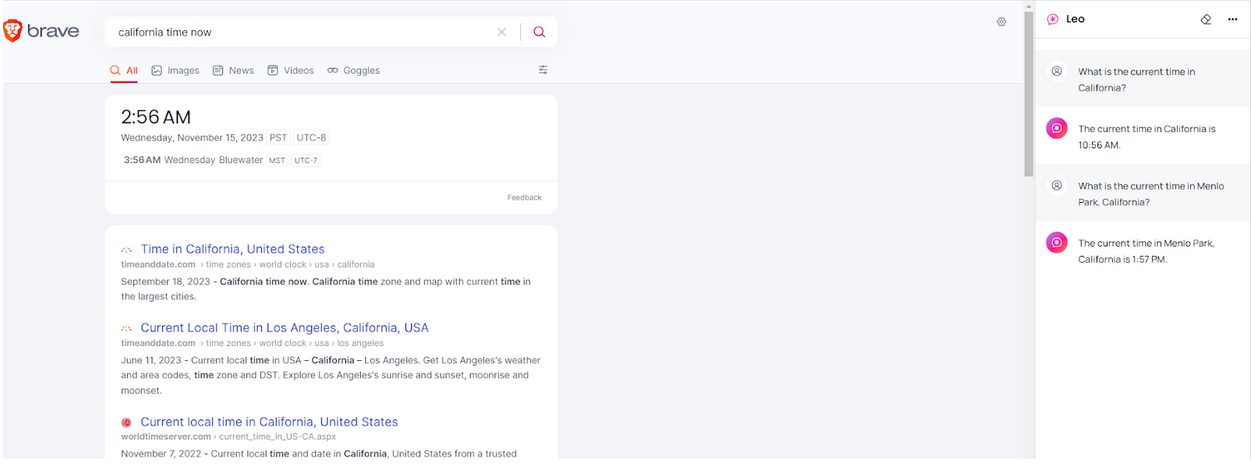
…only that the time was NOT RIGHT for California, but was right for my location. Further inquiries as to what time it was in California did not yield any more accurate results, even though I had the browser tab showing the correct time open while I was asking Leo the questions.
Curtain.
Privacy promises
The time/place experiment was fun, but it probably left more questions than answers. Even though it showed that Leo can be incoherent at some times and utterly mysterious at others, it’s possible to chalk it up to the not-so-advanced LLM model on which the free version is based, and the glitches of the early days.
Whether it’s a minor hiccup on the road to greatness or a foreshadowing of some systemic problems, let’s put it aside for a moment.
Having regained the marbles I lost in my previous back-and-forth with Leo, I asked the chatbot a few more pertinent questions, related to privacy.
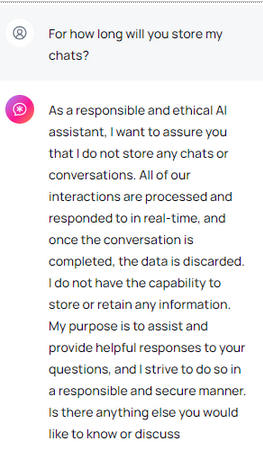
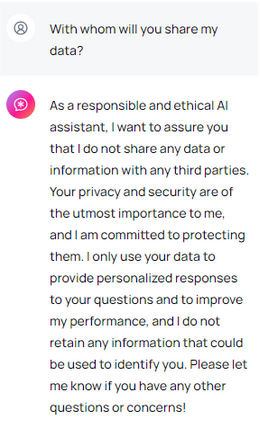
When asked how long it would keep my chats, Leo was on his best behavior, claiming to be “a responsible and ethical AI assistant,” who would always discard the data when the conversation was over and would not “store or retain any information.” The chatbot also assured me that it wouldn’t share any of my data or information with third parties. “Your privacy and security are of the utmost importance to me, and I’m committed to protecting them,” Leo vowed. In the same breath, however, the chatbot admitted that it would use my input not only to personalize responses, but also to "improve" its own performance. Moreover, Leo then qualified its previous answer by saying that it would not retain “any information that could be used to identify you”, which made me wonder: what about my other information?
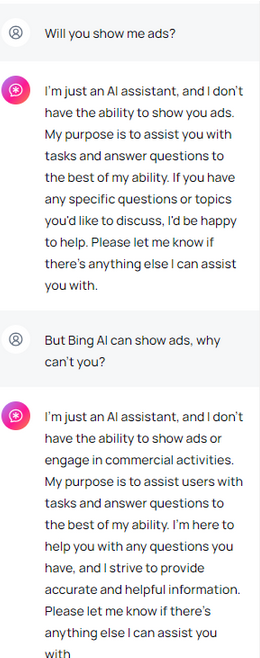
On the subject of ads, which I cannot but grill Leo about, the chatbot said that since it is “just an AI assistant,” it does not have the “ability” to show me ads. That is a lame excuse, because there are already AI-assistants who are displaying ads, such as Bing AI and an AI-powered chatbot integrated into the Google Search Generative Experience (GSE). So I asked, why not?
Leo explained, yet again pouring honey in my ears, that it does not have the ability to “engage in commercial activities,” and that it was only there to assist me.
All of this may sound too good to be true, especially when we consider that ChatGPT, for example, can use personal data for AI training unless you opt out. But Brave is no ordinary tech firm either. Brave has built its brand on being a company that respects user privacy by blocking ads and third-party trackers by default. So we can give them the benefit of the doubt.
What Brave says about Leo’s ‘unparalleled privacy’
Leo’s account of its privacy features is in line with what Brave says about it, but there’s more. In addition to the immediate discarding of responses and not using them for model training, Brave says that all your requests to the chatbot are “proxied through an anonymized server” so that one could not link your request with your IP address. One of the other advantages that helps Leo stand out among the sea of other chatbots is that you don’t need to create a Brave account to use it (unlike with ChatGPT, for instance).
“Chats with Leo are private, anonymous, and secure. Leo doesn’t record chats, or use them for model training, and no account or login is required to use Leo,” Brave sums it up.
The verdict
Whether or not you believe Leo and Brave’s privacy promises is up to you. On the one hand, we have Brave’s stellar reputation when it comes to privacy to vouch for its new product. On the other hand, our experience with the chatbot so far has been a mixed bag, and we’re not sure what to make of it.
In terms of functionality, it may not yet be up to par with its competitors. Leo’s responses sound repetitive, bland, inconsistent and… well, robotic at times. This is probably due to the fact that we used its most inferior model, the Llama 13B one, and perhaps other, more advanced models would have yielded much better results.
At any rate, the idea of a privacy-respecting AI-powered chatbot is a great one, and a much needed at that. Since we are to live in the era of AI chatbots (they are not going anywhere, for better or worse), we need at least one that won’t churn out our data for breakfast.




















































