Privacy Sandbox on Android and how it will affect you

AdGuard always keeps a close eye on industry news that affects privacy issues. Google recently introduced the Privacy Sandbox which will largely determine the future of privacy of Android users. And we certainly need to comment on it. This article is a brief overview of the situation made by Andrey Meshkov, CTO and co-founder of AdGuard. Now we are continuing to explore the topic, and a large research article will be published soon. Follow our blog and social media so you don't miss its release.

Google has announced a new suite of technologies called Privacy Sandbox that should (at least theoretically) make Android devices better in terms of privacy. But at the same time, Google is making it clear that they'd like advertisers to keep as many options as possible — and this is a tough balance to strike. Have they managed to do it?

Privacy Sandbox includes several separate technologies. You can dive deep into the matter yourself, but I'll try to describe the key points about each of the new initiatives here.

SDK Runtime

This is an extremely useful technology that will definitely have a positive effect. This SDK — which stands for Software Development Kit — creates a dedicated environment for third-party SDKs to run in.

How it was before

It used to be kind of a lawless land. Developers would insert third-party libraries in their apps (think Facebook, Google), and those libraries would inherit all the permissions that the app itself was granted. For example, let's say that the app has access to the device's location — the library has it too now. Needless to say, libraries' vendors were abusing this scheme left and right, collecting all sorts of data. And this wasn't the only trouble — should some kind of a problem occur with the library, the app was at risk of suffering the consequences too ([1], [2]).
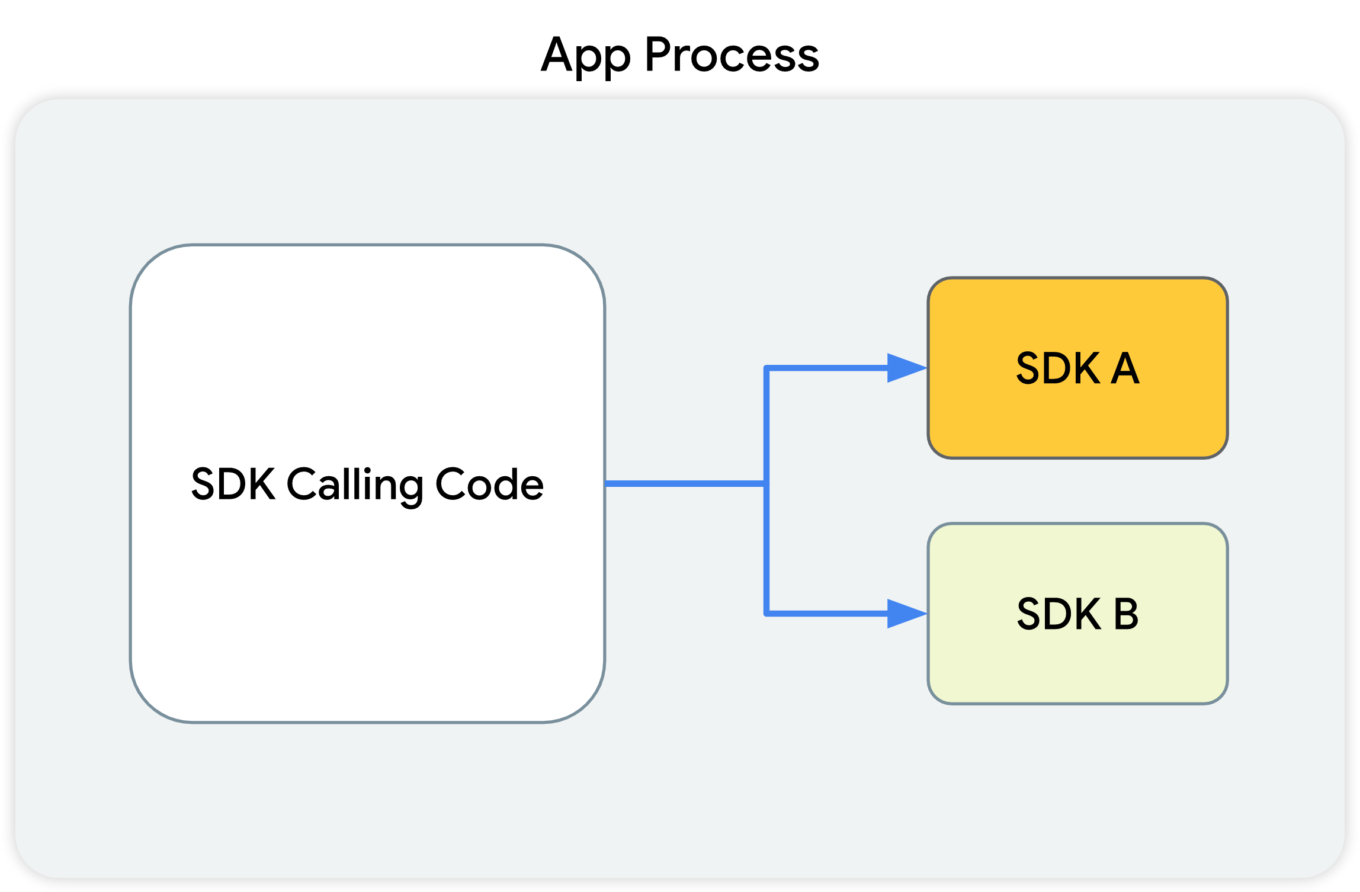
This diagram shows that the SDK-calling code, along with the SDKs that receive the calls from this code, all reside in the app's process.

What Google suggests

With the introduction of SDK Runtime, third-party libraries will operate in a separate, thoroughly monitored and regulated virtual "sandbox", hence the name. The developer will be able to manage the access rights for each of such libraries, including restricting them.
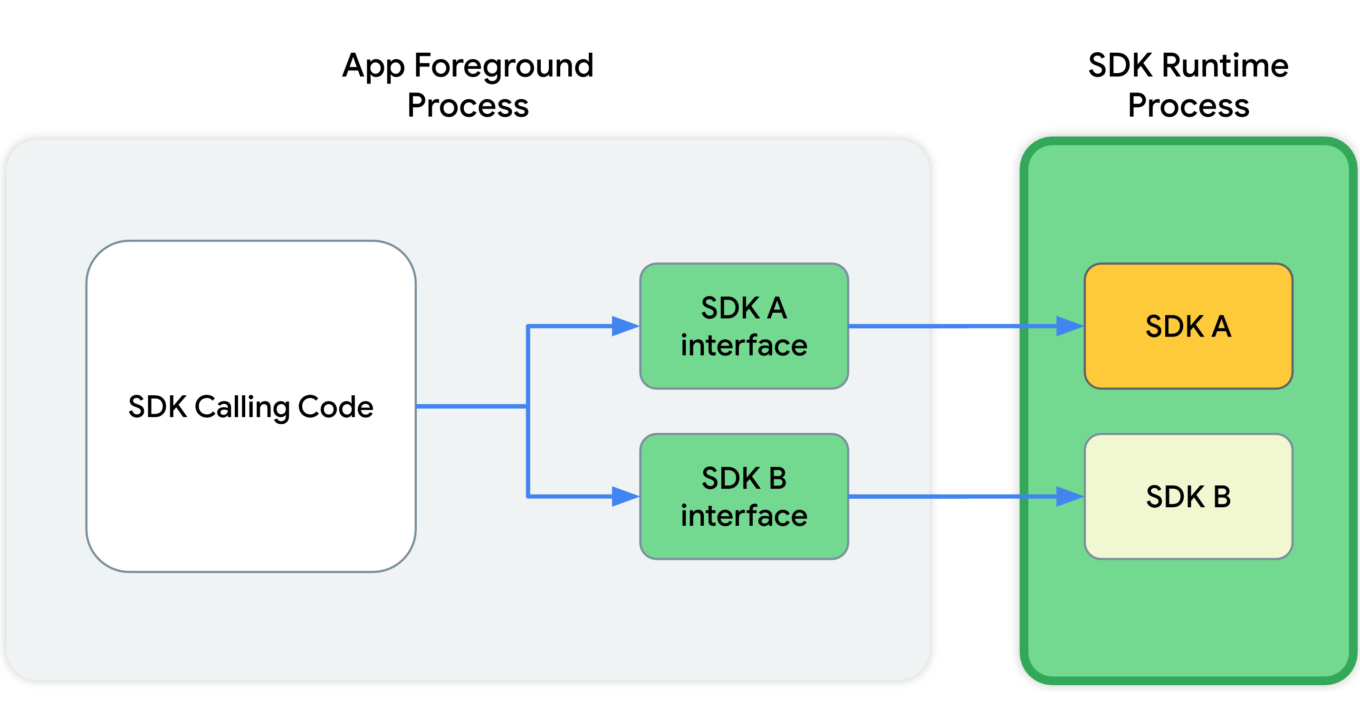
This diagram shows that, in the app's foreground process, the SDK calling code communicates with SDK interfaces. These interfaces then cross a process boundary into the SDK Runtime process to call into the SDKs themselves.

Since all those libraries will be running in a "sandbox" that's detached from the rest of the app's processes, the app won't crash in cases when something goes wrong with one of them.

And last but not least, these libraries will be distributed via a special store that (presumably) will have its own review guidelines.

Read more about SDK Runtime:
https://developer.android.com/design-for-safety/ads/sdk-runtime

Topics

This is the same technology that Google is going to introduce in Chrome. The main idea behind Topics is that the device itself will monitor which apps its owner is using. Based on this data, every week the device will calculate five topics that will have interested the user the most that week.

Apps will be able to get access to some of this data, and different apps will receive different data. This, according to Google, will minimize the risk of using Topics to fingerprint users.

But let's illustrate it with an example:

  1. You have several apps installed on your phone that you use regularly: Facebook, WhatsApp, Instagram, etc.
  2. Each of them receives some part of your topics for the week.
  3. The apps collect this information and use it to supplement your online profile.
  4. Week after week, your profile grows and accretes data.

It's not clear to me why Google has decided that it's OK to share my interests without my consent. Make no mistake, large publishers like Facebook/Meta will not just use this information once and then forget it. They will aggregate it, combine it with other data, and so on.

And that's not the end of it. Lots of apps use SDKs developed by a small pool of companies (you guessed it, Meta is one of them). These companies will receive information streams about you coming from dozens of different apps. From that point, it doesn't take much to construct an excruciatingly detailed profile that has all imaginable data about you.

Read more about Topics for Android:
https://developer.android.com/design-for-safety/ads/topics

FLEDGE on Android

FLEDGE is a mechanism that is meant to be used locally on your device. You will soon see that from a data safety standpoint it compares favorably to the existing alternatives.

How it was before

Currently, ad retargeting is mostly based on the lists of "audiences" that publishers upload. They are often made up of user IDs, or sometimes even straight up emails. This allows publishers to reach these users with ads that they consider relevant to the people from that list.

What Google suggests

When FLEDGE comes into full effect, apps will create such lists themselves with the help of a special API (Application Programming Interface). The key difference is that these lists will be stored locally on the device. The advertising networks will know the names of these lists, and they will upload ads that target specific lists. The process of selecting the ad to display to the user will happen entirely within the device, based on the lists (stored on the same device) and the advertisments uploaded by the ad networks.

Read more about FLEDGE:
https://developer.android.com/design-for-safety/ads/fledge

Attribution Reporting

This is a technology for counting clicks and measuring conversions. Advertisers want to know how their ads perform, and Google suggests doing all the measurements right on the device. Ad networks' SDKs will be able to request an aggregated report, which will, however, be presented with a certain delay. The delay is very important as it greatly complicates potential attempts to identify the user. And the entire mechanism is generously sprinkled with encryption and additional verifications.
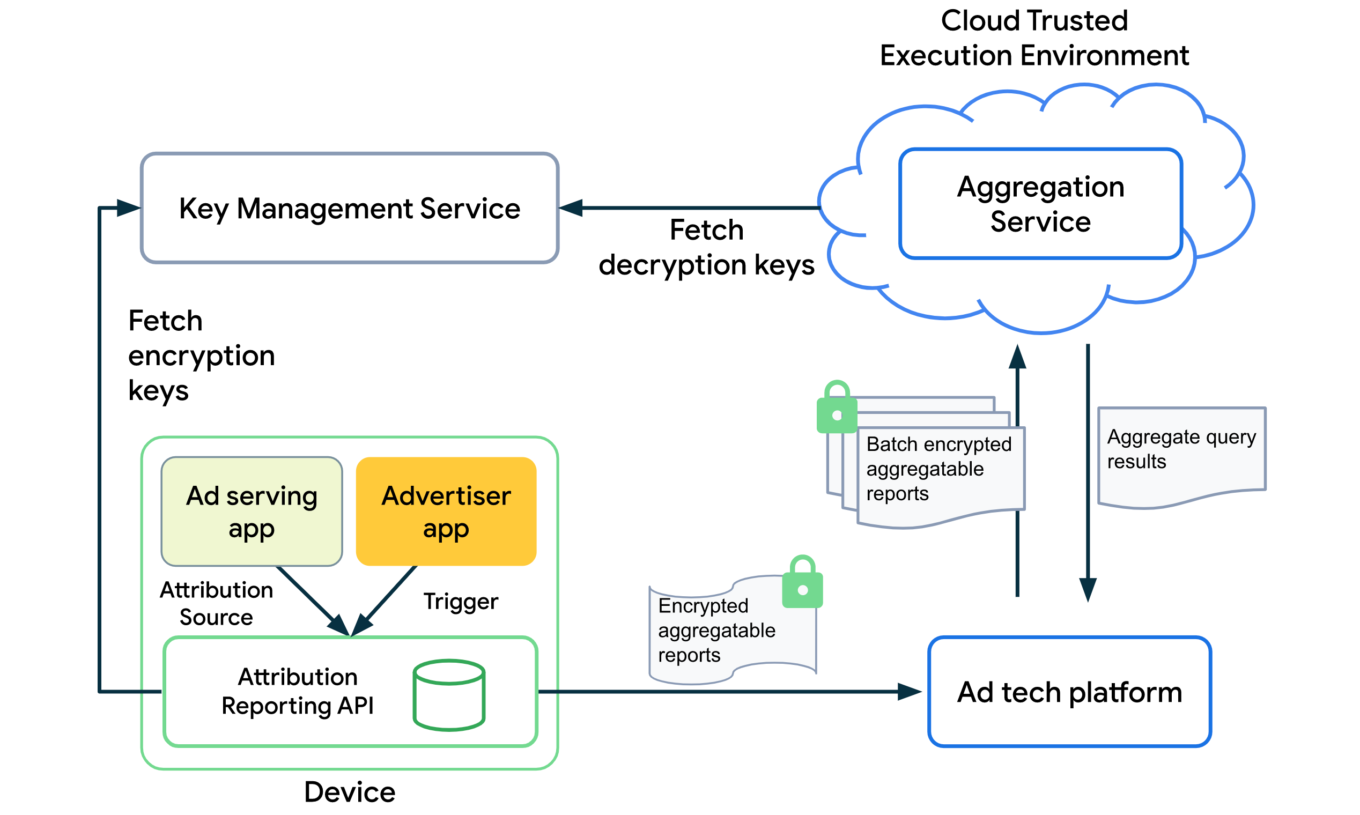
The overall design of how the Attribution Reporting API works looks quite complicated. To better understand the topic, open the link we've posted below.

Read more about Attribution Reporting:
https://developer.android.com/design-for-safety/ads/attribution

Conclusions

In general, all these initiatives (excluding Topics) can be described as improving users' privacy in the context of the ad market. But with one very important condition — ONLY those mechanisms should be used.

As for Topics, it reflects the (completely understandable) desire to keep the ability to utilize information about users' interests for targeting purposes. But this technology further expands the scope of that information instead of reducing it.

But even the good ones still leave a bitter aftertaste: de facto Google will become the single entity to control which ads users see on their Android devices. It was partially true before, but only within Google's own advertising network. Now they are looking to directly influence all other ad networks too, and we know that monopolies rarely end up being good for the consumer. We kind of know what is going to be happening on our smartphones now, and there's no guarantee it will stay that way.

This is the trend that we've been seeing for a while now — advertising networks slowly but steadily moving into our devices. Thinking about buying a new phone? Be ready to get your hands on a highly specialized tool for showing ads instead.


Podobał Ci się ten post?
AdGuard VPN AdGuard DNS AdGuard Mail AdGuard Wallet
Ekran główny AdGuard dla Windows
Ekran ochrony AdGuard dla Windows, pokazujący funkcje ochrony i ustawienia
Ekran statystyki AdGuard dla Windows, pokazujący statystyki zablokowanych reklam i trackery
Ekran Zarządzanie aplikacjami w AdGuard dla Windows, pokazujący opcje zarządzania ochroną dla aplikacji zainstalowanych na urządzeniu
20 753 20753 recenzje
Doskonały!

AdGuard dla Windows: bloker reklam na PC

AdGuard dla systemu Windows to coś więcej niż bloker reklam. To wielofunkcyjne narzędzie, które blokuje reklamy, kontroluje dostęp do niebezpiecznych stron, przyspiesza ładowanie stron i chroni dzieci przed nieodpowiednimi treściami
Pobierając program, akceptujesz warunki Umowy licencyjnej
Microsoft Store
Pobierając program, akceptujesz warunki Umowy licencyjnej
AdGuard na Windows v8.0, 14-dniowa wersja próbna
Ekran główny AdGuard dla Mac
Ekran Trybu ukrytego w AdGuard dla Mac
20 753 20753 recenzje
Doskonały!

AdGuard: bloker reklam na Maca

AdGuard dla Mac to wyjątkowy bloker reklam zaprojektowany z myślą o macOS. Oprócz ochrony przed uciążliwymi reklamami w przeglądarkach i aplikacjach chroni Cię przed śledzeniem, phishingiem i oszustwami
Pobierając program, akceptujesz warunki Umowy licencyjnej
Przeczytaj więcej
AdGuard na Mac v2.19, 14-dniowa wersja próbna
Ekran główny AdGuard dla Android
Ekran Ochrona przed śledzeniem w AdGuard dla Android
Ekran Zarządzanie aplikacjami w AdGuard dla Android, pokazujący opcje zarządzania ochroną dla aplikacji zainstalowanych na urządzeniu
Ekran statystyki AdGuard dla Android, pokazujący statystyki zablokowanych reklam i trackery
Ekran główny prywatnej przeglądarki AdGuard dla Android
Kod QR, aby pobierz AdGuard dla Android
20 753 20753 recenzje
Doskonały!

AdGuard: bloker reklam na Androida

Blokuje reklamy i moduły śledzące we wszystkich przeglądarkach, grach i innych aplikacjach. Chroni Twoją prywatność i pozwala kontrolować, w jaki sposób aplikacje korzystają z Internetu. Instalowane za pomocą pliku APK
Pobierając program, akceptujesz warunki Umowy licencyjnej
Przeczytaj więcej
Skanuj, aby pobrać
Użyj dowolnego czytnika kodów QR dostępnego w Twoim urządzeniu
AdGuard na Android v4.14, 14-dniowa wersja próbna
Ekran główny AdGuard dla iOS
Ekran ochrony AdGuard dla iOS, pokazujący funkcje ochrony i ustawienia
Ekran statystyki AdGuard dla iOS, pokazujący statystyki zablokowanych reklam i trackery
Kod QR, aby pobierz AdGuard dla iOS
20 753 20753 recenzje
Doskonały!

AdGuard na iOS: bloker reklam poza Safari

Najlepszy bloker reklam na iOS dla iPhone’a i iPada. AdGuard usuwa wszelkiego rodzaju reklamy i elementy śledzące w Safari oraz chroni Twoją prywatność we wszystkich aplikacjach na poziomie DNS
Pobierając program, akceptujesz warunki Umowy licencyjnej
Przeczytaj więcej
Skanuj, aby pobrać
Użyj dowolnego czytnika kodów QR dostępnego w Twoim urządzeniu
AdGuard na iOS v4.5
Ekran główny AdGuard Content Blocker
Ekran Filtry w AdGuard Content Blocker
Ekran ustawienia w AdGuard Content Blocker
20 753 20753 recenzje
Doskonały!

Blokada treści AdGuard

AdGuard Content Blocker eliminuje wszelkiego rodzaju reklamy w przeglądarkach mobilnych, które obsługują technologię blokowania treści — a mianowicie Samsung Internet i Yandex Browser. Jego funkcje są ograniczone w porównaniu z AdGuard na Androida, ale jest darmowy, łatwy w instalacji i wydajny
Pobierając program, akceptujesz warunki Umowy licencyjnej
Przeczytaj więcej
Blokada treści AdGuard v2.8
Ekran główny AdGuard Browser Extension
Ekran Ochrona przed śledzeniem w AdGuard Browser Extension
20 753 20753 recenzje
Doskonały!

Rozszerzenie przeglądarki AdGuard

AdGuard to najszybsze i najlżejsze rozszerzenie blokowania reklam, które skutecznie blokuje wszystkie typy reklam na wszystkich stronach internetowych! Wybierz AdGuard dla swojej przeglądarki i uzyskaj szybkie i bezpieczne przeglądanie Internetu pozbawione reklam.
Instalacja
Pobierając program, akceptujesz warunki Umowy licencyjnej
Instalacja
Pobierając program, akceptujesz warunki Umowy licencyjnej
Instalacja
Pobierając program, akceptujesz warunki Umowy licencyjnej
Instalacja
Pobierając program, akceptujesz warunki Umowy licencyjnej
Instalacja
Pobierając program, akceptujesz warunki Umowy licencyjnej
Przeczytaj więcej
Instalacja
Pobierając program, akceptujesz warunki Umowy licencyjnej
Przeczytaj więcej
Rozszerzenie przeglądarki AdGuard v5.5
Ekran główny Asystenta przeglądarki
20 753 20753 recenzje
Doskonały!

Asystent AdGuard

Towarzyszące rozszerzenie przeglądarki dla aplikacji desktopowych AdGuard. Umożliwia blokowanie niestandardowych elementów na stronach internetowych, dodawanie stron internetowych do listy dozwolonych i wysyłanie raportów bezpośrednio z przeglądarki

Asystent AdGuard v1.4
20 753 20753 recenzje
Doskonały!

AdGuard Home

AdGuard Home to sieciowe rozwiązanie do blokowania reklam i modułów śledzących. Zainstaluj go raz na routerze, aby objąć nim wszystkie urządzenia w sieci domowej — nie jest wymagane żadne dodatkowe oprogramowanie klienckie. Jest to szczególnie ważne w przypadku różnych urządzeń IoT, które często stanowią zagrożenie dla Twojej prywatności

AdGuard Home v0.107
Ekran główny AdGuard Pro dla iOS
Ekran Ochrona w AdGuard Pro dla iOS, pokazujący funkcje i ustawienia ochrony
Ekran statystyki w AdGuard Pro dla iOS, pokazujący statystyki zablokowanych reklam i trackerów
20 753 20753 recenzje
Doskonały!

AdGuard Pro dla iOS

AdGuard Pro na iOS oferuje wszystkie zaawansowane funkcje blokowania reklam. Oferuje te same narzędzia, co płatna wersja AdGuard na iOS. Doskonale blokuje reklamy w Safari i pozwala dostosować ustawienia DNS, aby dostosować poziom ochrony. Blokuje reklamy w przeglądarkach i aplikacjach, chroni dzieci przed nieodpowiednimi treściami i dba o bezpieczeństwo danych osobowych.
Pobierając program, akceptujesz warunki Umowy licencyjnej
Przeczytaj więcej
AdGuard Pro dla iOS v4.5
Ekran główny AdGuard Mini dla Mac
Ekran ochrony Safari w AdGuard Mini dla Mac
Ekran tworzenia reguły w AdGuard Mini dla Mac
20 753 20753 recenzje
Doskonały!

AdGuard Mini dla Mac — bloker reklam Safari

AdGuard Mini dla komputerów Mac to potężny bloker reklam w Safari. Ta lekka aplikacja usuwa reklamy, blokuje moduły śledzące i przyspiesza ładowanie stron. Umożliwia przeglądanie internetu w Safari bez rozpraszania uwagi i chroni prywatność danych
Instalacja
Pobierając program, akceptujesz warunki Umowy licencyjnej
Przeczytaj więcej
AdGuard Mini dla Mac v2.3
Ekran główny AdGuard dla Android TV z włączoną ochroną
Ekran blokowanie reklama AdGuard dla Android TV, pokazujący jego funkcje i ustawienia
Ekran ustawienia AdGuard dla Android TV
Ekran Zarządzanie aplikacjami AdGuard dla Android TV, pokazujący aplikacje, w których reklamy i trackery są zablokowane
20 753 20753 recenzje
Doskonały!

AdGuard dla Android TV

AdGuard dla Android TV to jedyna aplikacja, która blokuje reklamy, chroni prywatność i działa jak zapora sieciowa dla Smart TV. Otrzymuj ostrzeżenia o zagrożeniach internetowych, używaj bezpiecznego DNS i korzystaj z szyfrowanego ruchu. Zrelaksuj się i zanurz się w swoich ulubionych programach z najwyższej klasy zabezpieczeniami bez reklam!
AdGuard dla Android TV v4.14, 14-dniowa wersja próbna
Maskotka AdGuard, Agnar, trzymający pingwina Linux
20 753 20753 recenzje
Doskonały!

AdGuard dla Linux

AdGuard for Linux to pierwszy na świecie systemowy bloker reklam dla systemu Linux. Blokuj reklamy i elementy śledzące na poziomie urządzenia, wybieraj spośród wstępnie zainstalowanych filtrów lub dodawaj własne — wszystko za pośrednictwem interfejsu wiersza poleceń
AdGuard dla Linux v1.4
20 753 20753 recenzje
Doskonały!

AdGuard Temp Mail

Darmowy generator tymczasowych adresów e-mail, który zapewnia anonimowość i chroni prywatność. Brak spamu w głównej skrzynce odbiorczej!
20 753 20753 recenzje
Doskonały!

AdGuard VPN

75 lokalizacji na świecie

Dostęp do wszelkich treści

Silne szyfrowanie

Polityka braku logów

Najszybsze połączenie

Wsparcie 24/7

Wypróbuj za darmo
Pobierając program, akceptujesz warunki Umowy licencyjnej
Przeczytaj więcej
20 753 20753 recenzje
Doskonały!

AdGuard DNS

AdGuard DNS to alternatywne rozwiązanie do blokowania reklam, ochrony prywatności i kontroli rodzicielskiej. Łatwy w konfiguracji i darmowy, zapewnia niezbędną minimalną ochronę przed reklamami, śledzeniem i phishingiem, bez względu na platformę i urządzenie, z którego korzystasz.
20 753 20753 recenzje
Doskonały!

AdGuard Mail

Chroń swoją tożsamość, unikaj spamu i zabezpiecz swoją skrzynkę odbiorczą dzięki naszym aliasom i tymczasowym adresom e-mail. Skorzystaj z naszej bezpłatnej usługi przekazywania e-maili oraz aplikacji na wszystkie systemy operacyjne
20 753 20753 recenzje
Doskonały!

AdGuard Wallet

Bezpieczny i prywatny portfel kryptowalutowy, który daje Ci pełną kontrolę nad Twoimi aktywami. Zarządzaj wieloma portfelami i odkrywaj tysiące kryptowalut, aby je przechowywać, wysyłać i wymieniać
Rozpoczęto pobieranie AdGuard Kliknij przycisk wskazany strzałką, aby rozpocząć instalację Wybierz „Otwórz” i kliknij „OK”. Poczekaj aż plik zostanie pobrany. W otwartym oknie, przeciągnij ikonę AdGuard do folderu „Aplikacje”. Dziękujemy za wybrania AdGuard! Wybierz „Otrwórz” i kliknij „OK”. Poczekaj aż plik zostanie pobrany. W otwartym kliknij „Instaluj”. Dziękujemy za wybrania AdGuard!
Zainstaluj również AdGuard dla urządzeń mobilnych
















































