Reddit, AI’s lookalikes, US govt vs Apple and fake ads galore. AdGuard’s digest

In this edition of AdGuard’s digest: Americans want control of their data back, Reddit suffers a hack, researchers prove AI is a privacy threat, the US government wants Apple to open up, and Google search ad bandits target Amazon.

Americans do not want to ‘pay’ for services with their data — survey

The majority of Americans want to control what marketers can learn about them, but don’t believe they can, and have little idea what tools they can use to protect their data. According to a recent report by the Annenberg School for Communication at the University of Pennsylvania, 80% of Americans believe it is “naive” to think they can reliably protect their personal information from being collected by marketers.

At the same time, the overwhelming majority of Americans reject the status quo of receiving ‘free services’ or something of value in exchange for their personal information. 88% disagree that companies should be able to freely collect information about them without their knowledge in exchange for a discount. 61% don’t think it’s right for shops to create their detailed profiles on the pretext of improving their service. And 68% believe that stores should not use in-store WiFi to monitor their online behavior as they wander the aisles. The researchers also found that many respondents do not have a clear understanding of how tracking works. For example, 45% wrongly believe that a smart TV vendor cannot help advertisers send ads to users’ smartphones based on their TV viewing history.

The findings suggest that Americans are increasingly concerned about their data being collected without their explicit permission, but are confused about how far advertisers’ tentacles can reach. They also suggest that people no longer accept that they have to pay with their data to use a “free service.” This shift in attitude is encouraging and will hopefully lead to a change in the way advertisers, and especially Big Tech, treat users. We have long argued that, contrary to popular and misguided belief, our personal data is not worthless. In fact, it’s a hot commodity on the data market, generating huge profits for big companies. And it’s only fair to take back control of it.

Hackers leave Reddit red-faced after source code stolen in a phishing attack

Reddit, the fabled front page of the Internet with over 50 million users, has had its source code and internal documents stolen in a phishing attack. The attack took place on February, 5, with hackers targeting Reddit employees with “plausible-sounding prompts” to lure them to a clone of Reddit’s intranet, the company’s private network. Reddit’s CTO Christopher Slowe revealed that one employee fell for the ruse, which allowed hackers to steal his credentials and gain access to the company’s code, some internal documents, as well as some internal dashboards and business tools. Slowe also revealed that “limited contact information” of hundreds of Reddit’s employees and contacts was exposed. However, Reddit assured that regular users’ passwords and accounts appear to be “safe” so far.

Still, Slowe urged users to enable two-factor authentication for better account protection, change passwords every few months, and use password managers. In fact, these are some of the basic rules of digital hygiene that everyone should follow. See our digital hygiene cheat sheet for more. On a broader scale, it’s unfortunate that yet another company has been hacked and humans have once again proven to be the weakest link in the system. The only thing we can do to prevent such incidents is to raise awareness of these types of attacks among employees so that they can recognise potential red flags and educate them about cybersecurity rules.

AI image generators can ‘reproduce’ training images, but there’s a catch

Our digest would not be complete without the buzzword of the moment: AI and its models. A motley crew of researchers from Google, DeepMind, UC Berkeley, Princeton and ETH Zurich have found that AI-powered image-to-text generators such as Stable Diffusion and Google Imogen can memorize images from their training data. Put simply, this means that these larger-than-life models, which are trained on huge amounts of publicly available data, are able to produce an image that is almost identical to one they once scraped.
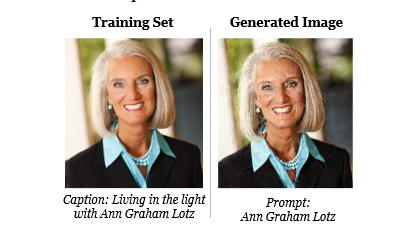
Generated images and training images sometimes look alike

Source: Extracting Training Data from Diffusion Models, Carlini et al.

Given that the people whose images serve as training material for these models have never given permission for them to be used for this purpose, this is a serious privacy risk. Imagine that your image (well, not yours, but one that looks identical to yours to the naked eye) is being used to promote some shady product, and you can’t do anything about it, not even sue?
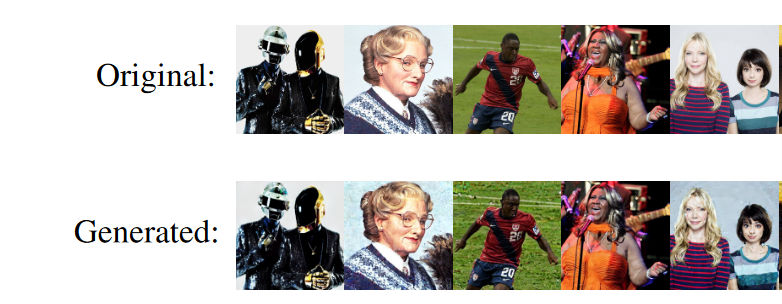
Original and AI-generated images are hard to distinguish

The catch is that the chances of your image being reproduced by AI are currently quite low. The researchers who tested 350,000 of the most duplicated images in the Stable Diffusion dataset found only 94 direct matches and 109 near matches to the training data (0.03 per cent). The figure for Google Imogen was slightly higher — 2.3 per cent. However, researcher Eric Wallace noted that while the numbers may seem small, future (and larger) diffusion models “will remember more” and thus pose a greater privacy risk. A privacy threat from AI is real, and we have been warning about it as well. At the moment, there’s little we can do to protect ourselves from this threat, other than to share less of our personal data online.

US govt takes on Big Tech, wants Apple to allow sideloading apps

Following in the EU’s footsteps, the US government has urged lawmakers to pass legislation that would curb the dominance of Apple and Google in the app store market. The US Department of Commerce’s National Telecommunications and Information Administration (NTIA) issued a report arguing that the so-called gatekeepers “created unnecessary barriers and costs for app developers, ranging from fees for access to functional restrictions that favor some apps over others.” Both Google and Apple charge up to 30% commission on in-app purchases and require apps to undergo review processes. The NTIA described the latter as “slow and opaque”.

The report also took aim at Google and Apple’s argument that any restrictions they impose on developers and users are aimed at providing better security. “In some areas, such as in-app payments, it is unclear how the current system benefits anyone other than Apple and Google,” the NTIA said. Ultimately, it is consumers who suffer from “inflated” prices, lack of app choice and lack of innovation, the officials concluded. The NTIA recommends that the US Congress pass legislation that would require gatekeepers to allow users to sideload applications (currently impossible on the iPhone) and use alternative payment methods.

It’s about time someone other than the EU challenged the hegemony of Google and Apple on the app store market. The pressure from regulators is already forcing Apple to open up its closed ecosystem in the EU, and we would like to see this happening everywhere.

Cybercriminals use ‘fake’ Google ad to steal Amazon Web Services credentials

Both we and the FBI have previously warned about the dangers of Google search ads placed by impersonators of well-known companies. And unfortunately, despite Google’s assurances that it is cracking down on malicious ads, the threat is not going away. This time, cybercriminals targeted customers of Amazon Web Services, Amazon’s subsidiary with more than 1 million active users, many of them small and medium-sized businesses. According to an investigation by cybersecurity firm SentinelOne, malicious actors created a phishing website that looked like the AWS login page and placed an ad in Google Search that appeared just below the platform’s legitimate ad.
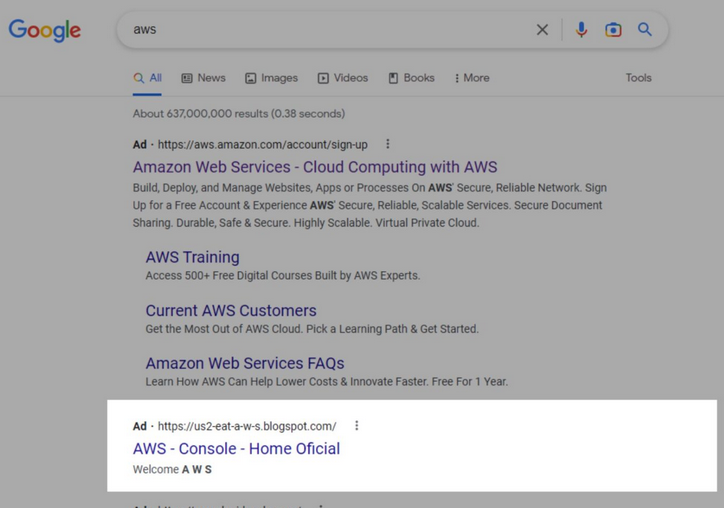
A fake Amazon Web Services ad appearsed in Google Search results

Image Source: SentinelOne

The ‘poisoned’ ad first led to the phishing domain itself, but subsequently the attackers replaced it with a proxy that was a copy of a legitimate confectionery blog. After the user clicked on the ad, the page loaded a second domain that redirected to a fake login page. This was presumably done to avoid detection by Google’s anti-fraud mechanisms. To further confuse the user, a legitimate AWS login page was displayed after the user entered credentials in a spoofed form. The researchers note that such attacks using Google search ads are easy to launch and therefore pose “a serious threat” to ordinary users, as well as network and cloud administrators. We wholly subscribe to this assessment.

One solution to this problem is to be aware of this type of malicious ads in the first place and use ad blockers, such as the AdGuard browser extension and the AdGuard app. If you’re using the AdGuard extension, you’ll need to enable the “block search ads” setting to not see search ads. For AdGuard apps, make sure you have the “Do not block search ads and self-promotion” check box unmarked.


Podobał Ci się ten post?
AdGuard VPN AdGuard DNS AdGuard Mail AdGuard Wallet
Ekran główny AdGuard dla Windows
Ekran ochrony AdGuard dla Windows, pokazujący funkcje ochrony i ustawienia
Ekran statystyki AdGuard dla Windows, pokazujący statystyki zablokowanych reklam i trackery
Ekran Zarządzanie aplikacjami w AdGuard dla Windows, pokazujący opcje zarządzania ochroną dla aplikacji zainstalowanych na urządzeniu
20 753 20753 recenzje
Doskonały!

AdGuard dla Windows: bloker reklam na PC

AdGuard dla systemu Windows to coś więcej niż bloker reklam. To wielofunkcyjne narzędzie, które blokuje reklamy, kontroluje dostęp do niebezpiecznych stron, przyspiesza ładowanie stron i chroni dzieci przed nieodpowiednimi treściami
Pobierając program, akceptujesz warunki Umowy licencyjnej
Microsoft Store
Pobierając program, akceptujesz warunki Umowy licencyjnej
AdGuard na Windows v8.0, 14-dniowa wersja próbna
Ekran główny AdGuard dla Mac
Ekran Trybu ukrytego w AdGuard dla Mac
20 753 20753 recenzje
Doskonały!

AdGuard: bloker reklam na Maca

AdGuard dla Mac to wyjątkowy bloker reklam zaprojektowany z myślą o macOS. Oprócz ochrony przed uciążliwymi reklamami w przeglądarkach i aplikacjach chroni Cię przed śledzeniem, phishingiem i oszustwami
Pobierając program, akceptujesz warunki Umowy licencyjnej
Przeczytaj więcej
AdGuard na Mac v2.19, 14-dniowa wersja próbna
Ekran główny AdGuard dla Android
Ekran Ochrona przed śledzeniem w AdGuard dla Android
Ekran Zarządzanie aplikacjami w AdGuard dla Android, pokazujący opcje zarządzania ochroną dla aplikacji zainstalowanych na urządzeniu
Ekran statystyki AdGuard dla Android, pokazujący statystyki zablokowanych reklam i trackery
Ekran główny prywatnej przeglądarki AdGuard dla Android
Kod QR, aby pobierz AdGuard dla Android
20 753 20753 recenzje
Doskonały!

AdGuard: bloker reklam na Androida

Blokuje reklamy i moduły śledzące we wszystkich przeglądarkach, grach i innych aplikacjach. Chroni Twoją prywatność i pozwala kontrolować, w jaki sposób aplikacje korzystają z Internetu. Instalowane za pomocą pliku APK
Pobierając program, akceptujesz warunki Umowy licencyjnej
Przeczytaj więcej
Skanuj, aby pobrać
Użyj dowolnego czytnika kodów QR dostępnego w Twoim urządzeniu
AdGuard na Android v4.14, 14-dniowa wersja próbna
Ekran główny AdGuard dla iOS
Ekran ochrony AdGuard dla iOS, pokazujący funkcje ochrony i ustawienia
Ekran statystyki AdGuard dla iOS, pokazujący statystyki zablokowanych reklam i trackery
Kod QR, aby pobierz AdGuard dla iOS
20 753 20753 recenzje
Doskonały!

AdGuard na iOS: bloker reklam poza Safari

Najlepszy bloker reklam na iOS dla iPhone’a i iPada. AdGuard usuwa wszelkiego rodzaju reklamy i elementy śledzące w Safari oraz chroni Twoją prywatność we wszystkich aplikacjach na poziomie DNS
Pobierając program, akceptujesz warunki Umowy licencyjnej
Przeczytaj więcej
Skanuj, aby pobrać
Użyj dowolnego czytnika kodów QR dostępnego w Twoim urządzeniu
AdGuard na iOS v4.5
Ekran główny AdGuard Content Blocker
Ekran Filtry w AdGuard Content Blocker
Ekran ustawienia w AdGuard Content Blocker
20 753 20753 recenzje
Doskonały!

Blokada treści AdGuard

AdGuard Content Blocker eliminuje wszelkiego rodzaju reklamy w przeglądarkach mobilnych, które obsługują technologię blokowania treści — a mianowicie Samsung Internet i Yandex Browser. Jego funkcje są ograniczone w porównaniu z AdGuard na Androida, ale jest darmowy, łatwy w instalacji i wydajny
Pobierając program, akceptujesz warunki Umowy licencyjnej
Przeczytaj więcej
Blokada treści AdGuard v2.8
Ekran główny AdGuard Browser Extension
Ekran Ochrona przed śledzeniem w AdGuard Browser Extension
20 753 20753 recenzje
Doskonały!

Rozszerzenie przeglądarki AdGuard

AdGuard to najszybsze i najlżejsze rozszerzenie blokowania reklam, które skutecznie blokuje wszystkie typy reklam na wszystkich stronach internetowych! Wybierz AdGuard dla swojej przeglądarki i uzyskaj szybkie i bezpieczne przeglądanie Internetu pozbawione reklam.
Instalacja
Pobierając program, akceptujesz warunki Umowy licencyjnej
Instalacja
Pobierając program, akceptujesz warunki Umowy licencyjnej
Instalacja
Pobierając program, akceptujesz warunki Umowy licencyjnej
Instalacja
Pobierając program, akceptujesz warunki Umowy licencyjnej
Instalacja
Pobierając program, akceptujesz warunki Umowy licencyjnej
Przeczytaj więcej
Instalacja
Pobierając program, akceptujesz warunki Umowy licencyjnej
Przeczytaj więcej
Rozszerzenie przeglądarki AdGuard v5.5
Ekran główny Asystenta przeglądarki
20 753 20753 recenzje
Doskonały!

Asystent AdGuard

Towarzyszące rozszerzenie przeglądarki dla aplikacji desktopowych AdGuard. Umożliwia blokowanie niestandardowych elementów na stronach internetowych, dodawanie stron internetowych do listy dozwolonych i wysyłanie raportów bezpośrednio z przeglądarki

Asystent AdGuard v1.4
20 753 20753 recenzje
Doskonały!

AdGuard Home

AdGuard Home to sieciowe rozwiązanie do blokowania reklam i modułów śledzących. Zainstaluj go raz na routerze, aby objąć nim wszystkie urządzenia w sieci domowej — nie jest wymagane żadne dodatkowe oprogramowanie klienckie. Jest to szczególnie ważne w przypadku różnych urządzeń IoT, które często stanowią zagrożenie dla Twojej prywatności

AdGuard Home v0.107
Ekran główny AdGuard Pro dla iOS
Ekran Ochrona w AdGuard Pro dla iOS, pokazujący funkcje i ustawienia ochrony
Ekran statystyki w AdGuard Pro dla iOS, pokazujący statystyki zablokowanych reklam i trackerów
20 753 20753 recenzje
Doskonały!

AdGuard Pro dla iOS

AdGuard Pro na iOS oferuje wszystkie zaawansowane funkcje blokowania reklam. Oferuje te same narzędzia, co płatna wersja AdGuard na iOS. Doskonale blokuje reklamy w Safari i pozwala dostosować ustawienia DNS, aby dostosować poziom ochrony. Blokuje reklamy w przeglądarkach i aplikacjach, chroni dzieci przed nieodpowiednimi treściami i dba o bezpieczeństwo danych osobowych.
Pobierając program, akceptujesz warunki Umowy licencyjnej
Przeczytaj więcej
AdGuard Pro dla iOS v4.5
Ekran główny AdGuard Mini dla Mac
Ekran ochrony Safari w AdGuard Mini dla Mac
Ekran tworzenia reguły w AdGuard Mini dla Mac
20 753 20753 recenzje
Doskonały!

AdGuard Mini dla Mac — bloker reklam Safari

AdGuard Mini dla komputerów Mac to potężny bloker reklam w Safari. Ta lekka aplikacja usuwa reklamy, blokuje moduły śledzące i przyspiesza ładowanie stron. Umożliwia przeglądanie internetu w Safari bez rozpraszania uwagi i chroni prywatność danych
Instalacja
Pobierając program, akceptujesz warunki Umowy licencyjnej
Przeczytaj więcej
AdGuard Mini dla Mac v2.3
Ekran główny AdGuard dla Android TV z włączoną ochroną
Ekran blokowanie reklama AdGuard dla Android TV, pokazujący jego funkcje i ustawienia
Ekran ustawienia AdGuard dla Android TV
Ekran Zarządzanie aplikacjami AdGuard dla Android TV, pokazujący aplikacje, w których reklamy i trackery są zablokowane
20 753 20753 recenzje
Doskonały!

AdGuard dla Android TV

AdGuard dla Android TV to jedyna aplikacja, która blokuje reklamy, chroni prywatność i działa jak zapora sieciowa dla Smart TV. Otrzymuj ostrzeżenia o zagrożeniach internetowych, używaj bezpiecznego DNS i korzystaj z szyfrowanego ruchu. Zrelaksuj się i zanurz się w swoich ulubionych programach z najwyższej klasy zabezpieczeniami bez reklam!
AdGuard dla Android TV v4.14, 14-dniowa wersja próbna
Maskotka AdGuard, Agnar, trzymający pingwina Linux
20 753 20753 recenzje
Doskonały!

AdGuard dla Linux

AdGuard for Linux to pierwszy na świecie systemowy bloker reklam dla systemu Linux. Blokuj reklamy i elementy śledzące na poziomie urządzenia, wybieraj spośród wstępnie zainstalowanych filtrów lub dodawaj własne — wszystko za pośrednictwem interfejsu wiersza poleceń
AdGuard dla Linux v1.4
20 753 20753 recenzje
Doskonały!

AdGuard Temp Mail

Darmowy generator tymczasowych adresów e-mail, który zapewnia anonimowość i chroni prywatność. Brak spamu w głównej skrzynce odbiorczej!
20 753 20753 recenzje
Doskonały!

AdGuard VPN

75 lokalizacji na świecie

Dostęp do wszelkich treści

Silne szyfrowanie

Polityka braku logów

Najszybsze połączenie

Wsparcie 24/7

Wypróbuj za darmo
Pobierając program, akceptujesz warunki Umowy licencyjnej
Przeczytaj więcej
20 753 20753 recenzje
Doskonały!

AdGuard DNS

AdGuard DNS to alternatywne rozwiązanie do blokowania reklam, ochrony prywatności i kontroli rodzicielskiej. Łatwy w konfiguracji i darmowy, zapewnia niezbędną minimalną ochronę przed reklamami, śledzeniem i phishingiem, bez względu na platformę i urządzenie, z którego korzystasz.
20 753 20753 recenzje
Doskonały!

AdGuard Mail

Chroń swoją tożsamość, unikaj spamu i zabezpiecz swoją skrzynkę odbiorczą dzięki naszym aliasom i tymczasowym adresom e-mail. Skorzystaj z naszej bezpłatnej usługi przekazywania e-maili oraz aplikacji na wszystkie systemy operacyjne
20 753 20753 recenzje
Doskonały!

AdGuard Wallet

Bezpieczny i prywatny portfel kryptowalutowy, który daje Ci pełną kontrolę nad Twoimi aktywami. Zarządzaj wieloma portfelami i odkrywaj tysiące kryptowalut, aby je przechowywać, wysyłać i wymieniać
Rozpoczęto pobieranie AdGuard Kliknij przycisk wskazany strzałką, aby rozpocząć instalację Wybierz „Otwórz” i kliknij „OK”. Poczekaj aż plik zostanie pobrany. W otwartym oknie, przeciągnij ikonę AdGuard do folderu „Aplikacje”. Dziękujemy za wybrania AdGuard! Wybierz „Otrwórz” i kliknij „OK”. Poczekaj aż plik zostanie pobrany. W otwartym kliknij „Instaluj”. Dziękujemy za wybrania AdGuard!
Zainstaluj również AdGuard dla urządzeń mobilnych
















































