Not watching TV? Does not matter, Roku will still serve you ads
Roku, a TV vendor which famously admitted that it’s more into ad business than the hardware business, has filed a patent that will allow it to show you its own ads even when you use any external device connected over HDMI, like game consoles or competing streaming adapters.
The patent, titled “Hdmi Customized Ad Insertion”, was filed last year and is still pending, which means it may not even be granted. Needless to say, the road to fruition could take years, or it could be one of the wildest pipe dreams Roku has ever had.
Now let’s take a deeper dive into the application.
Watching an Everest climb DVD? Brace for a mountain vacation ad
At the center of the patent is the idea of a system that has a display device coupled to a media device (a streaming media device, DVD or Blu-ray, audio/video playback device, cable box etc). A display device should be able to determine when you hit a pause button or otherwise make the media device stop playing the content. Whether you’re taking a break during an intense gaming session, stopping a movie to grab some popcorn, pausing your home video or a karaoke session to answer a call, the system should seamlessly recognize the halt in media playback across various devices — and show you an ad over that paused content.
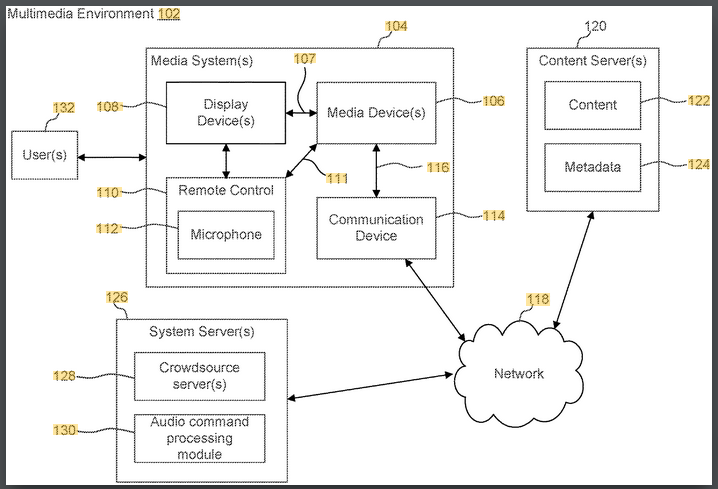
Source: Roku’s patent application
But not just any ad. As we all know, targeted advertising is the most effective way to advertise because the audience is already warm, primed to like and buy the product. Smart TVs already collect a lot of data about you: your IP address, information about your browser, device information, Wi-Fi network name, ISP name, and general location. This data can be enriched with data obtained from third-party sources, such as public records and data brokers. The extensive data collected by smart TV manufacturers, both directly from consumers and through third-party sources, not only enables highly targeted advertising, but also makes these manufacturers attractive targets for cyber-attacks, raising privacy concerns. For example, Roku experienced two security breaches in as many months that resulted in unauthorized transactions, including subscriptions to streaming services and purchases of Roku products.
However, what sets smart TVs apart from other smart devices when it comes to data collection is their ability to get to know you on an even deeper level — by tracking your viewing habits. This is done through a technology called ACR, or Automatic Content Recognition.
The ACR is built into smart TVs to identify content displayed on the screen on the go, in real time, including TV shows, movies, and advertisements. It works by capturing audio or visual signals from the content being shown, creating a unique fingerprint of that sample, and then comparing this fingerprint against an extensive database of known content.
So, the ACR is the technology Roku is banking on when drafting the patent application.
In some embodiments, recognizing the content includes analyzing a first video frame or a first audio frame of the one or more frames using automatic content recognition (ACR) technology, and determining a fingerprint, a watermark, or a cue tone corresponding to the first video frame or the first audio frame, where the fingerprint, watermark, and/or cue tone is used to identify information about content corresponding to the first video frame or the first audio frame
This will be done by an Automatic Content Recognition (ACR) module built into the display device (e.g., a Roku TV).
The other module that is set to play a huge role in content recognition is the CV or Computer Vision Module.
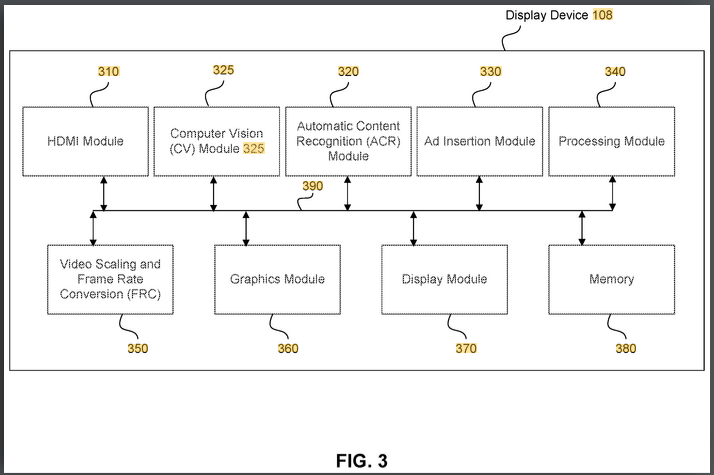
Source: Roku’s patent application
Will your home video get an ad break?
In its patent application, Roku says that CV module will be able to “analyze a video frame and generate metadata”. This metadata can also be used to “recognize images and/or objects within the video frame.”
What kind of images, you may ask? What level of detail are we talking about? Is it a general understanding of what's happening on the screen, or a more granular one? Well, it looks like the latter is the answer.
The fingerprint and/or watermark may correspond to a certain movie title, famous actor, and movie genre. The metadata may correspond to a champagne bottle and mountain scenery.
Consequently, the ads served based on this input can be incredibly specific — ranging from promotions featuring the actor you recently watched to advertisements for a particular type of champagne or vacation destinations “that include the mountain scenery recognized.”
It doesn't take a particularly vivid imagination to picture your home video of, say, a mountain trip or your wedding reception being interrupted by commercial breaks. Right now, it's just a dystopian fantasy, but the patent seems to be paving the way for that fantasy to become a reality. For starters, it may feel like an invasion of privacy, turning some intimate moments into marketing fodder. Of course, we suspect that there will be an opt-out button, but we also suspect that it will be buried somewhere deep in the settings and hard to find for the non-inquisitive user.
What types of ads can be served and when?
The ads that Roku wants to display on your screen are intended to be shown during pauses, as we mentioned earlier. There are several ways that Roku can detect that a “pause event” has occurred. We'll list a few of them, such as:
- receiving a remote control pass through pause signal;
- detecting a silent audio signal via the HDMI connection, and determining that a video frame of the one or more frames has not changed;
- detecting a pause icon from the one or more frames using computer vision (CV) technology
Once the pause is detected, the vendor can show one or more relevant ads. These ads can take different shapes and forms depending on the advertiser’s preferences, including being static, such as a still image, or dynamic, that includes a short video, an animation, an interactive screen or a gif.
Ads are invading spaces that were previously off-limits
Ads are what makes TV manufacturers increasingly rely on for profit. In fact, Roku’s revenue model is largely based on selling its media players at a cheap price and profiting off of lucrative advertising deals. For instance, Roku’s total revenue last year amounted to $3,5 billion, an increase of 11% year over year. Notably, ad sales and streaming service distribution (including the sale of premium subscriptions) brought it $3 billion, growing 10% year over year.
It’s no wonder that Roku is trying to cram ads into every place that, by some oversight, is still devoid of them or under-saturated. In January of this year, Roku announced that it would “immerse advertisers in more parts of the screen and home” through interactive and “shoppable” ad formats. To translate this from marketing-speak, viewers began to see more ads on their home screens, not just for entertainment or media content, but also for unrelated products such as cars and restaurants. That is in addition to the ads that have already been populating Roku’s home and menu screens and its screensavers.
And, if anything, Roku isn’t an outlier, it’s more of a company that's just getting up to speed. Almost a year ago, we wrote about how smart TV customers with Google TV and Android TV operating systems were seeing ads for products and businesses unrelated to their streaming preferences, such as physical phone stores, a donut shop, and a car dealership.
Being bombarded with ads while you’re trying to enjoy a video of that epic concert you were at, or while you're deep in the gaming zone, may seem like a step too far. But in reality, it’s just a logical continuation of a trend we’ve all been subjected to — more ads and steeper prices for ad-free content. Last year, Netflix introduced an ad-supported tier, while cancelling its cheapest ad-free plan. Similarly, Disney+ increased the price of its ad-free offering, while expanding the ad-supported option to more countries.
Roku is an enthusiastic proponent of this model. In its 2023 Q4 recap to shareholders, Roku signaled that this trend is what it is counting on for continued revenue growth.
As subscription prices increase, we believe consumers will seek savings via ad-supported subscriptions that have been launched by the major streaming services in the U.S. We believe these launches, along with growing consumer adoption, will be a catalyst within the industry for the shift of ad dollars from traditional TV to streaming
What will we be able to do about it?
The patent application is more of a rough blueprint of what Roku envisions for the future rather than a finished product. There is a lot of uncertainty about how and whether its ideas will be implemented and how Roku will handle potential privacy concerns.
Unlike more open platforms where you can install a dedicated ad blocker for TV to filter traffic on the device itself, closed operating systems like Roku OS do not support third-party security apps. For those devices, there is a possibility that system-level DNS with ad blocking could help intercept requests from ad-serving domains that Roku (or whoever it inspires with its patent) will use to deliver ads. Currently, AdGuard is capable of blocking Roku’s ad domains. However, this method isn’t infallible. For example, it fails to block ads on YouTube, where ads and content are delivered from the same domain.
The total elimination of ads, particularly in the context of YouTube, appears improbable. Nonetheless, alternative strategies exist that can either remove or substantially decrease the frequency of ads. We are currently exploring one such technique and may disclose it publicly in the future.
So, bottom line: In the best-case scenario, ad blocking software would identify the ad request as coming from a known ad domain — operated by Roku or someone else — and block it, preventing the ad from appearing on your screen.
But there are too many unknown variables, and there’s also a chance, and quite a big one, that this method won't work. For now, we'll have to wait and (hopefully not) see Roku's vision for the future come to fruition.




















































