TechTok #12. Navigating privacy in a data-driven world: Simple steps for protecting your data and fine-tuning your VPN

In this new edition of TechTok, we’re tackling two very different questions. One is incredibly broad in scope, while the other is much narrower. But what ties them together is that the answers to both may seem more straightforward than they actually are. Let’s dive in.

First question is from katy perry's boyfriend:

I've been online for ages, and I'm guessing my personal data is probably already out there for anyone who's interested. Does it make sense to start using ad blockers and VPNs? Or how can I start living a more private life after years of shitposting ? It seems a bit pointless now

First of all, it’s understandable to have regrets about all the data we’ve shared throughout the years, especially when we did not know better. However, unless you’re living completely off the grid, it’s impossible not to leave a trail of personal data behind. The real question isn’t whether that trail exists but how accurate and how distinct it is. As for having already left a trail, the truth is, you can’t be a purist in the digital age without a massive tradeoff in convenience, and very few people are in a fundamentally different position. In fact, younger generations arguably have it worse thanks to “sharenting,” which doesn’t mean they should give up on privacy from the start. Chances are, you’re actually in a better position than them. The key point here is that information is valuable mostly while it’s current. You can’t turn history back, but you can make sure that whatever you leave online from this point onward is limited. And data only really works as long as it’s searchable and linkable to you which means there are ways to blunt its impact.

From there, the goal isn’t to erase yourself from the internet, but to slowly make yourself less legible. Put simply, the goal is to make the data you leave behind fragmented, harder to link together, or less accurate, so anyone trying to track you, target you with ads, or aggregate your personal info will get a muddled picture rather than a “readable” profile.

Even small, boring changes in how you go about digital hygiene matter, and compound over time. One of those is clearing cookies and cache, especially if you automate it. In Chrome, you can configure on-device data to delete automatically upon closing. Similar features are available in most popular browsers. This doesn’t make you anonymous, but it does prevent long-term tracking from neatly stitching together months or years of behavior. The tradeoff is that you'll log out more often, and things will be a bit less convenient.

The same logic applies to separating contexts. Keeping work, private life, and casual online activity from constantly bleeding into one another makes profiling harder. Whether that’s separate browser profiles or separate email addresses, you’re making it harder to link different parts of your life. In this regard, using email aliases and temporary addresses can help. Aliases are useful for accounts you actually use but don’t fully trust with your main inbox like newsletters, shopping sites, or online services you want to keep separate. Temporary addresses are great for one-off sign-ups, trials, or downloads where you don’t expect or want any follow-up.

📫
One service that provides both is AdGuard Mail. Used this way, these tools reduce reuse, limit cross-site linkage, and help contain the damage when (not if) leaks happen.

Social media works similarly. Simply reducing discoverability can go a long way; one example is opting out of search engine indexing, which you can do on Instagram. Other measures include changing the name displayed on your profile, switching to a different username (or/and using different usernames for different social media accounts), or limiting who can see your posts in the first place — that is according to recommendations from X, but they are universally applicable. These steps can prevent your profile information and posts associated with it from appearing in search engine results. In short, changing a handle can help disrupt name-based searches, even if it doesn’t erase existing data entirely. And while none of this is a panacea, most data collection relies on ease rather than persistence.

You can also deal directly with search engines. Google, for example, lets you request the removal of private information like your address, phone number, email, government IDs, bank details, medical records, or even confidential usernames and passwords. Use Google’s “Results about you” feature to find and request removals, and you can even set up notifications for new results. Keep in mind that Google can only remove information from its search results — if you want content taken down from the original website, you’ll need to contact the site owner directly.

If there’s one unglamorous but genuinely effective step, it’s dealing with data brokers. Opting out is tedious, but it works, and once done it tends to stay done. You can visit the opt-out pages of sites like Spokeo and Epsilon to request your records be removed. However, given how many of such data brokers are out there, perhaps the most surefire way is to use a specialized removal service.

Beyond controlling what’s already out there, you can also limit how much new data gets collected about you. Ad blockers help stop trackers and third-party scripts from quietly following your activity across sites, which reduces the amount of behavioral data that can be linked back to you. VPNs, meanwhile, mask your IP address and encrypt your connection, making it harder for websites, advertisers, or even your ISP to build a profile based on your location or browsing habits. Neither of these tools makes you invisible, but combined with the other steps such as separating contexts, using aliases, and managing search visibility, they make it significantly harder for anyone to piece together a detailed picture of your online life.

Taken together, none of this is about achieving perfect privacy. That ship sailed for almost everyone a long time ago. What is achievable is making your data older, noisier, and less connected over time. And in practice, that’s usually enough.

Now, second question comes from Elle:

I'm sooo not tech-savvy. If I leave my VPN on, will it stay on when I shut down my PC? Thanks so much for your time.

If you leave your VPN on and then shut down your PC, the VPN won’t keep running in the background once your computer is powered off. When you restart your PC, the VPN will need to reconnect to establish the secure connection again. So, answering your question — no, the VPN won’t stay on once you shut down your PC.

However, most popular VPNs provide an option to automatically reconnect after a system restart, which is a common feature.

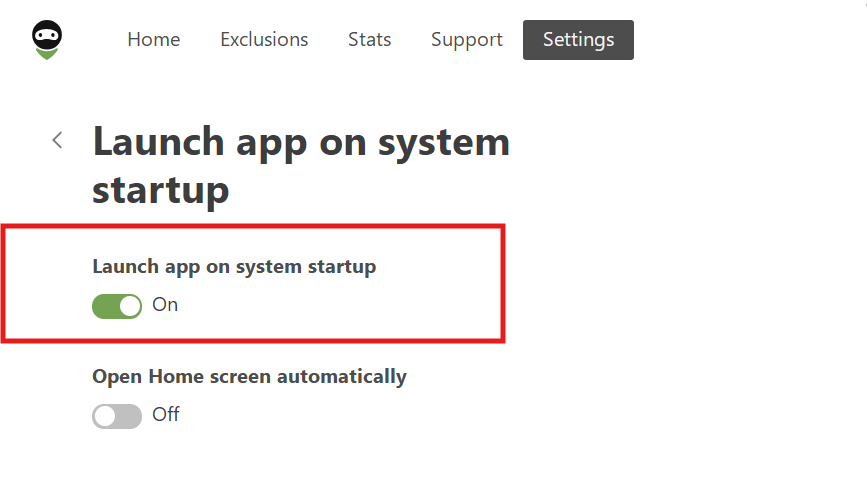
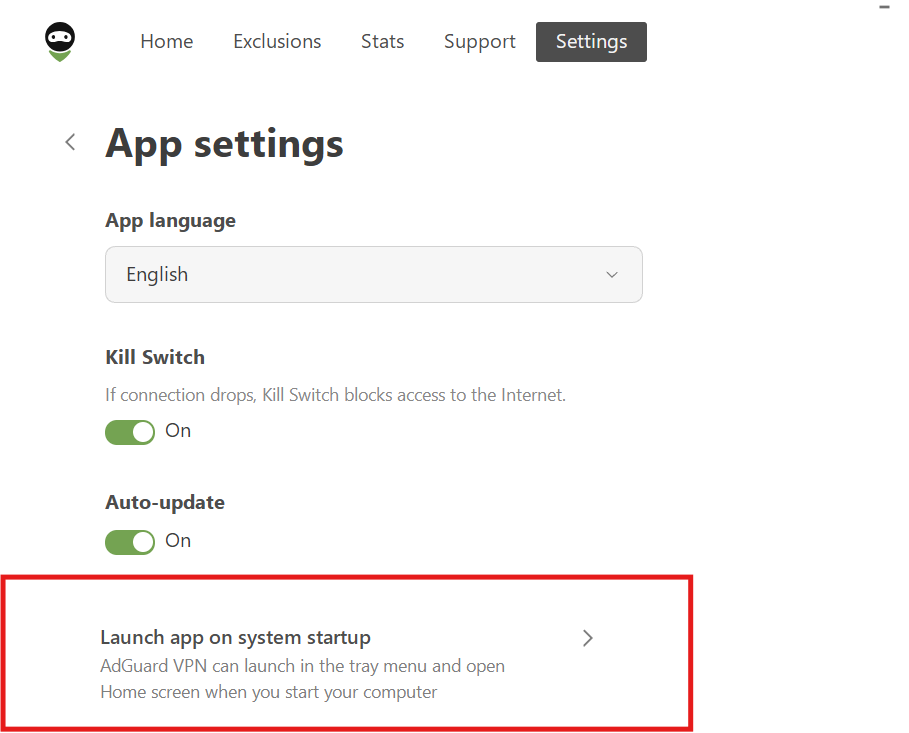
With AdGuard VPN, you can streamline this process with a couple of helpful features. First, you can enable Launch app on system startup in the app’s settings. This ensures that the VPN app automatically opens as soon as your computer boots up, so you don’t have to manually launch it each time.
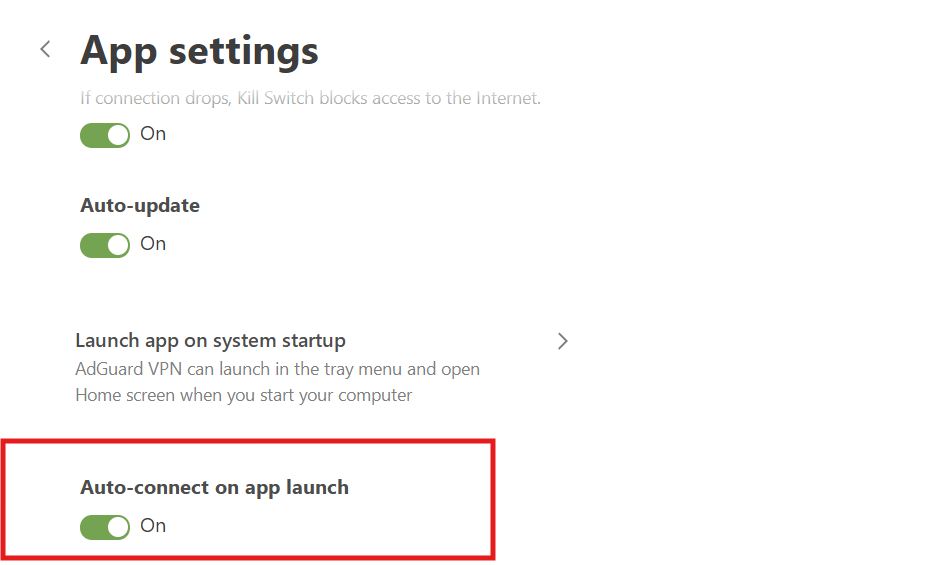
Next, you can enable the Auto-connect on app launch feature. This ensures that as soon as the app opens, it will automatically connect to the VPN without any extra action needed from you. Together, these features make sure that your VPN is ready to protect you right from the moment your computer starts up, with no additional steps required.
Podobał Ci się ten post?
AdGuard VPN AdGuard DNS AdGuard Mail AdGuard Wallet
Ekran główny AdGuard dla Windows
Ekran ochrony AdGuard dla Windows, pokazujący funkcje ochrony i ustawienia
Ekran statystyki AdGuard dla Windows, pokazujący statystyki zablokowanych reklam i trackery
Ekran Zarządzanie aplikacjami w AdGuard dla Windows, pokazujący opcje zarządzania ochroną dla aplikacji zainstalowanych na urządzeniu
20 751 20751 recenzji
Doskonały!

AdGuard dla Windows: bloker reklam na PC

AdGuard dla systemu Windows to coś więcej niż bloker reklam. To wielofunkcyjne narzędzie, które blokuje reklamy, kontroluje dostęp do niebezpiecznych stron, przyspiesza ładowanie stron i chroni dzieci przed nieodpowiednimi treściami
Pobierając program, akceptujesz warunki Umowy licencyjnej
Microsoft Store
Pobierając program, akceptujesz warunki Umowy licencyjnej
AdGuard na Windows v8.0, 14-dniowa wersja próbna
Ekran główny AdGuard dla Mac
Ekran Trybu ukrytego w AdGuard dla Mac
20 751 20751 recenzji
Doskonały!

AdGuard: bloker reklam na Maca

AdGuard dla Mac to wyjątkowy bloker reklam zaprojektowany z myślą o macOS. Oprócz ochrony przed uciążliwymi reklamami w przeglądarkach i aplikacjach chroni Cię przed śledzeniem, phishingiem i oszustwami
Pobierając program, akceptujesz warunki Umowy licencyjnej
Przeczytaj więcej
AdGuard na Mac v2.19, 14-dniowa wersja próbna
Ekran główny AdGuard dla Android
Ekran Ochrona przed śledzeniem w AdGuard dla Android
Ekran Zarządzanie aplikacjami w AdGuard dla Android, pokazujący opcje zarządzania ochroną dla aplikacji zainstalowanych na urządzeniu
Ekran statystyki AdGuard dla Android, pokazujący statystyki zablokowanych reklam i trackery
Ekran główny prywatnej przeglądarki AdGuard dla Android
Kod QR, aby pobierz AdGuard dla Android
20 751 20751 recenzji
Doskonały!

AdGuard: bloker reklam na Androida

Blokuje reklamy i moduły śledzące we wszystkich przeglądarkach, grach i innych aplikacjach. Chroni Twoją prywatność i pozwala kontrolować, w jaki sposób aplikacje korzystają z Internetu. Instalowane za pomocą pliku APK
Pobierając program, akceptujesz warunki Umowy licencyjnej
Przeczytaj więcej
Skanuj, aby pobrać
Użyj dowolnego czytnika kodów QR dostępnego w Twoim urządzeniu
AdGuard na Android v4.14, 14-dniowa wersja próbna
Ekran główny AdGuard dla iOS
Ekran ochrony AdGuard dla iOS, pokazujący funkcje ochrony i ustawienia
Ekran statystyki AdGuard dla iOS, pokazujący statystyki zablokowanych reklam i trackery
Kod QR, aby pobierz AdGuard dla iOS
20 751 20751 recenzji
Doskonały!

AdGuard na iOS: bloker reklam poza Safari

Najlepszy bloker reklam na iOS dla iPhone’a i iPada. AdGuard usuwa wszelkiego rodzaju reklamy i elementy śledzące w Safari oraz chroni Twoją prywatność we wszystkich aplikacjach na poziomie DNS
Pobierając program, akceptujesz warunki Umowy licencyjnej
Przeczytaj więcej
Skanuj, aby pobrać
Użyj dowolnego czytnika kodów QR dostępnego w Twoim urządzeniu
AdGuard na iOS v4.5
Ekran główny AdGuard Content Blocker
Ekran Filtry w AdGuard Content Blocker
Ekran ustawienia w AdGuard Content Blocker
20 751 20751 recenzji
Doskonały!

Blokada treści AdGuard

AdGuard Content Blocker eliminuje wszelkiego rodzaju reklamy w przeglądarkach mobilnych, które obsługują technologię blokowania treści — a mianowicie Samsung Internet i Yandex Browser. Jego funkcje są ograniczone w porównaniu z AdGuard na Androida, ale jest darmowy, łatwy w instalacji i wydajny
Pobierając program, akceptujesz warunki Umowy licencyjnej
Przeczytaj więcej
Blokada treści AdGuard v2.8
Ekran główny AdGuard Browser Extension
Ekran Ochrona przed śledzeniem w AdGuard Browser Extension
20 751 20751 recenzji
Doskonały!

Rozszerzenie przeglądarki AdGuard

AdGuard to najszybsze i najlżejsze rozszerzenie blokowania reklam, które skutecznie blokuje wszystkie typy reklam na wszystkich stronach internetowych! Wybierz AdGuard dla swojej przeglądarki i uzyskaj szybkie i bezpieczne przeglądanie Internetu pozbawione reklam.
Instalacja
Pobierając program, akceptujesz warunki Umowy licencyjnej
Instalacja
Pobierając program, akceptujesz warunki Umowy licencyjnej
Instalacja
Pobierając program, akceptujesz warunki Umowy licencyjnej
Instalacja
Pobierając program, akceptujesz warunki Umowy licencyjnej
Instalacja
Pobierając program, akceptujesz warunki Umowy licencyjnej
Przeczytaj więcej
Instalacja
Pobierając program, akceptujesz warunki Umowy licencyjnej
Przeczytaj więcej
Rozszerzenie przeglądarki AdGuard v5.5
Ekran główny Asystenta przeglądarki
20 751 20751 recenzji
Doskonały!

Asystent AdGuard

Towarzyszące rozszerzenie przeglądarki dla aplikacji desktopowych AdGuard. Umożliwia blokowanie niestandardowych elementów na stronach internetowych, dodawanie stron internetowych do listy dozwolonych i wysyłanie raportów bezpośrednio z przeglądarki

Asystent AdGuard v1.4
20 751 20751 recenzji
Doskonały!

AdGuard Home

AdGuard Home to sieciowe rozwiązanie do blokowania reklam i modułów śledzących. Zainstaluj go raz na routerze, aby objąć nim wszystkie urządzenia w sieci domowej — nie jest wymagane żadne dodatkowe oprogramowanie klienckie. Jest to szczególnie ważne w przypadku różnych urządzeń IoT, które często stanowią zagrożenie dla Twojej prywatności

AdGuard Home v0.107
Ekran główny AdGuard Pro dla iOS
Ekran Ochrona w AdGuard Pro dla iOS, pokazujący funkcje i ustawienia ochrony
Ekran statystyki w AdGuard Pro dla iOS, pokazujący statystyki zablokowanych reklam i trackerów
20 751 20751 recenzji
Doskonały!

AdGuard Pro dla iOS

AdGuard Pro na iOS oferuje wszystkie zaawansowane funkcje blokowania reklam. Oferuje te same narzędzia, co płatna wersja AdGuard na iOS. Doskonale blokuje reklamy w Safari i pozwala dostosować ustawienia DNS, aby dostosować poziom ochrony. Blokuje reklamy w przeglądarkach i aplikacjach, chroni dzieci przed nieodpowiednimi treściami i dba o bezpieczeństwo danych osobowych.
Pobierając program, akceptujesz warunki Umowy licencyjnej
Przeczytaj więcej
AdGuard Pro dla iOS v4.5
Ekran główny AdGuard Mini dla Mac
Ekran ochrony Safari w AdGuard Mini dla Mac
Ekran tworzenia reguły w AdGuard Mini dla Mac
20 751 20751 recenzji
Doskonały!

AdGuard Mini dla Mac — bloker reklam Safari

AdGuard Mini dla komputerów Mac to potężny bloker reklam w Safari. Ta lekka aplikacja usuwa reklamy, blokuje moduły śledzące i przyspiesza ładowanie stron. Umożliwia przeglądanie internetu w Safari bez rozpraszania uwagi i chroni prywatność danych
Instalacja
Pobierając program, akceptujesz warunki Umowy licencyjnej
Przeczytaj więcej
AdGuard Mini dla Mac v2.3
Ekran główny AdGuard dla Android TV z włączoną ochroną
Ekran blokowanie reklama AdGuard dla Android TV, pokazujący jego funkcje i ustawienia
Ekran ustawienia AdGuard dla Android TV
Ekran Zarządzanie aplikacjami AdGuard dla Android TV, pokazujący aplikacje, w których reklamy i trackery są zablokowane
20 751 20751 recenzji
Doskonały!

AdGuard dla Android TV

AdGuard dla Android TV to jedyna aplikacja, która blokuje reklamy, chroni prywatność i działa jak zapora sieciowa dla Smart TV. Otrzymuj ostrzeżenia o zagrożeniach internetowych, używaj bezpiecznego DNS i korzystaj z szyfrowanego ruchu. Zrelaksuj się i zanurz się w swoich ulubionych programach z najwyższej klasy zabezpieczeniami bez reklam!
AdGuard dla Android TV v4.14, 14-dniowa wersja próbna
Maskotka AdGuard, Agnar, trzymający pingwina Linux
20 751 20751 recenzji
Doskonały!

AdGuard dla Linux

AdGuard for Linux to pierwszy na świecie systemowy bloker reklam dla systemu Linux. Blokuj reklamy i elementy śledzące na poziomie urządzenia, wybieraj spośród wstępnie zainstalowanych filtrów lub dodawaj własne — wszystko za pośrednictwem interfejsu wiersza poleceń
AdGuard dla Linux v1.4
20 751 20751 recenzji
Doskonały!

AdGuard Temp Mail

Darmowy generator tymczasowych adresów e-mail, który zapewnia anonimowość i chroni prywatność. Brak spamu w głównej skrzynce odbiorczej!
20 751 20751 recenzji
Doskonały!

AdGuard VPN

75 lokalizacji na świecie

Dostęp do wszelkich treści

Silne szyfrowanie

Polityka braku logów

Najszybsze połączenie

Wsparcie 24/7

Wypróbuj za darmo
Pobierając program, akceptujesz warunki Umowy licencyjnej
Przeczytaj więcej
20 751 20751 recenzji
Doskonały!

AdGuard DNS

AdGuard DNS to alternatywne rozwiązanie do blokowania reklam, ochrony prywatności i kontroli rodzicielskiej. Łatwy w konfiguracji i darmowy, zapewnia niezbędną minimalną ochronę przed reklamami, śledzeniem i phishingiem, bez względu na platformę i urządzenie, z którego korzystasz.
20 751 20751 recenzji
Doskonały!

AdGuard Mail

Chroń swoją tożsamość, unikaj spamu i zabezpiecz swoją skrzynkę odbiorczą dzięki naszym aliasom i tymczasowym adresom e-mail. Skorzystaj z naszej bezpłatnej usługi przekazywania e-maili oraz aplikacji na wszystkie systemy operacyjne
20 751 20751 recenzji
Doskonały!

AdGuard Wallet

Bezpieczny i prywatny portfel kryptowalutowy, który daje Ci pełną kontrolę nad Twoimi aktywami. Zarządzaj wieloma portfelami i odkrywaj tysiące kryptowalut, aby je przechowywać, wysyłać i wymieniać
Rozpoczęto pobieranie AdGuard Kliknij przycisk wskazany strzałką, aby rozpocząć instalację Wybierz „Otwórz” i kliknij „OK”. Poczekaj aż plik zostanie pobrany. W otwartym oknie, przeciągnij ikonę AdGuard do folderu „Aplikacje”. Dziękujemy za wybrania AdGuard! Wybierz „Otrwórz” i kliknij „OK”. Poczekaj aż plik zostanie pobrany. W otwartym kliknij „Instaluj”. Dziękujemy za wybrania AdGuard!
Zainstaluj również AdGuard dla urządzeń mobilnych

















































