Twitter’s love-hate relationship with ads, Google’s flop, dangerous search and a big data breach. AdGuard’s digest

In this edition of AdGuard’s Digest: Google comes under fire for its flawed attempt to reinvent ad targeting, Twitter makes a U-turn on third-party clients and criticizes its own ad policies, hackers continue to exploit search ads, while a telecoms giant runs into bad luck for the eighth time.

Google’s replacement for third-party cookies is put on blast

Google’s much-discussed Privacy Sandbox initiative has been dealt a stinging blow. The W3C Technical Architecture Group (TAG) has concluded that it did not meet its stated goal of enabling targeted advertising and protecting users from tracking and profiling at the same time.

The group took aim at one specific element of the proposal, the Topics API, envisioned as a replacement for third-party cookies. In its review of Topics, TAG notes that the technology still allows the browser to share information about the user’s online behavior. Moreover, the data is “gathered and sent behind the scenes,” while the user has no “fine-grained control” over what it reveals about them, the group said. The proposed alternative to third-party cookies appears to “maintain the status quo of inappropriate surveillance on the web,” TAG said, while recommending that Google not proceed with the technology. Google disagreed with the findings, insisting that Topics is a significant improvement over third-party cookies.

TAG is a special working group within the The World Wide Web Consortium, and includes the inventor of the Web Tim Berners-Lee.

We have long argued that Google is up to no good with its Topics API. In our own deep-dive review of the Privacy Sandbox we argued that Topics would still allow Big Tech to profile users and, if anything, would only cement Google’s advertising monopoly.

‘End of an era’: Twitter bans third-party clients

Twitter’s embattled CEO Elon Musk may be busy in court, but that does not mean a pause in Twitter-related news.

Recently, Twitter updated its developer terms to outlaw third-party apps, breaking away from its long-held policy. When asked about the change, Twitter said it was simply “enforcing long-standing API rules.” Twitter’s oldest third-party client, Twitterriffic, which came to iOS even before Twitter itself, was forced to pull its apps from the iOS and Mac app stores as well. In a blog post, Twitterrific said that app’s “sudden and undignified demise” was brought about by an unannounced policy change from an “increasingly capricious Twitter”.

The ban represents a U-turn in Twitter’s treatment of third-party clients — the platform previously tolerated them. The move also signals that Musk’s Twitter is willing to go to great lengths to increase the tech giant’s advertising revenue. Users of third-party clients don’t see Twitter’s ads.

The fact that Twitter is betting heavily on advertising and leaving users with no alternatives in the form of third-party clients makes sense from a business perspective, but is worrying from a user’s point of view. The rumors that Twitter is planning to force non-paying users to share their location and phone numbers for targeted advertising only adds fuel to the concerns.

Musk vows to tackle icky ads, teases ad-free Twitter plan

As if to assuage some of these fears, Musk took to Twitter to state the obvious: “Ads are too frequent and too big on Twitter,” the still-CEO wrote. He then promised to take steps to address the issue “in the coming weeks”, as well as release a higher-priced subscription tier with “zero ads”.
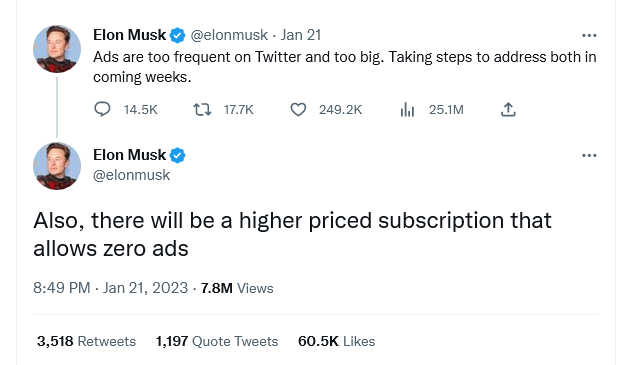
Musk teases ad-free subscription tier for Twitter

This is not the first time Musk has teased an ad-free tier. Last month, the Twitter CEO said that the new plan sans ads would arrive already that year. Currently, Twitter Blue subscribers pay $11 a month (if they buy the subscription through Android or iOS) or $8 (if they buy it through a web browser) to see half as many ads as regular, non-paying users.

Twitter’s introduction of an ad-free tier is a welcome step and a cause for celebration for those who have grown tired of ad-cluttered feeds, but not enough to give up on Twitter. A lot will depend on the pricing, though. We can see that Twitter is trying to walk a fine line between pleasing advertisers and users, and we can only hope that the balance doesn’t tip too heavily towards the former.

Google search is infested with malicious ads, researchers find

Cybercriminals increasingly rely on Google Search ads to lure users to bogus websites laced with malware, BleepingComputer has found. These fake websites often resemble those of legitimate companies, known for open-source software.

BleepingComputer conducted the research after a popular influencer saw all his crypto assets stolen as result of the scheme. The researchers found that in some cases, hackers outbid legitimate developers so the malicious ad appeared at the top of search results, above the legitimate company’s paid ad. Such was the case with CCleaner, a utility used to clean unwanted files. The fake CCLeaner website directed users to download Redline malware, which allowed criminals to steal sensitive personal information such as passwords, credit card details and crypto assets from unsuspecting victims. Together with other security researchers, BleepingComputer uncovered a dozen malicious ads leading to fake websites. In response, Google said it has “robust policies” against ads that impersonate brands and enforces them “vigorously”.

Well, apparently not vigorously enough, because the problem of malicious ads in Google search seems to persist. Last month the FBI even issued an alert about dangerous search ads, urging the public to use ad blockers. Indeed, ad blockers, including the AdGuard Browser extension and the AdGuard app, help protect against the threat of ads placed by cybercriminals. To block most search ads, you’ll need to enable the “block search ads” setting in your extension.
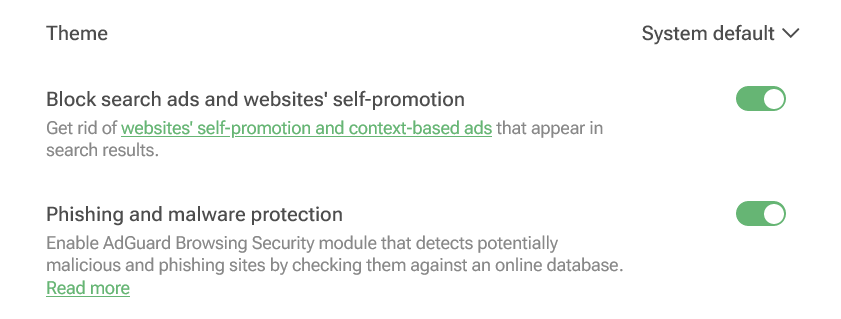
You can enable blocking search ads in your AdGuard Browser extension

Screenshot: AdGuard Browser extension

Not again... Personal data of 37 million T-Mobile customers stolen

Telecoms giant T-Mobile has revealed that it has suffered another data breach, with hackers stealing personal data of some 37 million of its customers. The bad actor apparently exploited a flaw in one of the company’s APIs to retrieve the data.

The breach occurred in early January and was immediately contained, T-Mobile said. The telecoms provider noted that hackers gained access to a “limited set of account information”, including its customers’ names, billing addresses, email addresses, dates of birth and T-Mobile account numbers. No payment information or government ID numbers were exposed, it claimed.

Still, the breach represents a very worrying pattern, as this is the eighth time T-Mobile has been hacked in five years, according to TechCrunch. T-Mobile also famously fell victim to the Lapsus$ hackers, who stole its source code in a series of hacks in March 2022. The new hack, as well as T-Mobile’s history of data breaches, shows that large companies are just as vulnerable to attack as smaller ones. The bigger the company, the more customer data it has at its disposal, the more attractive it is as a target. What this means for us as users is that we need to be very selective about what data we share, with whom, and how much control we have over it.


Podobał Ci się ten post?
AdGuard VPN AdGuard DNS AdGuard Mail AdGuard Wallet
Ekran główny AdGuard dla Windows
Ekran ochrony AdGuard dla Windows, pokazujący funkcje ochrony i ustawienia
Ekran statystyki AdGuard dla Windows, pokazujący statystyki zablokowanych reklam i trackery
Ekran Zarządzanie aplikacjami w AdGuard dla Windows, pokazujący opcje zarządzania ochroną dla aplikacji zainstalowanych na urządzeniu
20 753 20753 recenzje
Doskonały!

AdGuard dla Windows: bloker reklam na PC

AdGuard dla systemu Windows to coś więcej niż bloker reklam. To wielofunkcyjne narzędzie, które blokuje reklamy, kontroluje dostęp do niebezpiecznych stron, przyspiesza ładowanie stron i chroni dzieci przed nieodpowiednimi treściami

Pobierając program, akceptujesz warunki Umowy licencyjnej
Microsoft Store
Pobierając program, akceptujesz warunki Umowy licencyjnej
AdGuard na Windows v8.0, 14-dniowa wersja próbna
Ekran główny AdGuard dla Mac
Ekran Trybu ukrytego w AdGuard dla Mac
20 753 20753 recenzje
Doskonały!

AdGuard: bloker reklam na Maca

AdGuard dla Mac to wyjątkowy bloker reklam zaprojektowany z myślą o macOS. Oprócz ochrony przed uciążliwymi reklamami w przeglądarkach i aplikacjach chroni Cię przed śledzeniem, phishingiem i oszustwami
Pobierając program, akceptujesz warunki Umowy licencyjnej
Przeczytaj więcej
AdGuard na Mac v2.19, 14-dniowa wersja próbna
Ekran główny AdGuard dla Android
Ekran Ochrona przed śledzeniem w AdGuard dla Android
Ekran Zarządzanie aplikacjami w AdGuard dla Android, pokazujący opcje zarządzania ochroną dla aplikacji zainstalowanych na urządzeniu
Ekran statystyki AdGuard dla Android, pokazujący statystyki zablokowanych reklam i trackery
Ekran główny prywatnej przeglądarki AdGuard dla Android
Kod QR, aby pobierz AdGuard dla Android
20 753 20753 recenzje
Doskonały!

AdGuard: bloker reklam na Androida

Blokuje reklamy i moduły śledzące we wszystkich przeglądarkach, grach i innych aplikacjach. Chroni Twoją prywatność i pozwala kontrolować, w jaki sposób aplikacje korzystają z Internetu. Instalowane za pomocą pliku APK
Pobierając program, akceptujesz warunki Umowy licencyjnej
Przeczytaj więcej
Skanuj, aby pobrać
Użyj dowolnego czytnika kodów QR dostępnego w Twoim urządzeniu
AdGuard na Android v4.14, 14-dniowa wersja próbna
Ekran główny AdGuard dla iOS
Ekran ochrony AdGuard dla iOS, pokazujący funkcje ochrony i ustawienia
Ekran statystyki AdGuard dla iOS, pokazujący statystyki zablokowanych reklam i trackery
Kod QR, aby pobierz AdGuard dla iOS
20 753 20753 recenzje
Doskonały!

AdGuard na iOS: bloker reklam poza Safari

Najlepszy bloker reklam na iOS dla iPhone’a i iPada. AdGuard usuwa wszelkiego rodzaju reklamy i elementy śledzące w Safari oraz chroni Twoją prywatność we wszystkich aplikacjach na poziomie DNS
Pobierając program, akceptujesz warunki Umowy licencyjnej
Przeczytaj więcej
Skanuj, aby pobrać
Użyj dowolnego czytnika kodów QR dostępnego w Twoim urządzeniu
AdGuard na iOS v4.5
Ekran główny AdGuard Content Blocker
Ekran Filtry w AdGuard Content Blocker
Ekran ustawienia w AdGuard Content Blocker
20 753 20753 recenzje
Doskonały!

Blokada treści AdGuard

AdGuard Content Blocker eliminuje wszelkiego rodzaju reklamy w przeglądarkach mobilnych, które obsługują technologię blokowania treści — a mianowicie Samsung Internet i Yandex Browser. Jego funkcje są ograniczone w porównaniu z AdGuard na Androida, ale jest darmowy, łatwy w instalacji i wydajny
Pobierając program, akceptujesz warunki Umowy licencyjnej
Przeczytaj więcej
Blokada treści AdGuard v2.8
Ekran główny AdGuard Browser Extension
Ekran Ochrona przed śledzeniem w AdGuard Browser Extension
20 753 20753 recenzje
Doskonały!

Rozszerzenie przeglądarki AdGuard

AdGuard to najszybsze i najlżejsze rozszerzenie blokowania reklam, które skutecznie blokuje wszystkie typy reklam na wszystkich stronach internetowych! Wybierz AdGuard dla swojej przeglądarki i uzyskaj szybkie i bezpieczne przeglądanie Internetu pozbawione reklam.
Instalacja
Pobierając program, akceptujesz warunki Umowy licencyjnej
Instalacja
Pobierając program, akceptujesz warunki Umowy licencyjnej
Instalacja
Pobierając program, akceptujesz warunki Umowy licencyjnej
Instalacja
Pobierając program, akceptujesz warunki Umowy licencyjnej
Instalacja
Pobierając program, akceptujesz warunki Umowy licencyjnej
Przeczytaj więcej
Instalacja
Pobierając program, akceptujesz warunki Umowy licencyjnej
Przeczytaj więcej
Rozszerzenie przeglądarki AdGuard v5.5
Ekran główny Asystenta przeglądarki
20 753 20753 recenzje
Doskonały!

Asystent AdGuard

Towarzyszące rozszerzenie przeglądarki dla aplikacji desktopowych AdGuard. Umożliwia blokowanie niestandardowych elementów na stronach internetowych, dodawanie stron internetowych do listy dozwolonych i wysyłanie raportów bezpośrednio z przeglądarki
Asystent AdGuard v1.4
20 753 20753 recenzje
Doskonały!

AdGuard Home

AdGuard Home to sieciowe rozwiązanie do blokowania reklam i modułów śledzących. Zainstaluj go raz na routerze, aby objąć nim wszystkie urządzenia w sieci domowej — nie jest wymagane żadne dodatkowe oprogramowanie klienckie. Jest to szczególnie ważne w przypadku różnych urządzeń IoT, które często stanowią zagrożenie dla Twojej prywatności
AdGuard Home v0.107
Ekran główny AdGuard Pro dla iOS
Ekran Ochrona w AdGuard Pro dla iOS, pokazujący funkcje i ustawienia ochrony
Ekran statystyki w AdGuard Pro dla iOS, pokazujący statystyki zablokowanych reklam i trackerów
20 753 20753 recenzje
Doskonały!

AdGuard Pro dla iOS

AdGuard Pro na iOS oferuje wszystkie zaawansowane funkcje blokowania reklam. Oferuje te same narzędzia, co płatna wersja AdGuard na iOS. Doskonale blokuje reklamy w Safari i pozwala dostosować ustawienia DNS, aby dostosować poziom ochrony. Blokuje reklamy w przeglądarkach i aplikacjach, chroni dzieci przed nieodpowiednimi treściami i dba o bezpieczeństwo danych osobowych.
Pobierając program, akceptujesz warunki Umowy licencyjnej
Przeczytaj więcej
AdGuard Pro dla iOS v4.5
Ekran główny AdGuard Mini dla Mac
Ekran ochrony Safari w AdGuard Mini dla Mac
Ekran tworzenia reguły w AdGuard Mini dla Mac
20 753 20753 recenzje
Doskonały!

AdGuard Mini dla Mac — bloker reklam Safari

AdGuard Mini dla komputerów Mac to potężny bloker reklam w Safari. Ta lekka aplikacja usuwa reklamy, blokuje moduły śledzące i przyspiesza ładowanie stron. Umożliwia przeglądanie internetu w Safari bez rozpraszania uwagi i chroni prywatność danych
Instalacja
Pobierając program, akceptujesz warunki Umowy licencyjnej
Przeczytaj więcej
AdGuard Mini dla Mac v2.3
Ekran główny AdGuard dla Android TV z włączoną ochroną
Ekran blokowanie reklama AdGuard dla Android TV, pokazujący jego funkcje i ustawienia
Ekran ustawienia AdGuard dla Android TV
Ekran Zarządzanie aplikacjami AdGuard dla Android TV, pokazujący aplikacje, w których reklamy i trackery są zablokowane
20 753 20753 recenzje
Doskonały!

AdGuard dla Android TV

AdGuard dla Android TV to jedyna aplikacja, która blokuje reklamy, chroni prywatność i działa jak zapora sieciowa dla Smart TV. Otrzymuj ostrzeżenia o zagrożeniach internetowych, używaj bezpiecznego DNS i korzystaj z szyfrowanego ruchu. Zrelaksuj się i zanurz się w swoich ulubionych programach z najwyższej klasy zabezpieczeniami bez reklam!
AdGuard dla Android TV v4.14, 14-dniowa wersja próbna
Maskotka AdGuard, Agnar, trzymający pingwina Linux
20 753 20753 recenzje
Doskonały!

AdGuard dla Linux

AdGuard for Linux to pierwszy na świecie systemowy bloker reklam dla systemu Linux. Blokuj reklamy i elementy śledzące na poziomie urządzenia, wybieraj spośród wstępnie zainstalowanych filtrów lub dodawaj własne — wszystko za pośrednictwem interfejsu wiersza poleceń
AdGuard dla Linux v1.4
20 753 20753 recenzje
Doskonały!

AdGuard Temp Mail

Darmowy generator tymczasowych adresów e-mail, który zapewnia anonimowość i chroni prywatność. Brak spamu w głównej skrzynce odbiorczej!
20 753 20753 recenzje
Doskonały!

AdGuard VPN

75 lokalizacji na świecie

Dostęp do wszelkich treści

Silne szyfrowanie

Polityka braku logów

Najszybsze połączenie

Wsparcie 24/7

Wypróbuj za darmo
Pobierając program, akceptujesz warunki Umowy licencyjnej
Przeczytaj więcej
20 753 20753 recenzje
Doskonały!

AdGuard DNS

AdGuard DNS to alternatywne rozwiązanie do blokowania reklam, ochrony prywatności i kontroli rodzicielskiej. Łatwy w konfiguracji i darmowy, zapewnia niezbędną minimalną ochronę przed reklamami, śledzeniem i phishingiem, bez względu na platformę i urządzenie, z którego korzystasz.
20 753 20753 recenzje
Doskonały!

AdGuard Mail

Chroń swoją tożsamość, unikaj spamu i zabezpiecz swoją skrzynkę odbiorczą dzięki naszym aliasom i tymczasowym adresom e-mail. Skorzystaj z naszej bezpłatnej usługi przekazywania e-maili oraz aplikacji na wszystkie systemy operacyjne
20 753 20753 recenzje
Doskonały!

AdGuard Wallet

Bezpieczny i prywatny portfel kryptowalutowy, który daje Ci pełną kontrolę nad Twoimi aktywami. Zarządzaj wieloma portfelami i odkrywaj tysiące kryptowalut, aby je przechowywać, wysyłać i wymieniać
Rozpoczęto pobieranie AdGuard Kliknij przycisk wskazany strzałką, aby rozpocząć instalację Wybierz „Otwórz” i kliknij „OK”. Poczekaj aż plik zostanie pobrany. W otwartym oknie, przeciągnij ikonę AdGuard do folderu „Aplikacje”. Dziękujemy za wybrania AdGuard! Wybierz „Otrwórz” i kliknij „OK”. Poczekaj aż plik zostanie pobrany. W otwartym kliknij „Instaluj”. Dziękujemy za wybrania AdGuard!
Zainstaluj również AdGuard dla urządzeń mobilnych

















































