Twitter charges for security, Apple wants more ads, AI art deemed not copyrightable, and more. AdGuard’s digest

In this edition of AdGuard’s digest: Twitter makes 2FA through SMS part of its paid subscription, Apple TV may add an ad-supported plan, OpenAI promises to stop using customer data to train AI, AI-generated image copyright claim fails in the US as LastPass spills all the beans about its latest breach.

Twitter makes the most common 2FA option a paid service

Twitter users with multi-factor authentication will soon have to pay for a subscription to continue receiving verification codes via SMS. Twitter has announced that from 20 March, the popular 2FA method will be disabled for non-Twitter Blue subscribers, removing an extra layer of protection for their accounts. Instead, non-paying users are encouraged to switch to alternative 2FA methods that are free (at least for now): an authentication app and a security key.

Twitter portrayed its rather unorthodox decision to bundle a basic security feature with its paid subscription as a way… to improve user security. “While historically a popular form of 2FA, unfortunately we have seen phone-number based 2FA be used — and abused — by bad actors,”the company’s statement reads.

It’s true that attackers can bypass text-based 2FA, and it’s probably not the most secure MFA method available. But the question is, if it’s so bad, why would Twitter make it part of its paid service instead of just getting rid of it? If we had to hazard a guess, it’s probably that Twitter wants to save some money on sending text messages. What’s worrying, however, is that according to Twitter’s own data from two years ago, only 2.6% of its users had 2FA, of which a whopping 74% chose to receive codes via SMS. We’ll have to see how this all plays out, but chances are that the few people who were using 2FA will now stop using it, and that doesn’t bode well for Twitter’s security.

Apple’s romance with advertising gets steamier

Last year we wrote about and lamented Neftlix’s decision to introduce an ad-supported tier, and now it looks like Apple’s streaming service, Apple TV+, is following in Netflix’s footsteps. The Information reported that the tech giant recently hired a top executive to help it build an ad business for Apple TV+.

Currently, Apple TV+, which carries such hit shows as Ted Lasso on an exclusive basis, only has an ad-free subscription. That subscription costs $6.99 a month, the same as Netflix’s basic plan with ads. While Apple has not confirmed that it’d be launching an ad-supported tier, the rumor is that it has already been courting advertisers.

Too little is known about Apple’s plan for its streaming service to draw any definite conclusions. However, it should be noted that any advertising business relies on the widespread collection of user data in order to target ads. And widespread collection of user data is never good for privacy — something Apple says it cares about. It’s not as if Apple is just dipping its toes in the advertising waters. In fact, the company has been busy building its own advertising empire for quite some time. Most recently, it has started showing more ads in the App Store, and it’s likely we’ll see more of this in the coming years.

No, you cannot copyright AI-generated images, US government says

The US Copyright Office has revoked the copyright protection it had granted to a digital artist for the images she created using Midjorney, a text-to-image AI. The artist, Kris Kashtanova, used the images for a graphic novel, 'Zarya of the Dawn', published last year. The Copyright Office initially granted Kashtanova protection for the book in its entirety, thus setting a precedent. However, when the agency found out (from Kashtanova’s social media, no less) that the images had been generated by AI, it reconsidered the case and denied her protection for individual images.

The Copyright Office wrote that even though Kashtanova claimed to have edited the images, the edits were “too minor and imperceptible to supply the necessary creativity for copyright protection.”
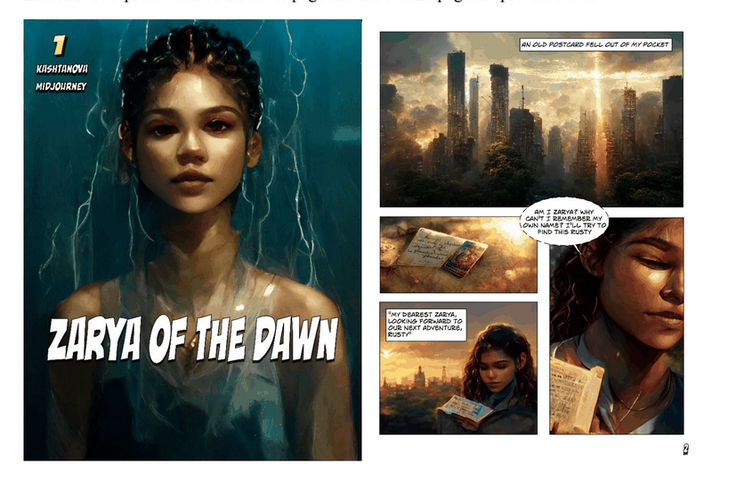
Al-generated images from ‘Zarya of the Dawn’

Excerpts from ‘Zarya of the Dawn’. Source: US Copyright Office

Since we have been ushered into the era of AI-generated art, the issue of copyright has been at the center of the debate. While some, like Kashtanova, argue that giving instructions to an AI is a creative act in itself, others disagree. It’s also worth remembering that this AI-generated art is preying on the work of other artists, scraped from the web without permission. And while there have been attempts to address this issue, it still looms large. Currently, two of the most popular text-to-image generators, Midjorney and Stable Diffusion, are both facing copyright infringement lawsuits.

OpenAI stops using customer data to train AI… but not users’

OpenAI, the mastermind behind ChatGPT and DALLE-E, has announced that it will stop harvesting data from companies that integrate its paid API by default. Previously, any data fed into the API could have been used to improve OpenAI’s services, unless the customer had specifically opted out of such sharing.

Now, OpenAI’s terms of service states that this will no longer be the case. “OpenAI will not use data submitted by customers via our API to train or improve our models unless you explicitly decide to share your data with us for this purpose”, the updated ToS reads. OpenAI now promises to only retain data sent through the API for a maximum of 30 days for “abuse and misuse monitoring purposes,” after which it says it will delete the data “unless otherwise required by law.”
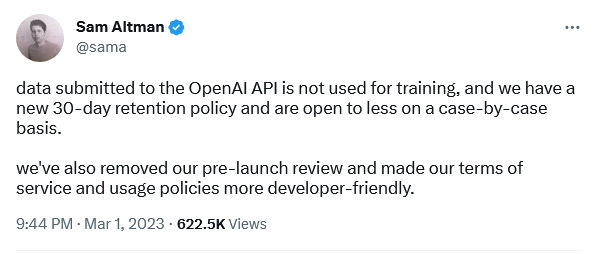
OpenAI’s CEO confirmed the policy change

The policy update is apparently intended to assuage fears about the privacy-bending nature of AI. However, it still doesn’t apply to regular users chatting with ChatGPT or experimenting with DALL-E. “For non-API consumer products like ChatGPT and DALL-E, we may use content such as prompts, responses, uploaded images, and generated images to improve our services,” OpenAI states on its website.

It’s rather unfortunate that regular users don’t get the same privacy protections as API customers, but, nevetherless, it’s still a step in the right direction by OpenAI.

All roads lead… to a home PC: LastPass spills the beans on mega-breach

LastPass, one of the world’s most popular password managers, has shed light on its recent breach that compromised users’ personal information. In an update, LastPass said that attackers hacked the home computer of one of its engineers who had access to the decryption keys for its cloud storage. The hackers used a vulnerability in media software on the engineer’s computer to install keylogger malware and steal his master password. This gave them access to sensitive user information such as billing and email addresses, end-user names and phone numbers, as well as encrypted vaults where passwords are stored. LastPass said that cracking users’ master passwords would likely take attackers “millions of years”, but some users could be at risk if they have weak or reused passwords.

The series of hacking incidents that have plagued LastPass reflects badly on the company. However, this does not mean that you should shy away from using password managers altogether. They are a much safer way to store your passwords than in a text file or on a piece of paper.


Podobał Ci się ten post?
AdGuard VPN AdGuard DNS AdGuard Mail AdGuard Wallet
Ekran główny AdGuard dla Windows
Ekran ochrony AdGuard dla Windows, pokazujący funkcje ochrony i ustawienia
Ekran statystyki AdGuard dla Windows, pokazujący statystyki zablokowanych reklam i trackery
Ekran Zarządzanie aplikacjami w AdGuard dla Windows, pokazujący opcje zarządzania ochroną dla aplikacji zainstalowanych na urządzeniu
20 753 20753 recenzje
Doskonały!

AdGuard dla Windows: bloker reklam na PC

AdGuard dla systemu Windows to coś więcej niż bloker reklam. To wielofunkcyjne narzędzie, które blokuje reklamy, kontroluje dostęp do niebezpiecznych stron, przyspiesza ładowanie stron i chroni dzieci przed nieodpowiednimi treściami
Pobierając program, akceptujesz warunki Umowy licencyjnej
Microsoft Store
Pobierając program, akceptujesz warunki Umowy licencyjnej
AdGuard na Windows v8.0, 14-dniowa wersja próbna
Ekran główny AdGuard dla Mac
Ekran Trybu ukrytego w AdGuard dla Mac
20 753 20753 recenzje
Doskonały!

AdGuard: bloker reklam na Maca

AdGuard dla Mac to wyjątkowy bloker reklam zaprojektowany z myślą o macOS. Oprócz ochrony przed uciążliwymi reklamami w przeglądarkach i aplikacjach chroni Cię przed śledzeniem, phishingiem i oszustwami
Pobierając program, akceptujesz warunki Umowy licencyjnej
Przeczytaj więcej
AdGuard na Mac v2.19, 14-dniowa wersja próbna
Ekran główny AdGuard dla Android
Ekran Ochrona przed śledzeniem w AdGuard dla Android
Ekran Zarządzanie aplikacjami w AdGuard dla Android, pokazujący opcje zarządzania ochroną dla aplikacji zainstalowanych na urządzeniu
Ekran statystyki AdGuard dla Android, pokazujący statystyki zablokowanych reklam i trackery
Ekran główny prywatnej przeglądarki AdGuard dla Android
Kod QR, aby pobierz AdGuard dla Android
20 753 20753 recenzje
Doskonały!

AdGuard: bloker reklam na Androida

Blokuje reklamy i moduły śledzące we wszystkich przeglądarkach, grach i innych aplikacjach. Chroni Twoją prywatność i pozwala kontrolować, w jaki sposób aplikacje korzystają z Internetu. Instalowane za pomocą pliku APK
Pobierając program, akceptujesz warunki Umowy licencyjnej
Przeczytaj więcej
Skanuj, aby pobrać
Użyj dowolnego czytnika kodów QR dostępnego w Twoim urządzeniu
AdGuard na Android v4.14, 14-dniowa wersja próbna
Ekran główny AdGuard dla iOS
Ekran ochrony AdGuard dla iOS, pokazujący funkcje ochrony i ustawienia
Ekran statystyki AdGuard dla iOS, pokazujący statystyki zablokowanych reklam i trackery
Kod QR, aby pobierz AdGuard dla iOS
20 753 20753 recenzje
Doskonały!

AdGuard na iOS: bloker reklam poza Safari

Najlepszy bloker reklam na iOS dla iPhone’a i iPada. AdGuard usuwa wszelkiego rodzaju reklamy i elementy śledzące w Safari oraz chroni Twoją prywatność we wszystkich aplikacjach na poziomie DNS
Pobierając program, akceptujesz warunki Umowy licencyjnej
Przeczytaj więcej
Skanuj, aby pobrać
Użyj dowolnego czytnika kodów QR dostępnego w Twoim urządzeniu
AdGuard na iOS v4.5
Ekran główny AdGuard Content Blocker
Ekran Filtry w AdGuard Content Blocker
Ekran ustawienia w AdGuard Content Blocker
20 753 20753 recenzje
Doskonały!

Blokada treści AdGuard

AdGuard Content Blocker eliminuje wszelkiego rodzaju reklamy w przeglądarkach mobilnych, które obsługują technologię blokowania treści — a mianowicie Samsung Internet i Yandex Browser. Jego funkcje są ograniczone w porównaniu z AdGuard na Androida, ale jest darmowy, łatwy w instalacji i wydajny

Pobierając program, akceptujesz warunki Umowy licencyjnej
Przeczytaj więcej
Blokada treści AdGuard v2.8
Ekran główny AdGuard Browser Extension
Ekran Ochrona przed śledzeniem w AdGuard Browser Extension
20 753 20753 recenzje
Doskonały!

Rozszerzenie przeglądarki AdGuard

AdGuard to najszybsze i najlżejsze rozszerzenie blokowania reklam, które skutecznie blokuje wszystkie typy reklam na wszystkich stronach internetowych! Wybierz AdGuard dla swojej przeglądarki i uzyskaj szybkie i bezpieczne przeglądanie Internetu pozbawione reklam.

Instalacja
Pobierając program, akceptujesz warunki Umowy licencyjnej
Instalacja
Pobierając program, akceptujesz warunki Umowy licencyjnej
Instalacja
Pobierając program, akceptujesz warunki Umowy licencyjnej
Instalacja
Pobierając program, akceptujesz warunki Umowy licencyjnej
Instalacja
Pobierając program, akceptujesz warunki Umowy licencyjnej
Przeczytaj więcej
Instalacja
Pobierając program, akceptujesz warunki Umowy licencyjnej
Przeczytaj więcej
Rozszerzenie przeglądarki AdGuard v5.5
Ekran główny Asystenta przeglądarki
20 753 20753 recenzje
Doskonały!

Asystent AdGuard

Towarzyszące rozszerzenie przeglądarki dla aplikacji desktopowych AdGuard. Umożliwia blokowanie niestandardowych elementów na stronach internetowych, dodawanie stron internetowych do listy dozwolonych i wysyłanie raportów bezpośrednio z przeglądarki
Asystent AdGuard v1.4
20 753 20753 recenzje
Doskonały!

AdGuard Home

AdGuard Home to sieciowe rozwiązanie do blokowania reklam i modułów śledzących. Zainstaluj go raz na routerze, aby objąć nim wszystkie urządzenia w sieci domowej — nie jest wymagane żadne dodatkowe oprogramowanie klienckie. Jest to szczególnie ważne w przypadku różnych urządzeń IoT, które często stanowią zagrożenie dla Twojej prywatności
AdGuard Home v0.107
Ekran główny AdGuard Pro dla iOS
Ekran Ochrona w AdGuard Pro dla iOS, pokazujący funkcje i ustawienia ochrony
Ekran statystyki w AdGuard Pro dla iOS, pokazujący statystyki zablokowanych reklam i trackerów
20 753 20753 recenzje
Doskonały!

AdGuard Pro dla iOS

AdGuard Pro na iOS oferuje wszystkie zaawansowane funkcje blokowania reklam. Oferuje te same narzędzia, co płatna wersja AdGuard na iOS. Doskonale blokuje reklamy w Safari i pozwala dostosować ustawienia DNS, aby dostosować poziom ochrony. Blokuje reklamy w przeglądarkach i aplikacjach, chroni dzieci przed nieodpowiednimi treściami i dba o bezpieczeństwo danych osobowych.
Pobierając program, akceptujesz warunki Umowy licencyjnej
Przeczytaj więcej
AdGuard Pro dla iOS v4.5
Ekran główny AdGuard Mini dla Mac
Ekran ochrony Safari w AdGuard Mini dla Mac
Ekran tworzenia reguły w AdGuard Mini dla Mac
20 753 20753 recenzje
Doskonały!

AdGuard Mini dla Mac — bloker reklam Safari

AdGuard Mini dla komputerów Mac to potężny bloker reklam w Safari. Ta lekka aplikacja usuwa reklamy, blokuje moduły śledzące i przyspiesza ładowanie stron. Umożliwia przeglądanie internetu w Safari bez rozpraszania uwagi i chroni prywatność danych
Instalacja
Pobierając program, akceptujesz warunki Umowy licencyjnej
Przeczytaj więcej
AdGuard Mini dla Mac v2.3
Ekran główny AdGuard dla Android TV z włączoną ochroną
Ekran blokowanie reklama AdGuard dla Android TV, pokazujący jego funkcje i ustawienia
Ekran ustawienia AdGuard dla Android TV
Ekran Zarządzanie aplikacjami AdGuard dla Android TV, pokazujący aplikacje, w których reklamy i trackery są zablokowane
20 753 20753 recenzje
Doskonały!

AdGuard dla Android TV

AdGuard dla Android TV to jedyna aplikacja, która blokuje reklamy, chroni prywatność i działa jak zapora sieciowa dla Smart TV. Otrzymuj ostrzeżenia o zagrożeniach internetowych, używaj bezpiecznego DNS i korzystaj z szyfrowanego ruchu. Zrelaksuj się i zanurz się w swoich ulubionych programach z najwyższej klasy zabezpieczeniami bez reklam!
AdGuard dla Android TV v4.14, 14-dniowa wersja próbna
Maskotka AdGuard, Agnar, trzymający pingwina Linux
20 753 20753 recenzje
Doskonały!

AdGuard dla Linux

AdGuard for Linux to pierwszy na świecie systemowy bloker reklam dla systemu Linux. Blokuj reklamy i elementy śledzące na poziomie urządzenia, wybieraj spośród wstępnie zainstalowanych filtrów lub dodawaj własne — wszystko za pośrednictwem interfejsu wiersza poleceń
AdGuard dla Linux v1.4
20 753 20753 recenzje
Doskonały!

AdGuard Temp Mail

Darmowy generator tymczasowych adresów e-mail, który zapewnia anonimowość i chroni prywatność. Brak spamu w głównej skrzynce odbiorczej!
20 753 20753 recenzje
Doskonały!

AdGuard VPN

75 lokalizacji na świecie

Dostęp do wszelkich treści

Silne szyfrowanie

Polityka braku logów

Najszybsze połączenie

Wsparcie 24/7

Wypróbuj za darmo
Pobierając program, akceptujesz warunki Umowy licencyjnej
Przeczytaj więcej
20 753 20753 recenzje
Doskonały!

AdGuard DNS

AdGuard DNS to alternatywne rozwiązanie do blokowania reklam, ochrony prywatności i kontroli rodzicielskiej. Łatwy w konfiguracji i darmowy, zapewnia niezbędną minimalną ochronę przed reklamami, śledzeniem i phishingiem, bez względu na platformę i urządzenie, z którego korzystasz.
20 753 20753 recenzje
Doskonały!

AdGuard Mail

Chroń swoją tożsamość, unikaj spamu i zabezpiecz swoją skrzynkę odbiorczą dzięki naszym aliasom i tymczasowym adresom e-mail. Skorzystaj z naszej bezpłatnej usługi przekazywania e-maili oraz aplikacji na wszystkie systemy operacyjne
20 753 20753 recenzje
Doskonały!

AdGuard Wallet

Bezpieczny i prywatny portfel kryptowalutowy, który daje Ci pełną kontrolę nad Twoimi aktywami. Zarządzaj wieloma portfelami i odkrywaj tysiące kryptowalut, aby je przechowywać, wysyłać i wymieniać
Rozpoczęto pobieranie AdGuard Kliknij przycisk wskazany strzałką, aby rozpocząć instalację Wybierz „Otwórz” i kliknij „OK”. Poczekaj aż plik zostanie pobrany. W otwartym oknie, przeciągnij ikonę AdGuard do folderu „Aplikacje”. Dziękujemy za wybrania AdGuard! Wybierz „Otrwórz” i kliknij „OK”. Poczekaj aż plik zostanie pobrany. W otwartym kliknij „Instaluj”. Dziękujemy za wybrania AdGuard!
Zainstaluj również AdGuard dla urządzeń mobilnych
















































