Musk taking over Twitter has created chaos. Will he make order out of it?

Some thought that this day would never come, but on October 27 billionaire entreprenuer Elon Musk officially closed the deal with Twitter, acquiring the social media company for $44 billion. Musk took the reins in rather dramatic fashion, showing the entire Twitter board of directors the door and making himself its sole director and CEO (presumably temporarily).

After becoming the Chief Twit, Musk unveiled his plan to change the platform’s monetization model via premium subscriptions. About 90% of Twitter’s revenue currently comes from advertising, and Twitter’s overreliance on ad money along with its spam bots have always been one of Musk’s biggest pet peeves.

Faced with the irreversable fact of Musk’s takeover, the Twittersphere descended into chaos. Users have envisaged doomsday scenarios in which Twitter would become a “cesspool of vitriol and hatred”, free of any regulation, and accused Musk of trying to turn it into “a money grabbing cash machine.”

With Musk taking his first steps at Twitter, only time will tell whether he breathes new life into the platform or indeed puts the final nail into its coffin. Musk himself declared that he added Twitter to his already extensive portfolio of assets not to make more money, but to “try to help humanity” and that he does not rule out that he fails in this quest. There is “a very real possibility” of that, according to the entrepreneur himself.

Still, Musk’s vision for Twitter’s future as a freemium service is spot-on. However, there are just too many variables that one has to take into account to bet on his success.

Moving away from ad-based monetization model

Musk had been talking about how he would change Twitter at length even before he bought the company. But the only proposal the auto tycon has given specific details about so far is how he plans to steer Twitter away from its ad-driven monetization model.
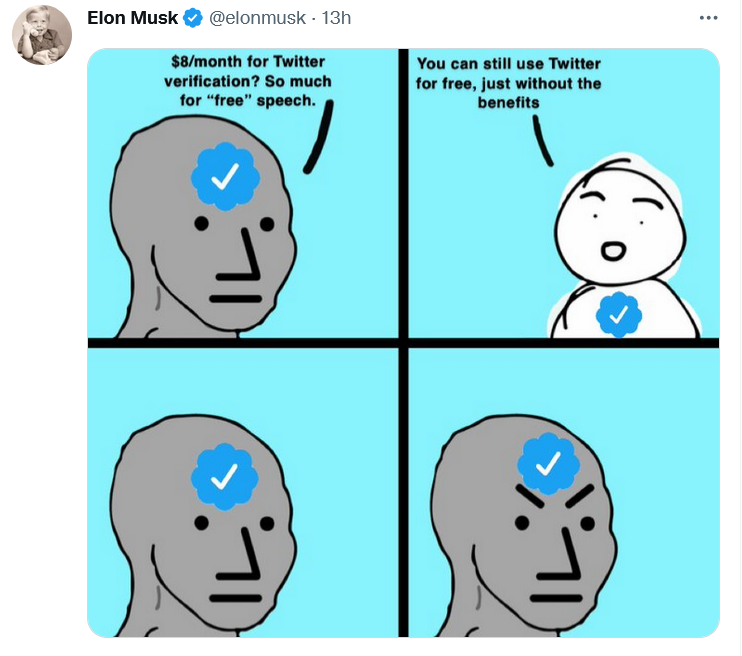
Musk explained Twitter’s freemium model in his favorite way — with a meme

In a series of tweets on November 1, Musk blasted the Twitter verification system as unfair. “Twitter’s current lords & peasants system for who has or doesn’t have a blue checkmark is bullshit,” the billionaire wrote.

To open up verification to all users, Musk suggested making the blue checkmark part of a paid Twitter Blue subscription. Launched last June, Twitter Blue is so far only available in the US, Canada, Australia, and New Zealand. Subscribers pay a monthly fee adjusted for the region. In the US, the fee amounts to $4.99/month.

As of now, Twitter requires an account to be “authentic,”“notable,” and “active” for a blue tick to be bestowed upon it. The allocation of verification badges and their removal is solely at Twitter’s discretion. The practice sparked controversy in the past: in 2016 Twitter “unverified” the account of right-wing personality Milo Yiannopoulos, fuelling the debate about censorship on the platform.

Good value for money finally or a rip-off?

Although Twitter Blue went live more than a year ago, the revenue stream from the company’s original attempt to diversify its monetization model has been more of a trickle. Sensor Tower estimated that Twitter Blue generated only $6.4 million in global spending to date, a drop in the ocean compared to Twitter’s annual revenue of $5.08 billion in 2021. Now Musk, apparently, wants to turn Twitter Blue into something worth paying for. Whether he succeeds in doing so or kills Twitter while trying, is a very big question.

Twitter Blue currently does offer a number of useful features, but they have failed to win over power users. Subscribers can already save tweets to bookmarks, undo a tweet within up to 60 seconds of sending it, read long threads as a single page of text, customize the navigation bar, and get instant access to the most-shared articles from people they follow. Most recently, Twitter Blue allowed subscribers in Australia, Canada, and New Zealand to edit tweets up to five times in 30 minutes after posting.

Musk proposed increasing the Twitter Blue fee from $4.5 to $8 a month in the US, but he also touted additional features that should turn things around for the paid service.

Apart from the blue tick, subscribers will get priority in replies, mentions and search. They will also be able to post longer videos and audios, as well as gain access to paywalled content from publishers willing to partner with Twitter.
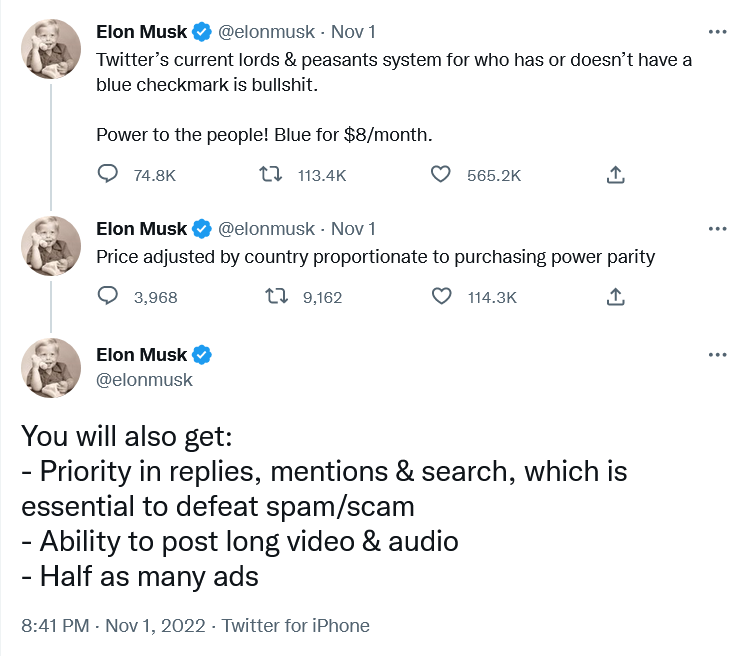
Musk unveiled his plan for Twitter monetization…on Twitter

According to different estimates, there are from 300,000 up to 400,000 verified accounts on Twitter. In the second quarter of 2022, Twitter reported 237 million monetizable daily users. It’s unclear how many of them will buy into the Musk vision, and will be ready to pay for it from their own pockets.

Under Musk’s plan, public figures should remain recognizable even if they do not pay for the subscription. Twitter would add “a secondary tag” below their names, “which is already the case for politicians,” according to Musk. Apparently, the Twitter CEO referred to the labels for government and state-affiliated media accounts Twitter introduced back in 2020.

Fewer ads for subscribers

Most interesting for regular users, perhaps, is that subscribers will see fewer distractions, namely, “half as many ads.”

Some may consider this as a letdown from a man who once said that he “hates advertising.”. In a since deleted Twitter thread from April, Musk proposed essentially the same model, but suggested that those who sign up for Twitter Blue should see no ads at all.

“The power of corporations to dictate policy is greatly enhanced if Twitter depends on advertising money to survive,” Musk tweeted at the time.
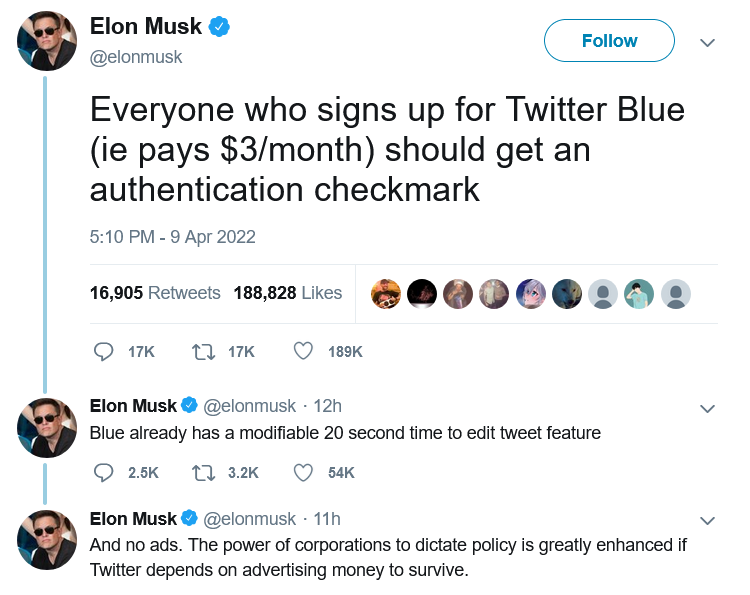
Half a year before becoming Twitter CEO, Musk suggested disabling ads for Twitter Blue subscribers

At the moment, though, Twitter Blue subscribers are being bombarded with the same amount of ads as non-subscribers. So, Musk’s decision can be seen as a step in the right direction.

According to Musk, the new system should enable Twitter to “defeat spam/scam on the platform”, as well as provide it with a “revenue stream to reward content creators.”

Ads will not go away, so won’t content moderation

After ascending to the Twitter throne, Musk has softened his stance towards advertisers. On the same day the Twitter deal was officially done and dusted, Musk addressed the advertising industry in a Twitter post titled “Dear Twitter Advertisers.”

“There has been much speculation about why I bought Twitter and what I think about advertising. Most of it has been wrong,”Musk wrote. The billionaire, who is known as a vocal advocate of the freedom of speech, added that while he wants the platform to be “warm and welcoming to all,” it won’t be completely free of regulation. “Twitter obviously cannot become a free-for-all hellspace, where anything can be said for no consequences!”

Musk then made it clear that advertisers will stay on the platform, but hinted that the rules for how they conduct their business can change. “It is essentially to show Twitter users advertising that is as relevant as possible to their needs. Low relevancy ads are spam, but highly relevant ads are actually content!” Musk went on to write.

The post was too sketchy on details as far as the future of ads on Twitter is concerned. Musk said that he wants to make Twitter “the most respected advertising platform in the world,” and judging by his previous rhetoric it is unlikely to mean harvesting more personal data without user consent. Hopefully, quite the opposite.

Meanwhile, individual companies, such as automaker GM (which, incidentally, is a Tesla competitor), have decided to suspend advertising on Twitter. It is unclear how many advertisers will decide to stick with the platform when the dust settles.

What to expect next?

It remains to be seen if Musk comes back to various proposals he’d made while still not at the helm of Twitter. One of them is to introduce end-to-end encryption for Twitter DMs like in the privacy-first Signal messanger. Another is to make Twitter algorithms open source. If Musk brings these ideas of his to life, Twitter would become more private and secure.

Given that Musk, however successful his other business ventures may be, is rather unpredictable, it’s difficult to gauge what will come out of his great Twitter gamble.

But a pivot from an ad-based revenue model to a model based on paid subscriptions is also pivot to more privacy. If Twitter’s revenue no longer fully depends on advertising, big corporations will have less sway over the company, and Twitter — fewer incentives to sell user data.
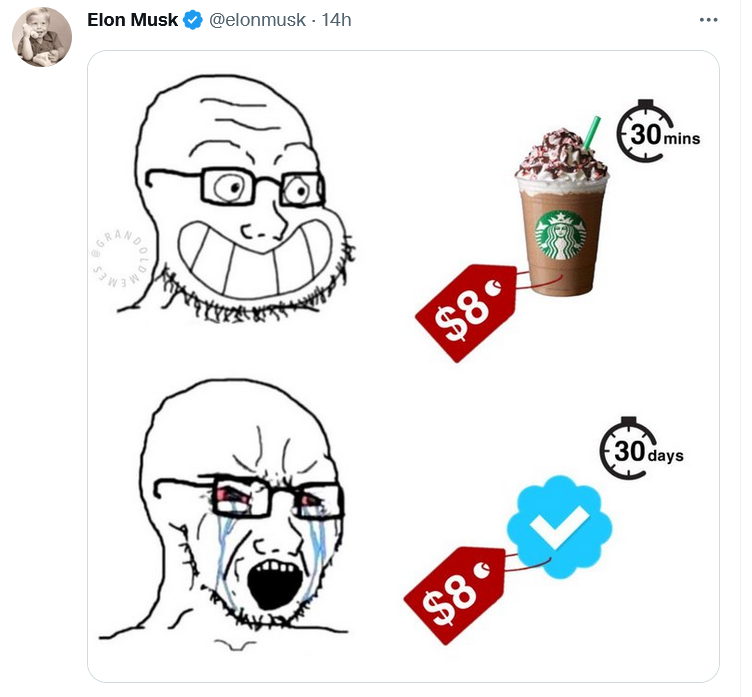
Musk compared the proposed Twitter subscription fee to a price of one cup of coffee

Whether the new model takes off, and what shape it will take in the end, one can only guess. Right now the odds are not in Musk’s favor, but no one becomes the richest man in the world for nothing. Much will depend on how Musk uses his personal marketing appeal to sell Twitter Blue to users, whether and how quickly he adds new features, and how well he listens to feedback. For now, everything is still up in the air. For example, it’s unclear how many ads are “half as many ads” exactly, and whether all the new proposed features would be enough to convince users to pay for a subscription.

As for the price tag, $8 is less than the cost of a few cups of coffee. It’s more about whether Musk will be able to sweeten the deal up enough.


Podobał Ci się ten post?
AdGuard VPN AdGuard DNS AdGuard Mail AdGuard Wallet
Ekran główny AdGuard dla Windows
Ekran ochrony AdGuard dla Windows, pokazujący funkcje ochrony i ustawienia
Ekran statystyki AdGuard dla Windows, pokazujący statystyki zablokowanych reklam i trackery
Ekran Zarządzanie aplikacjami w AdGuard dla Windows, pokazujący opcje zarządzania ochroną dla aplikacji zainstalowanych na urządzeniu
20 753 20753 recenzje
Doskonały!

AdGuard dla Windows: bloker reklam na PC

AdGuard dla systemu Windows to coś więcej niż bloker reklam. To wielofunkcyjne narzędzie, które blokuje reklamy, kontroluje dostęp do niebezpiecznych stron, przyspiesza ładowanie stron i chroni dzieci przed nieodpowiednimi treściami
Pobierając program, akceptujesz warunki Umowy licencyjnej
Microsoft Store
Pobierając program, akceptujesz warunki Umowy licencyjnej
AdGuard na Windows v8.0, 14-dniowa wersja próbna
Ekran główny AdGuard dla Mac
Ekran Trybu ukrytego w AdGuard dla Mac
20 753 20753 recenzje
Doskonały!

AdGuard: bloker reklam na Maca

AdGuard dla Mac to wyjątkowy bloker reklam zaprojektowany z myślą o macOS. Oprócz ochrony przed uciążliwymi reklamami w przeglądarkach i aplikacjach chroni Cię przed śledzeniem, phishingiem i oszustwami
Pobierając program, akceptujesz warunki Umowy licencyjnej
Przeczytaj więcej
AdGuard na Mac v2.19, 14-dniowa wersja próbna
Ekran główny AdGuard dla Android
Ekran Ochrona przed śledzeniem w AdGuard dla Android
Ekran Zarządzanie aplikacjami w AdGuard dla Android, pokazujący opcje zarządzania ochroną dla aplikacji zainstalowanych na urządzeniu
Ekran statystyki AdGuard dla Android, pokazujący statystyki zablokowanych reklam i trackery
Ekran główny prywatnej przeglądarki AdGuard dla Android
Kod QR, aby pobierz AdGuard dla Android
20 753 20753 recenzje
Doskonały!

AdGuard: bloker reklam na Androida

Blokuje reklamy i moduły śledzące we wszystkich przeglądarkach, grach i innych aplikacjach. Chroni Twoją prywatność i pozwala kontrolować, w jaki sposób aplikacje korzystają z Internetu. Instalowane za pomocą pliku APK


Pobierając program, akceptujesz warunki Umowy licencyjnej
Przeczytaj więcej
Skanuj, aby pobrać
Użyj dowolnego czytnika kodów QR dostępnego w Twoim urządzeniu
AdGuard na Android v4.14, 14-dniowa wersja próbna
Ekran główny AdGuard dla iOS
Ekran ochrony AdGuard dla iOS, pokazujący funkcje ochrony i ustawienia
Ekran statystyki AdGuard dla iOS, pokazujący statystyki zablokowanych reklam i trackery
Kod QR, aby pobierz AdGuard dla iOS
20 753 20753 recenzje
Doskonały!

AdGuard na iOS: bloker reklam poza Safari

Najlepszy bloker reklam na iOS dla iPhone’a i iPada. AdGuard usuwa wszelkiego rodzaju reklamy i elementy śledzące w Safari oraz chroni Twoją prywatność we wszystkich aplikacjach na poziomie DNS
Pobierając program, akceptujesz warunki Umowy licencyjnej
Przeczytaj więcej
Skanuj, aby pobrać
Użyj dowolnego czytnika kodów QR dostępnego w Twoim urządzeniu
AdGuard na iOS v4.5
Ekran główny AdGuard Content Blocker
Ekran Filtry w AdGuard Content Blocker
Ekran ustawienia w AdGuard Content Blocker
20 753 20753 recenzje
Doskonały!

Blokada treści AdGuard

AdGuard Content Blocker eliminuje wszelkiego rodzaju reklamy w przeglądarkach mobilnych, które obsługują technologię blokowania treści — a mianowicie Samsung Internet i Yandex Browser. Jego funkcje są ograniczone w porównaniu z AdGuard na Androida, ale jest darmowy, łatwy w instalacji i wydajny
Pobierając program, akceptujesz warunki Umowy licencyjnej
Przeczytaj więcej
Blokada treści AdGuard v2.8
Ekran główny AdGuard Browser Extension
Ekran Ochrona przed śledzeniem w AdGuard Browser Extension
20 753 20753 recenzje
Doskonały!

Rozszerzenie przeglądarki AdGuard

AdGuard to najszybsze i najlżejsze rozszerzenie blokowania reklam, które skutecznie blokuje wszystkie typy reklam na wszystkich stronach internetowych! Wybierz AdGuard dla swojej przeglądarki i uzyskaj szybkie i bezpieczne przeglądanie Internetu pozbawione reklam.
Instalacja
Pobierając program, akceptujesz warunki Umowy licencyjnej
Instalacja
Pobierając program, akceptujesz warunki Umowy licencyjnej
Instalacja
Pobierając program, akceptujesz warunki Umowy licencyjnej
Instalacja
Pobierając program, akceptujesz warunki Umowy licencyjnej
Instalacja
Pobierając program, akceptujesz warunki Umowy licencyjnej
Przeczytaj więcej
Instalacja
Pobierając program, akceptujesz warunki Umowy licencyjnej
Przeczytaj więcej
Rozszerzenie przeglądarki AdGuard v5.5
Ekran główny Asystenta przeglądarki
20 753 20753 recenzje
Doskonały!

Asystent AdGuard

Towarzyszące rozszerzenie przeglądarki dla aplikacji desktopowych AdGuard. Umożliwia blokowanie niestandardowych elementów na stronach internetowych, dodawanie stron internetowych do listy dozwolonych i wysyłanie raportów bezpośrednio z przeglądarki
Asystent AdGuard v1.4
20 753 20753 recenzje
Doskonały!

AdGuard Home

AdGuard Home to sieciowe rozwiązanie do blokowania reklam i modułów śledzących. Zainstaluj go raz na routerze, aby objąć nim wszystkie urządzenia w sieci domowej — nie jest wymagane żadne dodatkowe oprogramowanie klienckie. Jest to szczególnie ważne w przypadku różnych urządzeń IoT, które często stanowią zagrożenie dla Twojej prywatności
AdGuard Home v0.107
Ekran główny AdGuard Pro dla iOS
Ekran Ochrona w AdGuard Pro dla iOS, pokazujący funkcje i ustawienia ochrony
Ekran statystyki w AdGuard Pro dla iOS, pokazujący statystyki zablokowanych reklam i trackerów
20 753 20753 recenzje
Doskonały!

AdGuard Pro dla iOS

AdGuard Pro na iOS oferuje wszystkie zaawansowane funkcje blokowania reklam. Oferuje te same narzędzia, co płatna wersja AdGuard na iOS. Doskonale blokuje reklamy w Safari i pozwala dostosować ustawienia DNS, aby dostosować poziom ochrony. Blokuje reklamy w przeglądarkach i aplikacjach, chroni dzieci przed nieodpowiednimi treściami i dba o bezpieczeństwo danych osobowych.
Pobierając program, akceptujesz warunki Umowy licencyjnej
Przeczytaj więcej
AdGuard Pro dla iOS v4.5
Ekran główny AdGuard Mini dla Mac
Ekran ochrony Safari w AdGuard Mini dla Mac
Ekran tworzenia reguły w AdGuard Mini dla Mac
20 753 20753 recenzje
Doskonały!

AdGuard Mini dla Mac — bloker reklam Safari

AdGuard Mini dla komputerów Mac to potężny bloker reklam w Safari. Ta lekka aplikacja usuwa reklamy, blokuje moduły śledzące i przyspiesza ładowanie stron. Umożliwia przeglądanie internetu w Safari bez rozpraszania uwagi i chroni prywatność danych
Instalacja
Pobierając program, akceptujesz warunki Umowy licencyjnej
Przeczytaj więcej
AdGuard Mini dla Mac v2.3
Ekran główny AdGuard dla Android TV z włączoną ochroną
Ekran blokowanie reklama AdGuard dla Android TV, pokazujący jego funkcje i ustawienia
Ekran ustawienia AdGuard dla Android TV
Ekran Zarządzanie aplikacjami AdGuard dla Android TV, pokazujący aplikacje, w których reklamy i trackery są zablokowane
20 753 20753 recenzje
Doskonały!

AdGuard dla Android TV

AdGuard dla Android TV to jedyna aplikacja, która blokuje reklamy, chroni prywatność i działa jak zapora sieciowa dla Smart TV. Otrzymuj ostrzeżenia o zagrożeniach internetowych, używaj bezpiecznego DNS i korzystaj z szyfrowanego ruchu. Zrelaksuj się i zanurz się w swoich ulubionych programach z najwyższej klasy zabezpieczeniami bez reklam!
AdGuard dla Android TV v4.14, 14-dniowa wersja próbna
Maskotka AdGuard, Agnar, trzymający pingwina Linux
20 753 20753 recenzje
Doskonały!

AdGuard dla Linux

AdGuard for Linux to pierwszy na świecie systemowy bloker reklam dla systemu Linux. Blokuj reklamy i elementy śledzące na poziomie urządzenia, wybieraj spośród wstępnie zainstalowanych filtrów lub dodawaj własne — wszystko za pośrednictwem interfejsu wiersza poleceń
AdGuard dla Linux v1.4
20 753 20753 recenzje
Doskonały!

AdGuard Temp Mail

Darmowy generator tymczasowych adresów e-mail, który zapewnia anonimowość i chroni prywatność. Brak spamu w głównej skrzynce odbiorczej!
20 753 20753 recenzje
Doskonały!

AdGuard VPN

75 lokalizacji na świecie

Dostęp do wszelkich treści

Silne szyfrowanie

Polityka braku logów

Najszybsze połączenie

Wsparcie 24/7

Wypróbuj za darmo
Pobierając program, akceptujesz warunki Umowy licencyjnej
Przeczytaj więcej
20 753 20753 recenzje
Doskonały!

AdGuard DNS

AdGuard DNS to alternatywne rozwiązanie do blokowania reklam, ochrony prywatności i kontroli rodzicielskiej. Łatwy w konfiguracji i darmowy, zapewnia niezbędną minimalną ochronę przed reklamami, śledzeniem i phishingiem, bez względu na platformę i urządzenie, z którego korzystasz.
20 753 20753 recenzje
Doskonały!

AdGuard Mail

Chroń swoją tożsamość, unikaj spamu i zabezpiecz swoją skrzynkę odbiorczą dzięki naszym aliasom i tymczasowym adresom e-mail. Skorzystaj z naszej bezpłatnej usługi przekazywania e-maili oraz aplikacji na wszystkie systemy operacyjne
20 753 20753 recenzje
Doskonały!

AdGuard Wallet

Bezpieczny i prywatny portfel kryptowalutowy, który daje Ci pełną kontrolę nad Twoimi aktywami. Zarządzaj wieloma portfelami i odkrywaj tysiące kryptowalut, aby je przechowywać, wysyłać i wymieniać
Rozpoczęto pobieranie AdGuard Kliknij przycisk wskazany strzałką, aby rozpocząć instalację Wybierz „Otwórz” i kliknij „OK”. Poczekaj aż plik zostanie pobrany. W otwartym oknie, przeciągnij ikonę AdGuard do folderu „Aplikacje”. Dziękujemy za wybrania AdGuard! Wybierz „Otrwórz” i kliknij „OK”. Poczekaj aż plik zostanie pobrany. W otwartym kliknij „Instaluj”. Dziękujemy za wybrania AdGuard!
Zainstaluj również AdGuard dla urządzeń mobilnych
















































