Elon, what the ad?? Unmarked ads flood X

Since he took over Twitter a year ago, Elon Musk has made a lot of unpopular decisions. The billionaire has turned the once-coveted verification check into a pay-for-play feature, restricted (presumably temporarily) the number of posts users can see, ended free access to the Twitter API, and is seriously considering introducing $1 annual fee for all new users. And, lest we forget, he rebranded the blue, homey Twitter into a bland black-and-white “X,” a symbol straight out of the Aughts (hi, XTina and X-men) that Musk has long been obsessed with.

Musk’s grand vision of turning X into an “everything app,” similar to China’s WeChat, has been met with skepticism at best, while X’s ad revenue, the company’s main source of income by far, has been falling 55% each month year-on-year.

This alone makes for a pretty dismal record for the first year of Musk’s reign.

While previous moves have been controversial, but one could argue not completely unjustified, the latest one should, and hopefully will, draw universal condemnation. Apparently, X is now experimenting with removing “ad” labels from regular ads as well as introducing ads that cannot be reported at all.

Undercover ads

Since early September, users have been reporting en masse that some of the ads they saw in their algorithmic “for me” feed and “following” feed were missing ad labels.

The only difference between these unlabelled and regular ads was that they were not marked as such. If the user was shrewd enough to figure out that an unlabelled post was in fact an ad and not an organic result, they could click on a three-dot menu in the top right corner of the post and report it.
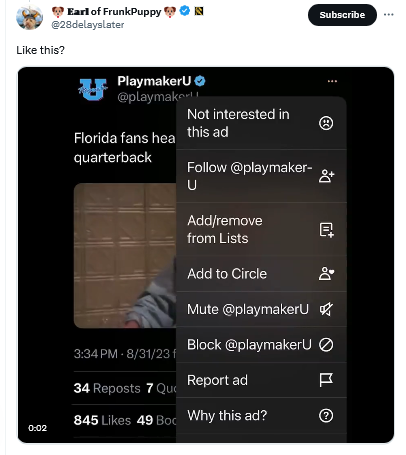
An unmarked X ad

Mashable was first on the story. It noted, giving Musk the benefit of the doubt, that it was “unclear if X, under owner Elon Musk, decided to remove these ad labels or if this is a temporary glitch.”

Judging by how the situation evolved over the next several weeks, the theory that it was a simple glitch seems increasingly unlikely.

About a month later, X users began noticing an even less transparent and more spammy ad format. These low-quality ads were posted by inactive accounts with no username and a profile picture that was a cropped version of the image in the post. The three-dot menu was also missing, making it impossible for users to block or report these ads.
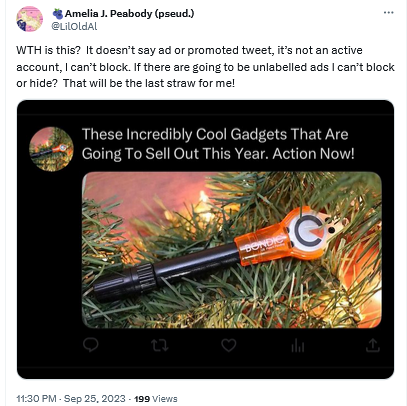
A spammy X ad without labels

We have not seen such ads ourselves, but according to Mashable, clicking on any part of these ads would redirect users to a third-party website. Mashable also reported that there was no mention of this new ad format in X’s ad inventory, which suggested that the ads came from a server of an external ad provider, not from X’s own servers.

X has not provided any explanation as to what is happening to its ads, but it is definitely something fishy. The Wired pointed out, the failure of X to clearly mark ads as ads can land it in trouble with the law, specifically the US Federal Trade Commission Act. The law requires companies to accompany ads with relevant disclosures to prevent that from being “deceptive.” And in the case of Twitter’s new ad formats these disclosures are nowhere to be seen, which makes the ads potentially illegal.

How it all started

X’s experiment with new ad formats and labeling (or rather, the lack thereof) did not come out of the blue. It’s been a slow progression from more obvious labels — to less obvious — and now, to no labels at all.

In fact, Twitter’s ad labels had not changed much for about ten years. When the platform first introduced ads in 2011, they were accompanied by the tag “Promoted” and a yellow arrow in the bottom left corner.
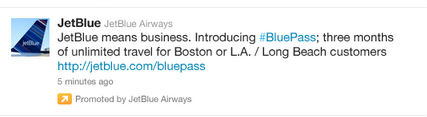
An old Twitter ad

Source: TechCrunch

These ads were displayed only to those users who already followed the advertiser’s account.

In the years that followed, the arrow lost its distinctive yellow color and took on a more subtle gray hue.
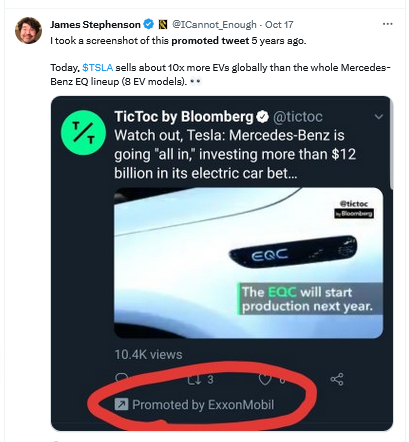
Twitter made the yellow arrow grey

And earlier this year, X changed the look of its ad labels again. It replaced the “promoted” tag in the bottom left corner with the tiny “ad” label in the top right corner, and got rid of the arrow. The new, much more subtle label was not well received by users, who argued that it was harder to spot, but the change stuck.
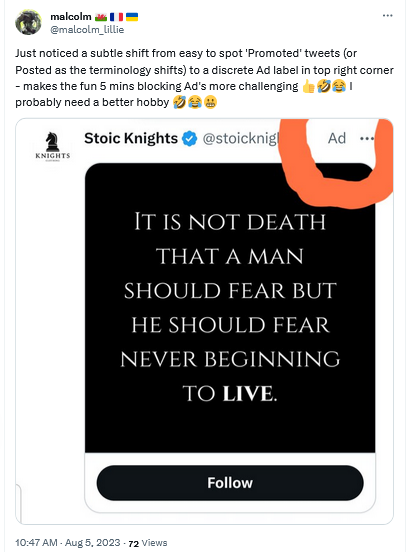
X replaced the 'promoted' tag with the 'ad' tag

It’s not that X is doing something unprecedented by making ad labels less prominent and promoted results less indistinguishable from organic results. Google has been at the forefront of this trend for years. But no one before has had the audacity to get rid of ad labels altogether (federal regulators, anyone?). And this is where X could set a precedent that, if they are allowed to set it, many will be tempted to follow.

Why is X doing that?

There are several possible explanations for X’s Schrödinger labels, and the most obvious one is that by removing the labels, X wants to increase engagement with the ads. The bet is that people who are misled into thinking that the ads are regular posts will click on them, which in turn will increase the click-through rate (CTR) and thus X’s ad revenue.

At first glance, this seems like a desperate move. But Musk, or whoever is in charge of this test, probably thinks that desperate times call for desperate measures. And what are desperate times if not when the majority of advertisers who returned to X reportedly spend 90% less than before. Add to that Musk’s increasing desire to blame X’s ad woes on someone else: first it was the Anti-Defamation League, and now the war in the Middle East.

As for where these spammy ads without handles might be coming from, Mashable pointed out that they are likely being seeded by X’s new third-party ad partners. These are Google and inMobi. Last month, Google confirmed that X would be using its programmatic platform, Google Ad Manager, to sell some of the unclaimed ad space on X’s home feed.

A less likely explanation for X’s new ad labels is a series of terrible glitches that the company (for some reason) has been unable to fix for over a month. While this explanation may seem preposterous, we would not rule it out: remember, we’re still talking about the company which at one point laid off 80% of its employees.

Another one is that Musk is probably testing the waters with regulators. In other words, X may want to see how far it can push the envelope with the government until it gets a slap on the wrist, or something more painful.

Are they possible to block?

X’s testing of these two new ad formats is a worrying development, as it makes ads more intrusive and less transparent. We hope that the regulators take notice, and intervene soon. We also hope that other platforms will not follow X’s example.

The AdGuard Ad Blocker app can block regular ads if X is opened in your browser, including on mobile devices. Note that if you have an Android device, you can block ads in any browser with AdGuard. As for iOS devices, you can only block ads in Safari with AdGuard.

Keep in mind: AdGuard DNS, or any other ad-blocking DNS for that matter, won’t be able to block ads on Twitter (or similar services like YouTube or Instagram) because Twitter uses the same DNS server to serve both ads and all other content.

We have not encountered X’s new ad formats yet, but based on the reports we’ve seen, we cannot rule out that AdGuard may not be able to block unlabelled ads that still have a three-dot menu with the existing filtering rules. However, we’re fairly confident that as soon as X rolls out this new ad format for a wider audience, we will be able to adapt and block these ads as well.

As for the “spammy-looking” ads that are presumably served by third-party networks, AdGuard should be able to block them with current filtering rules.


Podobał Ci się ten post?
AdGuard VPN AdGuard DNS AdGuard Mail AdGuard Wallet
Ekran główny AdGuard dla Windows
Ekran ochrony AdGuard dla Windows, pokazujący funkcje ochrony i ustawienia
Ekran statystyki AdGuard dla Windows, pokazujący statystyki zablokowanych reklam i trackery
Ekran Zarządzanie aplikacjami w AdGuard dla Windows, pokazujący opcje zarządzania ochroną dla aplikacji zainstalowanych na urządzeniu
20 752 20752 recenzje
Doskonały!

AdGuard dla Windows: bloker reklam na PC

AdGuard dla systemu Windows to coś więcej niż bloker reklam. To wielofunkcyjne narzędzie, które blokuje reklamy, kontroluje dostęp do niebezpiecznych stron, przyspiesza ładowanie stron i chroni dzieci przed nieodpowiednimi treściami

Pobierając program, akceptujesz warunki Umowy licencyjnej
Microsoft Store
Pobierając program, akceptujesz warunki Umowy licencyjnej
AdGuard na Windows v8.0, 14-dniowa wersja próbna
Ekran główny AdGuard dla Mac
Ekran Trybu ukrytego w AdGuard dla Mac
20 752 20752 recenzje
Doskonały!

AdGuard: bloker reklam na Maca

AdGuard dla Mac to wyjątkowy bloker reklam zaprojektowany z myślą o macOS. Oprócz ochrony przed uciążliwymi reklamami w przeglądarkach i aplikacjach chroni Cię przed śledzeniem, phishingiem i oszustwami
Pobierając program, akceptujesz warunki Umowy licencyjnej
Przeczytaj więcej
AdGuard na Mac v2.19, 14-dniowa wersja próbna
Ekran główny AdGuard dla Android
Ekran Ochrona przed śledzeniem w AdGuard dla Android
Ekran Zarządzanie aplikacjami w AdGuard dla Android, pokazujący opcje zarządzania ochroną dla aplikacji zainstalowanych na urządzeniu
Ekran statystyki AdGuard dla Android, pokazujący statystyki zablokowanych reklam i trackery
Ekran główny prywatnej przeglądarki AdGuard dla Android
Kod QR, aby pobierz AdGuard dla Android
20 752 20752 recenzje
Doskonały!

AdGuard: bloker reklam na Androida

Blokuje reklamy i moduły śledzące we wszystkich przeglądarkach, grach i innych aplikacjach. Chroni Twoją prywatność i pozwala kontrolować, w jaki sposób aplikacje korzystają z Internetu. Instalowane za pomocą pliku APK
Pobierając program, akceptujesz warunki Umowy licencyjnej
Przeczytaj więcej
Skanuj, aby pobrać
Użyj dowolnego czytnika kodów QR dostępnego w Twoim urządzeniu
AdGuard na Android v4.14, 14-dniowa wersja próbna
Ekran główny AdGuard dla iOS
Ekran ochrony AdGuard dla iOS, pokazujący funkcje ochrony i ustawienia
Ekran statystyki AdGuard dla iOS, pokazujący statystyki zablokowanych reklam i trackery
Kod QR, aby pobierz AdGuard dla iOS
20 752 20752 recenzje
Doskonały!

AdGuard na iOS: bloker reklam poza Safari

Najlepszy bloker reklam na iOS dla iPhone’a i iPada. AdGuard usuwa wszelkiego rodzaju reklamy i elementy śledzące w Safari oraz chroni Twoją prywatność we wszystkich aplikacjach na poziomie DNS
Pobierając program, akceptujesz warunki Umowy licencyjnej
Przeczytaj więcej
Skanuj, aby pobrać
Użyj dowolnego czytnika kodów QR dostępnego w Twoim urządzeniu
AdGuard na iOS v4.5
Ekran główny AdGuard Content Blocker
Ekran Filtry w AdGuard Content Blocker
Ekran ustawienia w AdGuard Content Blocker
20 752 20752 recenzje
Doskonały!

Blokada treści AdGuard

AdGuard Content Blocker eliminuje wszelkiego rodzaju reklamy w przeglądarkach mobilnych, które obsługują technologię blokowania treści — a mianowicie Samsung Internet i Yandex Browser. Jego funkcje są ograniczone w porównaniu z AdGuard na Androida, ale jest darmowy, łatwy w instalacji i wydajny
Pobierając program, akceptujesz warunki Umowy licencyjnej
Przeczytaj więcej
Blokada treści AdGuard v2.8
Ekran główny AdGuard Browser Extension
Ekran Ochrona przed śledzeniem w AdGuard Browser Extension
20 752 20752 recenzje
Doskonały!

Rozszerzenie przeglądarki AdGuard

AdGuard to najszybsze i najlżejsze rozszerzenie blokowania reklam, które skutecznie blokuje wszystkie typy reklam na wszystkich stronach internetowych! Wybierz AdGuard dla swojej przeglądarki i uzyskaj szybkie i bezpieczne przeglądanie Internetu pozbawione reklam.
Instalacja
Pobierając program, akceptujesz warunki Umowy licencyjnej
Instalacja
Pobierając program, akceptujesz warunki Umowy licencyjnej
Instalacja
Pobierając program, akceptujesz warunki Umowy licencyjnej
Instalacja
Pobierając program, akceptujesz warunki Umowy licencyjnej
Instalacja
Pobierając program, akceptujesz warunki Umowy licencyjnej
Przeczytaj więcej
Instalacja
Pobierając program, akceptujesz warunki Umowy licencyjnej
Przeczytaj więcej
Rozszerzenie przeglądarki AdGuard v5.5
Ekran główny Asystenta przeglądarki
20 752 20752 recenzje
Doskonały!

Asystent AdGuard

Towarzyszące rozszerzenie przeglądarki dla aplikacji desktopowych AdGuard. Umożliwia blokowanie niestandardowych elementów na stronach internetowych, dodawanie stron internetowych do listy dozwolonych i wysyłanie raportów bezpośrednio z przeglądarki
Asystent AdGuard v1.4
20 752 20752 recenzje
Doskonały!

AdGuard Home

AdGuard Home to sieciowe rozwiązanie do blokowania reklam i modułów śledzących. Zainstaluj go raz na routerze, aby objąć nim wszystkie urządzenia w sieci domowej — nie jest wymagane żadne dodatkowe oprogramowanie klienckie. Jest to szczególnie ważne w przypadku różnych urządzeń IoT, które często stanowią zagrożenie dla Twojej prywatności
AdGuard Home v0.107
Ekran główny AdGuard Pro dla iOS
Ekran Ochrona w AdGuard Pro dla iOS, pokazujący funkcje i ustawienia ochrony
Ekran statystyki w AdGuard Pro dla iOS, pokazujący statystyki zablokowanych reklam i trackerów
20 752 20752 recenzje
Doskonały!

AdGuard Pro dla iOS

AdGuard Pro na iOS oferuje wszystkie zaawansowane funkcje blokowania reklam. Oferuje te same narzędzia, co płatna wersja AdGuard na iOS. Doskonale blokuje reklamy w Safari i pozwala dostosować ustawienia DNS, aby dostosować poziom ochrony. Blokuje reklamy w przeglądarkach i aplikacjach, chroni dzieci przed nieodpowiednimi treściami i dba o bezpieczeństwo danych osobowych.
Pobierając program, akceptujesz warunki Umowy licencyjnej
Przeczytaj więcej
AdGuard Pro dla iOS v4.5
Ekran główny AdGuard Mini dla Mac
Ekran ochrony Safari w AdGuard Mini dla Mac
Ekran tworzenia reguły w AdGuard Mini dla Mac
20 752 20752 recenzje
Doskonały!

AdGuard Mini dla Mac — bloker reklam Safari

AdGuard Mini dla komputerów Mac to potężny bloker reklam w Safari. Ta lekka aplikacja usuwa reklamy, blokuje moduły śledzące i przyspiesza ładowanie stron. Umożliwia przeglądanie internetu w Safari bez rozpraszania uwagi i chroni prywatność danych
Instalacja
Pobierając program, akceptujesz warunki Umowy licencyjnej
Przeczytaj więcej
AdGuard Mini dla Mac v2.3
Ekran główny AdGuard dla Android TV z włączoną ochroną
Ekran blokowanie reklama AdGuard dla Android TV, pokazujący jego funkcje i ustawienia
Ekran ustawienia AdGuard dla Android TV
Ekran Zarządzanie aplikacjami AdGuard dla Android TV, pokazujący aplikacje, w których reklamy i trackery są zablokowane
20 752 20752 recenzje
Doskonały!

AdGuard dla Android TV

AdGuard dla Android TV to jedyna aplikacja, która blokuje reklamy, chroni prywatność i działa jak zapora sieciowa dla Smart TV. Otrzymuj ostrzeżenia o zagrożeniach internetowych, używaj bezpiecznego DNS i korzystaj z szyfrowanego ruchu. Zrelaksuj się i zanurz się w swoich ulubionych programach z najwyższej klasy zabezpieczeniami bez reklam!
AdGuard dla Android TV v4.14, 14-dniowa wersja próbna
Maskotka AdGuard, Agnar, trzymający pingwina Linux
20 752 20752 recenzje
Doskonały!

AdGuard dla Linux

AdGuard for Linux to pierwszy na świecie systemowy bloker reklam dla systemu Linux. Blokuj reklamy i elementy śledzące na poziomie urządzenia, wybieraj spośród wstępnie zainstalowanych filtrów lub dodawaj własne — wszystko za pośrednictwem interfejsu wiersza poleceń
AdGuard dla Linux v1.4
20 752 20752 recenzje
Doskonały!

AdGuard Temp Mail

Darmowy generator tymczasowych adresów e-mail, który zapewnia anonimowość i chroni prywatność. Brak spamu w głównej skrzynce odbiorczej!
20 752 20752 recenzje
Doskonały!

AdGuard VPN

75 lokalizacji na świecie

Dostęp do wszelkich treści

Silne szyfrowanie

Polityka braku logów

Najszybsze połączenie

Wsparcie 24/7

Wypróbuj za darmo
Pobierając program, akceptujesz warunki Umowy licencyjnej
Przeczytaj więcej
20 752 20752 recenzje
Doskonały!

AdGuard DNS

AdGuard DNS to alternatywne rozwiązanie do blokowania reklam, ochrony prywatności i kontroli rodzicielskiej. Łatwy w konfiguracji i darmowy, zapewnia niezbędną minimalną ochronę przed reklamami, śledzeniem i phishingiem, bez względu na platformę i urządzenie, z którego korzystasz.
20 752 20752 recenzje
Doskonały!

AdGuard Mail

Chroń swoją tożsamość, unikaj spamu i zabezpiecz swoją skrzynkę odbiorczą dzięki naszym aliasom i tymczasowym adresom e-mail. Skorzystaj z naszej bezpłatnej usługi przekazywania e-maili oraz aplikacji na wszystkie systemy operacyjne
20 752 20752 recenzje
Doskonały!

AdGuard Wallet

Bezpieczny i prywatny portfel kryptowalutowy, który daje Ci pełną kontrolę nad Twoimi aktywami. Zarządzaj wieloma portfelami i odkrywaj tysiące kryptowalut, aby je przechowywać, wysyłać i wymieniać
Rozpoczęto pobieranie AdGuard Kliknij przycisk wskazany strzałką, aby rozpocząć instalację Wybierz „Otwórz” i kliknij „OK”. Poczekaj aż plik zostanie pobrany. W otwartym oknie, przeciągnij ikonę AdGuard do folderu „Aplikacje”. Dziękujemy za wybrania AdGuard! Wybierz „Otrwórz” i kliknij „OK”. Poczekaj aż plik zostanie pobrany. W otwartym kliknij „Instaluj”. Dziękujemy za wybrania AdGuard!
Zainstaluj również AdGuard dla urządzeń mobilnych

















































