Updating AdGuard Pro for iOS: What has changed

A month ago we presented AdGuard 4.0 for iOS. Today we do the same for AdGuard Pro. And it inevitably leads to a lot of questions, which is quite fair. What's the difference between these apps? Is AdGuard Pro still 'pro'? We have gathered all the frequently asked questions and answered them in this article — and, of course, reviewed all major changes.

Regular AdGuard for iOS and AdGuard Pro

Before we dive into the intricacies of the new update, we'd like to preemptively give answers to all those questions that you might have now, or that might appear later.

What are the differences?

Long time ago, AdGuard Pro was our only app that offered premium functionality, in contrast to the free AdGuard for iOS app that was only intended to block ads in Safari. But then App Store's policies had become much stricter, and we were forced to virtually freeze the development of AdGuard Pro in order to keep what features it had by that moment.

Instead, we switched focus to AdGuard for iOS and saturated it with as many features as we could under the new restrictions. Until one day, Apple decided to revert the policy back to where it was before. We were once again allowed to add more DNS-related features. But this time we had two different apps, each having its own userbase, and a need to update both. A mess, in other words.

For the entire story, check out this link to an older article that explains the whole situation in detail. What's important,

Now AdGuard Pro and AdGuard for iOS are the same in terms of functionality.

And this takes us to the next question.

I already have AdGuard for iOS/AdGuard Pro, do I need to install another app?

No, you absolutely don't. One app is enough! And it doesn't really matter which one you have, feel free to stick to it and be sure that you don't miss on anything.

Why another article then? Why not simply quote our own post from last month? True, you'll see almost the same changelog here as for AdGuard v4.0 for iOS, but the two apps arrived here differently. For users of AdGuard Pro some features will stand out and other seem familiar, and vice versa.

What has changed?

All major changes can be grouped into three categories: UI, Safari content blocking and DNS-related. Let's start with the most obvious one.

Completely new UI

  • General design

Traditionally, a major version increase heralds a lot of changes regarding the UI. This time is not an exception. And considering the app jumped from v2.1 staright to v4.0, the transformation is drastic. The style, menu logic, and icons are new – the app looks so different you might not even recognize it. One thing stays the same though: you can switch to dark mode.
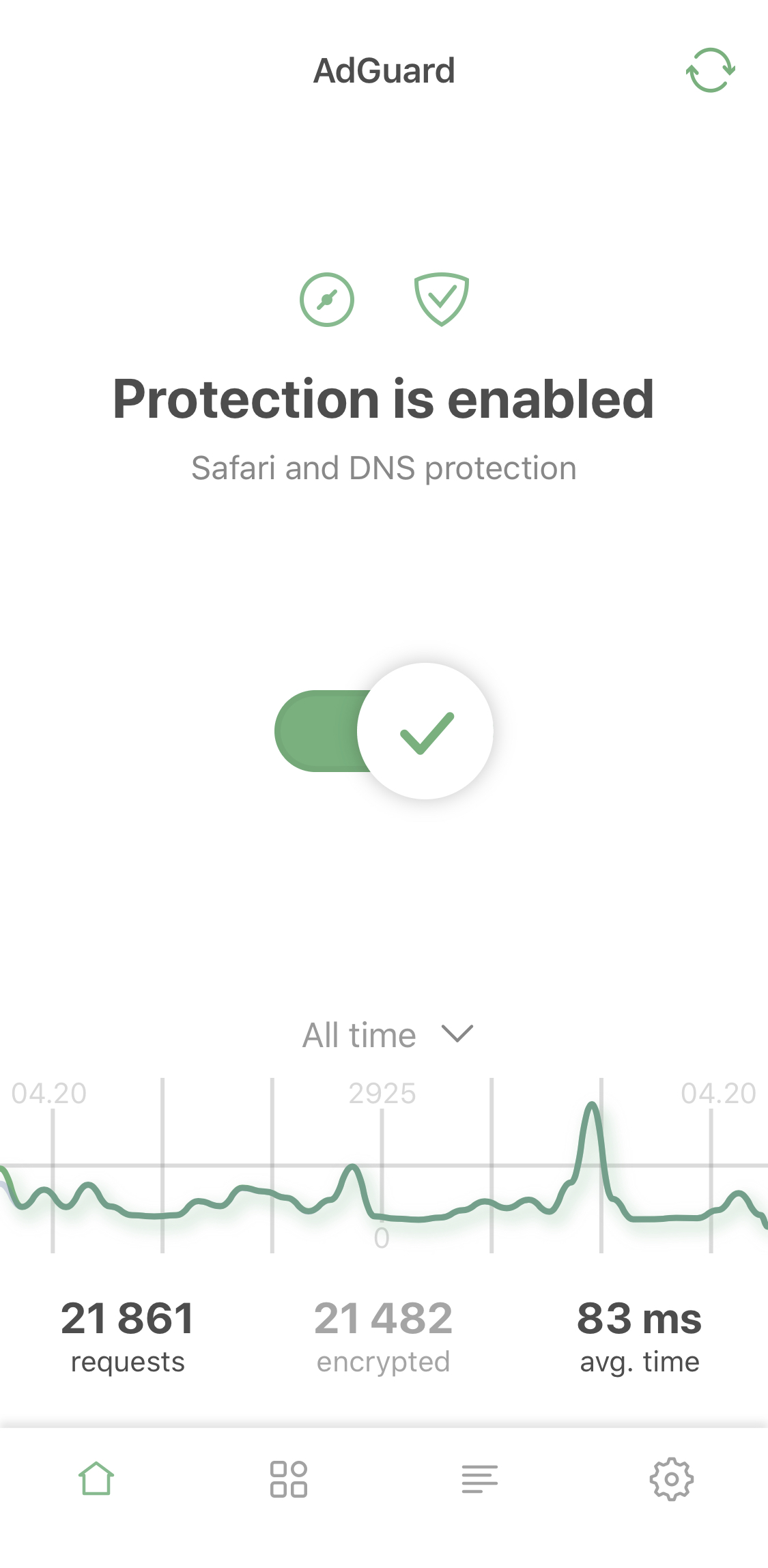
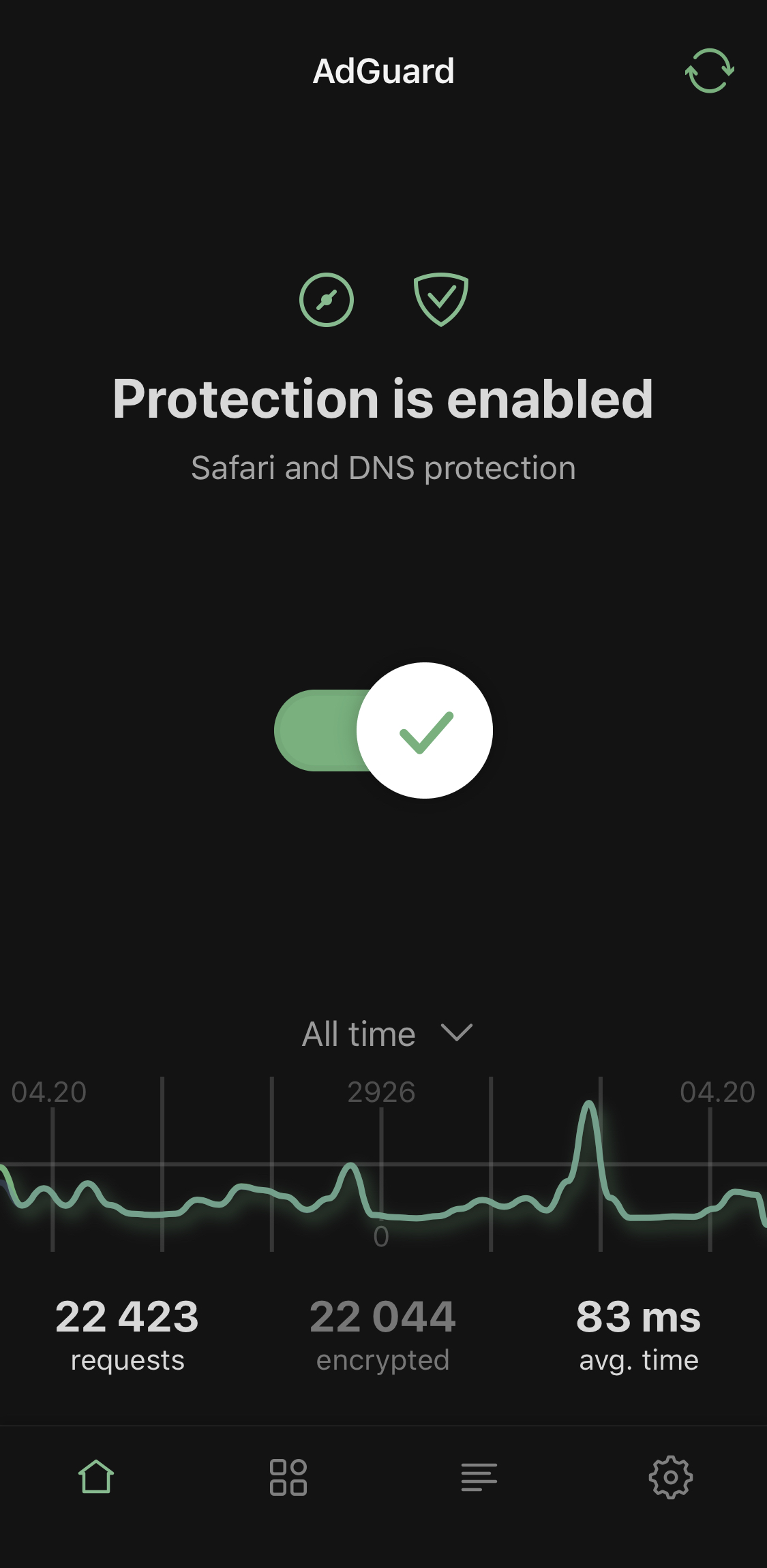
Light and dark themes

  • Advanced mode

We've added additional settings for advanced users. Use them at your own risk! However, the app isn't called 'AdGuard Pro' for nothing: if you've been using it for a while, these advanced settings probably won't scare you off.
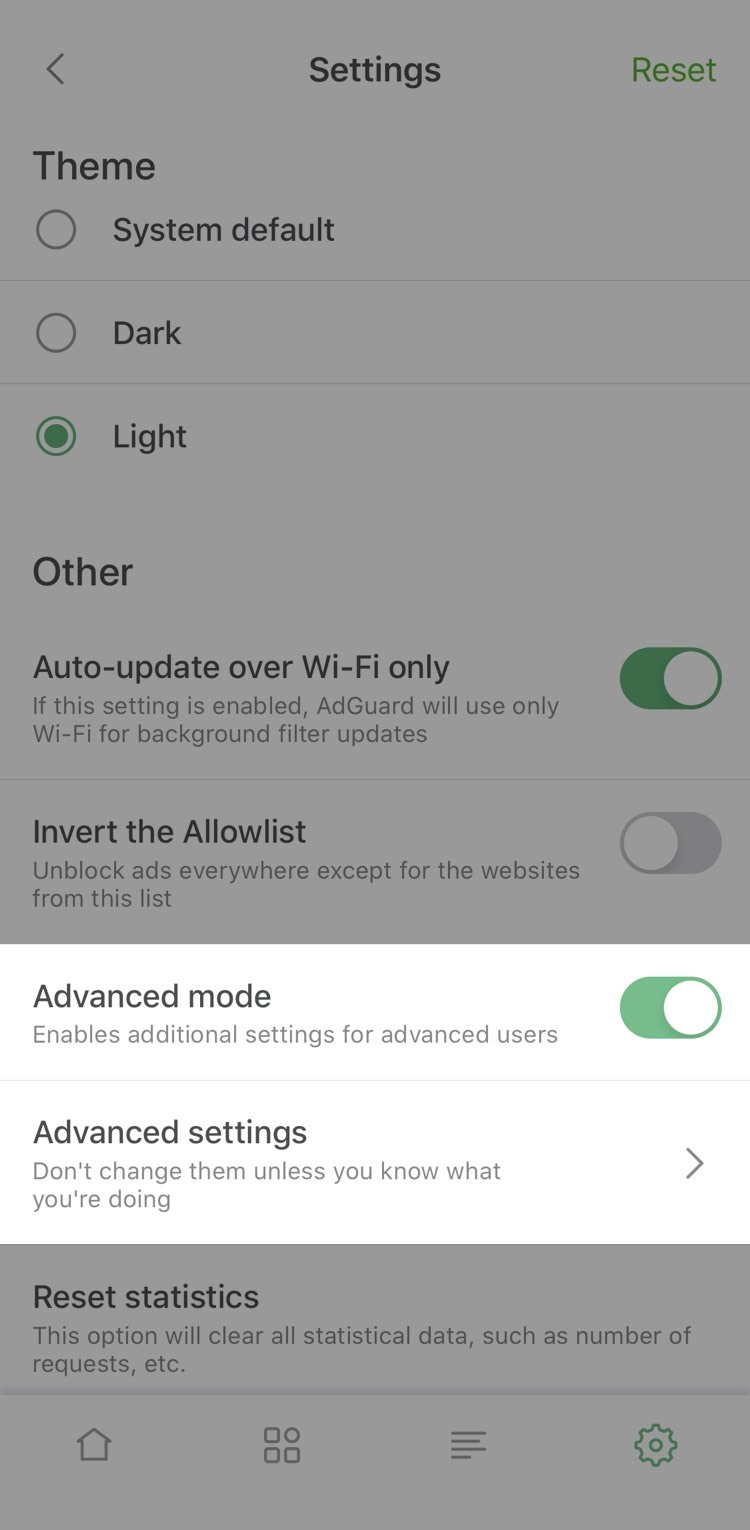
Advanced mode

By the way, now you have to enable Advanced mode to add your own DNS filter*. Let's illustrate this by an example of adding our AdGuard SDN filter.

*⠀Don't confuse it with adding a custom filter to Safari, the option we only added in this version.

Simplified domain names (SDN) filter is composed from several other filters (English filter, Social media filter, Spyware filter, Mobile ads filter, EasyList and EasyPrivacy) and simplified specifically to be better compatible with DNS-level ad blocking.

To enable it in AdGuard Pro, you need to take three steps:

  1. Open AdGuard Pro Settings —> General —> Enable Advanced mode
  2. Go to DNS protection —> DNS filtering —> DNS filters —> Add filter
  3. Paste this link to add AdGuard SDN filter (or use a link to any other filter you want to add).

That's it! You've successfully added a custom filter!

  • Activity feed

If we're being completely honest, it's a fancy name for the familiar DNS requests log, but better looking and more detailed. For example, it'll tell you the origin of most DNS requests.
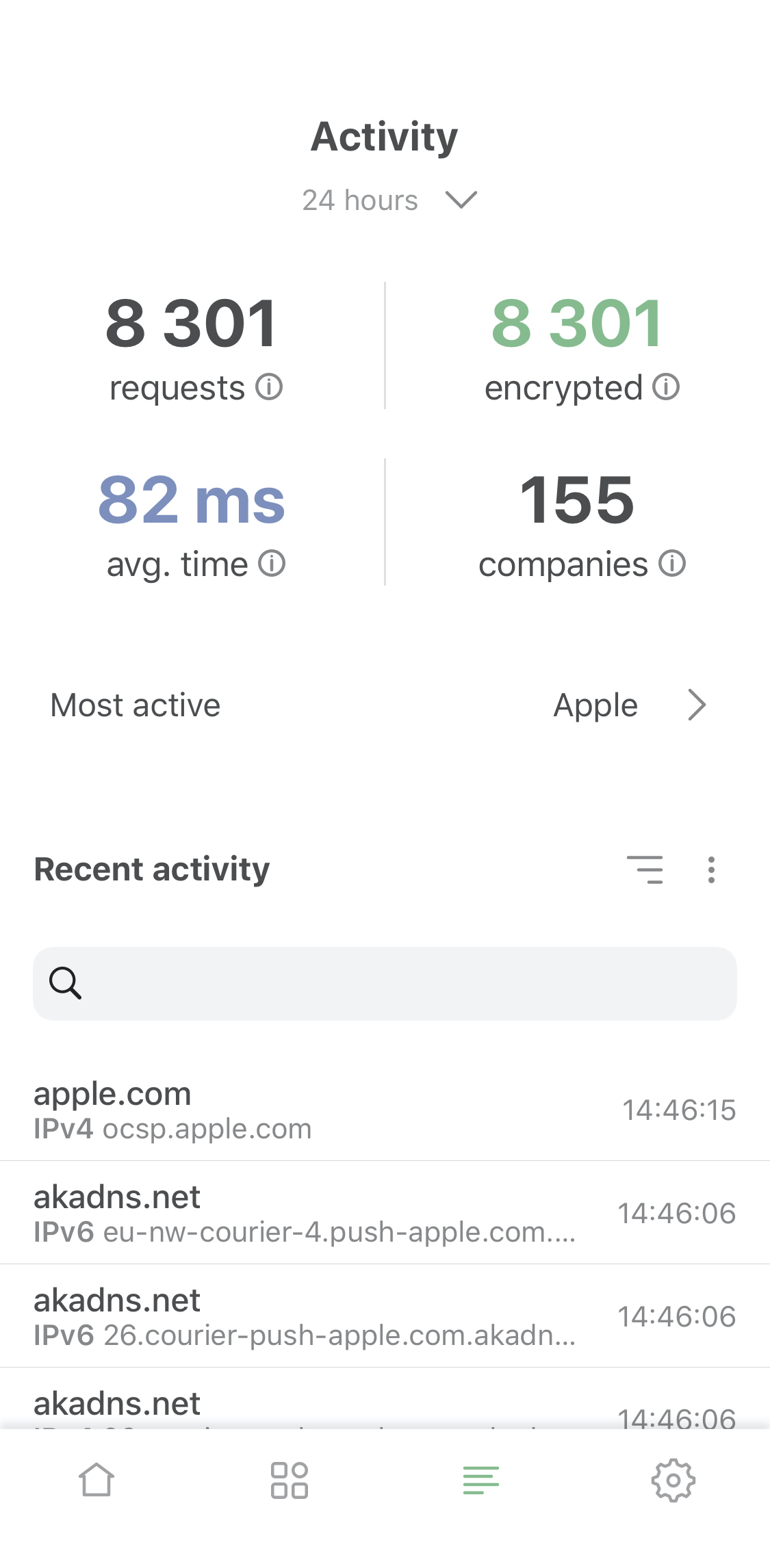
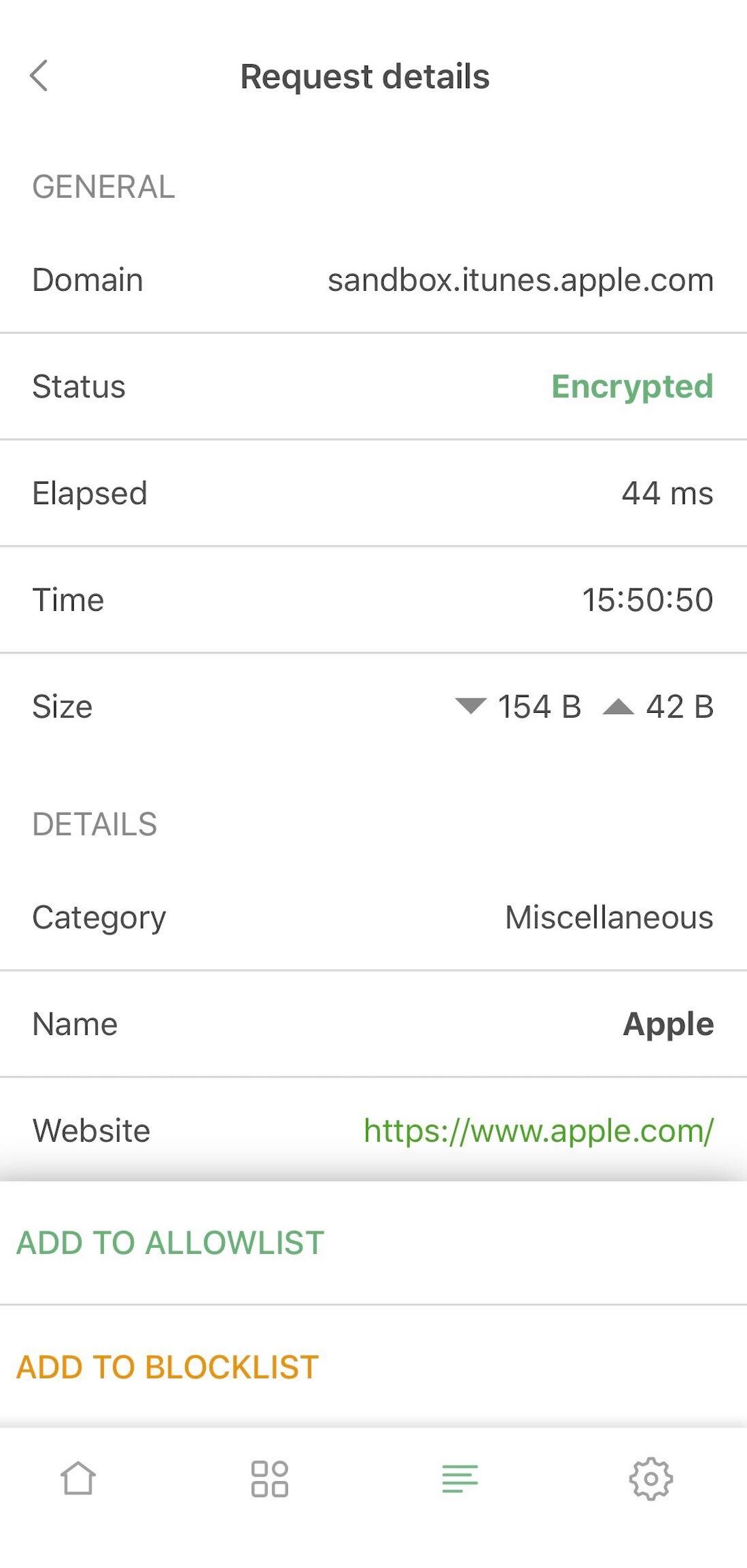
Activity screen and request details

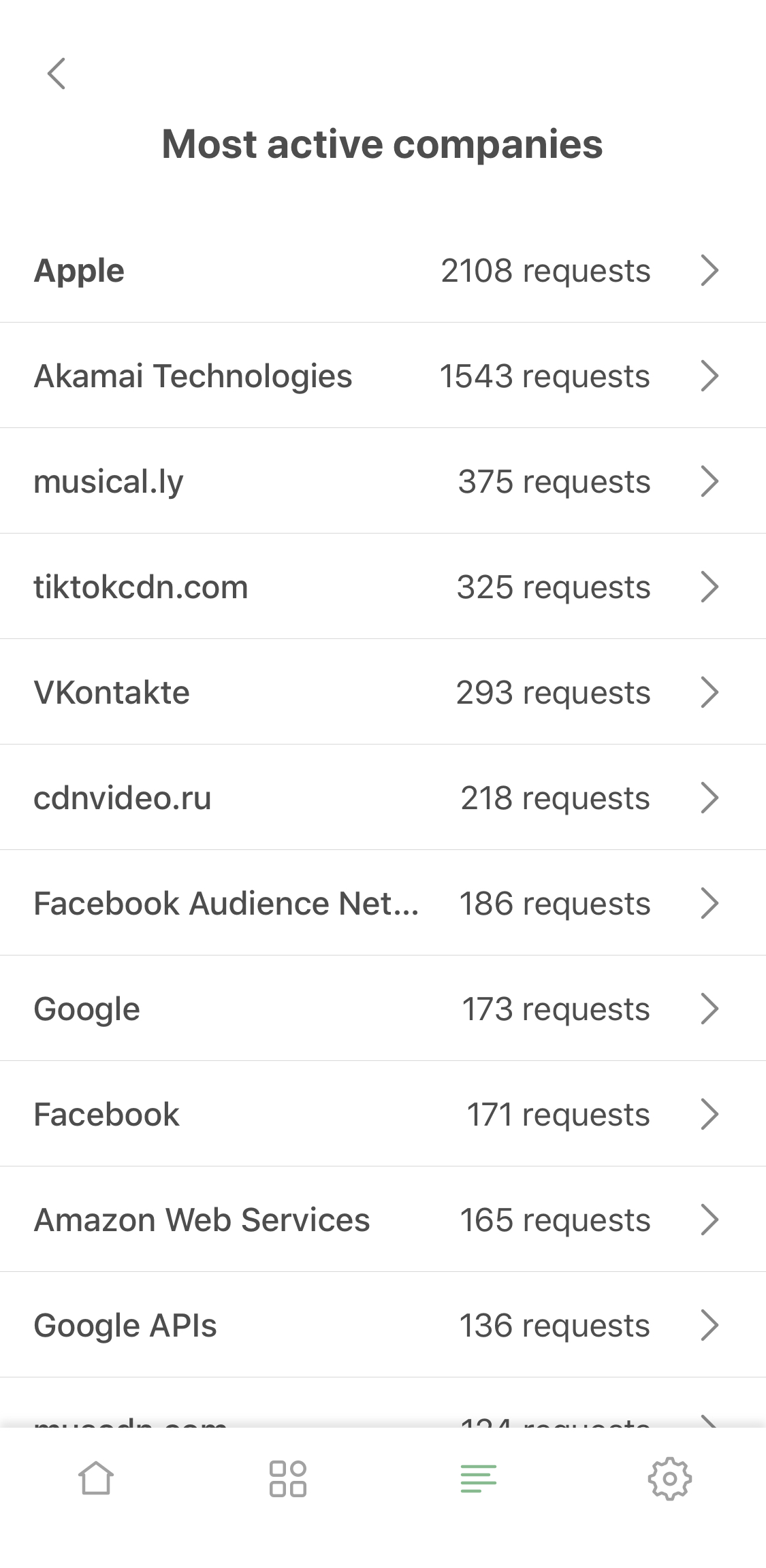
  • Most active companies

Now you can not only see which company this or that DNS request belongs to, you can view the "leaderboard" on the 'Most active companies' screen, accessible from the activity feed.
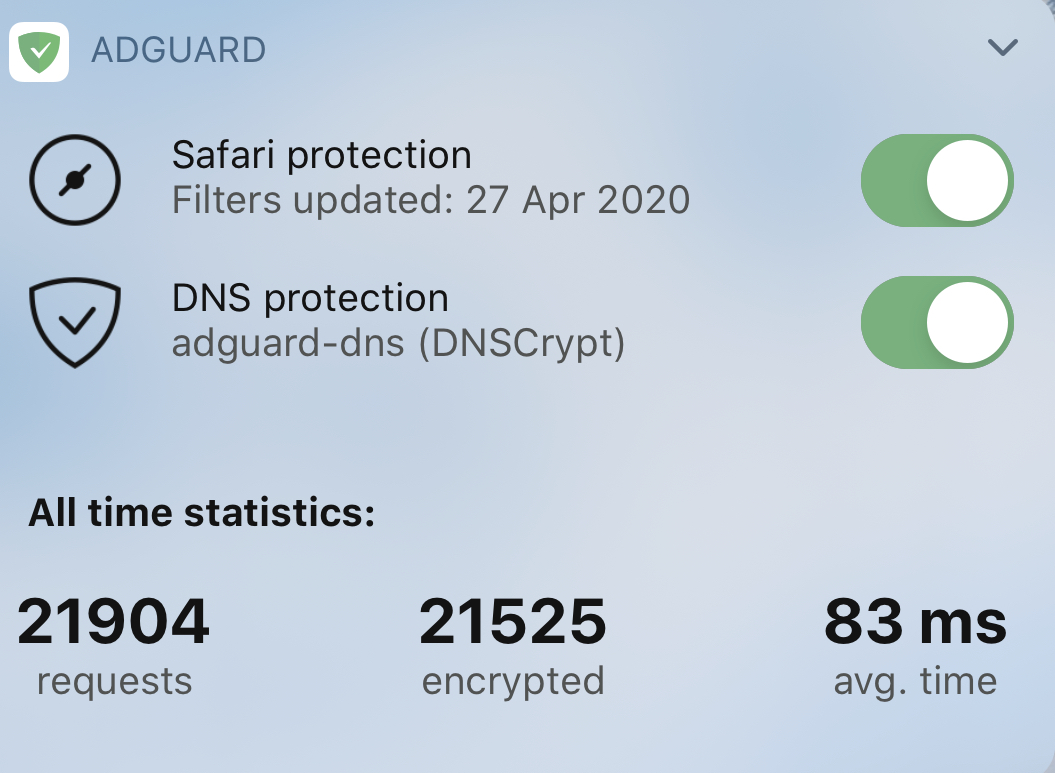
  • Requests statistic

Last but not least! Now you can switch between all-time, monthly, weekly or daily stats. You'll find it on the main screen and in widgets.
Content blocking

Speaking of changes that should really impress the old-timers. Safari content blocking went a long way since the last AdGuard Pro update. In v4.0 it has improved manyfold compared to v2.1, check it out:

  • Max rules count raised to 300k

Safari is notoriously known for its harsh 50k max limit for filtering rules in content blockers. This number is laughably low, and for ages we were struggling with it. Now we've implemented a workaround: split AdGuard Pro into six content blockers. Each of them has the same 50k restriction but in total they add up to a much more reasonable 300k rules cap. You don't have to seek weird compromises anymore and can enable all your favorite filters at once!
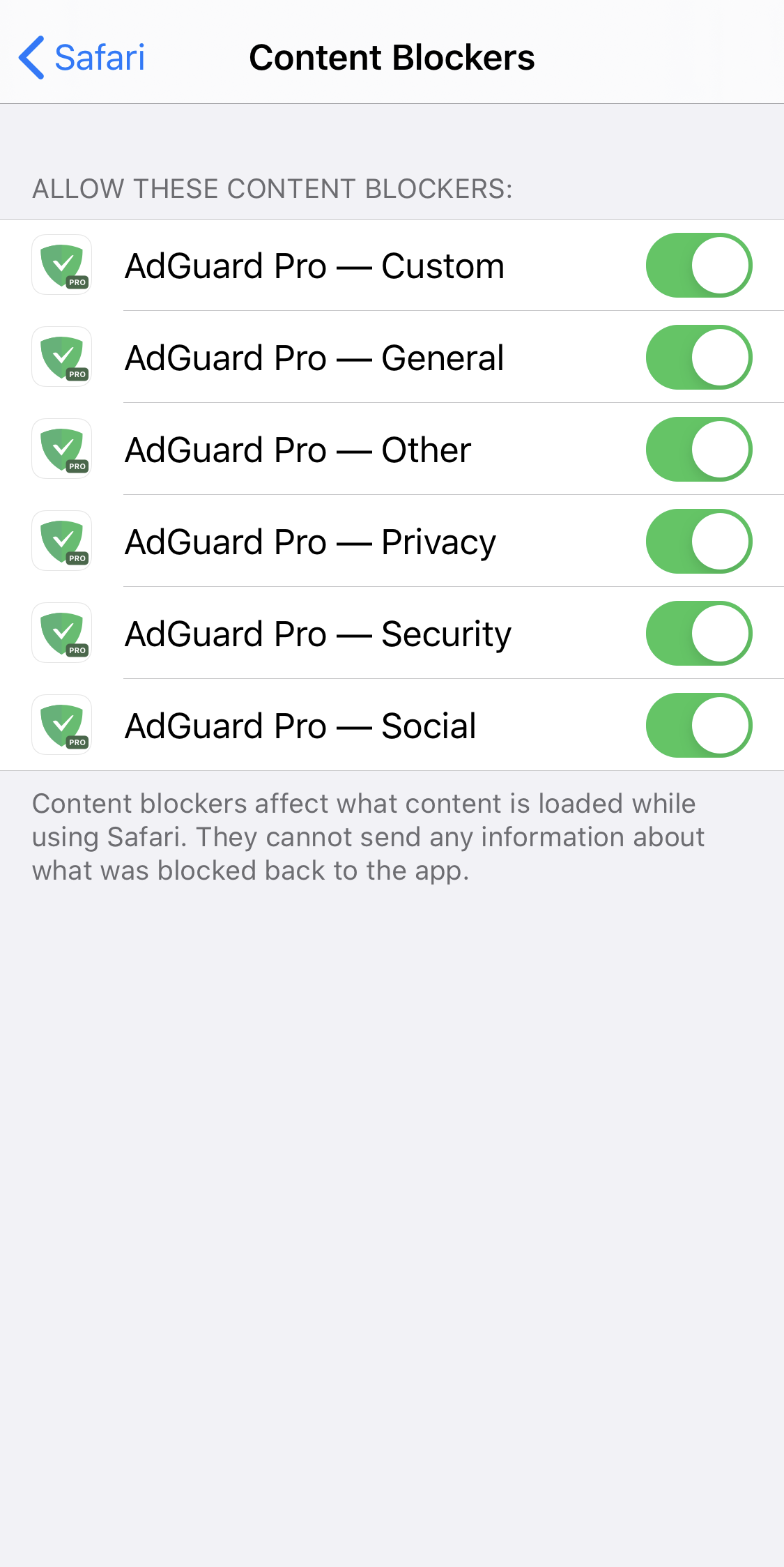
Content blockers — the avengers of Safari ad blocking

  • 'Content blockers' screen

Continuing on this topic, it would be rather annoying to go to Safari settings each time you want to check which content blockers and filters are enabled. We know this from personal experience. The logical solution was to add a new screen right to AdGuard Pro settings, which we did. Go to General settings > Content blockers to see the current state. You’ll even find there which content blockers exactly are enabled and how many rules each of them has used up.
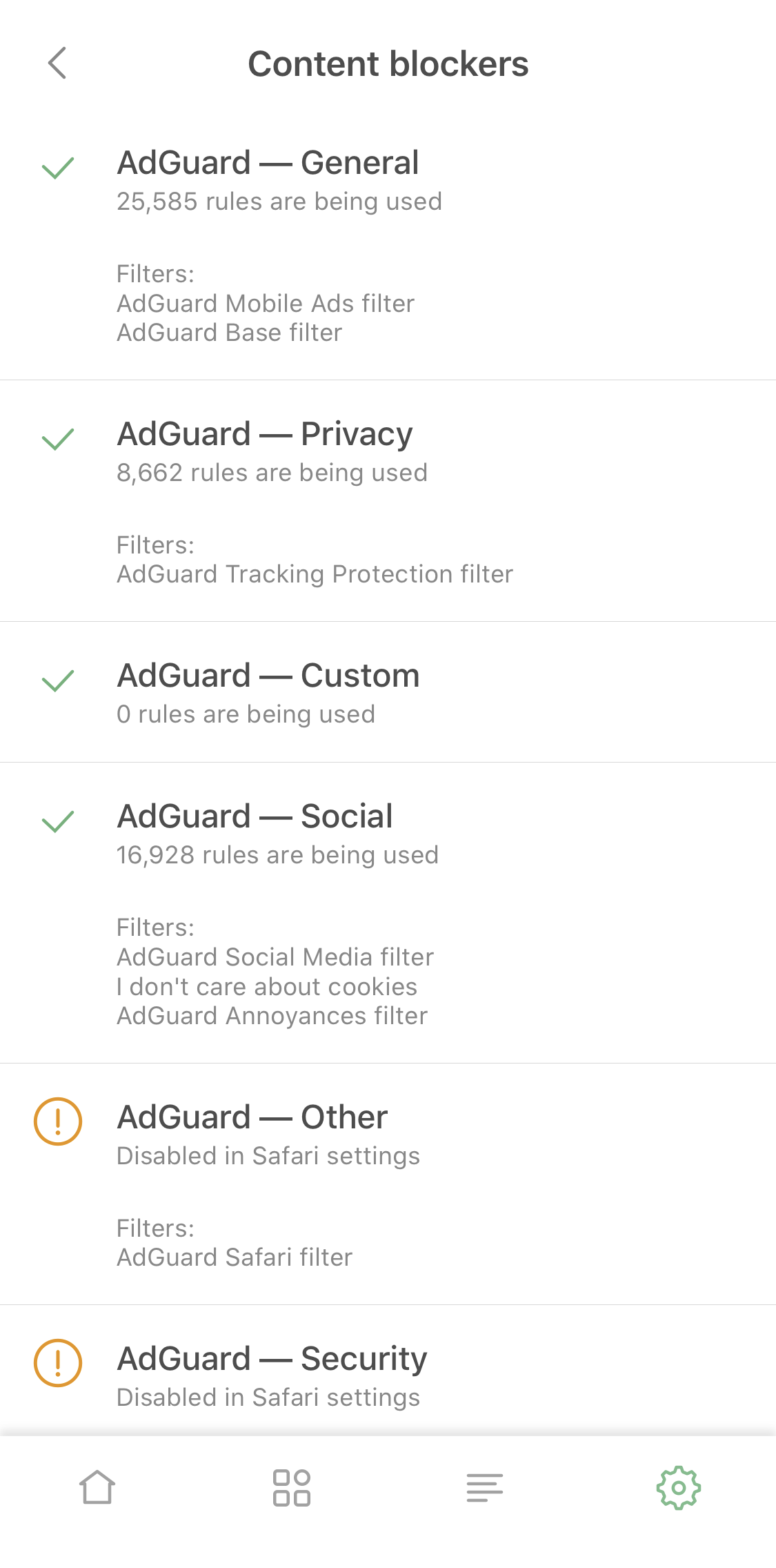
  • Content blocker affinity

Some filtering rules depend on each other or work better together. There’s a problem in cases when such rules belong to different content blockers. Normally they wouldn't always work as intended, even if both content blockers were enabled. But we put in extra work to achieve cross-content blocker compatibility, so the quality of ad blocking went further up.

  • Adding custom filters

This option will be very useful for those who support their own filters, or just have a favorite filter that wasn't included by default. Add it by URL and it will be kept updated just as any other filter!
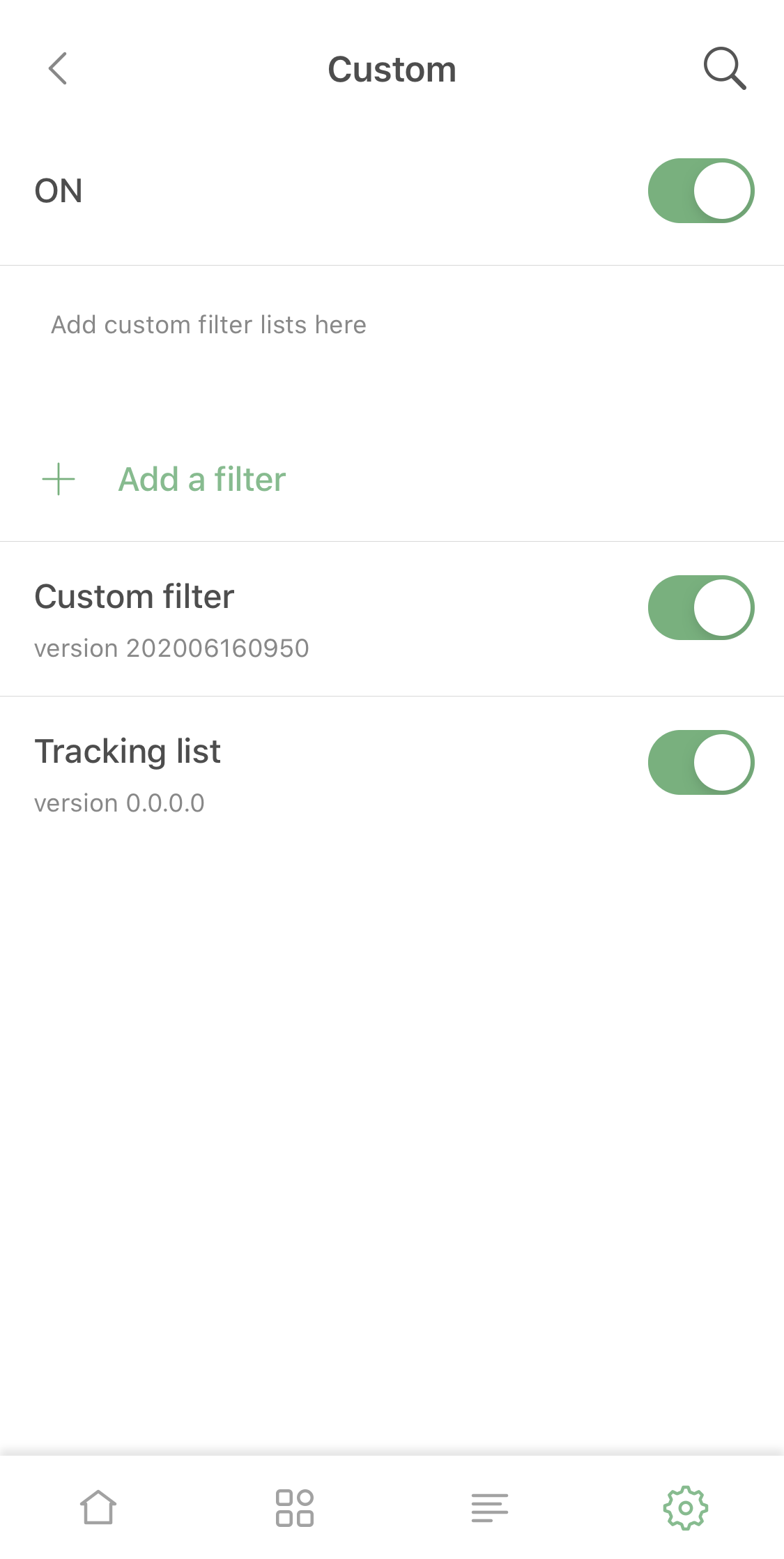
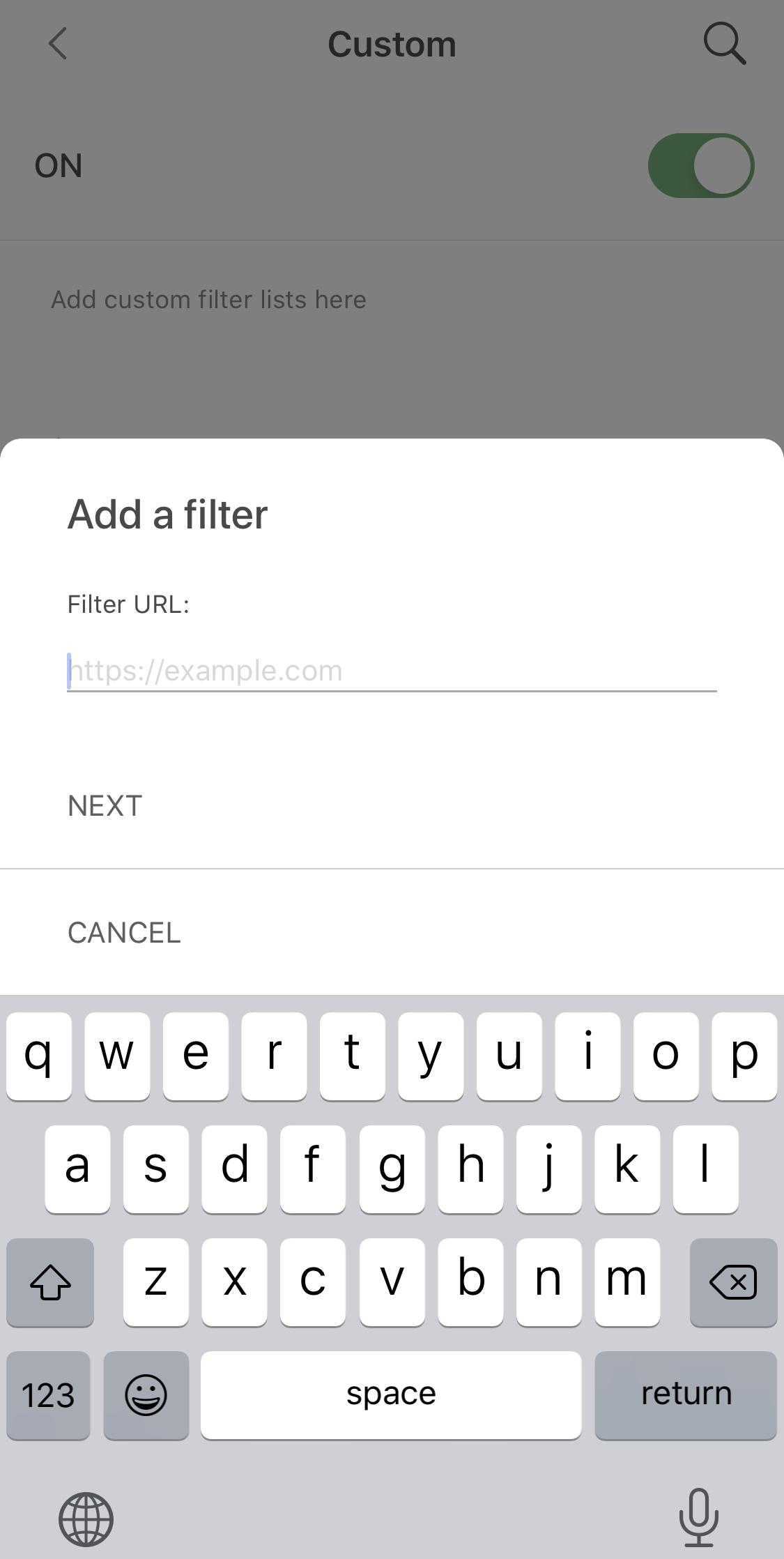
Adding a custom filter

DNS protection

Actually, despite it's been so long, DNS-related functionality in the old AdGuard Pro versions wasn't that much behind. However, we found some ways to improve it (aside from the obvious bugfixing).
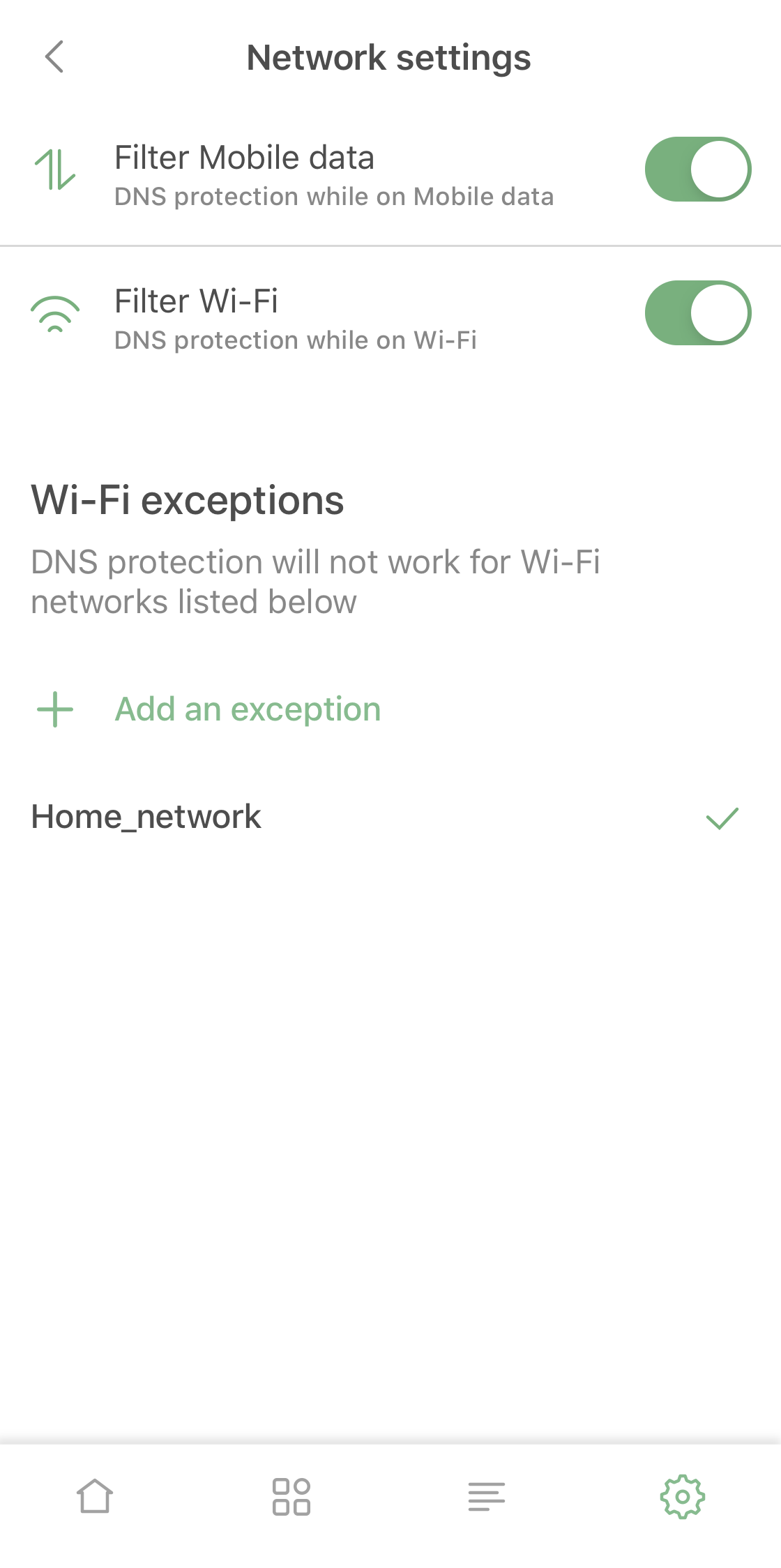
New Network Settings screen

Firstly, we made it so it's possible now to enable and disable DNS protection for Wi-Fi or mobile data separately, a feature that should be useful for many AdGuard Pro users.

Besides that, in addition to familiar DNS functionality you now can add mobile network or certain Wi-Fi networks to exclusions. For example, you can use it if you have AdGuard Home set up for your home Wi-Fi.

There are several lesser changes related to DNS functionality that are too technical or too minor to include here, but together they make the DNS protection suite quite a lot better compared to the previous version.

Pricing policy

Unlike AdGuard for iOS (that's subscription-based), AdGuard Pro has always been a one-time purchase app. Its price has stayed the same (and relatively low) for a long time for apparent reasons.

Now, when AdGuard Pro and AdGuard for iOS wield the same arsenal, it wouldn't be fair to have different prices. In the near future we're going to increase the price of AdGuard Pro to be in line with the lifetime subscription of AdGuard for iOS. You still have time to purchase it for the old price, though!

Summing it up

AdGuard Pro caught up with AdGuard for iOS and the two apps are now functionally equivalent and can completely replace one another. If you already have AdGuard Pro, you don't need the regular AdGuard version, and it works the other way around too.

If you have neither, hurry up and visit the App Store to take advantage of the low price, it won't stay that way for long!


We hope you'll enjoy using AdGuard Pro – it will be a completely new experience compared to v2.1. Traditionally, all the changes and bugfixes are available on GitHub. Share your feedback of using the app with us – right here in the comments, in the App Store or in social media!


Podobał Ci się ten post?
AdGuard VPN AdGuard DNS AdGuard Mail AdGuard Wallet
Ekran główny AdGuard dla Windows
Ekran ochrony AdGuard dla Windows, pokazujący funkcje ochrony i ustawienia
Ekran statystyki AdGuard dla Windows, pokazujący statystyki zablokowanych reklam i trackery
Ekran Zarządzanie aplikacjami w AdGuard dla Windows, pokazujący opcje zarządzania ochroną dla aplikacji zainstalowanych na urządzeniu
20 752 20752 recenzje
Doskonały!

AdGuard dla Windows: bloker reklam na PC

AdGuard dla systemu Windows to coś więcej niż bloker reklam. To wielofunkcyjne narzędzie, które blokuje reklamy, kontroluje dostęp do niebezpiecznych stron, przyspiesza ładowanie stron i chroni dzieci przed nieodpowiednimi treściami
Pobierając program, akceptujesz warunki Umowy licencyjnej
Microsoft Store
Pobierając program, akceptujesz warunki Umowy licencyjnej
AdGuard na Windows v8.0, 14-dniowa wersja próbna
Ekran główny AdGuard dla Mac
Ekran Trybu ukrytego w AdGuard dla Mac
20 752 20752 recenzje
Doskonały!

AdGuard: bloker reklam na Maca

AdGuard dla Mac to wyjątkowy bloker reklam zaprojektowany z myślą o macOS. Oprócz ochrony przed uciążliwymi reklamami w przeglądarkach i aplikacjach chroni Cię przed śledzeniem, phishingiem i oszustwami
Pobierając program, akceptujesz warunki Umowy licencyjnej
Przeczytaj więcej
AdGuard na Mac v2.19, 14-dniowa wersja próbna
Ekran główny AdGuard dla Android
Ekran Ochrona przed śledzeniem w AdGuard dla Android
Ekran Zarządzanie aplikacjami w AdGuard dla Android, pokazujący opcje zarządzania ochroną dla aplikacji zainstalowanych na urządzeniu
Ekran statystyki AdGuard dla Android, pokazujący statystyki zablokowanych reklam i trackery
Ekran główny prywatnej przeglądarki AdGuard dla Android
Kod QR, aby pobierz AdGuard dla Android
20 752 20752 recenzje
Doskonały!

AdGuard: bloker reklam na Androida

Blokuje reklamy i moduły śledzące we wszystkich przeglądarkach, grach i innych aplikacjach. Chroni Twoją prywatność i pozwala kontrolować, w jaki sposób aplikacje korzystają z Internetu. Instalowane za pomocą pliku APK
Pobierając program, akceptujesz warunki Umowy licencyjnej
Przeczytaj więcej
Skanuj, aby pobrać
Użyj dowolnego czytnika kodów QR dostępnego w Twoim urządzeniu
AdGuard na Android v4.14, 14-dniowa wersja próbna
Ekran główny AdGuard dla iOS
Ekran ochrony AdGuard dla iOS, pokazujący funkcje ochrony i ustawienia
Ekran statystyki AdGuard dla iOS, pokazujący statystyki zablokowanych reklam i trackery
Kod QR, aby pobierz AdGuard dla iOS
20 752 20752 recenzje
Doskonały!

AdGuard na iOS: bloker reklam poza Safari

Najlepszy bloker reklam na iOS dla iPhone’a i iPada. AdGuard usuwa wszelkiego rodzaju reklamy i elementy śledzące w Safari oraz chroni Twoją prywatność we wszystkich aplikacjach na poziomie DNS
Pobierając program, akceptujesz warunki Umowy licencyjnej
Przeczytaj więcej
Skanuj, aby pobrać
Użyj dowolnego czytnika kodów QR dostępnego w Twoim urządzeniu
AdGuard na iOS v4.5
Ekran główny AdGuard Content Blocker
Ekran Filtry w AdGuard Content Blocker
Ekran ustawienia w AdGuard Content Blocker
20 752 20752 recenzje
Doskonały!

Blokada treści AdGuard

AdGuard Content Blocker eliminuje wszelkiego rodzaju reklamy w przeglądarkach mobilnych, które obsługują technologię blokowania treści — a mianowicie Samsung Internet i Yandex Browser. Jego funkcje są ograniczone w porównaniu z AdGuard na Androida, ale jest darmowy, łatwy w instalacji i wydajny
Pobierając program, akceptujesz warunki Umowy licencyjnej
Przeczytaj więcej
Blokada treści AdGuard v2.8
Ekran główny AdGuard Browser Extension
Ekran Ochrona przed śledzeniem w AdGuard Browser Extension
20 752 20752 recenzje
Doskonały!

Rozszerzenie przeglądarki AdGuard

AdGuard to najszybsze i najlżejsze rozszerzenie blokowania reklam, które skutecznie blokuje wszystkie typy reklam na wszystkich stronach internetowych! Wybierz AdGuard dla swojej przeglądarki i uzyskaj szybkie i bezpieczne przeglądanie Internetu pozbawione reklam.
Instalacja
Pobierając program, akceptujesz warunki Umowy licencyjnej
Instalacja
Pobierając program, akceptujesz warunki Umowy licencyjnej
Instalacja
Pobierając program, akceptujesz warunki Umowy licencyjnej
Instalacja
Pobierając program, akceptujesz warunki Umowy licencyjnej
Instalacja
Pobierając program, akceptujesz warunki Umowy licencyjnej
Przeczytaj więcej
Instalacja
Pobierając program, akceptujesz warunki Umowy licencyjnej
Przeczytaj więcej
Rozszerzenie przeglądarki AdGuard v5.5
Ekran główny Asystenta przeglądarki
20 752 20752 recenzje
Doskonały!

Asystent AdGuard

Towarzyszące rozszerzenie przeglądarki dla aplikacji desktopowych AdGuard. Umożliwia blokowanie niestandardowych elementów na stronach internetowych, dodawanie stron internetowych do listy dozwolonych i wysyłanie raportów bezpośrednio z przeglądarki
Asystent AdGuard v1.4
20 752 20752 recenzje
Doskonały!

AdGuard Home

AdGuard Home to sieciowe rozwiązanie do blokowania reklam i modułów śledzących. Zainstaluj go raz na routerze, aby objąć nim wszystkie urządzenia w sieci domowej — nie jest wymagane żadne dodatkowe oprogramowanie klienckie. Jest to szczególnie ważne w przypadku różnych urządzeń IoT, które często stanowią zagrożenie dla Twojej prywatności
AdGuard Home v0.107
Ekran główny AdGuard Pro dla iOS
Ekran Ochrona w AdGuard Pro dla iOS, pokazujący funkcje i ustawienia ochrony
Ekran statystyki w AdGuard Pro dla iOS, pokazujący statystyki zablokowanych reklam i trackerów
20 752 20752 recenzje
Doskonały!

AdGuard Pro dla iOS

AdGuard Pro na iOS oferuje wszystkie zaawansowane funkcje blokowania reklam. Oferuje te same narzędzia, co płatna wersja AdGuard na iOS. Doskonale blokuje reklamy w Safari i pozwala dostosować ustawienia DNS, aby dostosować poziom ochrony. Blokuje reklamy w przeglądarkach i aplikacjach, chroni dzieci przed nieodpowiednimi treściami i dba o bezpieczeństwo danych osobowych.
Pobierając program, akceptujesz warunki Umowy licencyjnej
Przeczytaj więcej
AdGuard Pro dla iOS v4.5
Ekran główny AdGuard Mini dla Mac
Ekran ochrony Safari w AdGuard Mini dla Mac
Ekran tworzenia reguły w AdGuard Mini dla Mac
20 752 20752 recenzje
Doskonały!

AdGuard Mini dla Mac — bloker reklam Safari

AdGuard Mini dla komputerów Mac to potężny bloker reklam w Safari. Ta lekka aplikacja usuwa reklamy, blokuje moduły śledzące i przyspiesza ładowanie stron. Umożliwia przeglądanie internetu w Safari bez rozpraszania uwagi i chroni prywatność danych
Instalacja
Pobierając program, akceptujesz warunki Umowy licencyjnej
Przeczytaj więcej
AdGuard Mini dla Mac v2.3
Ekran główny AdGuard dla Android TV z włączoną ochroną
Ekran blokowanie reklama AdGuard dla Android TV, pokazujący jego funkcje i ustawienia
Ekran ustawienia AdGuard dla Android TV
Ekran Zarządzanie aplikacjami AdGuard dla Android TV, pokazujący aplikacje, w których reklamy i trackery są zablokowane
20 752 20752 recenzje
Doskonały!

AdGuard dla Android TV

AdGuard dla Android TV to jedyna aplikacja, która blokuje reklamy, chroni prywatność i działa jak zapora sieciowa dla Smart TV. Otrzymuj ostrzeżenia o zagrożeniach internetowych, używaj bezpiecznego DNS i korzystaj z szyfrowanego ruchu. Zrelaksuj się i zanurz się w swoich ulubionych programach z najwyższej klasy zabezpieczeniami bez reklam!
AdGuard dla Android TV v4.14, 14-dniowa wersja próbna
Maskotka AdGuard, Agnar, trzymający pingwina Linux
20 752 20752 recenzje
Doskonały!

AdGuard dla Linux

AdGuard for Linux to pierwszy na świecie systemowy bloker reklam dla systemu Linux. Blokuj reklamy i elementy śledzące na poziomie urządzenia, wybieraj spośród wstępnie zainstalowanych filtrów lub dodawaj własne — wszystko za pośrednictwem interfejsu wiersza poleceń
AdGuard dla Linux v1.4
20 752 20752 recenzje
Doskonały!

AdGuard Temp Mail

Darmowy generator tymczasowych adresów e-mail, który zapewnia anonimowość i chroni prywatność. Brak spamu w głównej skrzynce odbiorczej!
20 752 20752 recenzje
Doskonały!

AdGuard VPN

75 lokalizacji na świecie

Dostęp do wszelkich treści

Silne szyfrowanie

Polityka braku logów

Najszybsze połączenie

Wsparcie 24/7

Wypróbuj za darmo
Pobierając program, akceptujesz warunki Umowy licencyjnej
Przeczytaj więcej
20 752 20752 recenzje
Doskonały!

AdGuard DNS

AdGuard DNS to alternatywne rozwiązanie do blokowania reklam, ochrony prywatności i kontroli rodzicielskiej. Łatwy w konfiguracji i darmowy, zapewnia niezbędną minimalną ochronę przed reklamami, śledzeniem i phishingiem, bez względu na platformę i urządzenie, z którego korzystasz.
20 752 20752 recenzje
Doskonały!

AdGuard Mail

Chroń swoją tożsamość, unikaj spamu i zabezpiecz swoją skrzynkę odbiorczą dzięki naszym aliasom i tymczasowym adresom e-mail. Skorzystaj z naszej bezpłatnej usługi przekazywania e-maili oraz aplikacji na wszystkie systemy operacyjne
20 752 20752 recenzje
Doskonały!

AdGuard Wallet

Bezpieczny i prywatny portfel kryptowalutowy, który daje Ci pełną kontrolę nad Twoimi aktywami. Zarządzaj wieloma portfelami i odkrywaj tysiące kryptowalut, aby je przechowywać, wysyłać i wymieniać
Rozpoczęto pobieranie AdGuard Kliknij przycisk wskazany strzałką, aby rozpocząć instalację Wybierz „Otwórz” i kliknij „OK”. Poczekaj aż plik zostanie pobrany. W otwartym oknie, przeciągnij ikonę AdGuard do folderu „Aplikacje”. Dziękujemy za wybrania AdGuard! Wybierz „Otrwórz” i kliknij „OK”. Poczekaj aż plik zostanie pobrany. W otwartym kliknij „Instaluj”. Dziękujemy za wybrania AdGuard!
Zainstaluj również AdGuard dla urządzeń mobilnych

















































