Beyond Filter Lists: Rethinking Ad Blocking with LLMs
One of the biggest obstacles that ad blockers have been consistently facing during their entire existence is deeply intertwined with their very nature — it’s the limitations of filter lists and the need to maintain them. This maintenance is, in most cases, manual and extremely painstaking.
In this research, I’ll explore how ad blocking works today and review previous attempts to automate it by applying machine learning. Then, I’ll move on to my own experiments of adding LLM to ad blocking, discuss where this approach is headed, and even show the working prototype browser extension that you can download and test for yourself.
And while I know you’re probably eager to hear about the LLM experiments and check out the extension — but first, let’s set the stage with some context.
How ad blocking works today
At the core of all ad blockers are filter lists, which are maintained by the community. These lists consist of thousands of rules that fall into two main categories: network rules and cosmetic rules.
Network rules: The first line of defense
Actions: Block, redirect, or modify requests.
Example: ||evil-ads.com^ — this rule blocks evil-ads.com website and its subdomains.
Network rules block requests to third-party ad servers before content even reaches your browser, it’s a fast and efficient approach. These rules can block, redirect, or modify requests.
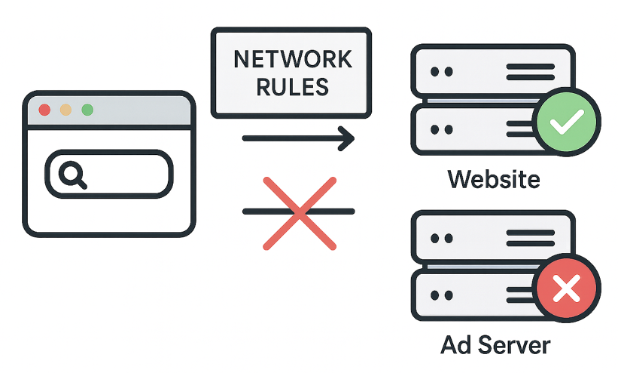
But network rules can’t block everything. For example, some ads are served from the same domain as the content, so blocking them at the network level would break the site. That’s where cosmetic rules come in.
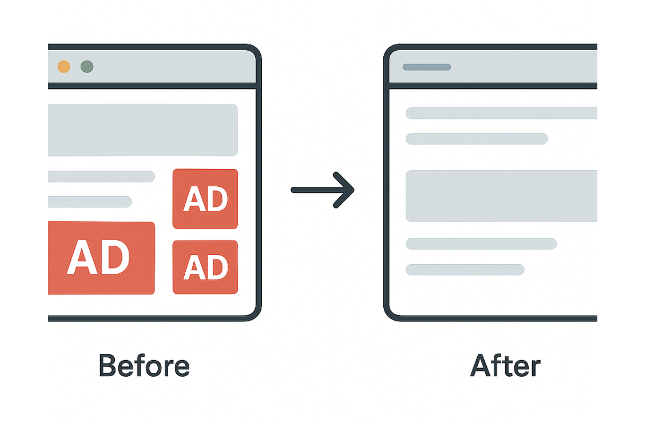
Cosmetic rules: Cleaning up the page
Actions: Use CSS selectors to hide unwanted elements directly on the page or apply custom styles.
Example: example.com##.ad-banner — hides elements with the class “ad-banner” on example.com)
CSS (Cascading Style Sheets) is a style sheet language that defines how HTML or XML documents are visually presented. It specifies how elements should appear on your device’s screen.
Cosmetic rules basically clean up leftover ad elements that simpler network rules can’t block.
Beyond CSS: Scriptlet rules
Actions: Modify or disable specific script functionalities on the page.
Example: example.com#%#//scriptlet('abort-on-property-read', 'alert') — stops a script on example.com if it tries to access a specific browser feature like alert.
When CSS isn’t enough to deal with complex scripts — like ad reinjection — we use scriptlets. Scriptlets are small JavaScript snippets injected by ad blockers to neutralize unwanted behavior.
Scriptlets have become filter developers’ favorite tool because they solve problems CSS and network rules can’t.
The power and the limits
We have briefly seen how filter lists work. They’re powerful and work very well for known patterns, but they also have some limitations. They struggle with native advertising, require constant updates, and in Manifest v3 these updates are harder.
These limitations lead to a fundamental question: what if we could eliminate filter lists entirely? What if the ad blocker could decide by itself what to block?
Imagine — no filters, no updates, no chasing ad networks. No manual tweaks and no cat-and-mouse game. In the end, isn’t this what users naturally expect from ad blockers? “Install and forget,” enjoying the clean web without the need to pay any further attention to your ad blocker. And this is exactly what early machine learning experiments wanted to achieve.
And with this motivation in mind, let’s look at how companies and researchers tried using machine learning to solve these problems.
A brief history of machine learning in ad blocking
Let’s take a look back at various past attempts to replace filter lists with machine learning. It will help us understand why this hasn’t happened, at least not yet.
Project Moonshot by eyeo
Goal: Automate cosmetic filtering at scale.
Method:
- Trained an ML model on page structure (DOM, HTML, CSS)
- Used existing filter lists for labeling
- Analyzed pages directly inside the browser extension
Project Moonshot from eyeo was presented at Ad-Filtering Dev Summit back in 2021. They trained a model on page structure using filter lists as labels. The model ran inside the browser extension to predict and hide ad elements. It worked but faced challenges: imbalanced data, deployment difficulties, and constant retraining needs.
Key idea: Decisions based on page structure, not images.
Result: Predicted and hid ad elements, complementing network blocking.
Challenges: Data imbalance, deployment friction, and constant retraining.
AdGraph by Brave
Goal: Block ads and trackers in real-time.
Method:
- Built a graph connecting all page activities (DOM, network, JavaScript)
- Classified content based on its context within the graph
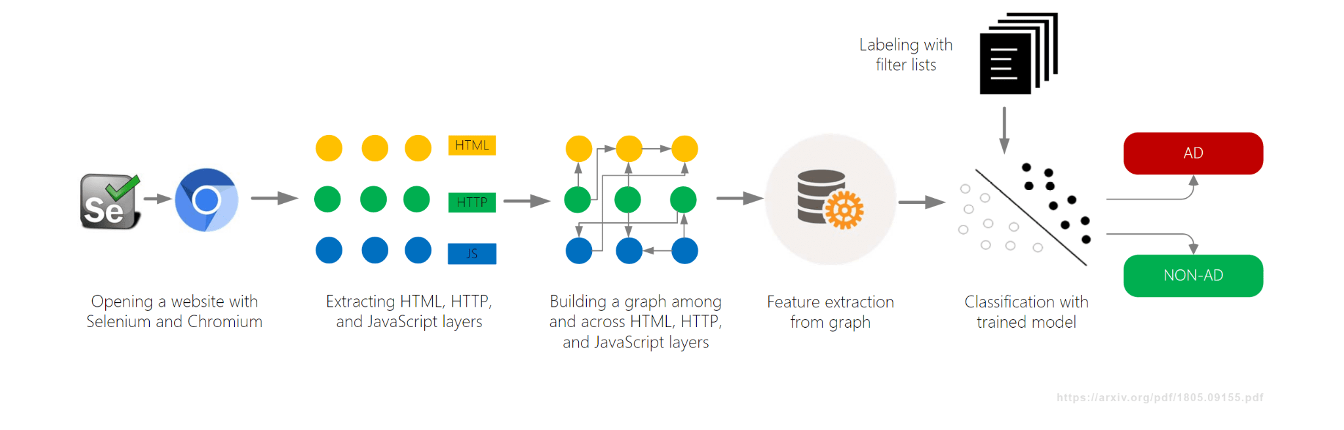
Another machine learning project, AdGraph, was developed by Brave Browser and introduced back in 2019, also at AFDS. They built a graph tracking how everything on a page connects — DOM, network, JavaScript — and then classified resources based on context.
AdGraph achieved high accuracy by tracing scripts back to ad servers even with random names. But it required deep browser integration and constant maintenance.
Key idea: Decisions based on causality, not just static URL patterns.
Result: Very high accuracy (~95–98%) and robust against obfuscation.
Challenges: Required deep browser integration and constant maintenance.
PERCIVAL by Brave
Goal: Block ad images in real time.
Method:
- Used a compact neural network (CNN) to classify images
- Embedded it directly in the browser’s image rendering pipeline
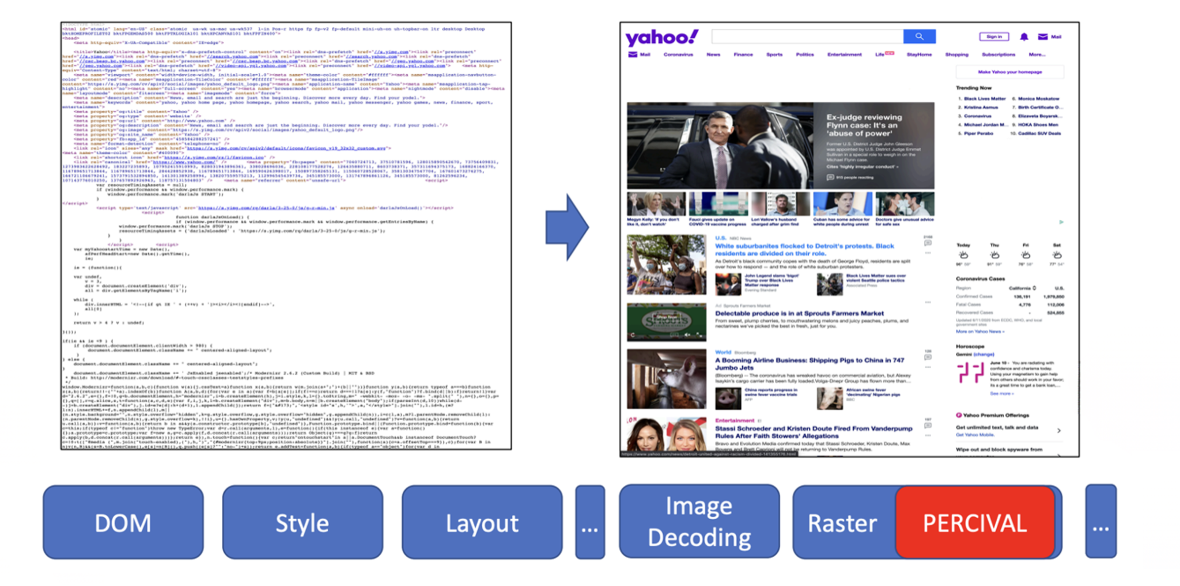
In 2020, Brave presented another machine learning approach called PERCIVAL, which focused on blocking ad images. They embedded a compact neural network directly in the browser’s rendering pipeline to classify images as they load. The results were impressive: they achieved 97% accuracy by analyzing image content directly. But it also had its limitations — it was vulnerable to adversarial images and only worked for image ads.
Key Idea: Analyze an image’s visual content, not just its URL or metadata.
Result: ~97% accuracy with low rendering overhead.
Challenges: Vulnerable to adversarial images; limited to image-based ads only.
AutoFR (academic research)
Goal: Automatically generate filter rules from scratch.
Method:
- Used reinforcement learning (a trial-and-error system) to test rules
- Analyzed page content to avoid breaking the site
Beyond just industry efforts, academic researchers also joined the search for better solutions. One interesting project was AutoFR, which aimed to automatically generate filter rules.
AutoFR was presented by Hieu Van Le at AFDS 2022 and AFDS 2023.
It generates URL patterns and CSS selectors, tests them, and learns from results while avoiding site breakage. And the results were quite impressive: AutoFR achieved 86% effectiveness (compared to EasyList), with rules generated in minutes.
Key idea: Automated rule generation with site breakage awareness.
Result: ~86% blocking effectiveness; rules generated in minutes.
SINBAD (academic research)
Goal: Detect and pinpoint site breakage caused by ad blocking.
Method:
- Used “web saliency” to identify important visual elements
- Compared page versions with and without ad blocker to find what broke
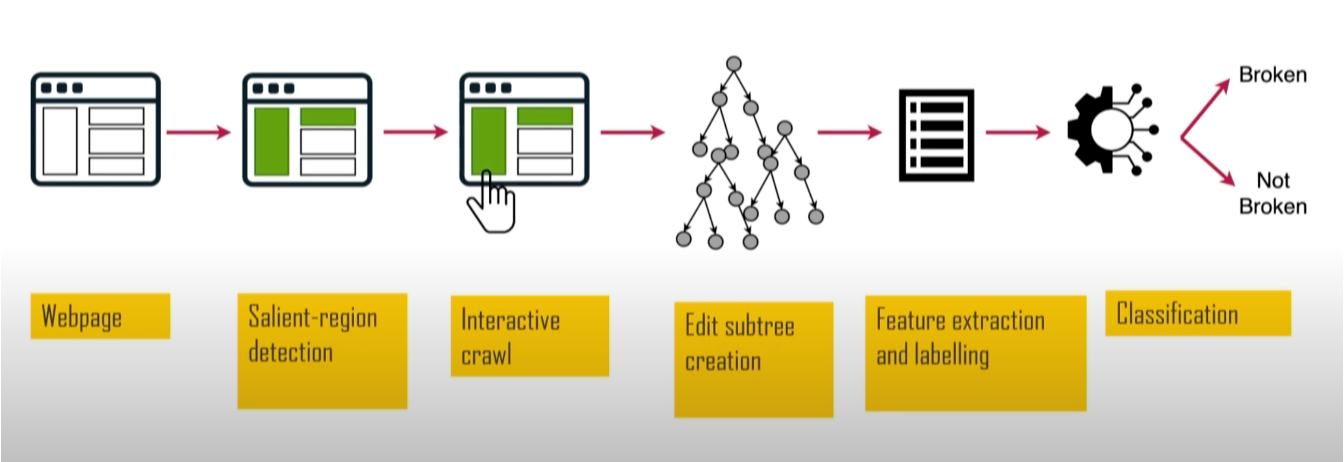
Another academic project was SINBAD. It focused on detecting when filter rules break websites. This project was valuable because site breakage is one of the main reasons why users leave ad blockers. It was presented at AFDS 2023 by Sandra Siby from Imperial College London (at that time).
By analyzing size, position, and contrast it identifies visually prominent elements, like headlines and buttons, then tests them for breakage. SINBAD achieved high accuracy in detecting breakage, with specific reports showing exactly what broke and which rules caused it.
Key idea: Focus on user-visible impact to find and fix issues faster.
Result: Higher accuracy in detecting breakage with specific, actionable reports.
Summary: Why ML didn’t take over
So we’ve seen all these experiments and research projects. But here’s the thing — despite all this work, none of these machine learning-based tools gained widespread adoption. So it would be logical to ask: why hasn’t machine learning replaced filters?
There are several reasons:
- High Bar: Human-curated filter lists are extremely effective and mature. To match them in effectiveness is not a simple task.
- High Cost: Creating and maintaining large, high-quality datasets is expensive, while most of the filter lists are maintained by the community for free.
- Evasion: Specialized models can be vulnerable to adversarial attacks.
So, as it turned out, building specialized models from scratch is slow, expensive, and inflexible. This is why the ML approach hasn’t taken off so far, and we’re still relying on good old filter lists. But is it about to change?
Enter LLMs: Big, expensive… But different
And here arrive Large Language Models (LLMs) and start changing the world. Is it possible they can change ad blocking too? Let’s explore how LLMs can be used for ad blocking in browser extensions. But first, let me quickly go through some key characteristics that define LLMs.
Rethinking blocking with LLMs: The power of rapid prototyping
Large Language Models (LLMs) are still a recent development, but their progress has been remarkably rapid. They’re now widely accessible through APIs, allowing developers to integrate LLM-based capabilities into their products with minimal effort. Many models come in both cloud-based and locally deployed versions, giving users flexibility depending on their needs.
The capabilities of LLMs span from generating high-quality text to analyzing data, creating images and videos, writing code, and supporting complex workflows. This makes them valuable across many industries and in demand by millions of people. But it’s not all sunshine and rainbows — at the same time, running or accessing these models can be costly, especially at scale, which is a real problem of adopting LLMs in many areas.
But what’s most important is that LLMs allow us to test ideas very quickly. So let me finally show you my experiments with applying LLMs to ad blocking in browser extensions.
Experiment 1. Blocking by meaning
The idea of my first experiment was to see if an LLM could distinguish between different content types on the fly.
The idea:
- Blur posts immediately
- LLM analyzes their content
- Unblurs if it’s safe or keeps blurred if not
I decided to test it out on the X’s feed. I was taking each post’s code and sending it to an LLM, asking if it was about politics. Since LLMs are a bit slow, I blurred all posts immediately, analyzed them with the help of an LLM, and then unblurred if they were safe.
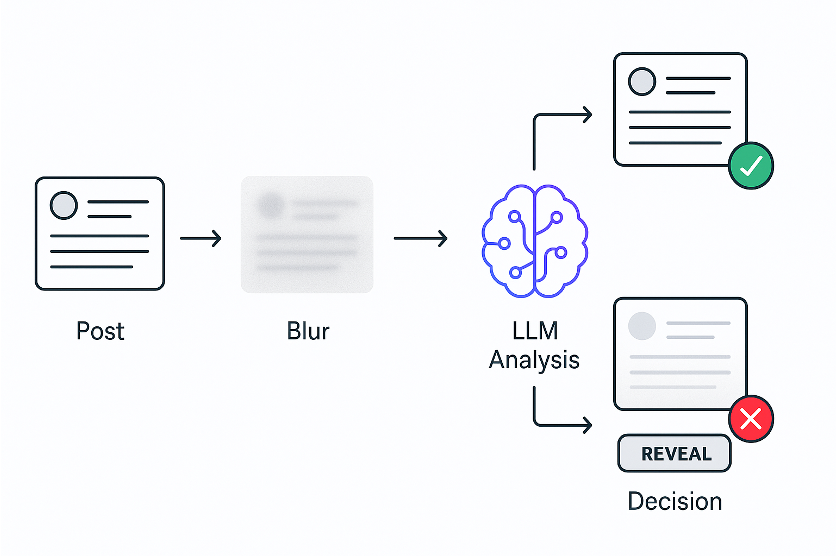
And it worked!
Which proves that a new, semantic way of filtering content is possible. And I prototyped this entire extension in just a few hours — something that would have taken months with traditional machine learning.
Let me show you a quick demo:
Here you can see how it works. Post appears, blurs immediately, LLM analyzes it, then unblurs it if safe or keeps it hidden if not. Users can manually reveal any blurred posts.
While I was experimenting on X, I noticed that some posts weren’t being blocked because they were mostly images. This led me to the second experiment.
Experiment 2. Blocking by visual meaning
In this experiment, I am going to teach the ad blocker to see.
The idea:
- Blur posts immediately
- Vision LLM analyzes the screenshot with the post
- Unblurs if it’s safe or keeps blurred if not
Posts often have minimal amount of text. Here’s an example of exactly this problem — a Facebook post with almost no text, just an image.

But it’s not just about posts without text. Even when text is present, websites hide it using obfuscated HTML. For example, look at this screenshot from the developer tools — you can see the “Sponsored” label is hidden in randomized HTML.
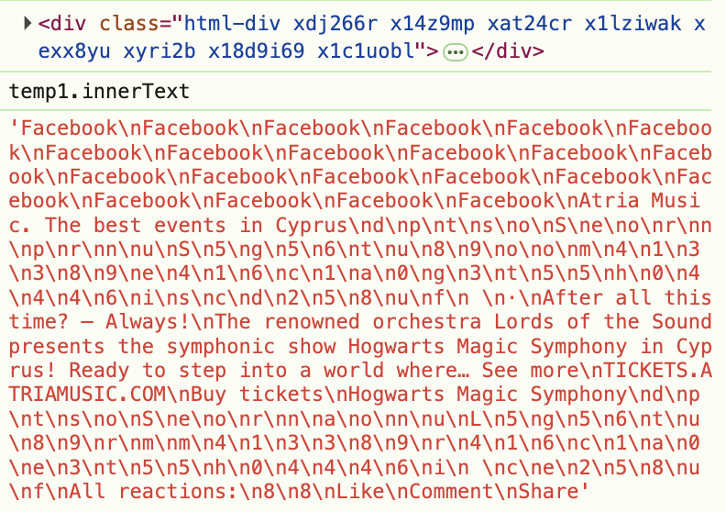
This is why we must stop analyzing the code and start analyzing what users actually see. So the idea is similar to the first experiment, but now we analyze not the code behind the element, but what users actually see on the page. So let’s take a screenshot of the post, send it to a vision-capable LLM, and ask if it’s about politics.
It worked again! The core idea was prototyped in just an hour or so. But then came the real challenge — taking screenshots through a browser extension turned out to be a nightmare.
Let me explain why. One approach I tried was the Debugger API. The Debugger API allows you to capture any element, even outside the viewport (the area currently visible on the screen), but it causes page to flicker, which can be annoying for users. See the demo below:
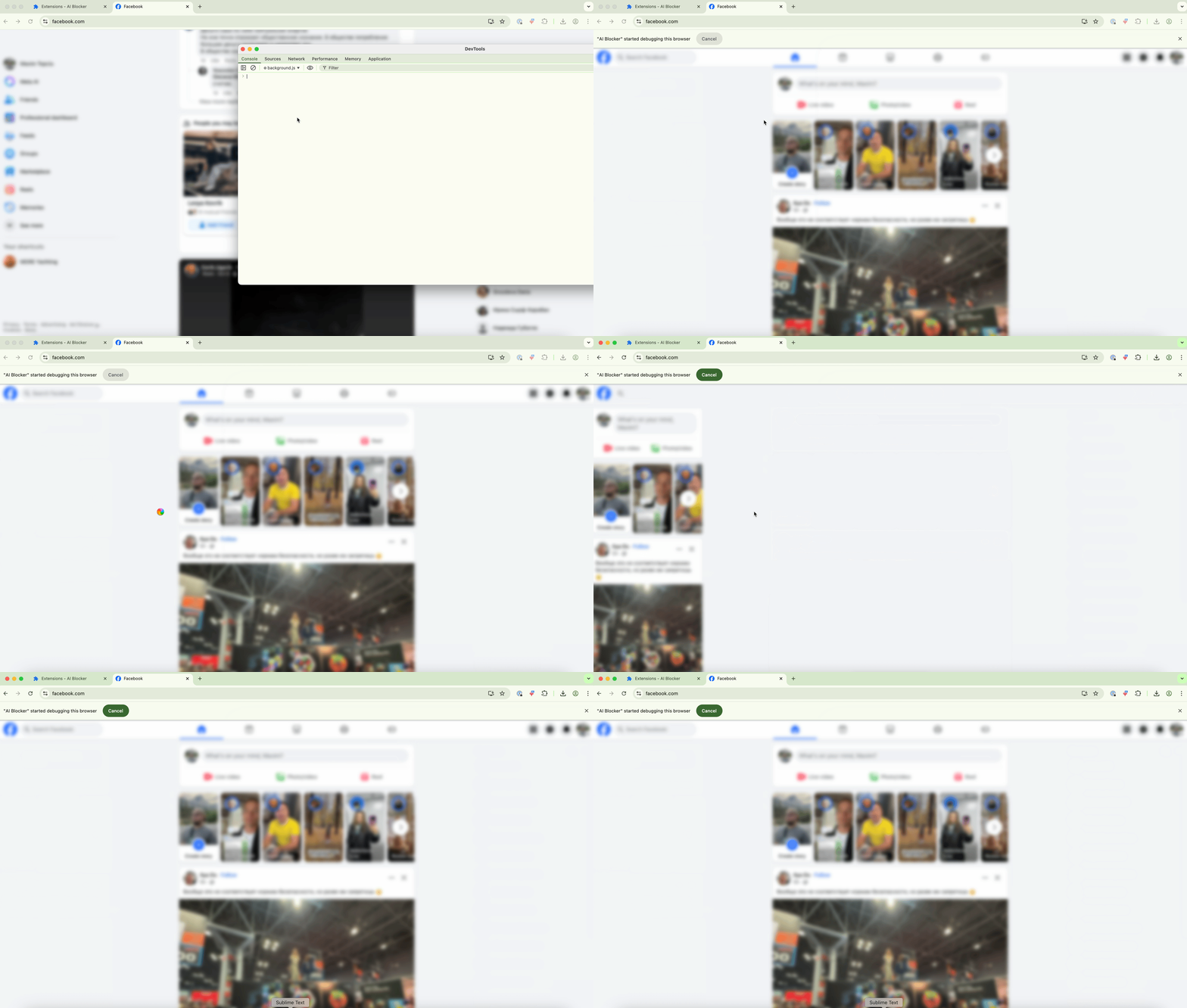
The other approach was using chrome.tabs.captureVisibleTab — the standard Chrome extension API for screenshots. This one causes no flickering. However, it can only capture what’s currently visible in the viewport, and Chrome limits how many screenshots you can take per second.
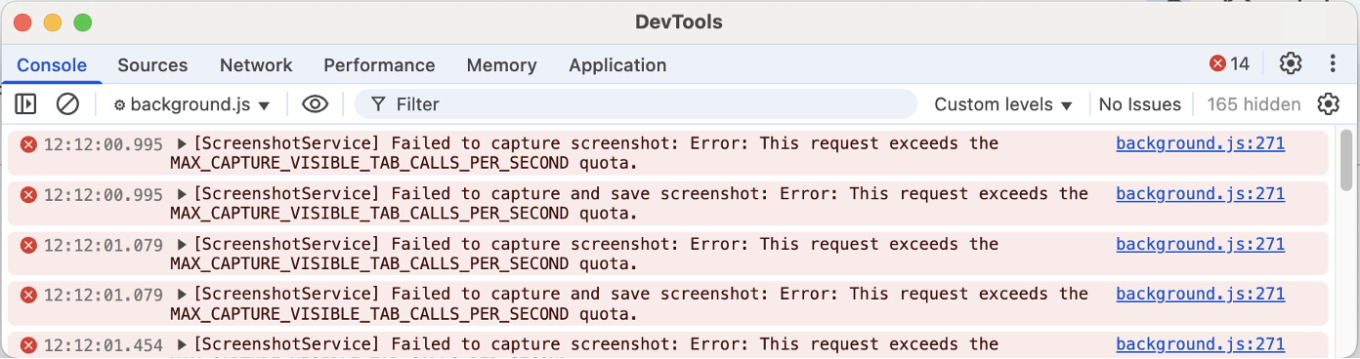
So if you have multiple elements to analyze, you have to wait, and you can only check posts that are already on screen.
These experiments showed that LLMs can analyze posts and decide whether to block them. Does this mean we can replace filter lists entirely? The answer is no — we still need them to know what to check. A webpage has thousands of elements, and analyzing all of them would be slow and expensive.
Experiment 3. Extending filter lists: a new primitive
If we still need to know which elements to check, the logical step is to connect LLMs with filter lists and generalize the power of LLMs into a reusable tool for filter list authors. But the problem here is that writing a new custom extension for every semantic task is not scalable — we need a more generic solution.
The inspiration: Extended CSS pseudo-class, :contains.
The question: What if we could check for meaning, not just text?
The result: Three new experimental pseudo-classes:
selector:contains-meaning-embedding('criteria')
selector:contains-meaning-prompt('criteria')
selector:contains-meaning-vision('criteria')
To create this generic solution, I took inspiration from AdGuard’s Extended CSS library. Extended CSS is a JavaScript library that adds additional pseudo-classes to extend what’s possible beyond native CSS.
It has a :contains() pseudo-class that hides elements with specific text. I decided we could upgrade this approach to check semantic meaning instead of just keywords. This led to three prototypes: embedding, prompt, and vision.
:contains-meaning-embedding
How it works: Compare similarities between text and criteria
Pros: Very fast and cheap
Cons: Requires setting thresholds and struggles with multiple languages
Let me start with :contains-meaning-embedding. This rule uses embedding models, which turn text into numbers that represent meaning. We calculate the similarity between the element’s text and the criteria, and decide whether they match each other. The advantage is it’s fast and cheap with caching. The downside is it needs threshold tuning and might struggle with multiple languages.
:contains-meaning-prompt
How it works: Ask LLM if content matches criteria
Pros: More accurate, no thresholds, language-agnostic
Cons: Slower and more expensive
Next is :contains-meaning-prompt. These rules are using a simple prompt API, where we just ask whether the content of some element matches the criteria or not. This is more accurate, requires no thresholds, and works across languages. The downside is it’s slower and more expensive than embeddings.
:contains-meaning-vision
How it works: Ask LLM if screenshot matches criteria
Pros: Catches things text and embeddings miss
Cons: Complex UX
And the last method is :contains-meaning-vision. It takes screenshots of selected elements and asks vision-capable LLMs whether the screenshot matches the criteria. After that, it works the same way as :contains-meaning-prompt. The key advantage to this approach is that it can detect visual content that text-based methods can’t see. The downside is complex UX with potential screen flickering.

So these three rules can provide filter developers with a flexible tool. They would be able to choose: embedding speed, prompt accuracy, or vision insight. To mitigate the analysis delay, one solution is to blur the elements first and then either un-blur them or keep them hidden.
Performance & cost analysis
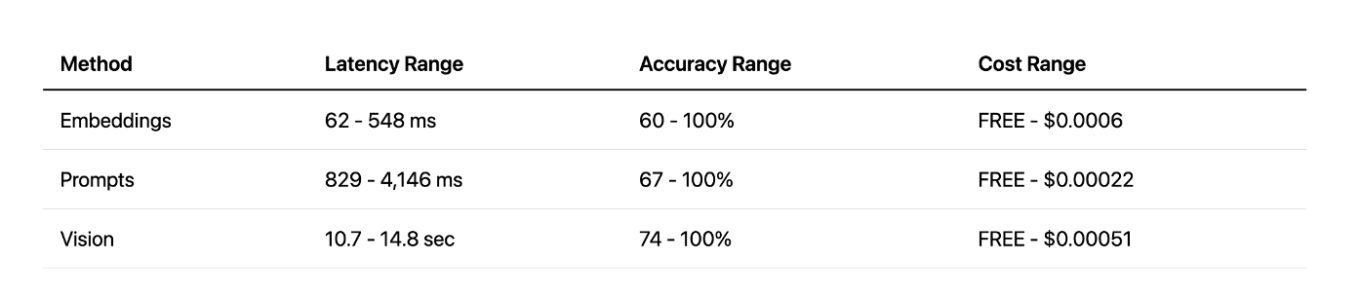
Now that we have these three prototypes, the most important question arises: are they practical? Can this actually work in production? To answer this, I analyzed the performance and cost for each approach.
Embeddings
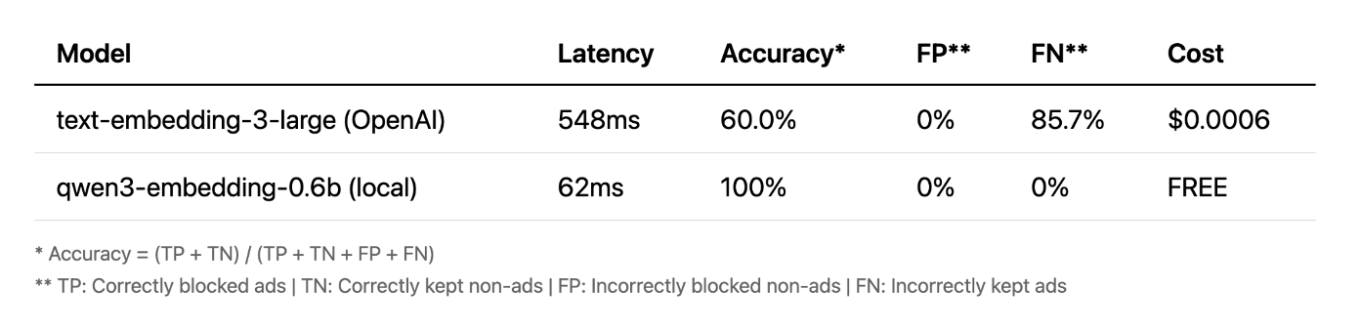
Let me start with embeddings. Initially, I started the extension with OpenAI’s cloud model, and to be honest, the results were not great. But then I decided to try a small local model, and the outcome surprised me. It was faster, completely free, and achieved 100% accuracy on my tests. This shows that for certain tasks, small local models can actually outperform big cloud APIs.
Prompts
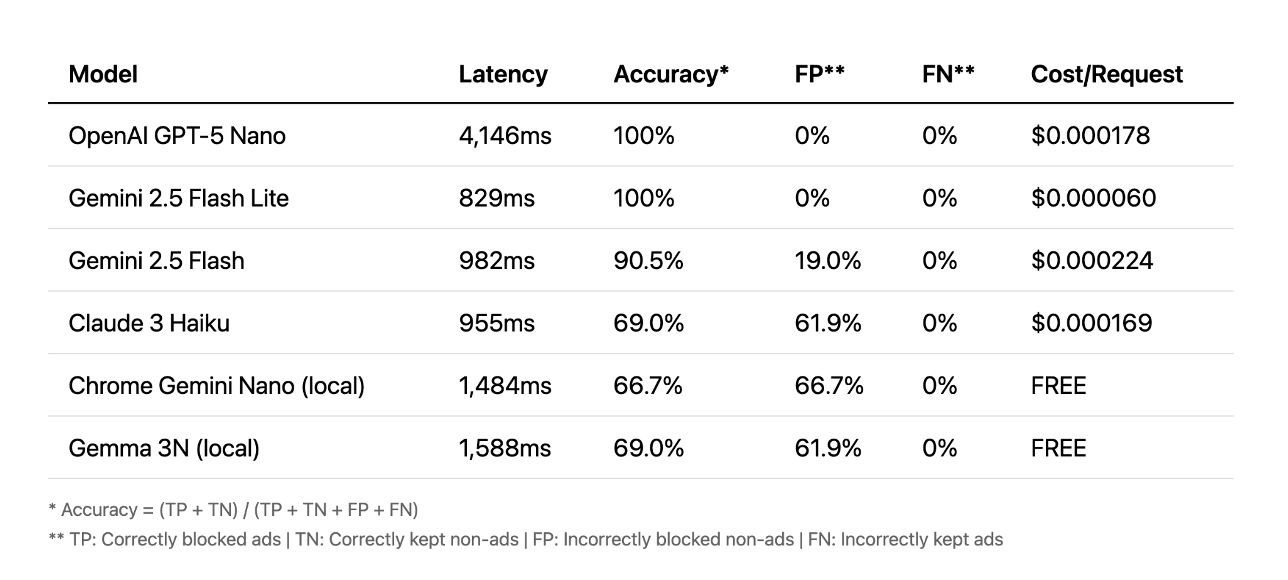
Next, let’s look at prompts. Here, the story is different. The cloud APIs performed best, with some achieving 100% accuracy in under a second. Some took over four seconds, which is far too slow for a good user experience. And in this case, the local models just couldn’t keep up with cloud accuracy.
Vision
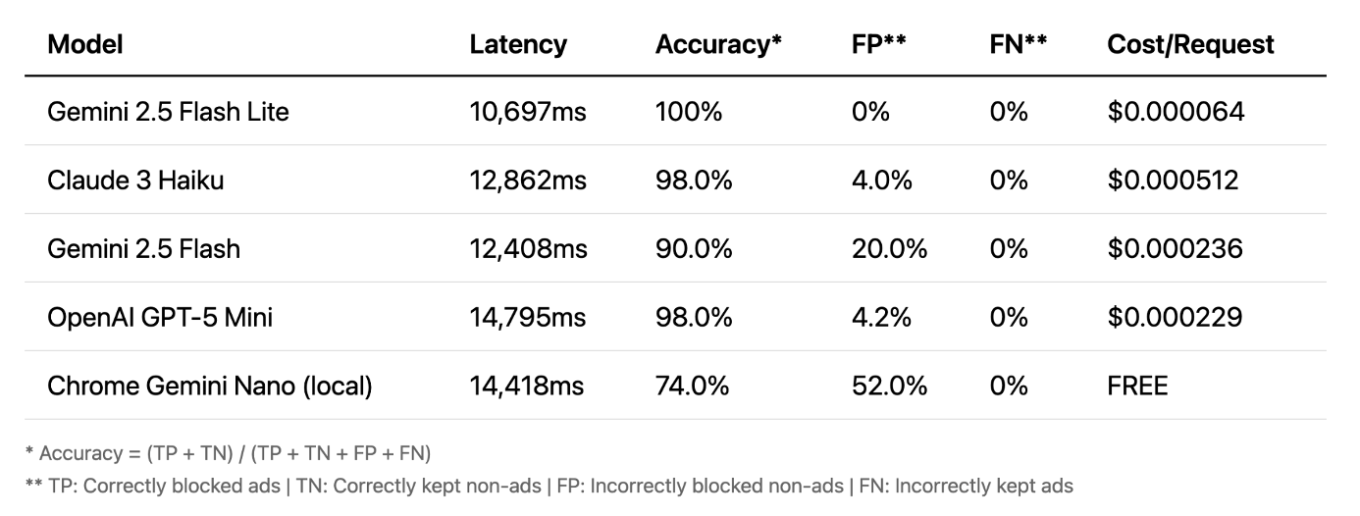
And finally, let’s talk about vision. This is where things get really interesting. The accuracy is very high — even local models perform well. Vision is often the most accurate method. Its key advantage is that it works on images, not text, catching ads that other methods miss. However, there’s a major trade-off: latency. A 10 to 15 second delay is not practical for real-time blocking.
Methods comparison
When comparing all methods, vision offers great accuracy, but with very high latency. Prompts approach provides a good balance of speed and accuracy, especially with cloud APIs. And local embeddings approach was a pleasant surprise — very fast and effective, but only for specific tasks. In the end, each method has its strengths and weaknesses.
The future of this approach
Vision: Too slow now, improving over time
Embeddings: Impractical in extensions, would be ideal if built into browsers
Local LLM prompts: Experimental, needs better accuracy
What does this mean for the future? In my opinion, vision is simply too slow for now. Embeddings aren’t very practical if used in browser extensions, but they could work well as a built-in browser API. And local LLMs prompts are the most promising path for a real, shippable experiment with Chrome’s Prompt API. There’s also the challenge of improving user experience as the current approach with blurring elements isn’t ideal. With faster models we could reduce the blur time, or maybe it is possible to come up with a completely different solution.
What have we learned? First, LLMs allow us to move beyond simple pattern matching and actually understand the meaning of web content. This opens up a completely new, semantic approach to filtering. And second, LLMs give us rapid prototyping. Ideas that used to take months of engineering can now be tested in a matter of hours. While there are still practical challenges to solve, this new approach allows us to rethink what’s possible in the world of content filtering.
I hope this has given you a new way to think about content filtering. You can try out everything I talked about in this article yourself — just download the AI AdBlocker from Chrome Store.
The full source code is also available on GitHub. Feel free to reach out if you have any questions or suggestions!




















































