This startup pays developers for watching ads when using AI. What’s the catch?
“Processing.” “Thinking.” “This might take a minute.” Anyone who uses an AI coding assistant — or AI in general — will recognise these messages. Sometimes the wait lasts only a few seconds. Sometimes it takes minutes. And for developers working on especially complex tasks, waits of 15 or 20 minutes, or even close to an hour, are not entirely unheard of.
During that time, you may just sit there watching the activity log as the agent reads files, runs commands, and attempts to finish the task. Or you may step away and return later to check whether it has finally succeeded. Either way, you see the small status message displayed while the coding assistant is working again and again. It gets a surprising amount of your attention. So, one startup decided to monetize it.
Kickbacks.ai replaces or supplements that little “thinking” line with an advertisement. Advertisers pay for the views, Kickbacks takes its share, and the developer whose computer displayed the ad receives the rest. At first glance, this sounds like a fairer version of the familiar data economy. Instead of quietly profiting from your data, the company puts a price on it and gives you a cut.
The idea is not entirely new. Evidation has offered points — redeemable at 10,000 points for a $10 cash payment — in exchange for health and activity data. Nielsen has paid people to install monitoring software that collects demographic, behavioural, and preference information. Honeygain pays users for sharing their internet traffic, while UpVoice rewarded users for allowing an extension to observe the ads shown to them on major platforms. Kickbacks is part of the same family, but the stakes of installing it may be way higher.
Once you get past the promise of a 50/50 split and start reading the fine print, it begins to look far less like compensation and far more like a very small payment for taking on a very large risk.
Kickbacks.ai: what it is and how it works
Kickbacks appeared in June 2026 as a project by developer Andrew McCalip. Its slogan is “Get paid for waiting.” When Claude Code or Codex is processing a request, the extension replaces or supplements the usual spinner message with a sponsored line.
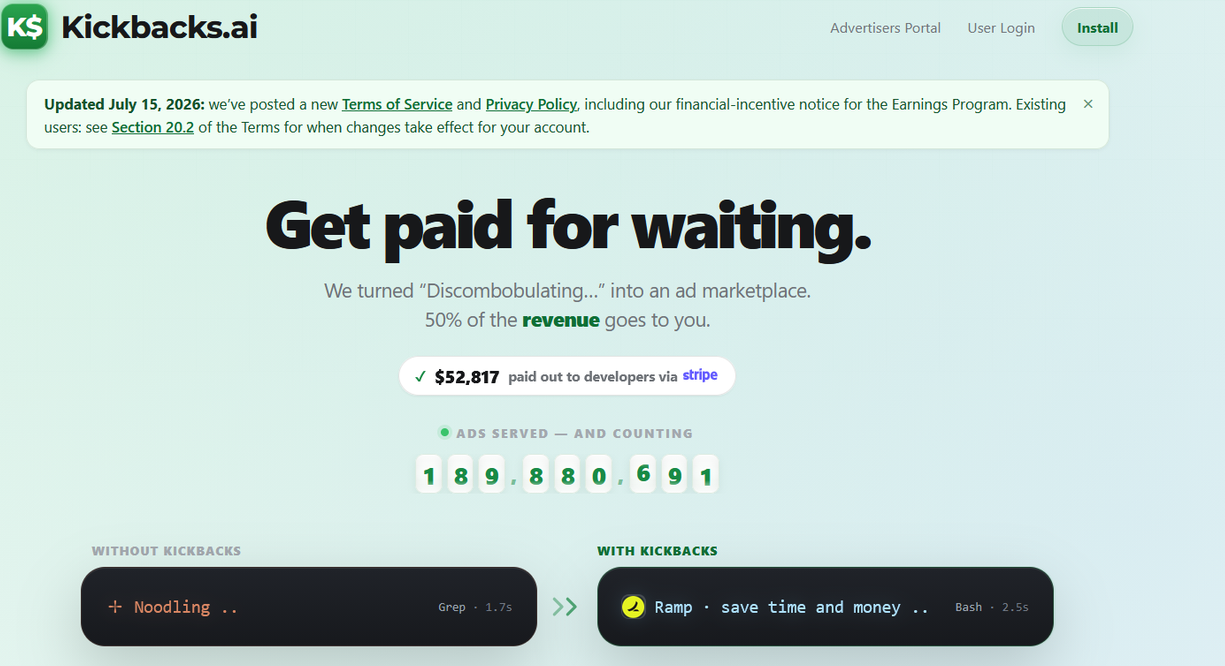
The product is aimed squarely at developers. It works inside Visual Studio Code, or VS Code — a popular desktop app where developers write and manage code — and can also be installed in VS Code-based editors such as Cursor and VSCodium. VS Code has its own extension system, similar in concept to browser add-ons, but the extensions run inside the code editor rather than inside Chrome, Firefox, or another browser. Kickbacks supports terminal versions of Claude Code and OpenAI Codex too, but with a catch: terminal ads do not earn anything on their own. The VS Code extension still has to be installed because it is the part that reports qualifying impressions. So, in a nutshell, this is not something that a regular ChatGPT or Gemini user can earn from. You need a developer setup for the extension simply to work.
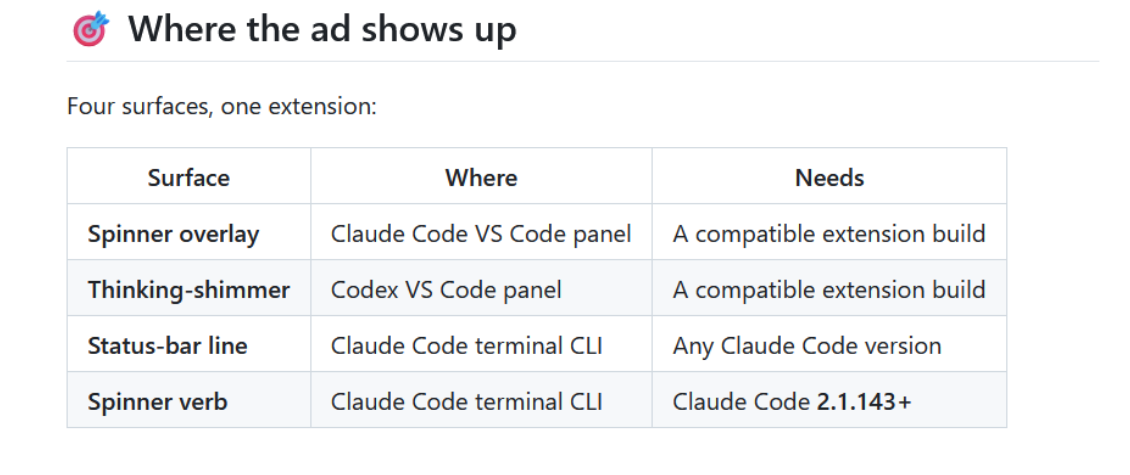
To get paid, the developer must be signed in, the Kickbacks extension must be installed and running, and the ad must stay visible for at least five seconds during a real coding request started by the developer. The editor also has to be open and not minimized, and Kickbacks says it checks whether the user has shown real activity within the previous few minutes. Automated prompts, repetitive requests designed to farm ads, or activity rejected by the company’s anti-fraud systems do not qualify.
There are two advertising modes. Private Mode turns on automatically when the user signs in. Boosted Mode requires a separate opt-in and uses information from the user’s conversations to target ads more precisely at them.
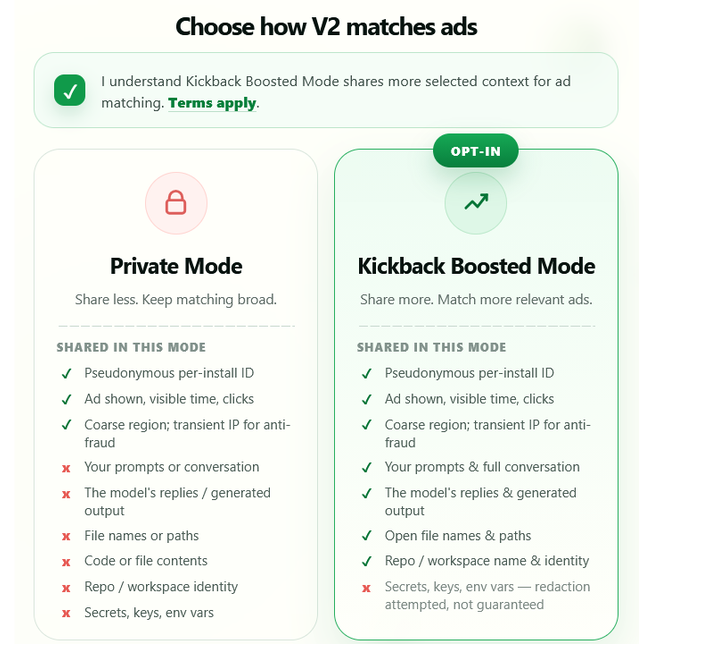
The difference is substantial. But even “Private Mode” is not what most people would probably expect from a truly private solution (if true privacy is even possible in a system built to track and attribute ads).
Is ‘Private Mode’ really private?
Private Mode is private in roughly the same way that replacing your name with a customer number makes a database anonymous: better than printing everything in plain text, but hardly makes you invisible.
Kickbacks says Private Mode does not send advertising partners your prompts, AI responses, source code, file contents, file names, paths, or repository identity. That protects the most sensitive part of your work. But it still falls well short of what most people would probably understand by “private.”
To serve an ad in Private Mode, Kickbacks says it shares the following with the advertising partner:
- a pseudonymous user or session identifier;
- a transformed or truncated version of the IP address;
- the operating system;
- the user-agent/editor version;
- an approximate city- or region-level location;
- confirmation of impressions and clicks.
Kickbacks itself collects more. Its telemetry can include which ad appeared, which campaign it belonged to, where it appeared on the screen, what percentage of it was visible, how long it remained visible, timestamps, extension and host versions, account and installation identifiers, click activity, request timing, request frequency, relationships between accounts and devices, and behavioural signals used for fraud detection. Most of these data points sound like nothing much in isolation. Together, over time, they create a persistent behavioural record of how a person uses an AI coding assistant: when they work, how often they make requests, how long sessions last, which editor and operating system they use, approximately where they are, and which ads they interact with.
And that “pseudonymous identifier” deserves more attention than it usually gets. It may not contain your name, but it still gives your device or account a recurring label, so companies can recognize that the same person came back, connect their activity across sessions, and keep adding new details to the same profile.
NIST, the US National Institute of Standards and Technology, warns that pseudonymous identifiers do not make people anonymous. The more information that gathers around one identifier — location, device details, timestamps, habits, and activity patterns — the easier it can become to match that profile with other data and work out who is behind it. In other words, “pseudonymous” means “your name is not written on the front.” It does not mean “nobody can work out who you are.”
Kickbacks goes further than simply admitting that data is shared. Its Privacy Policy explicitly says that, under California privacy laws, the program amounts to a sale or sharing of personal data. That wording may be there for legal reasons, but it is still worth taking at face value: your data is part of the product being sold.
Unusually, Kickbacks even puts a price tag on it. The company estimates that one participating user’s data is worth about $75 per year to Kickbacks, after the costs of running the program.

Boosted Mode: the privacy disaster upgrade
Private Mode is already hard to defend, but Boosted Mode makes the tradeoff almost impossible to justify.
When enabled, Kickbacks processes a portion of the developer’s recent AI-assistant conversation on its own servers. According to its Privacy Policy, this can include a capped tail of recent prompts and AI responses, open-file extensions, and a repository-name hint. The system then attempts to remove credentials and personal information and rewrites what remains into an advertising-interest profile: programming languages, technologies, professional topics, problem domains, region, role, or industry.
The policy says source files and file contents are not directly collected. But code, logs, customer information, internal architecture, credentials, financial details, or proprietary material may already be present inside a prompt or the model’s answer. Developers regularly paste exactly those things into coding assistants because that is how the assistant receives enough context to solve a problem.
Kickbacks says sensitive content — keys, tokens, and secrets — is stripped on the device before it is sent off. Its servers then apply more automated filters. If cleaning fails or appears uncertain, the company says the material is supposed to be discarded. But it also says, repeatedly, that this process is best effort and not guaranteed.
You have probably heard this warning before. OpenAI tells users not to enter sensitive information they would not want reviewed or used. Google similarly warns Gemini users not to enter confidential information they would not want a reviewer to see or Google to use to improve its services.
Kickbacks says advertising partners receive only the cleaned, derived profile, not the raw prompts or replies. But sensitive content that slips through filtering can still be processed by Kickbacks and may influence the profile before anybody notices. The terms explicitly say the company does not promise to find or remove undetected material afterwards.
Kickbacks may also enrich the profile with information from data brokers, such as your likely role or industry. So the ad is not simply matched to a word like “Python.” It may draw on a much broader picture of your work, including the technologies you use, the problems you solve, your location and device, and information gathered from outside sources.
The advertising partners that receive it are treated as independent controllers, not as contractors simply following Kickbacks’ instructions. With Kickbacks, users can at least read its Privacy Policy; once the data moves on, they may not even know which companies received it, let alone what those companies do with it.
The risk does not end when the user changes their mind. Switching from Boosted Mode back to Private Mode stops new profile data from being shared, but it does not automatically erase what partners have already received. That is not much of an undo button.
A 50/50 split — or not?
Kickbacks’ landing page paints an appealingly simple picture: the advertiser pays a dollar, Kickbacks gets 50 cents, and the developer gets 50 cents. It even calls the arrangement a “real 50/50 split,” explicitly promising no fuzzy math and no “up to” language.
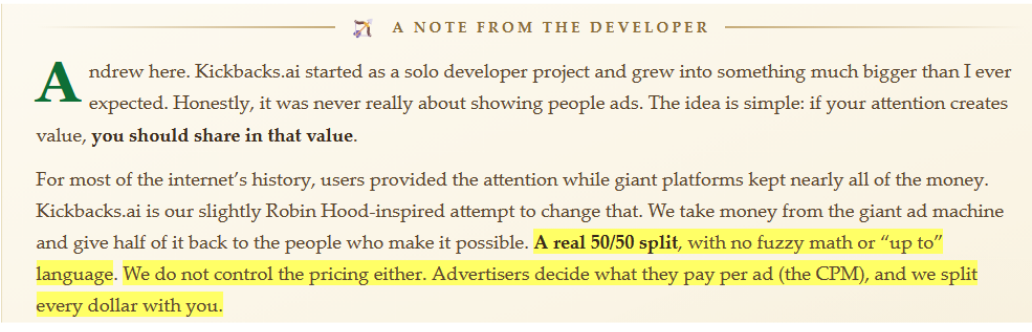
Yet Kickbacks’ own GitHub page describes the offer differently: developers receive “up to 50% of ad revenue.” That tiny “up to” directly contradicts the landing-page pitch.
And the Terms of Service introduce even more fuzz.
The user is not contractually promised half of every dollar an advertiser pays. The terms describe the reward as an estimated 50% of net advertising revenue after operational expenses. “Net revenue” means Kickbacks deducts operating costs before splitting the money, without clearly explaining what those costs include. And developers do not receive half of an advertiser’s entire payment: each person gets only the share Kickbacks attributes to qualifying ads shown on their own device.
So this is not a dollar neatly cut in half. It is an estimated share of the net revenue Kickbacks attributes to qualifying impressions shown on a user’s device, after operating costs and subject to fraud checks, eligibility rules, and usage limits. Those limits can apply daily, monthly, by region, by account, or even to individual users — and Kickbacks can change them without notice. It can also revise the revenue split, rates, and payout schedule with little more than a website or in-app notice.
Then comes the payout itself. Users cannot withdraw their money until they cross the current $10 threshold, which may also change. Stripe Connect Express is the only payout method. Most strikingly, the terms say users have no property interest in pending or accrued earnings until those earnings are actually disbursed. So the money displayed beside your account may look like your money, but they are legally not.
Underwhelming at best, a means to get you fired at worst
The most dangerous place to use Kickbacks is also the place where it is most likely to be used: at work.
The extension is designed for developers using AI tools to interact with real software projects. Those projects may involve unreleased products, customer records, internal services, confidential repositories, security vulnerabilities, financial systems, infrastructure credentials, or information covered by contracts and regulation. Kickbacks’ answer is essentially: make sure you have permission.
The company also makes clear that it is not affiliated with or endorsed by Microsoft, OpenAI, Anthropic, or GitHub. The software works by modifying, intercepting, or patching elements of third-party coding tools. Kickbacks does not guarantee that this is permitted by those platforms’ terms. It warns that a provider could block the extension, break it through an update, or take enforcement action against an account — including suspension or termination.
Suppose the filtering fails and an internal client name, access token, or fragment of proprietary information reaches Kickbacks’ servers. Suppose the AI provider decides that patching its interface violates its terms and closes the account. None of the above will be Kickback’s fault, according to its terms of service. Meanwhile, Kickbacks’ own total liability is capped at the greater of $100 or the amount the user paid Kickbacks during the previous 12 months. Since an earning user will normally have paid Kickbacks nothing — the whole point is that Kickbacks is supposed to pay them — the practical cap is likely to be just $100.
Your job, client relationship, professional reputation, AI account, confidential information are therefore being placed on one side of the scale. On the other side: an estimated share of net ad revenue, subject to deductions, undisclosed caps, fraud screening, a changeable threshold, Stripe availability, and forfeiture clauses. And perhaps $100 if something goes badly enough for Kickbacks itself to be legally liable.
Kickbacks is built around a genuinely attractive idea. If companies are going to profit from our attention and information anyway, why should users not receive part of that value? But a fair exchange requires both sides to understand what they are giving and to have meaningful control over what happens next. Kickbacks offers neither a simple half of every advertiser dollar nor a genuinely private mode of participation.
Kickbacks controls the calculations, the caps, the qualification rules, and the payment schedule. Its partners may retain data already received. The AI or editor provider may decide the extension is unwelcome. The developer’s unpaid balance is not legally theirs until it reaches their account.
For somebody using an AI coding assistant purely for personal experiments, with no confidential projects, no employer rules, no valuable data, and no concern about behavioural profiling, Kickbacks may be an amusing way to turn a spinner into pocket money.
For a professional developer whose livelihood depends on access to their tools, the trust of their employer and clients, and the confidentiality of their work, the equation is different.
Risk your data, your account, your reputation, and potentially your job, while the company promising to split the proceeds limits its own liability to around $100. That is not Robin Hood. It is a very small kickback for a very large risk.




















































