Is ad-free streaming doomed?

Those of us who have been around for a while may remember the blissful old days when streaming was strongly associated with an ad-free experience. Sick and tired of the commercial breaks on cable TV (and let’s not even get started on linear TV), we would embrace streaming as a healthy alternative to the choiceless and ad-laden regular TV viewing.

Little did we know that this would not last forever… a paradise lost, likely never to be rediscovered. Slowly but surely, the old subscription-based streaming services introduced ad-supported tiers, while the new ones, like Discovery+ or Peacock, received ad-supported tiers right out of the gate.

Last year, it was time for streaming veteran Netflix to bow to the trend: Netflix introduced an ad-supported tier for $6.99 a month and, to rub salt in the wound, in July this year dropped its $9.99 ad-free basic plan in the US, the UK, and Canada, with its cheapest ad-free plan now costing $15.49 a month. We have already lamented the demise of the completely ad-free Netflix, which once promised to never introduce ads. You can read our detailed epitaph here. This time, the bell has tolled for Amazon Prime.

Prime Video is past its prime

This month, Amazon announced that its Prime Video streaming service will begin featuring ads in shows and movies in early 2024. The rollout will begin in the US, UK, Germany, and Canada, and later expand to France, Italy, Spain, Mexico, and Australia. In a press release, Amazon justified the introduction of a new ad-supported tier by citing the need to support the creation of “compelling content,” such as its hit series The Marvelous Mrs. Maisel.

Whatever the justification, the fact that Prime Video is turning to an ad-supported model is frustrating. And it’s not just a matter of seeing ads in places where there were none before. The other problem with any ad-supported service is that it collects a lot of viewers’ data in order to show them the most relevant ads. We do not know what kind of information Amazon will use to target ads in Prime Video, but we can assume that it will have a lot of data to work with, given the role that Amazon services play in the daily lives of the average American. For example, Amazon has 148 million Prime members in the US who use its various services such as streaming, retail, prescription drugs, grocery delivery, photo storage, and gaming. This means that Amazon can track and analyze their online behavior, preferences, purchases, and more. The sheer amount of data potentially available to advertisers means that they will be willing to pay a lot of money to reach these customers with personalized ads.

For Amazon Prime users who want to keep watching videos without ads, they will have to shell out an extra $2.99/month. That may sound like just a cup of coffee, but it’s actually a huge price hike. It means paying ~20% more for the monthly Prime subscription in the US (currently $14.99) or ~26% more for the annual one (currently $139).

This, along with the sneaky way that Amazon is rolling out the ad-supported option, suggests that the company’s real goal is to lure users into staying on the ad-infested tier, rather than a genuine offer to let them choose between ads and no ads.

But what is so sneaky about Amazon’s new hard-to-resist offer?

‘No action required’

The sneaky part is that while there’s a fundamental difference between ads and no ads, and it may be a deal-breaker for many, Amazon isn’t technically introducing a new ad-supported tier that you are free to join; rather, it’s automatically enrolling all of its Prime users into the ad-supported plan.

In a statement announcing the arrival of ads to Prime Video, Amazon says: “No action is required for Prime members.” In the same statement it describes ads as a necessary evil that should not detract much from the Prime viewing experience, at least in comparison with its competitors: “We aim to have meaningfully fewer ads than linear TV and other streaming TV providers.”

However, the wording leaves much to interpretation, and we cannot possibly know what Amazon means by “meaningfully fewer ads” and who are “streaming TV providers” it compares itself with. For instance, subscribers of Netflix ad-supported plan should see on average 4 minutes of ads per hour, while Discovery +’s and Hulu’s ad load is higher — 5 minutes of ads per hour and 7.3(!) minutes of ads per hour respectively. According to Media Radar, the largest advertising-based video on-demand platforms average 6.1 minutes of ads per hour.

The way Amazon Prime is quietly pushing its subscribers toward the ad-supported plan reeks of unfair practices and dark patterns. And it’s not like Amazon is new to this. Just three months ago the US Federal Trade Commission (FTC) accused the company of having “knowingly duped millions into unknowingly enrolling in Amazon Prime,” that is without their consent or knowledge. The FTC claimed that Amazon had employed “manipulative, coercive or deceptive user-interface designs known as 'dark patterns' to trick consumers into enrolling in automatically renewing Prime subscriptions.” History repeating itself?

It’s bigger than Amazon

We have zeroed in on Amazon in this article not because it is an outlier, but because it is a perfect illustration of the domineering trend. Many streaming services nowadays are either adding ad-supported tiers or raising prices of the already existing ones. The ultimate goal seems to be to get users to accept the idea that what was once considered incompatible, even absurd — paying for subscriptions and still watching ads — is now the new normal.

In arguably the same vein, YouTube recently removed its cheapest ad-free plan, ‘Premium Lite,’ from several wealthy European countries where it was previously available. However, YouTube has not ruled out the plan’s return in some other form, and has launched ‘YouTube Lite’ in Thailand.

In any case, the idea that ads are something we have to come to terms with is being hammered vigorously into our minds. For instance, Telsey Advisory Group analyst Joseph Feldman, complementing Amazon for boosting its ad business via the new tier, notes that “for members who are heavy consumers of video, the ad-supported and ad-free options are standards in the industry, including Netflix, Inc NFLX and Hulu, and should not be a surprise.”

However, some users still beg to differ. In response to Amazon’s announcement, some have argued that the presence of ads, and not just the generic ads you can see on cable TV, but highly-targeted high-paying ads, is enough of a trade-off between the user and the service provider.
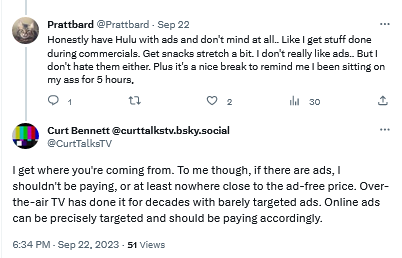
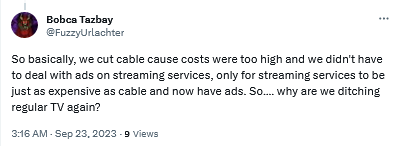
Users are not yet comfortable with streaming services introducing ad tiers

By introducing ads streaming services become just like regular TV

Bracing for the worst, hoping for the best

Unfortunately, everything points to a future where users are forced to be comfortable with ads as an inherent part of subscription-based services. We can come up with various reasons why this is so, but the most likely one is that ads are simply too lucrative to pass up, and no subscription revenue can (probably) make up for what they bring in.

Streaming platforms train us to see ads not as what they are — inherently intrusive and privacy-breaking nuisances — but as an inalienable part of every service, of every interface. We believe that users deserve a better streaming experience, and if platforms are not willing to provide it to them, it’s only natural that they turn to ad blockers.

However, there are limits to what ad blockers can do when you want to block ads on streaming services. If you want to get the most out of your ad blocker, we recommend that you use your streaming service in the browser. This way, an ad blocker (a browser extension or standalone app) is able to apply more complicated filtering techniques and block most ads. But it comes with no surprise that streaming platforms do not like their ads to be blocked, and they try to prevent ad blockers from working at full tilt. They do this by constantly changing their code and ad loading mechanism. This, in turn, requires ad blockers and filter developers to constantly update their filters to keep up with these changes. That takes time, as it’s not easy to monitor numerous streaming services all at once — and then there are thousands of other websites to block ads on, too. That’s why we at AdGuard appreciate it so much when you send us reports about missed ads. If you’re using AdGuard and notice an ad — please, take a minute of your time to report it. It really helps us a lot to stay on top of things.

Note that while DNS services (such as AdGuard DNS) can occasionally block some ads on some streaming services, it’s more the exception than the rule. So we would not recommend relying on DNS-level blocking alone to stop ads on your streaming platform of choice. The reason for this is that streaming services often use the same domain name for both the video content and the ads, making it impossible for the DNS server to distinguish between them. DNS blocking has its applications, but this isn’t the job for it.


Páčil sa vám tento príspevok?
AdGuard VPN AdGuard DNS AdGuard Mail Peňaženka AdGuard
Hlavná obrazovka AdGuardu pre Windows
Obrazovka ochrany AdGuardu pre Windows zobrazujúca funkcie a nastavenia ochrany
Obrazovka so štatistikami v aplikácii AdGuard pre Windows, ktorá zobrazuje štatistiky blokovaných reklám a sledovacích programov
Obrazovka správy aplikácií v AdGuarde pre Windows zobrazujúca možnosti správy ochrany pre aplikácie nainštalované v zariadení
20 387 20387 hodnotení
Výborne!

AdGuard: blokovač reklam pre Windows

AdGuard pre Windows je viac než blokovač reklám. Je to viacúčelový nástroj, ktorý blokuje reklamy, kontroluje prístup k nebezpečným stránkam, zrýchľuje načítavanie stránok a chráni deti pred nevhodným obsahom
Stiahnutím programu akceptujete podmienky licenčnej zmluvy
Microsoft Store
Stiahnutím programu akceptujete podmienky licenčnej zmluvy
AdGuard pre Windows v8.0, 14-dňová skúšobná doba
Hlavná obrazovka AdGuardu pre Mac
Obrazovka Režimu utajenia v aplikácii AdGuard pre Mac
20 387 20387 hodnotení
Výborne!

AdGuard: blokovač reklám pre Mac

AdGuard pre Mac je unikátny blokovač reklám navrhnutý pre macOS. Okrem ochrany pred otravnými reklamami v prehliadačoch a aplikáciách Vás chráni aj pred sledovaním, phishingom a podvodmi
Stiahnutím programu akceptujete podmienky licenčnej zmluvy
Prečítať si viac
AdGuard pre Mac v2.19, 14-dňová skúšobná doba
Hlavná obrazovka AdGuardu pre Android
Obrazovka ochrany pred sledovaním v aplikácii AdGuard pre Android
Obrazovka správy aplikácií v AdGuarde pre Android, ktorá zobrazuje možnosti správy ochrany pre aplikácie nainštalované v zariadení
Obrazovka so štatistikami aplikácie AdGuard pre Android, ktorá zobrazuje štatistiky blokovaných reklám a sledovacích programov
Hlavná obrazovka súkromného prehliadača AdGuard pre Android
QR kód na stiahnutie AdGuardu pre Android
20 387 20387 hodnotení
Výborne!

AdGuard: blokovač reklám pre Android

Blokuje reklamy a sledovače vo všetkých prehliadačoch, hrách a iných aplikáciách. Chráni Vaše súkromie a umožňuje Vám kontrolovať, ako Vaše aplikácie používajú internet. Inštaluje sa cez APK

Stiahnutím programu akceptujete podmienky licenčnej zmluvy
Prečítať si viac
Naskenujte a stiahnite
Použite akúkoľvek čítačku QR kódov dostupnú vo Vašom zariadení.

AdGuard pre Android v4.14, 14-dňová skúšobná doba
Hlavná obrazovka AdGuardu pre iOS
Obrazovka ochrany AdGuardu pre iOS zobrazujúca funkcie a nastavenia ochrany
Obrazovka so štatistikami v aplikácii AdGuard pre iOS, ktorá zobrazuje štatistiky blokovaných reklám a sledovačov
QR kód na stiahnutie AdGuardu pre iOS
20 387 20387 hodnotení
Výborne!

AdGuard: blokátor reklám pre iOS

Najlepší blokovač reklám pre iOS na iPhone a iPad. AdGuard eliminuje všetky druhy reklám a sledovacích nástrojov v prehliadači Safari a chráni Vaše súkromie vo všetkých aplikáciách na úrovni DNS.
Stiahnutím programu akceptujete podmienky licenčnej zmluvy
Prečítať si viac
Naskenujte a stiahnite
Použite akúkoľvek čítačku QR kódov dostupnú vo Vašom zariadení.
AdGuard pre iOS v4.5
Hlavná obrazovka blokovača obsahu AdGuard
Obrazovka filtrov blokovača obsahu AdGuard
Obrazovka nastavení blokovača obsahu AdGuard
20 387 20387 hodnotení
Výborne!

AdGuard blokovač obsahu

Blokovač obsahu AdGuard eliminuje všetky druhy reklám v mobilných prehliadačoch, ktoré podporujú technológiu blokovania obsahu – konkrétne v prehliadačoch Samsung Internet a Yandex Browser. Jeho funkcie sú v porovnaní s AdGuardom pre Android obmedzené, ale je bezplatný, ľahko sa inštaluje a je efektívny
Stiahnutím programu akceptujete podmienky licenčnej zmluvy
Prečítať si viac
AdGuard blokovač obsahu v2.8
Hlavná obrazovka rozšírenia prehliadača AdGuard
Obrazovka ochrany pred sledovaním rozšírenia prehliadača AdGuard
20 387 20387 hodnotení
Výborne!

AdGuard rozšírenie prehliadača

AdGuard je najrýchlejší a najľahšie rozšírenie pre blokovanie reklám, ktoré účinne blokuje všetky typy reklám na všetkých webových stránkach! Vyberte si AdGuard pre prehliadač, ktorý používate, a získajte rýchle a bezpečné prehliadanie bez reklám.
Inštalovať
Stiahnutím programu akceptujete podmienky licenčnej zmluvy
Inštalovať
Stiahnutím programu akceptujete podmienky licenčnej zmluvy
Inštalovať
Stiahnutím programu akceptujete podmienky licenčnej zmluvy
Inštalovať
Stiahnutím programu akceptujete podmienky licenčnej zmluvy
Inštalovať
Stiahnutím programu akceptujete podmienky licenčnej zmluvy
Prečítať si viac
Inštalovať
Stiahnutím programu akceptujete podmienky licenčnej zmluvy
Prečítať si viac
AdGuard rozšírenie prehliadača v5.5
Hlavná obrazovka AdGuard Assistant
20 387 20387 hodnotení
Výborne!

Asistent AdGuard

Rozšírenie prehliadača pre desktopové aplikácie AdGuard. Umožňuje vám blokovať vlastné položky na webových stránkach, pridávať webové stránky na zoznam povolených a odosielať hlásenia priamo z prehliadača
Asistent AdGuard v1.4
20 387 20387 hodnotení
Výborne!

AdGuard Home

AdGuard Home je sieťové riešenie na blokovanie reklám a sledovacích programov. Nainštalujte si ho raz na smerovač, aby ste pokryli všetky zariadenia vo Vašej domácej sieti – nie je potrebný žiadny ďalší klientsky softvér. Toto je obzvlášť dôležité pre rôzne zariadenia internetu vecí, ktoré často predstavujú hrozbu pre Vaše súkromie
AdGuard Home v0.107
Hlavná obrazovka AdGuard Pro pre iOS
Obrazovka ochrany AdGuard Pro pre iOS zobrazujúca funkcie a nastavenia ochrany
Obrazovka so štatistikami AdGuard Pro pre iOS, ktorá zobrazuje štatistiky blokovaných reklám a sledovacích nástrojov
20 387 20387 hodnotení
Výborne!

AdGuard Pro pre iOS

AdGuard Pro pre iOS obsahuje všetky pokročilé funkcie ochrany proti blokovaniu reklám. Ponúka rovnaké nástroje ako platená verzia AdGuardu pre iOS. Vyniká v blokovaní reklám v prehliadači Safari a umožňuje Vám prispôsobiť nastavenia DNS pre Vašu ochranu. Blokuje reklamy v prehliadačoch a aplikáciách, chráni Vaše deti pred nevhodným obsahom a chráni aj Vaše osobné údaje
Stiahnutím programu akceptujete podmienky licenčnej zmluvy
Prečítať si viac
AdGuard Pro pre iOS v4.5
Hlavná obrazovka AdGuard Mini pre Mac
Obrazovka ochrany Safari v AdGuard Mini pre Mac
Obrazovka Vytvorenie pravidla v aplikácii AdGuard Mini pre Mac
20 387 20387 hodnotení
Výborne!

AdGuard Mini pre Mac — blokovanie reklám v Safari

AdGuard Mini pre Mac je výkonný blokovač reklám pre Safari. Táto ľahká aplikácia odstraňuje reklamy, blokuje sledovače a zrýchľuje načítavanie stránok. Pomáha vám prehliadať web v Safari bez rozptýlení a chráni vaše dáta
Inštalovať
Stiahnutím programu akceptujete podmienky licenčnej zmluvy
Prečítať si viac
AdGuard Mini pre Mac v2.3
Hlavná obrazovka AdGuard pre Android TV so zapnutou ochranou
Obrazovka blokovania reklám aplikácie AdGuard pre Android TV zobrazujúca jej funkcie a nastavenia
Obrazovka nastavení AdGuardu pre Android TV
Obrazovka správy aplikácií AdGuard pre Android TV zobrazujúca aplikácie, v ktorých sú blokované reklamy a sledovače
20 387 20387 hodnotení
Výborne!

AdGuard pre Android TV

AdGuard pre Android TV je jediná aplikácia, ktorá blokuje reklamy, chráni Vaše súkromie a funguje ako firewall pre Váš Smart TV. Dostávajte upozornenia na webové hrozby, používajte zabezpečené DNS a profitujte zo šifrovanej prevádzky. Uvoľnite sa a ponorte sa do svojich obľúbených relácií so špičkovým zabezpečením a žiadnymi reklamami!
AdGuard pre Android TV v4.14, 14-dňová skúšobná doba
Maskot AdGuardu, Agnar, drží tučniaka s Linuxom
20 387 20387 hodnotení
Výborne!

AdGuard pre Linux

AdGuard pre Linux je celosvetovo prvý systémový blokovač reklám pre Linux. Blokujte reklamy a sledovače na úrovni zariadenia, vyberte si z predinštalovaných filtrov alebo pridajte svoje vlastné – to všetko cez rozhranie príkazového riadka
AdGuard pre Linux v1.4
20 387 20387 hodnotení
Výborne!

AdGuard Temp Mail

Bezplatný generátor dočasných e-mail adries, ktorý Vás udržiava v anonymite a chráni Vaše súkromie. Žiadny spam vo Vašom hlavnom priečinku doručenej pošty!
20 387 20387 hodnotení
Výborne!

AdGuard VPN

75 lokalít po celom svete

Prístup k ľubovoľnému obsahu

Silné šifrovanie

Neukladajú sa žiadne záznamy

Najrýchlejšie pripojenie

Non-stop podpora

Vyskúšajte bezplatne
Stiahnutím programu akceptujete podmienky licenčnej zmluvy
Prečítať si viac
20 387 20387 hodnotení
Výborne!

AdGuard DNS

AdGuard DNS je alternatívne riešenie pre blokovanie reklám, ochranu súkromia a rodičovskú kontrolu. Jednoduché nastavenie a bezplatné používanie poskytuje potrebné minimum ochrany proti online reklamám, sledovačom a phishingu bez ohľadu na to, akú platformu a zariadenie používate.
20 387 20387 hodnotení
Výborne!

AdGuard Mail

Chráňte svoju identitu, vyhýbajte sa spamu a udržujte svoju doručenú poštu v bezpečí pomocou našich aliasov a dočasných e-mailových adries. Užite si našu bezplatnú službu preposielania e-mail správ a aplikácie pre všetky operačné systémy
20 387 20387 hodnotení
Výborne!

Peňaženka AdGuard

Bezpečná a súkromná krypto peňaženka, ktorá Vám poskytuje plnú kontrolu nad Vašimi aktívami. Spravujte viacero peňaženiek a objavte tisíce kryptomien na ukladanie, odosielanie a výmenu
Sťahovanie AdGuard Ak chcete spustiť inštaláciu, kliknite na tlačidlo označené šípkou Vyberte možnosť "Otvoriť" a kliknite na tlačidlo "OK" - chvíľu počkajte, kým sa súbor stiahne. V otvorenom okne pretiahnite ikonu AdGuard do priečinka "Aplikácie". Ďakujeme, že ste si vybrali AdGuard! Vyberte možnosť "Otvoriť" a kliknite na tlačidlo "OK" - chvíľu počkajte, kým sa súbor stiahne. V otvorenom okne kliknite na "Inštalovať". Ďakujeme, že ste si vybrali AdGuard!
Nainštalujte AdGuard na Vaše mobilné zariadenie
















































