Light-side UX: How we design and write for privacy at AdGuard

💡
This post is based on the talk presented by Sofia Orlova, UX writer at AdGuard, at the Ad-Filtering Dev Summit in October, 2025. Other content about AFDS

At AdGuard, we develop a whole range of privacy tools: an ad blocker, a VPN, a DNS service, an email service, and soon — a crypto wallet. These products do a lot of complex things under the hood — but they need to stay simple and friendly on the outside.

Our users come from all over the world. Many of them don’t speak English natively, many aren’t tech-savvy. And yet we want all of them to feel supported while using our tools.

In this post, I want to show you how we at AdGuard approach UX design and copy:

  • What our writing and design are built on
  • How we handle different levels of user experience
  • How feedback and real-world constraints shape the final result
  • And how you can help us make it better

Let’s begin with the foundation.

What we build on: Our principles

At AdGuard, we like to say that we’re on the light side of the Internet. This idea runs through everything we do.

  • We care about transparency and openness
  • We actively show it — help users, explain things, or just get out of their way when needed
  • We give the control to the user. We believe the product should adapt to the user — not the other way around

Here’s what it looks like in practice.

Transparency → Clean UI, clear copy

We try to keep interfaces as clean as possible, with just enough visual and textual information to help you complete the task.
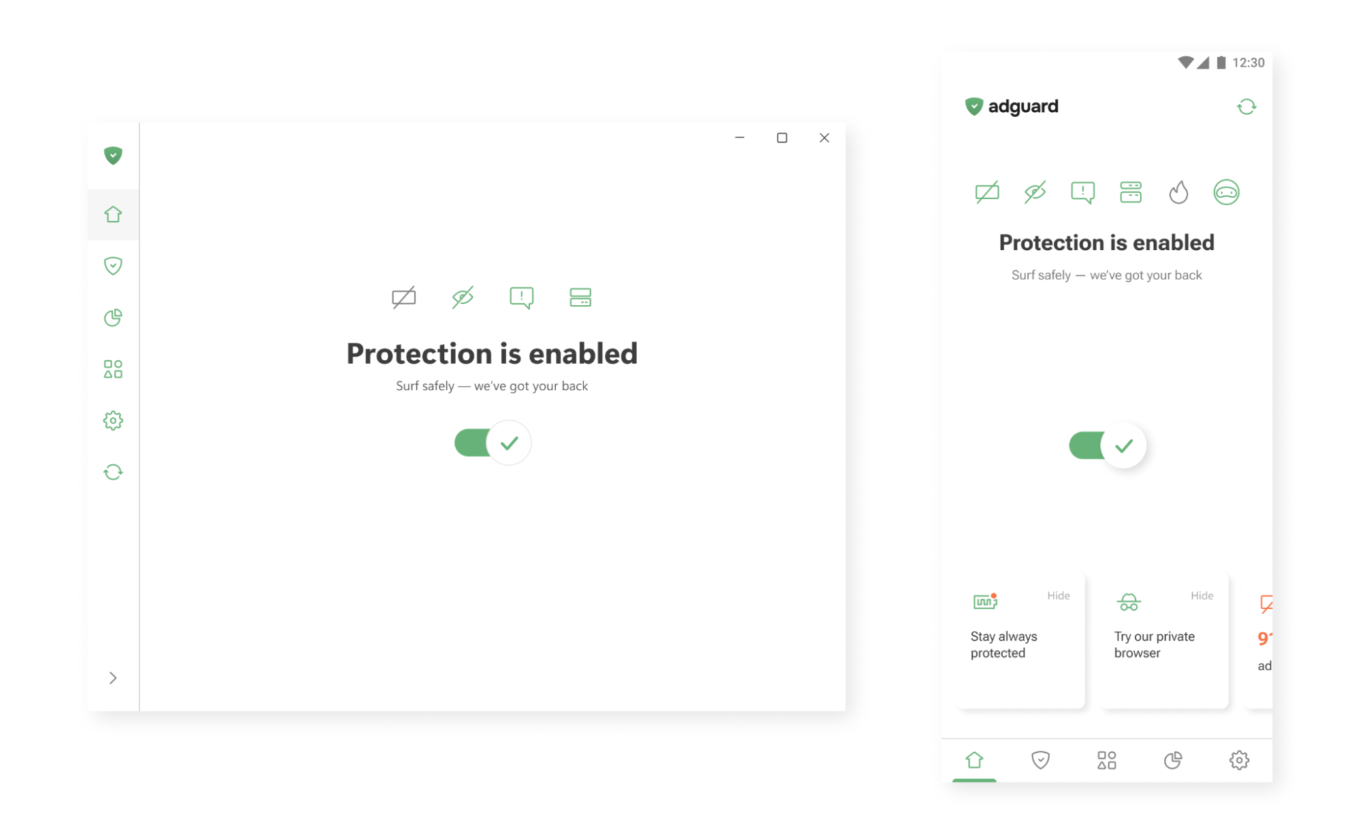
One button to enable protection

Active care → Help that’s always there

In our apps, you’ll often find small hints, tooltips, and summaries. Where needed, we add short explanations or links to longer articles — so you can dive deeper when you want to.
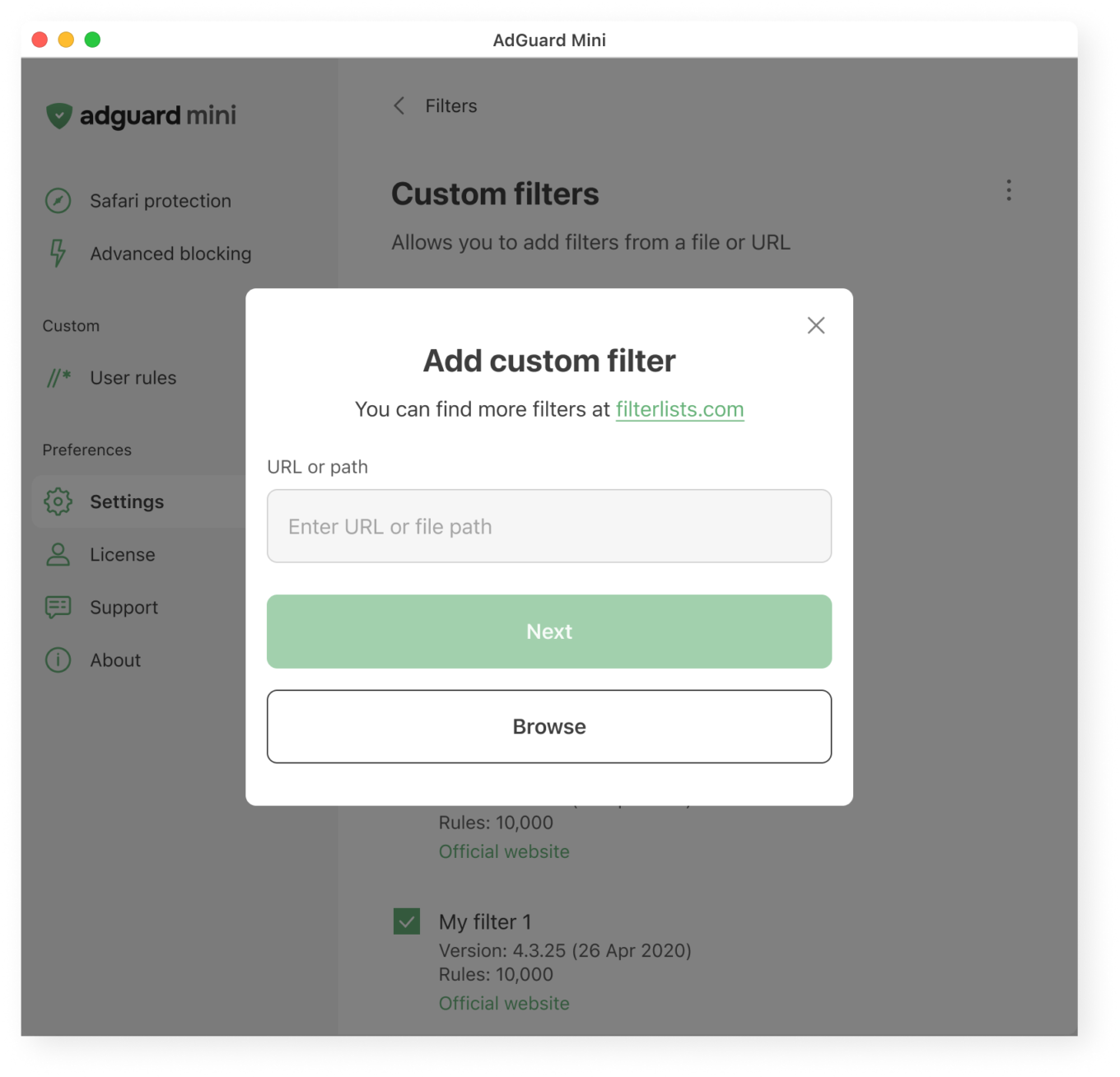
What users see when adding a custom filter

User control → Deep functionality, optional complexity

Most of our apps are layered. If you want to just turn on protection and move on, that’s great. If you want to dig deeper, you’ll find detailed settings, expert modes, and customizations. Your control is not necessary, but if you seek it, we’ll do our best to provide it to you.
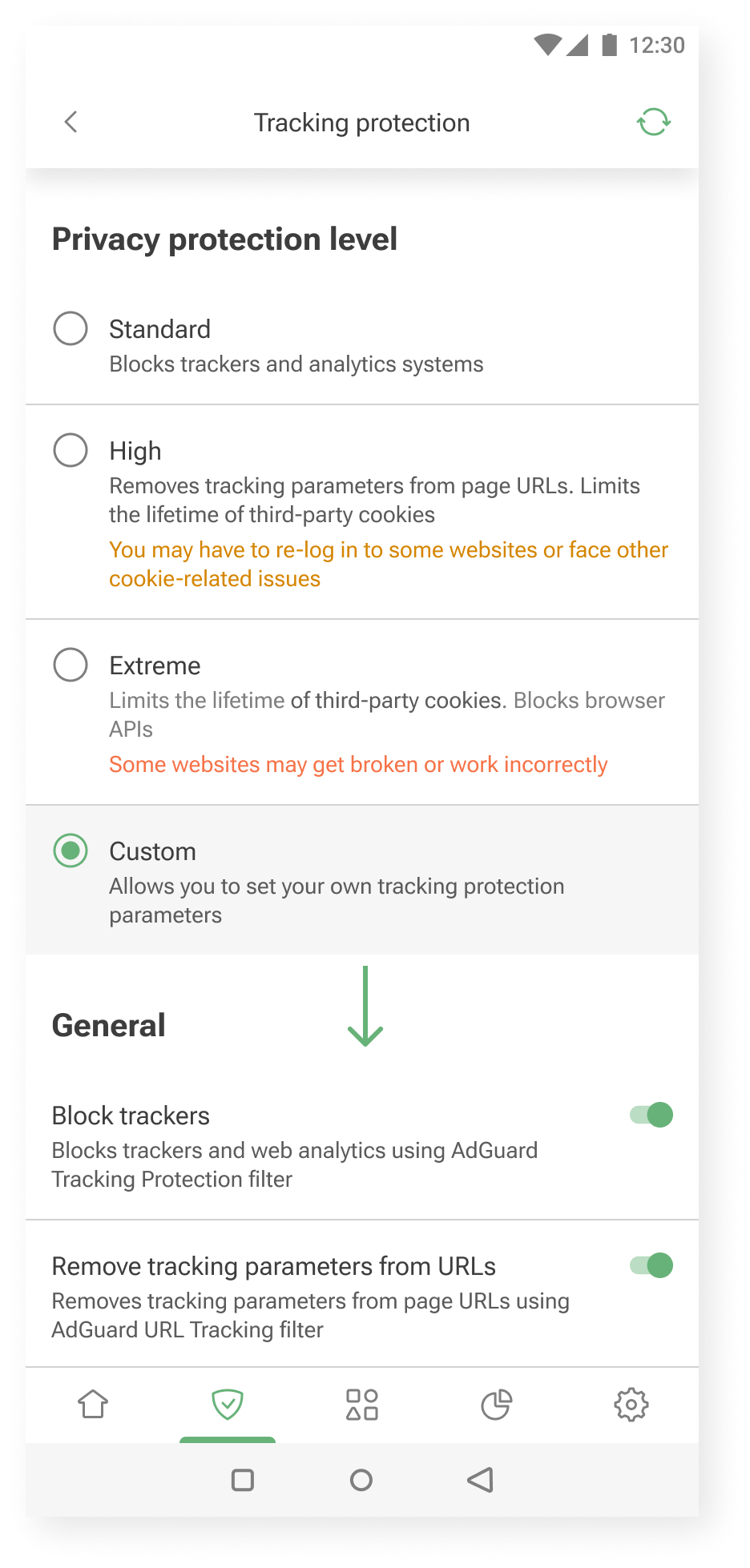
Additional settings are shown when you choose to customize further *mobile
Additional settings are shown when you choose to customize further

Our audience: How we approach different needs

Not everyone uses AdGuard the same way.

Some want to set it and forget it. Others enjoy tweaking settings and learning more about how privacy works. We try to support both.

Here’s how we approach it.

Layered experience

You can think of our apps as layered systems:

  • Simple on the surface — for those who want quick protection
  • Customizable in the middle — for those who are curious to learn and tweak things a bit
  • Deeply configurable — for power users who want full control without hand-holding

This approach helps us keep the UI clean, while still offering depth for those who need it.

One example is our User rules feature — a tool that allows users to create custom filtering rules.

Our previous approach was designed for advanced users only. There was a blank input field and a link to the documentation.
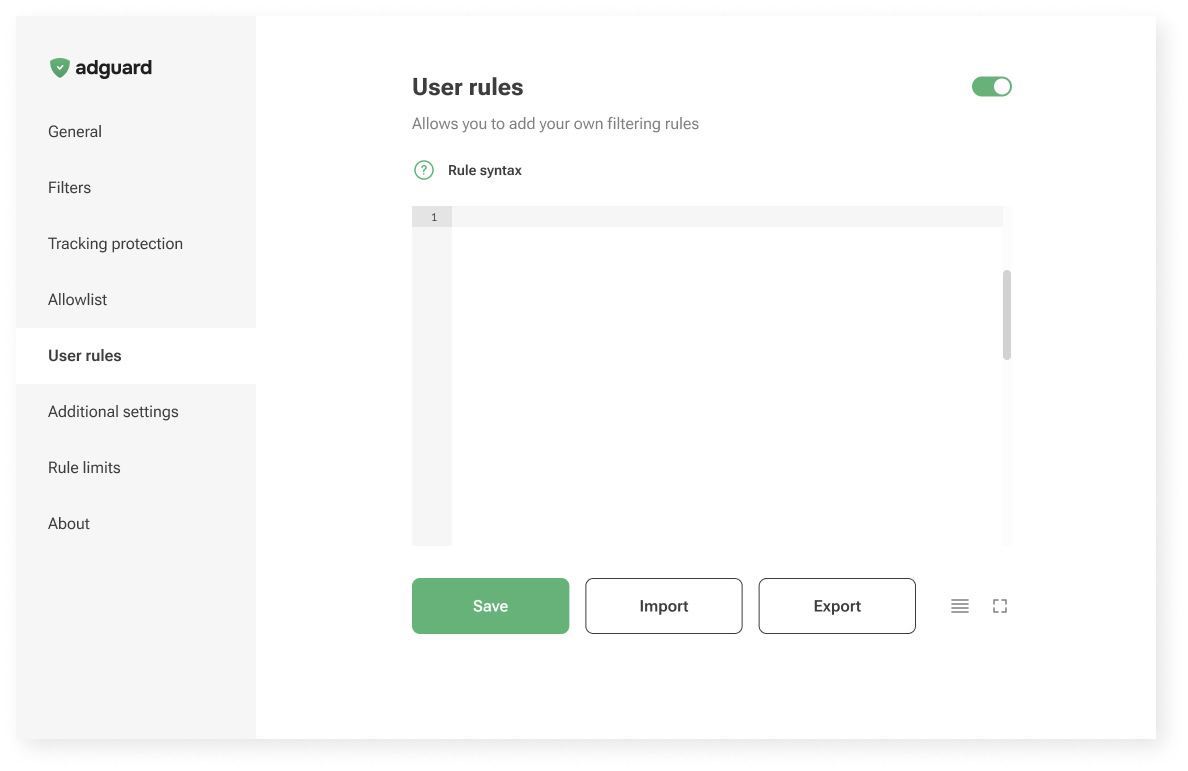
Old User rules unterface

Now, in AdGuard Mini for Mac, we’re trying something new: a guided interface that walks you through the process.
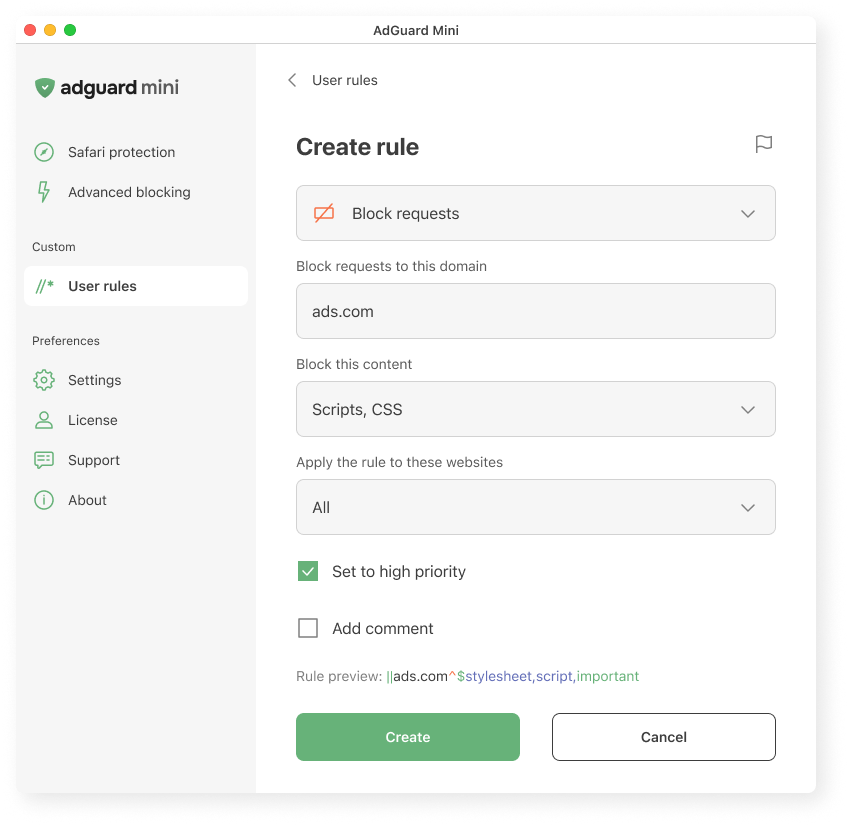
Creating a user rule in AdGuard Mini for Mac
Creating a user rule in AdGuard Mini for Mac

We explain what the rule does, where it applies, and how it works. We hope this makes it easier to get started, even if you’ve never written a rule before.

Let us know what you think: is it clear? Easy to follow? Missing something? Your feedback helps us decide whether to bring this approach to other platforms too.

Vocabulary

To meet users where they are, we adjust the vocabulary based on how familiar they might be with the topic and what they’re trying to achieve.

  • AdGuard protects you from ads and trackers — for those who just want peace of mind online. This works well when the user’s goal is simple: “I want the ads gone,” or “I want to feel safer.”
  • AdGuard blocks known analytics and phishing domains — for users who already understand the basics of online threats and want more transparency: “I know different types of tracking and risks exist, and I want to manage them more consciously.”
  • AdGuard lets you apply advanced cosmetic rules and scriptlets from custom lists — for experienced users who want full control, less explanations and more just tools: “I know what I’m doing; just let me configure it.”

Feedback: Where we learn what works

We’re constantly learning from you — and trying to reflect that in the product.

Sometimes the insights come from anonymous usage data. For example, we noticed that some users were ignoring the “card” about HTTPS filtering on the main screen. Without HTTPS filtering, however, most ads cannot be blocked. So we changed the wording on that “card” — and the result was immediate: the number of users who enabled the feature increased by about one and a half times.
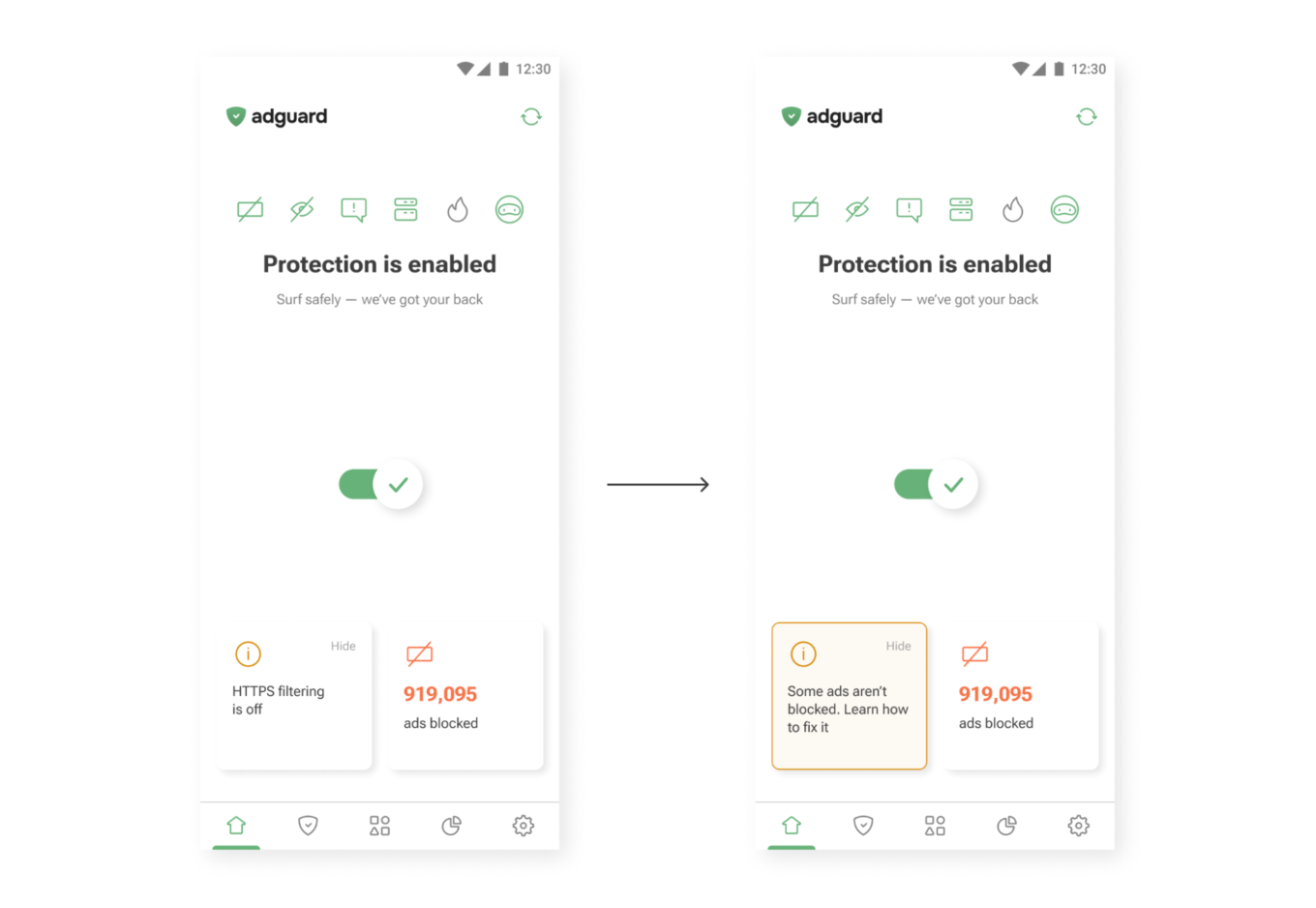
New wording on the main screen
New wording (right) drives more taps than the old one (left)

Sometimes feedback comes from support requests. One user once asked where they could find their VPN license key. The thing is, AdGuard VPN doesn’t use license keys — the subscription is simply tied to the email address used for purchase. So we added a short explanation to the confirmation email that users receive after buying a license. After that, questions about VPN license keys practically disappeared.
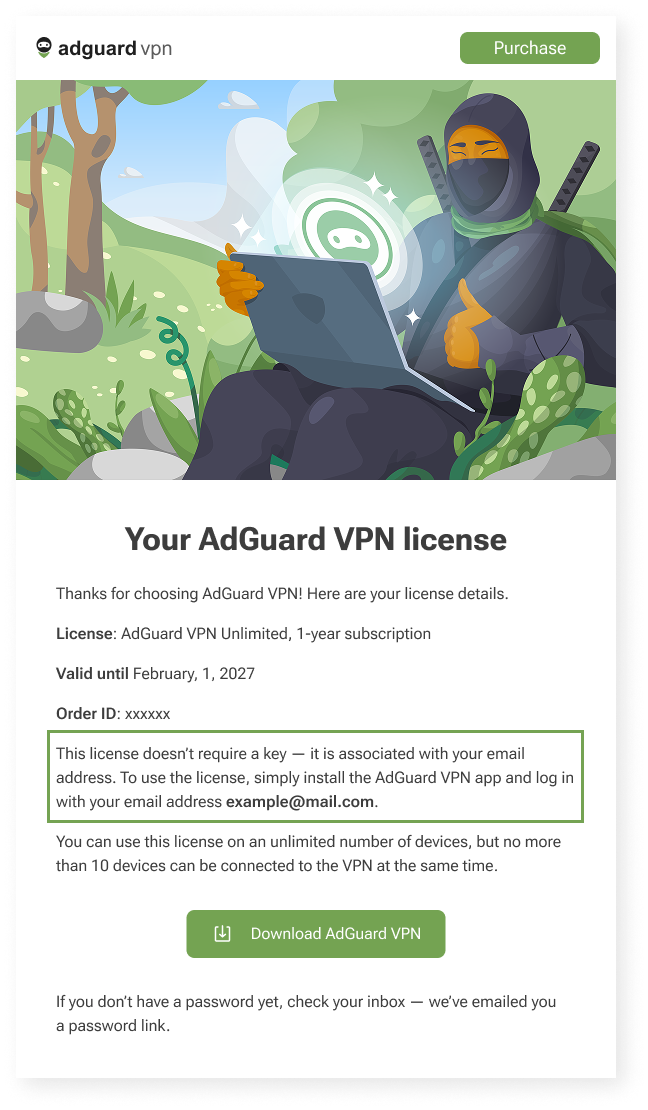
Post-purchase email for AdGuard VPN users *mobile
Post-purchase email for AdGuard VPN users

Constraints

We can’t implement every idea we come up with — and that’s not a bad thing. Constraints shape our work and help us better understand how and what to communicate to users. Here are a few examples of these constraints — and how we deal with them.

We’d love for all our texts to be friendly and concise, but in some cases we need to be legally precise to avoid any ambiguity. That’s why you may come across legal wording in our products — but whenever possible, we also provide a shorter, clearer summary to help you understand it quickly.
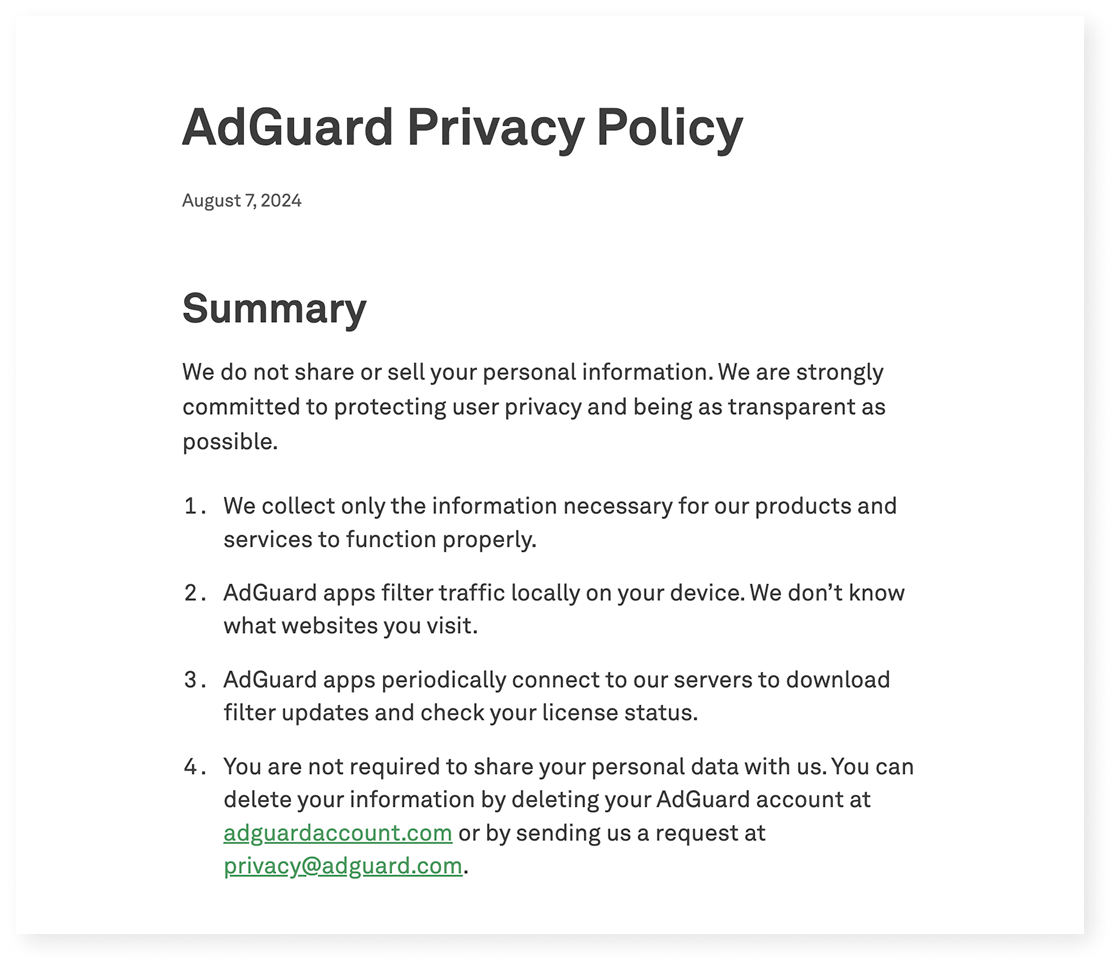
Excerpt from AdGuard’s Privacy policy

Localization

We build products for a global audience, and they are translated into 20+ languages. Even though we try to cover as many languages as possible, there will always be users who interact with our apps in a language that isn’t their native one. That means when we write in English, we have to keep in mind that not only native speakers will read it:

  • Vocabulary and syntax shouldn’t be too complex
  • We avoid local jokes, idioms, and wordplay that only native speakers would understand

Another constraint is how translation works in practice. We have several in-house translators and a group of dedicated volunteers who help us a lot (you can join too — read how). But in some cases, we have to rely on machine translation — and it’s much harder to provide context there.

This leads to a few additional rules:

  • Limit the amount of information in one message — English words are often shorter than their equivalents in other languages
  • Whenever possible, write in full sentences and avoid ending strings with prepositions — this can make translation more difficult

Let’s take another look at the User rules section.

When we were designing it, our initial idea was to make it feel like natural English: “Block request to ads.com.”

But in many languages, that structure wouldn’t work:

  • Slavic languages use grammatical cases
  • Turkic languages use postpositions, not prepositions
  • Asian languages often require more context

So we rewrote it as “Block requests to this domain.” It’s longer, but clearer for most of the users — and translators.
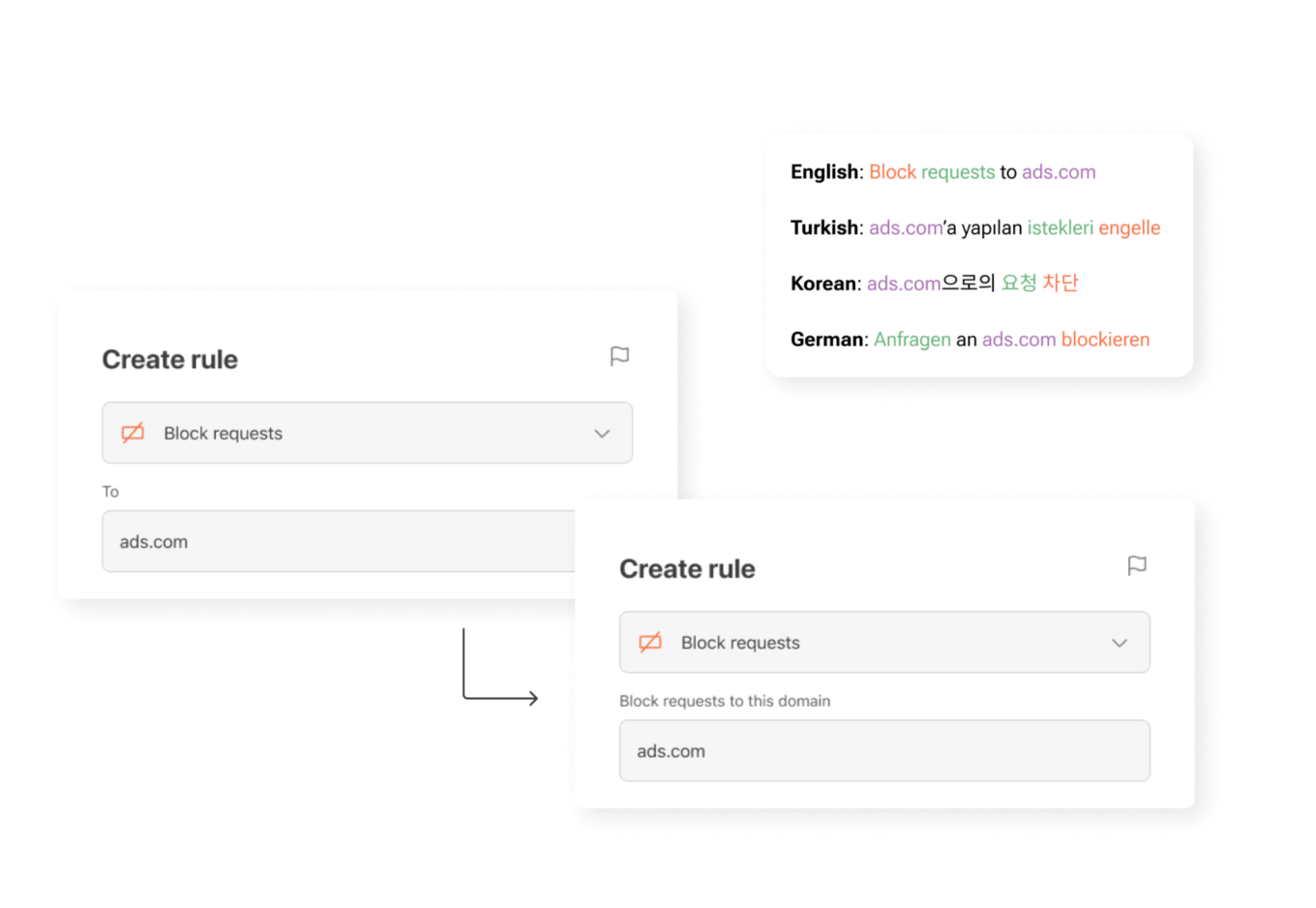
UI element for creating new rules in different languages

What’s next — and how you can help

Here’s a funny paradox: we’re a privacy company, so we collect as little data as possible. But that makes it harder to know which parts of our apps are most useful and which are confusing. We’re working on privacy-friendly ways to learn more about how you use AdGuard — so we can make things simpler, clearer, and more useful.

One small thing you can do to help: turn on the setting called Send anonymized app usage data. You’ll find it in AdGuard Ad Blocker, AdGuard VPN, and AdGuard Mail.

This option doesn’t send anything personal. We don’t collect identifiers, track you, or share your data with anyone. But it does help us see which screens people interact with — and which features need improvement.

Our next step is to rely more on insights like these when making product decisions. They help us see what really matters to users — and guide us in making AdGuard apps even clearer, more intuitive, and more helpful for you.

If you see something confusing — or something that worked well for you on our apps and websites — please let us know by clicking the button below.

We use every opportunity to make our apps clearer, more helpful, and closer to what you actually need!


Páčil sa vám tento príspevok?
AdGuard VPN AdGuard DNS AdGuard Mail Peňaženka AdGuard
Hlavná obrazovka AdGuardu pre Windows
Obrazovka ochrany AdGuardu pre Windows zobrazujúca funkcie a nastavenia ochrany
Obrazovka so štatistikami v aplikácii AdGuard pre Windows, ktorá zobrazuje štatistiky blokovaných reklám a sledovacích programov
Obrazovka správy aplikácií v AdGuarde pre Windows zobrazujúca možnosti správy ochrany pre aplikácie nainštalované v zariadení
20 387 20387 hodnotení
Výborne!

AdGuard: blokovač reklam pre Windows

AdGuard pre Windows je viac než blokovač reklám. Je to viacúčelový nástroj, ktorý blokuje reklamy, kontroluje prístup k nebezpečným stránkam, zrýchľuje načítavanie stránok a chráni deti pred nevhodným obsahom
Stiahnutím programu akceptujete podmienky licenčnej zmluvy
Microsoft Store
Stiahnutím programu akceptujete podmienky licenčnej zmluvy
AdGuard pre Windows v8.0, 14-dňová skúšobná doba
Hlavná obrazovka AdGuardu pre Mac
Obrazovka Režimu utajenia v aplikácii AdGuard pre Mac
20 387 20387 hodnotení
Výborne!

AdGuard: blokovač reklám pre Mac

AdGuard pre Mac je unikátny blokovač reklám navrhnutý pre macOS. Okrem ochrany pred otravnými reklamami v prehliadačoch a aplikáciách Vás chráni aj pred sledovaním, phishingom a podvodmi
Stiahnutím programu akceptujete podmienky licenčnej zmluvy
Prečítať si viac
AdGuard pre Mac v2.19, 14-dňová skúšobná doba
Hlavná obrazovka AdGuardu pre Android
Obrazovka ochrany pred sledovaním v aplikácii AdGuard pre Android
Obrazovka správy aplikácií v AdGuarde pre Android, ktorá zobrazuje možnosti správy ochrany pre aplikácie nainštalované v zariadení
Obrazovka so štatistikami aplikácie AdGuard pre Android, ktorá zobrazuje štatistiky blokovaných reklám a sledovacích programov
Hlavná obrazovka súkromného prehliadača AdGuard pre Android
QR kód na stiahnutie AdGuardu pre Android
20 387 20387 hodnotení
Výborne!

AdGuard: blokovač reklám pre Android

Blokuje reklamy a sledovače vo všetkých prehliadačoch, hrách a iných aplikáciách. Chráni Vaše súkromie a umožňuje Vám kontrolovať, ako Vaše aplikácie používajú internet. Inštaluje sa cez APK
Stiahnutím programu akceptujete podmienky licenčnej zmluvy
Prečítať si viac
Naskenujte a stiahnite
Použite akúkoľvek čítačku QR kódov dostupnú vo Vašom zariadení.
AdGuard pre Android v4.14, 14-dňová skúšobná doba
Hlavná obrazovka AdGuardu pre iOS
Obrazovka ochrany AdGuardu pre iOS zobrazujúca funkcie a nastavenia ochrany
Obrazovka so štatistikami v aplikácii AdGuard pre iOS, ktorá zobrazuje štatistiky blokovaných reklám a sledovačov
QR kód na stiahnutie AdGuardu pre iOS
20 387 20387 hodnotení
Výborne!

AdGuard: blokátor reklám pre iOS

Najlepší blokovač reklám pre iOS na iPhone a iPad. AdGuard eliminuje všetky druhy reklám a sledovacích nástrojov v prehliadači Safari a chráni Vaše súkromie vo všetkých aplikáciách na úrovni DNS.
Stiahnutím programu akceptujete podmienky licenčnej zmluvy
Prečítať si viac
Naskenujte a stiahnite
Použite akúkoľvek čítačku QR kódov dostupnú vo Vašom zariadení.
AdGuard pre iOS v4.5
Hlavná obrazovka blokovača obsahu AdGuard
Obrazovka filtrov blokovača obsahu AdGuard
Obrazovka nastavení blokovača obsahu AdGuard
20 387 20387 hodnotení
Výborne!

AdGuard blokovač obsahu

Blokovač obsahu AdGuard eliminuje všetky druhy reklám v mobilných prehliadačoch, ktoré podporujú technológiu blokovania obsahu – konkrétne v prehliadačoch Samsung Internet a Yandex Browser. Jeho funkcie sú v porovnaní s AdGuardom pre Android obmedzené, ale je bezplatný, ľahko sa inštaluje a je efektívny
Stiahnutím programu akceptujete podmienky licenčnej zmluvy
Prečítať si viac
AdGuard blokovač obsahu v2.8
Hlavná obrazovka rozšírenia prehliadača AdGuard
Obrazovka ochrany pred sledovaním rozšírenia prehliadača AdGuard
20 387 20387 hodnotení
Výborne!

AdGuard rozšírenie prehliadača

AdGuard je najrýchlejší a najľahšie rozšírenie pre blokovanie reklám, ktoré účinne blokuje všetky typy reklám na všetkých webových stránkach! Vyberte si AdGuard pre prehliadač, ktorý používate, a získajte rýchle a bezpečné prehliadanie bez reklám.
Inštalovať
Stiahnutím programu akceptujete podmienky licenčnej zmluvy
Inštalovať
Stiahnutím programu akceptujete podmienky licenčnej zmluvy
Inštalovať
Stiahnutím programu akceptujete podmienky licenčnej zmluvy
Inštalovať
Stiahnutím programu akceptujete podmienky licenčnej zmluvy
Inštalovať
Stiahnutím programu akceptujete podmienky licenčnej zmluvy
Prečítať si viac
Inštalovať
Stiahnutím programu akceptujete podmienky licenčnej zmluvy
Prečítať si viac
AdGuard rozšírenie prehliadača v5.5
Hlavná obrazovka AdGuard Assistant
20 387 20387 hodnotení
Výborne!

Asistent AdGuard

Rozšírenie prehliadača pre desktopové aplikácie AdGuard. Umožňuje vám blokovať vlastné položky na webových stránkach, pridávať webové stránky na zoznam povolených a odosielať hlásenia priamo z prehliadača
Asistent AdGuard v1.4
20 387 20387 hodnotení
Výborne!

AdGuard Home

AdGuard Home je sieťové riešenie na blokovanie reklám a sledovacích programov. Nainštalujte si ho raz na smerovač, aby ste pokryli všetky zariadenia vo Vašej domácej sieti – nie je potrebný žiadny ďalší klientsky softvér. Toto je obzvlášť dôležité pre rôzne zariadenia internetu vecí, ktoré často predstavujú hrozbu pre Vaše súkromie
AdGuard Home v0.107
Hlavná obrazovka AdGuard Pro pre iOS
Obrazovka ochrany AdGuard Pro pre iOS zobrazujúca funkcie a nastavenia ochrany
Obrazovka so štatistikami AdGuard Pro pre iOS, ktorá zobrazuje štatistiky blokovaných reklám a sledovacích nástrojov
20 387 20387 hodnotení
Výborne!

AdGuard Pro pre iOS

AdGuard Pro pre iOS obsahuje všetky pokročilé funkcie ochrany proti blokovaniu reklám. Ponúka rovnaké nástroje ako platená verzia AdGuardu pre iOS. Vyniká v blokovaní reklám v prehliadači Safari a umožňuje Vám prispôsobiť nastavenia DNS pre Vašu ochranu. Blokuje reklamy v prehliadačoch a aplikáciách, chráni Vaše deti pred nevhodným obsahom a chráni aj Vaše osobné údaje
Stiahnutím programu akceptujete podmienky licenčnej zmluvy
Prečítať si viac
AdGuard Pro pre iOS v4.5
Hlavná obrazovka AdGuard Mini pre Mac
Obrazovka ochrany Safari v AdGuard Mini pre Mac
Obrazovka Vytvorenie pravidla v aplikácii AdGuard Mini pre Mac
20 387 20387 hodnotení
Výborne!

AdGuard Mini pre Mac — blokovanie reklám v Safari

AdGuard Mini pre Mac je výkonný blokovač reklám pre Safari. Táto ľahká aplikácia odstraňuje reklamy, blokuje sledovače a zrýchľuje načítavanie stránok. Pomáha vám prehliadať web v Safari bez rozptýlení a chráni vaše dáta
Inštalovať
Stiahnutím programu akceptujete podmienky licenčnej zmluvy
Prečítať si viac
AdGuard Mini pre Mac v2.3
Hlavná obrazovka AdGuard pre Android TV so zapnutou ochranou
Obrazovka blokovania reklám aplikácie AdGuard pre Android TV zobrazujúca jej funkcie a nastavenia
Obrazovka nastavení AdGuardu pre Android TV
Obrazovka správy aplikácií AdGuard pre Android TV zobrazujúca aplikácie, v ktorých sú blokované reklamy a sledovače
20 387 20387 hodnotení
Výborne!

AdGuard pre Android TV

AdGuard pre Android TV je jediná aplikácia, ktorá blokuje reklamy, chráni Vaše súkromie a funguje ako firewall pre Váš Smart TV. Dostávajte upozornenia na webové hrozby, používajte zabezpečené DNS a profitujte zo šifrovanej prevádzky. Uvoľnite sa a ponorte sa do svojich obľúbených relácií so špičkovým zabezpečením a žiadnymi reklamami!
AdGuard pre Android TV v4.14, 14-dňová skúšobná doba
Maskot AdGuardu, Agnar, drží tučniaka s Linuxom
20 387 20387 hodnotení
Výborne!

AdGuard pre Linux

AdGuard pre Linux je celosvetovo prvý systémový blokovač reklám pre Linux. Blokujte reklamy a sledovače na úrovni zariadenia, vyberte si z predinštalovaných filtrov alebo pridajte svoje vlastné – to všetko cez rozhranie príkazového riadka
AdGuard pre Linux v1.4
20 387 20387 hodnotení
Výborne!

AdGuard Temp Mail

Bezplatný generátor dočasných e-mail adries, ktorý Vás udržiava v anonymite a chráni Vaše súkromie. Žiadny spam vo Vašom hlavnom priečinku doručenej pošty!
20 387 20387 hodnotení
Výborne!

AdGuard VPN

75 lokalít po celom svete

Prístup k ľubovoľnému obsahu

Silné šifrovanie

Neukladajú sa žiadne záznamy

Najrýchlejšie pripojenie

Non-stop podpora

Vyskúšajte bezplatne
Stiahnutím programu akceptujete podmienky licenčnej zmluvy
Prečítať si viac
20 387 20387 hodnotení
Výborne!

AdGuard DNS

AdGuard DNS je alternatívne riešenie pre blokovanie reklám, ochranu súkromia a rodičovskú kontrolu. Jednoduché nastavenie a bezplatné používanie poskytuje potrebné minimum ochrany proti online reklamám, sledovačom a phishingu bez ohľadu na to, akú platformu a zariadenie používate.
20 387 20387 hodnotení
Výborne!

AdGuard Mail

Chráňte svoju identitu, vyhýbajte sa spamu a udržujte svoju doručenú poštu v bezpečí pomocou našich aliasov a dočasných e-mailových adries. Užite si našu bezplatnú službu preposielania e-mail správ a aplikácie pre všetky operačné systémy
20 387 20387 hodnotení
Výborne!

Peňaženka AdGuard

Bezpečná a súkromná krypto peňaženka, ktorá Vám poskytuje plnú kontrolu nad Vašimi aktívami. Spravujte viacero peňaženiek a objavte tisíce kryptomien na ukladanie, odosielanie a výmenu
Sťahovanie AdGuard Ak chcete spustiť inštaláciu, kliknite na tlačidlo označené šípkou Vyberte možnosť "Otvoriť" a kliknite na tlačidlo "OK" - chvíľu počkajte, kým sa súbor stiahne. V otvorenom okne pretiahnite ikonu AdGuard do priečinka "Aplikácie". Ďakujeme, že ste si vybrali AdGuard! Vyberte možnosť "Otvoriť" a kliknite na tlačidlo "OK" - chvíľu počkajte, kým sa súbor stiahne. V otvorenom okne kliknite na "Inštalovať". Ďakujeme, že ste si vybrali AdGuard!


Nainštalujte AdGuard na Vaše mobilné zariadenie
















































