The downfall of smart TVs: From promises of seamless viewing to ad tool on steroids
Before we start talking about smart TV technology, let's take a short trip down memory lane and recall what television was like without it: it's the early 2000s, your favorite show is on, the action builds to a climax, you're on the edge of your seat.... and there it is, the dreaded commercial break.
There was literally nothing you could do about it except keep switching channels back and forth and cursing silently. You felt helpless and annoyed.
Not an idiot box…
The advent of user-friendly smart TV in the late 2000s felt like a breath of fresh air. It allowed viewers to stream what they wanted and when they wanted, play music and even browse the web. The only thing you had to do was to install a streaming app such as Netflix or Hulu (most smart TVs already come with preloaded apps) and enjoy your favorite content with minimum distractions and ads… Oh. Wait.
...but a smart data harvester
Smart TVs might have invaded almost every home on the promise of customized and seamless viewing experience, but, in essence, they are not much different from their bulkier and dumber predecessors. Right from the get-go TV vendors have been conditioning their smart brainchildren to collect user data to personalize ads and sometimes directly deliver them to viewers' screens. To do so, TV manufacturers have been tracking user behavior through a variety of tools, chipping away at their privacy.
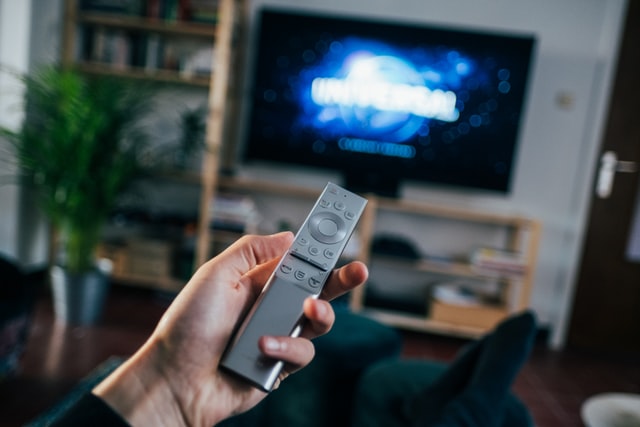
And while you can use an ad blocker to do away with ads on your PC or a smartphone, this would not work with smart TVs. Do not despair, though — there are some ready-made solutions that can help you get rid of noisy adverts even on smart TVs. For example, you can change the DNS server or install a network-wide software like AdGuard Home that will block ads and tracking across all your devices. But let's not get ahead of ourselves and first take a closer look at the problem itself.
Case in point: Vizio
California-based Vizio is one of the biggest smart TV vendors by market share in the US, trailing behind Samsung and on par with TCL and LG. According to its Wikipedia page, the company not only "designs and sells televisions, sound bars", but also viewer data, and advertising".
Most recently, Vizio has made headlines by displaying "jump ads" over live television. The ad banner appeared towards the end of the premier episode of a comedy show and nudged users to "jump" to an on-demand streaming service to continue watching it. Vizio said that pop-ups were "designed to bridge the gap between linear TV and streaming services". Some may argue that there's no need to be dramatic and that there's nothing wrong in seeing an occasional ad every now and then. However, we may only be witnessing the beginning of an end.
Vizio said that it was working with other brands and content providers on integrations. Translation: start bracing for more ads. What does not help the situation is that Vizio's track record as far as privacy goes is not exactly stellar.
Tarnished record
Back in 2017, Vizio paid $2.2 million to settle charges that it had been collecting data on millions of its customers without their knowledge or consent. According to the US government, the company went as far as to retrofit older models with surveillance software by installing it remotely.
It worked as follows: first, Vizio collected a selection of pixels on the screen and matched them to an existing database of content to find out what a user was watching and when. This way the vendor harvested as many as "100 billion data points each day".
Then, Vizio cashed in on that data by selling consumer's viewing histories "to advertisers and others". Vizio effectively made it possible for third parties to identify users by "facilitating appending special demographic information" to the viewing data. In other words, Vizio shared IP addresses of its consumers with the data aggregators who then would find a person or a household to which it belonged.
As part of the settlement, Vizio agreed to request the expressed consent of its consumers before starting tracking them, but little else has changed.
We can feign shock and surprise every time we see yet another company taking advantage of data-harvesting capabilities that our smart TVs offer. The fact, however, is that smart TVs have been going down this slippery slope for a decade now, and they have no intention of turning back.
Nothing new under the sun
Samsung, one of the early pioneers of smart TV technology, started showing pop-up ads back in the mid-2010s as part of its partnership with Yahoo. In some cases the pop-ups would reportedly appear halfway through the show and be injected into the users' own content, such as home videos.
Samsung faced its own share of privacy-related scandals back in the day. The older version of Samsung's privacy policy warned that users' spoken words, including personal and other sensitive information, could be recorded and sent to a third party if voice control was enabled. Panasonic, another well-established market player, has been showing pop-up banner ads since 2012.
Both Samsung and Panasonic may be household names, but the smart TV market is so lucrative that nobody wants to miss out on their chance to profit off it, including companies that do not produce TV sets themselves.
The rise of smart TV technology has sparked an interest in smart media players or over-the-top devices that can turn non-smart TV into smart TV if you hook them up to your HDMI input. Examples of such devices include the Android-based Nvidia Shield TV media player, Xiaomi Mi TV Stick, Google Chromecast Media Player, Apple's set-top box and Roku media player.
The latter has become the poster child of how far smart TV advertising can go if it's not reined in.
Case in point: Roku
Roku, the largest TV operating system in the US with 60 million monthly active users, has recently announced "first-of-its-kind partnership" with Walmart, the world's leading retailer. Under the deal, viewers of Roku-powered smart TVs would be able to purchase products right from the ads on their screens. Viewers won't even need to fill in their card details — that would have been quite a chore with a remote. They will only need to press "OK" twice: first, to proceed to virtual checkout and then to place an order, while Roku would take care of the payment details, inputting them from its own payments platform.
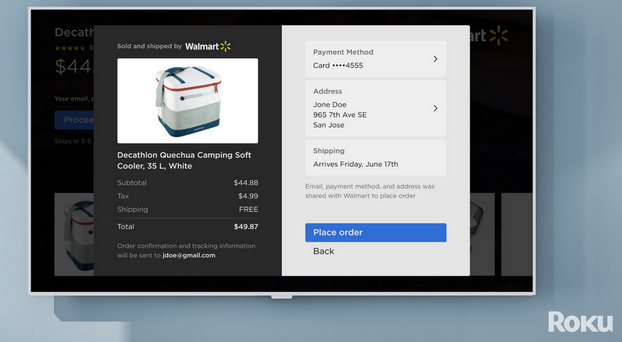
It's unclear at which precise moment a "shoppable ad" may appear on the screen — apparently, it's up to Walmart to decide:
"Walmart is unmatched in the ability to evaluate customer behaviors and then scale commerce offerings to customers where and how they want to shop, including during moments of entertainment"
Such a shopping model comes with obvious security risks, similar to those that Amazon's Alexa voice assistant became notorious for. Since it was possible for kids to buy a truckload of toys using Alexa, then why cannot the same happen to Roku?. After all, it takes two clicks to place an order.
Besides, the mere fact that your TV box is turning into a full-blown e-commerce tool without your consent is something that we find unnerving. And we surely are not alone.
One should not be surprised at the new addition to Roku's vast advertising arsenal. Roku is a trailblazer in the TV-slash-advertising business, and its customers have long been used to seeing interactive pop-ups over matching commercials.
But earlier this year it appeared as if the company decided to take the next big step. It started with a Reddit user complaining that Roku was showing pop-ads for a bed manufacturer during a completely unrelated sports broadcast. After the post went viral, Roku claimed that the ad was a "bug" which had been resolved. No additional comment was provided, so now we could only guess if it had not been not the trial run of the new add feature.
What does your TV know and who else knows it?
Smart TVs use a built-in technology, known as ACR (Automatic Content Recognition) to extract information about your viewing habits from your flatscreen. The technology enables your TV to collect data about the content playing on the screen, the name of the provider, cable, broadcast, programs and commercials. Your TV vendor knows how much time you spend watching what show at a given date, what channels you tune in, whether you view the content live or at a later time.
If the term ACR rings a bell, it's because of Vizio whose 2017 data collecting scandal propelled it to the realm of notoriarity.
In addition to your viewing history, smart TVs can collect device identifiers, including the IP address. And the list is far from complete: for instance, Roku says that it may "receive information about the browser and devices you use to access the Internet", including but not limited to its services, as well as Wi-Fi network name and connection data, "and information about other devices connected to the same network". Falling short of identifying you personally, Roku notes that it may "infer your general location information and internet service provider" based on device information it receives. In Vizio's case, the vieiwing data can be further enriched with the help of the "household demographic data"as well as the data about what consumers buy online and other activity on the devices that share the same IP Address with the smart TV.
According to Vizio, the information collected through ACR might be shared with analytics companies, media conglomerates and advertisers. Roku says that it shares information with partners whose services are available through Roku "for different purposes", including for tailoring your content to you and personalizing ads.
Cheaper TV = less privacy
Perhaps, you have already wondered why oversized smart TVs — quite a sophisticated piece of technology — are not exactly expensive. You can buy Vizio's latest 65-inch 4K model for less than $500, which is quite a bargain. The reason for that sudden bout of generosity on the part of TV sellers is not altruism. The only way for TV manufacturers to slash the cost of the devices and improve picture quality at the same time is to increasingly rely on ad revenue.
And if it's a secret, it's a thinly-veiled one. Roku CEO Anthony Wood admitted back in 2018 that his company was in the advertising and not in the hardware business. There is no doubt that other companies live by this creed, if they are not talking about it out loud.
OK, so what should I do?
The most drastic and bulletproof solution would be to dumb down your smart TV by disconnecting it from the internet or to find a functioning CRT TV at the nearest scrap yard or on Ebay.
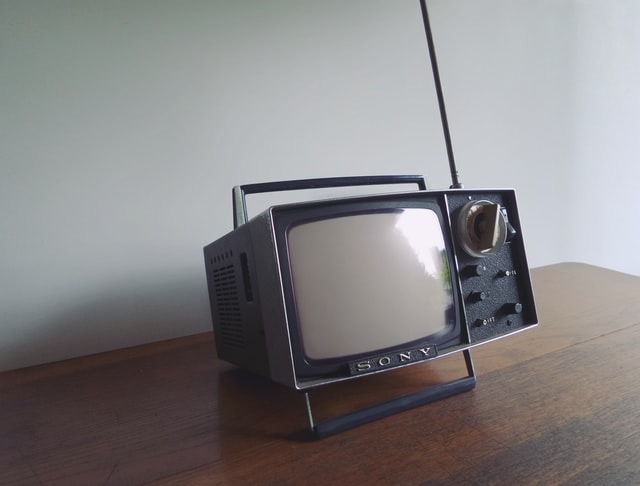
If you don't mind watching movies on Blu-ray or using an HDMI cable to connect your computer to your TV for streaming, you might want to consider doing just that.
However, if you do not want to go back to the days of old yore, then probably the better option for you would be to disable ACR. For example, when you turn on a Vizio TV for the first time, you are given an option to enable automatic content recognition — which you shouldn't do unless you want to give Vizio and advertisers free access to your viewing history. If you have already agreed to ACR, you may opt out of it in the Settings.
While the ACR settings can be buried deep in the menu, it's possible to turn the feature off on all major smart TV brands.
We must note, however, that even with ACR disabled, your smart TV will still have enough wits to collect some data about you, including potentially information about your location and the apps that you use.
Another option would be to block ads and trackers by changing just one setting in your smart TV, namely, its DNS server. You can use one of AdGuard public DNS servers, which are free to use and easy to configure. Or subscribe to Private AdGuard DNS and create your own DNS servers.
Alternatively, if your device runs on Android TV, you can install a dedicated app to block ads on Android TV. Download AdGuard for Android TV directly onto your TV and let it filter traffic at the system level. It runs as a local firewall, blocking ads and tracking attempts in both web browsers and other apps without requiring any changes to your router settings.
Courtesy: YouTube/hardwin82
If you're in for a more advanced and comprehensive solution, you may want to set up your own AdGuard Home server which would cover all your home devices, re-routing tracking domains to a "black hole".




















































