The big brother in your pocket: TeleSign’s ‘reputation score’ system explained

What if there’s a hidden system tracking and scoring you based on every phone call you make or take? It sounds like something from a Black Mirror episode and may remind you of the controversial China’s social credit system. But surprisingly, half of the world’s mobile phone users are already part of such a system, and many are Europeans, who are supposed to enjoy strong privacy protections.

How profiling works and why it’s problematic

NOYB, a privacy advocacy group, has filed a lawsuit against the US company TeleSign, a Belgian telecom provider BICS, and their parent Proximus. They claim these companies are unauthorizedly profiling billions of phone users to assign them a ‘reputation’ or ‘trust’ score.

This score can affect your access to online services: If your score is bad, you may be blocked from accessing certain online platforms, or be subject to additional checks which those with better scores won’t have to go through. These restrictions are imposed by TeleSign’s partners, which reportedly include Microsoft, TikTok, Skype, LinkedIn, and SalesForce. So, who are BICS and TeleSign and what do they do exactly?

BICS is a Belgian telecom giant, which connects networks of mobile phone providers in over 200 countries. By doing so, BICS gains access to personal information of billions of customers. BICS gets to know how often people make calls, how long they talk, for how long they don’t use their phones, where they are, and when they receive calls and from whom. This data is then shared with TeleSign, which assigns ‘reputation scores’ to phone numbers and sells this data as a fraud prevention tool, called ‘Intelligence API’. Per month, TeleSign says it “verifies over five billion phone numbers,” which represents “half of the world’s mobile users,” and “gives critical insight into the remaining billions.”

The problem? Phone users that trust their mobile operators with their information are not aware of this scheme.

The lawsuit points out that the system is problematic also because TeleSign falls under US surveillance laws, which means that the US government can access the data. Sending European personal data across the Atlantic is technically illegal without a valid EU-US data transfer agreement. The old agreement, called the Privacy Shield, was scrapped in 2020 in part because the US laws were deemed too intrusive, and the existing privacy protections in the US not on par with the GDPR standards in the EU. The resulting legal vacuum has left many big tech companies like Meta facing hefty fines for continuing to transfer European user data to the US. In early July, the EU and US finally hammered out the details of a deal that should replace it, but its fate is still uncertain as it is likely to face legal challenges.

What data does TeleSign access to determine a reputation score?

Exactly how the reputation score is calculated is anyone’s guess. On its website, TeleSign claims that the reputation score is assessed on various factors, but the exact methodology is proprietary. Some of the things TeleSign says it uses to assign a score to phone numbers are phone number data and analytics, data from organizations that allow it to check whether a phone number belongs to a known fraudster, patterns in phone usage, frequency of usage (which can also indicate fraud, for example, if it is used every few minutes), and machine learning predictions.

Because the methodology is proprietary, there’s no way to know how these things add up to a high or low trust score. Users can ask TeleSign for a copy of their data, and some have found they received a “medium-low” risk rating.

While users can obtain their data from TeleSign, mobile operators seem unaware that their customer data is being sent to TeleSign, according to NOYB.

So, in a nutshell, your access to a particular online service may be blocked due to an opaque, privately-operated scoring system that assigns you a rating based on an arbitrary set of criteria and works behind the scenes without your knowledge.

Legal basis: what BICS and Telesign say?

The GDPR lists six lawful grounds for processing personal data, namely consent, contract, vital interests, public duty, and legitimate interests. The latter is the most flexible, and it lets companies use data without asking the user directly. For instance, OpenAI uses “legitimate interests” as an excuse to collect and use publicly available personal information to train AI models like GPT, which powers ChatGPT. This justification is highly questionable, and OpenAI’s habit of grabbing personal and other data from the Web has been met with mounting pile of lawsuits accusing it of profiting from privacy violations.

BICS and TeleSign both claim ‘legitimate interests’, specifically, detection or prevention of fraud as their legal basis of data processing.
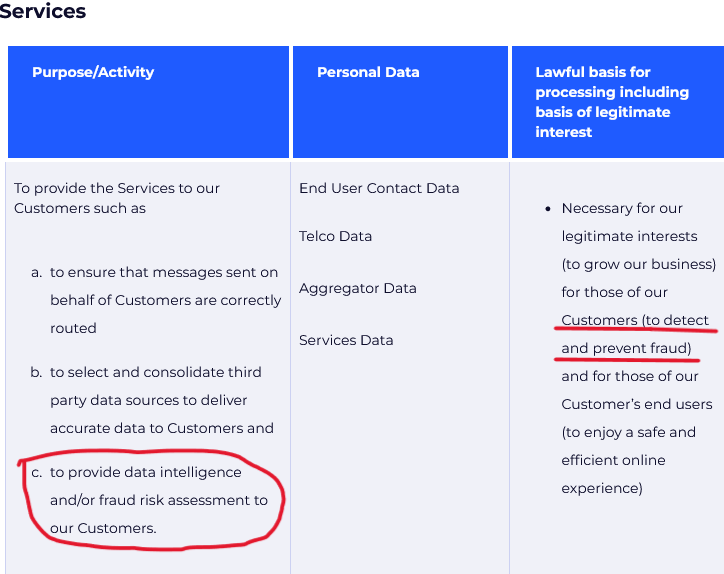
TeleSign claims it processes user data to detect fraud
Source: TeleSign privacy policy

Speaking to Belgian newspaper Le Soir last year, Proximus, which owns both BICS and TeleSign, said that all transferred data is “end-to-end encrypted” while telephone numbers “are masked to prevent individual identification.” As for how it manages privacy risks stemming from transfer of data to the US, which by this day still lacks a federal privacy law, it says that it “has taken additional measures to prevent the identification of individuals should the data end up in the hands of an authority or should a data breach occur.” But how these companies ensure the data does not fall into the wrong hands is unclear.

The lawsuit alleges that BICS and TeleSign’s activities go beyond fraud prevention, and are disproportionate, mainly meant to generate revenue. BICS has never informed users of the data processing, which potentially violates its transparency obligation under article 14 of GDPR.

Something rings a bell?

What the TeleSign system does is basically evaluate your reputation, or in other words, your trustworthiness, based on your phone behavior. To some extent, such a system is reminiscent of China’s social credit system in that they both assess trustworthiness based on behavior data, and can reward or punish individuals based on this data. This should ring alarm bells for privacy-conscious users.
Of course, It would be a stretch to equate the activities of TeleSign and BICS with those of the Chinese government. Firstly, because China’s social credit system is a government policy and not a commercial product, and secondly, it is way wider in scope, as it presumes tracking and scoring people based on a large variety of their online and offline activities.

How the system can negatively affect you

Despite assurances from Proximus, BICS, and TeleSign, the data is not safe with them. There is the obvious danger in the data being processed in the US, where data protection laws are weak, while the safeguards proposed in the newly proposed US-EU transfer agreement have yet to withstand a legal challenge. The collected data could also be exposed by a breach or a leak, leading to identity theft. In addition, and perhaps most importantly, the system can deny services to mobile users based on their reputation scores, which are calculated without their knowledge and consent, and which they have no way of correcting, deleting, or challenging, simply because they are unaware of their existence.

What can you do

Thanks to NOYB exposing the practice, more people will get to know about it and their right to request, rectify, and delete their data from TeleSign. This can be done through a form on TeleSign’s website. According to its privacy policy, it’s possible to opt out of all personal data selling and sharing, including for profiling purposes.

TeleSign privacy policy allows some users to opt out of profiling

Source: TeleSign privacy policy

To avoid being profiled by TeleSign or similar companies, some general recommendations are to use multiple phone numbers for different purposes, or to use a virtual number instead of your real one for online services. For example, if you do cold-calling, you may want to have a separate phone for that, so you won’t be mistaken for a scammer and denied access to certain services.

Moreover, you should be aware of the data protection laws that you can benefit from, such as by asking for the data that companies have on you and requesting its deletion. You should also take other measures to protect your privacy, including using a VPN, limiting the personal information you share online, and being careful with app permissions. These steps won’t stop phone-based profiling directly, but they will add an extra layer of privacy to your browsing.


Páčil sa vám tento príspevok?
AdGuard VPN AdGuard DNS AdGuard Mail Peňaženka AdGuard
Hlavná obrazovka AdGuardu pre Windows
Obrazovka ochrany AdGuardu pre Windows zobrazujúca funkcie a nastavenia ochrany
Obrazovka so štatistikami v aplikácii AdGuard pre Windows, ktorá zobrazuje štatistiky blokovaných reklám a sledovacích programov
Obrazovka správy aplikácií v AdGuarde pre Windows zobrazujúca možnosti správy ochrany pre aplikácie nainštalované v zariadení
20 387 20387 hodnotení
Výborne!

AdGuard: blokovač reklam pre Windows

AdGuard pre Windows je viac než blokovač reklám. Je to viacúčelový nástroj, ktorý blokuje reklamy, kontroluje prístup k nebezpečným stránkam, zrýchľuje načítavanie stránok a chráni deti pred nevhodným obsahom

Stiahnutím programu akceptujete podmienky licenčnej zmluvy
Microsoft Store
Stiahnutím programu akceptujete podmienky licenčnej zmluvy
AdGuard pre Windows v8.0, 14-dňová skúšobná doba
Hlavná obrazovka AdGuardu pre Mac
Obrazovka Režimu utajenia v aplikácii AdGuard pre Mac
20 387 20387 hodnotení
Výborne!

AdGuard: blokovač reklám pre Mac

AdGuard pre Mac je unikátny blokovač reklám navrhnutý pre macOS. Okrem ochrany pred otravnými reklamami v prehliadačoch a aplikáciách Vás chráni aj pred sledovaním, phishingom a podvodmi
Stiahnutím programu akceptujete podmienky licenčnej zmluvy
Prečítať si viac
AdGuard pre Mac v2.19, 14-dňová skúšobná doba
Hlavná obrazovka AdGuardu pre Android
Obrazovka ochrany pred sledovaním v aplikácii AdGuard pre Android
Obrazovka správy aplikácií v AdGuarde pre Android, ktorá zobrazuje možnosti správy ochrany pre aplikácie nainštalované v zariadení
Obrazovka so štatistikami aplikácie AdGuard pre Android, ktorá zobrazuje štatistiky blokovaných reklám a sledovacích programov
Hlavná obrazovka súkromného prehliadača AdGuard pre Android
QR kód na stiahnutie AdGuardu pre Android
20 387 20387 hodnotení
Výborne!

AdGuard: blokovač reklám pre Android

Blokuje reklamy a sledovače vo všetkých prehliadačoch, hrách a iných aplikáciách. Chráni Vaše súkromie a umožňuje Vám kontrolovať, ako Vaše aplikácie používajú internet. Inštaluje sa cez APK
Stiahnutím programu akceptujete podmienky licenčnej zmluvy
Prečítať si viac
Naskenujte a stiahnite
Použite akúkoľvek čítačku QR kódov dostupnú vo Vašom zariadení.
AdGuard pre Android v4.14, 14-dňová skúšobná doba
Hlavná obrazovka AdGuardu pre iOS
Obrazovka ochrany AdGuardu pre iOS zobrazujúca funkcie a nastavenia ochrany
Obrazovka so štatistikami v aplikácii AdGuard pre iOS, ktorá zobrazuje štatistiky blokovaných reklám a sledovačov
QR kód na stiahnutie AdGuardu pre iOS
20 387 20387 hodnotení
Výborne!

AdGuard: blokátor reklám pre iOS

Najlepší blokovač reklám pre iOS na iPhone a iPad. AdGuard eliminuje všetky druhy reklám a sledovacích nástrojov v prehliadači Safari a chráni Vaše súkromie vo všetkých aplikáciách na úrovni DNS.
Stiahnutím programu akceptujete podmienky licenčnej zmluvy
Prečítať si viac
Naskenujte a stiahnite
Použite akúkoľvek čítačku QR kódov dostupnú vo Vašom zariadení.
AdGuard pre iOS v4.5
Hlavná obrazovka blokovača obsahu AdGuard
Obrazovka filtrov blokovača obsahu AdGuard
Obrazovka nastavení blokovača obsahu AdGuard
20 387 20387 hodnotení
Výborne!

AdGuard blokovač obsahu

Blokovač obsahu AdGuard eliminuje všetky druhy reklám v mobilných prehliadačoch, ktoré podporujú technológiu blokovania obsahu – konkrétne v prehliadačoch Samsung Internet a Yandex Browser. Jeho funkcie sú v porovnaní s AdGuardom pre Android obmedzené, ale je bezplatný, ľahko sa inštaluje a je efektívny
Stiahnutím programu akceptujete podmienky licenčnej zmluvy
Prečítať si viac
AdGuard blokovač obsahu v2.8
Hlavná obrazovka rozšírenia prehliadača AdGuard
Obrazovka ochrany pred sledovaním rozšírenia prehliadača AdGuard
20 387 20387 hodnotení
Výborne!

AdGuard rozšírenie prehliadača

AdGuard je najrýchlejší a najľahšie rozšírenie pre blokovanie reklám, ktoré účinne blokuje všetky typy reklám na všetkých webových stránkach! Vyberte si AdGuard pre prehliadač, ktorý používate, a získajte rýchle a bezpečné prehliadanie bez reklám.
Inštalovať
Stiahnutím programu akceptujete podmienky licenčnej zmluvy
Inštalovať
Stiahnutím programu akceptujete podmienky licenčnej zmluvy
Inštalovať
Stiahnutím programu akceptujete podmienky licenčnej zmluvy
Inštalovať
Stiahnutím programu akceptujete podmienky licenčnej zmluvy
Inštalovať
Stiahnutím programu akceptujete podmienky licenčnej zmluvy
Prečítať si viac
Inštalovať
Stiahnutím programu akceptujete podmienky licenčnej zmluvy
Prečítať si viac
AdGuard rozšírenie prehliadača v5.5
Hlavná obrazovka AdGuard Assistant
20 387 20387 hodnotení
Výborne!

Asistent AdGuard

Rozšírenie prehliadača pre desktopové aplikácie AdGuard. Umožňuje vám blokovať vlastné položky na webových stránkach, pridávať webové stránky na zoznam povolených a odosielať hlásenia priamo z prehliadača
Asistent AdGuard v1.4
20 387 20387 hodnotení
Výborne!

AdGuard Home

AdGuard Home je sieťové riešenie na blokovanie reklám a sledovacích programov. Nainštalujte si ho raz na smerovač, aby ste pokryli všetky zariadenia vo Vašej domácej sieti – nie je potrebný žiadny ďalší klientsky softvér. Toto je obzvlášť dôležité pre rôzne zariadenia internetu vecí, ktoré často predstavujú hrozbu pre Vaše súkromie
AdGuard Home v0.107
Hlavná obrazovka AdGuard Pro pre iOS
Obrazovka ochrany AdGuard Pro pre iOS zobrazujúca funkcie a nastavenia ochrany
Obrazovka so štatistikami AdGuard Pro pre iOS, ktorá zobrazuje štatistiky blokovaných reklám a sledovacích nástrojov
20 387 20387 hodnotení
Výborne!

AdGuard Pro pre iOS

AdGuard Pro pre iOS obsahuje všetky pokročilé funkcie ochrany proti blokovaniu reklám. Ponúka rovnaké nástroje ako platená verzia AdGuardu pre iOS. Vyniká v blokovaní reklám v prehliadači Safari a umožňuje Vám prispôsobiť nastavenia DNS pre Vašu ochranu. Blokuje reklamy v prehliadačoch a aplikáciách, chráni Vaše deti pred nevhodným obsahom a chráni aj Vaše osobné údaje
Stiahnutím programu akceptujete podmienky licenčnej zmluvy
Prečítať si viac
AdGuard Pro pre iOS v4.5
Hlavná obrazovka AdGuard Mini pre Mac
Obrazovka ochrany Safari v AdGuard Mini pre Mac
Obrazovka Vytvorenie pravidla v aplikácii AdGuard Mini pre Mac
20 387 20387 hodnotení
Výborne!

AdGuard Mini pre Mac — blokovanie reklám v Safari

AdGuard Mini pre Mac je výkonný blokovač reklám pre Safari. Táto ľahká aplikácia odstraňuje reklamy, blokuje sledovače a zrýchľuje načítavanie stránok. Pomáha vám prehliadať web v Safari bez rozptýlení a chráni vaše dáta
Inštalovať
Stiahnutím programu akceptujete podmienky licenčnej zmluvy
Prečítať si viac
AdGuard Mini pre Mac v2.3
Hlavná obrazovka AdGuard pre Android TV so zapnutou ochranou
Obrazovka blokovania reklám aplikácie AdGuard pre Android TV zobrazujúca jej funkcie a nastavenia
Obrazovka nastavení AdGuardu pre Android TV
Obrazovka správy aplikácií AdGuard pre Android TV zobrazujúca aplikácie, v ktorých sú blokované reklamy a sledovače
20 387 20387 hodnotení
Výborne!

AdGuard pre Android TV

AdGuard pre Android TV je jediná aplikácia, ktorá blokuje reklamy, chráni Vaše súkromie a funguje ako firewall pre Váš Smart TV. Dostávajte upozornenia na webové hrozby, používajte zabezpečené DNS a profitujte zo šifrovanej prevádzky. Uvoľnite sa a ponorte sa do svojich obľúbených relácií so špičkovým zabezpečením a žiadnymi reklamami!
AdGuard pre Android TV v4.14, 14-dňová skúšobná doba
Maskot AdGuardu, Agnar, drží tučniaka s Linuxom
20 387 20387 hodnotení
Výborne!

AdGuard pre Linux

AdGuard pre Linux je celosvetovo prvý systémový blokovač reklám pre Linux. Blokujte reklamy a sledovače na úrovni zariadenia, vyberte si z predinštalovaných filtrov alebo pridajte svoje vlastné – to všetko cez rozhranie príkazového riadka
AdGuard pre Linux v1.4
20 387 20387 hodnotení
Výborne!

AdGuard Temp Mail

Bezplatný generátor dočasných e-mail adries, ktorý Vás udržiava v anonymite a chráni Vaše súkromie. Žiadny spam vo Vašom hlavnom priečinku doručenej pošty!
20 387 20387 hodnotení
Výborne!

AdGuard VPN

75 lokalít po celom svete

Prístup k ľubovoľnému obsahu

Silné šifrovanie

Neukladajú sa žiadne záznamy

Najrýchlejšie pripojenie

Non-stop podpora

Vyskúšajte bezplatne
Stiahnutím programu akceptujete podmienky licenčnej zmluvy
Prečítať si viac
20 387 20387 hodnotení
Výborne!

AdGuard DNS

AdGuard DNS je alternatívne riešenie pre blokovanie reklám, ochranu súkromia a rodičovskú kontrolu. Jednoduché nastavenie a bezplatné používanie poskytuje potrebné minimum ochrany proti online reklamám, sledovačom a phishingu bez ohľadu na to, akú platformu a zariadenie používate.
20 387 20387 hodnotení
Výborne!

AdGuard Mail

Chráňte svoju identitu, vyhýbajte sa spamu a udržujte svoju doručenú poštu v bezpečí pomocou našich aliasov a dočasných e-mailových adries. Užite si našu bezplatnú službu preposielania e-mail správ a aplikácie pre všetky operačné systémy
20 387 20387 hodnotení
Výborne!

Peňaženka AdGuard

Bezpečná a súkromná krypto peňaženka, ktorá Vám poskytuje plnú kontrolu nad Vašimi aktívami. Spravujte viacero peňaženiek a objavte tisíce kryptomien na ukladanie, odosielanie a výmenu
Sťahovanie AdGuard Ak chcete spustiť inštaláciu, kliknite na tlačidlo označené šípkou Vyberte možnosť "Otvoriť" a kliknite na tlačidlo "OK" - chvíľu počkajte, kým sa súbor stiahne. V otvorenom okne pretiahnite ikonu AdGuard do priečinka "Aplikácie". Ďakujeme, že ste si vybrali AdGuard! Vyberte možnosť "Otvoriť" a kliknite na tlačidlo "OK" - chvíľu počkajte, kým sa súbor stiahne. V otvorenom okne kliknite na "Inštalovať". Ďakujeme, že ste si vybrali AdGuard!
Nainštalujte AdGuard na Vaše mobilné zariadenie

















































