Incognito mode is a sham: it makes you feel safe while failing to protect your data

What does it mean to “go incognito”? According to the authoritative Collins dictionary, it means “using a false name or wearing a disguise, in order to avoid being recognized or identified.”

Given that, it’s quite tempting and natural to think that when you open an “incognito” window in the Google Chrome browser, you’re doing just that: hiding your identity and sailing anonymously across the Web (all while donning a stylish fedora hat and those circular Windsor glasses).

A survey by the University of Chicago found that many people vastly overestimate the benefits offered by private browsing modes, even after reading the fine print in the disclaimers. For example, the majority of the respondents believed that their search history was not recorded by Google, even if they were logged in their Google account. While some 27 percent wrongly thought that private mode protects them against viruses and malware.

To dispel these and other misunderstandings about private modes, we will zero in on the most popular of them — Chrome’s incognito mode.

How it works and what it is used for

Let’s start with what Incognito mode can really do for you. In a nutshell, it hides your browsing habits from other users of the same PC, or laptop, or phone — or any device for that matter. In more technical terms, when you’re in incognito mode, neither your search nor your browsing history is stored locally on your device. So it can be quite useful if you are looking for a surprise gift for your partner with whom you happen to share a laptop or a tablet. And if that was what people actually used the mode for, we would have no problem with it.
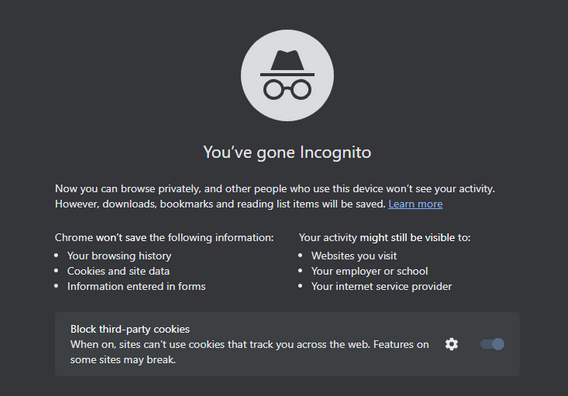
Chrome_Incognito_Mode

However, this is far from being the case. A February 2023 survey conducted in the UK showed that every second person who used private browsing or incognito mode primarily did it to protect their personal information from scammers and criminals. Around 40% would toggle it on in order to stop advertisers from tracking them across the Web.

While Chrome’s incognito mode blocks third-party cookies (tracking codes planted by the websites other than the one you’re visiting in your browser) by default, it still collects cookies and site data during the session. They are stored in a temporary folder and are not deleted at least until you close all incognito windows.

Moreover, a lawsuit filed against Google by the users of incognito mode in 2020 claims that Google “stores users’ regular and private browsing data in the same logs.” It then “uses those mixed logs to send users personalized ads,” and even if individual data points are “anonymized,” Google is able to “uniquely identify a user with a high probability of success” when these data points are pooled.

What Google admits about Incognito mode

Chrome’s incognito mode disclaimer states that your activity will still be visible to three parties: the websites you visit, your employer or school, and your internet service provider.

It means that the analytic tools of the websites you visit can still capture some data about your on-site activity. This data will be anonymized but only to a degree.
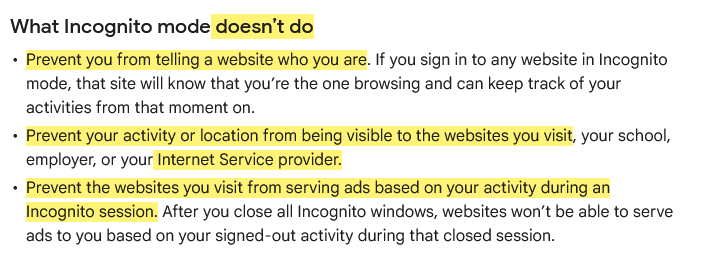
This is what Google says about Incognito mode

Source: Google

To give you the taste of browsing in an ‘incognito mode,’ we visited the CBC.ca website while using the AdGuard browser extension and took a screenshot of what it detected…
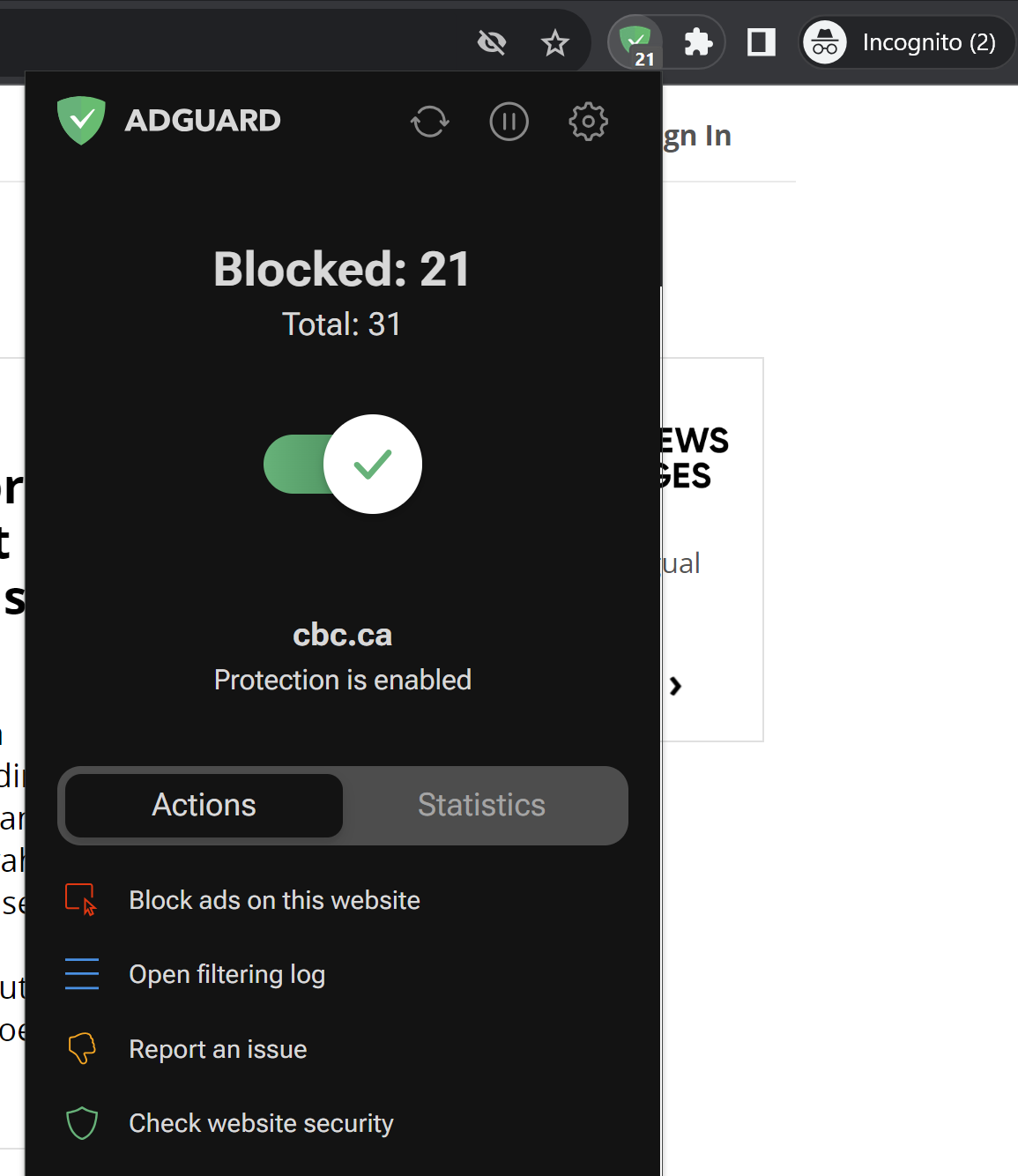
AdGuard Browser Extension has detected trackers in incognito mode

Note that we did not include third-party cookies in this test, because they are already blocked by default in Chrome’s incognito mode. But even without them, you can see how much tracking is going on behind the scenes. Almost every line you can see in the screenshot below is a failed attempt by a tracking tool to send some information about your online identity to a third party.
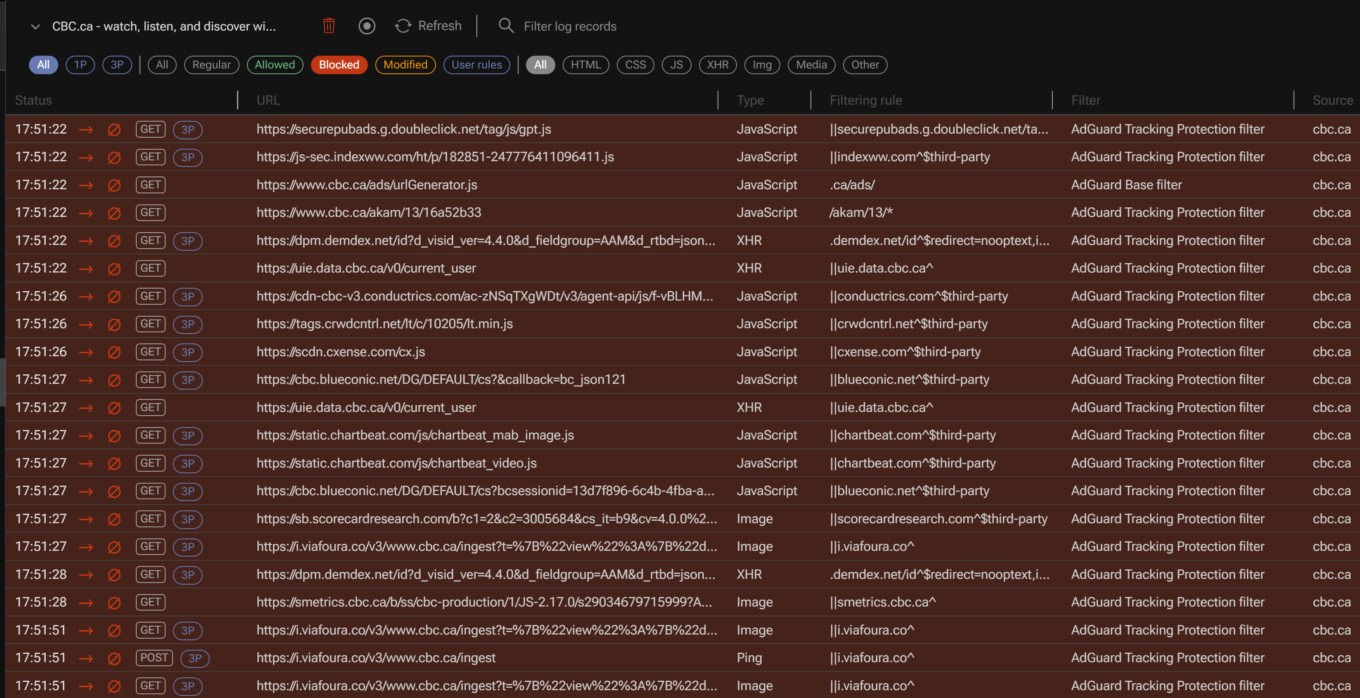
AdGuard filtering log

For example, one of such attempted requests was to Chartbeat, a provider of real-time website analytics. Chartbeat helps websites monitor their traffic, user engagement, and other important metrics. The request URL contains a tracking pixel (a tiny image embedded in web pages that is used to track user activity) and various parameters that send data to Chartbeat, such as host name, page URL, user ID, device type, screen resolution, and more.
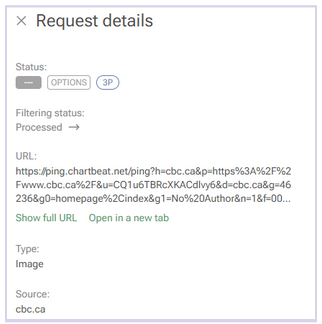
A request to a tracking company detected by AdGuard

Websites will be able to use this data to serve you ads during the session.

Incognito mode also does not hide your browsing activity from your IT department or your school network administrators, if you are using a work or a school network. In short, if you’re not the administrator of the network — for example, if you’re browsing the web using the Wi-Fi in a coffee shop — then you should consider your online activity to be out in the open, incognito mode or not.

In the same vein, regardless of whether you’re using incognito mode, your Internet Service Provider (ISP) will still be able to trace your IP address and see your activity.

And if you sign in to the site with your password and login, the little protection that incognito mode gives you from trackers will naturally be gone. “The site will know that you’re the one browsing and can keep track of your activities from that moment on,”Google says. So, if you sign in on YouTube, for example, while in incognito mode, it will record your activity and serve you recommendations based on it.

It’s probably even worse than that

There are things Google tells users about incognito mode — like the fact that it only helps keep your browsing history private from your partner or child — but there are some things it does not tell. The 2020 class-action lawsuit, that we’ve already mentioned, purports to reveal some of these things.

Remember that disclaimer that appears when you open an incognito mode window? Well, it does mention that third-party websites, your employer, and your school could see what you’re doing online. However, there is one important party that is not mentioned in the disclaimer: Google itself.

An excerpt from the lawsuit challenging incognito mode

Source: Lawsuit

According to the lawsuit, Google tracks and collects data from users even when they are in incognito mode. The plaintiffs claim that Google uses various methods to intercept and monitor users’ browsing data without their consent. The lawsuit explains how this works: “Whenever a user visits a website that is running Google Analytics, Ad Manager, or some similar Google service, Google’s software directs the user’s browser to send a separate communication to Google. This happens even when users are in private browsing mode, unbeknownst to website developers or the users themselves.”

The grand illusion of incognito mode

Incognito mode is like the emperor’s new clothes: it creates a false sense of security where there is none. In fact, its application is so narrow that you might be better off without it. If you want to clear your browsing history, cookies, and site data for a certain time period, there are other tools you can use. In Chrome, you can do this by selecting More Tools → Clear Browsing Data on the desktop version, or Settings → Privacy and security → Clear browsing data on the mobile version.
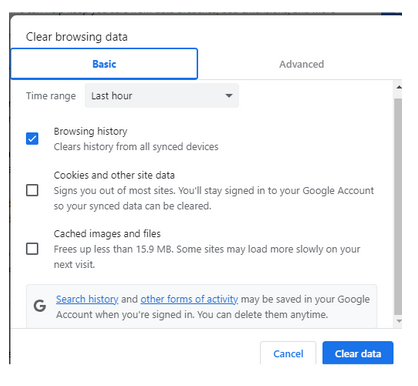
Google privacy controls allow to clear browsing history

However, if you want to truly protect your privacy and anonymity online, there are other, far better ways to do so.

One of them is using a VPN (Virtual Private Network), which is a service that encrypts your internet traffic and routes it through a remote server. This way, you can hide your IP address and location from your ISP, websites and third parties. There are many VPN providers available, but you should choose one that has a good reputation, a no-logs policy, and strong encryption. Generally, a VPN should not slow down your connection a lot, but it might be something you have to come to terms with in exchange for improved privacy.

Another way to go private online is using the Tor browser, which is a free software that allows you to browse the web anonymously. Tor works by bouncing your traffic through a network of volunteer nodes, called relays, that make it hard to trace your identity and location. Tor, however, has some drawbacks as well, such as (sometimes extremely) slow speed and serious compatibility issues.

Using a reliable ad blocker for Chrome will also go a long way in ensuring your browsing stays private. Almost every single one of them blocks trackers and not just ads; not to mention that the vast majority of ads serve as tracking tools, too.

When there are so many tools available to you to protect your privacy and keep your data private, there’s just no reason to resort to incognito mode… unless, of course, you’re looking for that gift for your SO.


Vam je bila objava všeč?
AdGuard VPN AdGuard DNS AdGuard Mail AdGuard Wallet
Glavni zaslon AdGuard za Windows
Zaslon zaščite AdGuard za Windows, ki prikazuje funkcije zaščite in nastavitve
Zaslon statistike AdGuard za Windows, ki prikazuje statistiko blokiranih oglasov in sledilcev
Zaslon Upravljanje aplikacij AdGuard za Windows, ki prikazuje možnosti upravljanja zaščite za aplikacije, nameščene v napravi
20.368 20368 ocen uporabnikov
Odlično!

AdGuard: blokator oglasov za Windows

AdGuard za Windows je več kot blokator oglasov. Je večnamensko orodje, ki blokira oglase, nadzoruje dostop do nevarnih spletnih mest, pospeši nalaganje strani in ščiti otroke pred neprimerno vsebino

S prenosom programa sprejemate pogoje Licenčne pogodbe
Microsoft Trgovina
S prenosom programa sprejemate pogoje Licenčne pogodbe
AdGuard za Windows v8.0, 14-dnevno preizkusno obdobje
Glavni zaslon AdGuard za Mac
Zaslon Prikritega načina AdGuard for Mac
20.368 20368 ocen uporabnikov
Odlično!

AdGuard: blokator oglasov za Mac

AdGuard za Mac je edinstven blokator oglasov, zasnovan z mislijo na macOS. Poleg zaščite pred nadležnimi oglasi v brskalnikih in aplikacijah vas ščiti pred sledenjem, lažnim predstavljanjem in goljufijami
S prenosom programa sprejemate pogoje Licenčne pogodbe
Več o tem
AdGuard za macOS v2.19, 14-dnevno preizkusno obdobje
Glavni zaslon AdGuard za Android
Zaslon Zaščita pred sledenjem AdGuard za Android
Zaslon Upravljanje aplikacij AdGuard za Android, ki prikazuje možnosti upravljanja zaščite za aplikacije, nameščene v napravi
Zaslon statistike AdGuard za Android, ki prikazuje statistiko blokiranih oglasov in sledilcev
Glavni zaslon zasebnega brskalnika AdGuard za Android
QR koda za prenos AdGuard za Android
20.368 20368 ocen uporabnikov
Odlično!

AdGuard: blokator oglasov za Android

Blokira oglase in sledilnike v vseh brskalnikih, igrah in drugih aplikacijah. Ščiti vašo zasebnost in vam omogoča nadzor nad tem, kako vaše aplikacije uporabljajo internet. Nameščeno prek APK-ja
S prenosom programa sprejemate pogoje Licenčne pogodbe
Več o tem
Preglejte za prenos
Uporabite kateri koli razpoložljivi bralnik QR kod v vaši napravi
AdGuard za Android v4.14, 14-dnevno preizkusno obdobje
Glavni zaslon AdGuard za iOS
Zaslon zaščite AdGuard za iOS, ki prikazuje funkcije zaščite in nastavitve
Zaslon statistike AdGuard za iOS, ki prikazuje statistiko blokiranih oglasov in sledilcev
QR koda za prenos AdGuard za iOS
20.368 20368 ocen uporabnikov
Odlično!

AdGuard: blokator oglasov za iOS

Najboljši blokator oglasov za iOS za iPhone in iPad. AdGuard odstrani vse vrste oglasov in sledilnikov v Safariju ter ščiti vašo zasebnost v vseh aplikacijah na ravni DNS
S prenosom programa sprejemate pogoje Licenčne pogodbe
Več o tem
Preglejte za prenos
Uporabite kateri koli razpoložljivi bralnik QR kod v vaši napravi
AdGuard za iOS v4.5
Glavni zaslon AdGuard Content Blocker
Zaslon filtri AdGuard Content Blocker
Zaslon nastavitve AdGuard Content Blocker
20.368 20368 ocen uporabnikov
Odlično!

AdGuard Zaviralec vsebine

AdGuard Content Blocker odpravlja vse vrste oglasov v mobilnih brskalnikih, ki podpirajo tehnologijo blokiranja vsebine — in sicer Samsung Internet in Yandex Browser. Njegove funkcije so omejene v primerjavi z AdGuardom za Android, vendar je brezplačen, enostaven za namestitev in učinkovit
S prenosom programa sprejemate pogoje Licenčne pogodbe
Več o tem
AdGuard Zaviralec vsebine v2.8
Glavni zaslon razširitev brskalnika AdGuard
Zaslon Zaščita pred sledenjem razširitve brskalnika AdGuard
20.368 20368 ocen uporabnikov
Odlično!

AdGuard Razširitev brskalnika

AdGuard je najhitrejša in najlažja razširitev za zaviranje oglasov, ki učinkovito onemogoča vse vrste oglasov na vseh spletnih straneh! Za brskalnik, ki ga uporabljate, izberite AdGuard in hitro ter varno brskajte brez oglasov.
Namesti
S prenosom programa sprejemate pogoje Licenčne pogodbe
Namesti
S prenosom programa sprejemate pogoje Licenčne pogodbe
Namesti
S prenosom programa sprejemate pogoje Licenčne pogodbe
Namesti
S prenosom programa sprejemate pogoje Licenčne pogodbe
Namesti
S prenosom programa sprejemate pogoje Licenčne pogodbe
Več o tem
Namesti
S prenosom programa sprejemate pogoje Licenčne pogodbe
Več o tem
AdGuard Razširitev brskalnika v5.5
Glavni zaslon Pomočnik brskalnika
20.368 20368 ocen uporabnikov
Odlično!

AdGuard Pomočnik

Sopodajalna razširitev za brskalnik za AdGuard namizne aplikacije. Dovoli vam, da blokirate po meri nastavljene elemente na spletnih straneh, dodajate spletne strani na seznam dovoljenih in pošiljate poročila neposredno iz vašega brskalnika
AdGuard Pomočnik v1.4
20.368 20368 ocen uporabnikov
Odlično!

AdGuard Home

AdGuard Home je omrežna rešitev za blokiranje oglasov in sledilcev. Namestite ga enkrat na usmerjevalnik, da pokrijete vse naprave v domačem omrežju — dodatna programska oprema odjemalca ni potrebna. To je še posebej pomembno za različne naprave IoT, ki pogosto ogrožajo vašo zasebnost
AdGuard Home v0.107
Glavni zaslon AdGuard Pro za iOS
Zaslon zaščite AdGuard Pro za iOS, ki prikazuje funkcije zaščite in nastavitve
Zaslon statistike AdGuard Pro za iOS, ki prikazuje statistiko za blokirane oglase in sledilce
20.368 20368 ocen uporabnikov
Odlično!

AdGuard Pro za iOS

AdGuard Pro za iOS vključuje vse napredne funkcije zaščite pred oglasi z omogočeno blokado. Ponuja ista orodja kot plačljiva različica AdGuard za iOS. Odličen je pri blokiranju oglasov v Safari in omogoča prilagajanje DNS nastavitev za prilagojeno zaščito. Oglase blokira v brskalnikih in aplikacijah, vaše otroke ščiti pred neprimerno vsebino ter ohranja vaše osebne podatke varne.
S prenosom programa sprejemate pogoje Licenčne pogodbe
Več o tem
AdGuard Pro za iOS v4.5
Glavni zaslon AdGuard Mini za Mac
Zaslon zaščite Safari v AdGuard Mini za Mac
Zaslon ustvarjanja pravila AdGuard Mini za Mac
20.368 20368 ocen uporabnikov
Odlično!

AdGuard Mini za Mac — zaviralec oglasov Safari

AdGuard Mini za Mac je zmogljiv Safari blokator oglasov. Ta lahka aplikacija odstranjuje oglase, blokira sledilce in pospešuje nalaganje strani. Pomaga vam brskati po spletu v Safariju brez motenj in varuje vaše podatke
Namesti
S prenosom programa sprejemate pogoje Licenčne pogodbe
Več o tem
AdGuard Mini za Mac v2.3
Glavni zaslon AdGuard za Android TV z omogočeno zaščito
Zaslon blokiranja oglasov AdGuard za Android TV, ki prikazuje njegove funkcije in nastavitve
Zaslon nastavitev AdGuard za Android TV
Zaslon Upravljanje aplikacij AdGuard za Android TV, ki prikazuje aplikacije, kjer so oglasi in sledilci blokirani
20.368 20368 ocen uporabnikov
Odlično!

AdGuard za Android TV

AdGuard za Android TV je edina aplikacija, ki zavira oglase, varuje vašo zasebnost in deluje kot požarni zid za vaš Smart TV. Prejmite opozorila o spletnih grožnjah, uporabite varen DNS in izkoristite šifriran promet. Sprostite se in se potopite v svoje najljubše oddaje z vrhunsko varnostjo in brez oglasov!
AdGuard za Android TV v4.14, 14-dnevno preizkusno obdobje
Maskota AdGuard, Agnar, ki drži Linux pingvina
20.368 20368 ocen uporabnikov
Odlično!

AdGuard za Linux

AdGuard za Linux je prvi sistemski zaviralec oglasov za Linux na svetu. Onemogočite oglase in sledilce na ravni naprave, izberite med vnaprej nameščenimi filtri ali dodajte svoje — vse preko ukazne lupine vmesnika
AdGuard za Linux v1.4
20.368 20368 ocen uporabnikov
Odlično!

AdGuard Temp Mail

Brezplačen ustvarjalec začasnih elektronskih naslovov, ki vas ohranja anonimne in ščiti vašo zasebnost. Brez neželene pošte v vašem glavnem predalu!
20.368 20368 ocen uporabnikov
Odlično!

AdGuard VPN

75 lokacij svetovnega spleta

Dostop do katere koli vsebine

Močno šifriranje

Politika 'Brez dnevnikov'

Najhitrejša povezava

stalna podpora

Poskusite brezplačno
S prenosom programa sprejemate pogoje Licenčne pogodbe
Več o tem
20.368 20368 ocen uporabnikov
Odlično!

AdGuard DNS

AdGuard DNS je brezhiben način zaviranja internetnih oglasov, ki ne zahteva nameščanja nobenih aplikacij. Je preprost za uporabo, popolnoma brezplačen, enostavno nastavljiv na kateri koli napravi in vam zagotavlja minimalne potrebne funkcije za zaviranje oglasov, števcev, zlonamernih spletnih strani in vsebine za odrasle.
20.368 20368 ocen uporabnikov
Odlično!

AdGuard Mail

Ščitite svoj identitet, izogibajte se neželeni pošti in ohranite svoj nabiralnik varno z našimi vzdevki in začasnimi e-poštnimi naslovi. Uživajte v naši brezplačni storitvi posredovanja e-pošte in aplikacijah za vse operacijske sisteme
20.368 20368 ocen uporabnikov
Odlično!

AdGuard Wallet

Varna in zasebna kripto denarnica, ki vam omogoča popoln nadzor nad vašimi sredstvi. Upravljaj več denarnic in odkrij tisoče kriptovalut za shranjevanje, pošiljanje in zamenjavo
Prenos AdGuarda Za namestitev AdGuarda kliknite gumb, označen s puščico Izberite 'Odpri' in kliknite na 'Vredu', nato pa počakajte, da se datoteka prenese. V odprtem oknu povlecite ikono AdGuarda in jo spustite v mapo 'Aplikacije'. Hvala, ker ste izbrali AdGuard! Izberite 'Odpri' in kliknite na 'Vredu', nato pa počakajte, da se datoteka prenese. V odprtem oknu kliknite na 'Namesti'. Hvala, ker ste izbrali AdGuard!
Namestite AdGuard na svojo mobilno napravo

















































