Introducing AdGuard Home

As many of you probably know, AdGuard provides a lot of ways to block ads in form of various apps and browser extensions. Some even heard about AdGuard DNS, a way to block ads without installing anything on your device. And today we are announcing the official release of a completely new product — AdGuard Home, which carries a lot of cool new stuff with it.

The short version: AdGuard Home is a network-wide ad-and-tracker blocking DNS server. Its purpose is to let you control your entire network and all your devices, and it does not require using a client-side program. At the same, AdGuard Home features a web interface to easily manage the filtering process.


Where it started

The first step towards AdGuard Home was made two years ago, with the announcement of the AdGuard DNS beta. For the first time, we offered a way to block ads without having to install anything on your device, like a browser extension or an app. And while AdGuard Home is a standalone project, it took a lot from its spiritual predecessor.

In fact, we should probably "thank" Apple for speeding up the development of AdGuard Home. When Apple decided that you couldn't control the traffic on your own devices anymore, we sought ways to put users back in charge of their own gadgets. Naturally, the DNS approach looked the most promising. It's too bad Apple won't allow apps that manage DNS requests anywhere near the AppStore — well, what if you didn't need any apps? And this is the main strength of AdGuard Home: you can set it up anywhere, but I'm getting ahead of myself.

Honestly, I would be lying if I said that we implemented 100% of everything that we wanted. That is why we are calling this version of AdGuard Home "v0.9".

One of the main reasons is that the installation of AdGuard Home is currently not the easiest task for an unprepared user, simplifying it is one of the highest priority tasks as we move forward.

Don't get me wrong, it works perfectly fine in its current state, there's just even more we want to add — and we will, in the official v1.0 release that will be announced before you know it.

But we simply couldn't wait any longer, so meet AdGuard Home 0.9!

Why use it?

It is probably not news to you that ads and trackers follow you on the web wherever you go, not only on your computer, but also on your smartphone (in fact, probably even more on your smartphone!), and even in things like smart fridges, smart vacuums and — God help us all! — smart light bulbs!

Even if you have nothing against companies gathering data about you, tracking can be plain dangerous. Ads are no better — they have long become a gateway to all kinds of malware, viruses, crypto lockers, phishing and more trackers.

Given how densely we are surrounded by gadgets in our life, it can get really tiresome to find, install, configure and maintain an ad blocker app for each of them, and, as I've mentioned already, in case of "smart furniture" this is not possible at all. This is where AdGuard Home comes into play — and shines. It provides a unified solution for blocking ads and trackers on all devices within your network, most commonly your home Wi-Fi network, but nothing prevents you from setting it up in your workspace or anywhere else.

Features and advantages of AG Home

The first thing you will notice is the web interface. We think it looks neat and tidy:
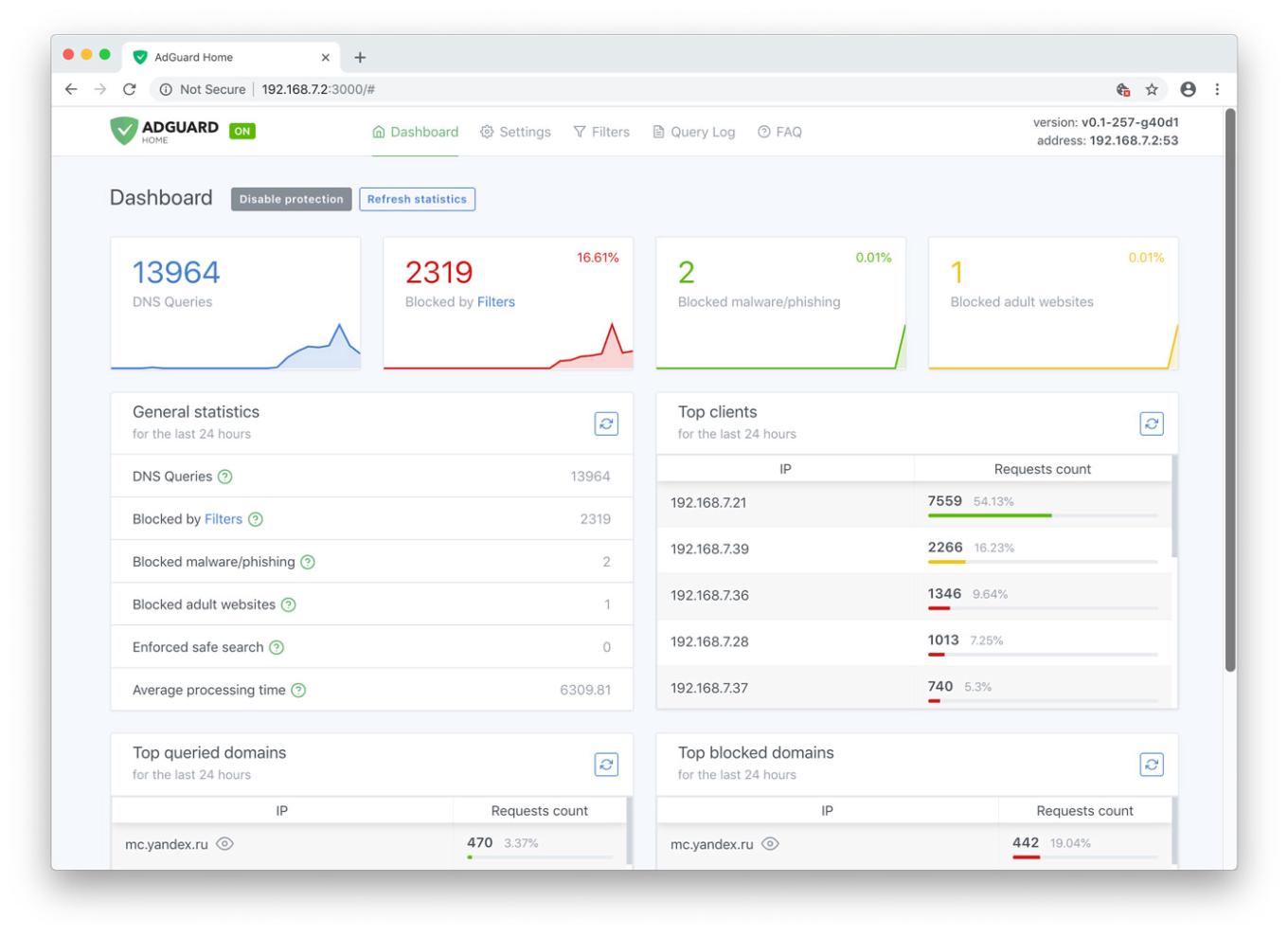
AdGuard Home Dashboard

Let's have a look at the main tab. Here you will find all kinds of statistics, including a vivid graphical representation. As you probably noticed, it looks just like a normal app, but you only need it alone to manage filtering on all your devices within the network.

Unlike application-based solutions for Android and iOS, AdGuard Home is not dependent on media giants like Google and Apple and their countless artificial limitations. Your personal preference is the only deciding factor

Now let's go to the "Settings" tab and look more closely at each of the options offered.
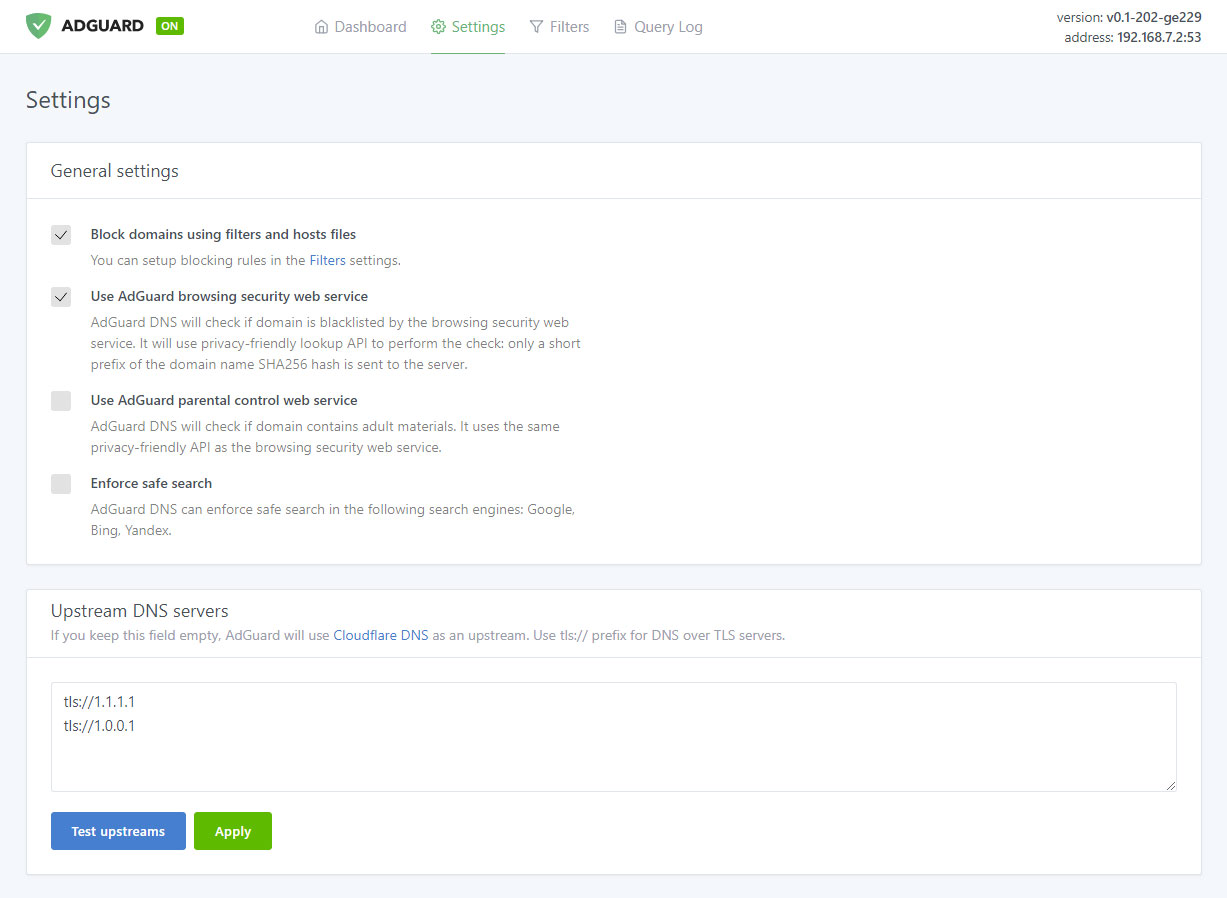
Manage filtering process

Ad blocking

The name speaks for itself. This is the main module, keep it enabled if you want AdGuard Home to block ads and tracking in your network — and it will block a lot. Just look at this comparison:
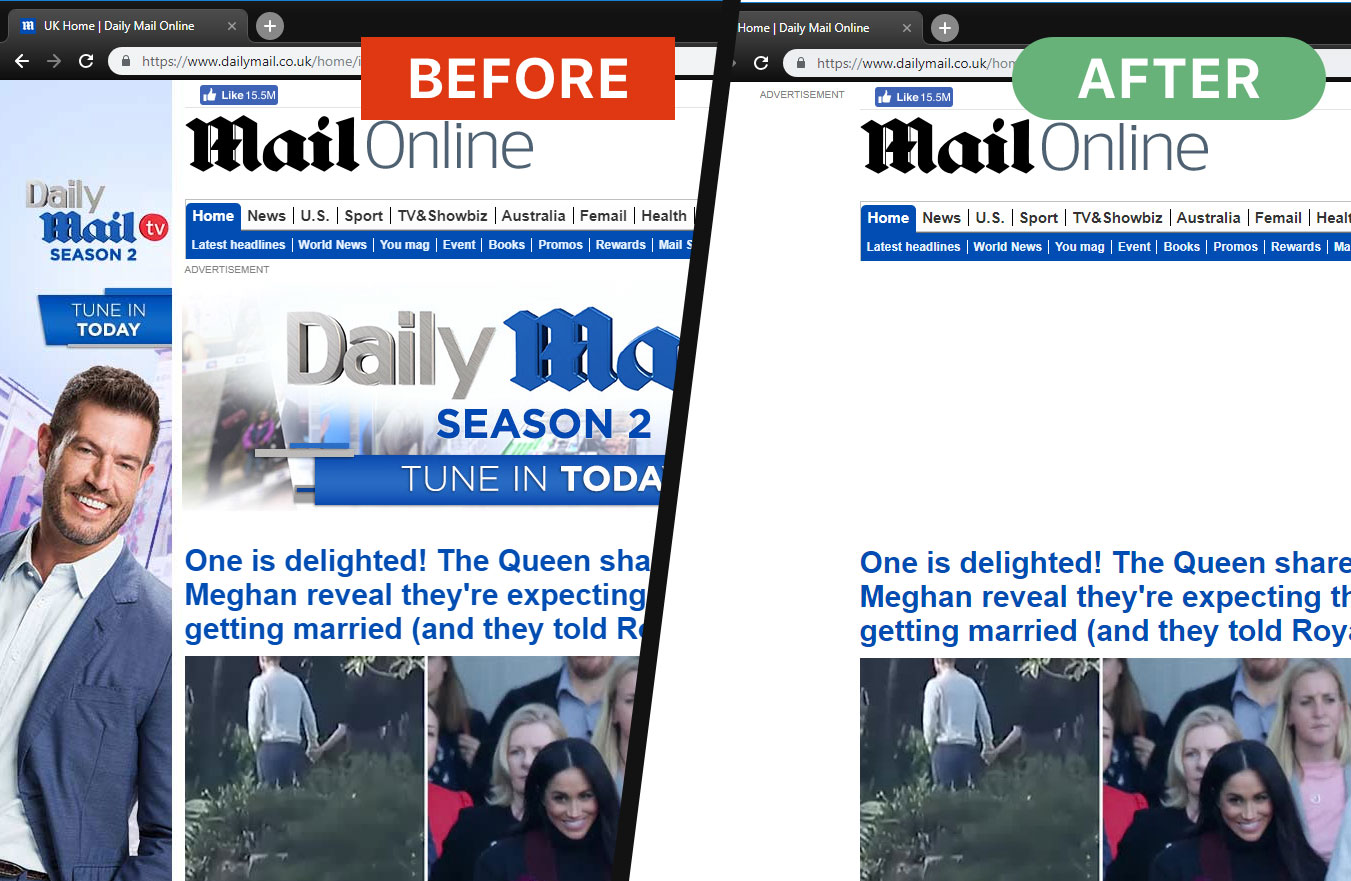
Ads are gone now

And this is not just aesthetics, look at the amount of saved traffic and load speed:
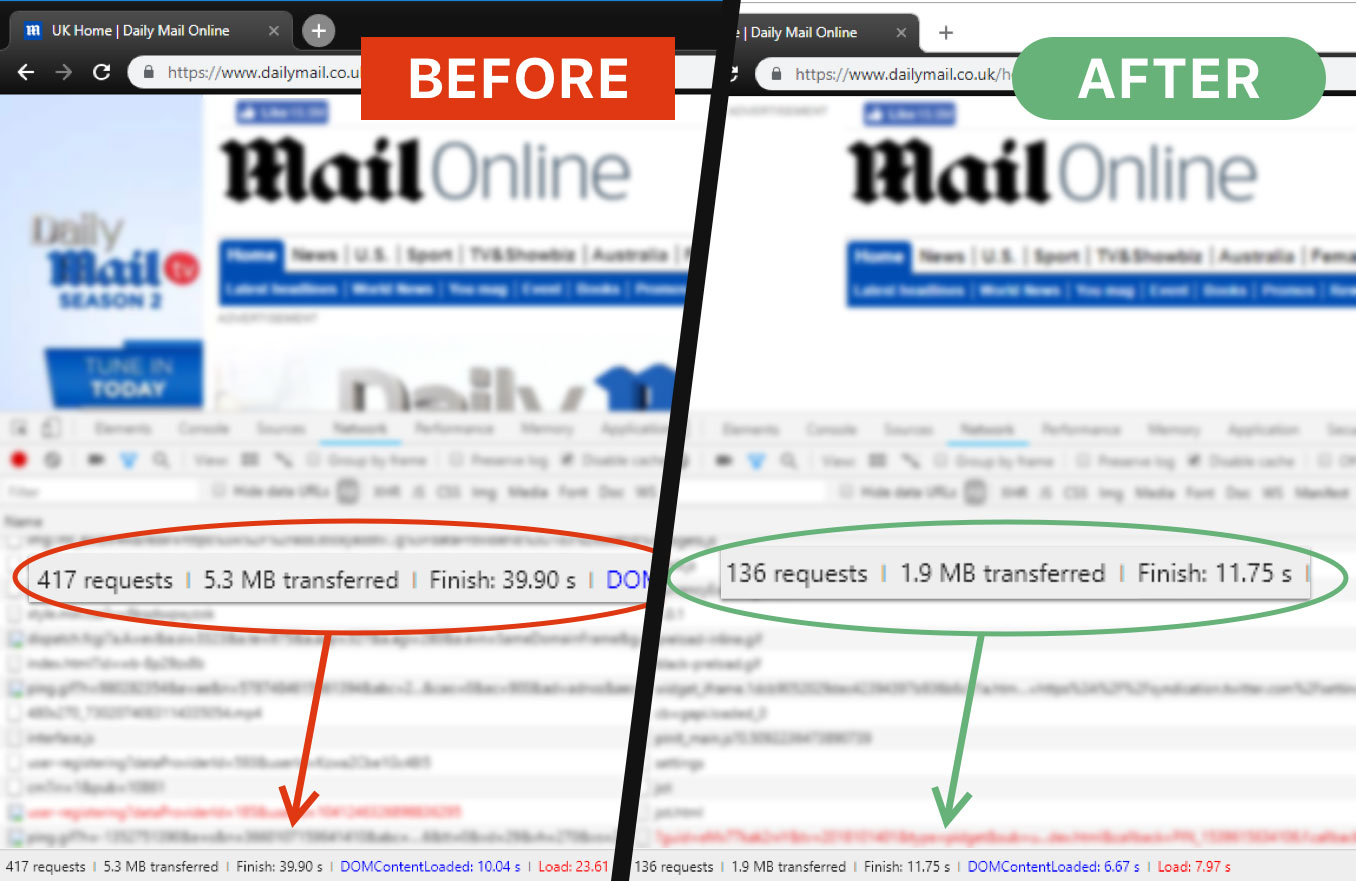
AG Home saves time and traffic

That is more than 3Mb of traffic and 15 seconds of load speed, and that's only one page.

Browsing Security
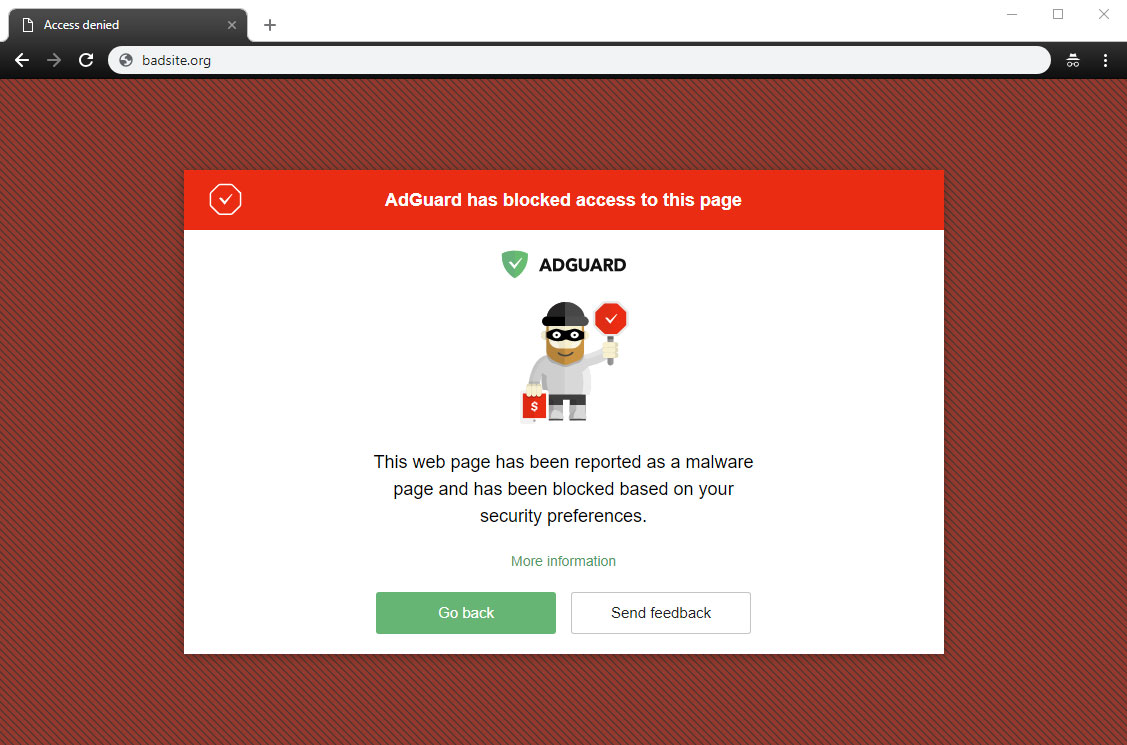
AG Home blocked a dangerous website

This stands for anti-malware and anti-phishing protection. AG Home will block all potentially dangerous requests to malicious and fraudulent websites, protecting you from online threats.

Parental control
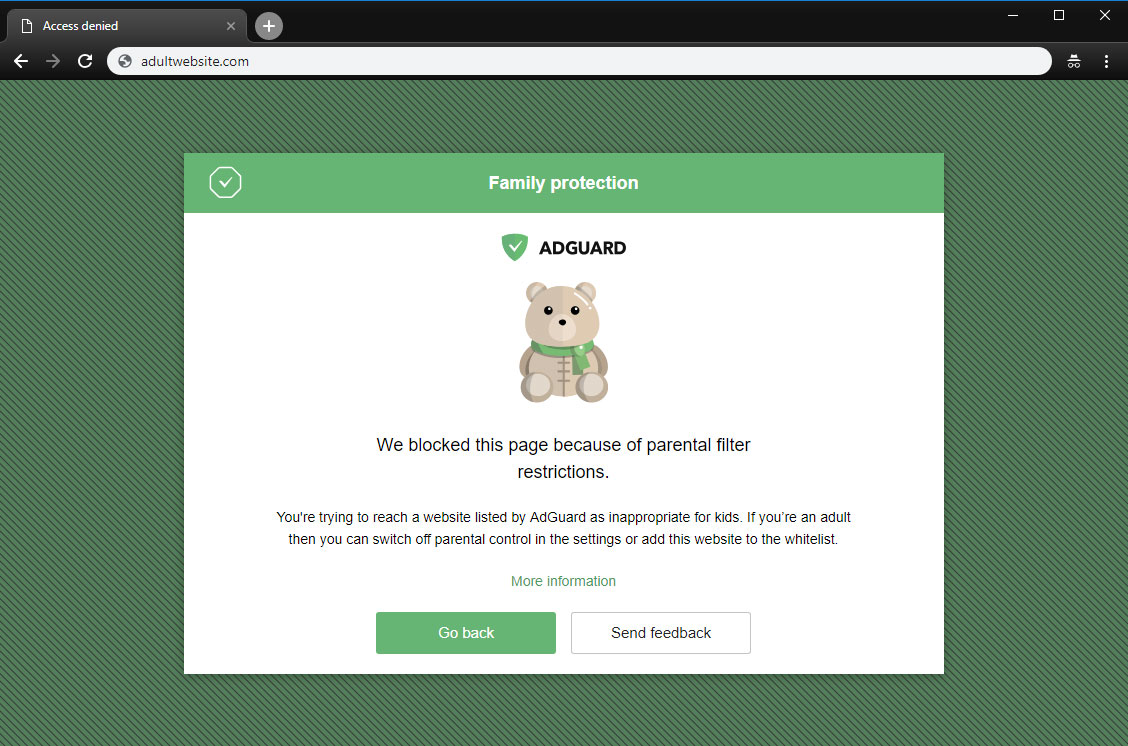
A page is blocked by Parental control

This is useful if you have kids and you don't want them to access websites with inappropriate content.

Safe search
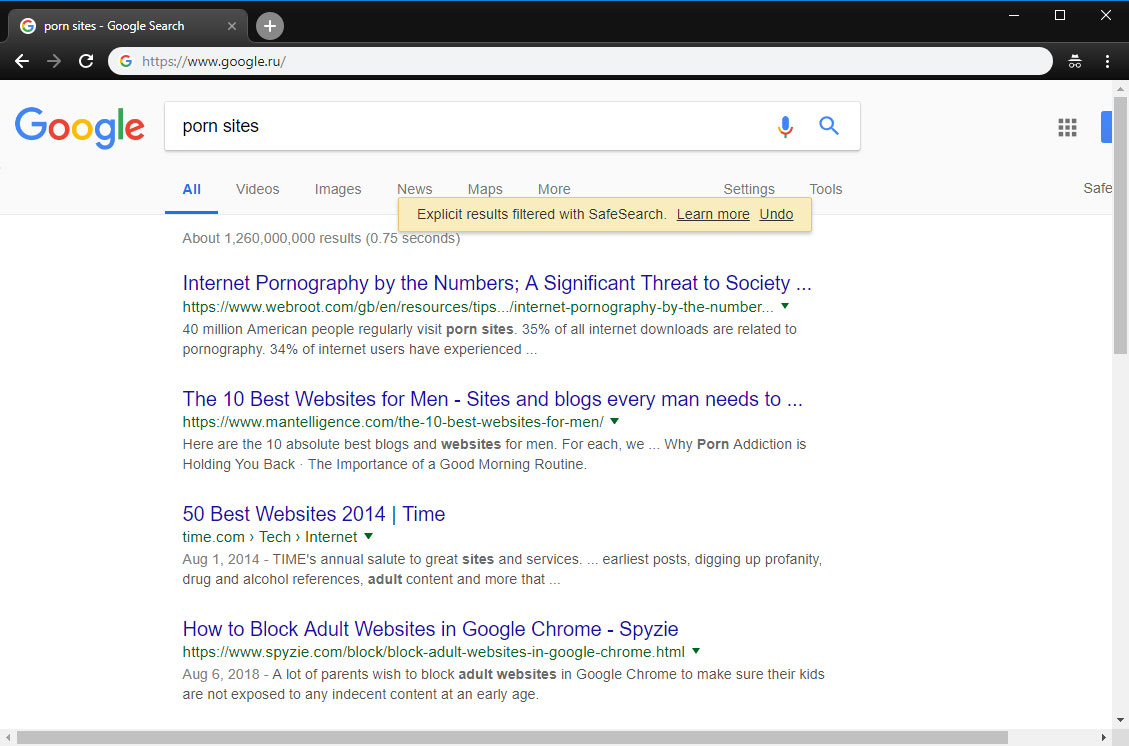
AG Home enforced "Safe search"

In the same vein, this option enforces "Safe search" mode in the most popular search engines (when enabled, it omits adult websites and pictures from being displayed in the search results)

Custom upstream servers

At the bottom of the "Settings" tab is a window to select a preferable upstream DNS server. Don't bother yourself with it unless you know what it means — this option is not essential to the quality filtering at all, but rather is a nice bonus.

AdGuard Home was developed based on the production-ready AdGuard DNS software, which has been used successfully by millions of users from around the globe for the last two years

Filter lists
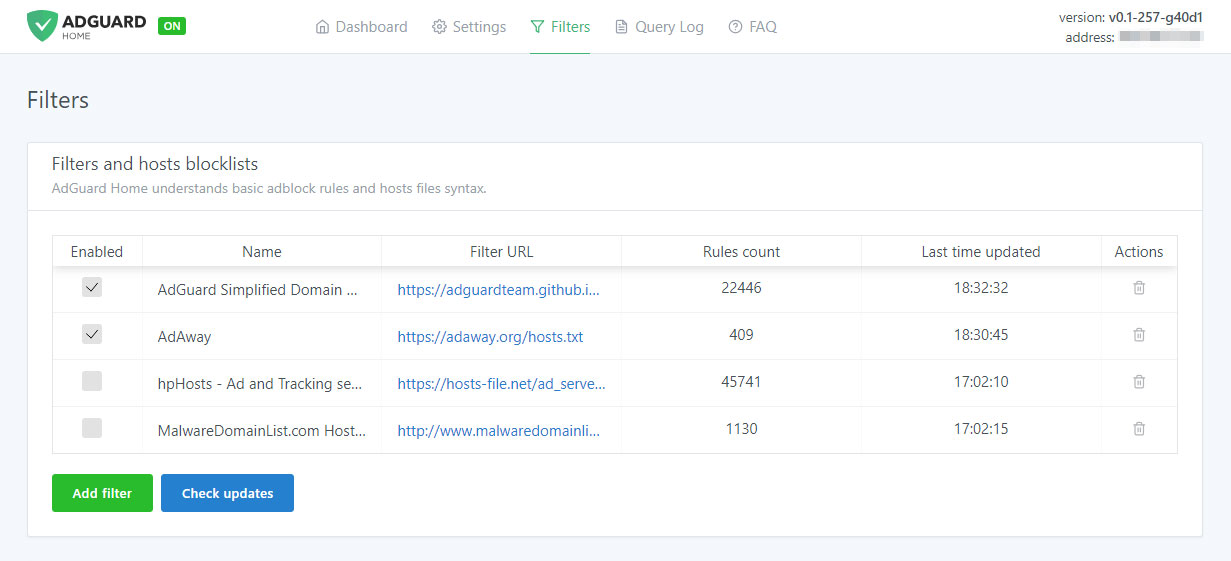
Add third-party filters

The third tab is devoted to filter settings. By default, ad blocking will be managed by the AdGuard SDN filter, but you have an option to add other filters and hosts-based blocking lists (basically, those are lists of rules that tell AG Home what exactly to block), or even create your own custom filtering rules. Multiple filters and hosts lists are available on the Internet.

AdGuard Home is developed by AdGuard — known experts in ad blocking and privacy protection. Over 25,000,000 users entrusted us with their online safety and never looked back

Query log
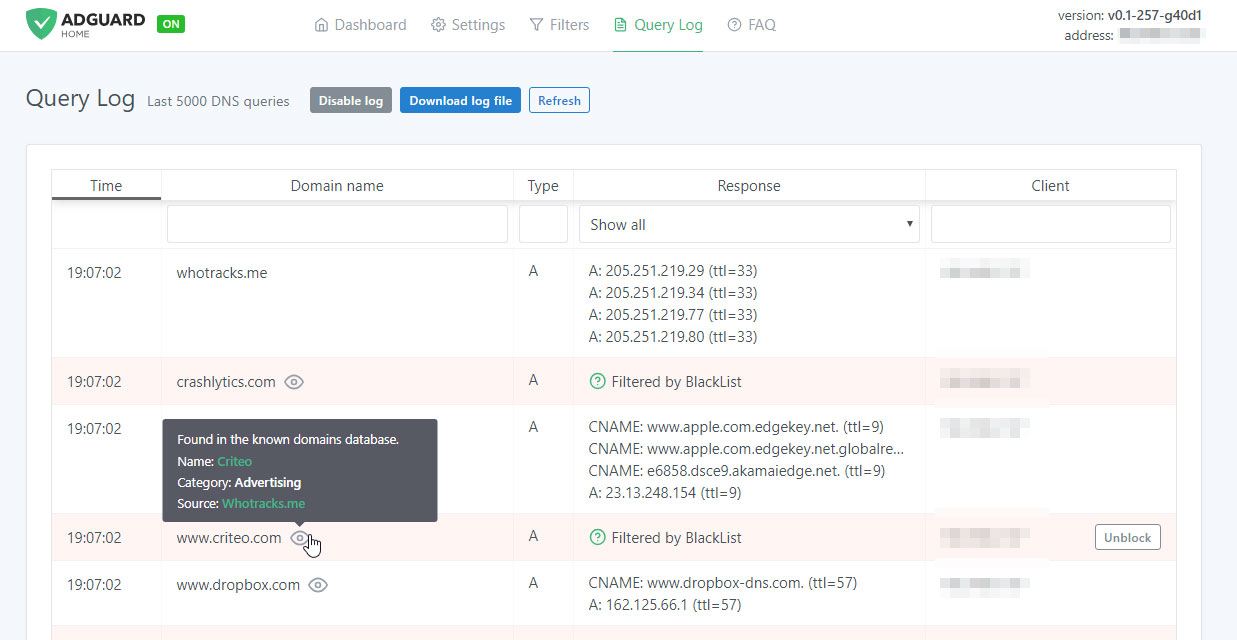
Monitor network activity

In the next tab there is a query log that offers everything you would expect from it — complete information on each and every request, all kinds of sorting. For each blocked request, there is a small tooltip telling you what rule it was filtered by, additional information about its origin and an "Unblock" button right next to it. Similarly, for unblocked requests there is a "Block" button. The log keeps track of the last 5000 queries and, of course, you can download the log file.

Open source

AdGuard Home is an open source project. We would be delighted to see any feedback, suggestions or other contribution from you. Whatever it is you have for us, the place to go to let us know about it is always the GitHub repository.

In summary, AdGuard Home gives you complete control over what is happening within your network.

How to set it up

Currently, you can install AdGuard Home on MacOS, Linux (x32 or x64), and Raspberry Pi. There is no need to go into technical details — we have the installation process described in the dedicated GitHub repository. Also, detailed guides on installing AG DNS to VPS and Raspberry Pi are available in our Wiki.

Further plans

We are not going to stop here: on the contrary, we have big plans regarding the future development of AdGuard Home. Here is a short list of what we are planning to do next:

  • One-click setup of your private VPN integrated with AdGuard Home
  • Improve the UI, make it better both functionally and aesthetically (send us your suggestions!)
  • Enhance the encryption options — DNSCrypt and DoH support, a possibility to run in the encrypted DNS server mode
  • Make it easier to use AdGuard Home with mobile devices (e.g. Mobileconfig for iOS)
  • Integrate AG Home with AdGuard applications

Being optimistic and looking a bit further, we would like AG Home to eventually become the privacy protection center for you and your devices, simple to use and easy to configure, where you can set up a personal proxy, VPN or encrypted DNS just in a couple of clicks.

Can I uninstall my ad blocker now?

The main advantage of AG Home lies in its ability to protect the whole network. When it comes to the sheer "filtering power", DNS-based ad blocking is inherently less potent and flexible than the approach taken by browser extensions and especially less so than dedicated tools. As an example, this article compares AG for Android and hosts-based ad blockers, and it gives a good impression of their relative capabilities. Whether you need this level of protection or not is a matter only you can decide.

And that's about it, hope you'll like AdGuard Home and will find a good use for it!

Do you have any questions or suggestions? We're answering everything on Product Hunt today!

Vam je bila objava všeč?
AdGuard VPN AdGuard DNS AdGuard Mail AdGuard Wallet
Glavni zaslon AdGuard za Windows
Zaslon zaščite AdGuard za Windows, ki prikazuje funkcije zaščite in nastavitve
Zaslon statistike AdGuard za Windows, ki prikazuje statistiko blokiranih oglasov in sledilcev
Zaslon Upravljanje aplikacij AdGuard za Windows, ki prikazuje možnosti upravljanja zaščite za aplikacije, nameščene v napravi
20.368 20368 ocen uporabnikov
Odlično!

AdGuard: blokator oglasov za Windows

AdGuard za Windows je več kot blokator oglasov. Je večnamensko orodje, ki blokira oglase, nadzoruje dostop do nevarnih spletnih mest, pospeši nalaganje strani in ščiti otroke pred neprimerno vsebino
S prenosom programa sprejemate pogoje Licenčne pogodbe
Microsoft Trgovina
S prenosom programa sprejemate pogoje Licenčne pogodbe
AdGuard za Windows v8.0, 14-dnevno preizkusno obdobje
Glavni zaslon AdGuard za Mac
Zaslon Prikritega načina AdGuard for Mac
20.368 20368 ocen uporabnikov
Odlično!

AdGuard: blokator oglasov za Mac

AdGuard za Mac je edinstven blokator oglasov, zasnovan z mislijo na macOS. Poleg zaščite pred nadležnimi oglasi v brskalnikih in aplikacijah vas ščiti pred sledenjem, lažnim predstavljanjem in goljufijami
S prenosom programa sprejemate pogoje Licenčne pogodbe
Več o tem
AdGuard za macOS v2.19, 14-dnevno preizkusno obdobje
Glavni zaslon AdGuard za Android
Zaslon Zaščita pred sledenjem AdGuard za Android
Zaslon Upravljanje aplikacij AdGuard za Android, ki prikazuje možnosti upravljanja zaščite za aplikacije, nameščene v napravi
Zaslon statistike AdGuard za Android, ki prikazuje statistiko blokiranih oglasov in sledilcev
Glavni zaslon zasebnega brskalnika AdGuard za Android
QR koda za prenos AdGuard za Android
20.368 20368 ocen uporabnikov
Odlično!

AdGuard: blokator oglasov za Android

Blokira oglase in sledilnike v vseh brskalnikih, igrah in drugih aplikacijah. Ščiti vašo zasebnost in vam omogoča nadzor nad tem, kako vaše aplikacije uporabljajo internet. Nameščeno prek APK-ja
S prenosom programa sprejemate pogoje Licenčne pogodbe
Več o tem
Preglejte za prenos
Uporabite kateri koli razpoložljivi bralnik QR kod v vaši napravi
AdGuard za Android v4.14, 14-dnevno preizkusno obdobje
Glavni zaslon AdGuard za iOS
Zaslon zaščite AdGuard za iOS, ki prikazuje funkcije zaščite in nastavitve
Zaslon statistike AdGuard za iOS, ki prikazuje statistiko blokiranih oglasov in sledilcev
QR koda za prenos AdGuard za iOS
20.368 20368 ocen uporabnikov
Odlično!

AdGuard: blokator oglasov za iOS

Najboljši blokator oglasov za iOS za iPhone in iPad. AdGuard odstrani vse vrste oglasov in sledilnikov v Safariju ter ščiti vašo zasebnost v vseh aplikacijah na ravni DNS
S prenosom programa sprejemate pogoje Licenčne pogodbe
Več o tem
Preglejte za prenos
Uporabite kateri koli razpoložljivi bralnik QR kod v vaši napravi
AdGuard za iOS v4.5
Glavni zaslon AdGuard Content Blocker
Zaslon filtri AdGuard Content Blocker
Zaslon nastavitve AdGuard Content Blocker
20.368 20368 ocen uporabnikov
Odlično!

AdGuard Zaviralec vsebine

AdGuard Content Blocker odpravlja vse vrste oglasov v mobilnih brskalnikih, ki podpirajo tehnologijo blokiranja vsebine — in sicer Samsung Internet in Yandex Browser. Njegove funkcije so omejene v primerjavi z AdGuardom za Android, vendar je brezplačen, enostaven za namestitev in učinkovit
S prenosom programa sprejemate pogoje Licenčne pogodbe
Več o tem
AdGuard Zaviralec vsebine v2.8
Glavni zaslon razširitev brskalnika AdGuard
Zaslon Zaščita pred sledenjem razširitve brskalnika AdGuard
20.368 20368 ocen uporabnikov
Odlično!

AdGuard Razširitev brskalnika

AdGuard je najhitrejša in najlažja razširitev za zaviranje oglasov, ki učinkovito onemogoča vse vrste oglasov na vseh spletnih straneh! Za brskalnik, ki ga uporabljate, izberite AdGuard in hitro ter varno brskajte brez oglasov.
Namesti
S prenosom programa sprejemate pogoje Licenčne pogodbe
Namesti
S prenosom programa sprejemate pogoje Licenčne pogodbe
Namesti
S prenosom programa sprejemate pogoje Licenčne pogodbe
Namesti
S prenosom programa sprejemate pogoje Licenčne pogodbe
Namesti
S prenosom programa sprejemate pogoje Licenčne pogodbe
Več o tem
Namesti
S prenosom programa sprejemate pogoje Licenčne pogodbe
Več o tem
AdGuard Razširitev brskalnika v5.5
Glavni zaslon Pomočnik brskalnika
20.368 20368 ocen uporabnikov
Odlično!

AdGuard Pomočnik

Sopodajalna razširitev za brskalnik za AdGuard namizne aplikacije. Dovoli vam, da blokirate po meri nastavljene elemente na spletnih straneh, dodajate spletne strani na seznam dovoljenih in pošiljate poročila neposredno iz vašega brskalnika
AdGuard Pomočnik v1.4
20.368 20368 ocen uporabnikov
Odlično!

AdGuard Home

AdGuard Home je omrežna rešitev za blokiranje oglasov in sledilcev. Namestite ga enkrat na usmerjevalnik, da pokrijete vse naprave v domačem omrežju — dodatna programska oprema odjemalca ni potrebna. To je še posebej pomembno za različne naprave IoT, ki pogosto ogrožajo vašo zasebnost
AdGuard Home v0.107
Glavni zaslon AdGuard Pro za iOS
Zaslon zaščite AdGuard Pro za iOS, ki prikazuje funkcije zaščite in nastavitve
Zaslon statistike AdGuard Pro za iOS, ki prikazuje statistiko za blokirane oglase in sledilce
20.368 20368 ocen uporabnikov
Odlično!

AdGuard Pro za iOS

AdGuard Pro za iOS vključuje vse napredne funkcije zaščite pred oglasi z omogočeno blokado. Ponuja ista orodja kot plačljiva različica AdGuard za iOS. Odličen je pri blokiranju oglasov v Safari in omogoča prilagajanje DNS nastavitev za prilagojeno zaščito. Oglase blokira v brskalnikih in aplikacijah, vaše otroke ščiti pred neprimerno vsebino ter ohranja vaše osebne podatke varne.
S prenosom programa sprejemate pogoje Licenčne pogodbe
Več o tem
AdGuard Pro za iOS v4.5
Glavni zaslon AdGuard Mini za Mac
Zaslon zaščite Safari v AdGuard Mini za Mac
Zaslon ustvarjanja pravila AdGuard Mini za Mac
20.368 20368 ocen uporabnikov
Odlično!

AdGuard Mini za Mac — zaviralec oglasov Safari

AdGuard Mini za Mac je zmogljiv Safari blokator oglasov. Ta lahka aplikacija odstranjuje oglase, blokira sledilce in pospešuje nalaganje strani. Pomaga vam brskati po spletu v Safariju brez motenj in varuje vaše podatke
Namesti
S prenosom programa sprejemate pogoje Licenčne pogodbe
Več o tem
AdGuard Mini za Mac v2.3
Glavni zaslon AdGuard za Android TV z omogočeno zaščito
Zaslon blokiranja oglasov AdGuard za Android TV, ki prikazuje njegove funkcije in nastavitve
Zaslon nastavitev AdGuard za Android TV
Zaslon Upravljanje aplikacij AdGuard za Android TV, ki prikazuje aplikacije, kjer so oglasi in sledilci blokirani
20.368 20368 ocen uporabnikov
Odlično!

AdGuard za Android TV

AdGuard za Android TV je edina aplikacija, ki zavira oglase, varuje vašo zasebnost in deluje kot požarni zid za vaš Smart TV. Prejmite opozorila o spletnih grožnjah, uporabite varen DNS in izkoristite šifriran promet. Sprostite se in se potopite v svoje najljubše oddaje z vrhunsko varnostjo in brez oglasov!
AdGuard za Android TV v4.14, 14-dnevno preizkusno obdobje
Maskota AdGuard, Agnar, ki drži Linux pingvina
20.368 20368 ocen uporabnikov
Odlično!

AdGuard za Linux

AdGuard za Linux je prvi sistemski zaviralec oglasov za Linux na svetu. Onemogočite oglase in sledilce na ravni naprave, izberite med vnaprej nameščenimi filtri ali dodajte svoje — vse preko ukazne lupine vmesnika
AdGuard za Linux v1.4
20.368 20368 ocen uporabnikov
Odlično!

AdGuard Temp Mail

Brezplačen ustvarjalec začasnih elektronskih naslovov, ki vas ohranja anonimne in ščiti vašo zasebnost. Brez neželene pošte v vašem glavnem predalu!
20.368 20368 ocen uporabnikov
Odlično!

AdGuard VPN

75 lokacij svetovnega spleta

Dostop do katere koli vsebine

Močno šifriranje

Politika 'Brez dnevnikov'

Najhitrejša povezava

stalna podpora

Poskusite brezplačno
S prenosom programa sprejemate pogoje Licenčne pogodbe
Več o tem
20.368 20368 ocen uporabnikov
Odlično!

AdGuard DNS

AdGuard DNS je brezhiben način zaviranja internetnih oglasov, ki ne zahteva nameščanja nobenih aplikacij. Je preprost za uporabo, popolnoma brezplačen, enostavno nastavljiv na kateri koli napravi in vam zagotavlja minimalne potrebne funkcije za zaviranje oglasov, števcev, zlonamernih spletnih strani in vsebine za odrasle.
20.368 20368 ocen uporabnikov
Odlično!

AdGuard Mail

Ščitite svoj identitet, izogibajte se neželeni pošti in ohranite svoj nabiralnik varno z našimi vzdevki in začasnimi e-poštnimi naslovi. Uživajte v naši brezplačni storitvi posredovanja e-pošte in aplikacijah za vse operacijske sisteme
20.368 20368 ocen uporabnikov
Odlično!

AdGuard Wallet

Varna in zasebna kripto denarnica, ki vam omogoča popoln nadzor nad vašimi sredstvi. Upravljaj več denarnic in odkrij tisoče kriptovalut za shranjevanje, pošiljanje in zamenjavo
Prenos AdGuarda Za namestitev AdGuarda kliknite gumb, označen s puščico Izberite 'Odpri' in kliknite na 'Vredu', nato pa počakajte, da se datoteka prenese. V odprtem oknu povlecite ikono AdGuarda in jo spustite v mapo 'Aplikacije'. Hvala, ker ste izbrali AdGuard! Izberite 'Odpri' in kliknite na 'Vredu', nato pa počakajte, da se datoteka prenese. V odprtem oknu kliknite na 'Namesti'. Hvala, ker ste izbrali AdGuard!
Namestite AdGuard na svojo mobilno napravo


















































