Mozilla deletes promise to 'never sell' your data. Has it really backed out on its word?

Mozilla, the company behind the open-source Firefox browser, has long prided itself on standing apart from tech giants like Google. Unlike Google, which has a rich history of collecting user data even if you try to say ‘no’, Mozilla has consistently insisted — and generally followed through — that user controls in Firefox aren’t a smokescreen and that it puts privacy front and center. Mozilla’s Privacy FAQ still greets you with a subheading in bold: “We Stand for People over Profit.”

The promise that’s no longer there

In late February, Mozilla updated its Privacy FAQ, Firefox’s own Privacy FAQ and introduced Firefox TOU. All three documents raised a lot of eyebrows, sending the community into frenzy.

Let’s start with the TOU. The Firefox Terms of Use, released in late February, intially included the language that had many users scratching their heads. Specifically, it stated that “when you upload or input information through Firefox, you hereby grant us a nonexclusive, royalty-free, worldwide license to use that information to help you navigate, experience, and interact with online content as you indicate with your use of Firefox.”
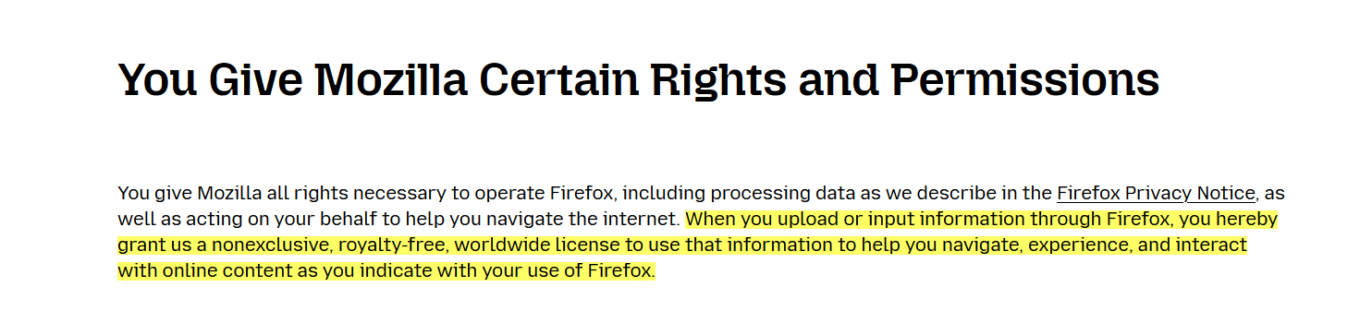
The promise

What appeared to be a new policy triggered a flood of comments on Reddit, with users taking exception to the wording. Some criticized the language for being too vague, while not inherently and necessarily nefarious. Others were ringing alarm bells, and rather loudly: “For frick's sake I don't want you to use information typed in to Firefox, Mozilla. Whatever I type into the browser window is between me and whatever service I'm sending the information to, not you, Mozilla,” one Redditor ranted.

Others were still more willing to give Mozilla the benefit of the doubt: “I believe the Mozilla Foundation is trying to do the right thing, but this kind of language in the terms is ripe for abuse. I hope they clarify it.”

In response to the backlash, Mozilla released a blog post to try and clear things up, saying:

We’ve seen a little confusion about the language regarding licenses, so we want to clear that up. We need a license to allow us to make some of the basic functionality of Firefox possible. Without it, we couldn’t use information typed into Firefox, for example. It does NOT give us ownership of your data or a right to use it for anything other than what is described in the Privacy Notice.

However, this attempt at clarification only seemed to stir the pot further. Mozilla claimed they needed the license to make basic Firefox features work, but didn’t explain why they needed access to what you type in.

A few days later, Mozilla made another attempt at setting the record straight (or at damage control, whichever you prefer).

In a seperate blog post on February 28, it announced that it had changed the TOU once again.

Now the paragraph, that has caused so much controversy, reads like this:

You give Mozilla the rights necessary to operate Firefox. This includes processing your data as we describe in the Firefox Privacy Notice. It also includes a nonexclusive, royalty-free, worldwide license for the purpose of doing as you request with the content you input in Firefox. This does not give Mozilla any ownership in that content.

The apparent goal of this change was to ease users' fears that Mozilla now claims ownership of their typed-in content. However, if anything, the wording is even more vague than before, as it simply directs users to check the Firefox Privacy Notice for details as to how exactly their data will be used.

The TOU was only a small part of the controversy. Mozilla's updated Privacy FAQ and Firefox Privacy FAQ were responsible for the other part.

Previously, Mozilla's Privacy FAQ proudly stated that they “don’t sell data about you,” nor do they buy data about you. Below is a screenshot of the FAQ from February 6:
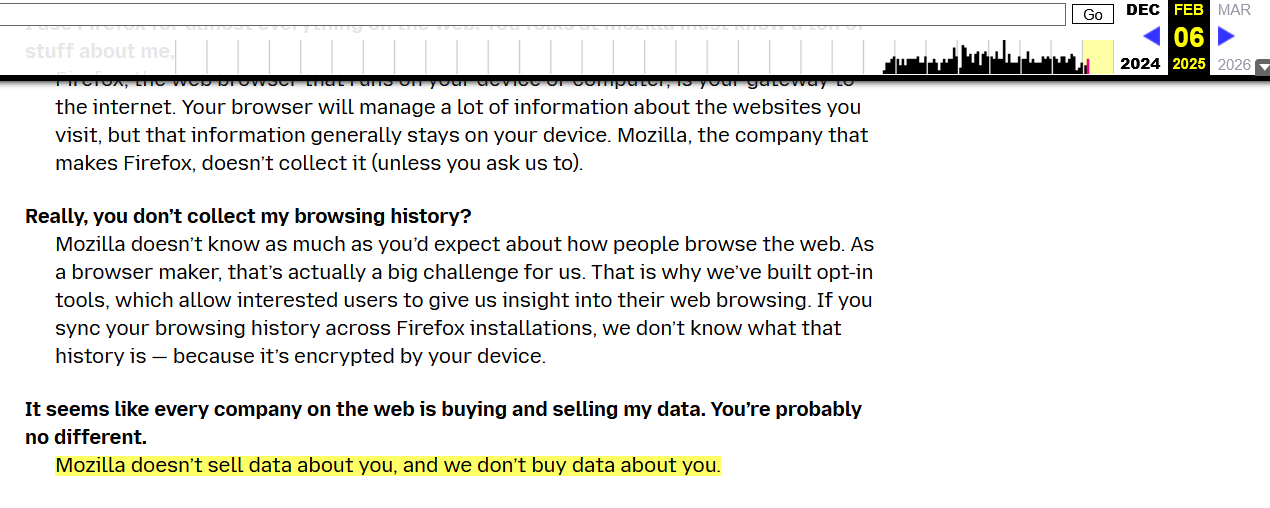
The promise2

The updated version now reads that Mozilla “does not sell data about you” but “in the way that most people think about “selling data”. This makes you wonder, whether you’re the ‘most people’ and what’s all this really supposed to mean.
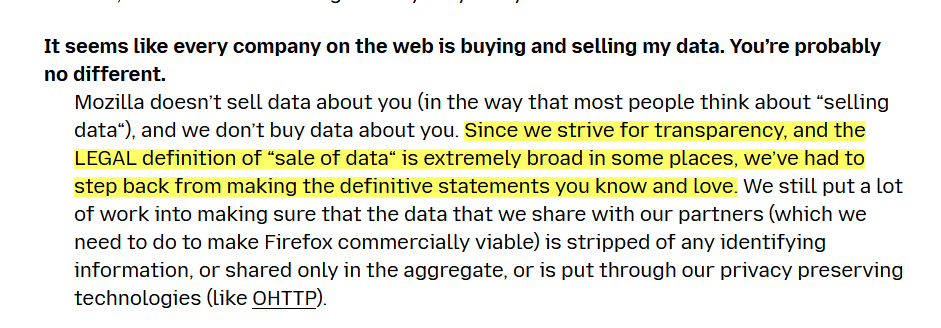
The promise
Current version of Mozilla’s Privacy FAQ

In its blog post from February 28, Mozilla justified the new, somewhat vague wording by stating that the current legal definition of what constitutes a sale of data is too "broad and evolving."

However, even more confusing — and arguably more disheartening for users — was the removal of Mozilla’s bold promise to “never sell your data” from its Firefox Privacy FAQ. Previously, the FAQ had answered the question “Does Firefox sell your personal data?” with a resounding “Nope. Never have, never will. And we protect you from many of the advertisers who do.”
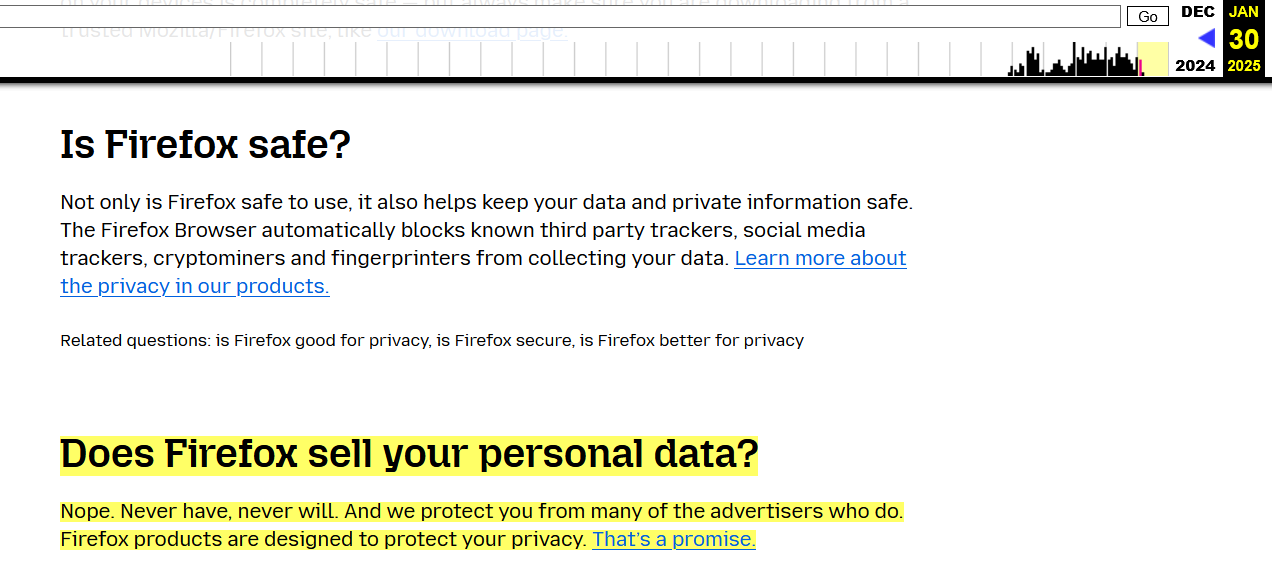
Mozilla's FAQ screenshot

Now (as of the time of writing), the section is missing completely from Firefox’s Privacy FAQ:
The promise

To be fair, the section appears to be under construction, and it’s likely we’ll soon see a replacement to the promise that had been dear to many of Firefox’s users.

And while some might have been taken off guard by an apparent change of heart on behalf of Mozilla, this new language isn't coming as a surprise to those who’ve been paying close attention to Mozilla lately. Here’s why.

Mozilla’s slow descent into ad tech

One of Mozilla’s core principles has always been its commitment to user privacy, with a foundational promise not to sell data. However, over the past few years, and more noticeably, months, that promise has started to fade, and the pillars supporting it have shown signs of crumbling.

Back in October, Mozilla made official what many had been predicting: its move into the ad-tech space. In a blog post, Mozilla president Mark Surman raised a question: “How do we ensure that privacy is not a privilege of the few, but a fundamental right available to everyone?” He went on to suggest that one part of the solution lies in “online advertising,” arguing that the system is “fundamentally broken.” Mozilla, according to Surman, is experimenting with advertising as a way to fix it.

For what it’s worth, Mozilla is following a well-worn path that many tech companies took before it. Much like Google and Microsoft, which have rolled out features like Google’s Protected Audience API and Microsoft’s Ad Selection API, Mozilla is now attempting to blend privacy with advertising. However, advertising has never been a major part of Mozilla’s DNA — until quite recently.

The shift has taken time to shape up, but it’s becoming much clearer now. Just last summer, Mozilla made waves by acquiring Anonym, an ad metrics company. The goal? They claim it will improve ad targeting while safeguarding user data. Not long after, Mozilla rolled out Privacy-Preserving Attribution (PPA), a feature designed to let advertisers track the effectiveness of their ads without crossing the line into intrusive tracking. PPA was enabled by default in Firefox.

Time to ditch Firefox?

The latest changes to Mozilla’s Terms of Service and Privacy FAQs seem to reflect its growing focus on advertising.

As the company becomes more deeply entangled in the ad-tech industry, its long-standing promises about privacy are starting to feel less clear-cut. What once seemed like an unwavering dedication to protecting user data is now being tested by the growing push to make privacy compatible with advertising. For many users, this raises the question: how much is Mozilla really willing to compromise? While the answer is not yet clear, bidding farewell to that bold, albeit idealistic, promise feels sad. It might mark the end of an era — and, even sadder, that end may be inevitable.


Vam je bila objava všeč?
AdGuard VPN AdGuard DNS AdGuard Mail AdGuard Wallet
Glavni zaslon AdGuard za Windows
Zaslon zaščite AdGuard za Windows, ki prikazuje funkcije zaščite in nastavitve
Zaslon statistike AdGuard za Windows, ki prikazuje statistiko blokiranih oglasov in sledilcev
Zaslon Upravljanje aplikacij AdGuard za Windows, ki prikazuje možnosti upravljanja zaščite za aplikacije, nameščene v napravi
20.367 20367 ocen uporabnikov
Odlično!

AdGuard: blokator oglasov za Windows

AdGuard za Windows je več kot blokator oglasov. Je večnamensko orodje, ki blokira oglase, nadzoruje dostop do nevarnih spletnih mest, pospeši nalaganje strani in ščiti otroke pred neprimerno vsebino
S prenosom programa sprejemate pogoje Licenčne pogodbe
Microsoft Trgovina
S prenosom programa sprejemate pogoje Licenčne pogodbe
AdGuard za Windows v8.0, 14-dnevno preizkusno obdobje
Glavni zaslon AdGuard za Mac
Zaslon Prikritega načina AdGuard for Mac
20.367 20367 ocen uporabnikov
Odlično!

AdGuard: blokator oglasov za Mac

AdGuard za Mac je edinstven blokator oglasov, zasnovan z mislijo na macOS. Poleg zaščite pred nadležnimi oglasi v brskalnikih in aplikacijah vas ščiti pred sledenjem, lažnim predstavljanjem in goljufijami
S prenosom programa sprejemate pogoje Licenčne pogodbe
Več o tem
AdGuard za macOS v2.19, 14-dnevno preizkusno obdobje
Glavni zaslon AdGuard za Android
Zaslon Zaščita pred sledenjem AdGuard za Android
Zaslon Upravljanje aplikacij AdGuard za Android, ki prikazuje možnosti upravljanja zaščite za aplikacije, nameščene v napravi
Zaslon statistike AdGuard za Android, ki prikazuje statistiko blokiranih oglasov in sledilcev
Glavni zaslon zasebnega brskalnika AdGuard za Android
QR koda za prenos AdGuard za Android
20.367 20367 ocen uporabnikov
Odlično!

AdGuard: blokator oglasov za Android

Blokira oglase in sledilnike v vseh brskalnikih, igrah in drugih aplikacijah. Ščiti vašo zasebnost in vam omogoča nadzor nad tem, kako vaše aplikacije uporabljajo internet. Nameščeno prek APK-ja
S prenosom programa sprejemate pogoje Licenčne pogodbe
Več o tem
Preglejte za prenos
Uporabite kateri koli razpoložljivi bralnik QR kod v vaši napravi
AdGuard za Android v4.14, 14-dnevno preizkusno obdobje
Glavni zaslon AdGuard za iOS
Zaslon zaščite AdGuard za iOS, ki prikazuje funkcije zaščite in nastavitve
Zaslon statistike AdGuard za iOS, ki prikazuje statistiko blokiranih oglasov in sledilcev
QR koda za prenos AdGuard za iOS
20.367 20367 ocen uporabnikov
Odlično!

AdGuard: blokator oglasov za iOS

Najboljši blokator oglasov za iOS za iPhone in iPad. AdGuard odstrani vse vrste oglasov in sledilnikov v Safariju ter ščiti vašo zasebnost v vseh aplikacijah na ravni DNS
S prenosom programa sprejemate pogoje Licenčne pogodbe
Več o tem
Preglejte za prenos
Uporabite kateri koli razpoložljivi bralnik QR kod v vaši napravi
AdGuard za iOS v4.5
Glavni zaslon AdGuard Content Blocker
Zaslon filtri AdGuard Content Blocker
Zaslon nastavitve AdGuard Content Blocker
20.367 20367 ocen uporabnikov
Odlično!

AdGuard Zaviralec vsebine

AdGuard Content Blocker odpravlja vse vrste oglasov v mobilnih brskalnikih, ki podpirajo tehnologijo blokiranja vsebine — in sicer Samsung Internet in Yandex Browser. Njegove funkcije so omejene v primerjavi z AdGuardom za Android, vendar je brezplačen, enostaven za namestitev in učinkovit
S prenosom programa sprejemate pogoje Licenčne pogodbe
Več o tem
AdGuard Zaviralec vsebine v2.8
Glavni zaslon razširitev brskalnika AdGuard
Zaslon Zaščita pred sledenjem razširitve brskalnika AdGuard
20.367 20367 ocen uporabnikov
Odlično!

AdGuard Razširitev brskalnika

AdGuard je najhitrejša in najlažja razširitev za zaviranje oglasov, ki učinkovito onemogoča vse vrste oglasov na vseh spletnih straneh! Za brskalnik, ki ga uporabljate, izberite AdGuard in hitro ter varno brskajte brez oglasov.
Namesti
S prenosom programa sprejemate pogoje Licenčne pogodbe
Namesti
S prenosom programa sprejemate pogoje Licenčne pogodbe
Namesti
S prenosom programa sprejemate pogoje Licenčne pogodbe
Namesti
S prenosom programa sprejemate pogoje Licenčne pogodbe
Namesti
S prenosom programa sprejemate pogoje Licenčne pogodbe
Več o tem
Namesti
S prenosom programa sprejemate pogoje Licenčne pogodbe
Več o tem
AdGuard Razširitev brskalnika v5.5
Glavni zaslon Pomočnik brskalnika
20.367 20367 ocen uporabnikov
Odlično!

AdGuard Pomočnik

Sopodajalna razširitev za brskalnik za AdGuard namizne aplikacije. Dovoli vam, da blokirate po meri nastavljene elemente na spletnih straneh, dodajate spletne strani na seznam dovoljenih in pošiljate poročila neposredno iz vašega brskalnika
AdGuard Pomočnik v1.4
20.367 20367 ocen uporabnikov
Odlično!

AdGuard Home

AdGuard Home je omrežna rešitev za blokiranje oglasov in sledilcev. Namestite ga enkrat na usmerjevalnik, da pokrijete vse naprave v domačem omrežju — dodatna programska oprema odjemalca ni potrebna. To je še posebej pomembno za različne naprave IoT, ki pogosto ogrožajo vašo zasebnost
AdGuard Home v0.107
Glavni zaslon AdGuard Pro za iOS
Zaslon zaščite AdGuard Pro za iOS, ki prikazuje funkcije zaščite in nastavitve
Zaslon statistike AdGuard Pro za iOS, ki prikazuje statistiko za blokirane oglase in sledilce
20.367 20367 ocen uporabnikov
Odlično!

AdGuard Pro za iOS

AdGuard Pro za iOS vključuje vse napredne funkcije zaščite pred oglasi z omogočeno blokado. Ponuja ista orodja kot plačljiva različica AdGuard za iOS. Odličen je pri blokiranju oglasov v Safari in omogoča prilagajanje DNS nastavitev za prilagojeno zaščito. Oglase blokira v brskalnikih in aplikacijah, vaše otroke ščiti pred neprimerno vsebino ter ohranja vaše osebne podatke varne.
S prenosom programa sprejemate pogoje Licenčne pogodbe
Več o tem
AdGuard Pro za iOS v4.5
Glavni zaslon AdGuard Mini za Mac
Zaslon zaščite Safari v AdGuard Mini za Mac
Zaslon ustvarjanja pravila AdGuard Mini za Mac
20.367 20367 ocen uporabnikov
Odlično!

AdGuard Mini za Mac — zaviralec oglasov Safari

AdGuard Mini za Mac je zmogljiv Safari blokator oglasov. Ta lahka aplikacija odstranjuje oglase, blokira sledilce in pospešuje nalaganje strani. Pomaga vam brskati po spletu v Safariju brez motenj in varuje vaše podatke
Namesti
S prenosom programa sprejemate pogoje Licenčne pogodbe
Več o tem
AdGuard Mini za Mac v2.3
Glavni zaslon AdGuard za Android TV z omogočeno zaščito
Zaslon blokiranja oglasov AdGuard za Android TV, ki prikazuje njegove funkcije in nastavitve
Zaslon nastavitev AdGuard za Android TV
Zaslon Upravljanje aplikacij AdGuard za Android TV, ki prikazuje aplikacije, kjer so oglasi in sledilci blokirani
20.367 20367 ocen uporabnikov
Odlično!

AdGuard za Android TV

AdGuard za Android TV je edina aplikacija, ki zavira oglase, varuje vašo zasebnost in deluje kot požarni zid za vaš Smart TV. Prejmite opozorila o spletnih grožnjah, uporabite varen DNS in izkoristite šifriran promet. Sprostite se in se potopite v svoje najljubše oddaje z vrhunsko varnostjo in brez oglasov!
AdGuard za Android TV v4.14, 14-dnevno preizkusno obdobje
Maskota AdGuard, Agnar, ki drži Linux pingvina
20.367 20367 ocen uporabnikov
Odlično!

AdGuard za Linux

AdGuard za Linux je prvi sistemski zaviralec oglasov za Linux na svetu. Onemogočite oglase in sledilce na ravni naprave, izberite med vnaprej nameščenimi filtri ali dodajte svoje — vse preko ukazne lupine vmesnika
AdGuard za Linux v1.4
20.367 20367 ocen uporabnikov
Odlično!

AdGuard Temp Mail

Brezplačen ustvarjalec začasnih elektronskih naslovov, ki vas ohranja anonimne in ščiti vašo zasebnost. Brez neželene pošte v vašem glavnem predalu!
20.367 20367 ocen uporabnikov
Odlično!

AdGuard VPN

75 lokacij svetovnega spleta

Dostop do katere koli vsebine

Močno šifriranje

Politika 'Brez dnevnikov'

Najhitrejša povezava

stalna podpora

Poskusite brezplačno
S prenosom programa sprejemate pogoje Licenčne pogodbe
Več o tem
20.367 20367 ocen uporabnikov
Odlično!

AdGuard DNS

AdGuard DNS je brezhiben način zaviranja internetnih oglasov, ki ne zahteva nameščanja nobenih aplikacij. Je preprost za uporabo, popolnoma brezplačen, enostavno nastavljiv na kateri koli napravi in vam zagotavlja minimalne potrebne funkcije za zaviranje oglasov, števcev, zlonamernih spletnih strani in vsebine za odrasle.

20.367 20367 ocen uporabnikov
Odlično!

AdGuard Mail

Ščitite svoj identitet, izogibajte se neželeni pošti in ohranite svoj nabiralnik varno z našimi vzdevki in začasnimi e-poštnimi naslovi. Uživajte v naši brezplačni storitvi posredovanja e-pošte in aplikacijah za vse operacijske sisteme
20.367 20367 ocen uporabnikov
Odlično!

AdGuard Wallet

Varna in zasebna kripto denarnica, ki vam omogoča popoln nadzor nad vašimi sredstvi. Upravljaj več denarnic in odkrij tisoče kriptovalut za shranjevanje, pošiljanje in zamenjavo
Prenos AdGuarda Za namestitev AdGuarda kliknite gumb, označen s puščico Izberite 'Odpri' in kliknite na 'Vredu', nato pa počakajte, da se datoteka prenese. V odprtem oknu povlecite ikono AdGuarda in jo spustite v mapo 'Aplikacije'. Hvala, ker ste izbrali AdGuard! Izberite 'Odpri' in kliknite na 'Vredu', nato pa počakajte, da se datoteka prenese. V odprtem oknu kliknite na 'Namesti'. Hvala, ker ste izbrali AdGuard!


Namestite AdGuard na svojo mobilno napravo















































