Twitter’s love-hate relationship with ads, Google’s flop, dangerous search and a big data breach. AdGuard’s digest

In this edition of AdGuard’s Digest: Google comes under fire for its flawed attempt to reinvent ad targeting, Twitter makes a U-turn on third-party clients and criticizes its own ad policies, hackers continue to exploit search ads, while a telecoms giant runs into bad luck for the eighth time.

Google’s replacement for third-party cookies is put on blast

Google’s much-discussed Privacy Sandbox initiative has been dealt a stinging blow. The W3C Technical Architecture Group (TAG) has concluded that it did not meet its stated goal of enabling targeted advertising and protecting users from tracking and profiling at the same time.

The group took aim at one specific element of the proposal, the Topics API, envisioned as a replacement for third-party cookies. In its review of Topics, TAG notes that the technology still allows the browser to share information about the user’s online behavior. Moreover, the data is “gathered and sent behind the scenes,” while the user has no “fine-grained control” over what it reveals about them, the group said. The proposed alternative to third-party cookies appears to “maintain the status quo of inappropriate surveillance on the web,” TAG said, while recommending that Google not proceed with the technology. Google disagreed with the findings, insisting that Topics is a significant improvement over third-party cookies.

TAG is a special working group within the The World Wide Web Consortium, and includes the inventor of the Web Tim Berners-Lee.

We have long argued that Google is up to no good with its Topics API. In our own deep-dive review of the Privacy Sandbox we argued that Topics would still allow Big Tech to profile users and, if anything, would only cement Google’s advertising monopoly.

‘End of an era’: Twitter bans third-party clients

Twitter’s embattled CEO Elon Musk may be busy in court, but that does not mean a pause in Twitter-related news.

Recently, Twitter updated its developer terms to outlaw third-party apps, breaking away from its long-held policy. When asked about the change, Twitter said it was simply “enforcing long-standing API rules.” Twitter’s oldest third-party client, Twitterriffic, which came to iOS even before Twitter itself, was forced to pull its apps from the iOS and Mac app stores as well. In a blog post, Twitterrific said that app’s “sudden and undignified demise” was brought about by an unannounced policy change from an “increasingly capricious Twitter”.

The ban represents a U-turn in Twitter’s treatment of third-party clients — the platform previously tolerated them. The move also signals that Musk’s Twitter is willing to go to great lengths to increase the tech giant’s advertising revenue. Users of third-party clients don’t see Twitter’s ads.

The fact that Twitter is betting heavily on advertising and leaving users with no alternatives in the form of third-party clients makes sense from a business perspective, but is worrying from a user’s point of view. The rumors that Twitter is planning to force non-paying users to share their location and phone numbers for targeted advertising only adds fuel to the concerns.

Musk vows to tackle icky ads, teases ad-free Twitter plan

As if to assuage some of these fears, Musk took to Twitter to state the obvious: “Ads are too frequent and too big on Twitter,” the still-CEO wrote. He then promised to take steps to address the issue “in the coming weeks”, as well as release a higher-priced subscription tier with “zero ads”.

Musk teases ad-free subscription tier for Twitter

This is not the first time Musk has teased an ad-free tier. Last month, the Twitter CEO said that the new plan sans ads would arrive already that year. Currently, Twitter Blue subscribers pay $11 a month (if they buy the subscription through Android or iOS) or $8 (if they buy it through a web browser) to see half as many ads as regular, non-paying users.

Twitter’s introduction of an ad-free tier is a welcome step and a cause for celebration for those who have grown tired of ad-cluttered feeds, but not enough to give up on Twitter. A lot will depend on the pricing, though. We can see that Twitter is trying to walk a fine line between pleasing advertisers and users, and we can only hope that the balance doesn’t tip too heavily towards the former.

Google search is infested with malicious ads, researchers find

Cybercriminals increasingly rely on Google Search ads to lure users to bogus websites laced with malware, BleepingComputer has found. These fake websites often resemble those of legitimate companies, known for open-source software.

BleepingComputer conducted the research after a popular influencer saw all his crypto assets stolen as result of the scheme. The researchers found that in some cases, hackers outbid legitimate developers so the malicious ad appeared at the top of search results, above the legitimate company’s paid ad. Such was the case with CCleaner, a utility used to clean unwanted files. The fake CCLeaner website directed users to download Redline malware, which allowed criminals to steal sensitive personal information such as passwords, credit card details and crypto assets from unsuspecting victims. Together with other security researchers, BleepingComputer uncovered a dozen malicious ads leading to fake websites. In response, Google said it has “robust policies” against ads that impersonate brands and enforces them “vigorously”.

Well, apparently not vigorously enough, because the problem of malicious ads in Google search seems to persist. Last month the FBI even issued an alert about dangerous search ads, urging the public to use ad blockers. Indeed, ad blockers, including the AdGuard Browser extension and the AdGuard app, help protect against the threat of ads placed by cybercriminals. To block most search ads, you’ll need to enable the “block search ads” setting in your extension.
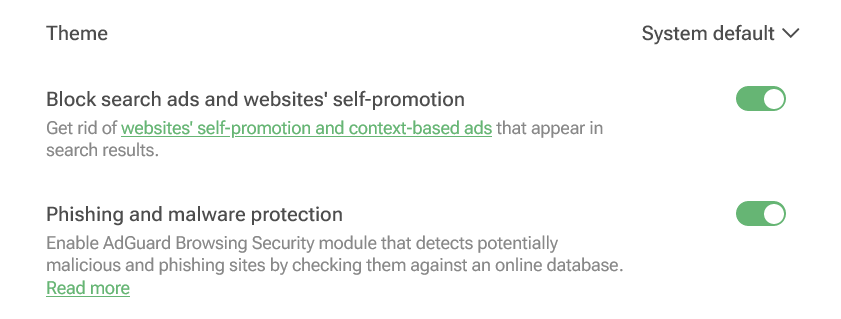
You can enable blocking search ads in your AdGuard Browser extension

Screenshot: AdGuard Browser extension

Not again... Personal data of 37 million T-Mobile customers stolen

Telecoms giant T-Mobile has revealed that it has suffered another data breach, with hackers stealing personal data of some 37 million of its customers. The bad actor apparently exploited a flaw in one of the company’s APIs to retrieve the data.

The breach occurred in early January and was immediately contained, T-Mobile said. The telecoms provider noted that hackers gained access to a “limited set of account information”, including its customers’ names, billing addresses, email addresses, dates of birth and T-Mobile account numbers. No payment information or government ID numbers were exposed, it claimed.

Still, the breach represents a very worrying pattern, as this is the eighth time T-Mobile has been hacked in five years, according to TechCrunch. T-Mobile also famously fell victim to the Lapsus$ hackers, who stole its source code in a series of hacks in March 2022. The new hack, as well as T-Mobile’s history of data breaches, shows that large companies are just as vulnerable to attack as smaller ones. The bigger the company, the more customer data it has at its disposal, the more attractive it is as a target. What this means for us as users is that we need to be very selective about what data we share, with whom, and how much control we have over it.


Vam je bila objava všeč?
AdGuard VPN AdGuard DNS AdGuard Mail AdGuard Wallet
Glavni zaslon AdGuard za Windows
Zaslon zaščite AdGuard za Windows, ki prikazuje funkcije zaščite in nastavitve
Zaslon statistike AdGuard za Windows, ki prikazuje statistiko blokiranih oglasov in sledilcev
Zaslon Upravljanje aplikacij AdGuard za Windows, ki prikazuje možnosti upravljanja zaščite za aplikacije, nameščene v napravi
20.369 20369 ocen uporabnikov
Odlično!

AdGuard: blokator oglasov za Windows

AdGuard za Windows je več kot blokator oglasov. Je večnamensko orodje, ki blokira oglase, nadzoruje dostop do nevarnih spletnih mest, pospeši nalaganje strani in ščiti otroke pred neprimerno vsebino
S prenosom programa sprejemate pogoje Licenčne pogodbe
Microsoft Trgovina
S prenosom programa sprejemate pogoje Licenčne pogodbe
AdGuard za Windows v8.0, 14-dnevno preizkusno obdobje
Glavni zaslon AdGuard za Mac
Zaslon Prikritega načina AdGuard for Mac
20.369 20369 ocen uporabnikov
Odlično!

AdGuard: blokator oglasov za Mac

AdGuard za Mac je edinstven blokator oglasov, zasnovan z mislijo na macOS. Poleg zaščite pred nadležnimi oglasi v brskalnikih in aplikacijah vas ščiti pred sledenjem, lažnim predstavljanjem in goljufijami
S prenosom programa sprejemate pogoje Licenčne pogodbe
Več o tem
AdGuard za macOS v2.19, 14-dnevno preizkusno obdobje
Glavni zaslon AdGuard za Android
Zaslon Zaščita pred sledenjem AdGuard za Android
Zaslon Upravljanje aplikacij AdGuard za Android, ki prikazuje možnosti upravljanja zaščite za aplikacije, nameščene v napravi
Zaslon statistike AdGuard za Android, ki prikazuje statistiko blokiranih oglasov in sledilcev
Glavni zaslon zasebnega brskalnika AdGuard za Android
QR koda za prenos AdGuard za Android
20.369 20369 ocen uporabnikov
Odlično!

AdGuard: blokator oglasov za Android

Blokira oglase in sledilnike v vseh brskalnikih, igrah in drugih aplikacijah. Ščiti vašo zasebnost in vam omogoča nadzor nad tem, kako vaše aplikacije uporabljajo internet. Nameščeno prek APK-ja

S prenosom programa sprejemate pogoje Licenčne pogodbe
Več o tem
Preglejte za prenos
Uporabite kateri koli razpoložljivi bralnik QR kod v vaši napravi
AdGuard za Android v4.14, 14-dnevno preizkusno obdobje
Glavni zaslon AdGuard za iOS
Zaslon zaščite AdGuard za iOS, ki prikazuje funkcije zaščite in nastavitve
Zaslon statistike AdGuard za iOS, ki prikazuje statistiko blokiranih oglasov in sledilcev
QR koda za prenos AdGuard za iOS
20.369 20369 ocen uporabnikov
Odlično!

AdGuard: blokator oglasov za iOS

Najboljši blokator oglasov za iOS za iPhone in iPad. AdGuard odstrani vse vrste oglasov in sledilnikov v Safariju ter ščiti vašo zasebnost v vseh aplikacijah na ravni DNS

S prenosom programa sprejemate pogoje Licenčne pogodbe
Več o tem
Preglejte za prenos
Uporabite kateri koli razpoložljivi bralnik QR kod v vaši napravi
AdGuard za iOS v4.5
Glavni zaslon AdGuard Content Blocker
Zaslon filtri AdGuard Content Blocker
Zaslon nastavitve AdGuard Content Blocker
20.369 20369 ocen uporabnikov
Odlično!

AdGuard Zaviralec vsebine

AdGuard Content Blocker odpravlja vse vrste oglasov v mobilnih brskalnikih, ki podpirajo tehnologijo blokiranja vsebine — in sicer Samsung Internet in Yandex Browser. Njegove funkcije so omejene v primerjavi z AdGuardom za Android, vendar je brezplačen, enostaven za namestitev in učinkovit
S prenosom programa sprejemate pogoje Licenčne pogodbe
Več o tem
AdGuard Zaviralec vsebine v2.8
Glavni zaslon razširitev brskalnika AdGuard
Zaslon Zaščita pred sledenjem razširitve brskalnika AdGuard
20.369 20369 ocen uporabnikov
Odlično!

AdGuard Razširitev brskalnika

AdGuard je najhitrejša in najlažja razširitev za zaviranje oglasov, ki učinkovito onemogoča vse vrste oglasov na vseh spletnih straneh! Za brskalnik, ki ga uporabljate, izberite AdGuard in hitro ter varno brskajte brez oglasov.
Namesti
S prenosom programa sprejemate pogoje Licenčne pogodbe
Namesti
S prenosom programa sprejemate pogoje Licenčne pogodbe
Namesti
S prenosom programa sprejemate pogoje Licenčne pogodbe
Namesti
S prenosom programa sprejemate pogoje Licenčne pogodbe
Namesti
S prenosom programa sprejemate pogoje Licenčne pogodbe
Več o tem
Namesti
S prenosom programa sprejemate pogoje Licenčne pogodbe
Več o tem
AdGuard Razširitev brskalnika v5.5
Glavni zaslon Pomočnik brskalnika
20.369 20369 ocen uporabnikov
Odlično!

AdGuard Pomočnik

Sopodajalna razširitev za brskalnik za AdGuard namizne aplikacije. Dovoli vam, da blokirate po meri nastavljene elemente na spletnih straneh, dodajate spletne strani na seznam dovoljenih in pošiljate poročila neposredno iz vašega brskalnika
AdGuard Pomočnik v1.4
20.369 20369 ocen uporabnikov
Odlično!

AdGuard Home

AdGuard Home je omrežna rešitev za blokiranje oglasov in sledilcev. Namestite ga enkrat na usmerjevalnik, da pokrijete vse naprave v domačem omrežju — dodatna programska oprema odjemalca ni potrebna. To je še posebej pomembno za različne naprave IoT, ki pogosto ogrožajo vašo zasebnost
AdGuard Home v0.107
Glavni zaslon AdGuard Pro za iOS
Zaslon zaščite AdGuard Pro za iOS, ki prikazuje funkcije zaščite in nastavitve
Zaslon statistike AdGuard Pro za iOS, ki prikazuje statistiko za blokirane oglase in sledilce
20.369 20369 ocen uporabnikov
Odlično!

AdGuard Pro za iOS

AdGuard Pro za iOS vključuje vse napredne funkcije zaščite pred oglasi z omogočeno blokado. Ponuja ista orodja kot plačljiva različica AdGuard za iOS. Odličen je pri blokiranju oglasov v Safari in omogoča prilagajanje DNS nastavitev za prilagojeno zaščito. Oglase blokira v brskalnikih in aplikacijah, vaše otroke ščiti pred neprimerno vsebino ter ohranja vaše osebne podatke varne.
S prenosom programa sprejemate pogoje Licenčne pogodbe
Več o tem
AdGuard Pro za iOS v4.5
Glavni zaslon AdGuard Mini za Mac
Zaslon zaščite Safari v AdGuard Mini za Mac
Zaslon ustvarjanja pravila AdGuard Mini za Mac
20.369 20369 ocen uporabnikov
Odlično!

AdGuard Mini za Mac — zaviralec oglasov Safari

AdGuard Mini za Mac je zmogljiv Safari blokator oglasov. Ta lahka aplikacija odstranjuje oglase, blokira sledilce in pospešuje nalaganje strani. Pomaga vam brskati po spletu v Safariju brez motenj in varuje vaše podatke
Namesti
S prenosom programa sprejemate pogoje Licenčne pogodbe
Več o tem
AdGuard Mini za Mac v2.3
Glavni zaslon AdGuard za Android TV z omogočeno zaščito
Zaslon blokiranja oglasov AdGuard za Android TV, ki prikazuje njegove funkcije in nastavitve
Zaslon nastavitev AdGuard za Android TV
Zaslon Upravljanje aplikacij AdGuard za Android TV, ki prikazuje aplikacije, kjer so oglasi in sledilci blokirani
20.369 20369 ocen uporabnikov
Odlično!

AdGuard za Android TV

AdGuard za Android TV je edina aplikacija, ki zavira oglase, varuje vašo zasebnost in deluje kot požarni zid za vaš Smart TV. Prejmite opozorila o spletnih grožnjah, uporabite varen DNS in izkoristite šifriran promet. Sprostite se in se potopite v svoje najljubše oddaje z vrhunsko varnostjo in brez oglasov!
AdGuard za Android TV v4.14, 14-dnevno preizkusno obdobje
Maskota AdGuard, Agnar, ki drži Linux pingvina
20.369 20369 ocen uporabnikov
Odlično!

AdGuard za Linux

AdGuard za Linux je prvi sistemski zaviralec oglasov za Linux na svetu. Onemogočite oglase in sledilce na ravni naprave, izberite med vnaprej nameščenimi filtri ali dodajte svoje — vse preko ukazne lupine vmesnika
AdGuard za Linux v1.4
20.369 20369 ocen uporabnikov
Odlično!

AdGuard Temp Mail

Brezplačen ustvarjalec začasnih elektronskih naslovov, ki vas ohranja anonimne in ščiti vašo zasebnost. Brez neželene pošte v vašem glavnem predalu!
20.369 20369 ocen uporabnikov
Odlično!

AdGuard VPN

75 lokacij svetovnega spleta

Dostop do katere koli vsebine

Močno šifriranje

Politika 'Brez dnevnikov'

Najhitrejša povezava

stalna podpora

Poskusite brezplačno
S prenosom programa sprejemate pogoje Licenčne pogodbe
Več o tem
20.369 20369 ocen uporabnikov
Odlično!

AdGuard DNS

AdGuard DNS je brezhiben način zaviranja internetnih oglasov, ki ne zahteva nameščanja nobenih aplikacij. Je preprost za uporabo, popolnoma brezplačen, enostavno nastavljiv na kateri koli napravi in vam zagotavlja minimalne potrebne funkcije za zaviranje oglasov, števcev, zlonamernih spletnih strani in vsebine za odrasle.
20.369 20369 ocen uporabnikov
Odlično!

AdGuard Mail

Ščitite svoj identitet, izogibajte se neželeni pošti in ohranite svoj nabiralnik varno z našimi vzdevki in začasnimi e-poštnimi naslovi. Uživajte v naši brezplačni storitvi posredovanja e-pošte in aplikacijah za vse operacijske sisteme
20.369 20369 ocen uporabnikov
Odlično!

AdGuard Wallet

Varna in zasebna kripto denarnica, ki vam omogoča popoln nadzor nad vašimi sredstvi. Upravljaj več denarnic in odkrij tisoče kriptovalut za shranjevanje, pošiljanje in zamenjavo
Prenos AdGuarda Za namestitev AdGuarda kliknite gumb, označen s puščico Izberite 'Odpri' in kliknite na 'Vredu', nato pa počakajte, da se datoteka prenese. V odprtem oknu povlecite ikono AdGuarda in jo spustite v mapo 'Aplikacije'. Hvala, ker ste izbrali AdGuard! Izberite 'Odpri' in kliknite na 'Vredu', nato pa počakajte, da se datoteka prenese. V odprtem oknu kliknite na 'Namesti'. Hvala, ker ste izbrali AdGuard!
Namestite AdGuard na svojo mobilno napravo
















































