AdGuard v3.5 for Android: added AdGuard VPN compatibility

As the summer fades away, the mood often goes down. We'd like to brighten up your day with a major AdGuard for Android update!

Let me say it right away — the most important change here is added compatibility with AdGuard VPN. It's especially topical since a big update of AdGuard VPN for Android is coming VERY soon. I want to save it for dessert, but if you're not the patient type, feel free to jump straight to it. For the rest, let's look at some slightly less exciting (but still exciting!) changes first.

Better Android 11 compatibility

Perhaps, for some of those who have Android 11 installed on their devices this is the most important topic, and not some VPN-related news.

You receive a notification about a new episode of your favorite podcast, and rush to download it to listen to on your way back home. But the download doesn't start for some reason, and on top of that your Telegram messenger won't update. In the end, you have to stare out of the window for the next half an hour. Did you recognize yourself in this situation?

Hopefully not, but many Android 11 users encountered various download-related issues with all kinds of apps while AdGuard protection was enabled. We looked into the problem and managed to find a solution. In v3.5 this won't be an issue anymore. Download everything you want, all day, every day! AdGuard won't stand in your way.

'What's new?' screen

If you prefer to click buttons first and read letters later, chances are you've noticed it already.
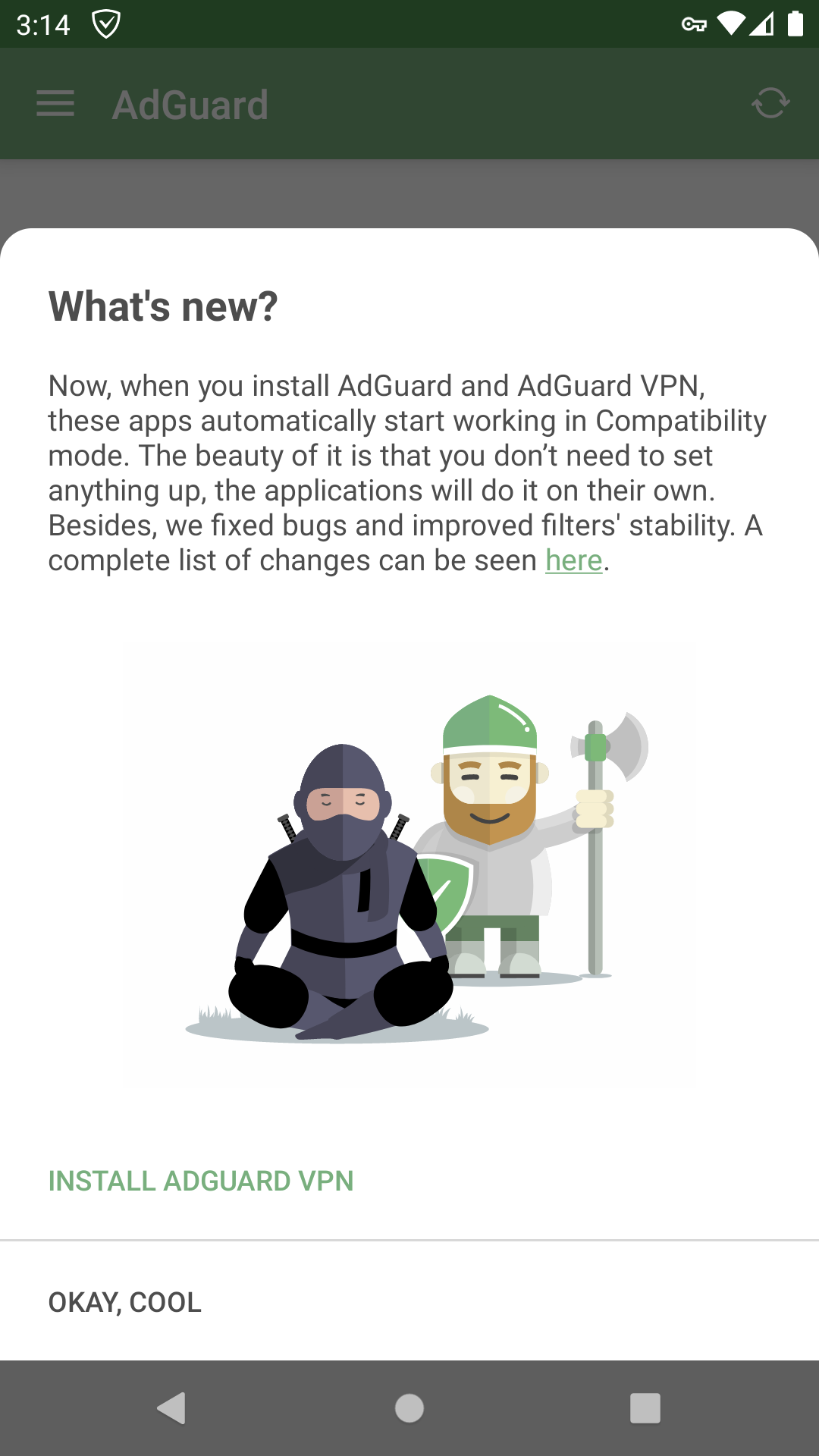
This time it's all about two AdGuards working together, of course

A picture tells more than words in this case: after an update you'll be met with a screen that briefly familiarizes you with the latest changes so you won't miss anything important. This time it's all about VPN compatibility. Speaking of...

Compatibility with AdGuard VPN for Android

And now — as promised — to the main course (I know I called it dessert earlier. You don't eat dessert for a main course?).

Since AdGuard VPN for Android was first introduced, there was already a way to make it work along with AdGuard ad blocker. But to make the two apps coexist in peace, you were required to jump through some hoops. Anyone who went ahead and did the thing, 100% has been waiting for a proper integration ever since — and we oblige.


The best kind of compatibility is when you install two apps and they just start working together. We did exactly that. Presuming you already have AdGuard ad blocker installed, just download AdGuard VPN from Play Store (you can get there right from the ad blocker app, there's a new item in General Settings menu).
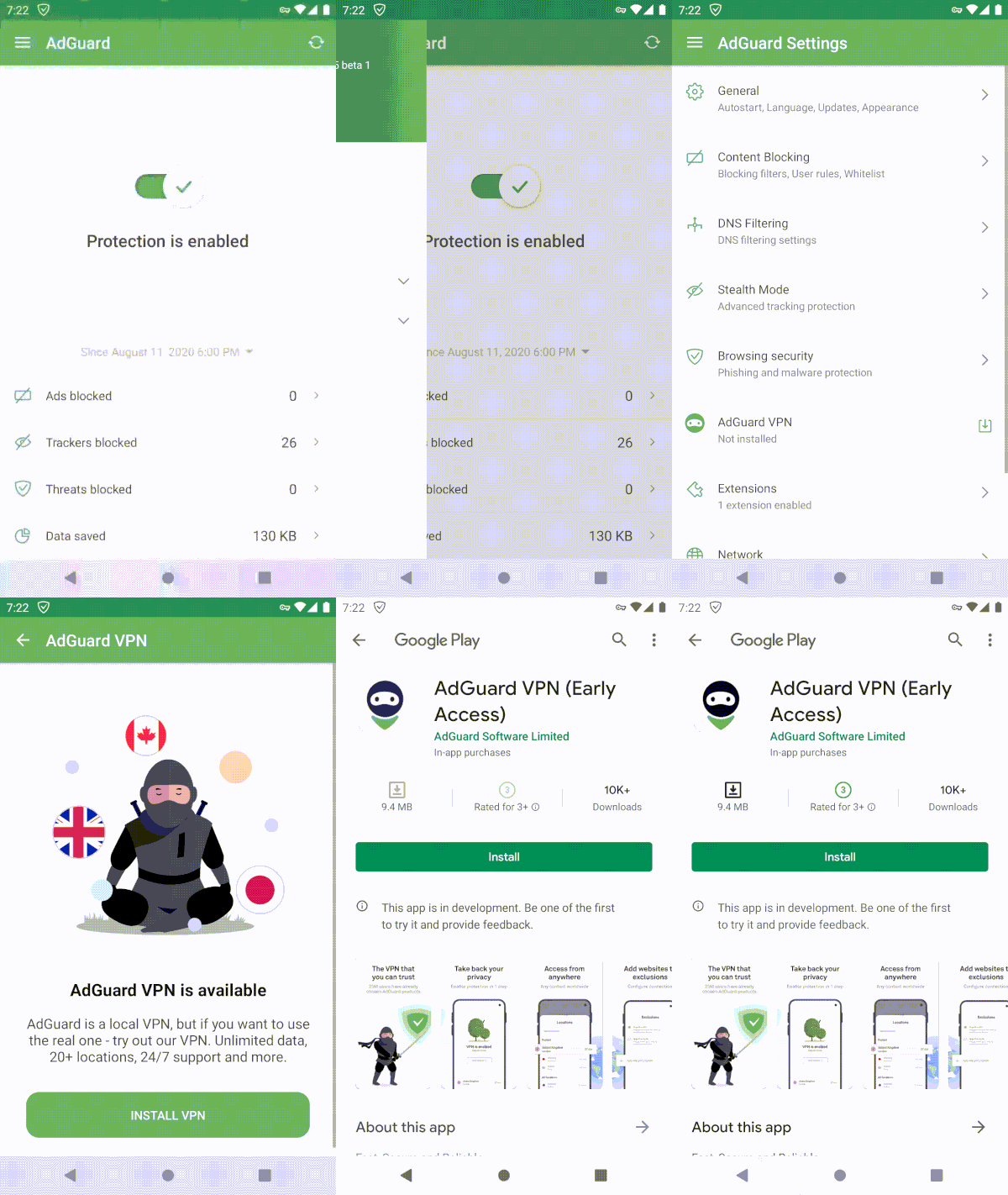
It's almost harder to NOT install AdGuard VPN

Both apps will detect each other and do everything that's needed for smooth joint work. All that will be left for you is to enjoy both ad-free Internet and all the benefits of a VPN. By the way, it works the other way around just as well: install AdGuard ad blocker on top of an already-running AdGuard VPN and you're good.
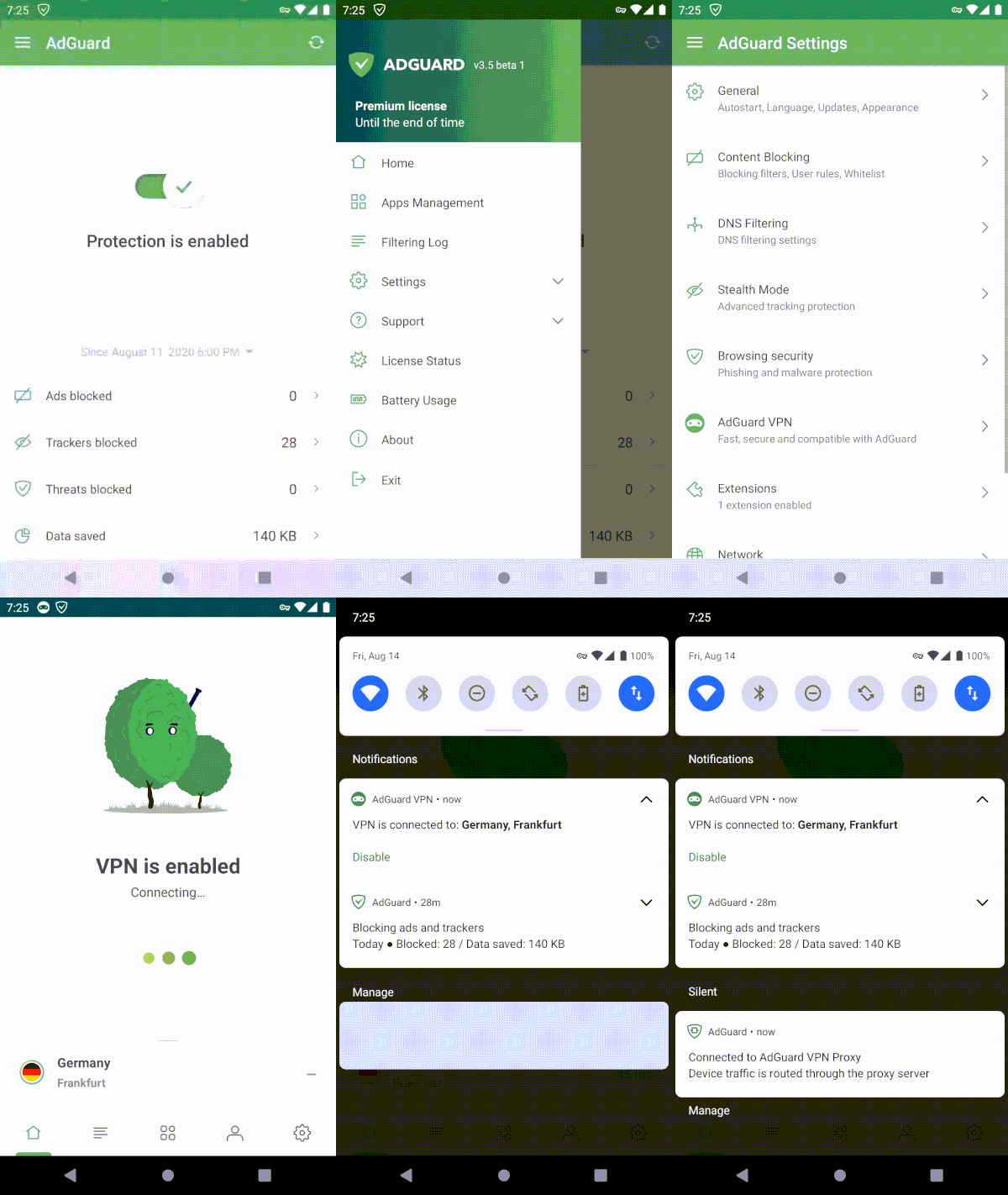
Literally takes 4 taps on the screen (5 to 6 if you're clumsy like me)

If you'd like to disable Compatibility Mode for any reason, it's very simple to do so from AdGuard ad blocker settings, just toggle the switch. Additionally, you can add AdGuard ad blocker and AdGuard VPN tiles to your device's notification bar and toggle them in one tap at your own will — thanks to Compatibility Mode the configuration will change immediately and silently.
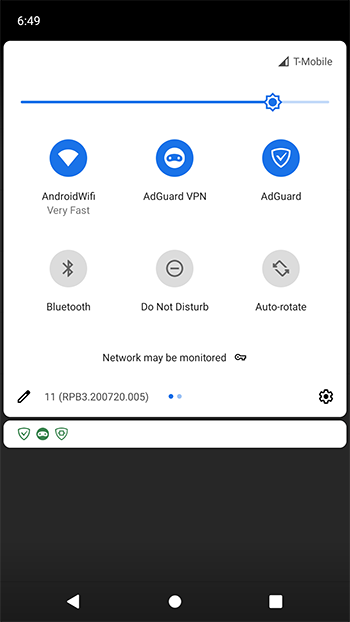
If you're a sucker for tiles, I got some good news for you

What is AdGuard VPN?
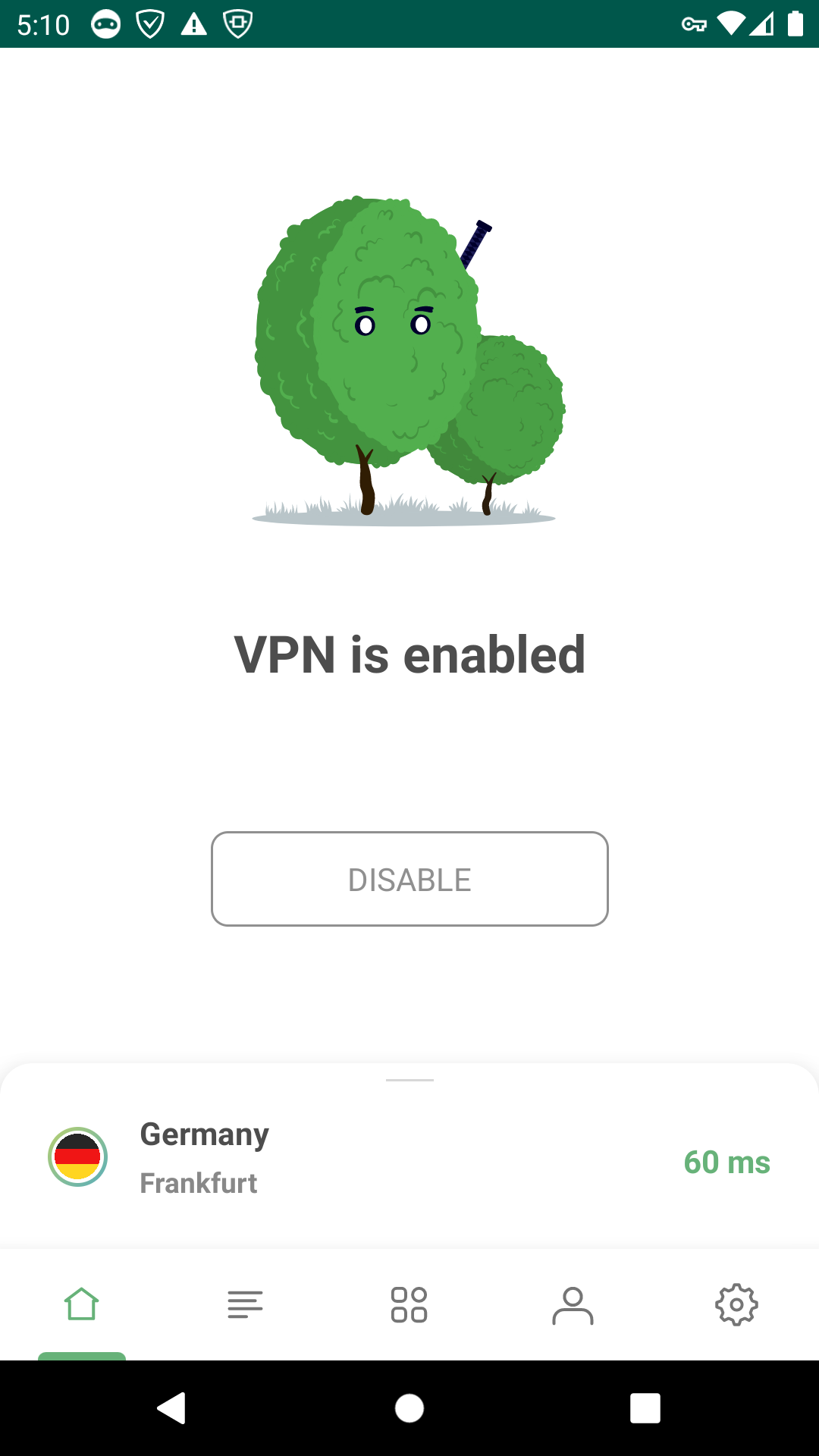
Soon you'll know, and here's how looks

Wait, no. What's a VPN?

Imagine VPN as a tunnel that connects your device to a server and allows you to browse the web using someone else's IP address. So if the chosen VPN server is located in a different country, it will appear like you have connected to the Internet from that country. At the same time, if the VPN is any good, this tunnel is secure, your traffic is encrypted and your data safe. Why would you want to use a VPN?

  • It can hide your real whereabouts and help stay anonymous
  • Your traffic will be protected from spoofing (network traffic interception) and tracking on the part of your Internet service provider and malefactors.

Now, there's dozens of VPNs available out there, and some of them are even good. What distincts AdGuard VPN from the rest?

Why AdGuard VPN?

You already know the first reason. Normally, two VPN-based apps can't work together on Android. So if you want to reap the benefits of AdGuard ad blocker protection, using a VPN may prove a challenging task — unless you use AdGuard VPN in compatibility mode, of course. But there's more reasons:

  • Unique VPN protocol

One of the main differences between AdGuard VPN and its competitors is that we use our own protocol that we developed ourselves. It disguises itself as normal traffic, so it is much more difficult to detect that you're using a VPN at all, and therefore track and block your connection.

  • Regular/Selective mode

Users can configure themselves where VPN works and where it doesn’t work.
For example, you want your VPN to work on all websites except example.com. Regular mode is enabled by default, so you don’t need to turn it on. Simply add this website to the list of exceptions. That’s it!

  • No logs policy

No logs policy means that we don’t collect, store your personal data or transfer it to third parties. The full text of AdGuard privacy policy can be found here.

  • Trusted developer

Not going to lie, it's a bit weird to brag like that, but we at AdGuard genuinely believe that over more than 10 years of developing AdGuard ad blocker we have proven that we value users' privacy and safety above everything else. With AdGuard VPN it's not going to be any different.

There's more, but despite how it looks, this article isn't just about AdGuard VPN. So I won't go into too many details, especially since there are places like Knowledge base that do it much better.

How to get it?

For the sake of argument let's say that you're convinced to at least give AdGuard VPN a try. How would you get around it?

If you have AdGuard ad blocker, simply update it to v3.5 and tap the respective button in the menu. Or download the VPN app directly from the Play Store. It's free, although some premium features are only available after you purchase a subscription. We also have AdGuard VPN browser extensions for Chrome and Firefox browsers, you can get them from our website.

I also know for a fact that many of you strive to be on the very edge when it comes to new features and updates. Anticipating your question — yes, we do have a beta testing program. You can sign up here for our future testing on Android, we even have an ongoing beta test for AdGuard VPN for iOS if you're playing both fields.

And what a pitch would it be if I don't end it with a link to a purchase page. If you like the idea of using a VPN and find AdGuard to be a good choice, hurry up! Right now you can purchase AdGuard VPN subscription with a discount, and it won't be that way forever.


Wow, in case you forgot, we were talking about AdGuard v3.5 for Android. As always, the complete list of changes is on GitHub, and as always, we welcome your feedback on the update. Leave a comment here or contact us in social media, anything will do! See you next time!


Svidela vam se ova objava?
AdGuard VPN AdGuard DNS AdGuard Mail AdGuard Wallet
Glavni ekran AdGuard za Windows
Ekran Zaštita u AdGuard za Windows, prikazuje funkcije zaštite i podešavanja
Ekran Statistika u AdGuard za Windows, prikazuje statistiku za blokirane oglase i trackere
Ekran Upravljanje aplikacijama u AdGuard za Windows, koji prikazuje opcije upravljanja zaštitom za aplikacije instalirane na uređaju
20.385 20385 recenzija
Odlično!

AdGuard — blokator reklama za Windows

AdGuard za Windows je više od blokatora oglasa. To je višenamenski alat koji blokira oglase, kontroliše pristup opasnim sajtovima, ubrzava učitavanje stranica i štiti decu od neprimerenog sadržaja
Preuzimanjem programa prihvate uslove licenčnog ugovora
Microsoft prodavnica
Preuzimanjem programa prihvate uslove licenčnog ugovora
AdGuard za Windows v.8.0, 14-dnevni probni period
Glavni ekran AdGuard za Mac
Ekran Stealth režima u AdGuard za Mac
20.385 20385 recenzija
Odlično!

AdGuard — blokator reklama za Mac

AdGuard za Mac je jedinstveni blokator oglasa dizajniran imajući u vidu macOS. Pored zaštite od dosadnih oglasa u pregledačima i aplikacijama, štiti vas od praćenja, fišinga i prevara
Preuzimanjem programa prihvate uslove licenčnog ugovora
Saznajte više
AdGuard za Mac v.2.19, 14-dnevni probni period
Glavni ekran AdGuard za Android
Ekran Zaštita od praćenja u AdGuard za Android
Ekran Upravljanje aplikacijama u AdGuard za Android, koji prikazuje opcije upravljanja zaštitom za aplikacije instalirane na uređaju
Ekran Statistika u AdGuard za Android, prikazuje statistiku za blokirane oglase i trackere
Glavni ekran privatnog pregledača AdGuard za Android
QR kod za preuzimanje AdGuard za Android
20.385 20385 recenzija
Odlično!

AdGuard — blokator reklama za Android

Blokira oglase i trackere u svim pregledačima, igrama i drugim aplikacijama. Štiti vašu privatnost i omogućava vam da kontrolišete kako vaše aplikacije koriste Internet. Instalira se putem APK-a
Preuzimanjem programa prihvate uslove licenčnog ugovora
Saznajte više
Skeniranje za preuzimanje
Korišćenje bilo kog QR-kod čitača dostupnog na uređaju
AdGuard za Android v.4.14, 14-dnevni probni period
Glavni ekran AdGuard za iOS
Ekran Zaštita u AdGuard za iOS, prikazuje funkcije zaštite i podešavanja
Ekran Statistika u AdGuard za iOS, prikazuje statistiku za blokirane oglase i trackere
QR kod za preuzimanje AdGuard za iOS
20.385 20385 recenzija
Odlično!

AdGuard — blokator reklama za iOS

Najbolji iOS blokator oglasa za iPhone i iPad. AdGuard uklanja sve vrste oglasa i trackera u Safariju i štiti vašu privatnost u svim aplikacijama na DNS nivou
Preuzimanjem programa prihvate uslove licenčnog ugovora
Saznajte više
Skeniranje za preuzimanje
Korišćenje bilo kog QR-kod čitača dostupnog na uređaju
AdGuard za iOS v.4.5
Glavni ekran AdGuard Content Blocker
Ekran filtera u AdGuard Content Blocker
Ekran podešavanja u AdGuard Content Blocker
20.385 20385 recenzija
Odlično!

AdGuard blokator sadržaja

AdGuard Content Blocker eliminiše sve vrste reklama u mobilnim pregledačima koji podržavaju tehnologiju blokiranja sadržaja – kao što su Samsung Internet i Yandex Browser. Njegove funkcije su ograničene u odnosu na AdGuard za Android, ali je besplatan, lako se instalira i efikasan je
Preuzimanjem programa prihvate uslove licenčnog ugovora
Saznajte više
AdGuard blokator sadržaja v.2.8
Glavni ekran AdGuard Browser Extension
Ekran Zaštita od praćenja u AdGuard Browser Extension
20.385 20385 recenzija
Odlično!

AdGuard proširenje za preglednike

AdGuard je najbrže i najlakše proširenje za blokiranje reklama koje uspešno blokira sve vrste reklama na svim veb stranicama! Izaberite AdGuard za preglednik koji koristite i uživajte u surfovanju bez reklama, koje će postati sigurno i brzo.
Instaliraj
Preuzimanjem programa prihvate uslove licenčnog ugovora
Instaliraj
Preuzimanjem programa prihvate uslove licenčnog ugovora
Instaliraj
Preuzimanjem programa prihvate uslove licenčnog ugovora
Instaliraj
Preuzimanjem programa prihvate uslove licenčnog ugovora
Instaliraj
Preuzimanjem programa prihvate uslove licenčnog ugovora
Saznajte više
Instaliraj
Preuzimanjem programa prihvate uslove licenčnog ugovora
Saznajte više
AdGuard proširenje za preglednike v.5.5
Glavni ekran AdGuard Assistant
20.385 20385 recenzija
Odlično!

AdGuard pomoćnik

Dodatak pregledača za prateće AdGuard desktop aplikacije. Omogućava vam da blokirate prilagođene stavke na vebsajtovima, dodate vebsajtove na listu dozvoljenih i šaljete izveštaje direktno iz pregledača
AdGuard pomoćnik v.1.4
20.385 20385 recenzija
Odlično!

AdGuard Home

AdGuard Home je mrežno rešenje za blokiranje oglasa i tragača. Instalirajte ga jednom na ruteru da biste pokrili sve uređaje na vašoj kućnoj mreži — nije potreban dodatni klijentski softver. Ovo je posebno važno za različite IoT uređaje koji često predstavljaju pretnju vašoj privatnosti
AdGuard Home v.0.107
Glavni ekran AdGuard Pro za iOS
Ekran zaštite u AdGuard Pro za iOS, koji prikazuje funkcije zaštite i podešavanja
Ekran statistike u AdGuard Pro za iOS, koji prikazuje statistiku za blokirane oglase i tragače
20.385 20385 recenzija
Odlično!

AdGuard Pro za iOS

AdGuard Pro za iOS dolazi sa svim naprednim funkcijama zaštite od blokiranja oglasa. Nudi iste alate kao i plaćena verzija AdGuard-a za iOS. Ističe se u blokiranju oglasa u Safariju i omogućava vam da prilagodite DNS postavke kako biste prilagodili svoju zaštitu. Blokira oglase u pretraživačima i aplikacijama, štiti vašu decu od neprikladnog sadržaja i čuva vaše lične podatke na sigurnom
Preuzimanjem programa prihvate uslove licenčnog ugovora
Saznajte više
AdGuard Pro za iOS v.4.5
Glavni ekran AdGuard Mini za Mac
Ekran zaštite za Safari u AdGuard Mini za Mac
Ekran Kreiranje pravila u AdGuard Mini za Mac
20.385 20385 recenzija
Odlično!

AdGuard Mini za Mac — Safari blokator oglasa

AdGuard Mini za Mac je moćan Safari blokator adova. Ova lagana aplikacija uklanja reklame, blokira praćenike i ubrzava učitavanje stranica. Pomaže vam da pretražujete veb u Safariju bez ometanja i da sačuvate svoje podatke privatnim
Instaliraj
Preuzimanjem programa prihvate uslove licenčnog ugovora
Saznajte više
AdGuard Mini za Mac v.2.3
Glavni ekran AdGuard za Android TV sa uključenom zaštitom
Ekran Blokiranje oglasa u AdGuard za Android TV, prikazuje njegove funkcije i podešavanja
Ekran Podešavanja u AdGuard za Android TV
Ekran Upravljanje aplikacijama u AdGuard za Android TV, prikazuje aplikacije gde su oglasi i trackeri blokirani
20.385 20385 recenzija
Odlično!

AdGuard za Android TV

AdGuard za Android TV je jedina aplikacija koja blokira oglase, čuva vašu privatnost i deluje kao zaštitni zid za vaš Smart TV. Dobijajte upozorenja o Veb pretnjama, koristite bezbedni DNS i koristite šifrovani saobraćaj. Opustite se i zaronite u omiljene serije sa vrhunskim obezbeđenjem i nula oglasa!
AdGuard za Android TV v.4.14, 14-dnevni probni period
Maskota AdGuard, Agnar, drži Linux pingvina
20.385 20385 recenzija
Odlično!

AdGuard za Linux

AdGuard za Linuk je prvi sistemski bloker oglasa na svetu. Blokirajte oglase i tragače na nivou uređaja, izaberite unapred instalirane filtere ili dodajte sopstvene — sve kroz interfejs komandne linije
AdGuard za Linux v.1.4
20.385 20385 recenzija
Odlično!

AdGuard Temp Mail

Besplatan generator privremenih email adresa koji vas čuva anonimnim i štiti vašu privatnost. Nema spama u vašem glavnom sandučetu!
20.385 20385 recenzija
Odlično!

AdGuard VPN

75 lokacija širom sveta

Pristup bilo kom sadržaju

Jako šifrovanje

Nema prikupljanja dnevnika

Najbrža veza

24/7 podrška

Probajte besplatno
Preuzimanjem programa prihvate uslove licenčnog ugovora
Saznajte više
20.385 20385 recenzija
Odlično!

AdGuard DNS

AdGuard DNS je alternativno rešenje za blokiranje reklama, zaštitu privatnosti i roditeljsku kontrolu. Lako se postavlja i besplatan je za korišćenje. On obezbeđuje neophodni minimum zaštite od reklama na mreži, praćenja i fišinga, bez obzira koju platformu i uređaj koristite.
20.385 20385 recenzija
Odlično!

AdGuard Mail

Zaštitite svoj identitet, izbegnite spam i održite bezbednost svog sandučeta uz naše alias-e i privremene e-adrese. Uživajte u našoj besplatnoj usluzi prosleđivanja emaila i aplikacijama za sve operativne sisteme.
20.385 20385 recenzija
Odlično!

AdGuard Wallet

Bezbedan i privatan kripto novčanik koji vam daje potpunu kontrolu nad vašom imovinom. Upravljajte više novčanika i otkrijte hiljade kriptovaluta za čuvanje, slanje i razmenu
Preuzimanje AdGuard Da biste instalirali AdGuard, kliknite na datoteku označenu strelicom Izaberite „Otvori“ i kliknite na „U redu“, a zatim sačekajte da se datoteka preuzme. U otvorenom prozoru prevucite ikonu AdGuard u fasciklu „Aplikacije“. Hvala vam što ste izabrali AdGuard! Izaberite „Otvori“ i kliknite na „U redu“, a zatim sačekajte da se datoteka preuzme. U otvorenom prozoru kliknite na „Instaliraj“. Hvala vam što ste izabrali AdGuard!
Instalirajte AdGuard na svoj mobilni uređaj

















































